
Operational Infrastructure for SMEs

Manage your business in one powerful connected app

Track sales, manage inventory and monitor cash flow in one simple system so everything stays organized while you focus on growing your business.

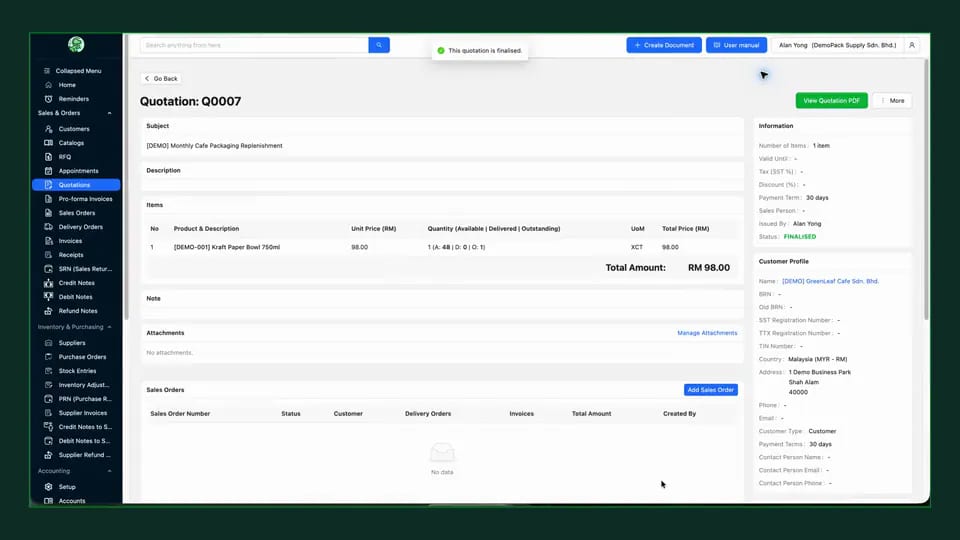
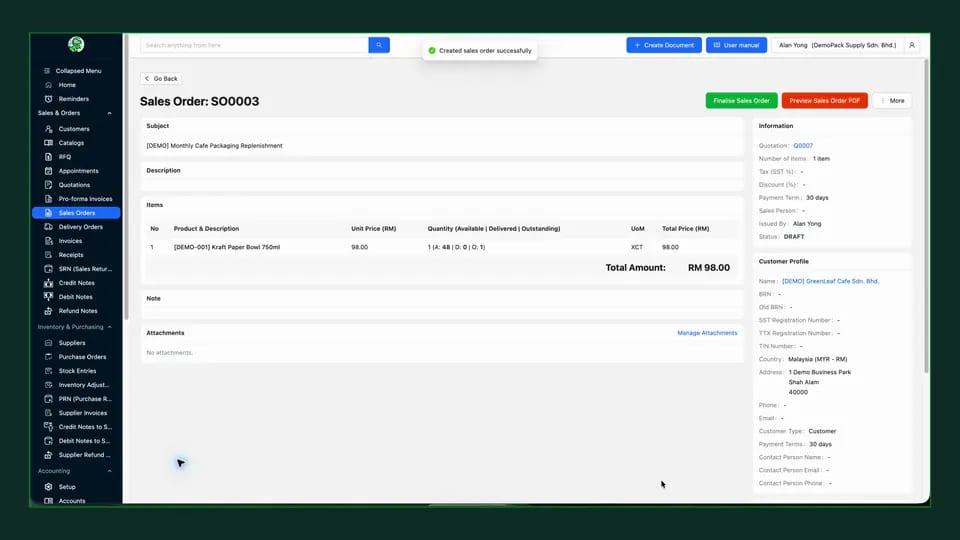
A short TREX Grow product demonstration. Quotation Q0007 is finalised, its customer and product details are carried into a new Sales Order, and Sales Order S00003 is created without retyping.
Completed TREX Grow Sales Order S00003

Connected sales-to-cash records

Controlled procure-to-pay approvals

Malaysia-ready compliance tracking

As your business grows, keeping everything in sync becomes harder to manage

With more sales, transactions and moving parts, managing operations across different tools can quickly become complex and time-consuming.

Too many systems to manage

Sales, inventory and finances are handled in different tools, making everything harder to keep aligned.

Time spent on manual updates

Data needs to be entered, checked and updated repeatedly across multiple places.

Lack of real-time visibility

You don’t always have an instant and complete view of how your business is performing.

Payment tracking requires effort

Outstanding invoices and payment statuses are not always easy to monitor in one place.

Decision-making takes longer

Without clear and connected data, even simple decisions require extra time and verification.

Duplicated Entries

The same information often ends up being re-entered across sales, inventory, and finance workflows.

Annoyed woman covering her ears
Watch the workflow

One sale. One connected document trail.

Create the Quotation once, then carry the right customer, product and commercial details into ordering, delivery, invoicing and corrections—without rebuilding the transaction at every stage.

One rule across every document

Work stays editable while it is a draft. Review and finalise each document before it moves forward.

Quotation
Sales Order
Delivery Order
Invoice
Credit / Debit Note
01Capture the sale

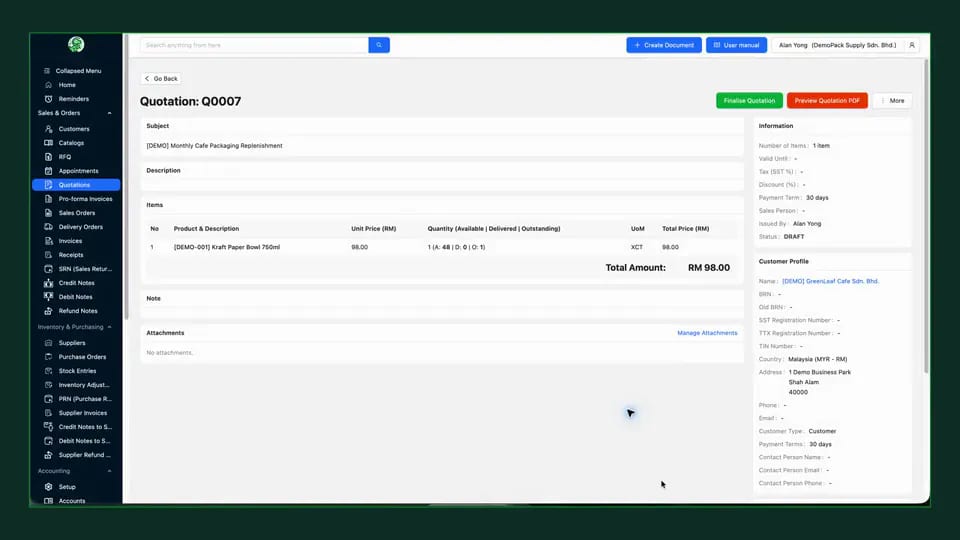
Build the quotation once

Enter the customer, products, quantities and prices in one place. Your salesperson can review the draft, make any necessary changes and finalise it before sharing it with the customer.

  • Editable draft
  • Review before sharing
  • Details captured once

01 · Quotation

Sample data
13 seconds · Tap the video to play or enlarge
02Customer confirmed

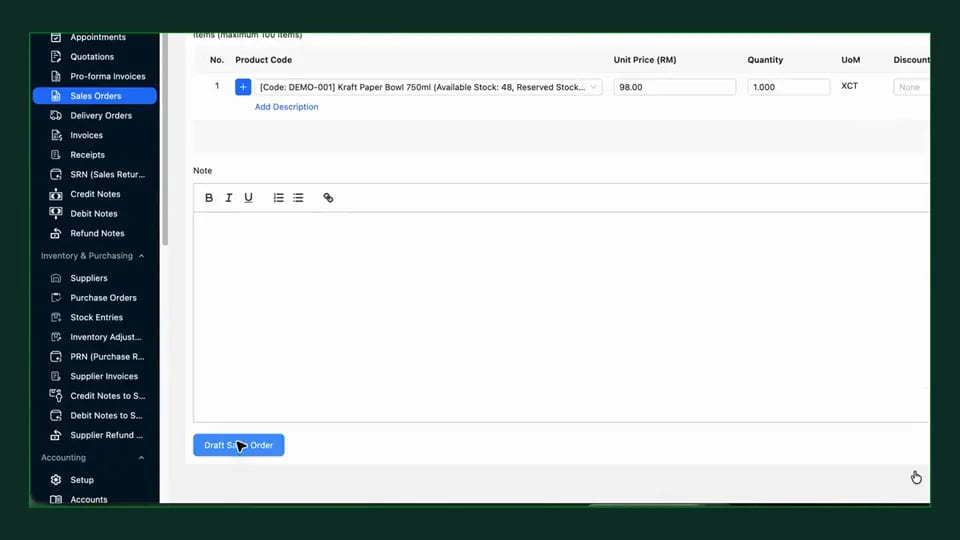
Turn approval into a Sales Order

Once the customer confirms, convert the Quotation into a Sales Order without typing everything again. Discounts, prices and quantities can still be adjusted, while the original Quotation remains linked for traceability.

  • No duplicate entry
  • Commercial details stay editable
  • Quotation retained

02 · Sales Order

Sample data
17 seconds · Tap the video to play or enlarge
03Prepare fulfilment

Move the approved order into delivery

Create the Delivery Order from the confirmed Sales Order, with the customer, products and quantities already carried forward. Review the delivery details, make any necessary adjustments and finalise it when the order is ready to go.

  • Products carried forward
  • Delivery details stay editable
  • Order linked

03 · Delivery Order

Sample data
23 seconds · Tap the video to play or enlarge
04Ready to bill

Create the Invoice without starting over

When it’s time to bill, create the Invoice from the Sales Order—there’s no need to start over. Prices, discounts and payment terms remain editable. Review everything with confidence before sharing it with your customer; the Invoice remains linked to the original sale.

  • Editable commercial terms
  • No need to start over
  • Clear audit trail

04 · Invoice

Sample data
20 seconds · Tap the video to play or enlarge
05Correct with confidence

Correct an Invoice without losing the trail

If an Invoice needs correcting, create a Credit Note directly from it. The adjustment remains linked to the original Invoice, preserving a clear audit trail. Debit Notes are also supported when a different adjustment is required.

  • Original Invoice retained
  • Corrections stay traceable
  • Debit Notes supported

The recording demonstrates a Credit Note. Debit Notes are also available in T.REX Grow.

05 · Credit Note

Sample data
22 seconds · Tap the video to play or enlarge

20-minute workflow review

See how T.REX Grow fits your actual workflow

We’ll map your current document hand-offs, identify the biggest retyping or traceability gaps, and show the relevant T.REX Grow flow using sample data.

No customer files neededTailored sample-data walkthrough
Book a 20-minute Workflow Review

Everything becomes simpler when your business runs in one place

TREX GROW brings your sales, inventory and finances together in one connected system so you can manage everything clearly and move forward with confidence.

Always know where your business stands

Get a clear and complete view of your sales, expenses and cash flow without needing to check multiple sources.

Business dashboard and laptop view

Stay organized without extra effort

Everything updates in one place, so your records stay consistent and easy to manage.

Phone and laptop showing trading and organized records

Keep your inventory accurate and up to date

Stock levels adjust automatically as your business runs, helping you avoid unnecessary shortages or overstock.

People working inside a warehouse

Track payments with clarity

Quickly see what has been paid and what is still outstanding without manual tracking.

People reviewing paperwork and financial documents

Make decisions with confidence

With clear and connected information, you can move faster and make better decisions for your business.

Professional writing notes while making business decisions

Used internally by growing businesses to simplify operations

TREX GROW is built and used in real business environments to improve clarity, organization and day-to-day operations.

Business owner working on a laptop by a large window

TREX GROW gives us a much clearer view of our business. Everything from sales to cash flow is now in one place, which makes it easier to stay organized and make decisions.

Business Owner

Asian florist turning a signboard on a store wall

We used to rely on different tools and manual tracking. With TREX GROW, everything feels more connected and easier to manage as we grow.

Startup Founder

Man working on a laptop with a pink water bottle nearby

Create a free TREX GROW workspace

Start with the Free Forever plan and bring sales, inventory, cash flow, and Malaysia e-Invoice workflows into one connected system.

Start with the Free Forever plan. Upgrade later when your business needs more.

Paid plans include a 30-day trial when you are ready to explore more modules.

Asian woman browsing a tablet in a cafe