

A clear delivery order PDF helps warehouse, sales, customer, and finance teams confirm what was packed, what was delivered, and what should happen next.
Why Delivery Order Clarity Matters at Handover
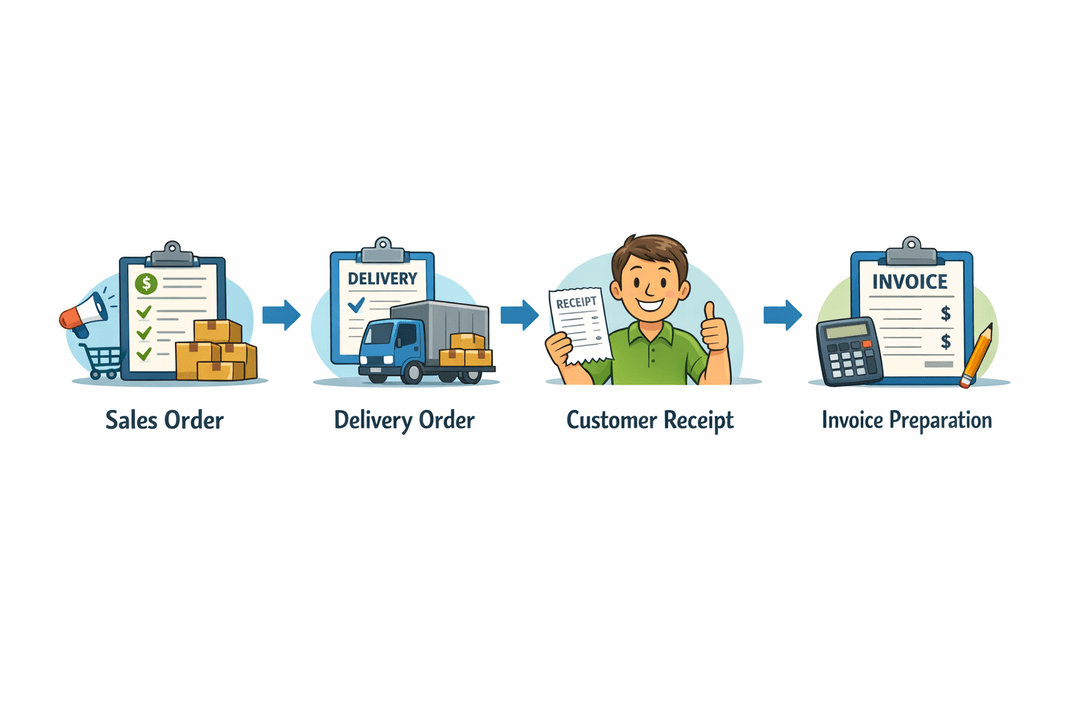
A delivery order PDF sits between warehouse fulfilment, customer receipt, and finance follow-up. Each team uses the same document for a different purpose, so unclear fields can create avoidable questions.
For example, a warehouse coordinator needs to know exactly which items to release. The customer needs to see what was received. The sales admin or finance team may later use the same record to prepare or check an invoice.
A useful delivery order should therefore make the transaction easy to understand without requiring staff to search through chat messages, quotation files, or handwritten notes.
Customer and Delivery Information Should Be Easy to Verify
The delivery order should clearly identify who the delivery is for and where it is going. This reduces confusion when a customer has multiple branches, sites, or receiving contacts.
Include practical details such as:
- Customer company name
- Delivery address
- Receiving contact name and phone number
- Delivery order number
- Related sales order, purchase order, or quotation reference
- Planned delivery date or delivery time window
For example, a distributor may sell to a customer head office but deliver to a separate warehouse. Showing both the billing customer reference and the delivery location helps internal teams avoid sending goods to the wrong site.

Item Descriptions and Quantities Must Match the Actual Delivery
Each line item should be specific enough for warehouse staff and customers to recognise the product without relying on memory. Product codes, product names, units of measure, and quantities should be shown consistently.
A clear item table may include:
- Product code or SKU
- Product name and description
- Ordered quantity
- Packed quantity
- Delivered quantity
- Unit of measure
- Batch, serial, or variation details when relevant
For example, if 20 cartons were ordered but only 16 were available for the first delivery, the PDF should show 16 as the delivered quantity rather than copying the original order quantity. This gives the sales admin a cleaner record for backorder follow-up and invoice preparation.
Packed Items, Delivery Remarks, and Exceptions Need a Clear Record
Product-based SMEs often face small differences between what was planned and what was actually sent. A delivery order should make these exceptions visible.
Useful remarks may include:
- Two cartons to follow in the next delivery
- One item replaced with an approved alternative
- Outer packaging slightly damaged but contents checked
- Customer requested partial delivery
- Goods left with a named receiving department
For example, the warehouse team may pack 10 units, but the customer accepts only 9 because one unit has the wrong model. Recording the delivered quantity as 9 and adding a short remark gives sales and finance a clearer basis for follow-up.

Customer Sign-Off Should Confirm What Was Received
A customer sign-off area helps the receiving person confirm the delivery details shown on the document. Keep the fields simple and practical.
Common sign-off fields include:
- Name of receiving person
- Signature
- Date and time received
- Company stamp, where the customer uses one
- Delivery remarks or acknowledgement notes
The sign-off should refer to the actual quantities and remarks on the delivery order. For instance, when a customer receives 48 units out of 50 ordered, the document should show 48 delivered before the receiving person signs. This helps the next internal team understand the handover without treating the signature as a substitute for accurate item details.
Prepare the Delivery Order for Invoice Handover
The delivery order should make it easy for sales or finance staff to determine what can be invoiced and what still requires action.
Before handing the document to the next team, check that:
- Delivered quantities are updated.
- Partial deliveries are clearly marked.
- Customer remarks are readable.
- The receiving person's name and date are recorded.
- The correct sales order or customer purchase order reference is included.
- Any undelivered balance is identified for follow-up.
For example, if a supplier delivers 75 units from an order of 100, finance should be able to see whether the invoice should cover 75 units now or follow the company's agreed billing workflow. The delivery order provides the operational facts needed for that decision.
A Practical Delivery Order Checklist for SMEs
Before generating or sending a delivery order PDF, product-based SMEs, distributors, and suppliers can use this checklist:
- Confirm the correct customer and delivery location.
- Use clear product names, codes, and units.
- Separate ordered, packed, and delivered quantities where needed.
- Add delivery timing and receiving contact details.
- Record shortages, substitutions, damages, or partial acceptance in remarks.
- Make customer sign-off fields easy to complete.
- Link the document to the correct sales order or purchase order reference.
- Pass the completed delivery information to sales or finance promptly.
This checklist keeps the document focused on the information each team needs rather than adding unnecessary operational detail.
How TREX Grow Can Help Solve This
TREX Grow can help SMEs create cleaner delivery order workflows by keeping customer information, item details, quantities, document references, and delivery records in one structured system.
Teams can prepare delivery documents from existing transaction data, reduce repeated data entry, and maintain a clearer handover from confirmed order to warehouse fulfilment and invoice preparation. This is especially useful when multiple staff members handle sales, packing, delivery, and billing.
Explore TREX Grow to support cleaner delivery order PDFs and more organised handovers between warehouse, sales, customers, and finance teams.

