

A practical guide for warehouse managers, inventory controllers, and SME operations teams on using structured inventory count sessions to check stock while daily sales, receiving, and fulfilment continue. It explains how to plan count timing, assign count areas, review stock differences, and turn approved results into traceable inventory adjustments.
Why Inventory Count Sessions Matter For Busy SME Operations
Stock checks are necessary, but they can become disruptive when teams treat them as a sudden warehouse shutdown. For distributors, wholesalers, and small manufacturers, daily work still needs to continue: sales orders must be picked, supplier deliveries must be received, urgent stock must be packed, and production materials may need to move.
A structured inventory count session helps teams manage this more calmly. Instead of asking everyone to count everything at once, the business can define what will be counted, when it will be counted, who is responsible, and how differences will be reviewed.
The goal is not to promise perfect stock accuracy. The goal is to create a repeatable way to find issues, confirm quantities, and update records with enough traceability for better purchasing, fulfilment, and stock planning.
Plan Counts Around Stock Movement, Risk, And Timing
A good count session starts with planning. SMEs should avoid counting only when problems become obvious, because by then the team may already be dealing with missed sales, urgent reorders, or delayed fulfilment.
Practical planning examples include:
- Cycle counts: Count selected products or locations regularly instead of counting the full warehouse every time. For example, a distributor may count high-value electrical parts every month while counting general accessories quarterly.
- Year-end stock checks: Prepare a wider count session before financial closing, but split the work by warehouse zone, product category, or shelf range so the whole operation does not freeze unnecessarily.
- Fast-moving items: Count products that sell or move frequently at quieter times, such as early morning before picking starts or after the main dispatch window.
- Slow-moving items: Count older or low-turnover stock less frequently, but use the session to confirm whether stock is still usable, sellable, or misplaced.
- Location-based counting: Count one rack, bin, cold room, production store, or warehouse section at a time, especially when the business has multiple storage areas.
For small manufacturers, count planning can also separate raw materials, work-in-progress holding areas, and finished goods. This makes it easier to check stock without interrupting production flow.

Assign Count Areas Clearly Before Work Begins
Unclear assignments are one of the easiest ways for stock counts to become confusing. Teams may double-count the same shelf, skip a hidden location, or mix counted and uncounted stock without realising it.
Before the session starts, define the count scope clearly:
- Which warehouse, room, shelf, rack, bin, or floor area is included
- Which product categories or SKUs are included
- Which stock should be excluded, such as already-packed orders or goods waiting for inspection
- Who is responsible for the first count and who will review exceptions
- Whether sales, receiving, or stock transfers are allowed during the count window
For wholesalers with many cartons and mixed storage areas, location-based assignment can make stock checks easier to control. For example, Team A counts Rack A1 to A5, Team B counts Rack B1 to B4, and a supervisor reviews any product with a difference above an agreed threshold.
This keeps accountability clear without blaming warehouse staff. Most stock differences come from normal operational complexity, timing gaps, unclear locations, unit-of-measure confusion, or document delays. A structured session helps the team find and fix those gaps.
Choose The Right Count Approach For Each Stock Type
Not every item needs the same counting method. A practical SME workflow should match the count approach to the way stock moves.
Fast-moving items usually need tighter control because small recording delays can quickly affect available stock. For example, a food distributor may cycle count popular cartons every week because sales and receiving happen daily.
Slow-moving items may be counted less often, but they deserve attention during wider reviews. A spare parts wholesaler may use a quarterly session to confirm whether old items are still in the correct bin, whether labels are readable, and whether quantities still match the system.
High-value or sensitive items should have more careful review. A small manufacturer may count imported components before production planning because one missing part can delay a full batch.
Location-based counts are useful when teams want to check one part of the warehouse without stopping everything else. For example, counting only the finished goods area today and raw materials next week can reduce disruption while still improving stock visibility over time.
Review Differences Before Making Adjustments
A count result should not automatically become a stock adjustment. The review step is important because some differences may be caused by timing rather than actual stock loss or gain.
Before approving an adjustment, teams should check:
- Was there a sales order picked but not yet recorded?
- Was a supplier delivery received physically but not entered into the system?
- Was stock moved to another location without a completed transfer record?
- Was the product counted using the wrong unit, such as pieces instead of cartons?
- Was stock reserved, damaged, returned, or waiting for inspection?
For example, a warehouse team may count 48 units while the system shows 60. Before reducing stock by 12, the inventory controller should check whether 12 units were packed for an order but not yet issued. If that is the case, the answer is not an inventory loss; it is a workflow timing issue.
This review process protects the business from unnecessary corrections and helps managers identify where operational records need to be improved.

Turn Approved Count Results Into Traceable Inventory Adjustments
Once differences are reviewed and approved, the result should be converted into a traceable inventory adjustment. This is where the count session becomes useful for reporting and future decision-making.
A traceable adjustment should record:
- The product or SKU affected
- The location counted, if location tracking is used
- The system quantity before adjustment
- The counted quantity
- The adjustment quantity
- The reason for adjustment
- The person who prepared or approved the adjustment
- The date and reference to the count session
For distributors and wholesalers, this helps explain why stock changed outside of normal sales or purchasing documents. For small manufacturers, it helps separate production usage issues from warehouse storage issues.
Traceability also supports better purchasing decisions. If fast-moving items repeatedly show negative differences, the team may need tighter picking controls or more frequent cycle counts. If slow-moving items repeatedly show excess stock, the business may need to review purchasing habits, storage discipline, or old product records.
How TREX Grow Can Help Solve This
TREX Grow can help SMEs manage inventory count workflows in a more controlled way by connecting stock checks with inventory records, locations, approvals, and adjustment history.
Instead of handling count results in disconnected spreadsheets, teams can work towards a clearer process:
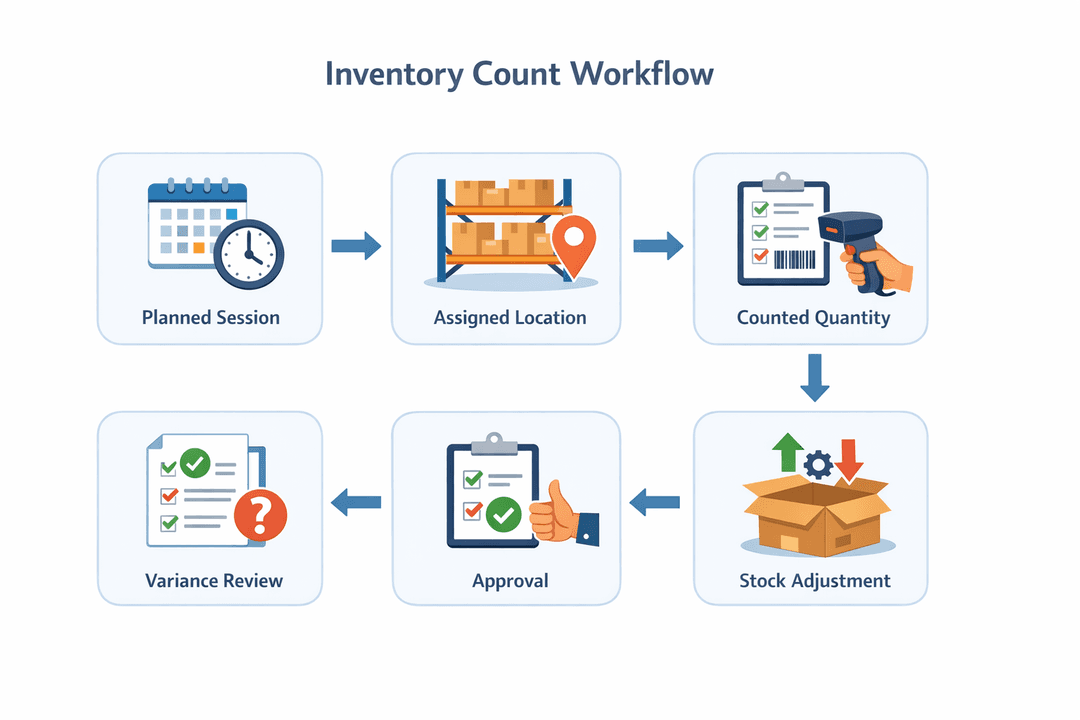
- Plan a count session for selected products, locations, or stock groups.
- Assign count responsibilities based on warehouse areas or operational roles.
- Record counted quantities in a structured format.
- Review differences before making changes to stock records.
- Convert approved results into inventory adjustments with a traceable reason.
- Keep adjustment history available for later review by managers, finance teams, or operations leads.
This is especially useful when SMEs need to keep sales, purchasing, receiving, and fulfilment moving while stock checks are taking place. TREX Grow gives teams a more organised way to control the process without relying only on memory, chat messages, or manual spreadsheet clean-up.
For businesses that want more controlled inventory count workflows, TREX Grow can be explored as part of a broader SME operations setup covering purchasing, inventory, sales documents, supplier records, and stock movement visibility.
A Practical Checklist For Your Next Count Session
Before your next stock count, use a simple checklist to reduce disruption:
- Define the count scope: products, locations, categories, or full warehouse.
- Choose the count type: cycle count, year-end count, fast-moving item review, slow-moving item review, or location-based count.
- Schedule the count around busy picking, receiving, or production periods.
- Assign clear count areas to each person or team.
- Freeze or control stock movement only where necessary, not across the entire business by default.
- Review differences before approving any adjustment.
- Record approved changes as traceable inventory adjustments.
- Use repeated differences as signals for process improvement, not as a reason to blame individuals.
A structured inventory count session helps SMEs keep stock records healthier while daily operations continue. It gives warehouse managers and inventory controllers a practical way to check stock, understand differences, and make better decisions without turning every stock check into a major disruption.

