

As SMEs move from owner-managed spreadsheets to shared team workflows, access control becomes a practical operations issue. When sales, warehouse, finance, and procurement teams all work in the same system, unclear permissions can create confusion over who should create, edit, approve, or manage key records. This guide helps business owners, admin managers, and operations leads think through user access by role, responsibility, and company context. It also shows how TREX Grow supports more controlled collaboration using users, company members, permissions, and multi-company access.
Why user permissions matter once more teams share the same system
Many SMEs start with a simple setup: the owner manages most records, a few staff update spreadsheets, and key decisions happen through chat or verbal instruction. That approach can work for a while, but it becomes harder to manage when sales, warehouse, finance, and procurement teams all start using the same platform.
At that point, access control is no longer an IT topic. It becomes a day-to-day operations question:
- Who should be allowed to create quotations, invoices, purchase orders, or stock records?
- Who only needs to view information?
- Who should be allowed to edit records after they are created?
- Who should approve important transactions?
- Who should manage master data such as customers, suppliers, products, or company settings?
Without clear permissions, teams often run into practical problems such as:
- duplicate or inconsistent records
- accidental edits to completed documents
- unclear approval responsibility
- staff seeing records outside their work scope
- shared teams using the wrong company context
Good permission discipline helps growing SMEs move from owner-controlled work into cleaner team collaboration. It gives each role enough access to do the job without making every user responsible for everything.
What to decide before assigning access
Before creating users and turning permissions on or off, it helps to map the work first. The goal is not to make access complicated. The goal is to match system access to actual operational responsibility.
Start with five practical access questions for each role:
- What records does this person need to create?
- What records does this person need to view?
- What records does this person need to edit?
- What actions should require manager review or approval?
- What records or settings should this person never manage directly?
A simple way to plan this is to review access by function.
| Role | Usually create | Usually view | Usually edit | Usually approve/manage |
|---|---|---|---|---|
| Sales staff | quotations, customer notes, sales orders | customer records, product info, quotation status | their own draft sales documents | usually not finance settings or payment records |
| Warehouse staff | stock entries, fulfilment-related updates, delivery confirmations | item records, delivery details, stock levels | stock-related operational records | usually not customer pricing or supplier payments |
| Finance admin | invoices, receipts, payment records, account follow-up notes | customer balances, supplier bills, sales handover records | billing and payment records | may manage financial completion checks |
| Procurement users | purchase requests, purchase orders, supplier notes | supplier records, item details, incoming stock status | purchasing documents before approval | usually not sales pricing or customer billing |
| Managers | selected records across teams | wider operational dashboards and document history | exception handling where needed | approvals, overrides, team review |
This kind of review helps avoid two common mistakes:
- giving everyone broad editing rights because it feels faster at the start
- restricting users too tightly without considering what they need to complete daily work
If your team is also struggling with handover between departments, [why-quote-to-invoice-handover-breaks-after-quotation-acceptance] can help you think through where ownership should shift from sales to operations and finance.

How permissions typically differ across sales, warehouse, finance, and procurement
Different teams work on connected records, but they do not need the same level of control.
For sales staff, access usually centers on customer-facing work. A salesperson may need to create and update quotations, review customer details, and check whether stock is available before confirming a deal. But that does not mean the salesperson should be able to adjust inventory freely, edit posted invoices, or manage supplier records.
For warehouse staff, access is usually operational. They may need to confirm stock movement, view delivery-related records, and update fulfilment status. They often do not need access to margin-sensitive quotation details, overdue payment notes, or procurement approval settings.
For finance admins, broader visibility is often needed across sales and purchasing records because billing, collections, and supplier payment planning depend on document accuracy. Even so, finance access should still be intentional. For example, a finance admin may need to issue invoices and record payments, but not change item master data or reopen stock transactions casually.
For procurement users, the key need is supplier-side control. They may create purchase orders, track incoming items, and manage supplier communication. But they usually should not manage customer invoicing or edit completed sales documents.
For managers, access often includes review and approval authority rather than unrestricted editing. In many SMEs, managers do not need to create every document themselves. They need visibility into exceptions, pending approvals, and cross-team accountability.
A practical way to think about this is:
- create access for the work a role starts
- view access for the work a role depends on
- edit access for the work a role owns
- approval access for the work a role is accountable for
- management access only for settings or records the role is expected to maintain
This distinction becomes especially important when inventory, purchasing, and fulfilment are linked. For related workflow thinking, see [how-distributors-keep-online-b2b-enquiries-inventory-records-aligned] and [why-small-inventory-variances-become-bigger-business-problems].
A practical record-by-record access checklist
Many SME teams find it easier to review permissions by document type instead of by job title alone. This helps when one person covers more than one role, which is common in smaller businesses.
Use a checklist like this during your access review:
-
Customer records
- Who can create new customers?
- Who can update contact details, credit-related notes, or commercial terms?
- Who only needs to view customer information?
-
Supplier records
- Who can add new suppliers?
- Who can edit supplier payment terms or reference details?
- Should sales staff see supplier records at all?
-
Quotations and sales documents
- Who can create quotations?
- Who can revise pricing?
- Who can approve unusual discounts or special terms?
-
Purchase orders and procurement records
- Who can create purchase orders?
- Who can edit quantities or prices before approval?
- Who can approve supplier commitments?
-
Inventory and warehouse records
- Who can record stock entries?
- Who can adjust stock quantities?
- Who can view stock across locations or companies?
-
Invoices, receipts, and payment records
- Who can issue invoices?
- Who can record collections or supplier payments?
- Who can edit completed finance records?
-
Company and system settings
- Who can invite users?
- Who can assign permissions?
- Who can manage company-level configuration?
During this review, do not aim for perfection on the first pass. Aim for clarity. A good first version of permissions is one where each team member understands what they are responsible for and what should be escalated.
If approvals are currently slowing things down, [where-approval-bottlenecks-slow-sme-workflows-and-how-to-fix-them] is a useful next read.

Common permission mistakes in growing SMEs
The most common permission issues in SMEs are usually operational, not technical.
One common mistake is keeping all control with the owner for too long. This often leads to delays because staff must keep asking for access, confirmation, or edits even for routine work.
Another mistake is going too far in the other direction by giving broad access to everyone. This tends to happen when the team wants speed, but it can create confusion over who changed what, who approved what, and which version of a record should be trusted.
Other common issues include:
- one shared login used by multiple staff members
- staff from one department editing records owned by another department
- finance teams fixing operational records directly instead of sending them back for correction
- warehouse teams updating stock without clear document reference
- group staff working under the wrong company when businesses share employees
- no regular review when staff roles change
These issues usually show up as rework, back-and-forth clarification, and messy handovers rather than dramatic failure. That is why access control should be treated as part of normal process design.
For group businesses, company context matters just as much as user role. [document-ownership-best-practices-multi-company-smes] gives more detail on keeping records under the right entity.
How TREX Grow Can Help Solve This
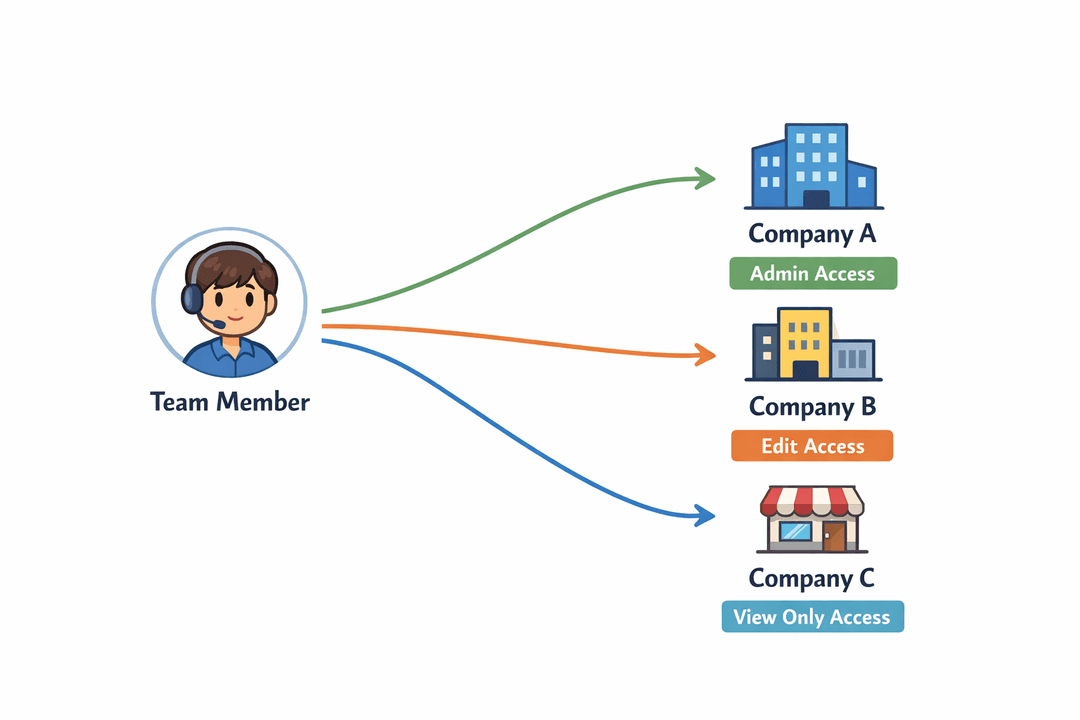
TREX Grow gives SMEs a more structured way to manage shared system access as teams grow. Instead of relying on one owner account or informal team habits, businesses can organize access through users, company members, permissions, and multi-company context.
A practical way to review access in TREX Grow is:
-
List every active user
- Review who currently logs into the system.
- Remove or update access for staff whose responsibilities have changed.
-
Confirm each user's actual business role
- Identify whether the person works mainly in sales, warehouse, finance, procurement, management, or a mixed role.
- Focus on what they do weekly, not just their job title.
-
Review company member setup
- Check which company or companies the user belongs to.
- For shared group-company teams, confirm whether the person should access one entity or multiple entities.
-
Match permissions to role responsibility
- Give create access where the user starts work.
- Give view access where the user needs context.
- Give edit access where the user owns corrections or updates.
- Reserve broader management rights for trusted admin or leadership roles.
-
Review multi-company context carefully
- If one finance admin supports two companies, confirm what they should see and do in each one.
- If a procurement user buys only for one entity, avoid granting unnecessary access across the whole group.
- If managers oversee several companies, make sure their visibility matches their responsibility.
-
Test common workflows by team
- Ask a sales user to create and hand over a quotation.
- Ask a warehouse user to process stock-related work without seeing unrelated finance controls.
- Ask a finance admin to follow billing and payment steps without changing operational records they do not own.
-
Repeat the review regularly
- Recheck access when new team members join.
- Update permissions when departments expand or responsibilities shift.
- Review company assignments when shared staff begin supporting additional entities.
This approach helps SMEs build controlled team collaboration without making daily work harder. It also supports clearer ownership when several departments rely on the same records.
If your business is also managing collections or supplier invoice timing across teams, [reduce-overdue-invoices-better-payment-follow-up-discipline] and [supplier-payment-planning-sme-invoice-visibility-guide] are relevant follow-up guides.
A simple starting point for owner-led businesses
If your business is still transitioning from spreadsheets and owner-controlled approvals, you do not need a complex permission model to get started. A simple phased approach is often enough.
Phase 1: separate users by person
- make sure each team member has their own user access
- stop relying on shared logins or owner-only workarounds
Phase 2: separate access by department
- define a basic permission pattern for sales, warehouse, finance, procurement, and managers
- limit editing rights to records each team actually owns
Phase 3: separate access by company context
- if your group has more than one company, confirm which users belong to which entity
- review shared staff carefully
Phase 4: review exceptions and approvals
- identify where managers need approval visibility
- reduce unnecessary escalation for routine work
The main goal is not restriction for its own sake. The main goal is cleaner work, clearer ownership, and less operational confusion as more people use the same system.
Moving toward more controlled team collaboration
As SMEs grow, shared systems work best when access follows responsibility. Sales teams need room to move quickly, warehouse teams need operational clarity, finance teams need document accuracy, procurement teams need supplier-side control, and managers need oversight without becoming the bottleneck for every task.
User permissions help turn that balance into a workable structure. They support smoother handover, clearer ownership, and better day-to-day discipline across departments and companies.
If your team is moving beyond spreadsheets and informal access, TREX Grow offers a practical way to support more controlled collaboration through users, company members, permissions, and multi-company setup. It is a useful next step for SMEs that want shared workflows without losing operational clarity.

