
Manual bank checking and separate payment notes make it difficult to know whether an invoice is unpaid, pending, failed or already settled. A structured process connects payment attempts, bank references, payment history, reconciliation and invoice updates so finance teams can follow up accurately.
Why Manual Payment Tracking Becomes Confusing
When online payments are checked manually, the finance team often has to move between bank portals, gateway notifications, invoices, spreadsheets and customer messages. Each source may show only part of the payment story.
For example, a customer may say that payment has been made while the bank transaction is still pending. Another payment may have failed even though an attempt appears in the payment history. If the invoice is updated before the transaction is confirmed, the business may record revenue that has not actually been received.
The problem is not simply extra administrative work. It is the lack of a reliable connection between the invoice, each payment attempt, the payment status and the final reconciliation result.
Common Payment Status Problems for SMEs
Manual tracking makes several everyday situations harder to resolve:
- Failed payments: A customer attempts to pay, but the transaction does not complete. Without a recorded failed status, the finance team may not know whether to follow up or wait.
- Pending payments: A payment appears to be in progress, but the invoice remains unsettled. Different team members may interpret this as paid, unpaid or awaiting confirmation.
- Possible duplicates: A customer retries after seeing an error or delay. The team must check payment amounts, timestamps and bank references before deciding whether two records represent separate payments.
- Missing bank references: A transfer reaches the bank account without a clear invoice number or customer reference, making reconciliation dependent on manual investigation.
- Outdated invoices: Payment may be confirmed in the bank, but the corresponding invoice is not updated. This creates incorrect outstanding balances and unnecessary follow-up.

Payment Attempts and Confirmed Payments Are Not the Same
A payment attempt records that a customer tried to pay. It does not always mean that the business has received and reconciled the money.
A useful payment history should preserve every relevant attempt and its latest status, such as pending, failed or successful. The confirmed payment can then be matched to the correct invoice using details such as the customer, amount, date and bank reference.
This distinction is especially important when a customer retries a failed or delayed transaction. Instead of deleting the earlier attempt or assuming that both entries are payments, the finance admin can review the history and perform a duplicate check before updating the invoice.
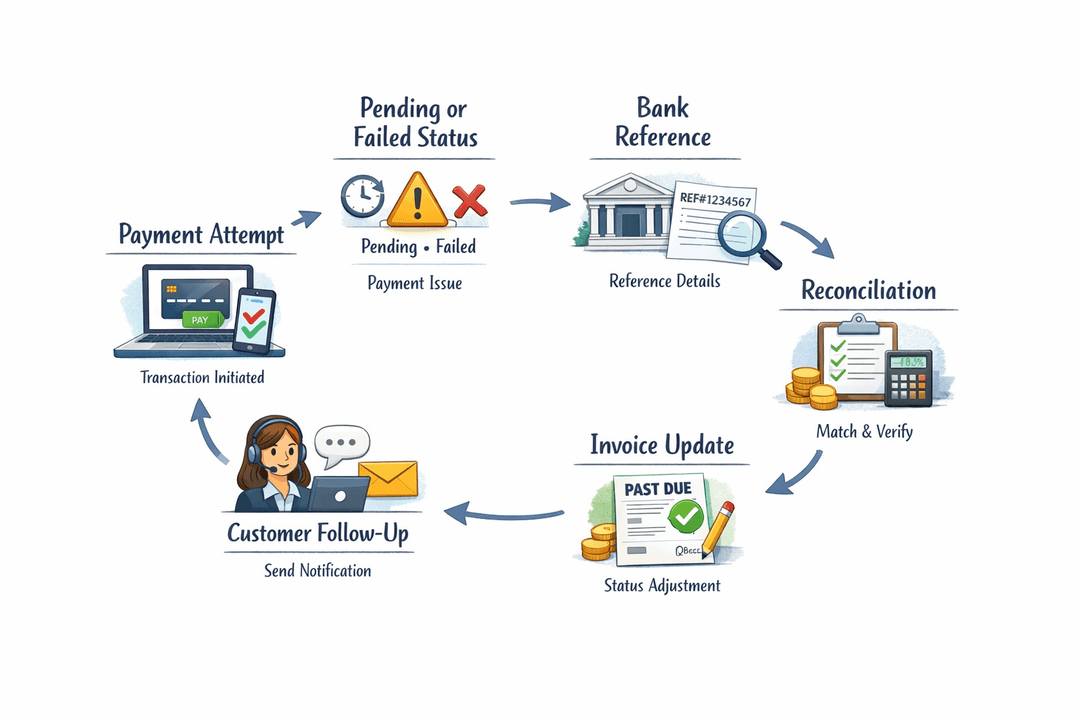
A More Structured Payment Tracking Workflow
SMEs can move away from repeated manual bank checking by establishing a consistent workflow:
- Record every online payment attempt against the relevant customer or invoice.
- Assign a clear status such as pending, failed or confirmed.
- Keep the transaction date, amount and available bank reference with the payment record.
- Review pending payments at scheduled intervals rather than treating them as completed.
- Check for matching amounts, references and timestamps before recording a retried payment.
- Reconcile confirmed funds against the correct invoice.
- Update the invoice balance only after the payment is confirmed according to the company's process.
- Use the latest status and payment history when following up with the customer.
This gives the team one repeatable process while preserving the evidence needed to understand what happened.
Use Payment History to Improve Customer Follow-Up
Customer follow-up should reflect the actual payment status. A generic overdue reminder can cause confusion when a customer has already attempted payment or when a transaction remains pending.
Before contacting the customer, the team should review:
- the invoice number and outstanding balance
- the latest payment status
- previous failed or pending attempts
- the amount and date of each attempt
- the bank or transaction reference
- the reconciliation result
With this context, the finance admin can ask the customer to retry a failed payment, wait for a pending transaction to be resolved, request a missing reference or confirm that the invoice has been settled. This reduces contradictory messages from different team members.
How TREX Grow Can Help Solve This
TREX Grow can help SMEs maintain clearer connections between invoices, payment records and customer accounts. Instead of relying on separate spreadsheets, inbox messages and memory, teams can keep payment information alongside the related business records.
A more organised record makes it easier to review payment history, check references, identify possible duplicate entries, reconcile confirmed payments and keep invoice balances current. Finance admins and SME owners can also work from the same information when deciding whether customer follow-up is required.
Explore TREX Grow if your team needs a cleaner and more consistent way to track invoice payments from the initial payment record through reconciliation and invoice updates.