

A practical guide for service-based SMEs, admin teams, and business owners on using clear appointment schedules, availability rules, exceptions, booking details, and admin visibility to reduce double bookings, missed slots, customer frustration, and manual coordination work.
Why Appointment Availability Rules Matter For Service SMEs
For service-based SMEs, appointment scheduling is often handled through phone calls, WhatsApp messages, spreadsheets, shared calendars, and staff memory. This may work when appointment volume is low, but it becomes difficult when more customers request consultations, site visits, inspections, repairs, installations, or recurring service appointments.
Unclear availability rules can create avoidable problems:
- Two customers are booked into the same slot.
- A site visit is confirmed when the assigned staff member is unavailable.
- A customer is offered a slot that has already been reserved informally.
- Admin teams miss open slots because schedules are not visible in one place.
- Rescheduling requires too many manual messages across teams.
Clear availability rules help admin teams know when appointments can be accepted, when exceptions need review, and what information must be captured before a booking is confirmed.
Manual Booking Becomes Risky When Rules Are Not Written Down
Many SMEs coordinate appointments manually because the team is small and the process feels familiar. The issue is not the manual work itself. The issue is when the rules are not clear enough for everyone to follow consistently.
For example, a sales admin may confirm a consultation at 10:00 AM because the slot looks free in a spreadsheet. At the same time, the service manager may have already promised the same slot to a repeat customer through a message. Another staff member may block that morning for a supplier delivery or internal meeting, but the update never reaches the admin team.
This creates more coordination work after the booking is made. The team has to apologise, find another slot, check staff availability again, and update the customer. When this happens repeatedly, customers may feel the business is disorganised even if the actual service quality is good.

Define What Counts As Available, Unavailable, And Conditional
A useful appointment schedule should not only show empty time slots. It should help the admin team understand what can actually be booked.
Service businesses can define availability in three simple categories:
- Available: Slots that can be offered to customers without extra approval.
- Unavailable: Dates or times blocked for public holidays, staff leave, training, maintenance, internal work, supplier visits, or fully booked service teams.
- Conditional: Slots that may be possible, but need approval because they involve travel time, urgent work, high-value customers, special equipment, or specific staff.
For example, a renovation contractor may allow consultations on weekdays but treat Saturdays as conditional because only selected site visits can be handled. A cleaning service may block unavailable dates when all teams are assigned to recurring contracts. An equipment service provider may keep conditional slots for urgent breakdown support.
This gives admins a clearer decision framework instead of making every booking decision from scratch.
Capture Customer Booking Details Before Confirming The Slot
A confirmed appointment is only useful if the team has enough information to prepare. Missing details often cause delays, repeat calls, or failed visits.
Before confirming a service appointment, admin teams should capture:
- Customer name and contact number
- Company name, if it is a B2B appointment
- Appointment type, such as consultation, site visit, inspection, installation, repair, or follow-up
- Appointment location or service address
- Preferred date and time
- Assigned staff or team, if known
- Required equipment, documents, or access notes
- Customer remarks, urgency, or special instructions
- Rescheduling history, if the appointment has changed before
For a site visit, the address and access details may be critical. For a consultation, the business may need to know whether it is online, in-office, or on-site. For a service appointment, the team may need product model details, issue description, photos, or warranty information before dispatching staff.
Plan For Exceptions Instead Of Handling Them Randomly
Exceptions are normal in service operations. Customers may request unavailable dates, staff may fall sick, urgent jobs may appear, or a site visit may take longer than expected. The problem is not that exceptions happen. The problem is when every exception is handled differently.
Common exceptions include:
- A customer asks for a date that is already blocked.
- A repeat customer needs urgent service outside standard hours.
- A consultation needs to be moved because the assigned person is unavailable.
- A site visit must be rescheduled because the customer cannot access the premises.
- A service job requires a specific technician, vehicle, or equipment.
SMEs can reduce confusion by deciding who can approve exceptions, what information is needed, and how changes should be recorded. For example, an admin may be allowed to reschedule within the same week, but weekend appointments or urgent same-day site visits require manager approval.
This keeps the process flexible without making it chaotic.

Make Rescheduling Visible To Everyone Involved
Rescheduling is where many appointment workflows become messy. A customer may change the time with one admin, while the service team still follows the old schedule. A staff member may move a booking verbally but forget to update the shared record. A manager may not know which customers have already been rescheduled multiple times.
A practical rescheduling workflow should show:
- Original appointment date and time
- New appointment date and time
- Reason for rescheduling
- Person who updated the booking
- Customer confirmation status
- Assigned staff or team after the change
- Any impact on other appointments
For example, if a site visit is moved from Tuesday morning to Thursday afternoon, the admin team should know whether the customer has confirmed the new time, whether the assigned staff is still available, and whether the travel route still makes sense.
Clear rescheduling records reduce repeated questions and help the business avoid missed appointments.
Practical Workflow Advice For SMEs Still Coordinating Bookings Manually
Service businesses do not need to rebuild their entire process immediately. They can start by making the manual workflow more consistent.
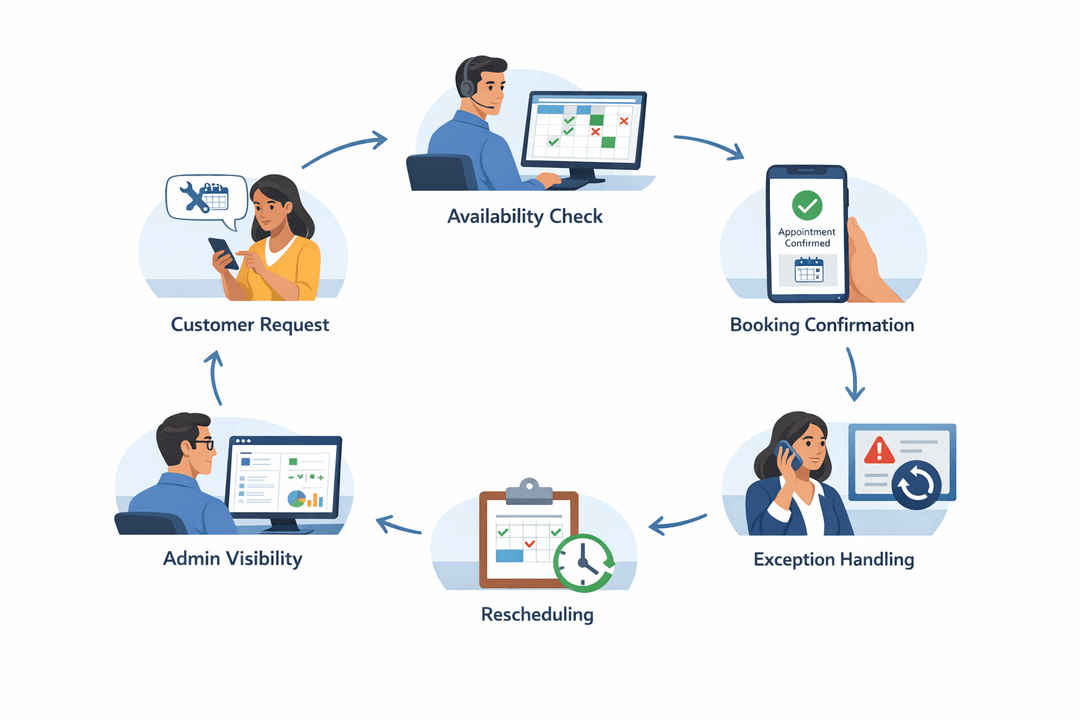
A simple appointment workflow can look like this:
- Customer requests a consultation, site visit, or service appointment.
- Admin checks available, unavailable, and conditional slots.
- Admin confirms the required booking details.
- Admin assigns the appointment to the correct staff, team, or service category.
- Any exception is reviewed before confirmation.
- Customer receives the confirmed date, time, location, and preparation notes.
- Any rescheduling is recorded with the reason and updated status.
- Admin and service teams review the same appointment view before the working day starts.
This is practical for consultants, repair teams, installers, maintenance providers, training companies, B2B service suppliers, and appointment-based professional services.
The main objective is to reduce hidden coordination work. When the rules and details are visible, admins spend less time checking separate messages and more time helping customers get the right appointment.
How TREX Grow Can Help Solve This
TREX Grow can help SMEs move towards more organised appointment handling by connecting customer records, booking details, internal notes, reminders, and admin visibility in a more structured workflow.
Instead of relying only on scattered messages or personal memory, teams can work towards a clearer process:
- Keep customer appointment details connected to customer records.
- Record consultation, site visit, or service appointment information in a structured way.
- Make unavailable dates, exceptions, and rescheduling notes easier for admins to track.
- Give business owners and admin teams clearer visibility over upcoming appointments.
- Reduce repeated manual checking between sales, admin, and service teams.
- Keep appointment-related context easier to review when customers contact the business again.
This is especially useful for service-based SMEs that need to manage customer appointments while also handling sales documents, follow-ups, reminders, and daily operations.
Businesses that want more organised appointment handling can explore TREX Grow as part of a broader SME workflow for customer records, reminders, sales coordination, and operational visibility.
A Simple Checklist For Clearer Appointment Scheduling
Before confirming the next customer appointment, admin teams can use this checklist:
- Is the requested slot clearly available?
- Are there any unavailable dates or blocked times?
- Does the booking require a specific staff member, team, location, or equipment?
- Is the customer record complete and updated?
- Are the appointment type, address, contact person, and notes recorded?
- Does this booking need approval because it is urgent, high-value, or outside normal rules?
- Has the customer received the confirmed date, time, location, and preparation details?
- If rescheduled, was the old and new appointment information recorded clearly?
Clear availability rules do not remove every scheduling issue, but they reduce unnecessary confusion. For SMEs, that can mean fewer double bookings, fewer missed slots, less customer frustration, and less manual coordination work for admin teams.

