Sales enquiries arrive without structure
Customers ask for prices but omit product references, quantities, company details or notes, so the sales team must rebuild the request before quoting.

Some RFQ tools help customers request a sales quotation from you. Others help your team invite and compare supplier bids. Choose that direction first, compare six credible options by operating model, then prove the handoff with one repeatable test.

This guide is for a Malaysian SME replacing quote requests handled through email, chat, spreadsheets or disconnected forms. It is most useful when the shortlist contains products built for different sides of the transaction.
Operational pressure
When records live in different places, the person responsible has to reconstruct what happened before they can make a confident decision or follow up.
Customers ask for prices but omit product references, quantities, company details or notes, so the sales team must rebuild the request before quoting.
Procurement sends similar requirements to several suppliers, then manually aligns prices, lead times, terms and changed lines.
The team says it needs RFQ software without agreeing whether the requester is a customer, employee, buyer or supplier.
Accepted request details must be re-entered into a sales quotation, purchase order, ERP or accounting system.
A form tool, SME operations platform, ERP purchase app and source-to-pay suite can all match the keyword while solving different jobs.
Management needs a dated decision based on the same request, exception, user roles, commercial scope and export check for every candidate.
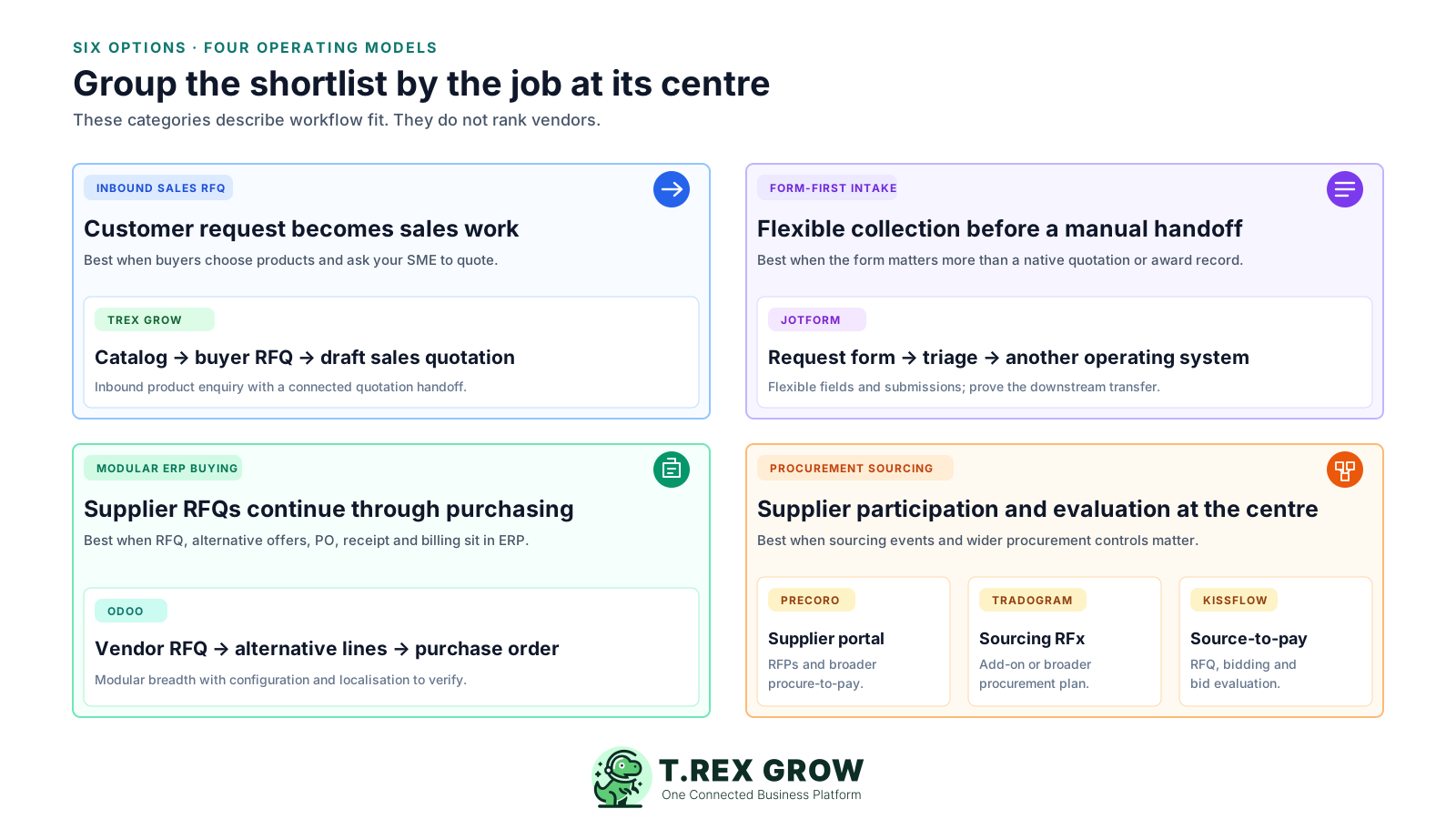
RFQ is a broad label. Map who starts the request, who responds and which official record should follow before comparing vendors. This single decision removes most false matches from the shortlist.
Write down whether the first user is a customer, employee, procurement buyer or invited supplier.
Define whether the business must produce a sales quotation, collect supplier offers or simply acknowledge a request.
Choose the official next record: quotation, sourcing decision, purchase order, ERP entry or assigned follow-up.
Use the row that matches the real trigger and required outcome.
| Operating model | Typical path | Software must prove |
|---|---|---|
| Inbound customer RFQ | Customer selects products or describes a need → your team reviews → sales quotation | Usable buyer and line data, quantity rules, request status and a controlled quotation handoff. |
| Outbound supplier RFQ | Your buying team defines a need → suppliers respond → bids are evaluated → purchase decision or PO | Consistent requirements, supplier access, deadline and revision control, comparable responses and award evidence. |
| Form-first request intake | External or internal requester submits a form → staff triage → details move to another system | Flexible fields, attachments, routing and dependable integration or manual handoff into the system of record. |
Score every product against the same live scenario. Record what was observed, what requires configuration, what belongs to another plan and what remains unproven.
Confirm who creates the RFQ, where responses arrive and which system owns the request after submission.
Check items or services, quantities, units, specifications, attachments, dates, currency, terms and mandatory fields.
Test customer, supplier, requester, buyer and reviewer access without assuming every external participant needs a paid seat.
Verify links, email, portal or form access, response status, deadlines, acknowledgements and incomplete submissions.
Change one quantity or specification, submit one late or partial response and inspect versions, ownership and notifications.
For supplier sourcing, prove line-level comparison and a defensible selection record. For inbound RFQs, prove sales review and qualification.
Continue the tested data into a sales quotation, purchase order, ERP, accounting tool or assigned task without hiding re-entry.
Normalise users, external participants, events, submissions, modules, add-ons, implementation, support, integration and usable export.
The request screen is only the entry point. Differences become visible when the request changes, another participant responds and the winning data must become an operating record.
Recurring issues usually point to workflow-control gaps, not one isolated data-entry mistake.
Searching products before fixing the RFQ direction produces a shortlist that mixes sales-enquiry capture with procurement sourcing.
Vendor terminology varies. Inspect the actual line, response, evaluation and handoff workflow instead of relying on the label.
A perfect submission hides how the product handles changed quantities, unavailable products, missing files, late bids or withdrawn responses.
A configurable form can capture data well while leaving supplier invitations, sealed responses, comparison and award evidence to staff.
The lowest listed plan may exclude RFx, supplier portals, integrations, external users, event volume or implementation services.
An RFQ is a pre-transaction document. Verify currency, SST, accounting, e-Invoice and record-retention requirements in the downstream workflow separately.
This is an editorial shortlist, not a paid ranking. TREX Grow has no sponsorship, endorsement, affiliation or partnership with Jotform, Odoo, Precoro, Tradogram or Kissflow. Product and pricing claims were checked against official sources on 5 September 2026; verify the live plan, regional availability, tax and written quote before purchase.
Published commercial starting points and practical checks, reviewed 5 September 2026. Prices exclude any unlisted tax, foreign-exchange cost, add-on, implementation, migration, integration or support fee.
| Option | Direction and best-fit job | Published starting point or model | Check before choosing |
|---|---|---|---|
| TREX Grow | Inbound. Malaysian SMEs that want buyers to select catalog products and quantities, submit a structured RFQ and let staff continue it into a draft sales quotation. | Free is RM 0. Current Malaysia plans list unlimited users and products, and RFQ is included across Free, Starter, Essential and Premium. | Confirm catalog design, buyer fields, quantity rules and the sales-document plan needed after the RFQ. TREX Grow does not claim outbound supplier invitations, bid comparison, tender evaluation or award-to-PO sourcing. |
| Jotform | Inbound or general intake. Teams that need a flexible quote-request form and will triage or transfer the submission into another operating system. | The official Request For Pricing template is offered free. Jotform also lists a Starter free plan and paid tiers with higher limits; account limits and regional checkout pricing vary. | Prove product-line design, attachments, spam and duplicate handling, reviewer routing, data export and the manual or integrated quotation handoff. It is not presented here as a dedicated sourcing or bid-comparison platform. |
| Odoo Purchase | Outbound. SMEs wanting vendor RFQs, alternative supplier quotations, line comparison and conversion into purchase orders inside modular ERP. | One App Free is USD 0 for one app and unlimited users. Standard is displayed at USD 24.90/user/month and Custom at USD 49/user/month on annual billing; the displayed discount applies for 12 months to initial users. | Confirm the required apps, Purchase Agreements configuration, Malaysia localisation, implementation, custom work, partner services and post-promotion price. Odoo.sh hosting is separate where relevant. |
| Precoro | Outbound. Growing procurement teams needing supplier collaboration, RFP or quotation requests and broader procure-to-pay controls. | Core starts at USD 499/month billed annually. Automation starts at USD 999/month billed annually and lists Supplier Portal and RFPs; Enterprise is custom. | Confirm whether the exact RFQ event, invited supplier experience, response comparison, users, entities, integrations and regional hosting required are included in the written quote. |
| Tradogram | Outbound. Purchasing teams wanting sourcing RFx alongside supplier, PO, receiving, budget, contract and approval workflows. | Essentials is USD 99/month or USD 950.40/year for 1+ users. Sourcing RFx appears as an Essentials add-on and is included in Premium, which is a custom quote for 20+ users. | Obtain the RFx add-on or Premium quote and confirm user fees, event workflow, supplier access, comparison depth, integrations, setup and support. |
| Kissflow Procurement Cloud | Outbound. Larger or more complex teams wanting configurable source-to-pay, supplier portals, RFQ and bidding, and automated bid evaluation. | The reviewed procurement page uses an enquiry-led commercial model; no fixed public Procurement Cloud price was visible. | Ask for a written scope covering users, supplier portal, sourcing events, low-code configuration, ERP integration, implementation, support, data location and exit. |
The best practice is to make the next action clear before the situation becomes urgent.
Use safe sample data and two participants. Capture screenshots or notes at each checkpoint, then compare evidence rather than demonstration claims.
Record the current facts in one shared place.
Confirm what is known and what needs attention.
Make the next decision or follow-up accountable.
Complete the next task and record the outcome.
Refresh the shared view when facts change.
A dependable workflow keeps the shared record and the next action aligned.
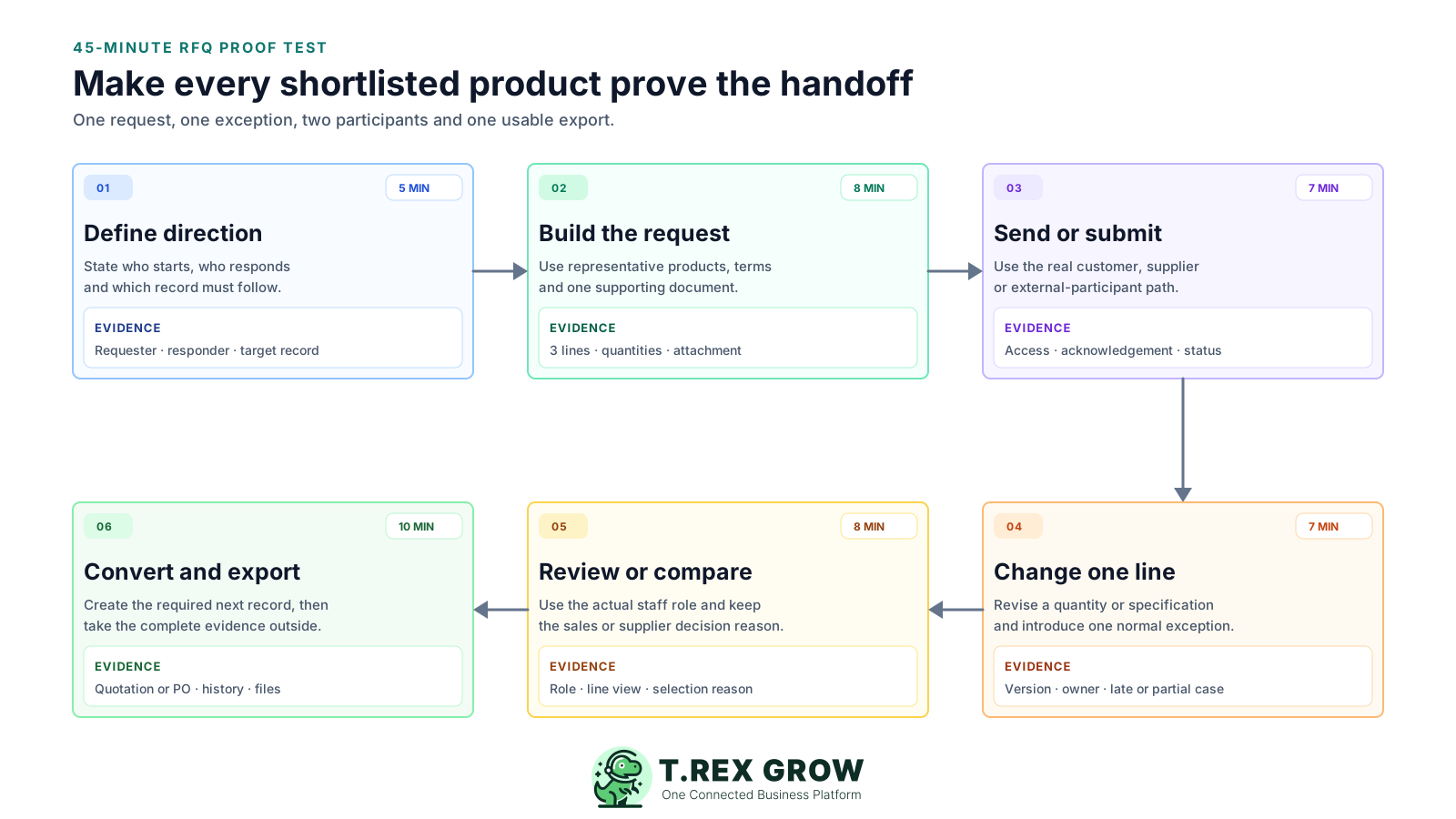
5 minutes — State the direction, requester, responder and required downstream record.
8 minutes — Build one representative RFQ with three lines, quantities, one attachment, a response date and one required term.
7 minutes — Submit or send it through the real customer, supplier or external-user path and inspect acknowledgement and status.
7 minutes — Change one quantity or specification and introduce one incomplete, late or unavailable-item exception.
8 minutes — Review the response with the actual staff role and, for sourcing, compare supplier lines and record the selection reason.
10 minutes — Continue into the sales quotation, PO or assigned system, then export the request, response, history and attachments.
TREX Grow's verified RFQ path begins with a published product catalog. A buyer selects one or more products, enters quantities and contact details, and submits a request that staff can review and convert into a draft quotation. That is a sales-enquiry workflow for an SME receiving RFQs from customers.
The business can present selected products with descriptions, images, PDFs, optional pricing, minimum order quantities and contact information.
The public flow lets buyers choose products and quantities and provide name, email, phone, company and a note.
The flow checks product availability and minimum quantities and asks the buyer to review when selected products have changed.
Staff can review the RFQ inside TREX Grow and use its details to create a draft sales quotation rather than rebuilding the enquiry from scratch.
Current Malaysia pricing lists Free at RM 0 with unlimited users and products, and Catalog and RFQ tools included.
Do not choose TREX Grow for a supplier-sourcing requirement based only on the RFQ label. The verified catalog flow does not establish outbound supplier invitation, competing bid collection, sealed responses, tender evaluation, award scoring or award-to-purchase-order sourcing.
The strongest fit is an SME that publishes products and wants customer requests to become structured sales quotation work.
If the SME sends the same requirement to suppliers and compares their offers, test Odoo, Precoro, Tradogram, Kissflow or another verified sourcing product.
RFQ is on all current TREX Grow plans, while attachments, broader sales documents, purchasing, stock and warehouse capabilities remain plan-dependent.
A useful commercial comparison normalises the production workflow, not the smallest advertised plan. Build a twelve-month estimate using the exact users, participants and modules proven in the test.
Record company, user, external user, event, submission, module, app, environment and annual-contract charges in one currency.
Confirm whether supplier portal, RFQ or RFP events, line comparison, evaluation, approvals and PO conversion sit in the quoted plan or an add-on.
Include item and service definitions, supplier or customer records, terms, templates, attachments and migration cleanup.
Price workflow design, roles, email, portal, ERP or accounting integration, API access, testing and exception handling.
Assign someone to maintain supplier access, catalog data, forms, approval logic, templates, reports and exports after launch.
Recheck displayed currency, foreign-exchange exposure, SST or other tax, data location, support hours and contract entity for Malaysia.
Security badges and feature lists are starting points. Ask each shortlisted provider to demonstrate the controls and exports that apply to the exact plan, region and implementation you will buy.
Test who can view requirements, prices, competing responses, attachments, selection notes and downstream records.
Inspect who changed lines, deadlines, terms and decisions, how the current version is identified and which history exports.
Prove the external path on mobile and desktop, including login, link expiry, acknowledgement, errors and support responsibility.
Interrupt or reject one handoff and confirm ownership, retry behaviour, duplicate prevention and reconciliation.
Export representative requests, line items, responses, decisions, participants, history and files in a usable form.
Attach the tested plan, add-ons, users, events, implementation, service levels, renewal terms and exit assistance to the decision record.
The best practice is to make the next action clear before the situation becomes urgent.
If customers request quotations from your product catalog, start with TREX Grow's Free plan and prove the path into a draft sales quotation. If your team invites suppliers to bid, use the same 45-minute test with an outbound sourcing shortlist.
There is no universal winner because RFQ software covers opposite workflows. TREX Grow fits inbound catalog-to-sales-quotation requests; Jotform fits flexible form-first intake; Odoo fits modular ERP purchasing; and Precoro, Tradogram and Kissflow fit progressively broader procurement sourcing. Test the direction and downstream record first.