Supplier information is not ready when the buyer needs it
The current contact, payment term, lead time, currency and product relationship are spread across email, chat, spreadsheets and old documents.

TREX Grow gives purchasing, warehouse and finance teams a connected record chain. Prepare supplier and product data, create and approve purchase orders, record what actually arrives, add supplier invoices from the order, retain payment history, and document purchase returns without rebuilding the story from separate spreadsheets.
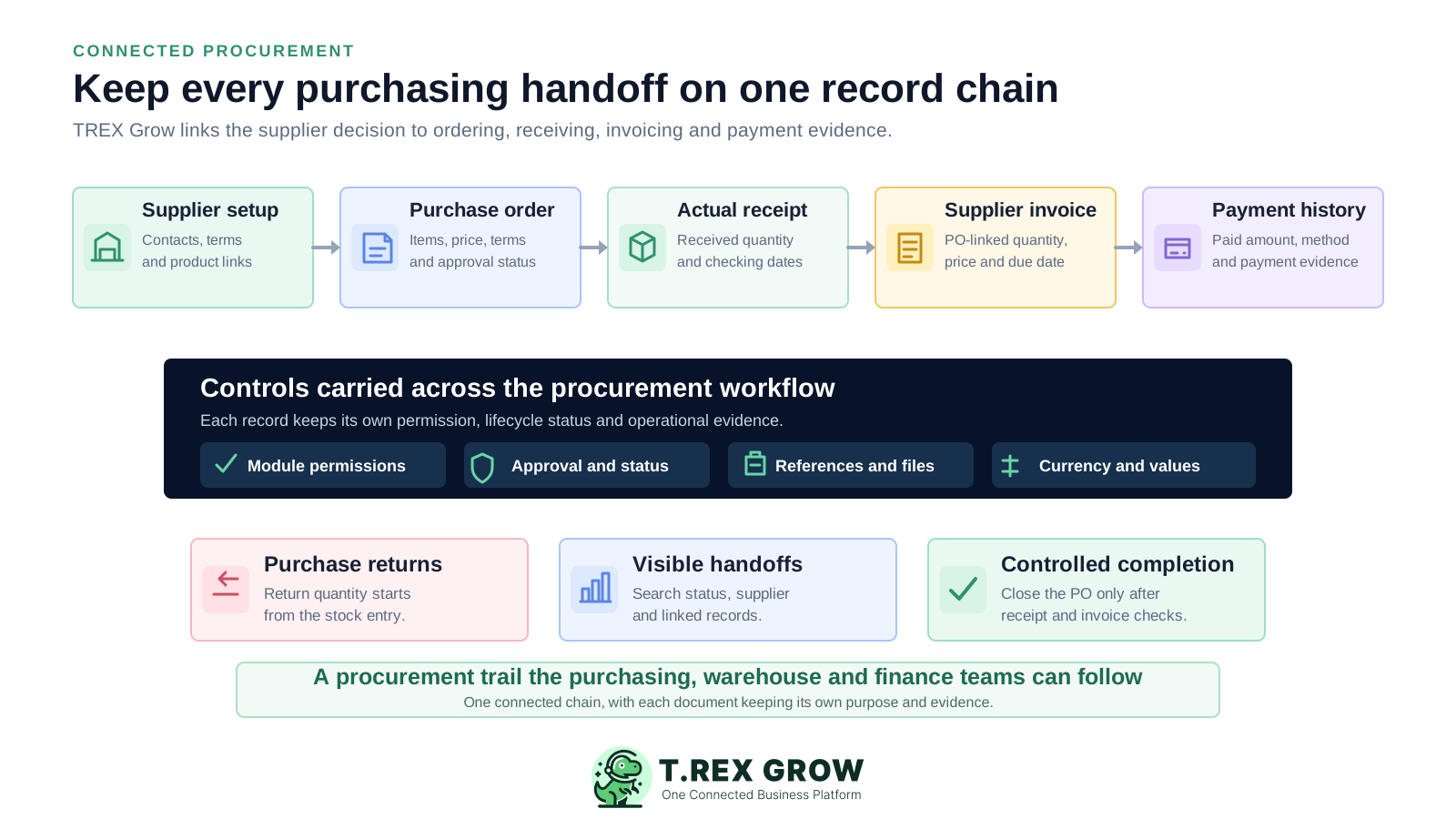
Buying begins before the PO and continues after it. Supplier setup, item eligibility, approval, physical receiving, supplier invoicing, payment and returns each answer a different business question. When the handoffs are disconnected, the team repeatedly reconstructs the same purchase.
Operational pressure
When records live in different places, the person responsible has to reconstruct what happened before they can make a confident decision or follow up.
The current contact, payment term, lead time, currency and product relationship are spread across email, chat, spreadsheets and old documents.
The team cannot confidently identify which supplier, items, quantities, prices, delivery expectations and commercial terms were authorised.
A manager agrees in chat, but the system does not show whether the purchase order or supplier document is draft, pending review, finalised or approved.
The PO states the expectation. The warehouse still needs to record the quantity that physically arrived, the receipt date and the checking evidence.
Finance retypes supplier and item context rather than starting from the purchase order that already explains the original commitment.
Payment references, attachments and returned quantities are added to separate files after the team has already lost the connection to the source purchase.
Manual tools can produce a purchase list or a presentable document, but they do not inherently connect module permissions, lifecycle status, actual receiving, supplier invoice detail, payment history, returns and completion rules.
Recurring issues usually point to workflow-control gaps, not one isolated data-entry mistake.
A polished document does not control supplier readiness, product assignment, approval, stock receipt, invoice follow-up or payment evidence.
Repeated manual entry introduces old contacts, inconsistent product codes, incorrect units of measure and unreviewed commercial terms.
Those quantities can legitimately differ because of partial deliveries, backorders, rejected goods, invoicing milestones or later adjustments.
The approver cannot reliably see whether the record changed after the screenshot or whether the official document was generated from the reviewed version.
The status changes, but the amount, payment date, method, reference, responsible person and attachment history remain difficult to verify.
The PO is marked done even though receiving is unfinished, no finalised supplier invoice exists, a return is unresolved or downstream work still needs attention.
A growing SME usually needs a dependable operating chain before it needs an enterprise sourcing suite. The system should make the purchasing commitment, actual receipt, supplier bill, payment evidence and exceptions easy to follow while preserving the purpose of each record.
Maintain active supplier profiles, contact and payment context, approved products, supplier assignments, codes and units before purchase-order creation.
Keep supplier, quantity, unit price, currency, delivery expectation, payment terms, tax, discount, totals and address on the purchase order.
Separate users who can view, create, edit, request approval and approve operational records according to their company role.
Create the stock entry from an approved or finalised PO and record the quantity received instead of increasing stock from the order alone.
Start the supplier invoice from the PO, preserve its own quantity, price and due date, then retain payment amount, method, date, reference and evidence.
Record physical supplier returns from the stock entry and complete the PO only after its receiving and supplier-invoice conditions are satisfied.
The procurement chain starts with supplier and product master data, moves into the purchase-order commitment, records operational execution through stock entries and supplier invoices, and retains payment or return evidence as separate but connected records.
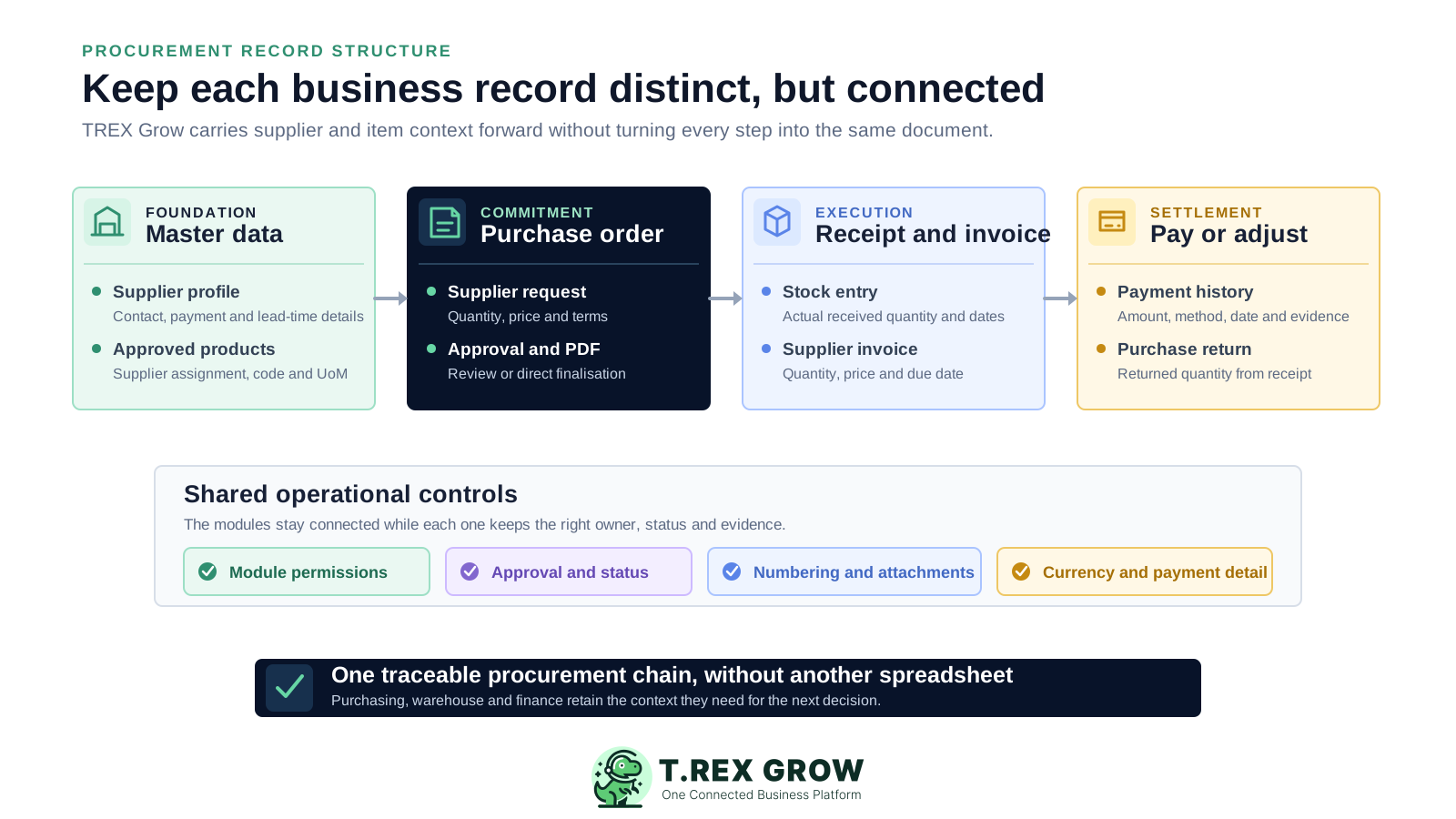
Search active or archived suppliers and retain contact, address, payment term, lead-time and supplier-facing tax fields around the purchase history.
Use products that are finalised or approved and assigned to the selected supplier before they enter a purchase order.
Generate the PO number, calculate totals, route review where configured and produce a watermarked draft or official PDF according to status.
Start receiving from the approved or finalised order, inherit its items and record the actual quantity received.
Prefill supplier and item lines from the purchase order while retaining the supplier invoice's own number, quantity, price, dates and terms.
Keep supplier-invoice payment history and create quantity-based purchase returns from the relevant stock entry.
The practical flow is direct: prepare the supplier and products, create the purchase order, finalise or request approval, record actual receipt, add the supplier invoice from the PO, then record payment or returns and complete the purchase order only after the required checks.
Record the current facts in one shared place.
Confirm what is known and what needs attention.
Make the next decision or follow-up accountable.
Complete the next task and record the outcome.
Refresh the shared view when facts change.
A dependable workflow keeps the shared record and the next action aligned.
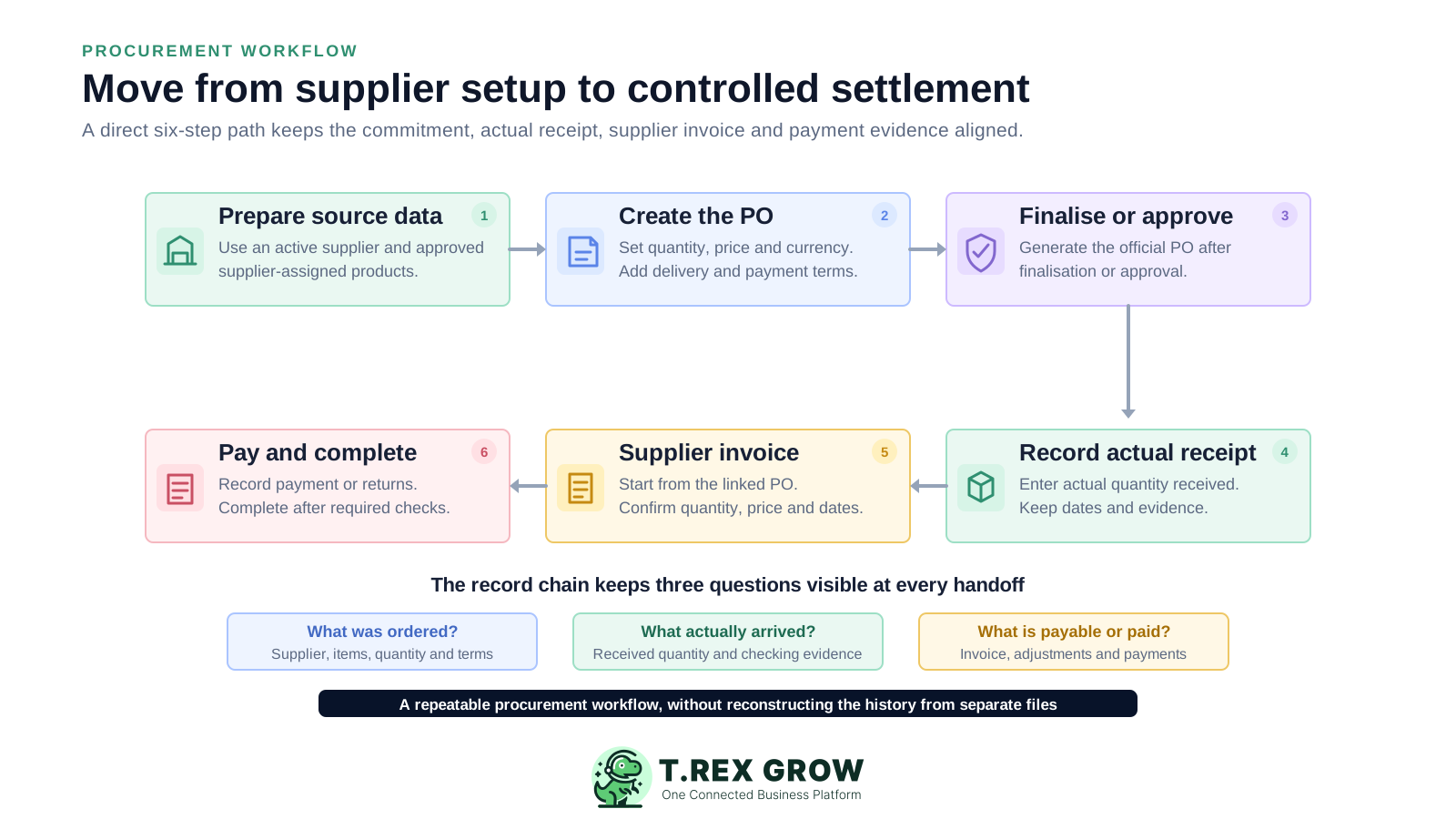
Prepare supplier and product data: create the active supplier, confirm contact, payment, lead-time and currency context, and use finalised or approved products assigned to that supplier.
Create the purchase order: add the supplier-assigned products, quantity, unit price, expected delivery, payment terms, tax, discount, currency, address and supporting notes or attachments.
Finalise or request approval: authorised direct-finalisation users can create the active PO immediately; request users move it to Pending Approval for an approver to review and activate.
Record actual receipt: create the stock entry from the approved or finalised PO, keep its supplier and items, and enter the quantity physically received with the relevant dates and evidence.
Record the supplier invoice: create it from the PO, retain the supplier and item context, then confirm the supplier invoice number, quantity, unit price, dates, payment terms, tax and discount.
Pay, adjust and complete: retain payment history on the supplier invoice, record physical returns from the stock entry where needed, and complete the PO only after linked stock entries and supplier-invoice checks are satisfied.
TREX Grow provides the connected supplier, purchasing, receiving, supplier-invoice, payment-history and return controls needed for a practical SME workflow. The purchasing modules are available on Essential and Premium; Premium adds warehouse-level stock control.
Search supplier records, view active or archived suppliers, and keep their contact, payment, lead-time, product and purchasing context together.
Finalise or approve products before operational use and assign the relevant products to suppliers before ordering.
Use configured numbering for purchase orders and purchase return notes, with watermarked draft PDFs and official PDFs after finalisation or approval where supported.
Apply View, Create, Edit and module-specific Request or Approve permissions to purchase orders, stock entries, supplier invoices and purchase return notes.
Create stock entries and supplier invoices from the relevant PO so supplier and product context stays connected.
Record paid amount, payment method, paid date, reference, bank, person-in-charge, remarks and payment attachments.
Essential and Premium can store document currency, exchange-rate detail and company-currency values across supported supplier documents and payments.
Essential provides the purchasing and inventory document workflow using system locations; Premium adds warehouse locations, allocation, transfers and location-level stock visibility.
This TREX Grow purchase-order screen shows the subject and product lines beside unit prices, ordered quantities, received quantities, outstanding quantities and units of measure. Purchasing can use the live PO as the reference when following up a partial delivery or preparing the next supplier document.
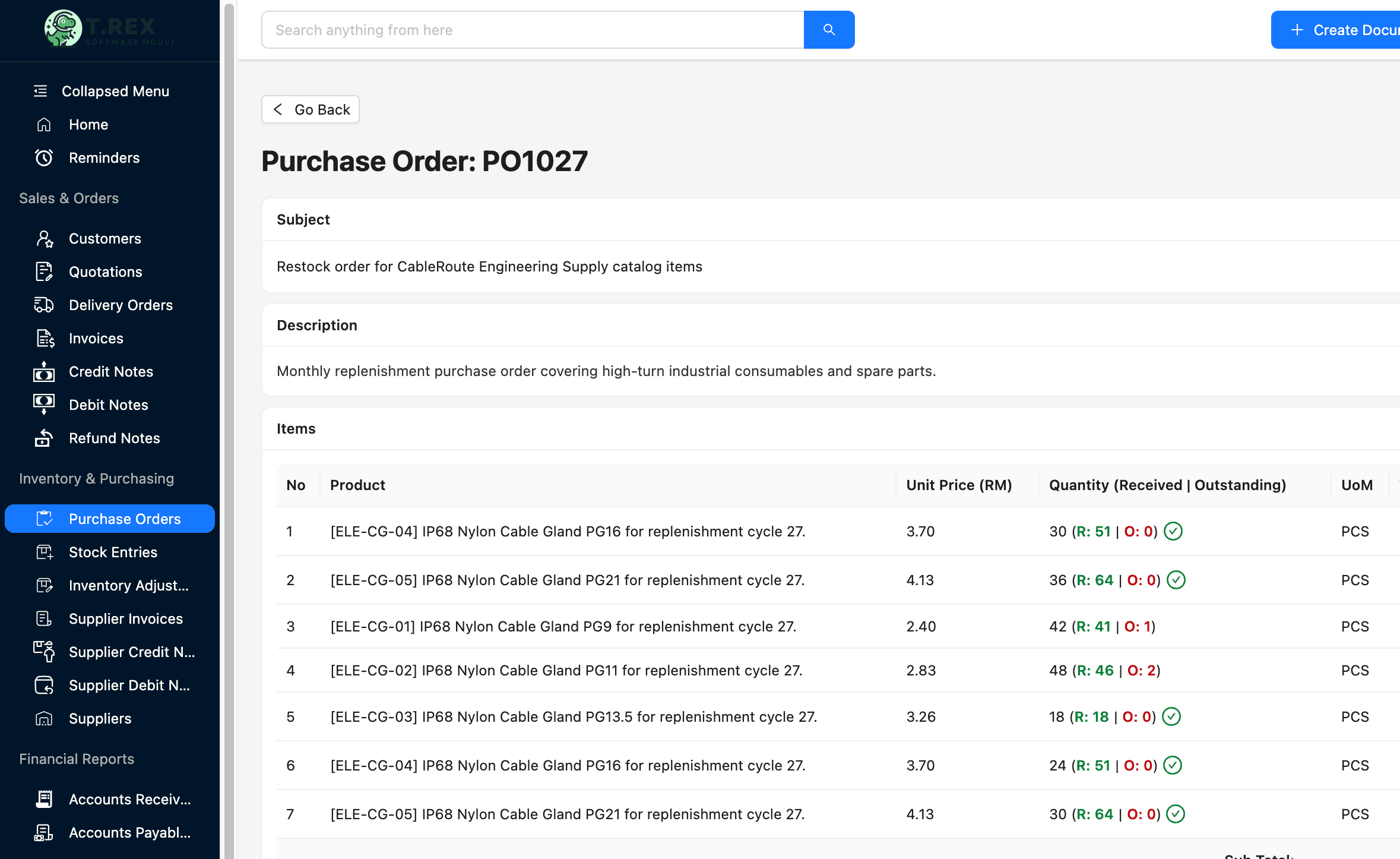
The PO subject, item description, unit price, ordered quantity and unit of measure remain available in one operating view.
Linked stock entries update the received position so purchasing can distinguish completed item lines from remaining supplier commitments.
Purchasing, warehouse and finance can return to the same PO when discussing deliveries, supplier invoices and completion.
The TREX Grow Create Stock Entry screen begins from a purchase order and carries its supplier, products and expected quantity into receiving. The warehouse records the quantity physically received, checks shortage or oversupply status, assigns locations where applicable and can retain supporting evidence.
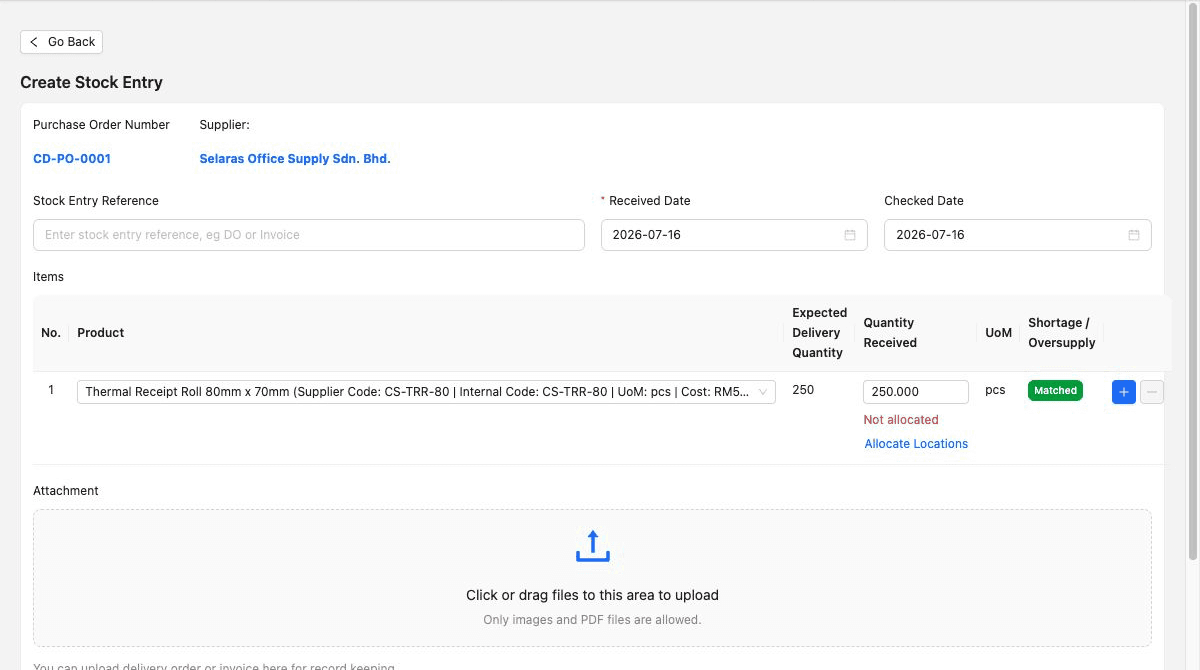
The stock entry inherits the purchase-order reference, supplier and items instead of asking receiving staff to recreate the source.
The warehouse records what physically arrived and preserves a visible expected-versus-received position.
Received and checked dates, receiving reference, attachments and location allocation where applicable help explain the accepted stock.
TREX Grow provides the connected records and permission model. The SME still needs to decide who owns supplier data, who can order, which records require approval, what receiving evidence is mandatory, how supplier invoices are reviewed, and when a purchase can be considered complete.
Choose who maintains active status, contacts, payment terms, lead time, currency and tax fields, because supplier creation itself has no approval workflow.
Confirm finalised or approved products, supplier assignments, item codes, units of measure and prices before buyers begin creating POs.
Document who can view, create, edit, request approval and approve purchase orders, stock entries, supplier invoices and purchase returns.
Treat each as a different business fact and investigate differences instead of forcing all four quantities or values to match manually.
Agree when delivery references, received and checked dates, supplier invoice attachments, payment references and purchase-return reasons are mandatory.
Test one complete Essential or Premium workflow and verify specialist procurement, warehouse, accounting and integration requirements separately.
Compare the verified TREX Grow workflow with the purchasing controls your SME expects.
| Requirement | Verified TREX Grow workflow | What to confirm |
|---|---|---|
| Supplier records | Searchable supplier profile with contact, payment, lead-time, product and purchase history context | Supplier owner, required fields, tax data, review cadence and the absence of supplier-creation approval |
| Purchase commitment | PO from an active supplier and approved supplier-assigned products, with values, terms, approval and PDF controls | Ordering roles, numbering, required terms, approval policy and supplier communication process |
| Receiving | Stock entry from an approved or finalised PO with prefilled items and actual received quantity | Receiving owner, partial-delivery rules, checks, dates, locations, attachments and approval permissions |
| Supplier invoicing | Supplier invoice starts from the PO and keeps its own number, quantity, price, dates and payment terms | Invoice-review owner, evidence, due-date follow-up, tax treatment and finance approval process |
| Payment history | Record paid amount, method, date, reference, bank, person-in-charge, remarks and attachments | Payment authorisation, bank execution, reconciliation and whether an external integration is required |
| Purchase returns | Quantity-based purchase return note created from a stock entry with reason, return date and approval | Return owner, supplier acceptance, replacement handling, financial adjustment and evidence policy |
| Plan and currency | Essential and Premium purchasing modules with paid-plan multi-currency; Premium adds warehouse control | Company locations, foreign-currency review, warehouse depth, accounting needs and current plan entitlement |
| Advanced procurement | Connected supplier, PO, receiving, invoice, payment-history, return and completion records | Requisitions, budgets, contracts, tenders, supplier portal, auto-reorder, three-way matching, thresholds and integrations |
The best practice is to make the next action clear before the situation becomes urgent.
The value is not simply replacing a PO spreadsheet. It is giving purchasing, warehouse and finance a shared chain of records while preserving the different decision each team needs to make.
The purchase order keeps supplier, products, quantities, prices, dates, terms and delivery context in one controlled commitment.
Permission-based request and approve behaviour gives authorised users a checkpoint before the operational document becomes active.
Warehouse staff record actual receipt from the PO rather than treating ordered quantity as available stock.
The supplier invoice begins with the relevant PO supplier and item lines while preserving its own invoice detail.
Payment history remains on the supplier invoice, while physical returned quantities remain linked to the stock receipt.
TREX Grow supports the verified connected purchasing workflow. Confirm advanced sourcing, budget, contract, matching and integration needs separately.
Use a safe supplier and products to create a PO, test direct finalisation or approval, receive a partial quantity, add the supplier invoice, record payment evidence, try a purchase return where relevant, and review the completion rule. That end-to-end test shows whether the workflow fits before a wider rollout.
Procurement software helps a business manage the records and decisions involved in buying from suppliers. For an SME, that can include supplier and product setup, purchase orders, approval, receiving, supplier invoices, payment history, returns and purchase-order completion.