The purchase context is missing
The supplier bill reaches finance without a dependable link to the purchase order, supplier record and item details that explain the original commitment.

TREX Grow creates the supplier invoice from the purchase order, carries forward supplier and item context, records the supplier's invoice number and due date, supports permission-based review, and keeps each payment, outstanding balance and later adjustment connected to the same bill.
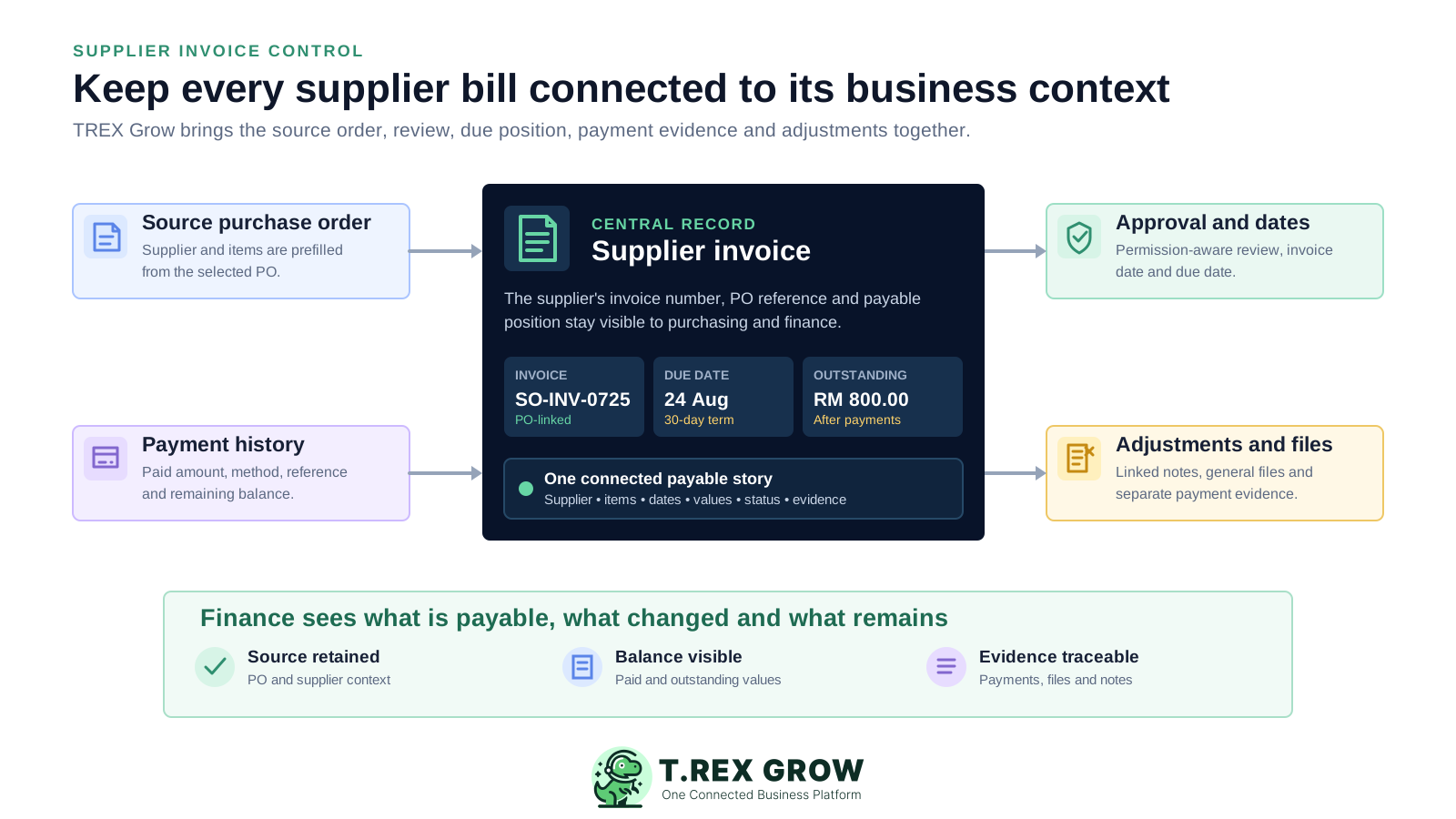
A supplier invoice is not an isolated number. The team needs to know which purchase order created the commitment, what the supplier invoiced, when payment is due, who reviewed it, what has been paid and which later notes changed the payable amount.
Operational pressure
When records live in different places, the person responsible has to reconstruct what happened before they can make a confident decision or follow up.
The supplier bill reaches finance without a dependable link to the purchase order, supplier record and item details that explain the original commitment.
Supplier invoice number, invoice date, due date and payment terms are copied into files and chat messages with no consistent record.
Product codes, quantities and unit prices are recreated instead of starting from the source PO and reviewing only what the supplier actually invoiced.
A manager agrees in email or chat, but the supplier invoice does not show whether it is pending review, finalised or ready for payment tracking.
The register stores one paid amount or one date, so finance cannot see multiple instalments, evidence and the balance still outstanding.
Credit, debit or refund adjustments are treated like cash transactions even though they change the payable position for a different reason.
A spreadsheet can list invoice numbers and due dates, but it does not inherently preserve source-document relationships, item detail, permission-aware status, multiple payments, separate evidence and linked adjustment records.
Recurring issues usually point to workflow-control gaps, not one isolated data-entry mistake.
The row hides which PO and item lines created the amount, so the team must reopen other files whenever a value is questioned.
One checkbox cannot explain a partial payment, several instalments, different payment methods or the remaining outstanding balance.
Repeated entry makes it easier to use an old supplier code, mistype a quantity or lose the currency and unit-price context.
A bank slip or reference may exist, but it is difficult to tell which payment row, supplier invoice and responsible person it belongs to.
Edits to a settled payable can make the recorded payment history and the invoice values describe different versions of the transaction.
Applying a supplier credit, debit or refund note changes the payable balance, but it should not be presented as money paid or received.
For a growing SME, the useful foundation is a connected record that keeps the purchase source, supplier bill, review, payments and adjustments understandable without pretending to be an enterprise accounts-payable automation suite.
Create the supplier invoice from the relevant PO so the supplier, items, currency and original buying context do not need to be rebuilt.
Record the supplier's invoice number, invoice date, due date, payment terms, tax, discount and milestone information where relevant.
Prefill the PO items, keep the item set tied to the source, and let authorised users review the invoice quantity and unit price.
Separate users who can create, edit, request approval and approve supplier invoices according to their operational role.
Retain each amount, date, method, reference and supporting detail while keeping the total paid and remaining balance visible.
Use supplier credit, debit and supported refund notes to explain changes to the payable position without rewriting payment history.
The supplier invoice becomes the controlled bridge between purchasing and payment evidence. The PO supplies the starting data; the invoice keeps its own number, dates and values; linked controls explain review, payments and later adjustments.
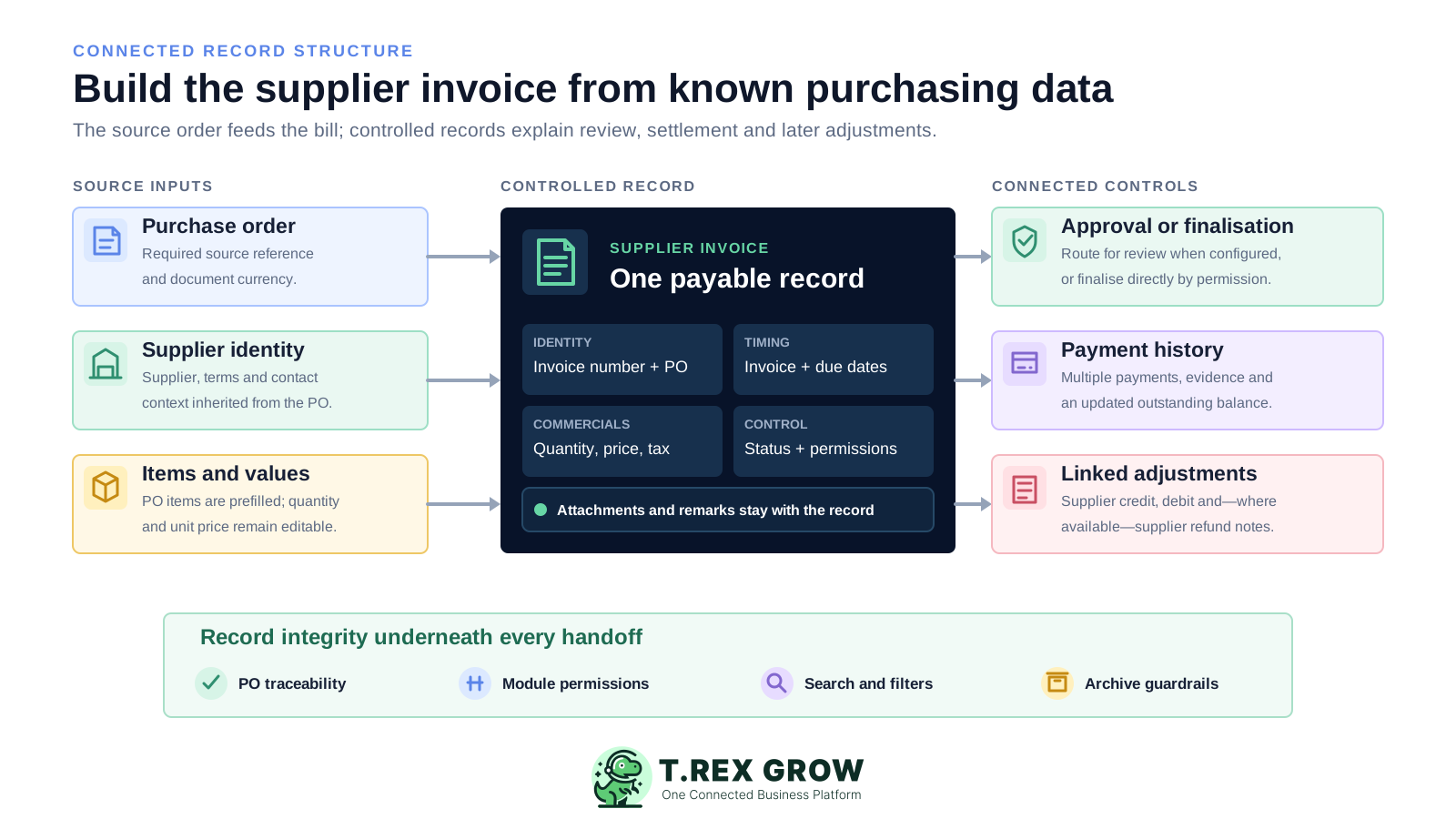
TREX Grow requires a purchase-order source for supplier-invoice creation instead of allowing an unrelated bill record to be entered from scratch.
The selected PO determines the supplier and document currency, reducing repeated setup and preventing the source relationship from being switched later.
All items come from the selected PO. Users cannot add or remove invoice items, but can update invoice quantity and unit price.
Invoice number, invoice date, due date, payment terms, tax, discount and milestone percentage stay on the supplier-invoice record.
General document attachments stay with the supplier invoice, while payment attachments belong to the relevant payment-history row.
A fully paid supplier invoice becomes read-only, and archive rules prevent records with payment history or linked adjustment notes from being removed.
The workflow starts with an approved or finalised purchase order and keeps each later decision on a connected record. It does not rely on retyping the supplier, replacing earlier payments or hiding adjustments in a spreadsheet note.
Record the current facts in one shared place.
Confirm what is known and what needs attention.
Make the next decision or follow-up accountable.
Complete the next task and record the outcome.
Refresh the shared view when facts change.
A dependable workflow keeps the shared record and the next action aligned.
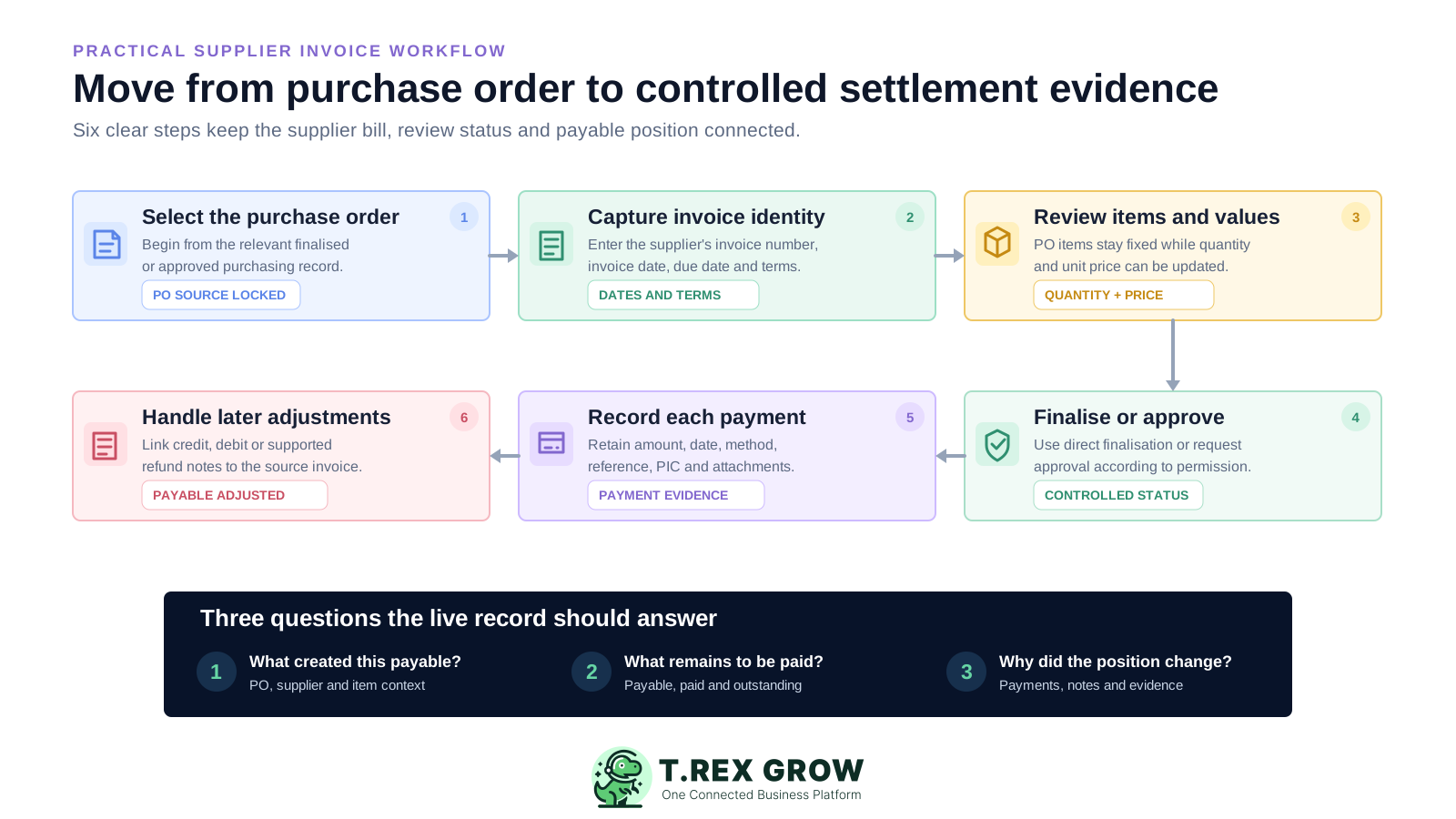
Open the relevant approved or finalised purchase order and choose Add Invoice.
Enter the supplier's invoice number, invoice date, due date, payment terms and other applicable commercial details.
Review the items prefilled from the PO, then update the invoiced quantity and unit price where required without adding unrelated items.
Finalise directly or request approval according to the user's Supplier Invoice Management permissions.
Record each partial or full payment with amount, date, method, reference, bank, person-in-charge, remarks and optional attachment evidence.
Create linked supplier credit, debit or supported refund notes when the payable position changes after the supplier invoice is ready.
TREX Grow covers the practical supplier-invoice record lifecycle for Essential and Premium companies. The controls below are based on the current product workflow and intentionally avoid unsupported accounts-payable automation claims.
Search supplier invoices and filter by created date, paid or unpaid position, archived status and supplier.
Create the supplier invoice from the purchase-order detail page with the supplier and PO item set carried into the form.
Use Create, Edit, Request Approval and Approve permissions, with direct finalisation where the creator does not use a request step.
See total paid, outstanding balance, last paid date, payment count and latest payment method above the individual payment rows.
Record payment amount, paid date, method, reference, bank, person-in-charge, remarks and separate payment attachments.
Link supplier credit and debit notes, plus supplier refund notes for supported Malaysian Essential and Premium workflows, back to the supplier invoice.
Essential and Premium can preserve the PO document currency, exchange-rate detail and company-currency values on foreign-currency supplier invoices and payments.
Supplier invoices have no generated PDF or revision workflow; the invoice number locks after finalisation, paid records become read-only, and records with payments or linked notes cannot be archived.
This TREX Grow supplier-invoice screen shows the supplier's invoice number, linked purchase order, payment term, invoice date, due date, paid status, supplier profile and item totals on one operating view. Finance can return to the source record instead of reconstructing the bill from several files.
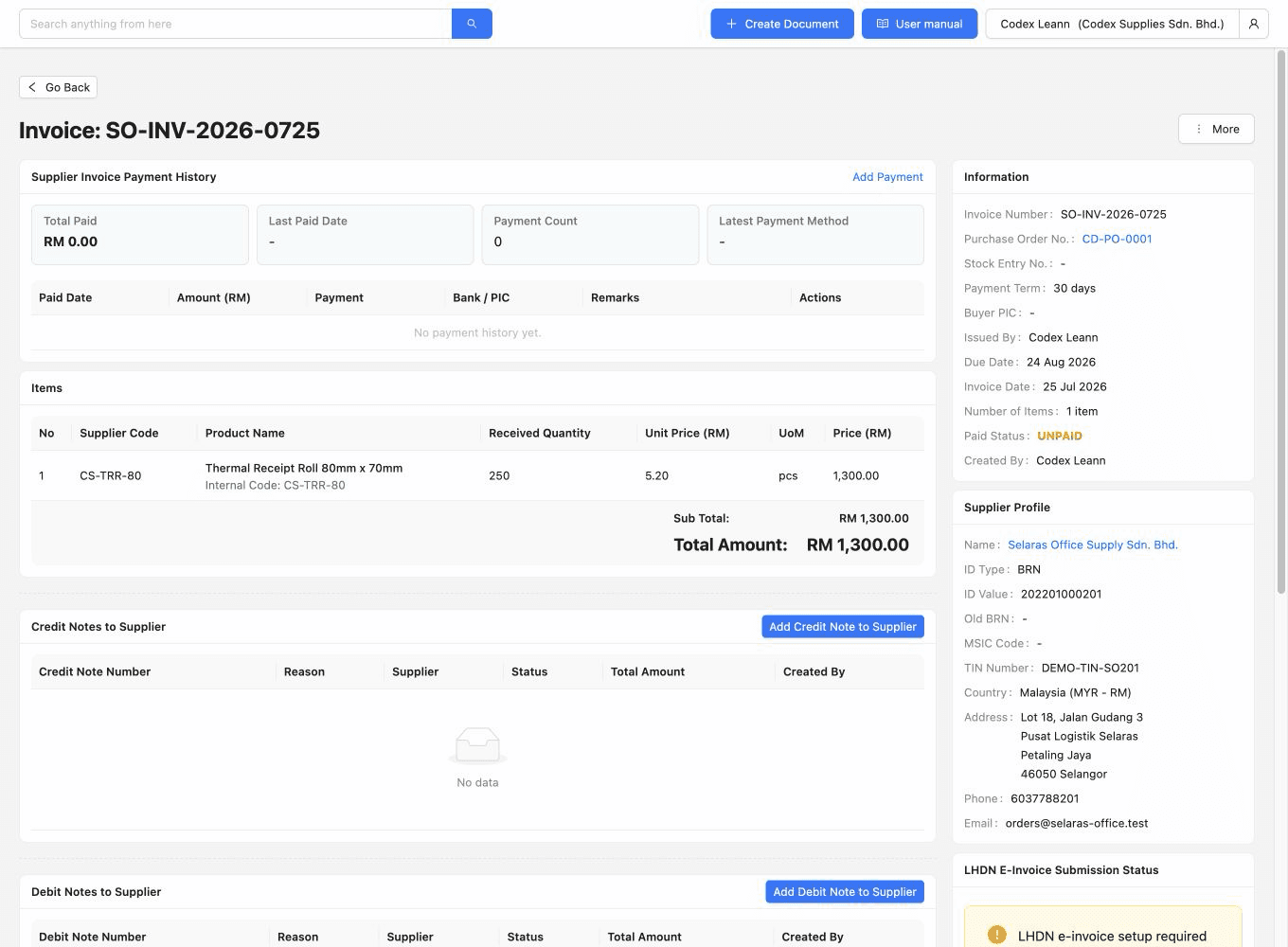
The purchase-order number sits beside the supplier-invoice information so the original buying record remains one click away.
Payment term, invoice date and due date are shown with the supplier invoice rather than stored in a separate due-date tracker.
Supplier code, product, invoice quantity, unit price, unit of measure and total amount remain available for operational review.
The payment-history screen keeps the individual payment row beside the invoice amount, total paid and remaining outstanding balance. The example records a partial bank transfer with a reference, bank, responsible team and remarks while the supplier invoice remains partially paid.
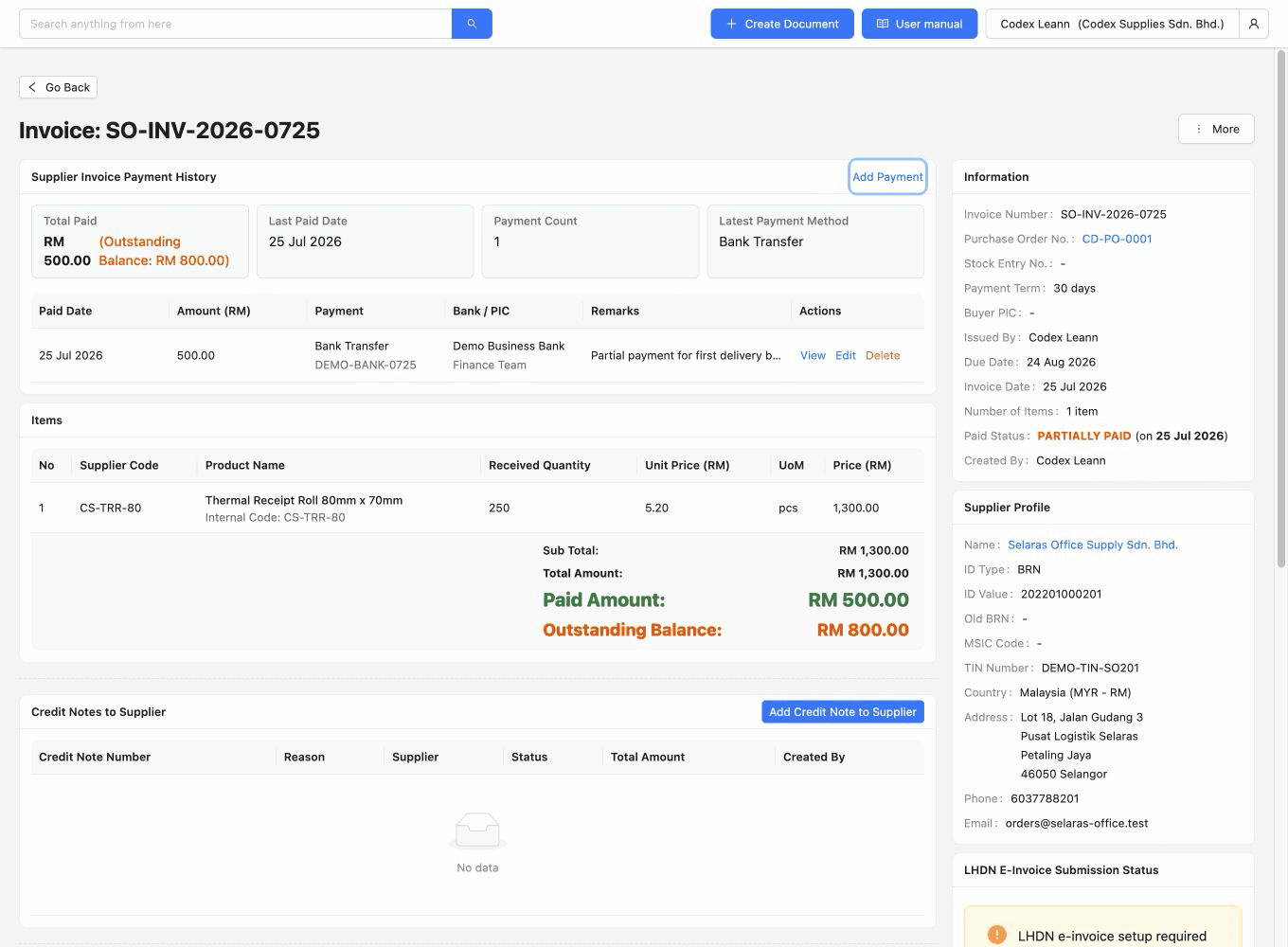
Each payment retains its own amount, date, method, reference, bank, person-in-charge, remarks and attachment relationship.
The payment summary and item totals show how much has been recorded and how much remains payable after the current history.
The supplier invoice can show a partially paid operating position before the final payment makes the record read-only.
TREX Grow provides the connected records and permission model. The SME still needs to decide who receives supplier invoices, which details must be checked, when approval is required, what payment evidence is mandatory and how adjustments are handled.
Choose who receives the supplier's bill, checks the invoice number and confirms that the correct purchase order is used.
Do not assume the PO values and supplier invoice values are identical; investigate legitimate differences before finalisation.
Document who can create, edit, request approval, approve and record payments so review responsibility is visible.
Agree which method, reference, bank, person-in-charge, remarks and attachments are required for each recorded payment.
Apply supplier credit, debit and refund-note workflows according to the business reason instead of disguising the change as cash paid.
Test a complete Essential or Premium workflow and verify OCR, bank, accounting, matching and approval-routing requirements separately.
Assign one owner and one decision rule to each point before the team begins entering live supplier invoices.
| Control point | Suggested owner | TREX Grow record | Decision rule |
|---|---|---|---|
| Invoice intake | Purchasing or finance | PO-linked supplier invoice | Use the supplier's invoice number and the correct source PO |
| Invoice review | Manager or approver | Pending approval or finalised status | Confirm dates, quantity, price, tax, discount and terms |
| Payment entry | Finance | Supplier invoice payment history | Record each real payment with its own evidence |
| Payable adjustment | Finance and purchasing | Linked supplier credit, debit or refund note | Separate balance adjustments from cash history |
| Record closure | Finance administrator | Paid or archived supplier invoice | Do not archive records with payments or linked notes |
The best practice is to make the next action clear before the situation becomes urgent.
The benefit is not a promise that software removes every finance task. It is a clearer operating record that reduces reconstruction work and gives purchasing and finance the same view of the supplier bill.
Supplier, purchase-order and item context starts from an existing record instead of being typed into another disconnected register.
The team can move from the supplier invoice back to the purchase order and understand why the payable was created.
Invoice date, due date, payment term, total paid and outstanding balance stay visible on the same operating record.
Several payments can be retained individually instead of replacing one amount and one date in a spreadsheet row.
Linked supplier credit, debit and supported refund notes show why the payable changed without rewriting earlier payment rows.
Both teams can discuss the supplier bill using the same PO reference, invoice identity, item values and evidence.
Use your real supplier-invoice fields and internal decision rules during a TREX Grow trial. Confirm the source PO, review the item values, record a partial payment and verify the outstanding balance before rolling the workflow out more broadly.
Supplier invoice management software helps a business record, review and follow supplier bills. In TREX Grow, the supplier invoice starts from a purchase order and connects supplier and item context with invoice dates, payment terms, approval status, payment history, outstanding balance and linked adjustment notes.