There is no dependable unpaid worklist
Supplier invoices are spread across spreadsheets, inboxes and folders, so the team cannot quickly isolate the records that still need attention.

TREX Grow gives Malaysian SMEs an unpaid supplier-invoice worklist, keeps due dates and net payable values in context, records every partial or full payment as its own evidence row, and shows the total paid and outstanding balance. Your company sends the money through its approved payment channel; TREX Grow tracks the settlement around it.
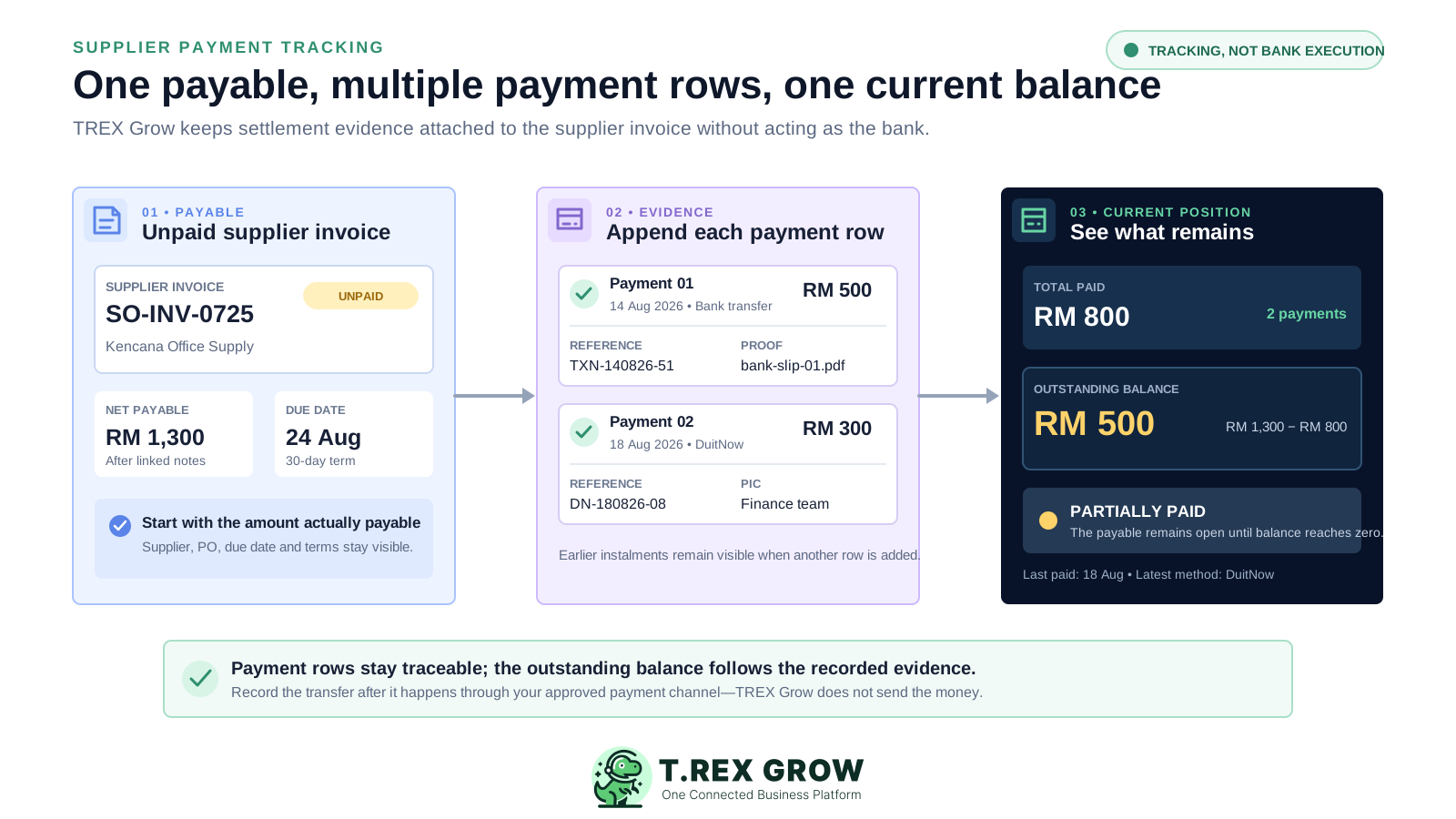
Finance needs more than a yes-or-no status. The useful operating view connects the supplier invoice, due timing, net payable, every real settlement and the amount still open without confusing non-cash adjustments with money paid.
Operational pressure
When records live in different places, the person responsible has to reconstruct what happened before they can make a confident decision or follow up.
Supplier invoices are spread across spreadsheets, inboxes and folders, so the team cannot quickly isolate the records that still need attention.
The due date and payment term live in the bill register while the paid amount and remaining payable live in a different file.
A new instalment replaces the previous amount or date, leaving no clean history of how the supplier invoice moved toward settlement.
References, bank details, responsible staff, remarks and attachments cannot be tied confidently to one specific payment.
Supplier credit, debit or refund notes are entered in the payment register even though they change the payable for a different reason.
One team discusses the supplier invoice amount while another discusses a manually adjusted balance with no shared source record.
A spreadsheet can list suppliers and dates, but a single row becomes difficult to trust when one payable has several settlements, linked notes, separate proof and a balance that must change without erasing its history.
Recurring issues usually point to workflow-control gaps, not one isolated data-entry mistake.
Changing RM 500 to RM 800 loses the fact that two separate payments occurred with different dates, methods and evidence.
Marking an invoice Partially Paid does not show the net payable, total recorded settlement or outstanding amount behind that label.
The remaining balance becomes wrong when linked supplier notes change the payable but the spreadsheet formula still starts from the original amount.
A transfer slip in a shared folder is weak evidence when its filename does not identify the supplier invoice and payment row it supports.
Treating a supplier credit note as a payment makes total cash paid appear higher than the settlement history actually supports.
A tracking record documents what happened; it does not replace the authorised banking or disbursement process that moves the money.
For a growing SME, the practical requirement is a traceable settlement layer after the supplier invoice is ready—not a vague promise to automate every accounts-payable task.
Start with a visible count or filtered list of supplier invoices whose current payment position is unpaid.
Keep the supplier, source purchase order, due date, payment term and current net payable available before a settlement is recorded.
Retain the amount, paid date and method for each instalment rather than replacing an earlier settlement.
Connect the payment reference, bank, person-in-charge, remarks and optional attachment to the settlement they explain.
Show total paid, amount still open, last paid date, payment count and latest method above the detailed payment history.
Let supplier credit, debit and refund notes change the net payable without presenting those notes as cash-payment rows.
The supplier invoice first establishes what is currently payable after linked supplier-side notes. Payment-history rows then explain how much cash has been recorded. TREX Grow subtracts the active recorded payments from the net payable to show the outstanding balance.
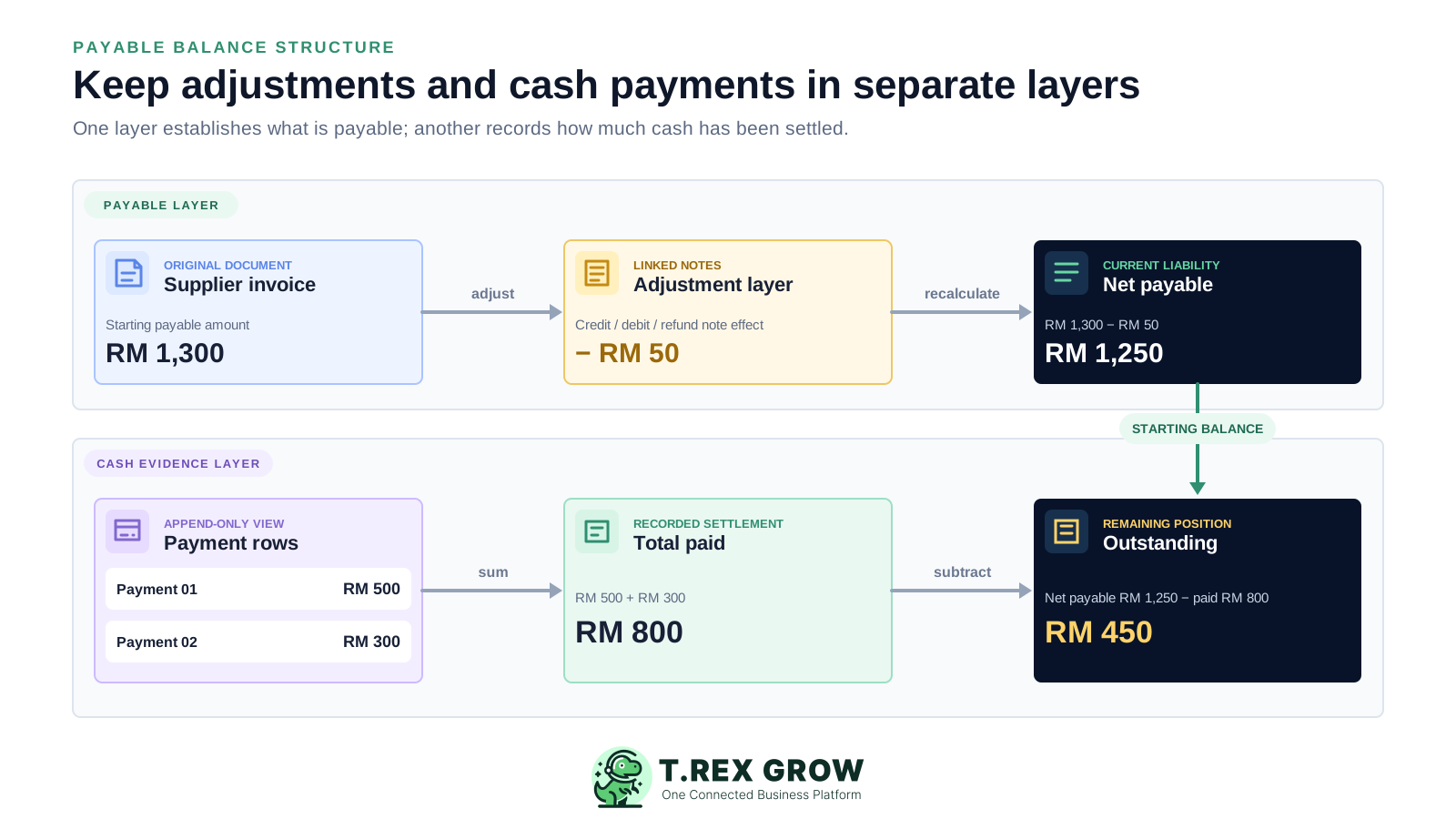
The supplier invoice retains its purchase-order source, supplier identity, item values, invoice date, due date and payment terms.
Linked supplier credit, debit and supported refund notes can reduce or increase the amount currently payable according to their record type.
Each partial or full payment stays as its own payment-history row with its own evidence fields.
The payment card totals the active payment rows rather than relying on a manually maintained Paid cell.
The current balance follows the net payable minus the total recorded settlement, so the partially paid position stays visible.
TREX Grow stores the settlement record after payment; it does not initiate transfers, schedule disbursements or reconcile a bank feed.
The workflow starts by finding an unpaid supplier invoice and ends with a current, explainable balance. The payment itself happens through the company's approved channel outside TREX Grow.
Record the current facts in one shared place.
Confirm what is known and what needs attention.
Make the next decision or follow-up accountable.
Complete the next task and record the outcome.
Refresh the shared view when facts change.
A dependable workflow keeps the shared record and the next action aligned.
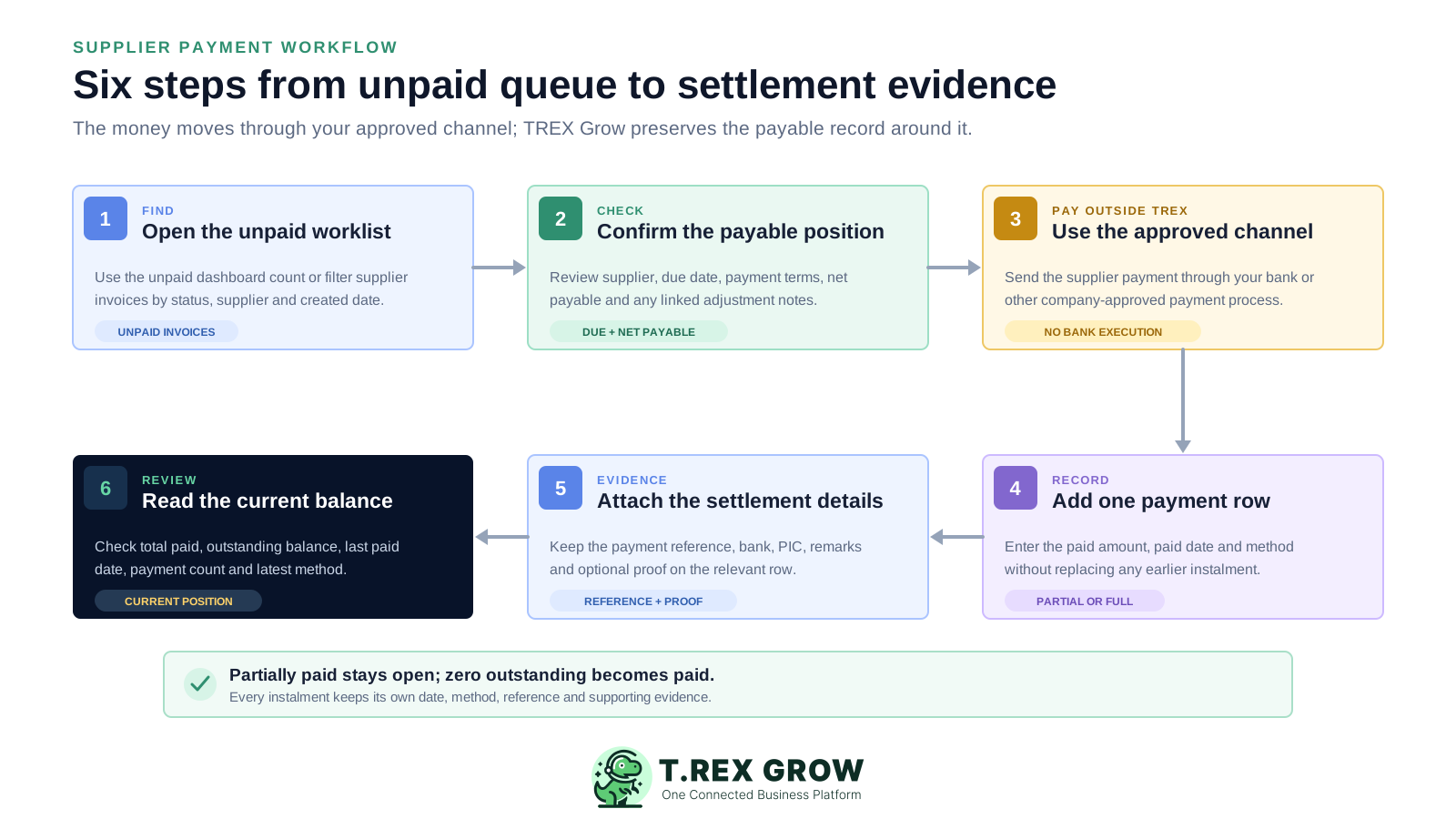
Open the unpaid supplier-invoice dashboard card or filter the supplier-invoice list by unpaid status, supplier or created date.
Review the supplier, source purchase order, due date, payment term, current net payable and any linked supplier adjustment notes.
Send the supplier payment through the company's approved bank or other authorised payment channel outside TREX Grow.
Add one payment-history row with the real paid amount, paid date and applicable payment method.
Record the payment reference, bank, person-in-charge and remarks, then attach optional proof to that payment row.
Review total paid, outstanding balance, last paid date, payment count and latest method; keep a partial balance open until it reaches zero.
TREX Grow covers the practical settlement-record workflow for supplier invoices on Essential and Premium. These controls are based on the current product and deliberately exclude bank execution and unsupported enterprise accounts-payable claims.
See how many supplier invoices are unpaid and open the supplier-invoice list in that payment position.
Search the list and filter by created date, paid or unpaid position, archived status and supplier.
Read the due date and payment term with the payable amount after linked supplier-side notes are considered.
Record several partial settlements without overwriting the earlier amount, paid date or method.
See total paid, outstanding balance, last paid date, payment count and latest payment method above the detailed rows.
Keep payment reference, bank, person-in-charge, remarks and separate attachment evidence with the relevant settlement.
Essential and Premium can retain document-currency amount, exchange rate, rate date and company-currency amount for supported foreign-currency payments.
Supplier-invoice update permission controls payment management, and recorded payment totals cannot exceed the current net supplier-invoice amount.
This TREX Grow supplier-invoice view keeps the supplier, source purchase order, payment term, invoice date, due date, paid status, item total and current payment summary together. Finance can verify the payable record before adding any settlement evidence.
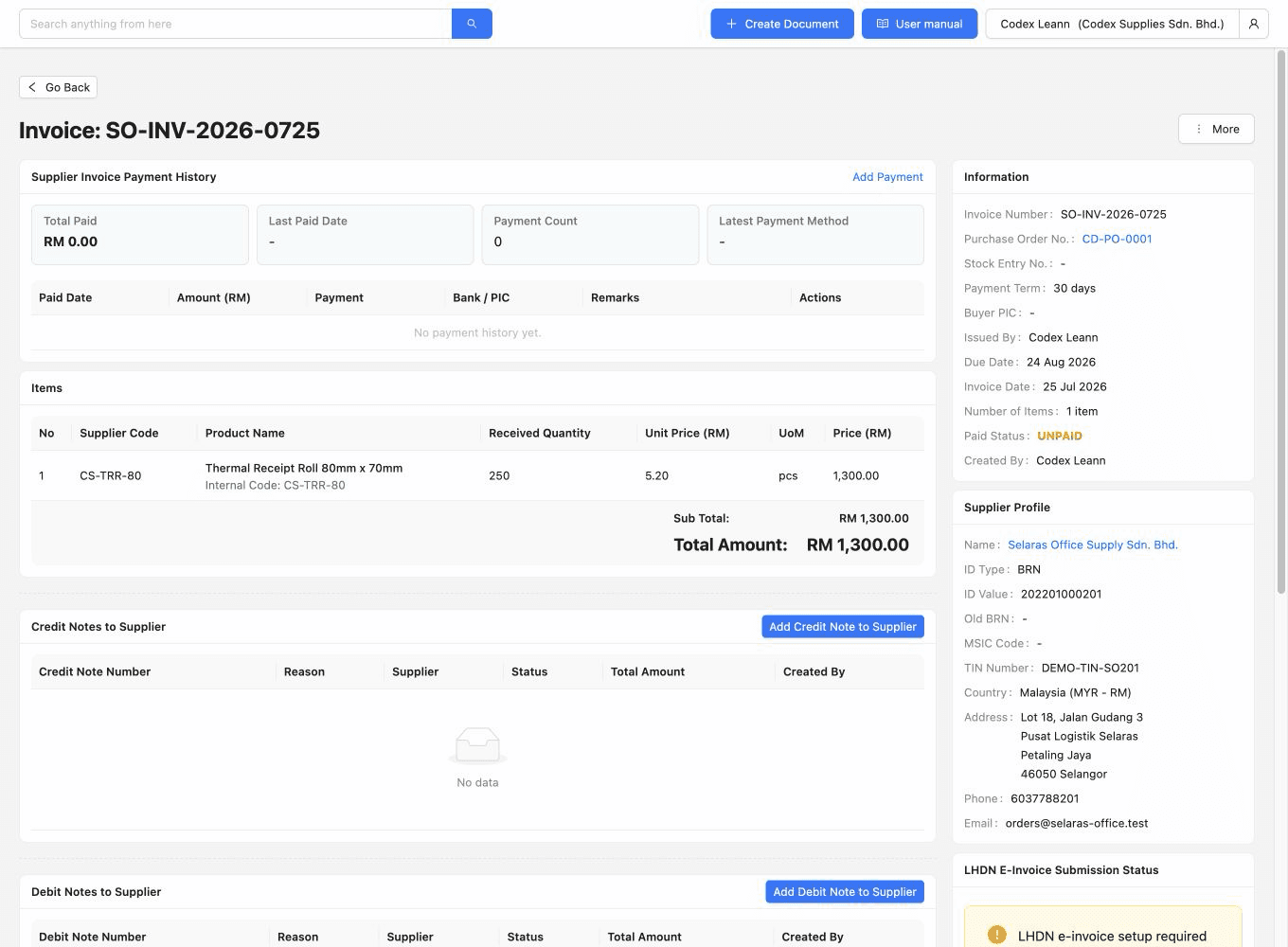
The supplier invoice keeps its linked purchase-order reference and supplier context visible before payment is recorded.
Payment term, invoice date and due date sit on the same operating record as the amount payable.
The payment summary shows zero paid on the unpaid example while the invoice items explain the RM 1,300 total.
The payment-history screen shows one RM 500 bank-transfer row beside the RM 1,300 supplier invoice, RM 500 total paid and RM 800 outstanding. Its reference, bank, responsible team and remarks stay attached to that settlement while the invoice remains partially paid.
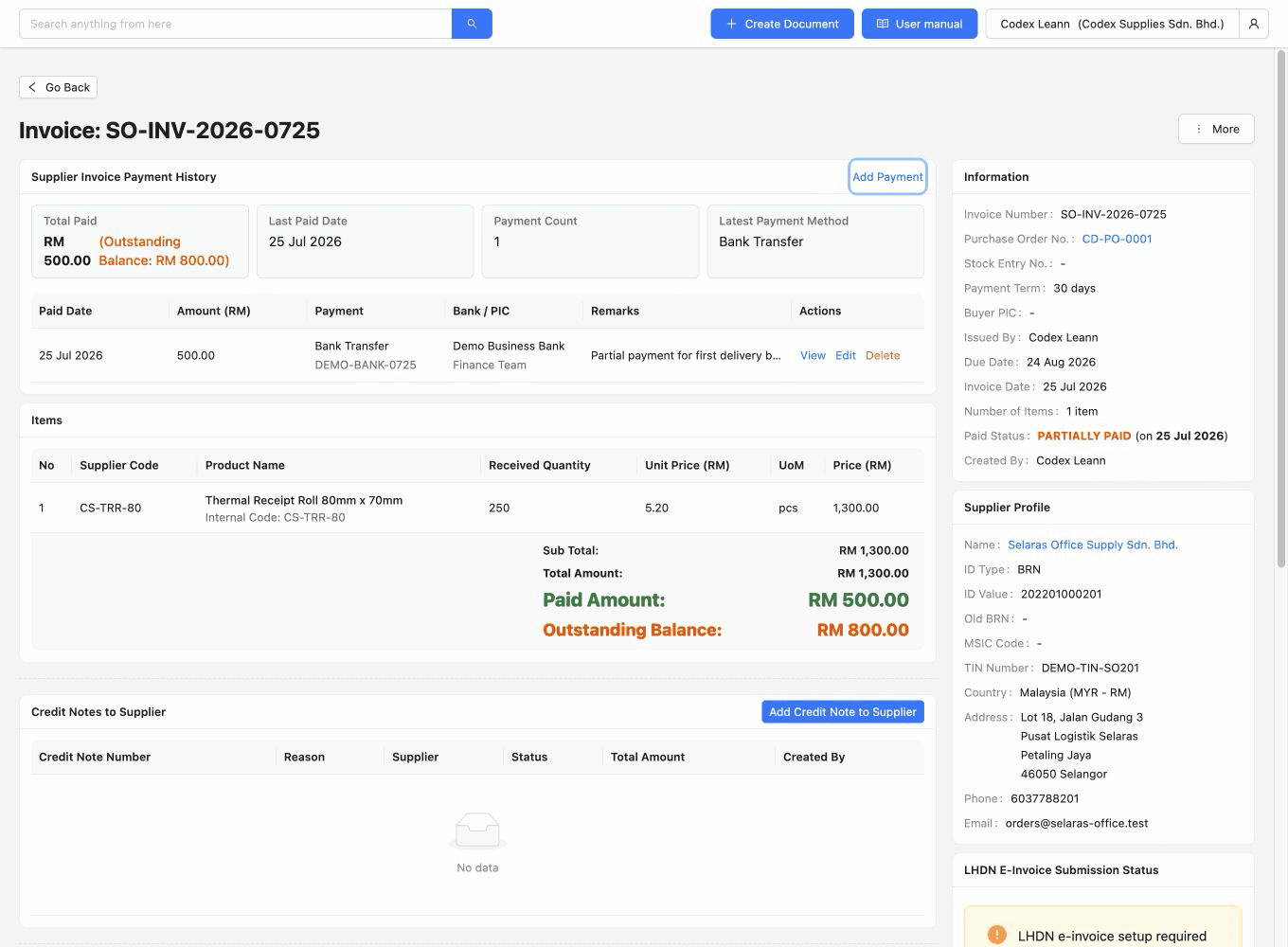
An instalment keeps its own amount, date, method, reference, bank, person-in-charge, remarks and attachment relationship.
The summary makes the recorded settlement and remaining supplier balance visible without a separate spreadsheet formula.
A payment row can move the supplier invoice to Partially Paid before a later settlement reduces the outstanding balance to zero.
TREX Grow supplies the connected payable and payment records. The SME still needs to define payment authority, evidence standards, timing, adjustment ownership and review responsibility around those records.
Document who approves or sends supplier payments and who may add or edit the corresponding TREX Grow payment history.
Agree how often finance reviews unpaid supplier invoices and which due dates or supplier commitments are considered first.
Choose which method, reference, bank, PIC, remarks and attachment are mandatory for each recorded supplier payment.
Record the date the payment happened rather than the date someone later updated the supplier-invoice history.
Keep credit, debit and refund-note effects separate from cash settlement so both payable changes remain explainable.
Use your authorised banking evidence and finance process to verify the TREX Grow rows because the product does not reconcile a bank feed automatically.
Assign one owner and one evidence rule to each point before the team begins recording live supplier settlements.
| Control point | Suggested owner | TREX Grow record | Decision rule |
|---|---|---|---|
| Unpaid review | Finance | Unpaid supplier-invoice list | Confirm supplier, due date, terms and current net payable |
| Payment authorisation | Authorised manager | External bank or payment process | Approve and send outside TREX Grow |
| Settlement entry | Finance operator | Supplier-invoice payment history | Add one row for each real partial or full payment |
| Evidence review | Finance reviewer | Reference, bank, PIC, remarks and attachment | Match the row to the authorised external evidence |
| Balance adjustment | Finance and purchasing | Linked supplier credit, debit or refund note | Do not represent a non-cash note as money paid |
The best practice is to make the next action clear before the situation becomes urgent.
The value is a clearer operating position, not a promise that software eliminates payment decisions. Purchasing and finance can work from the same supplier invoice, settlement history and current balance.
Finance can start from supplier invoices that are still unpaid instead of rebuilding the queue from email and spreadsheet tabs.
Several instalments remain individually visible with the date, method and evidence that belong to each one.
Net payable, total paid and outstanding balance provide the arithmetic behind Unpaid, Partially Paid and Paid positions.
The payment reference, bank, responsible person, remarks and attachment stay associated with the relevant supplier settlement.
Linked notes show why the payable changed without inflating or rewriting the cash-payment history.
Both teams can discuss the same supplier, source PO, due timing, payment history and remaining balance.
Use a TREX Grow trial to open an unpaid supplier invoice, verify its due and net payable position, record one real-world test payment with safe evidence, and confirm the total paid and outstanding balance before rolling the workflow out more broadly.
Supplier payment tracking software helps a business find supplier invoices that remain unpaid, retain each partial or full settlement, connect payment evidence and see the current outstanding balance. In TREX Grow, this settlement history stays on the supplier-invoice record with its purchase-order, supplier, due-date and adjustment context.