The purchase order stops at purchasing
The buyer issues the PO but receiving and finance cannot return to the same supplier, product, quantity, price, terms and reference context.

TREX Grow links the purchase order, approval or direct-finalisation path, stock entries, supplier invoices and payment-history rows without pretending they are one status. Purchasing, warehouse and finance can follow the same supplier commitment while purchase-order completion and supplier-invoice payment remain independently visible.
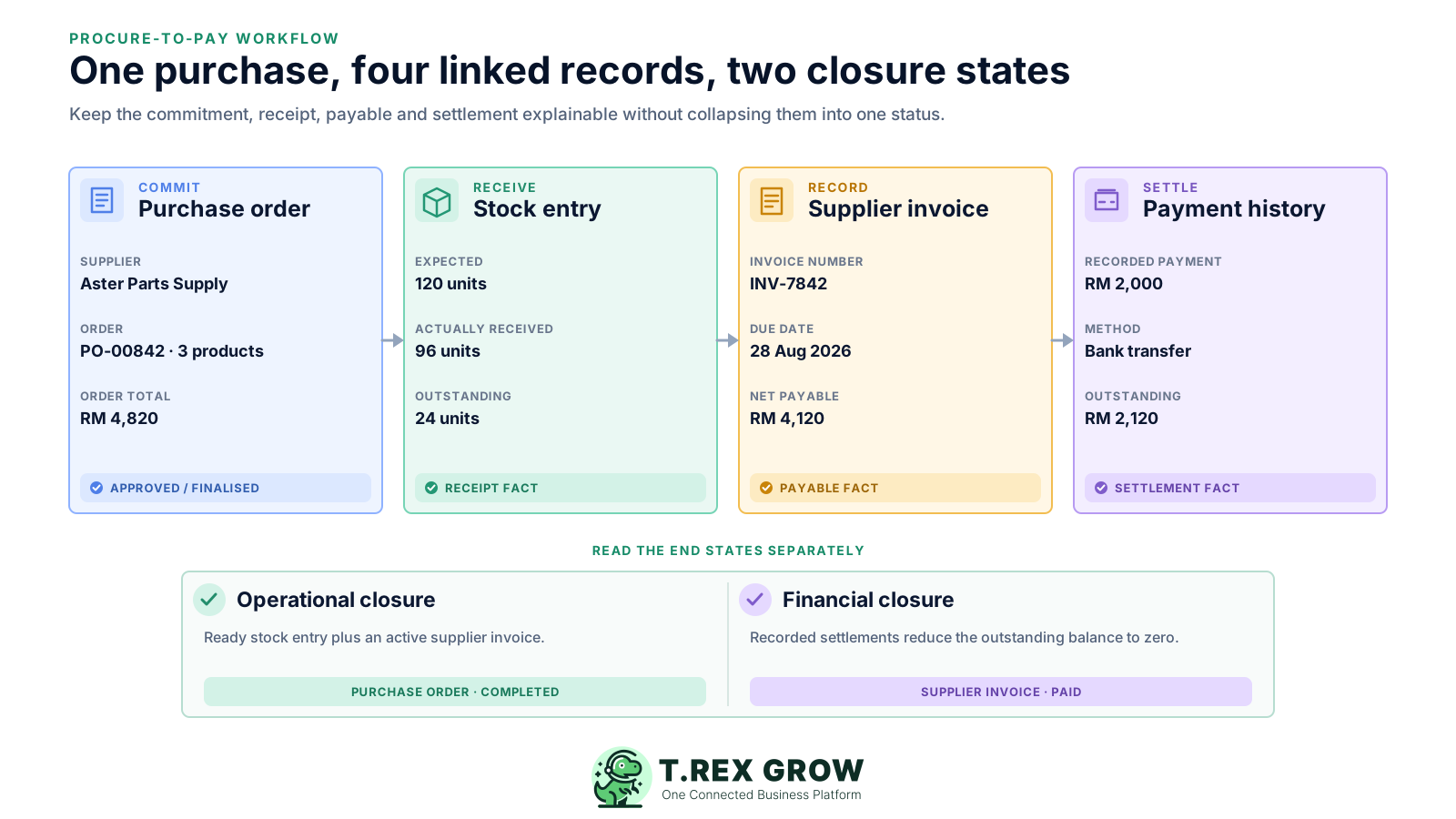
A supplier purchase crosses several roles and records. When purchasing keeps the order, warehouse keeps the receipt and finance keeps the bill and payment in separate files, the SME loses the chain that explains how one commitment became stock and a payable.
Operational pressure
When records live in different places, the person responsible has to reconstruct what happened before they can make a confident decision or follow up.
The buyer issues the PO but receiving and finance cannot return to the same supplier, product, quantity, price, terms and reference context.
Warehouse updates a stock total without preserving which PO arrived, who received it, when it was checked or what remained outstanding.
The supplier invoice reaches accounts payable as an attachment while its order and optional receipt relationship must be reconstructed manually.
A second delivery, invoice or payment replaces the first spreadsheet value instead of becoming another linked record in the history.
Operations may have finished receiving while finance still has an outstanding supplier balance—or settlement may exist before every operational check is complete.
Purchase returns, supplier notes and payment evidence are stored in separate folders with no dependable relationship to the affected records.
A master spreadsheet can summarise a purchase, but it cannot by itself enforce module permissions, create linked operational records or preserve every partial event with its own evidence.
Recurring issues usually point to workflow-control gaps, not one isolated data-entry mistake.
A single row cannot explain several receipts, supplier invoices, payments, returns and adjustment records without becoming an unreadable collection of columns.
Supplier and item details are retyped into a goods-received sheet and payable register, creating multiple versions of the same source data.
Stock is updated from the supplier commitment instead of the quantity warehouse physically accepted.
The amount owed is replaced with a Paid flag, so partial settlements, dates, methods, references and attachments disappear.
Opening a PO, receipt and invoice side by side is a review practice; it is not an automated matching engine with tolerance rules and exception routing.
The team marks the purchase complete without separately checking whether receiving is ready and the supplier invoice has zero outstanding balance.
The goal is not to force every purchasing fact into one document. A useful SME system should keep the records connected while making their different owners, states and evidence easy to understand.
The purchase order should hold the selected supplier, products, quantities, prices, delivery expectation, terms and official document state.
The system should distinguish a PO that requires a direct requester-to-approver handoff from one intentionally finalised without that request.
Warehouse should record actual received quantities and receiving evidence from the source PO rather than assuming the order arrived in full.
The supplier invoice should retain its PO context while keeping its own invoice number, quantities, prices, dates, terms and payable position.
Every payment should remain an individual history row with its own amount, date, method, reference and optional attachment.
Operational completion on the PO and financial settlement on the supplier invoice should remain visible as separate outcomes.
Supplier and product data feed the purchase order. Approved or finalised POs become the source for stock entries and supplier invoices, while payment-history rows remain attached to the payable they settle.
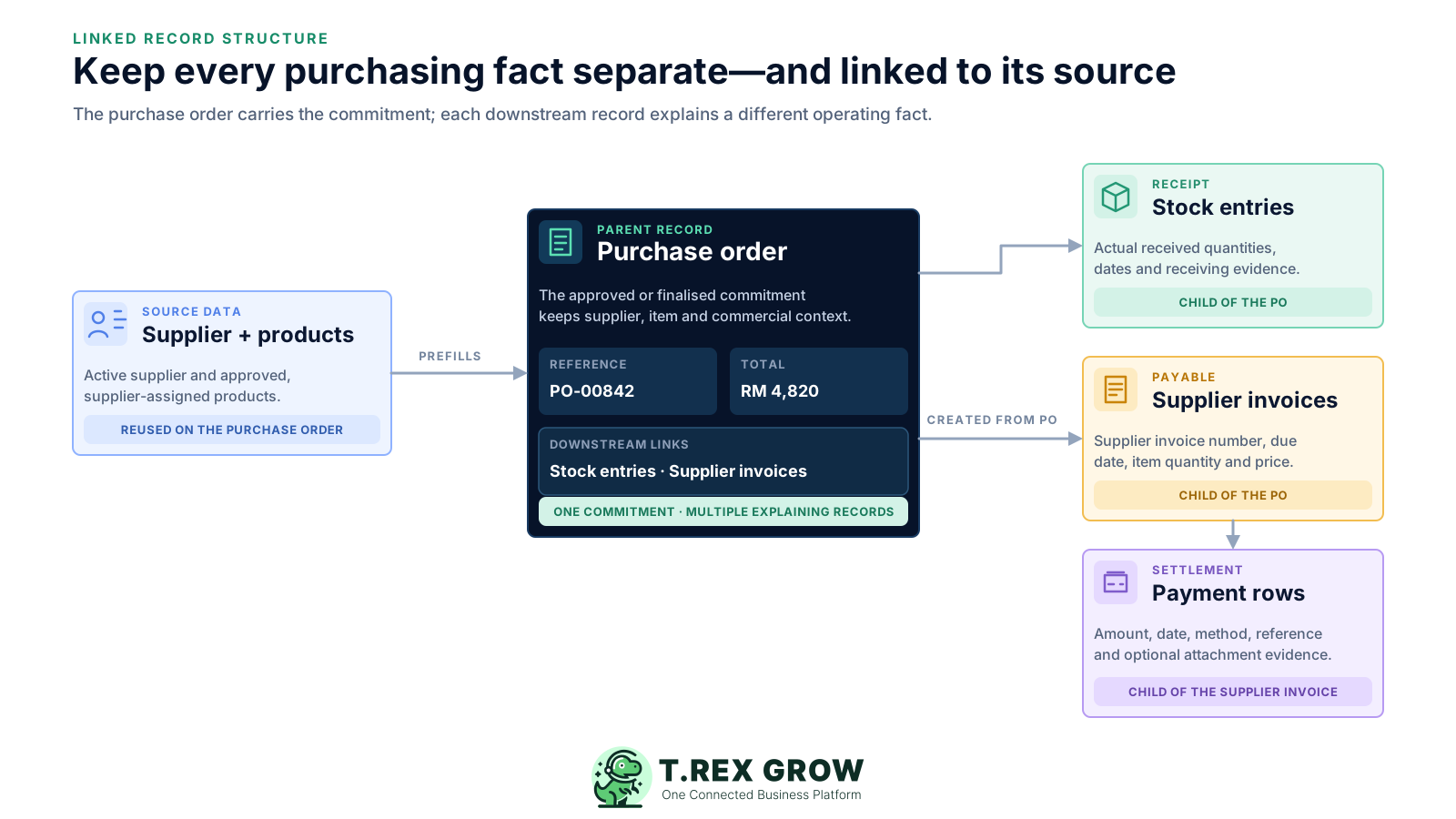
Select an active supplier and finalised or approved products assigned to that supplier when preparing the purchase order.
Supplier, items, quantity, price, dates, terms, tax, discount, currency and attachments stay available on the order that explains the purchase.
Create receiving records from the approved or finalised PO and enter the quantity physically received instead of posting the ordered quantity automatically.
Create the supplier invoice from the PO, carry forward its supplier and item context, and confirm the supplier's invoice number, dates, quantities and prices.
Keep partial or full settlement evidence on the supplier invoice so total paid and outstanding balance can be read without a separate payment register.
The workflow follows one connected record chain. The final review deliberately checks fulfilment and settlement separately because a completed purchase order does not prove that the supplier invoice is paid.
Record the current facts in one shared place.
Confirm what is known and what needs attention.
Make the next decision or follow-up accountable.
Complete the next task and record the outcome.
Refresh the shared view when facts change.
A dependable workflow keeps the shared record and the next action aligned.
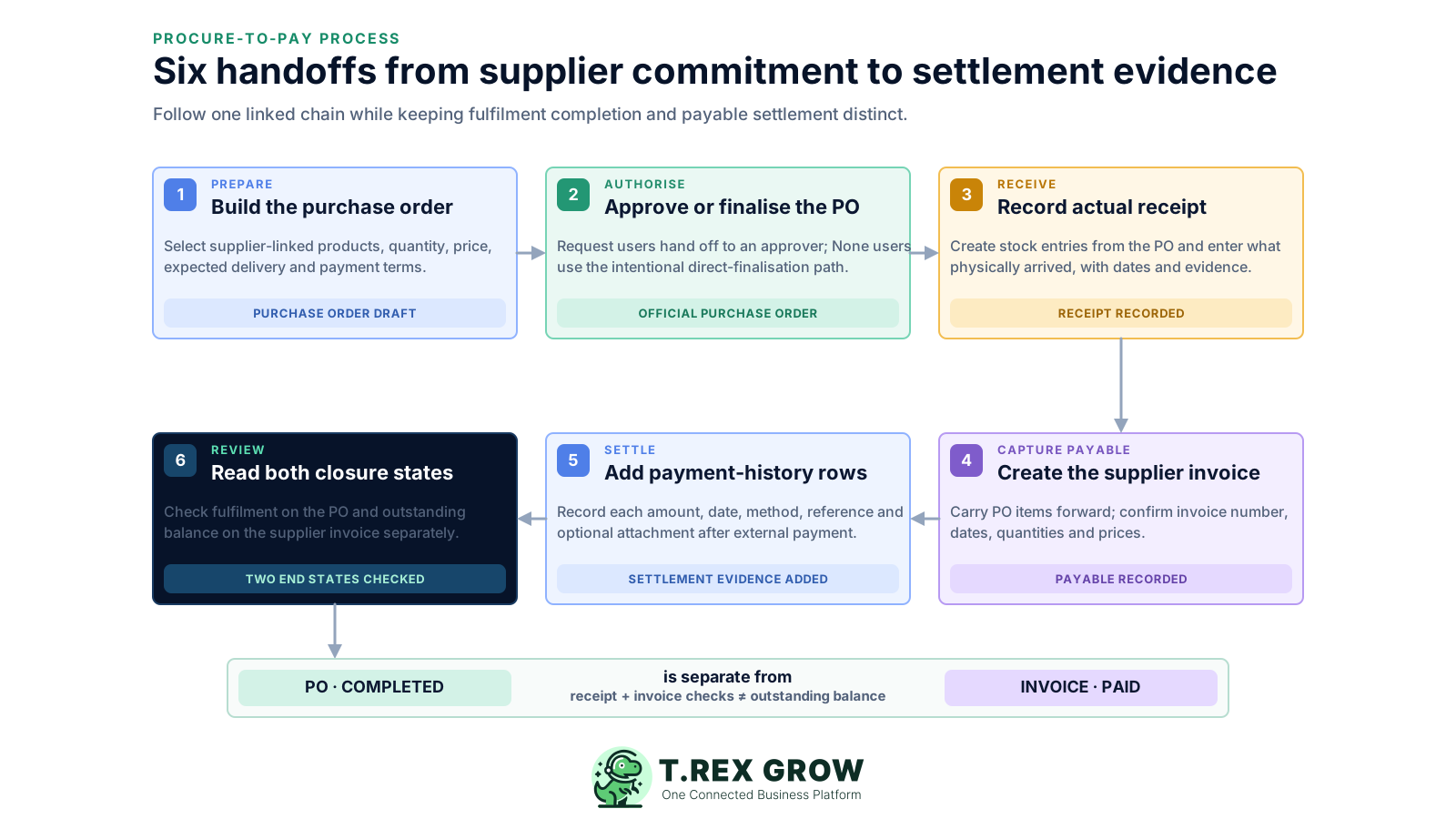
Prepare the purchase order: select the active supplier and supplier-assigned products, then record quantity, unit price, expected delivery, payment terms, tax, discount, currency, address and supporting context.
Approve or finalise the PO: Request users submit the live order to a matching approver; users whose setting is None can use the intentional direct-finalisation path when their access permits it.
Record actual receipt: create one or more stock entries from the approved or finalised PO and enter the quantities physically received with the applicable reference, received date, checked date and evidence.
Create the supplier invoice: start from the PO, retain its supplier and item relationship, then confirm the supplier invoice number, invoice and due dates, quantities, prices, terms, tax and discount.
Add settlement evidence: send the payment through the company's authorised external channel, then add each paid amount, date, method, reference, bank, person-in-charge, remarks and optional attachment as a payment-history row.
Review both closure states: confirm the PO's receiving and supplier-invoice conditions separately from the supplier invoice's paid, partially paid or unpaid position.
TREX Grow covers a practical SME order-to-payment record chain. The controls are deliberately narrower than enterprise source-to-pay suites and do not claim requisitioning, automated matching or payment execution.
Keep supplier contact, payment-term, lead-time, currency and tax context, then assign the relevant finalised or approved products before ordering.
Record supplier, products, quantities, unit prices, expected delivery, terms, tax, discount, currency, delivery address, notes and attachments.
Use separate None, Request and Approve responsibilities for purchase orders, with pending status, approver notification and an official PDF after approval or direct finalisation.
Create stock entries from the source PO, inherit its supplier and items, and record actual received quantities with dates and evidence.
Carry the supplier and items forward while keeping the supplier invoice's own number, dates, quantities, unit prices, terms, tax and discount.
Record partial or full settlements separately and read total paid, outstanding balance, latest paid date, payment count and latest method.
Create supported purchase returns from stock entries and use supplier credit, debit or refund notes to explain later payable changes without rewriting cash-payment history.
Separate access to purchase orders, stock entries, purchase return notes and supplier invoices so each team receives only the operating actions it needs.
TREX Grow uses different records for different end states. A purchase order can be marked complete only after its receiving and supplier-invoice conditions are satisfied, while payment progress remains on the supplier invoice and its active settlement history.
Use the source record for each fact and investigate differences instead of forcing every stage to agree automatically.
| Checkpoint | Source record | What the state confirms | What it does not prove |
|---|---|---|---|
| Official commitment | Purchase order | The PO was approved or intentionally finalised and its official PDF exists | That goods were received or a supplier bill was paid |
| Receipt recorded | Stock entry | A quantity was recorded as physically received from the source PO | That the supplier invoice quantity or value matches automatically |
| PO completed | Purchase order | The required ready receiving record and active supplier invoice conditions exist | That the supplier invoice outstanding balance is zero |
| Invoice paid | Supplier invoice + payment history | Recorded settlement covers the current net payable position | That every ordered quantity was received without exception |
A finalised or approved purchase order is ready for supported downstream records and has its official supplier-facing PDF.
A finalised or approved stock entry records the physical receipt and contributes to the received position on the source PO.
Completion requires at least one linked ready stock entry and at least one active finalised supplier invoice; it then prevents new stock entries or supplier invoices from being created from that PO.
Financial closure follows the supplier invoice's net payable and active payment history, including any supported supplier-note effects on the outstanding balance.
Real supplier purchases rarely arrive, invoice and settle in one perfect event. TREX Grow keeps supported partial activity and adjustment evidence as separate connected records.
Record each accepted delivery separately so the received and outstanding quantity position can develop over time.
Create additional supplier-invoice records from the same active PO when the supplier bills the purchase in more than one document.
Append instalments as individual payment rows instead of replacing the first amount or losing its date and reference.
Create purchase return notes from the receipt record so returned quantities remain connected to the goods that originally arrived.
Use supported supplier credit, debit and refund notes to reduce, increase or separately settle amounts without rewriting the existing cash-payment rows.
Read-only, completion and archive restrictions help protect relationships after downstream records exist, without claiming an immutable enterprise audit system.
TREX Grow supplies connected records and permissions. The SME still needs an operating agreement for who prepares, reviews, receives, records payables, sends payments and checks the two closure states.
Assign responsibility for supplier data, PO preparation, approval, receipt, supplier-invoice entry, payment execution and payment-history recording.
Document who needs View, Edit or Admin access and where the direct Request-to-Approve settings apply instead of sharing one broad login.
Agree when received and checked dates, delivery references, attachments and warehouse location detail are required before a stock entry is ready.
Check supplier, source PO, invoice number, due date, quantities, prices, notes and current outstanding balance before the company sends payment externally.
Use supplier notes for payable changes and payment-history rows only for actual settlements so both effects remain explainable.
Use a safe trial PO with a partial delivery, supplier invoice and instalment payment to verify the workflow before broad rollout.
The best practice is to make the next action clear before the situation becomes urgent.
The benefit is clearer operational context across teams, not a promise that software replaces purchasing judgement, bank controls or accounting review.
Purchasing, warehouse and finance can return to the same PO and its linked records when discussing a supplier purchase.
Supplier and item relationships carry into supported downstream records instead of being rebuilt from a spreadsheet or attachment.
Several receiving or settlement rows can remain visible instead of forcing a purchase into a premature Complete or Paid checkbox.
Teams can inspect which record explains an ordered, received, invoiced or paid difference before deciding what action is appropriate.
Module permissions, document states and record relationships make each team's next action easier to define.
Current TREX Grow pricing places purchasing and stock workflows in Essential, while Premium adds deeper warehouse locations and picking; confirm current plan details before rollout.
Use a TREX Grow trial to prepare a safe purchase order, follow the configured approval or direct-finalisation path, record a partial receipt, create the supplier invoice, add an instalment payment and verify that PO completion and invoice payment remain separately understandable.
Procure-to-pay workflow software connects the records used to buy from a supplier and explain the resulting payable. In TREX Grow, the verified chain starts with supplier and product data, moves through the purchase order, supported approval or direct finalisation, stock receiving and supplier invoicing, and ends with payment-history evidence and separate closure checks.