The decision is detached from the PO
A manager replies Approved in chat while the purchase-order record still shows a draft or contains details that were changed later.

TREX Grow separates purchase-order preparation from approval through company permissions. A requester submits the live supplier order, matching approvers receive an email link, and approval records who acted and when before generating the official PO PDF. Users set to None can finalise directly when that handoff is not required.
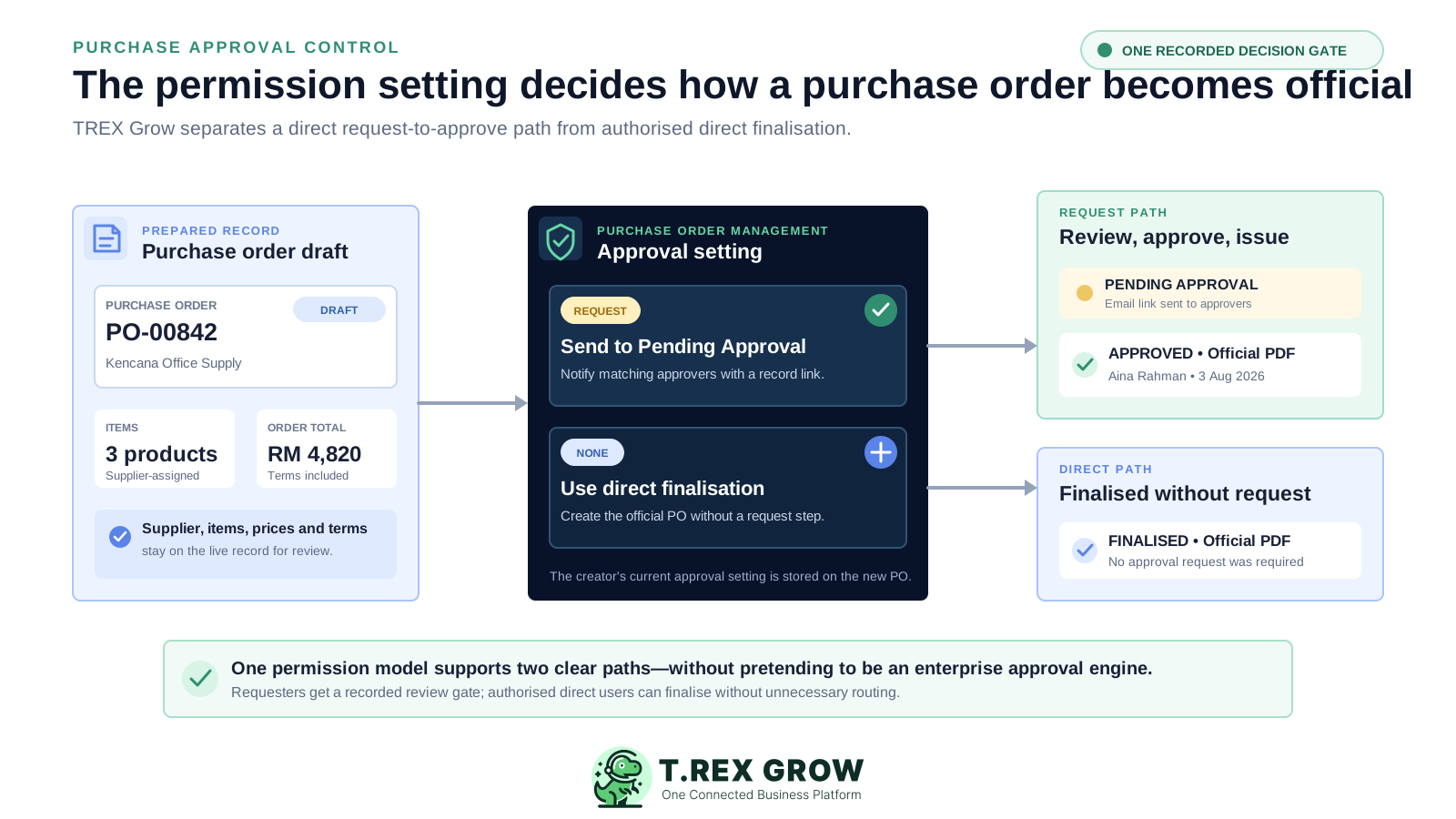
The buying commitment lives on the purchase order, so the review should stay connected to that record. A separate message may show that someone agreed, but it does not automatically identify which supplier, products, quantities, prices, terms and version were reviewed.
Operational pressure
When records live in different places, the person responsible has to reconstruct what happened before they can make a confident decision or follow up.
A manager replies Approved in chat while the purchase-order record still shows a draft or contains details that were changed later.
A total amount is forwarded for approval without the supplier, item lines, quantity, unit price, delivery date, payment terms or attachments.
The same shared account creates, edits and releases supplier commitments, making individual responsibility difficult to explain.
Purchasing cannot filter a live list of POs waiting for review, so requests disappear inside inboxes and message threads.
Files are generated manually and stored together, leaving the supplier-facing version disconnected from the approval decision.
A workflow becomes frustrating when it cannot distinguish a user who must request approval from one authorised to finalise directly.
A manual approval register can record a name and date, but it does not inherently control the live PO status, user permissions, official PDF or downstream purchasing readiness.
Recurring issues usually point to workflow-control gaps, not one isolated data-entry mistake.
The reviewer signs off a copied amount while the supplier order continues to change in a different file.
Being copied on a message does not establish who can create, update, request or approve the purchase order inside the operating system.
An Approved column cannot distinguish an unsubmitted draft, a pending request, a direct finalisation or a recorded approval.
The team produces a supplier-ready PO too early and then relies on filenames or watermarks to remember which version was authorised.
Multiple conditional stages sound sophisticated but create delay when the real need is one accountable requester-to-reviewer handoff.
Approver and timestamp fields provide useful decision context, but they should not be presented as an immutable governance or compliance audit system.
For many SMEs, the useful foundation is not enterprise orchestration. It is a consistent checkpoint that keeps permission, status, review context, decision identity and the official document on one purchase-order record.
Control whether the user can view, create, update or archive records separately from whether their POs need approval or they can approve others.
Distinguish Draft, Pending Approval, Approved and direct Finalised outcomes instead of relying on a single manual checkbox.
Let the approver open the same PO containing supplier, products, quantities, prices, terms, total, attachments and remarks.
Send matching approvers the PO number, supplier, item count and direct record link when a requester submits the order.
Keep the approved status, approver identity and approval timestamp visible on the PO after the decision.
Allow a watermarked draft PDF for internal review, then generate the official PO PDF after approval or authorised direct finalisation.
The Purchase Order Management permission row combines an access preset with one approval setting. Access controls which PO actions the user can perform; None, Request or Approve controls how their purchase-order work enters or completes the approval handoff.
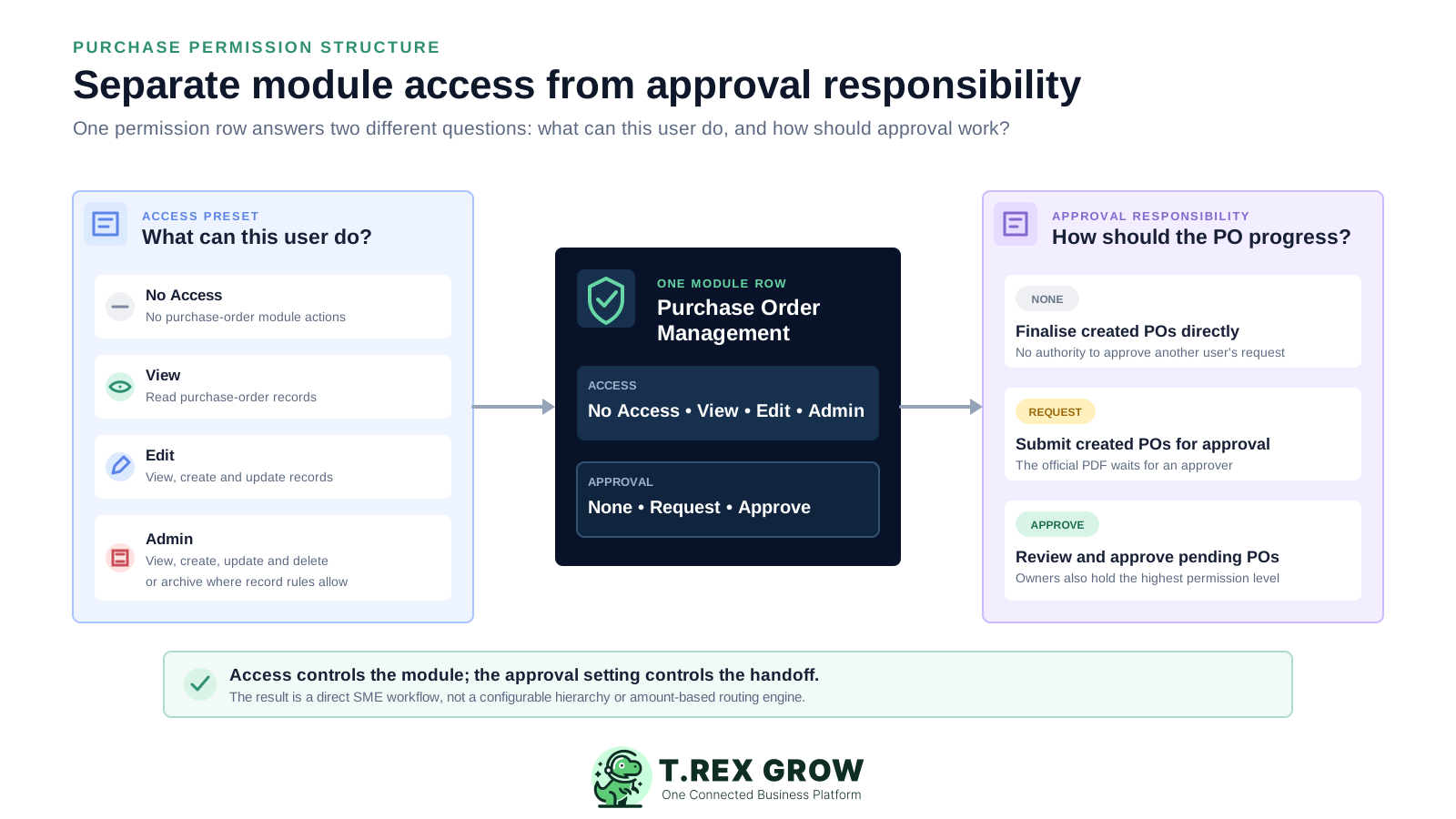
Remove Purchase Order Management access when the user should not open or act on the module.
Allow read access to purchase-order records without create, update or archive actions.
Allow the user to view, create and update POs while leaving delete or archive access out of the preset.
Allow view, create, update and delete or archive actions where the purchase-order record rules permit them.
Mark POs created by that user as requiring approval and move the submitted record to Pending Approval.
Let an authorised user review and approve pending purchase orders; owners retain the highest permission level.
The verified TREX Grow flow is direct: assign the approval responsibility, prepare the purchase order, submit it, notify matching approvers, review the live record and record one approval before the official PDF is generated.
Record the current facts in one shared place.
Confirm what is known and what needs attention.
Make the next decision or follow-up accountable.
Complete the next task and record the outcome.
Refresh the shared view when facts change.
A dependable workflow keeps the shared record and the next action aligned.
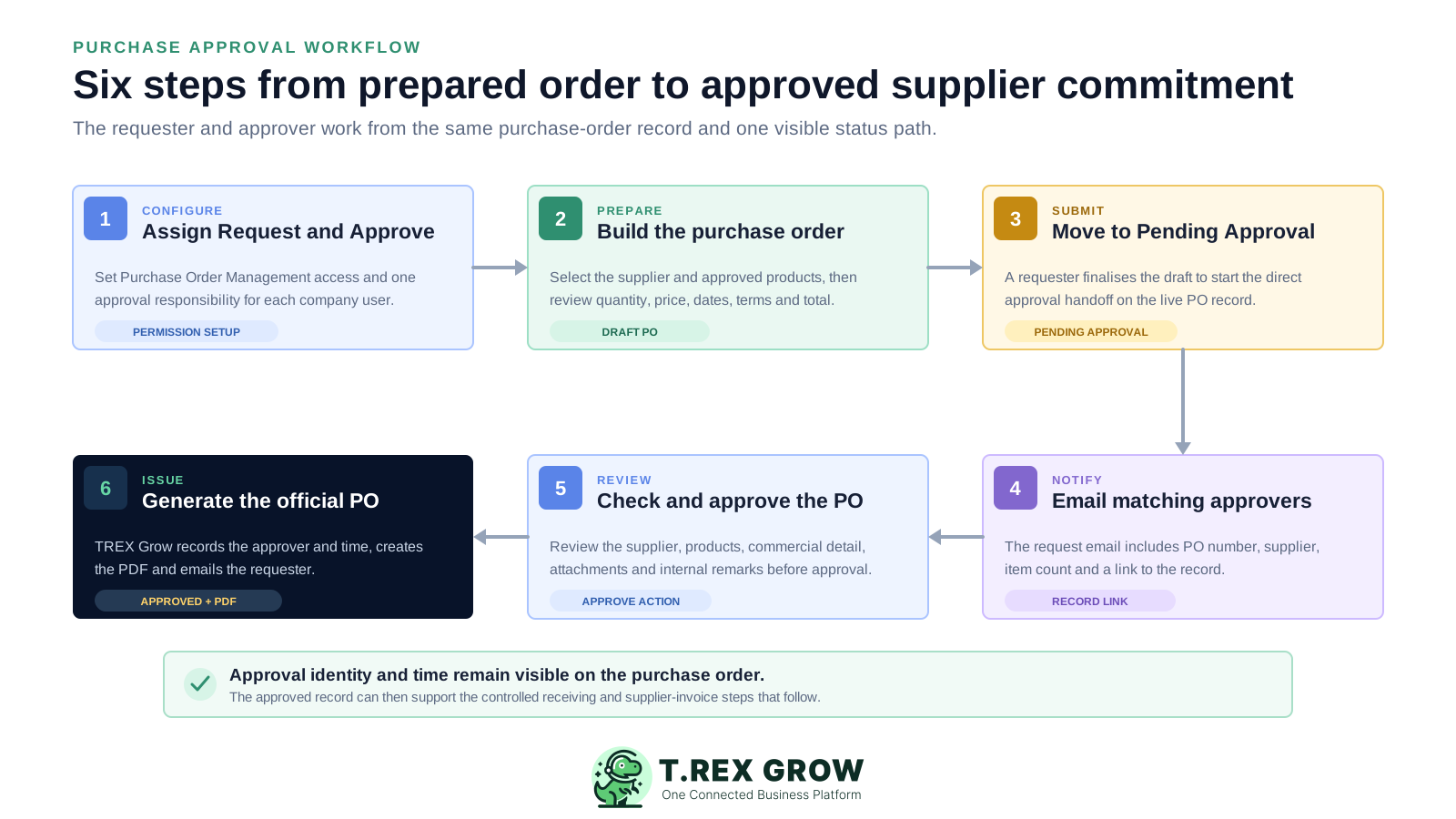
Assign Purchase Order Management access and choose None, Request or Approve for each relevant company user.
Prepare the PO with the supplier, approved supplier-assigned products, quantity, unit price, expected delivery date, payment terms, tax, discount, delivery address and supporting context.
Finalise the draft as a requester so the purchase order moves to Pending Approval instead of becoming an official direct-finalised order.
TREX Grow emails users with matching Approve permission, including the PO number, supplier, item count and a link to the purchase-order record.
The approver opens the live PO, reviews the commercial and supporting information, and uses the Approve Purchase Order action.
TREX Grow records the approver and approval time, generates the official PO PDF, emails the requester and makes the approved order ready for supported downstream records.
TREX Grow provides a direct permission-based approval layer for purchase orders on Essential and Premium. These controls are grounded in the current product and deliberately avoid unsupported enterprise procurement claims.
Configure No Access, View, Edit or Admin together with a separate None, Request or Approve responsibility in the user permission matrix.
A new PO records whether approval is required according to the creator's Purchase Order Management setting at creation time.
Search purchase orders and filter the list by created date, Draft, Pending Approval, Finalised, Completed or Archived status and supplier.
Notify matching approvers with the PO number, supplier, total item count and a link to the live record.
Show the Approved status together with who approved the purchase order and when the approval occurred.
Generate a watermarked draft PDF before the decision and the official purchase-order PDF after approval or direct finalisation.
Email the purchase-order requester after an authorised user approves the record.
Use separate Purchase Return Note Management Request and Approve permissions for supported supplier-return records and their official PDFs.
The approval action belongs on the live purchase order because that is where the supplier-facing commitment is defined. The reviewer can inspect the same business objects that will appear in the approved workflow instead of acting on a copied total alone.
Review the supplier, buyer person-in-charge, issuing or preparing user and the PO number that identifies the commitment.
Check the finalised or approved products assigned to that supplier, including the item identity and relevant description.
Review the ordered quantity, editable unit price, subtotal, tax, discount and grand total calculated on the PO.
Keep expected delivery date, payment terms and delivery address available beside the supplier order.
Retain the supplier-facing context that will help explain the purchase order after it becomes official.
Store supporting files with the document and keep internal remarks separate from the generated supplier-facing PO PDF.
Purchase approval is not limited to the initial order. TREX Grow also provides separate Request and Approve responsibilities for purchase return notes, which document goods returned to a supplier from an existing stock entry.
Purchase Return Note Management has its own access and None, Request or Approve responsibility rather than inheriting the PO setting.
The approver can review the linked stock entry, supplier, returned items, quantities, return date, reason, reference and supporting context.
Matching approvers receive the return-note request link, and the requester receives an email after approval.
A draft PRN can use a watermarked PDF; approval or direct finalisation generates the official purchase return note PDF.
TREX Grow supplies the permission, status, notification and record controls. The company still needs to decide who prepares orders, who reviews them, what must be checked and which users are trusted to finalise directly.
Assign Request to users whose POs need review and Approve to the owners or users responsible for the purchase-order decision.
Avoid shared purchasing logins when the business wants the approved-by identity to describe the person who acted.
Agree which supplier, item, quantity, price, total, date, term, address and supporting-file checks happen before approval.
Use the None setting only where the company deliberately allows that user to issue the PO without an approval request.
Use the Pending Approval filter alongside request emails instead of relying on individual inbox memory.
Confirm purchase requisitions, thresholds, budgets, rejection, delegation, escalation and multi-level routing independently if the business needs them.
Use the visible PO state to decide what the team should do next rather than adding a separate manual approval column.
| Status | What it means | Document state | Next action |
|---|---|---|---|
| Draft | The PO is still being prepared | Optional PDF carries a DRAFT watermark | Review and submit, or continue editing if permitted |
| Pending Approval | A requester has submitted the PO | No official PO PDF yet | An authorised approver opens the live record |
| Approved | An approver completed the recorded decision | Official PDF generated; approver and time visible | Proceed with supported receiving and supplier-invoice steps |
| Finalised | The creator's setting did not require approval | Official PDF generated without a request step | Proceed according to the company's direct-finalisation rule |
The best practice is to make the next action clear before the situation becomes urgent.
The benefit is a clearer operating checkpoint, not a promise that software replaces purchasing judgement. The requester, reviewer and downstream team can read the same status and supplier-order facts.
The configured request path keeps the supplier-facing official PDF behind one authorised decision.
Company-user permissions and the approved-by field make the requester-to-reviewer handoff easier to explain.
The approver email opens the actual PO instead of forcing the reviewer to reconstruct the order from attachments and messages.
A shared status filter helps purchasing find POs that have been submitted but are not yet approved.
The None path lets intentionally authorised users finalise directly without disguising that outcome as an approval request.
Approved or direct-finalised POs can become the source for supported stock-entry and supplier-invoice records.
Use a TREX Grow trial to configure one Request user and one Approve user, prepare a safe test PO, submit it, follow the approver email, inspect the live record and confirm the approved identity and official PDF before rolling the workflow out more broadly.
Purchase approval workflow software connects purchase-order preparation with an authorised review step. In TREX Grow, a Request user submits the live PO into Pending Approval, matching Approve users receive an email link, and approval records the approver and time before generating the official purchase-order PDF.