Incorrect product data spreads into documents
A wrong product code, unit, supplier, type, classification, category, or reorder setting can be reused across quotations, purchase orders, stock entries, deliveries, adjustments, and invoices.

TREX Grow separates preparation from authorisation across product setup, stock entries, inventory adjustments, and inventory-count variances. Requesters submit the operating facts, authorised users review the record, and the approved result keeps the status, approver, date, and resulting inventory effect connected.
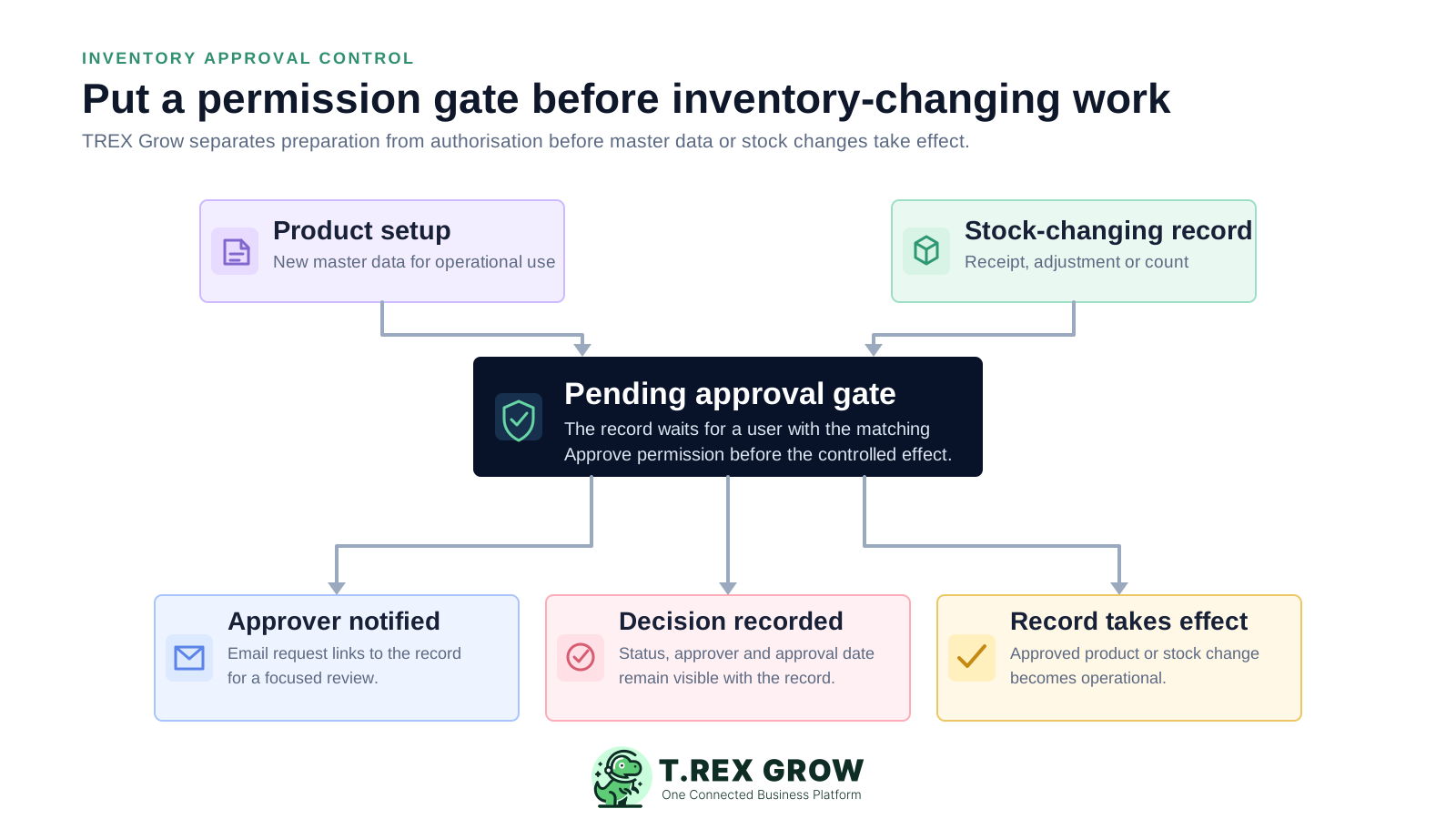
Inventory approval is not paperwork for its own sake. A product, receipt, correction, or count variance can change what sales promises, what purchasing orders, what finance values, and what the warehouse expects to find.
Operational pressure
When records live in different places, the person responsible has to reconstruct what happened before they can make a confident decision or follow up.
A wrong product code, unit, supplier, type, classification, category, or reorder setting can be reused across quotations, purchase orders, stock entries, deliveries, adjustments, and invoices.
The team records what arrived, but nobody checks it against the purchase order, expected quantity, supplier, receipt date, shortage or oversupply, and supporting delivery evidence.
An inventory adjustment can increase or reduce a product quantity. Without a controlled review, the wrong item, quantity, reason, location, or source reference may become the next operating balance.
Unexpected gains or losses may come from timing, an unrecorded movement, the wrong location, a duplicate transaction, or a real physical difference. Approval creates a deliberate checkpoint before posting.
A manager replies in chat or email, but the application does not show whether the inventory record is still pending, who approved it, or when the decision was completed.
When everyone can create and approve the same sensitive records, the business loses a practical separation between entering the facts and accepting their operational effect.
A manual approval list can record a yes or no, but it does not automatically preserve the exact product, stock source, quantity, evidence, status, permission, and resulting inventory change reviewed at that moment.
Recurring issues usually point to workflow-control gaps, not one isolated data-entry mistake.
A message such as approve receipt 103 does not show whether the quantity, supplier, product, purchase-order link, date, attachment, or stock location changed after the message was sent.
The requester edits a spreadsheet row after receiving approval, or several attachment versions circulate. The final inventory record cannot prove which facts were actually reviewed.
Staff know that a manager normally checks adjustments, but the system permission does not distinguish the person who can request from the person who can approve.
The team cannot tell whether stock changed when the record was drafted, when the request was sent, when a manager replied, or when somebody updated the spreadsheet.
Delivery notes, photos, supplier documents, count explanations, and remarks are stored separately from the stock entry or adjustment the reviewer is expected to authorise.
Even after the manager approves, the person who prepared the record may not know whether to continue, correct something, or wait for another decision.
The right workflow connects permission, status, evidence, decision, and inventory effect. It should make approval stricter where the business needs it without forcing every user or every record through an unnecessarily complex process.
Let an authorised administrator decide who can create, who can request approval, and who can approve within the relevant inventory module.
A Pending Approval status gives the requester, reviewer, and operations team one shared answer about whether the record is ready to take effect.
Product fields, source documents, quantities, suppliers, reasons, remarks, attachments, and count variances should remain visible during the approval decision.
A review email should identify the record and link the authorised user back to its current application page instead of asking them to approve from an isolated message.
Approval should be the point at which an approval-required product becomes usable or an authorised stock receipt, adjustment, or count variance is applied.
The approved record should retain visible status, approver, and approval date so later users can understand who accepted the change.
TREX Grow assigns the approval path through the relevant module. Users with Create and Request permission submit a Pending Approval record, while a user with the matching Approve permission reviews and authorises it. Users not configured to request approval may finalise directly, so the business should map permissions deliberately.
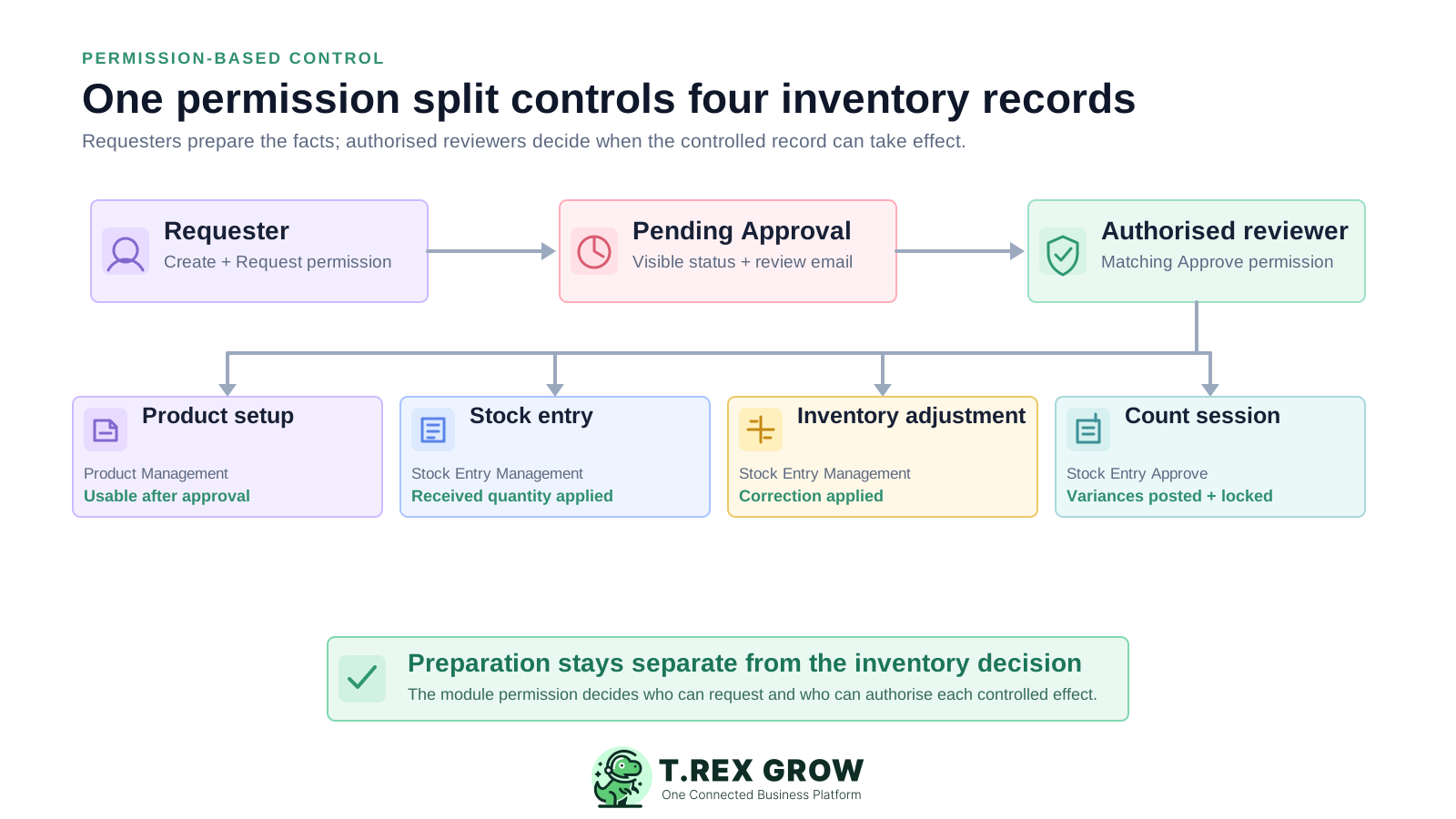
Create a product as Pending Approval when the requester requires review. Only an owner or user with Product Management Approve permission can approve it for operational use.
Use Stock Entry Management Request and Approve permissions to control receiving records and the quantities linked to a supported purchase-order workflow.
The same Stock Entry Management permission area controls inventory adjustments, keeping the product, add-or-minus quantity, reason, remarks, attachments, and source context together.
An authorised Stock Entry approver can approve a supported count session. Approval posts the recorded variances to stock and locks the session, so this action needs deliberate review.
For product, stock-entry, and inventory-adjustment requests, TREX Grow emails matching approvers with a link to the record and emails the requester after approval.
Relevant records display approval status together with the approving user and date instead of leaving the result only in a message thread.
The workflow is intentionally direct. Configure the responsibility split, prepare the live record, send it for approval, review the evidence, authorise the action, and keep the inventory effect attached to the decision.
Record the current facts in one shared place.
Confirm what is known and what needs attention.
Make the next decision or follow-up accountable.
Complete the next task and record the outcome.
Refresh the shared view when facts change.
A dependable workflow keeps the shared record and the next action aligned.
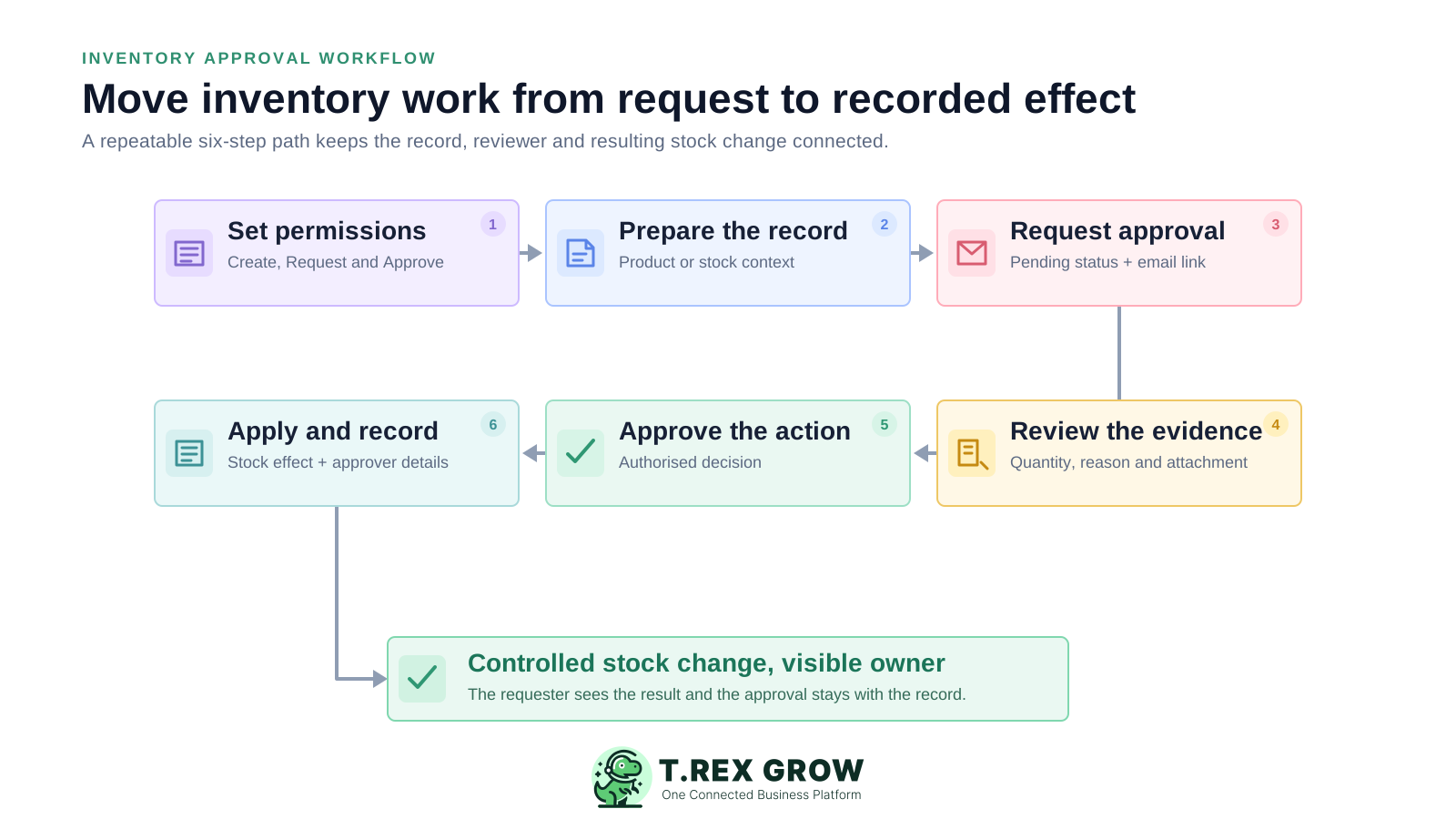
Set module permissions: decide which users can create inventory records, which users must request approval, and which users can approve within Product Management or Stock Entry Management.
Prepare the live record: enter the product fields, purchase-order and receiving context, adjustment quantity and reason, attachments, or counted quantities needed for the decision.
Request approval: finalise the approval-required draft so it moves to Pending Approval and the matching approvers receive the record-specific review email.
Review the evidence: check the product identity, source document, supplier, expected and received quantity, add-or-minus adjustment, reason, remarks, attachment, location, or variance relevant to that record.
Approve the action: the authorised user confirms the record through the application. Do not treat the approval email itself as a substitute for reviewing the live record.
Apply and record the result: the approved product becomes usable, approved receipts or adjustments update inventory, or an approved count posts variances and locks the session. The requester receives the supported result email and the record retains approval details.
TREX Grow applies the same clear separation principle to several inventory records, while preserving the different evidence and operational effect each record requires. Module and plan access can vary, so confirm the current scope before rollout.
Hold a new goods or service record for approval before it can be selected in downstream quotations, delivery orders, purchase orders, stock entries, inventory adjustments, or invoices.
Review the selected purchase order, supplier, received and checked dates, product quantities, expected-versus-received position, locations where available, and attachments before approving the receipt.
Review whether stock is being added or removed, the product, quantity, reason code, remarks, attachments, location where available, and linked stock or purchasing references.
Review expected, counted, and variance quantities before approval posts all variances immediately and makes the supported session read-only.
Use a visible status on approval-required records and relevant list filters so the team can distinguish work awaiting review from finalised or approved records.
Keep the identity and timing of the approval visible with the record for a more useful decision trail.
Send the authorised approver a request email with a direct record link and send the supported requester an approval result email.
Draft, pending, approved, finalised, archived, and locked states restrict later editing or deletion differently, helping protect records after their controlled effect.
This actual TREX Grow inventory-adjustment screen keeps the pending approval state beside the product, location, adjusted quantity, reason, remarks, creator, and approval action. The approver can review the operational evidence in one record before accepting the stock change.
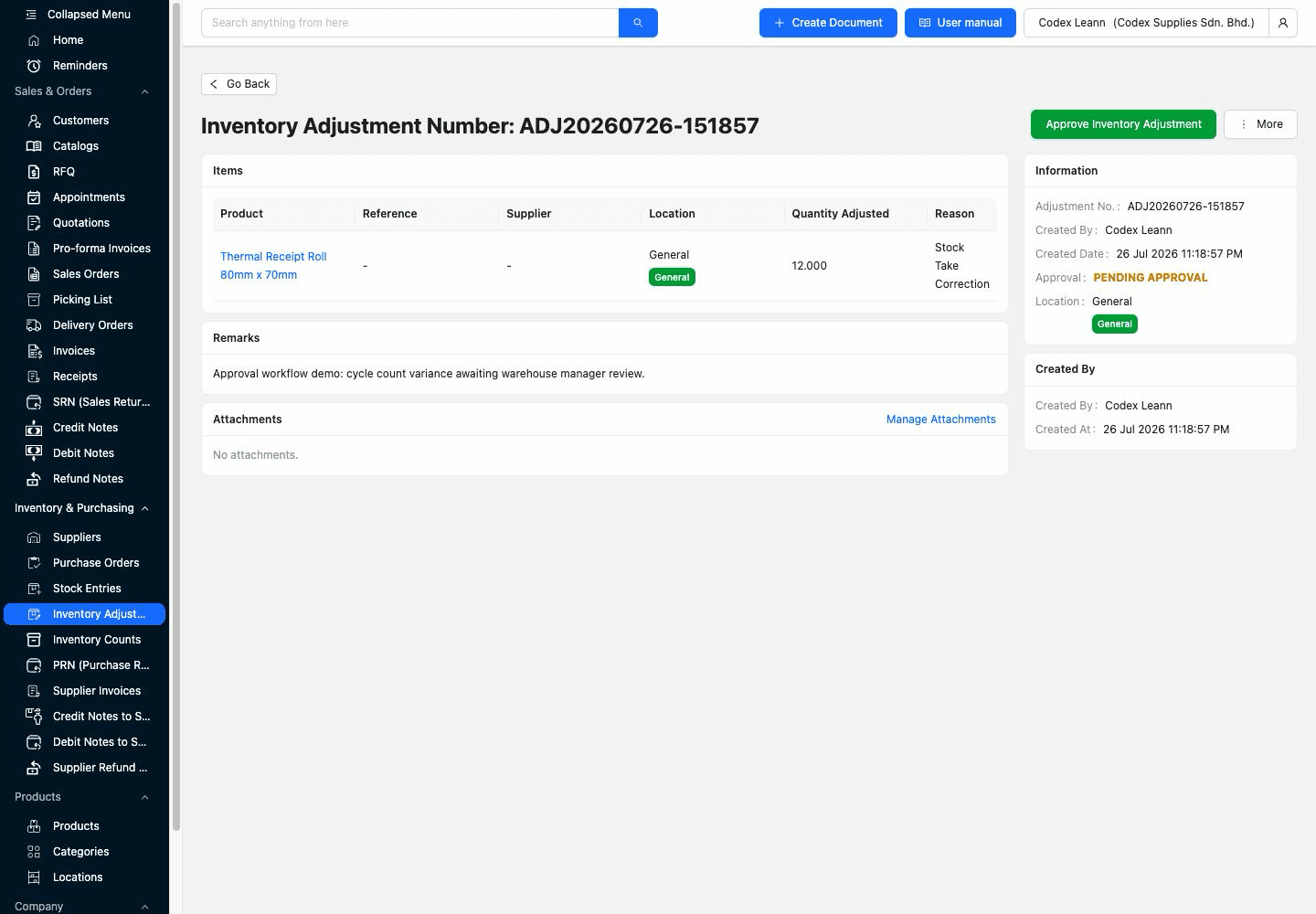
Product and location keep the decision attached to the same controlled item and stock position used by the operating team.
Adjusted quantity, stock-take correction reason, and review remarks give the approver the core facts behind the proposed change.
The pending approval label and approval action distinguish a record awaiting review from stock that is already accepted.
After approval, the same TREX Grow record retains the approved state, approver identity, approval time, product, adjusted quantity, reason, remarks, creator, and creation date. The decision remains part of the operational audit trail instead of disappearing into a separate message.
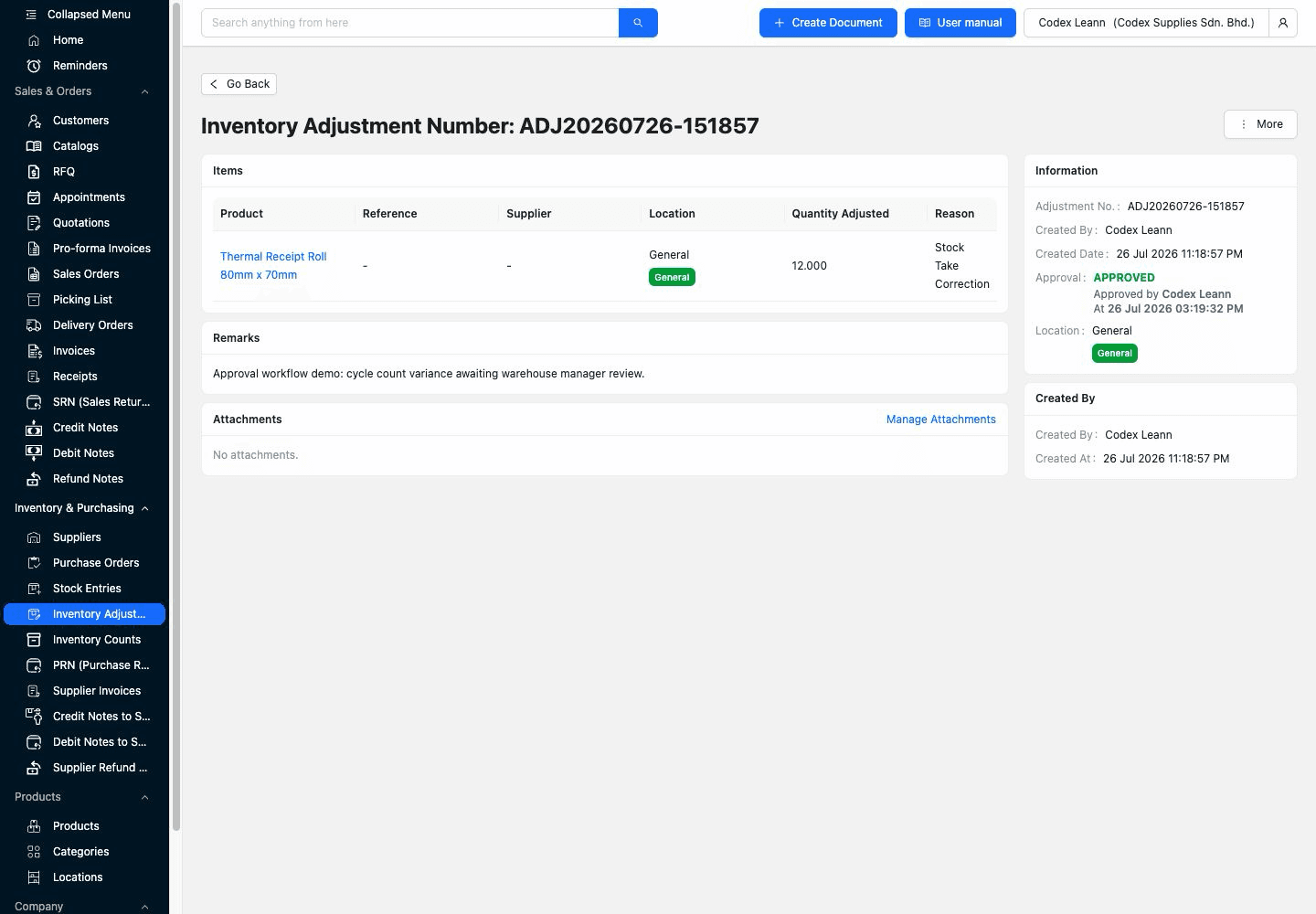
The approval panel identifies the approving user and exact decision time beside the approved state.
Product, location, quantity, correction reason, and remarks remain on the approved record so the decision can be understood later.
Creator identity and creation time remain separate from approver identity and approval time, making the handoff visible.
TREX Grow provides the permission and record workflow; the SME still needs to decide which actions require review, who owns each decision, which evidence is mandatory, and how quickly pending work should be handled.
Document who prepares products, stock entries, adjustments, and counts, then assign Request and Approve permissions only to the roles that should hold those responsibilities.
Users with Create permission but without Request Approval can finalise supported records directly. Reserve that path for roles and low-risk workflows where the business deliberately accepts it.
Agree which product fields, purchase-order links, quantities, dates, reason codes, remarks, attachments, locations, and variance explanations must be present before approval.
Use a safe product and small quantity to confirm when a pending product becomes usable, when a stock receipt or adjustment changes quantity, and when a count session posts and locks.
Assign enough authorised reviewers for leave and workload coverage. This page does not claim delegation, escalation, or substitute approver rules, so operating coverage still matters.
Frequent emergency approvals, recurring adjustments, and repeated count losses may point to poor receiving, delayed transactions, weak product setup, or an unsuitable permission design.
Use this table to match the verified TREX Grow workflow to the inventory control your Malaysian SME expects.
| Controlled record | TREX Grow approval effect | What to verify |
|---|---|---|
| Product setup | Approval-required product remains pending until an authorised Product Management reviewer approves it for use | Required product fields, requester role, approver coverage, and bulk-import policy |
| Stock entry | Approval-required receipt waits before received quantities are applied to inventory | Purchase-order source, quantity check, dates, locations, attachments, and Stock Entry permissions |
| Inventory adjustment | Approval-required add-or-minus correction waits before the authorised quantity change is applied | Product, reason, remarks, source record, location, supporting evidence, and approval owner |
| Inventory count | Approving a supported session posts all variances immediately and locks the session | Current plan, count scope, transaction cut-off, variance investigation, and Stock Entry Approve access |
| Notification and attribution | Supported request and approval emails link back to records; approved records retain approver and date context | Valid user email addresses, review expectations, permissions, and application access |
| Advanced approval depth | Direct permission-based request-to-approve workflow for verified inventory records | Multi-level routing, rejection, thresholds, delegation, escalation, SLA, comments, and integration requirements |
The best practice is to make the next action clear before the situation becomes urgent.
The workflow is most useful when the approved decision changes what other teams can use or trust. It gives growing SMEs a controlled checkpoint without pretending every inventory event needs a long enterprise approval chain.
A reviewer can catch inconsistent codes, units, product type, categories, suppliers, or reorder information before the item enters daily documents.
Expected and received quantities, supplier context, dates, attachments, and allocations can be reviewed before an approval-required stock receipt updates inventory.
An add-or-minus adjustment stays attached to a product, reason, remarks, evidence, source, and approving user instead of becoming an unexplained balance edit.
The team reviews the expected, counted, and variance position before approval posts the supported count result and locks the session.
Request and approval roles, pending status, email handoff, approver identity, and approval date make the decision easier to follow across teams.
The verified workflow is a direct permission-based request and approval path. Confirm specialist needs separately if the business requires multiple stages, rejection reasons, conditional thresholds, delegation, escalation, or external workflow integration.
Create a TREX Grow workspace, assign a safe requester and approver, then test a product, stock receipt, adjustment, or count scenario with realistic evidence. Confirm the pending status, review email, approval permission, resulting inventory effect, and recorded approver details before expanding the workflow.
Inventory approval workflow software separates preparation from authorisation for records that affect product setup or stock. A requester enters the operating facts, an authorised reviewer checks the live record, and the approved result retains its status and decision context.