The product master is inconsistent
The same item appears under different names, codes, units, barcodes, supplier references, or categories. Purchasing, sales, and warehouse documents can then update different records for the same physical stock.

TREX Grow gives Malaysian SMEs a clearer way to manage product details, available, incoming, and reserved quantities, reorder points, stock entries, fulfilment, returns, adjustments, and warehouse activity. Your team can review how a stock balance was built instead of treating the latest spreadsheet total as the only source of truth.
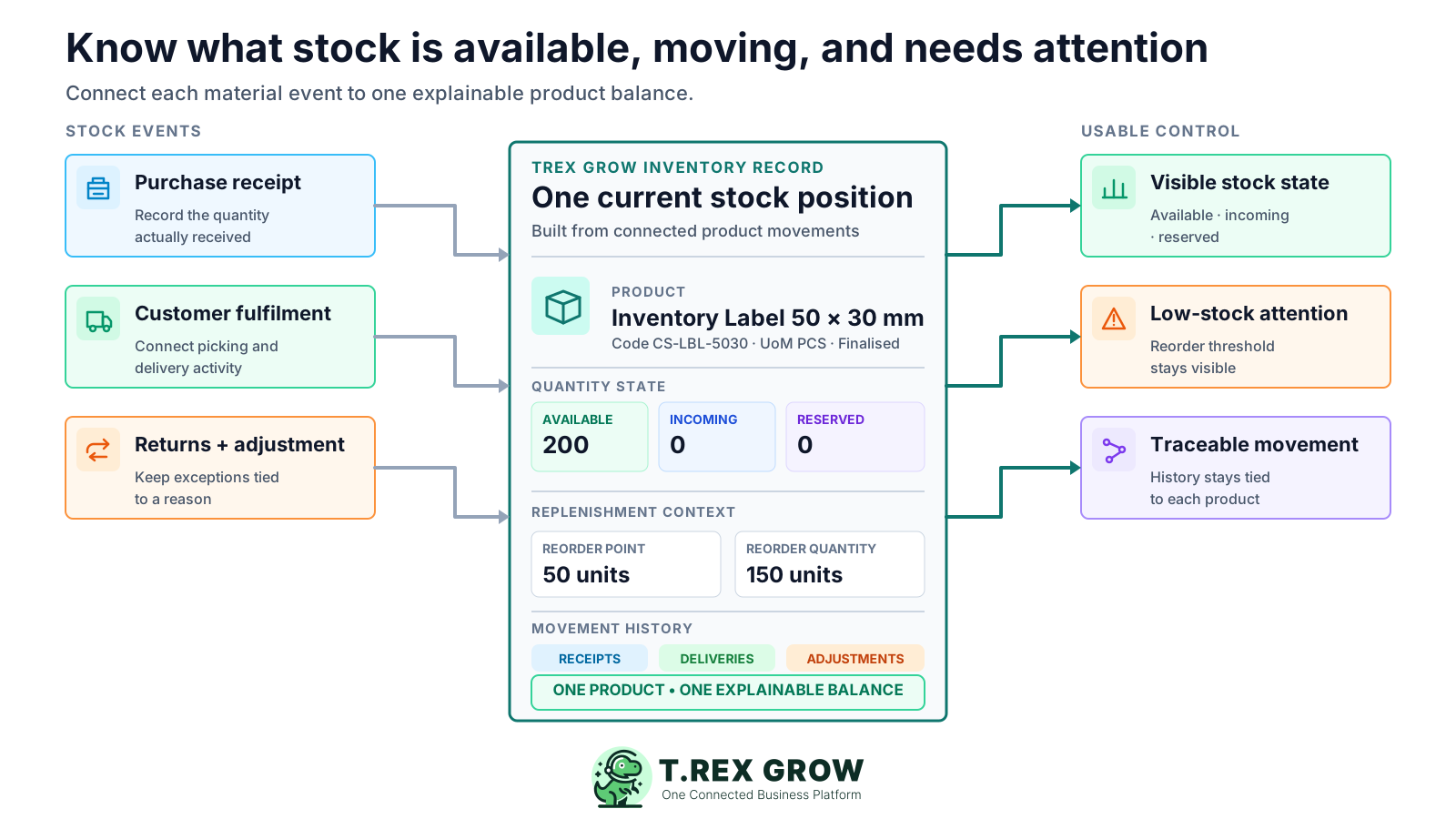
Inventory software should do more than display one quantity. The team needs to know which product the balance belongs to, what is available, incoming, or reserved, which movement changed it, where the stock sits, and which exception requires attention.
Operational pressure
When records live in different places, the person responsible has to reconstruct what happened before they can make a confident decision or follow up.
The same item appears under different names, codes, units, barcodes, supplier references, or categories. Purchasing, sales, and warehouse documents can then update different records for the same physical stock.
Available, incoming, and reserved quantities answer different operating questions. Combining them into one spreadsheet number can make purchasing and fulfilment decisions look safer than they are.
A purchase order exists in one system while the actual quantity received is written on paper or entered later. The recorded stock can lag behind what arrived at the warehouse.
Sales, delivery, and warehouse staff may each know part of the customer commitment, but the inventory record does not clearly show when goods were picked, delivered, returned, or still reserved.
Damage, shortages, oversupply, returns, and count variances are changed directly in a sheet. The next reviewer sees the new quantity but cannot identify the document, reason, person, or date behind the correction.
The company-wide balance may be correct while stock is assigned to the wrong warehouse, rack, bin, damaged area, or return location. Staff still have to search physically before fulfilling work.
A spreadsheet can calculate a balance, but it does not automatically enforce the operating sequence behind that balance. As products, documents, locations, and users increase, small timing and ownership gaps become repeated inventory uncertainty.
Recurring issues usually point to workflow-control gaps, not one isolated data-entry mistake.
Sales checks an availability sheet, purchasing checks an order tracker, and warehouse staff keep a count file. None of the files is guaranteed to reflect the latest event from the other teams.
The purchase order says what should arrive, not necessarily what was accepted. Partial deliveries, rejected units, and later receipts need their own receiving record.
Reorder points and quantities may exist in another tab or only in someone's memory. Buyers spend time comparing lists before they can identify which items need attention.
Instead of recording the actual receipt, delivery, return, or transfer, the team changes the balance directly. The number looks current while the movement history becomes less useful.
Stock is moved from one area to another, but only the destination list or source list changes. Company totals and location totals no longer reconcile.
One person counts a product, another counts a location, and transactions continue during the exercise. The physical count and system balance may refer to different items, places, or cut-off times.
Evaluate software against the stock workflow your business actually runs. The right system should maintain product identity, separate quantity states, capture normal and exceptional movements, and add warehouse depth only when the operation needs it.
Keep product names, codes, SKU, optional barcode, units of measure, categories, selling information, suppliers, and approval status in one maintained record.
Separate available, incoming, and reserved quantities so sales, purchasing, and warehouse teams do not make different decisions from one ambiguous total.
Store reorder points and reorder quantities with the product record, then filter or flag low-stock items so the buyer has a clearer review list.
Connect purchasing receipts, customer fulfilment, and return workflows to stock instead of recreating every movement as a manual balance change.
Use inventory adjustments, reasons, remarks, supporting files, statuses, and permission-aware review when the physical result differs from the normal document flow.
When the business needs it, add locations, transfers, product and location ledgers, picking, and scoped inventory count sessions without confusing those controls with basic product setup.
TREX Grow connects the product definition to its quantity states, movement history, and plan-dependent warehouse controls. This gives the team a more useful path from what the item is to why its current stock position changed.
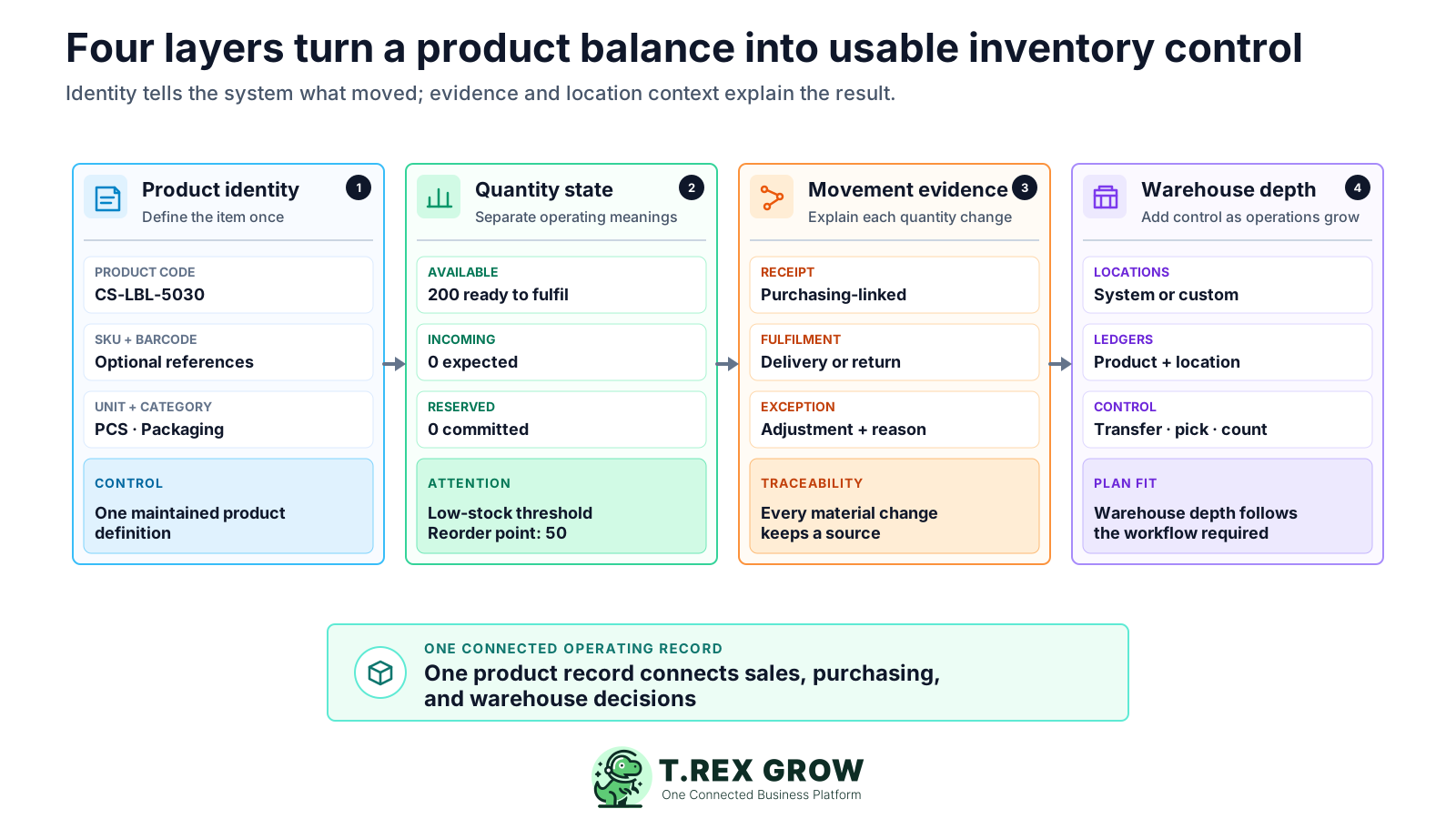
Maintain the product name, code, SKU, optional barcode, goods-or-service type, unit of measure, categories, and relevant Malaysia classification fields before the item is used in downstream documents.
Review distinct quantity states from the product record so the team can separate stock on hand from expected receipts and customer commitments.
Store replenishment thresholds with the product and use the low-stock filter or badge to focus attention on products below their defined point.
Trace stock entries, delivery activity, inventory adjustments, sales returns, and purchase returns from the related product context.
Link products to suppliers and carry purchase-order context into stock entry work so receiving does not begin from an isolated quantity update.
Use system or custom locations, transfers, location summaries, product ledgers, picking, and count sessions according to the plan and warehouse depth required.
The system should carry one product identity through receiving, fulfilment, exceptions, and counting. TREX Grow supports a practical sequence that can start with core product records and expand into paid inventory and warehouse controls.
Record the current facts in one shared place.
Confirm what is known and what needs attention.
Make the next decision or follow-up accountable.
Complete the next task and record the outcome.
Refresh the shared view when facts change.
A dependable workflow keeps the shared record and the next action aligned.
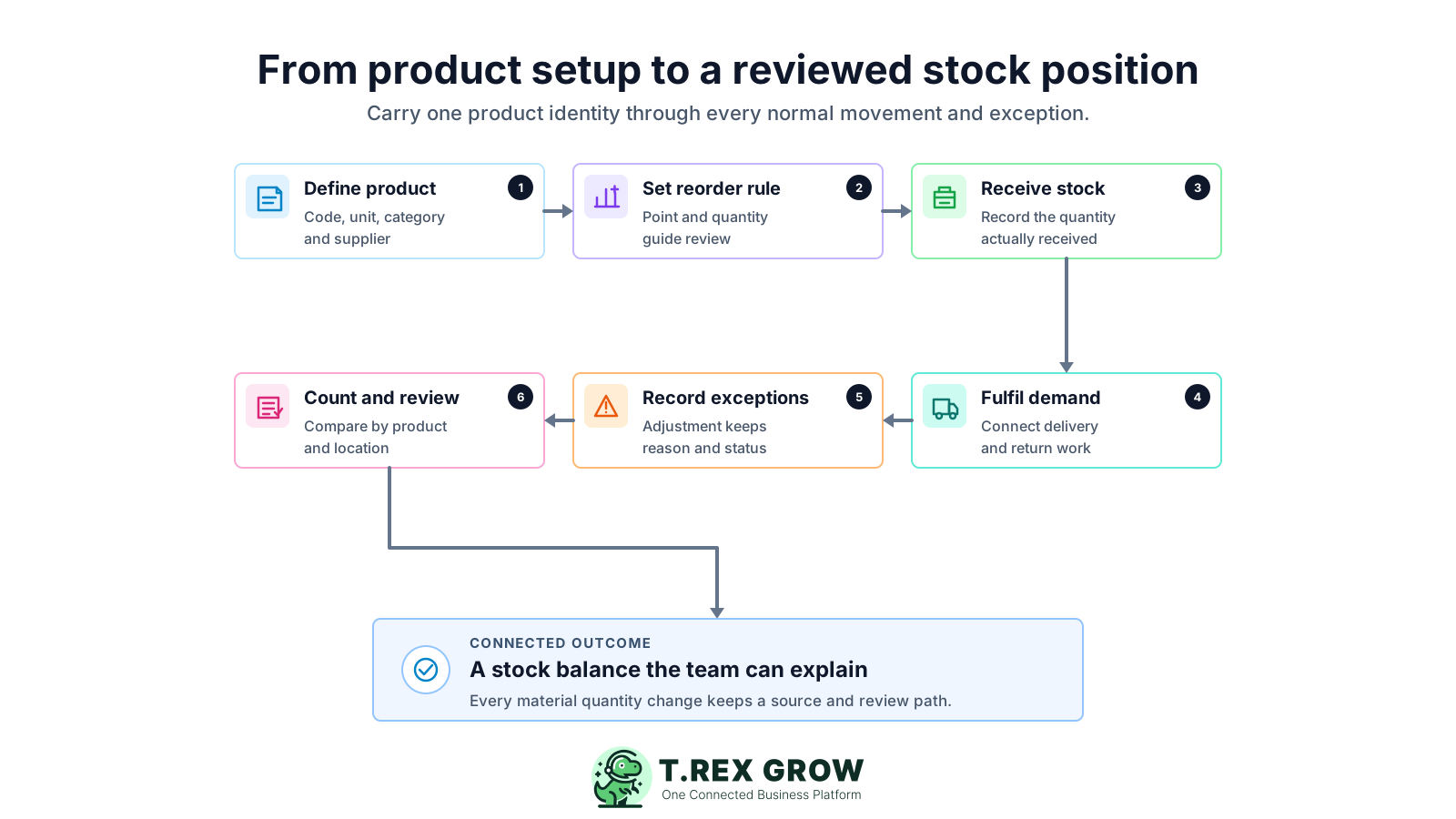
Define the product once: create the product name, code, SKU, optional barcode, unit of measure, categories, supplier relationships, and other required fields before using the item in transactions.
Set the replenishment rule: add a reorder point and reorder quantity that reflect how the business reviews low stock. Treat the signal as an attention threshold, not an automatic purchase forecast.
Receive stock from the purchasing workflow: start a stock entry from the relevant purchase order or supported return workflow and record the quantity actually received rather than copying the ordered quantity.
Fulfil customer demand through the sales workflow: keep product, sales order, delivery, return, and stock context connected so customer work changes inventory through the intended document path.
Record exceptions with a reason: use a structured inventory adjustment or return workflow for damage, shortage, oversupply, count difference, or other exceptions, according to permissions and review rules.
Count and review the result: when warehouse controls are used, scope an inventory count by cycle count or stock take, location, and product. Investigate variances before using the result as the next trusted balance.
TREX Grow separates core product setup from deeper inventory and warehouse workflows. Start with the records your team needs today, then evaluate paid controls against actual receiving, fulfilment, location, and counting requirements.
Search by product name, product code, SKU, or barcode and filter by status, supplier, category, archive state, or low-stock condition.
Maintain goods and services, product codes, SKU, optional barcodes, units, categories, suppliers, prices, reorder points, reorder quantities, and approval status.
Keep available, incoming, and reserved quantities visible so different teams can understand the state behind the product total.
Use purchasing-linked stock entries for receiving activity and structured adjustments for exceptions that need quantities, reasons, remarks, and controlled status.
Review product history and, where included, product or location ledgers that help explain receipts, deliveries, returns, transfers, and corrections.
Organise stock into system or custom locations and move existing stock between locations without treating a pure transfer as a new receipt or adjustment.
Premium warehouse workflows add delivery picking, picking list PDFs, location-aware control, and cycle-count or stock-take sessions with optional product and location scope.
The product list gives the team a shared view before it receives, sells, delivers, adjusts, or counts stock. This screenshot uses safe demo products and shows quantity states, units, reorder rules, and product approval status in one operational screen.
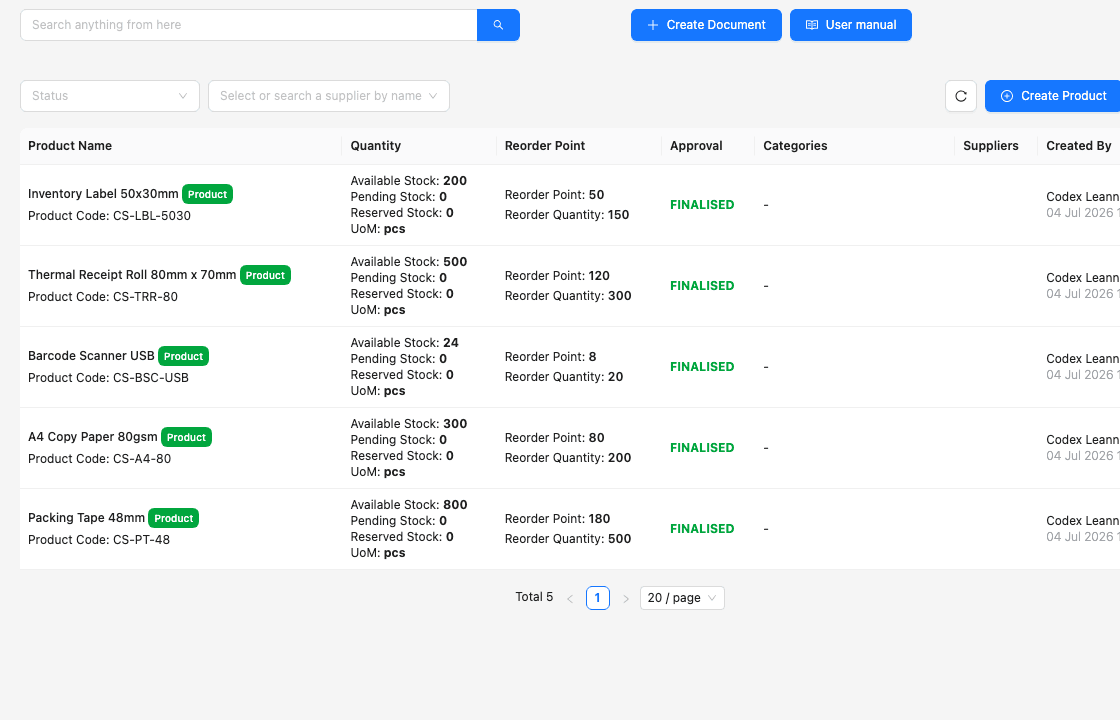
Product names and codes give staff a controlled identity before they add the item to purchasing, sales, stock, or warehouse work.
Available, pending or incoming, and reserved quantities remain visible instead of being compressed into one ambiguous spreadsheet balance.
Reorder points, reorder quantities, and units of measure sit beside the current stock state so low-stock review begins with better context.
TREX Grow is a practical fit when product records must connect to sales, purchasing, stock movement, and warehouse work. Separate specialist requirements before rollout so the team does not assume every inventory product includes the same manufacturing, POS, forecasting, scanning, or integration capabilities.
Resolve duplicate names, codes, SKU, units, supplier references, and categories before moving opening balances. Software cannot decide which duplicate product should own the history.
Agree what available, incoming, reserved, damaged, return, and other location states mean in your operation so staff do not interpret the same quantity differently.
Use a realistic product and partial receipt to confirm how purchase orders, stock entries, supplier documents, and receiving checks work together.
Follow a realistic customer order through delivery and return scenarios to confirm when inventory is reserved, fulfilled, returned, or adjusted.
Core product records, stock entries, system locations, custom locations, ledgers, picking, and counts are not identical across plans. Verify the latest module access before rollout.
If the business needs manufacturing bills of materials, production planning, native POS, marketplace sync, serial or batch traceability, expiry control, automated forecasting, or scanner-led mobile workflows, confirm those needs explicitly.
Use this table to match TREX Grow's workflow depth to the inventory process your Malaysian SME expects to run.
| Requirement | TREX Grow workflow | What to verify |
|---|---|---|
| Product master data | Product code, SKU, optional barcode, unit, categories, suppliers, price, reorder fields, and approval status | Duplicate clean-up, opening stock, and required product fields |
| Stock visibility | Available, incoming, reserved, and low-stock context on product records | How each state maps to your fulfilment rules |
| Receiving and exceptions | Purchasing-linked stock entries, returns, and structured inventory adjustments | Essential or other current plan access and approval rules |
| Warehouse locations | System locations, custom location hierarchy, transfers, location summaries, and ledgers | Whether WMS-lite or Premium warehouse depth fits your sites |
| Picking and counts | Delivery picking, picking list PDF, and scoped inventory count sessions | Premium access, count procedure, and device workflow |
| Specialist inventory scope | Connected SME product, stock, purchasing, sales, and warehouse operations | Separate MRP, POS, e-commerce, serial, batch, expiry, forecasting, and integration needs |
The best practice is to make the next action clear before the situation becomes urgent.
The solution suits SMEs that need stock records to support real purchasing, sales, delivery, return, and warehouse work. It is especially relevant when the operation has outgrown one shared spreadsheet but does not need a full manufacturing ERP.
Products move from supplier purchasing into customer fulfilment, and the team needs one record connecting quantities, documents, and exceptions.
The team needs consistent product identity, receiving, use, returns, and replenishment context even though inventory is not the only part of the business.
Customer commitments depend on whether stock is available, incoming, reserved, damaged, or stored in another location.
Purchase orders and supplier activity should connect to the quantity actually received rather than being reconciled later in a separate stock sheet.
The business is moving from one general storage area toward system or custom locations, transfers, ledgers, picking, and structured count sessions.
The team understands which manufacturing, retail, e-commerce, scanning, serial, batch, expiry, or forecasting capabilities must be verified outside the core TREX Grow inventory workflow.
Create a TREX Grow workspace, add a current product, define its unit and reorder rule, then test one realistic purchasing, receipt, fulfilment, return, adjustment, and count scenario. Start with core product records and use the paid-plan trial when your team is ready to evaluate inventory and warehouse controls.
Inventory management software maintains product records and helps a business record, review, and explain stock quantities and movements. A practical SME system should connect product identity, receipts, fulfilment, returns, adjustments, reorder attention, locations, and counts according to the workflow used.