Available stock is promised but cannot be found
Sales sees a positive balance and confirms an order, while the physical units were already issued, damaged, returned to quarantine, or moved to another location without the matching record.

An inventory balance is not a standalone fact. It is the opening quantity plus every receipt, issue, transfer, return, write-off, and adjustment recorded on the correct item, unit, location, status, and date. When one event is missing or wrong, the record begins to drift.
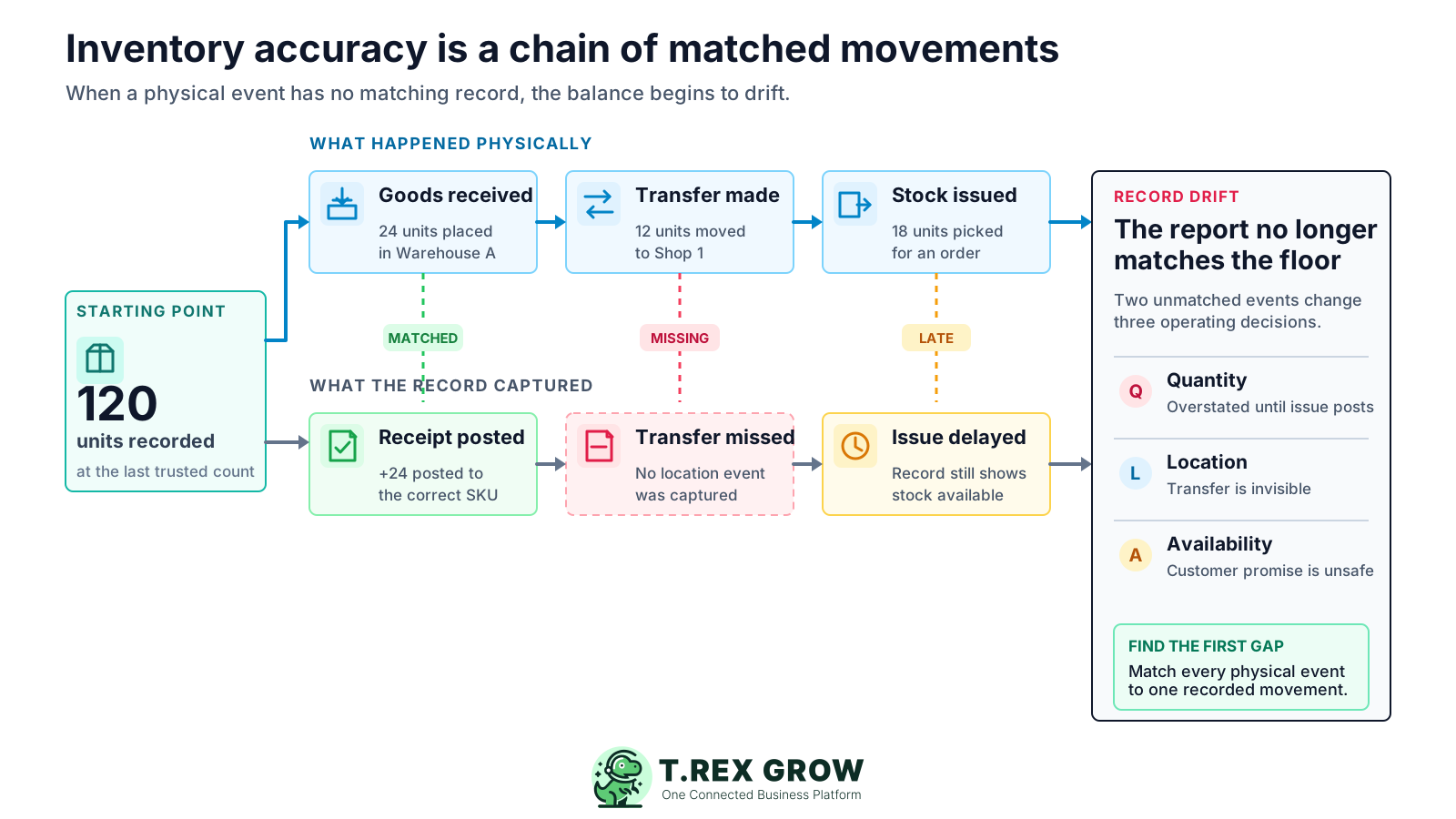
The number beside a product is the result of many earlier events. A correct opening quantity can become unreliable after one incomplete receipt, unrecorded issue, wrong unit conversion, missing location transfer, or unexplained adjustment. The visible variance may appear later, but the cause usually sits at an earlier handoff.
Operational pressure
When records live in different places, the person responsible has to reconstruct what happened before they can make a confident decision or follow up.
Sales sees a positive balance and confirms an order, while the physical units were already issued, damaged, returned to quarantine, or moved to another location without the matching record.
A missing receipt or location transfer can make a useful item look unavailable. The team may reorder unnecessarily while the original stock remains elsewhere in the business.
When repeated searches contradict the system, people begin relying on memory, chat messages, paper notes, or private spreadsheets. Those workarounds create more movements outside the shared record.
A count may reveal the current difference, but a large adjustment does not explain when the drift began or which receiving, selling, transfer, return, or damage rule failed.
Company-wide quantity may look correct while the wrong warehouse holds the balance, or returned and damaged units are mixed with stock that can actually be picked for customers.
Reorder points, purchase plans, fulfilment promises, cash commitments, ageing analysis, and count priorities all become less useful when their starting stock record cannot be explained.
Inventory drift is rarely one mysterious event. It usually comes from a small set of repeatable failure points. Classifying the difference first helps the team search the right records instead of recounting everything or changing the balance immediately.
Similar products use inconsistent names, reused barcodes, duplicate SKUs, or one generic item code. A receipt can land on one record while the sale or count uses another.
A supplier delivers 10 cartons containing 12 pieces each, but the receipt records 10 pieces or another conversion. The record is wrong even though the delivery itself was correct.
The purchase order says 100 units, but only 92 arrive, eight are rejected, or the balance comes later. Recording the ordered quantity before checking the actual receipt creates an immediate gap.
Sales fulfilment, samples, internal consumption, service parts, promotional items, production use, or emergency withdrawals reduce physical stock but are not captured against the correct item and location.
Moving stock between a warehouse, shop, van, project site, shelf, or branch changes where the item can be found. If only one side of the transfer is recorded, one location is overstated and another is understated.
A returned item may need inspection before it becomes saleable. Damaged, expired, reserved, or quarantined units should not silently remain in the quantity available for customer orders.
A late entry, backdated movement, duplicate import, count performed while stock is moving, or balance adjustment without evidence can make the same event appear in the wrong period or more than once.
A usable movement record should answer what moved, how much, where it moved, when it happened, why it happened, and who completed or reviewed it. These facts let the team reconstruct the balance instead of treating the latest quantity as an unexplained total.
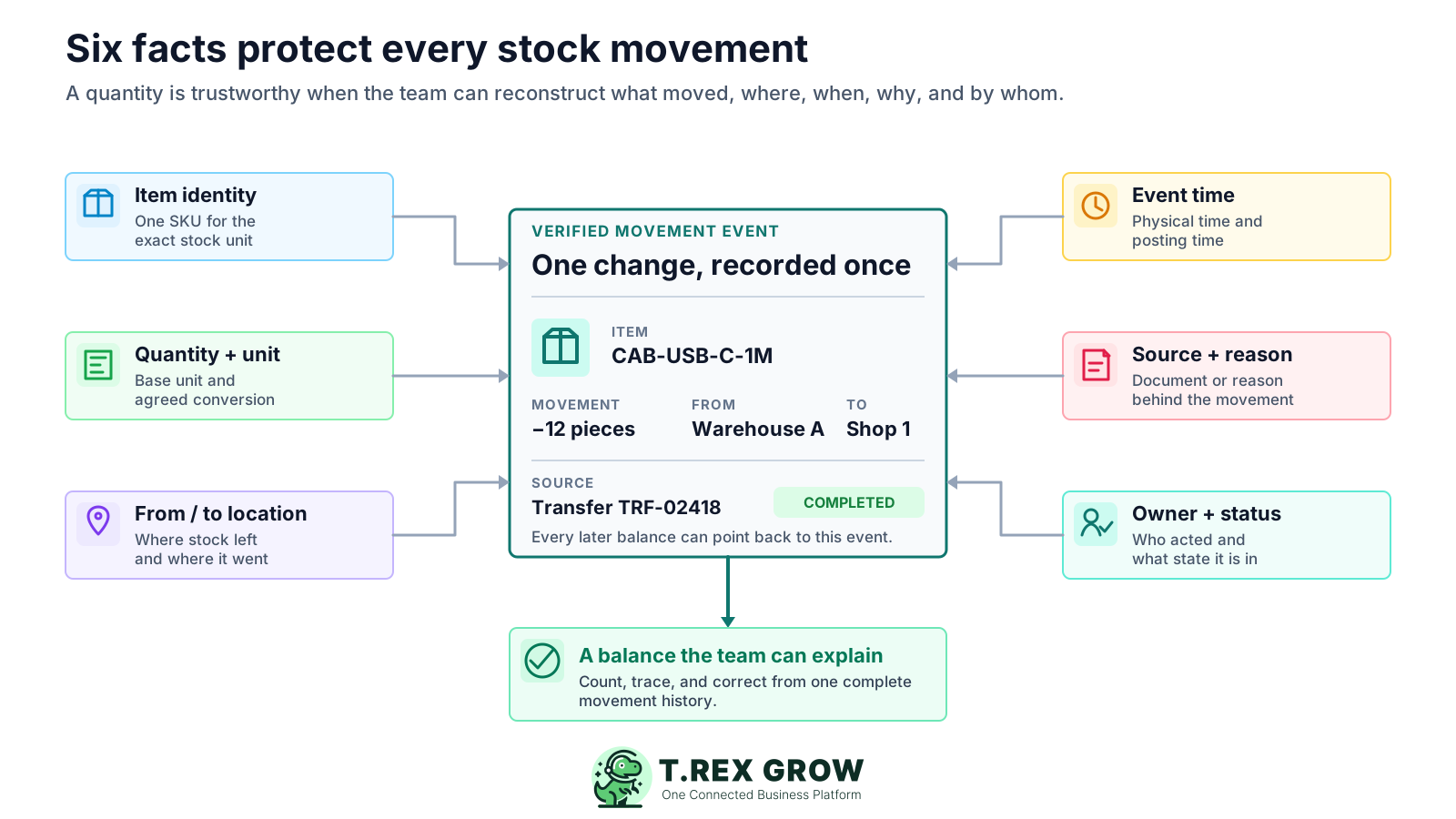
Use a controlled product name and unique item code for the exact stock unit being moved. Distinguish variants, pack sizes, batches, serialised items, or other attributes only when the business needs that level of control.
Record the movement quantity together with its unit of measure and an agreed conversion where purchasing, storage, and sales use different pack sizes.
Show where the stock came from and where it went, including receipt, dispatch, branch, van, project, quarantine, damaged, or return locations where relevant.
Keep the physical movement time and the record entry time understandable. A difference between them can explain why a report or count was correct at one cut-off and wrong at another.
Link the movement to a purchase receipt, delivery, sales issue, transfer, customer or supplier return, damage note, stock count, or approved adjustment reason.
Identify who recorded or confirmed the event, whether it is draft, completed, reversed, or pending review, and who approved sensitive adjustments where the workflow requires it.
Investigate from a common cut-off and the last balance the team trusts. The goal is to locate the first unmatched or misclassified movement, correct the record with evidence, and repair the rule that allowed the same error to happen.
Record the current facts in one shared place.
Confirm what is known and what needs attention.
Make the next decision or follow-up accountable.
Complete the next task and record the outcome.
Refresh the shared view when facts change.
A dependable workflow keeps the shared record and the next action aligned.
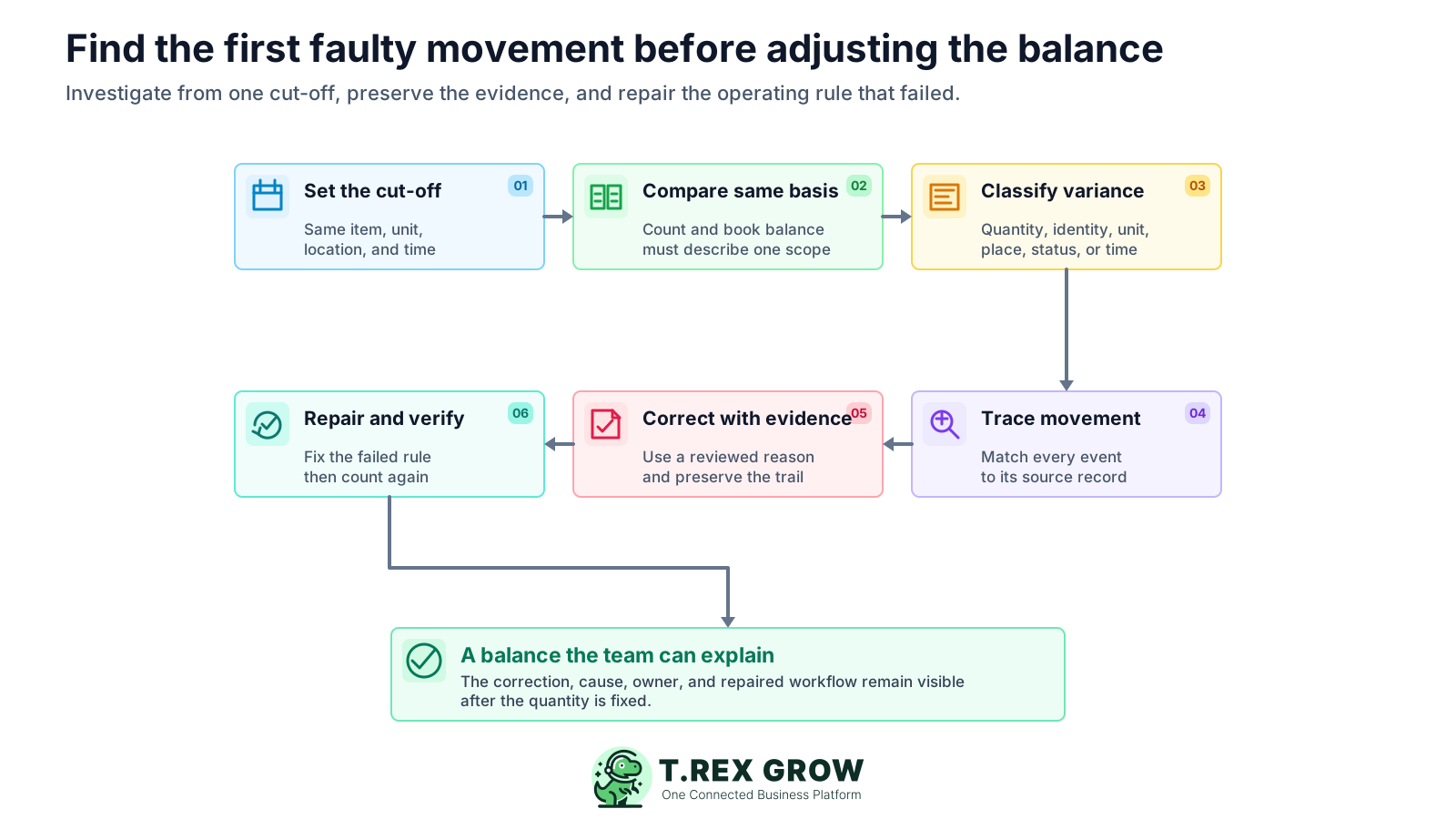
Set the scope and cut-off: choose the item, unit, location, stock status, and exact count time. Pause or clearly separate movements during the count so the physical quantity and record refer to the same moment.
Compare like with like: compare the physical count with the book balance for the same SKU, unit of measure, location, batch or status where used. Do not compare a carton count with a piece balance or company-wide stock with one warehouse.
Classify the variance: decide whether the main difference concerns quantity, item identity, unit conversion, location, stock status, timing, duplicate entry, or a combination. This narrows the movement history that needs review.
Trace movements from the last trusted balance: follow receipts, sales or delivery issues, internal use, transfers, returns, damage, write-offs, count entries, and reversals. Match each physical event to its source record and status until the first gap appears.
Correct the record with evidence: fix the source transaction when the workflow allows it, or use a documented and reviewed adjustment that states the quantity, reason, source evidence, owner, and date. Preserve the earlier record instead of hiding the trail.
Repair and verify the workflow: change the receiving, issuing, transfer, return, unit, cut-off, or approval rule that failed. Recount or monitor the affected item and similar high-risk items to confirm the same cause does not recur.
A quick correction can make today's report look right while leaving tomorrow's workflow unchanged. These responses remove the visible variance without restoring a reliable movement history.
Recurring issues usually point to workflow-control gaps, not one isolated data-entry mistake.
Changing the quantity to match the count may be necessary after review, but doing it first destroys the chance to learn whether receiving, issuing, transfer, return, unit, or timing controls failed.
A correct physical count can still disagree with the report when receipts, picks, deliveries, or transfers cross the count cut-off without being separated and reconciled.
A carton is not a piece, one branch is not the whole company, and quarantined stock is not automatically saleable. The comparison basis must match before the difference means anything.
Loss and unauthorised removal are possible, but so are wrong receipts, unit conversions, duplicate entries, unrecorded use, mixed locations, returns, damage, and timing gaps. Investigate evidence before assigning a cause.
Labels such as correction or stocktake variance do not help the next investigation. Use a reason that identifies the failed movement type and retain the supporting count or document.
A private file may help someone finish today's task, but it adds another balance and another update delay. Restore the shared movement workflow and reconcile any temporary record back into it.
Accuracy improves when each stock movement is easy to identify, capture, review, and count. The control should be proportionate to the item's value, movement speed, risk, and operational impact rather than identical for every product.
Give each distinct stock item a clear identity, define its base unit, document pack conversions, and retire duplicates carefully so receipts, sales, counts, and transfers use the same record.
Capture receipt, pick, issue, transfer, return, damage, or internal use at the operational handoff instead of collecting paper or chat messages for a later batch update.
Use the relevant order, receipt, delivery, return, damage note, transfer, count sheet, or approved reason so another person can reconstruct why the balance changed.
Keep stock identifiable by warehouse or operating location and distinguish available, reserved, returned, quarantined, damaged, expired, or other business-defined conditions when those states affect fulfilment.
Use clear permissions, reasons, ownership, and proportionate review for changes that bypass the normal receipt or issue flow, especially repeated or material corrections.
Choose count frequency from item value, movement volume, shrinkage exposure, expiry, and customer impact. Repeated differences on the same item or process should trigger a workflow review, not only another adjustment.
Use this table to test whether the physical event and the inventory record tell the same story.
| Movement | Physical event | Record evidence | Common failure |
|---|---|---|---|
| Receive stock | Count and inspect what arrived | Receipt linked to supplier order and accepted quantity | Ordered quantity recorded instead of actual receipt |
| Transfer stock | Move the same units from one location to another | Completed from-and-to transfer | Only one location changes or neither side is recorded |
| Issue or sell | Pick and release units for a customer or internal use | Delivery, issue, sale, or authorised usage record | Physical stock leaves before the issue is posted |
| Customer return | Receive, inspect, and assign a condition | Return linked to the original transaction and stock status | Returned units become saleable before inspection |
| Damage or expiry | Separate units that can no longer be sold | Damage, expiry, quarantine, or write-off record with reason | Units are removed physically but remain available |
| Count adjustment | Confirm a physical difference at a defined cut-off | Count sheet, variance reason, owner, review, and date | Balance changes without root-cause evidence |
The best practice is to make the next action clear before the situation becomes urgent.
Software does not repair an undefined stock process by itself. Once the business agrees how items, units, locations, movements, counts, and adjustments should work, TREX Grow can help keep the related product, purchasing, sales, inventory, warehouse, and control records closer together.
Keep product names, codes, units of measure, categories, suppliers, quantities, reorder points, and relevant status information together before creating downstream documents.
Bring purchase orders, supplier activity, receiving context, supplier returns, and stock entries into a more traceable flow instead of treating the warehouse update as a separate spreadsheet task.
Use inventory quantities, stock entries, adjustments, location handling, picking, warehouse controls, and inventory counts to understand how the recorded balance was built.
Keep quotations, sales orders, delivery orders, invoices, product records, and inventory context closer together so the team can see where fulfilment work should affect stock.
Use users, permissions, approvals, document status, and attachments to structure sensitive work and retain useful evidence when a stock movement or correction needs review.
Choose one item with a known gap. Confirm its unit, location, status, and cut-off, then match every receipt, issue, transfer, return, damage record, and adjustment since the last trusted balance. Use the first unmatched event to fix one operating rule before expanding the review.
A stocktake establishes a balance at one cut-off. The record can drift again when a later receipt, issue, transfer, return, damage event, unit conversion, reversal, or adjustment is missing, duplicated, delayed, or posted to the wrong item, location, or status.