
How TREX Grow Works
One workflow for sales, purchasing, inventory, billing, and follow-up
TREX Grow connects the records and documents SMEs use every day, so your team can move from setup to quotation, invoice, purchasing, stock movement, and reminders without rebuilding work in separate spreadsheets.
Records
Connected in one workspace
Documents
Connected in one workspace
Stock
Connected in one workspace
Follow-up
Connected in one workspace
Operating model
The parts of TREX Grow that work together
TREX Grow is built around practical SME operations. Master data, documents, stock movement, payments, approvals, and reminders are connected instead of being handled as separate files.
Start with master records
Add products, customers, suppliers, users, units, categories, tax settings, and company details so documents are created from consistent data.
Run sales documents
Create quotations, sales orders, delivery orders, invoices, receipts, notes, and Malaysia e-Invoice submissions without rebuilding the same details.
Connect purchasing
Prepare purchase orders, supplier invoices, supplier returns, and stock entries so buying activity is easier to trace.
Control inventory movement
Track product quantities, reorder points, stock entries, adjustments, location handling, picking, and inventory counts as the business grows.
Keep finance visible
Review unpaid invoices, supplier invoices, receipts, expenses, and operating reminders from a dashboard built around daily work.
Add team controls
Use users, permissions, approvals, attachments, and document status to keep work structured as more people join the workflow.
Workflow
How a daily TREX Grow workflow moves
A business does not need to change everything at once. Start with the records and documents that matter most, then add deeper workflow controls when the team is ready.
Set up records once
Your team creates the customer, product, supplier, and company records that every document depends on.
Create the first document
Start from the real workflow: quotation, sales order, invoice, purchase order, appointment, catalog, or RFQ.
Convert or continue the flow
Accepted work can move into the next operational document instead of being copied manually into another file.
Review stock and payment impact
Inventory, unpaid invoices, supplier invoices, delivery status, and reminders stay visible as work moves forward.
Use reports and controls
Managers can review statuses, approvals, records, and follow-up work without asking the team to rebuild a spreadsheet.
Product screenshots
See the screens behind the workflow
These screenshots show the actual TREX Grow areas your team can use to manage records, documents, purchasing, invoices, and daily operating visibility.
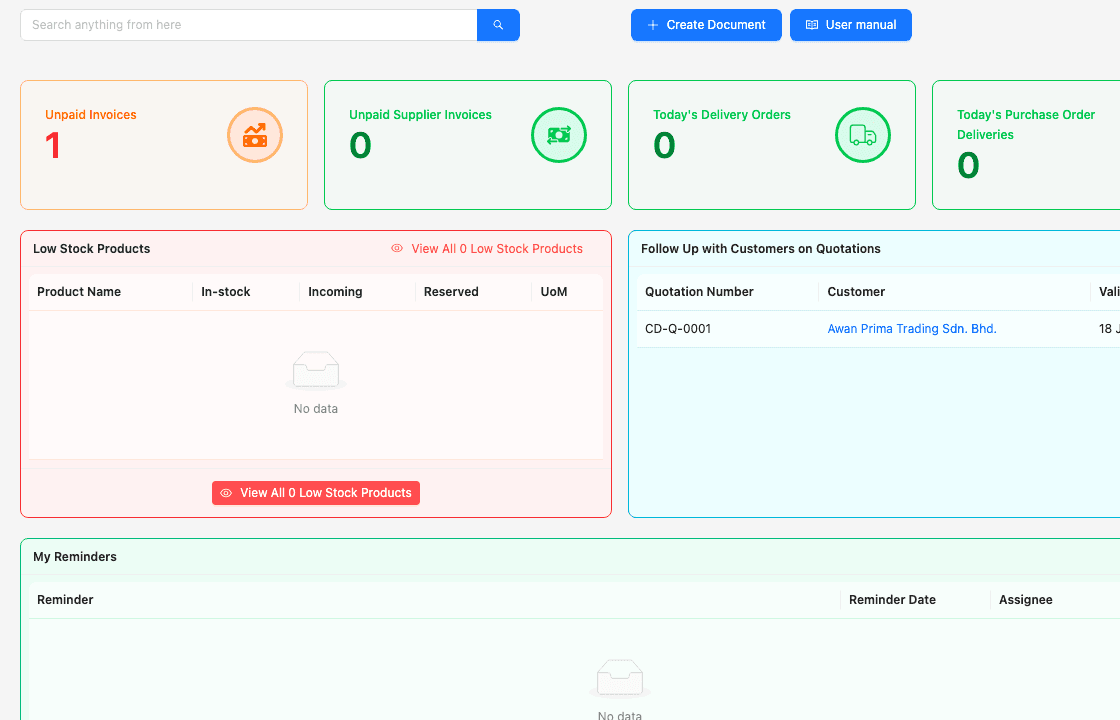
Operations dashboard
Start each day with unpaid invoices, supplier invoice status, delivery work, low-stock products, quotation follow-ups, and reminders.
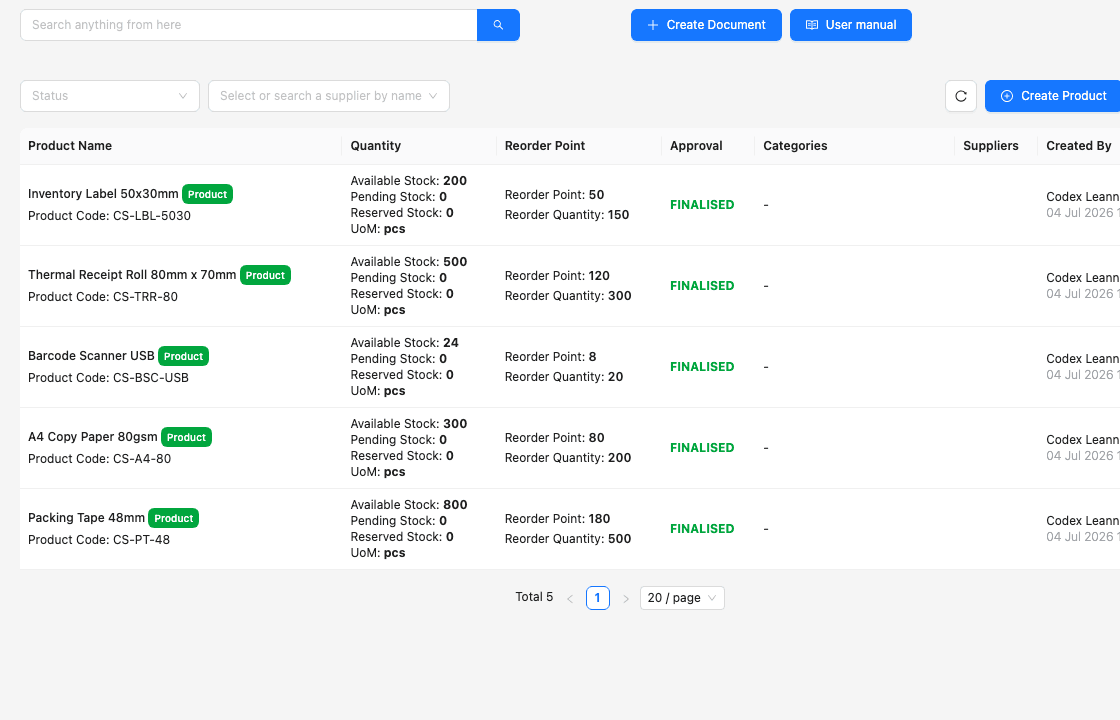
Product and stock records
Keep product names, codes, quantities, reorder points, units of measure, approval status, suppliers, and inventory visibility together.
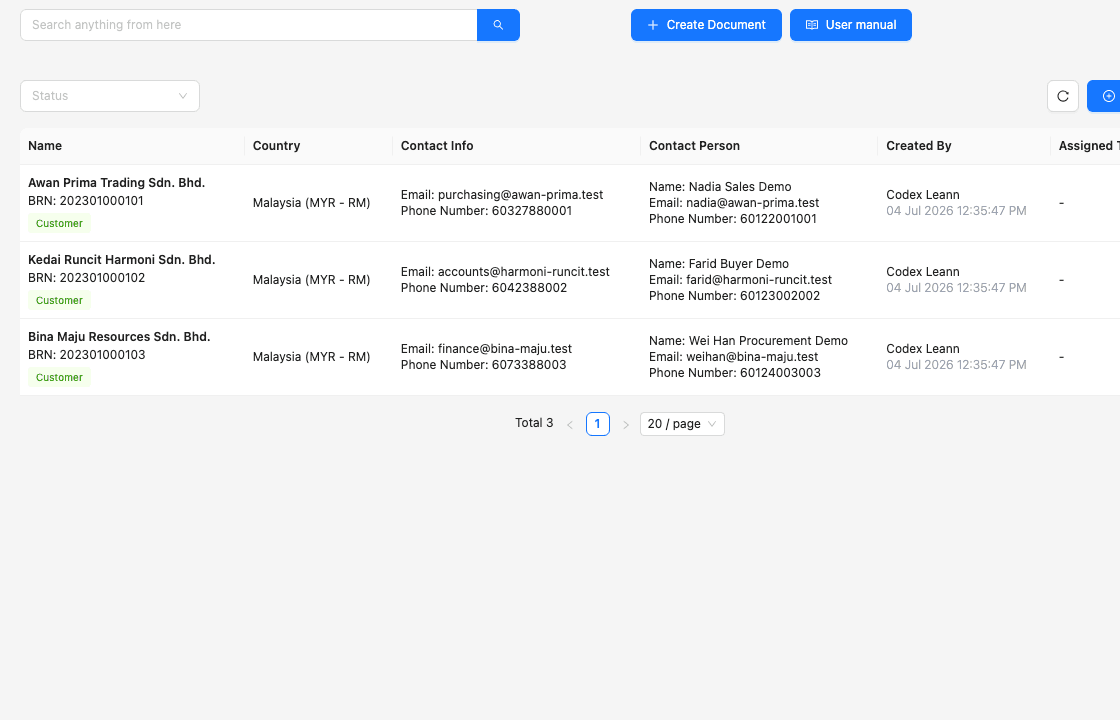
Customer workspace
Store customer names, phone numbers, email addresses, company records, and contact details before creating sales documents.
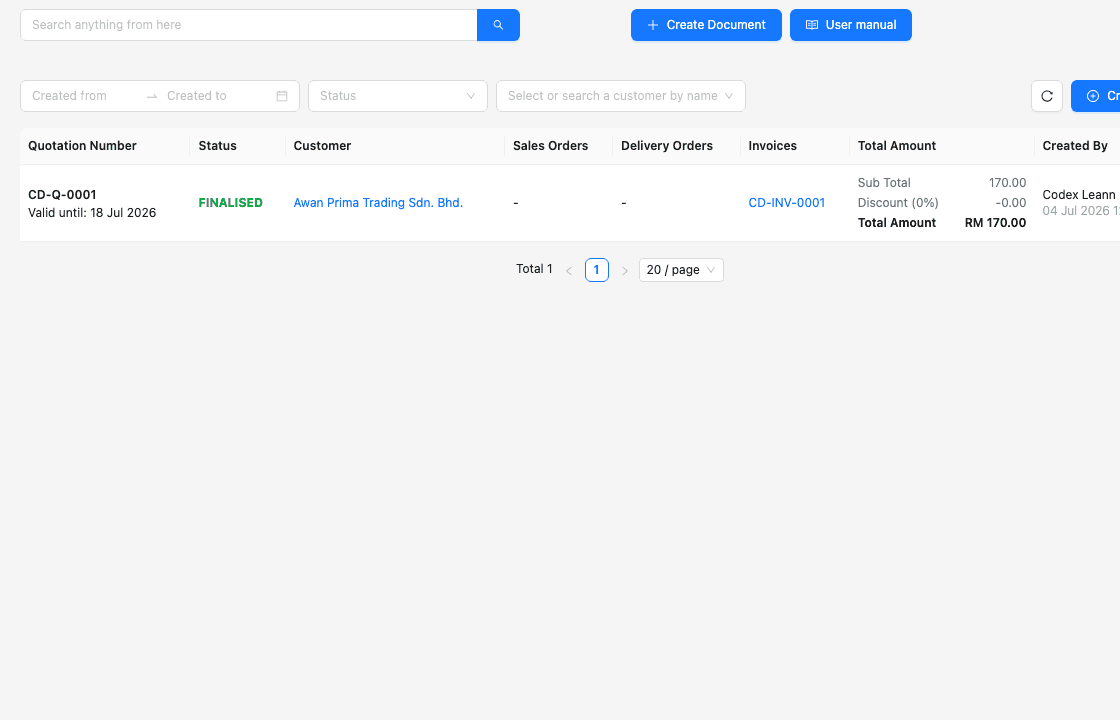
Quotation workflow
Prepare quotations from structured customer and product data, then keep quotation follow-up visible for the sales team.
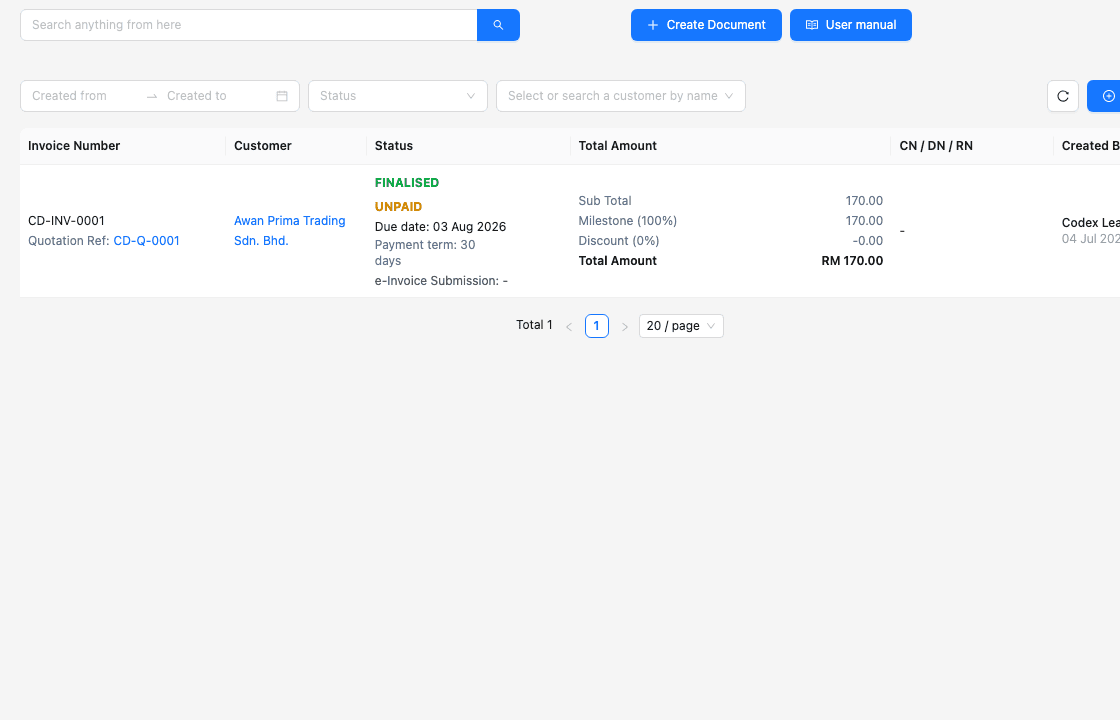
Invoice workflow
Manage invoice status, payment visibility, customer information, document totals, and the handoff into e-Invoice workflows.
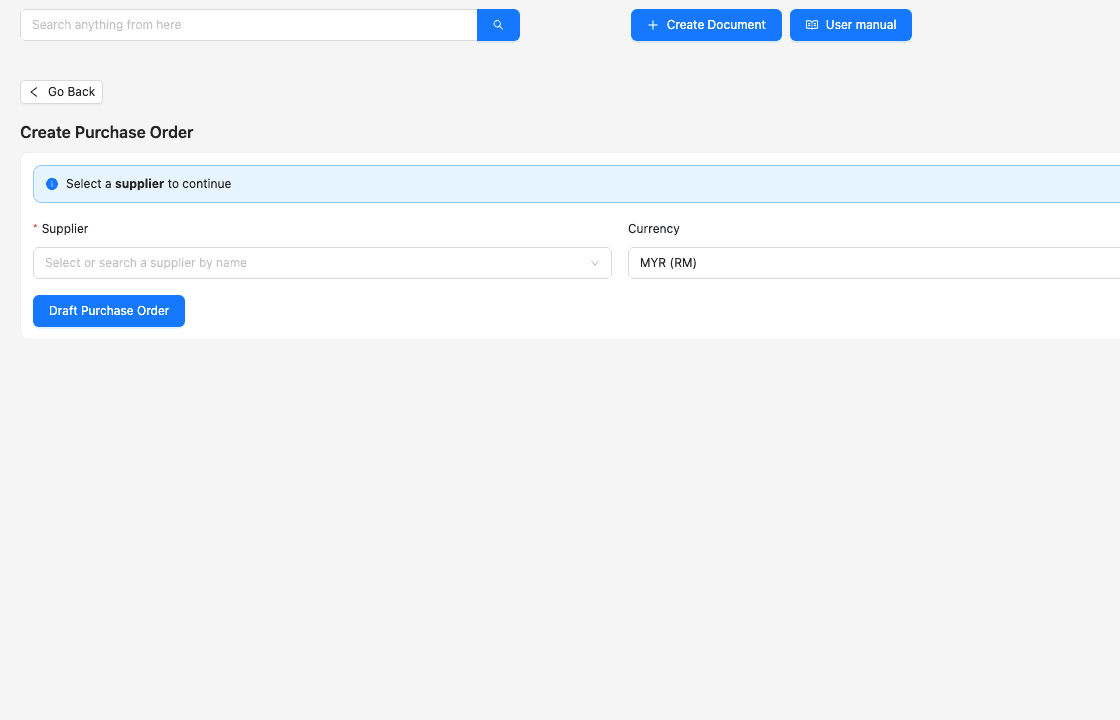
Purchasing workflow
Create purchase orders with supplier, currency, delivery, and billing details so purchasing activity feeds downstream operations.
Practical use cases
Start with one workflow, then expand
TREX Grow works best when SMEs adopt it around real daily work. Begin with customer documents or product records, then add purchasing, inventory, warehouse, and approval controls as the team needs more structure.
Quotation to invoice
Sales teams can move from customer enquiry to quotation, confirmation, invoice, payment, and receipt with fewer duplicated details.
Purchase to stock entry
Purchasing teams can record supplier commitments, receiving activity, supplier invoices, and inventory movement in one flow.
Catalog and RFQ
Teams can publish product catalogs, receive RFQs, and turn cleaner customer requests into follow-up sales documents.
Inventory and warehouse
Growing teams can add warehouse locations, picking, stock counts, and tighter movement visibility when Free is no longer enough.
Where to start
Choose the path that matches your current workflow
If you only need core customer, product, quotation, invoice, catalog, RFQ, and appointment workflows, start with Free. If your team needs purchasing, inventory, warehouse, attachments, or wider document controls, test the paid workflow first.
FAQ
Common questions about how TREX Grow works
Answers for SMEs deciding whether TREX Grow fits the way their team handles documents, stock, and daily follow-up.
Is How TREX Grow Works different from the Product page?
Yes. The Product page lists TREX Grow modules. This page explains how those modules connect into daily SME workflows such as setup, quotation, invoice, purchasing, stock movement, and follow-up.
Do I need to set up everything before using TREX Grow?
No. Most teams should start with the records they use most often, such as products, customers, users, and company settings, then expand into purchasing, inventory, warehouse, and approvals as needed.
Can I start with the Free plan?
Yes. The Free plan is suitable for starting with products, customers, quotations, invoices, catalog, RFQ, appointments, users, and Malaysia e-Invoice workflows.
When should I use the 30-day trial?
Use the 30-day trial when you want to test paid workflows such as sales orders, purchasing, stock entries, supplier documents, document attachments, multi-currency, or warehouse controls.
See how TREX Grow fits your daily operations
Start free for core workflows, or use the 30-day trial to test the wider operating flow with your team.