Receiving ends before placement is recorded
The stock entry confirms what arrived, but cartons remain in a staging area while the final warehouse location is decided verbally or entered later.

TREX Grow helps Malaysian SMEs organise where products are stored, move existing stock between locations without inventing another receipt, connect picking work to supported fulfilment sources, and review warehouse movement through product or location context. Premium warehouse controls add the depth needed when General-location stock is no longer enough.
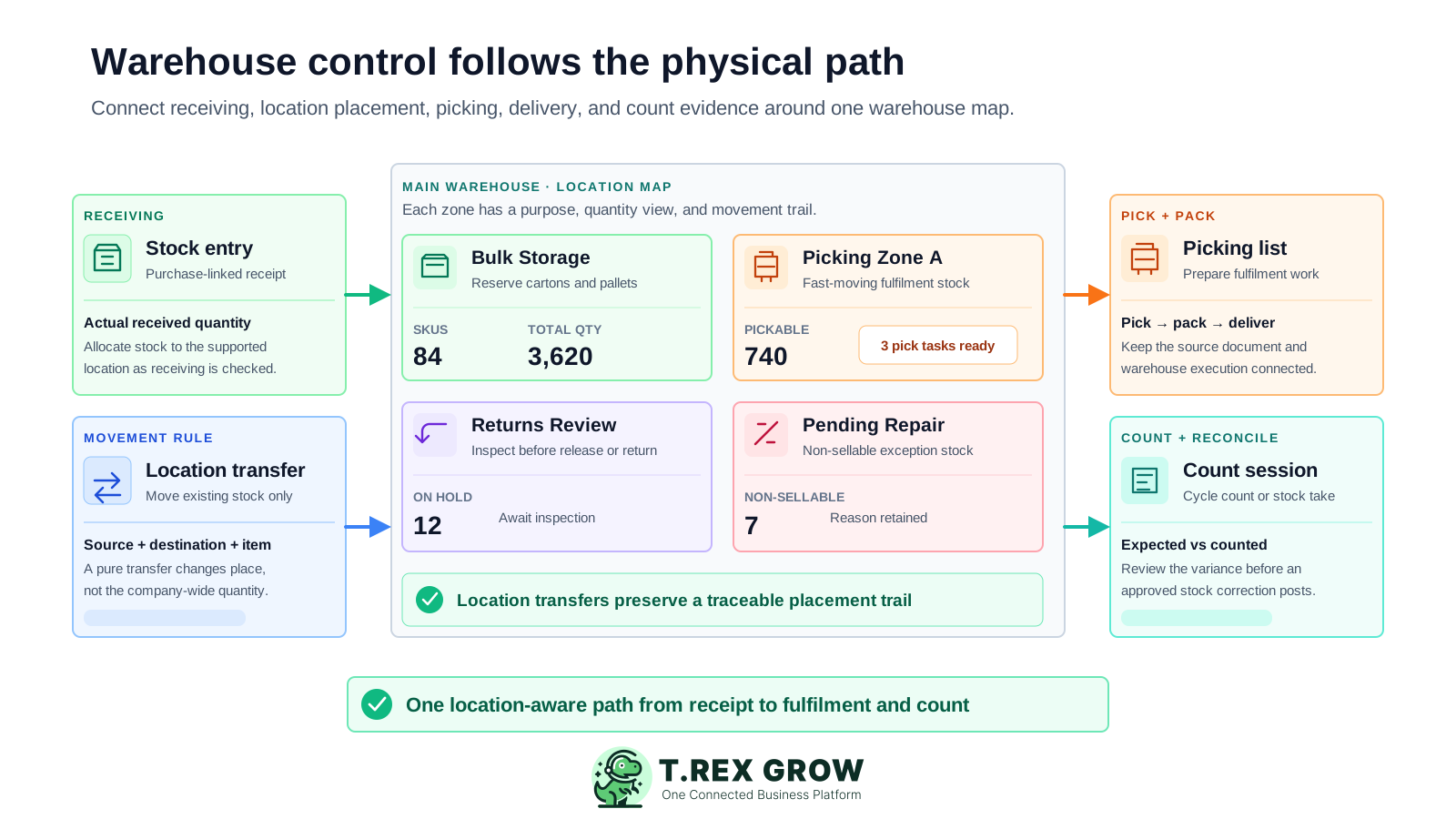
A total quantity can tell the business how many units the system holds, but not where staff should find them, whether they are sellable, how they moved, what must be picked, or which location should be counted. Warehouse management begins when place and execution become part of the record.
Operational pressure
When records live in different places, the person responsible has to reconstruct what happened before they can make a confident decision or follow up.
The stock entry confirms what arrived, but cartons remain in a staging area while the final warehouse location is decided verbally or entered later.
The company has enough stock overall, but fulfilment stalls because the item is stored in another warehouse area, bin, return zone, or repair location.
A pure location move is recorded as another stock entry or inventory adjustment. The item changes place, but the company-wide quantity is incorrectly changed or double-counted.
Warehouse staff receive a printed order, spreadsheet, or message without a supported source document, location plan, picked quantity, exception reason, or delivery handoff.
Returns, damaged units, pending-repair products, or stock awaiting review remain mixed with normal pickable quantity even though warehouse staff should not fulfil them.
The physical team counts one location and product set while the system comparison includes another cut-off, status, unit, or transaction range. The variance is difficult to interpret.
Spreadsheets can list locations, but they do not automatically connect placement, transfers, picking, permissions, or count results to the operating documents that created the warehouse work.
Recurring issues usually point to workflow-control gaps, not one isolated data-entry mistake.
The warehouse total is calculated by combining several sheets, tabs, or whiteboards. One delayed update makes the product total and location totals disagree.
Staff refer to the same place as Main Store, Store A, Rack A, General, or Front Shelf. Search, reporting, and transfer history cannot rely on a consistent location identity.
Stock is added to the new location without removing it from the source, or removed from the source before the destination is confirmed.
The team picks from memory or a copied list and cannot easily verify the quotation, sales order, delivery order, customer, item, or outstanding quantity behind the task.
A physical difference is posted immediately instead of checking open picks, transfers, returns, timing, units, locations, and missing movement records first.
View, edit, delete, transfer, stock-entry, adjustment, return, approval, and count responsibilities are not separated, weakening accountability when a movement is questioned.
Evaluate warehouse software against the physical work your team performs. The system should preserve product identity, place, movement type, source, quantity, user, status, and reconciliation scope without pretending every warehouse action is the same kind of stock change.
Create stable warehouse, storage, picking, return, damage, repair, or other supported locations and organise them into a clear tree when the plan allows custom locations.
Review where each product is held and which products are stored in a selected location rather than relying only on a company-wide balance.
Move existing stock using a source location, destination location, product, and quantity without replacing the transfer with a stock entry, return, or adjustment.
Create picking work from supported quotations, sales orders, delivery orders, or other supported workflows and retain the fulfilment relationship.
Use product or location ledgers, reference codes, movement types, timestamps, and users to investigate how stock entered, moved, was picked, or changed.
Choose a cycle count or stock take, optionally scope it by location and product, compare expected and counted quantities, and review variances before approval.
Warehouse control becomes easier to review when the location hierarchy, product placement summary, movement ledger, and user permissions remain connected. A product total can then be reconciled against where stock is sellable, held, transferred, picked, or counted.
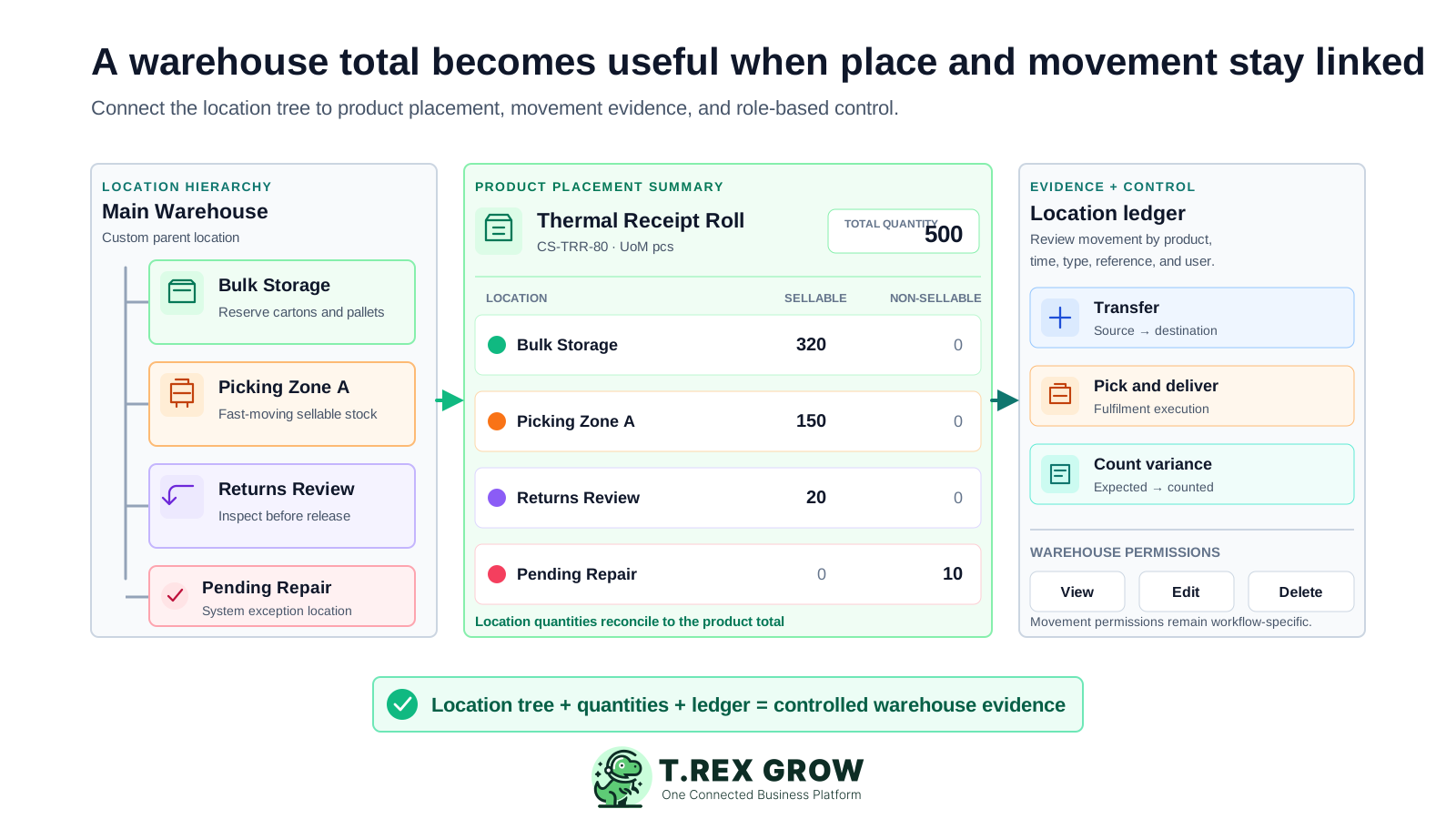
Premium users can create standard locations under allowed locations, edit and reorder the tree, and retain system locations that TREX Grow maintains.
Product-location summaries show where one product is held, while location-product summaries show all products within a selected place.
Warehouse areas can separate normal pickable stock from returns, damaged units, repair work, or other exception handling supported by the location workflow.
Premium ledger views provide movement evidence by product or location so staff can follow quantity deltas, reference codes, timestamps, and users.
Warehouse Management permissions control location viewing, editing, reordering, transferring, allocating, and eligible deletion according to the user's role.
Warehouse permission does not automatically grant stock-entry, inventory-adjustment, sales-return, purchase-return, or unrelated product-quantity authority.
TREX Grow supports a location-aware operating path. Receive against the correct source, allocate placement, transfer existing stock when needed, create picking work, complete the fulfilment handoff, and use a scoped count to reconcile what remains.
Record the current facts in one shared place.
Confirm what is known and what needs attention.
Make the next decision or follow-up accountable.
Complete the next task and record the outcome.
Refresh the shared view when facts change.
A dependable workflow keeps the shared record and the next action aligned.
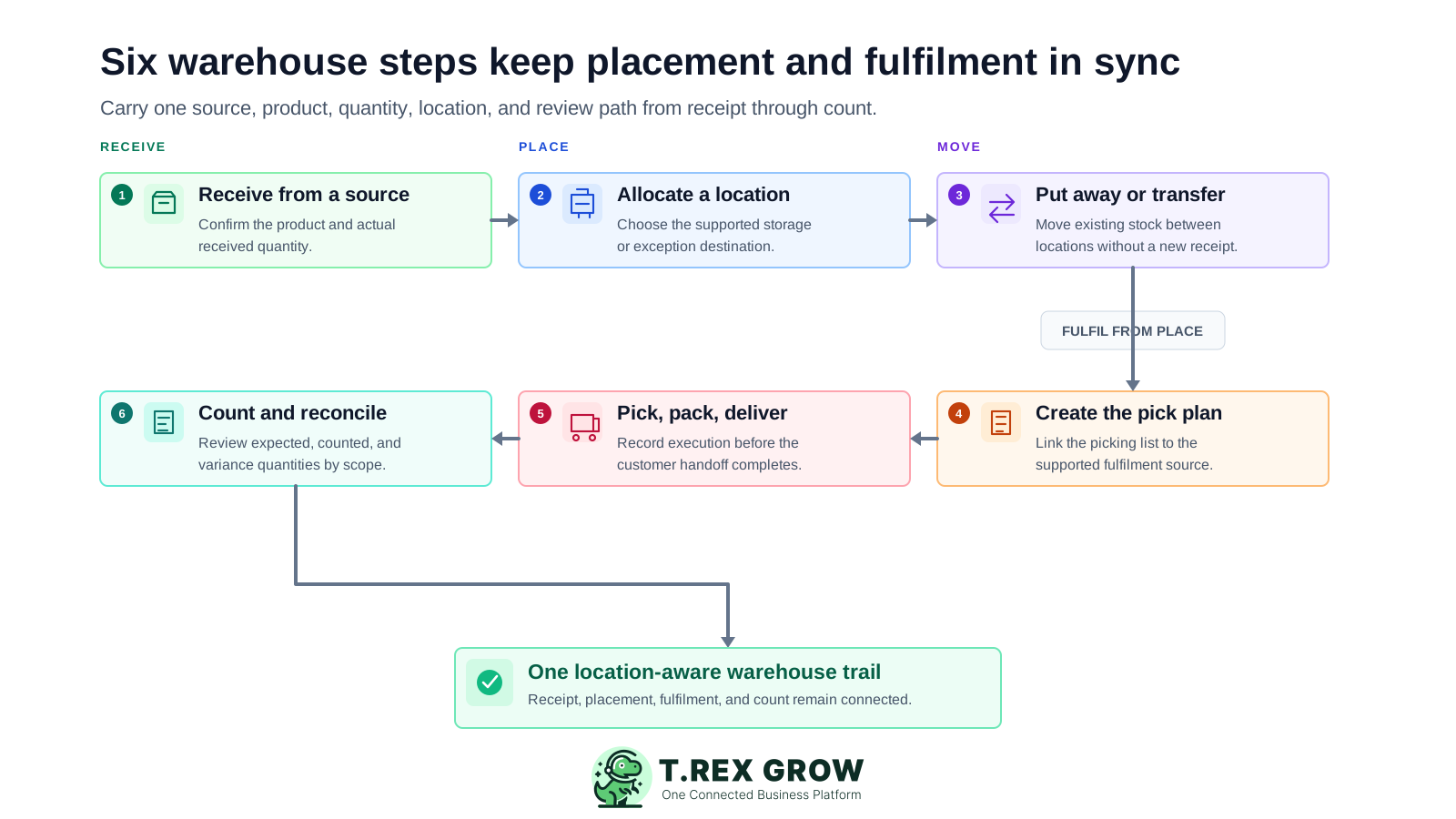
Receive from the correct source: use the supported purchasing or return workflow, confirm the product and actual received quantity, and keep the receiving status separate from what was merely ordered.
Allocate the supported location: place the received units into General, BIN, another system location, or a Premium custom location according to the plan and warehouse rule.
Put away or transfer existing stock: when stock is already in the system, use a location transfer with a source, destination, product, and quantity rather than creating a second receipt or adjustment.
Create the pick plan: generate picking work from the supported quotation, sales order, delivery order, or other available source and confirm the products and quantities required for fulfilment.
Pick, pack, and hand off to delivery: record the warehouse execution, picked quantity, location, user, exception context, and downstream delivery state supported by the workflow.
Count and reconcile the warehouse: create a cycle count or stock take scope, select locations and products where helpful, enter counted quantities, investigate variances, and approve only after the evidence is understood.
TREX Grow separates Starter sales workflows, Essential WMS-lite stock handling and deeper Premium warehouse management. Review the current plan and permissions before rollout because location, ledger, picking and count depth is not identical across Free, Starter, Essential and Premium.
Essential supports WMS-lite stock handling through supported system locations, with normal product and stock work centred on General and BIN according to the current plan.
Premium adds custom locations that can be created, edited, reordered into a tree, and deleted only when eligible and free of stock.
Review the products stored in a location and the location distribution for a product to support placement and movement decisions.
Move existing stock from one location to another using a distinct transfer workflow without treating the location change as a new receipt, return, or adjustment.
Premium ledger views support movement review by location or product with filters and operating references for deeper warehouse traceability.
Premium supports picking work, pick-and-pack execution, linked sales-order context where available, and picking-list PDF output.
Premium count sessions support cycle count or stock take setup, optional location and product scope, expected and counted quantities, variance review, and approval-time stock adjustment posting.
This safe-demo Premium warehouse screen shows a cycle count scoped to Main Warehouse, the system Pending Repair location, and one demo product. Location and product filters are optional, allowing the team to count a targeted area or a broader pickable-stock scope before entering and reviewing results.
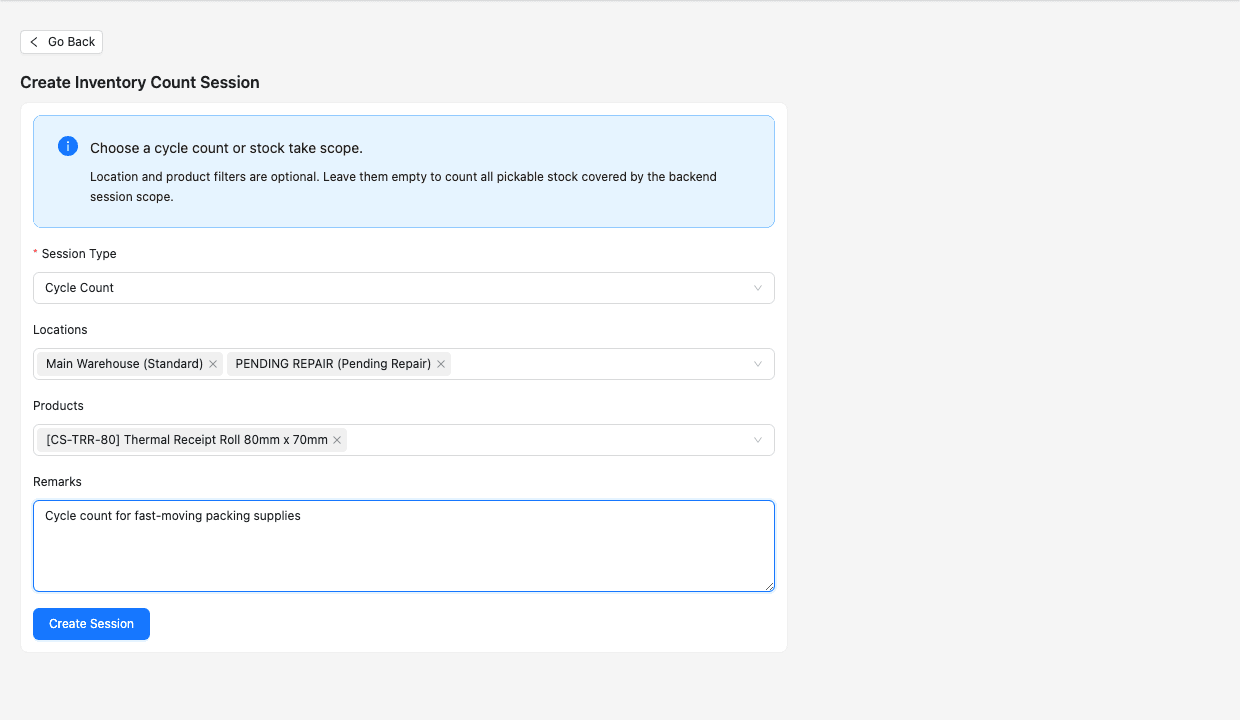
Start with a cycle count for targeted recurring checks or a stock take for a broader physical-count exercise.
Select relevant locations and products when the count should focus on a warehouse area, exception zone, or product group.
Use remarks and the later expected, counted, variance, note, status, and approval fields to keep the reconciliation understandable.
TREX Grow is a practical fit when the warehouse needs structured location and fulfilment control connected to sales, purchasing, stock, and returns. Test real exceptions and distinguish supported WMS depth from specialist enterprise or manufacturing requirements.
Agree how warehouses, zones, racks, bins, returns, damage, repair, and other areas will be named and nested before users begin moving stock.
Confirm what arrived through the stock-entry workflow, then record where the units were allocated. A receiving source and a warehouse destination answer different questions.
If the quantity already exists and only the source and destination location change, use the transfer workflow. Use returns or adjustments for their intended exceptions.
Evaluate quotation or order source, pick planning, picked quantity, packing, delivery, exceptions, PDFs, and the status that actually changes warehouse inventory.
Freeze or document the relevant transaction cut-off and compare the same product, unit, location, status, and pickability rules before approving a variance.
Treat mobile scanning, barcode hardware, serial, batch, expiry, wave or zone optimisation, carrier integration, automation, manufacturing MRP, labour planning, and advanced costing as separate requirements.
Use this table to match TREX Grow warehouse controls to the physical work your Malaysian SME needs to govern.
| Requirement | TREX Grow workflow | What to verify |
|---|---|---|
| Warehouse locations | System locations for WMS-lite and Premium custom location hierarchy | Your required sites, zones, nesting, naming, and plan |
| Product placement | Product-by-location and location-by-product summaries | Sellable, non-sellable, return, damage, and repair rules |
| Location transfer | Source, destination, product, and quantity movement without a new stock entry | Who can transfer, allocate, review, and correct mistakes |
| Picking and packing | Picking lists from supported sales or fulfilment sources with pick execution and PDF output | The exact source, status, exception, and delivery handoff your team uses |
| Warehouse movement history | Premium product and location ledgers with movement references | Required filters, users, dates, movement types, and reconciliation evidence |
| Inventory counts | Cycle count or stock take sessions with optional location and product scope | Count cut-off, expected quantity, variance review, note, and approval procedure |
| Specialist WMS scope | Connected SME receiving, placement, transfer, picking, fulfilment, ledger, and count workflows | Separate scanning, serial, batch, expiry, automation, carrier, MRP, labour, and costing needs |
The best practice is to make the next action clear before the situation becomes urgent.
The solution suits SMEs whose warehouse questions now depend on location and execution rather than only product totals. It is especially relevant when purchasing, warehouse, fulfilment, returns, and counts affect the same stock across several users.
The business often knows that stock exists but loses time finding the correct warehouse area, bin, return zone, or repair location.
Separate sheets or informal moves cause the product total and the sum of warehouse-location quantities to disagree.
The team needs a clear location-to-location movement that preserves the company-wide quantity and retains the source and destination.
Warehouse staff need fulfilment work connected to supported quotations, orders, delivery context, picked quantities, packing, and PDFs.
The operation is moving from ad hoc corrections toward cycle counts or stock takes with defined location, product, variance, note, and approval steps.
The team understands that advanced scanning, serial, batch, expiry, automation, carrier, labour, manufacturing, and costing requirements must be verified separately.
Create a TREX Grow workspace, add one current product, then test receiving, location allocation, a pure transfer, a pick-and-delivery handoff, and a scoped count. Start with core product records and use the paid-plan trial when your team is ready to evaluate Essential WMS-lite or Premium warehouse controls.
Warehouse management software helps a business organise where stock is stored and control how it is received, placed, transferred, picked, packed, delivered, counted, and reviewed. A practical WMS connects product, quantity, location, source, user, status, and movement evidence rather than showing only a company-wide total.