The latest balance has no explanation
Staff can see 500 units but cannot tell whether the change came from receiving, fulfilment, a customer return, a supplier return, an adjustment, or a count correction.

TREX Grow helps Malaysian SMEs see a product's available, incoming, and reserved quantities, then follow its history through stock entries, delivery orders, returns, and inventory adjustments. Instead of treating the latest total as the whole answer, your team keeps the item, source, status, creator, date, and plan-dependent location context close enough to investigate what happened.
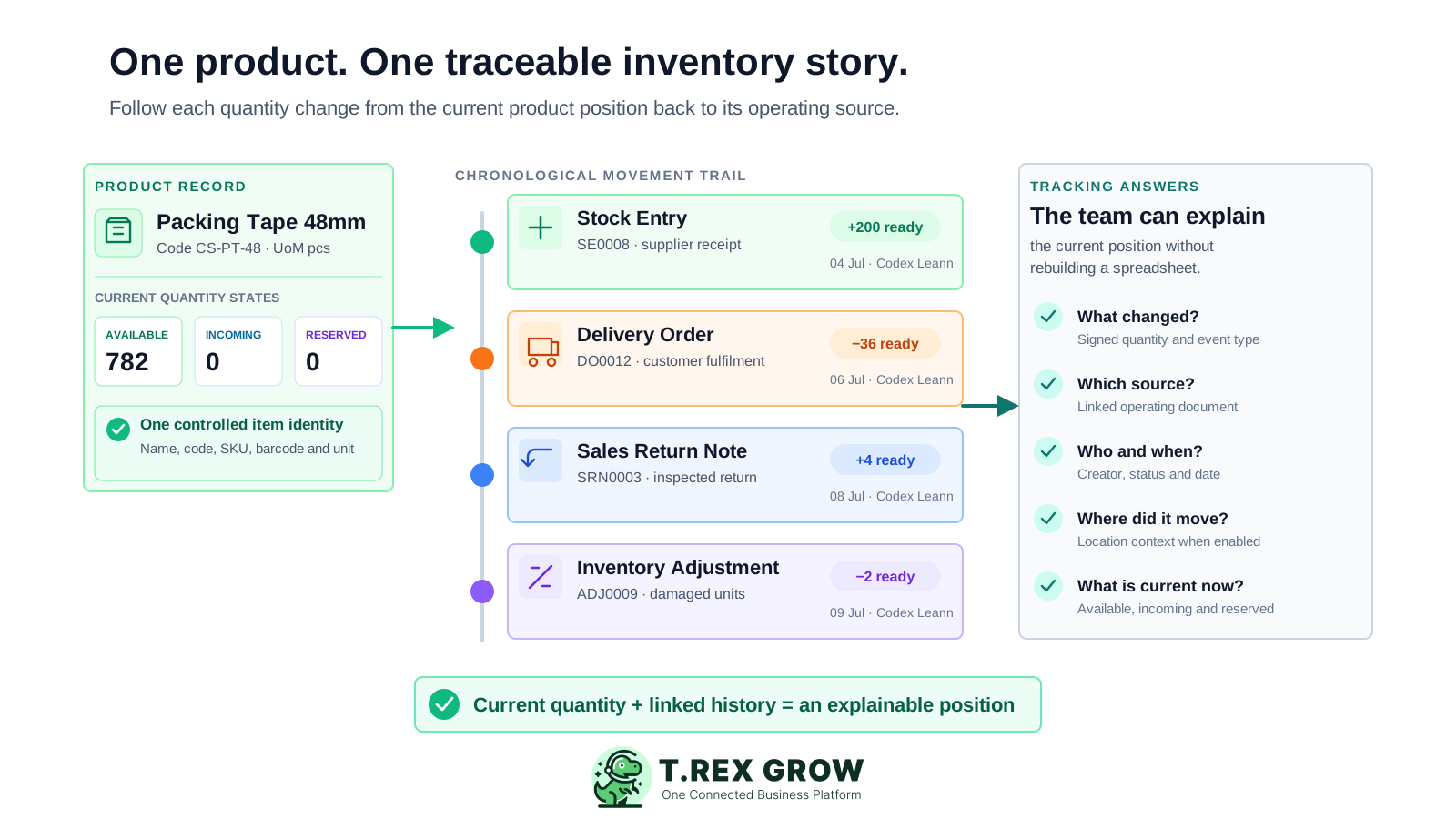
An inventory tracking system should do more than display the latest number. It should help the team identify the exact product, understand what each quantity state means, and follow a change back to the operating record that made it effective.
Operational pressure
When records live in different places, the person responsible has to reconstruct what happened before they can make a confident decision or follow up.
Staff can see 500 units but cannot tell whether the change came from receiving, fulfilment, a customer return, a supplier return, an adjustment, or a count correction.
A product name, internal code, SKU, barcode, unit, and supplier description are copied differently across files. Movements are posted to the wrong row or pack size.
A purchase order or planned delivery is treated as a completed movement. The tracker cannot show which units are expected, already available, or committed.
The stock sheet contains a note, while the purchase order, delivery, return, approval, attachment, or reason remains in email, chat, paper, or another account.
The company-wide total looks correct, but the units are in a different bin, damaged area, return area, showroom, or warehouse from the one staff expect.
A direct quantity edit makes the total look right without resolving whether the original problem was a missing document, delayed posting, wrong unit, wrong location, duplicate record, or true variance.
A spreadsheet can calculate a running balance, but it rarely governs identity, status, links, permissions, and location context across several operating teams. The failure appears when somebody asks why a quantity changed rather than what the latest cell contains.
Recurring issues usually point to workflow-control gaps, not one isolated data-entry mistake.
Editing the current total removes the previous position and the signed event between them. The team cannot reconstruct which movement was missed, duplicated, or reversed.
A short note tries to hold the document number, person, date, status, customer, supplier, location, and reason. Each user writes it differently and links nothing.
One user enters the order date, another uses the receiving date, and another posts at the end of the week. Sorting the sheet does not recreate the real movement sequence.
Expected receipts, pending deliveries, approved returns, completed movements, cancelled documents, and archived records appear in the same list without a dependable status rule.
Two rows represent the same item or one row mixes cartons, packs, and pieces. The arithmetic can be correct while the inventory meaning is wrong.
Staff wait for a stock take to discover months of missing source records. The count finds a difference but does not automatically explain which operating event caused it.
Evaluate the system by the questions it resolves. A useful tracker should move from product identity to current state, then from each movement to its source and operating context without forcing the reader to rebuild a second ledger.
Use a controlled product name, product code, SKU, barcode field, unit of measure, category, and approval status before reviewing quantity.
Show available, incoming, and reserved quantities separately so expected receipts and supported commitments are not mistaken for free stock.
Identify the delivery order, stock entry, inventory adjustment, sales return, purchase return, location movement, or inventory count behind the change.
Keep draft, pending, approved, finalised, returned, archived, cancelled, or other supported states visible so planned work does not silently become actual stock.
Retain creator, date, permissions, and approval context so the team knows who can verify the event and which operating cut-off applies.
Use company-wide quantity first, then add system or custom locations, transfers, ledgers, picking, and count sessions when the warehouse needs location-level evidence.
The latest quantity becomes easier to trust when the product identity, quantity state, movement event, source document, and responsibility or location context stay connected. Each layer answers a different operational question instead of repeating the same total.
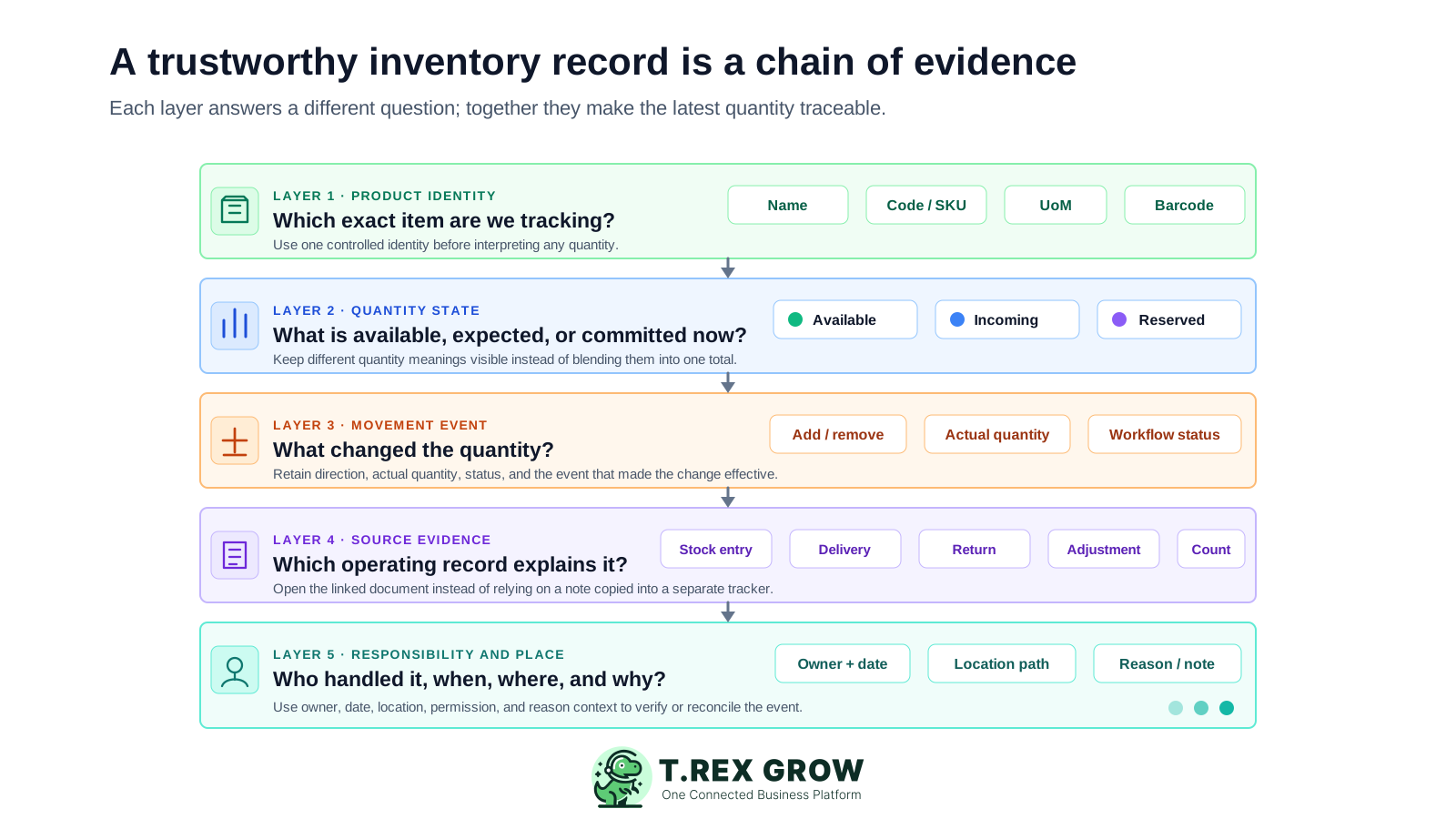
The item name, code, SKU, barcode field, unit, categories, supplier links, and approval status establish what the team is tracking.
Available, incoming, and reserved quantities separate the current system position from expected supply and supported customer commitments.
The event records whether quantity was added, removed, reserved, received, returned, transferred, or adjusted and whether the workflow is ready.
The product history links supported stock entries, delivery orders, inventory adjustments, sales returns, and purchase returns back to their operating records.
Creator, date, permissions, approval, customer, supplier, reason, and attachments provide the context needed to review a questionable movement.
Plan-dependent locations, product or location ledgers, transfers, picking, and inventory count sessions add warehouse depth when company-wide history is not enough.
TREX Grow supports a repeatable investigation path. Start with one controlled product, read its quantity states, open the relevant history event, follow the source record, verify the operating context, and reconcile only after the evidence uses the same item, unit, status, location, and cut-off.
Record the current facts in one shared place.
Confirm what is known and what needs attention.
Make the next decision or follow-up accountable.
Complete the next task and record the outcome.
Refresh the shared view when facts change.
A dependable workflow keeps the shared record and the next action aligned.
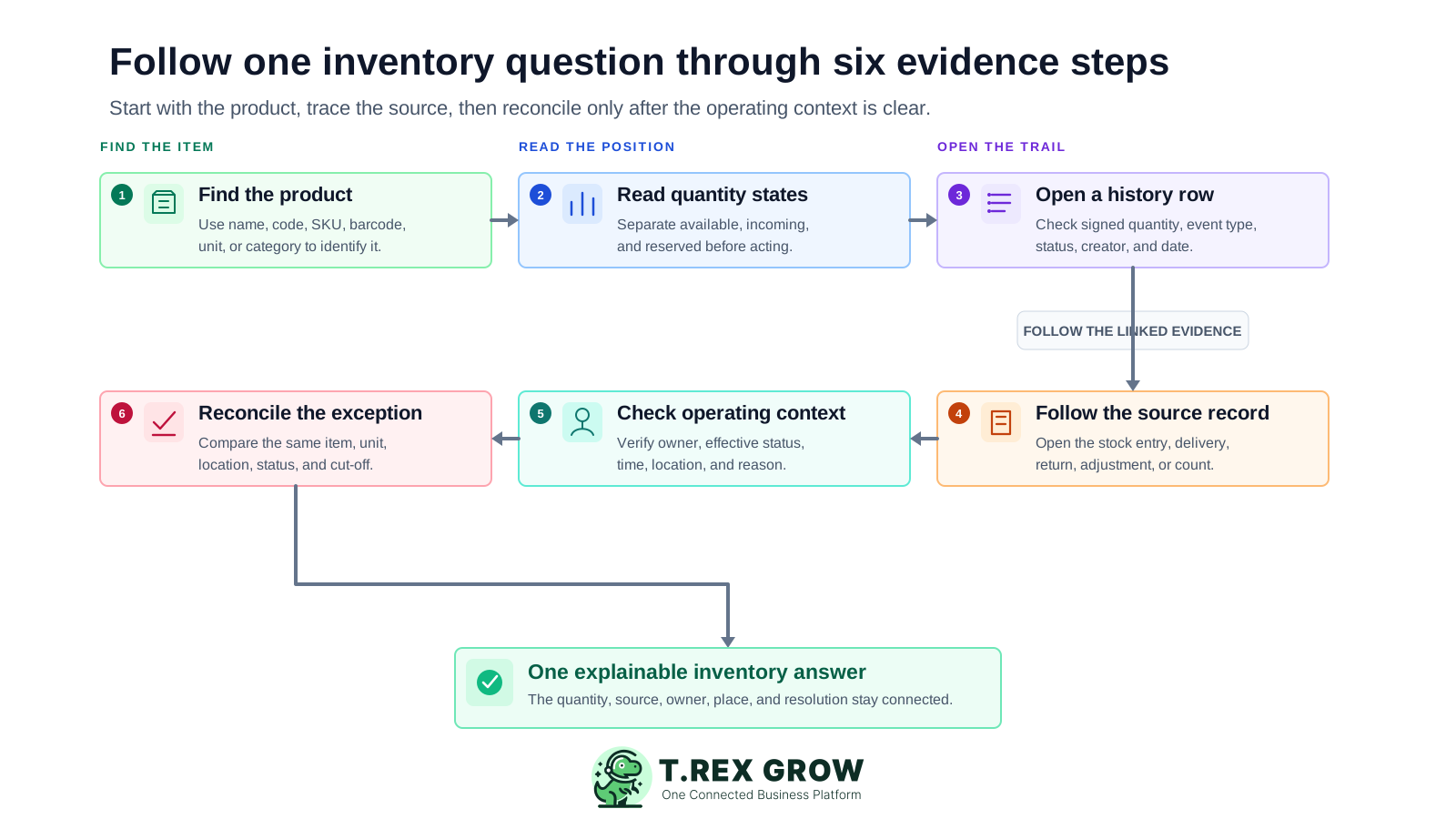
Find the controlled product: search by the supported product identity and confirm the code, SKU, barcode field, unit, category, approval status, and active or archived state before reading quantity.
Read the quantity states: distinguish available, incoming, and reserved quantities. Do not assume a physically present unit is available or an ordered unit has already been received.
Open the relevant product-history row: review the movement type, signed quantity, readiness or status, creator, date, customer or supplier context, and linked record.
Follow the source document: open the stock entry, delivery order, inventory adjustment, sales return note, purchase return note, transfer, ledger event, or count session that matches the question.
Check the operating context: confirm the actual quantity, item unit, document status, owner, date, location, reason, remarks, and supporting files that make the movement understandable.
Reconcile the exception: compare the physical observation with the same product, unit, status, location, and cut-off. Use the correct missing document, return, transfer, or count path before posting an adjustment.
TREX Grow brings product records and movement evidence into one connected operating system. Access depends on the plan and user permissions, so test the exact history, source-document, location, and count path your team needs.
Manage product name, code, optional SKU and barcode fields, unit of measure, categories, suppliers, reorder information, approval status, and archive state from one product profile.
Review distinct quantity states from the product context rather than relying on one number that mixes usable stock, expected receipts, and commitments.
Review supported delivery orders, stock entries, inventory adjustments, sales returns, and purchase returns with quantities, readiness, source links, creator, date, customer, or supplier context.
Move from Product History into supported Delivery Orders, Stock Entries, Inventory Adjustments, Suppliers, Locations, and Ledger views without creating a separate tracker.
Use plan- and permission-aware create, view, edit, approve, archive, transfer, and warehouse actions so inventory evidence has clearer responsibility.
Premium warehouse workflows add custom locations, product and location summaries, transfers, and product or location ledgers for deeper movement history.
Premium inventory count sessions help the team select locations and products, enter counted quantities, review variances, and approve stock adjustments through a controlled workflow.
This safe-demo product profile shows the current available, incoming, and reserved quantities beside a linked Product History row. The screen keeps the inventory adjustment number, signed quantity, creator, date, product code, SKU, unit, status, and reorder context within one operational view.
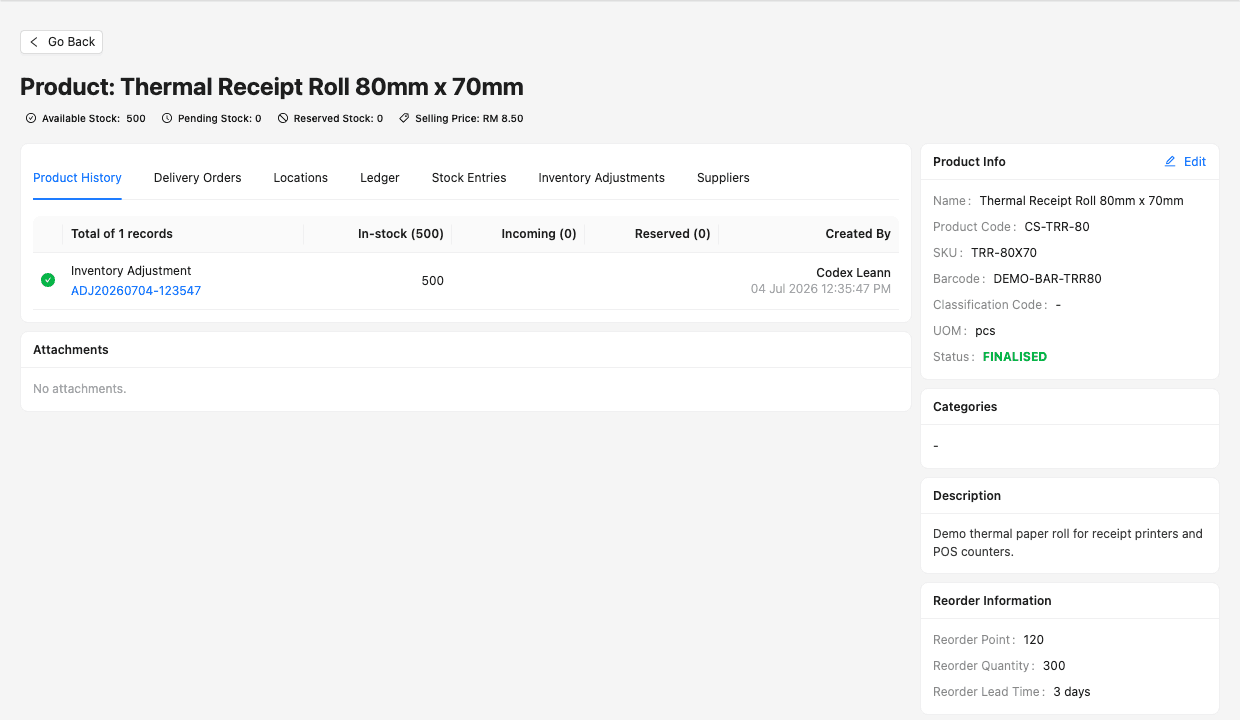
The user can compare the available, incoming, and reserved quantities with the events listed in the same product profile.
The adjustment number is a link rather than a copied note, allowing the reviewer to open the source record for more context.
The product code, SKU, barcode field, unit, status, creator, date, and reorder information reduce ambiguity while the movement is reviewed.
TREX Grow is a practical fit when the main requirement is to connect product quantities to their operating history. Separate daily movement control, broader inventory planning, specialist warehouse execution, and manufacturing traceability so the evaluation remains honest.
Choose the fields that make one item unique and decide how staff handle pack sizes, units, inactive records, duplicate codes, and product approval.
Explain when available, incoming, and reserved quantities change in your workflow so sales, purchasing, warehouse, and finance interpret them consistently.
Check for a missing receipt, delivery, return, transfer, or status change before using an inventory adjustment to change the quantity.
Compare system and physical evidence for the same product, unit, status, location, and time. Otherwise a timing difference can look like a stock variance.
Verify who can view history, create or approve movements, manage products, use locations, inspect ledgers, perform transfers, and approve counts.
Treat POS, manufacturing MRP, production scheduling, scanning, serial, batch, expiry, costing, e-commerce, marketplace, and integration requirements as separate evaluation items.
Use this table to distinguish TREX Grow inventory traceability from adjacent software requirements before choosing a plan or workflow.
| Question | TREX Grow tracking path | What to verify |
|---|---|---|
| Which product is affected? | Product profile with name, code, SKU, barcode field, UoM, category, supplier, status, and archive state | Your unique-item and pack-size rules |
| What is the current system position? | Available, incoming, and reserved quantities from the product context | When each state changes in your workflow |
| Why did the quantity change? | Product History with supported delivery, stock-entry, return, and adjustment events | The exact document status that makes each movement effective |
| Who recorded it and when? | Creator, date, linked source, customer or supplier context, permissions, and approvals | Role ownership and operating cut-off |
| Where are the units? | Plan-dependent system or custom locations, transfers, product summaries, and ledgers | Whether Essential or Premium location depth fits your sites |
| How is a difference reconciled? | Source-document review, structured adjustments, and Premium inventory count sessions | Evidence, reason, approval, unit, location, and count procedure |
| Do we need specialist traceability? | Connected SME product, inventory, purchasing, sales, return, and warehouse records | Separate serial, batch, expiry, scanning, MRP, POS, costing, and integration needs |
The best practice is to make the next action clear before the situation becomes urgent.
The solution suits SMEs that need to answer item-level inventory questions from connected business records. It is strongest when purchasing, fulfilment, returns, adjustments, and warehouse work already affect the same products across several users.
Staff regularly combine purchase orders, delivery records, return notes, adjustment sheets, and messages to explain one item's latest quantity.
Purchasing, warehouse, sales, fulfilment, and finance need one controlled product identity and a shared movement trail.
The operation needs available, incoming, and reserved quantities to carry distinct meanings before staff make a promise, purchase, or fulfilment decision.
The business wants each correction tied to a reason, owner, status, evidence, and approval path instead of an unexplained total edit.
Company-wide history is no longer enough and the team is preparing for locations, transfers, ledgers, picking, or formal count sessions.
The team understands that broader planning, daily stock control, specialist warehouse execution, manufacturing, scanning, serial, batch, expiry, costing, and integrations may require separate evaluation.
Create a TREX Grow workspace, add one current product, then test whether your team can identify its quantity states and trace a movement to the source, creator, date, status, and location context. Start with core product records and use the paid-plan trial when you are ready to evaluate stock entries, adjustments, ledgers, and warehouse controls.
An inventory tracking system helps a business identify products, see current quantity states, record or connect inventory movements, and trace changes through their source, status, owner, date, and location context. It should help explain why a quantity changed, not only display the latest total.