The request is treated as proof of movement
A purchase order, transfer request, sales order or return request states what should happen. It does not prove which item, unit and quantity were actually received, handed over or accepted.

Efficient stock movement is not the fastest possible quantity update. It is a repeatable handoff where the actual item, unit, quantity, source, destination, status, owner and time are confirmed once, while shortages and mismatches move into a visible exception lane.
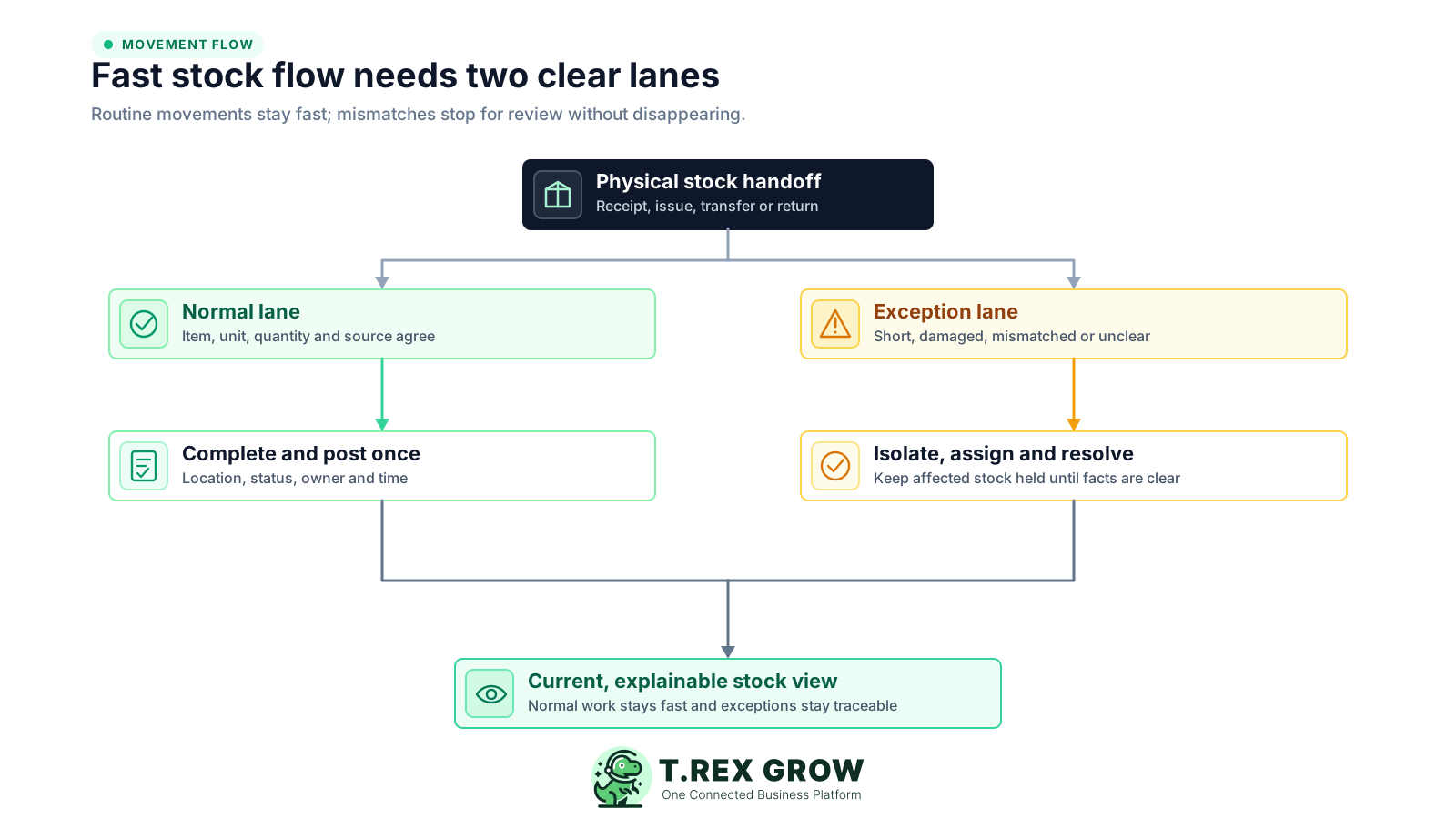
Every receipt, issue, transfer and return has two parts: stock changes physically and the shared record changes operationally. When those moments use different quantities, owners or timing, staff either wait for an answer or move quickly with a stock view nobody can trust.
Operational pressure
When records live in different places, the person responsible has to reconstruct what happened before they can make a confident decision or follow up.
A purchase order, transfer request, sales order or return request states what should happen. It does not prove which item, unit and quantity were actually received, handed over or accepted.
Staff post the expected quantity first and plan to correct shortages, excess, substitutions or damage later. The temporary number then reaches purchasing, fulfilment and customer decisions.
One person loads, receives or issues the goods while another updates the record from a message. Missing context turns a simple handoff into a later investigation.
The source location decreases before the destination confirms receipt, or each location uses an unrelated adjustment. Stock can appear lost, duplicated or available in the wrong place.
A damaged carton, missing source document or quantity mismatch blocks the same queue used by routine movements, even when the unaffected items could be completed safely.
Units may be physically present but reserved, returned, quarantined, damaged, in transit or stored elsewhere. Updating only the total can make unavailable stock look usable.
Paper notes, spreadsheets and chat messages hold unposted movements until the end of the shift or week. During that gap, nobody knows which view reflects the latest physical position.
A movement record does not need a long form, but it must answer the same operational questions every time: what changed, how much, where it moved, which event made it effective and who can explain it. Consistent fields make routine work faster because staff stop inventing the record for each transaction.
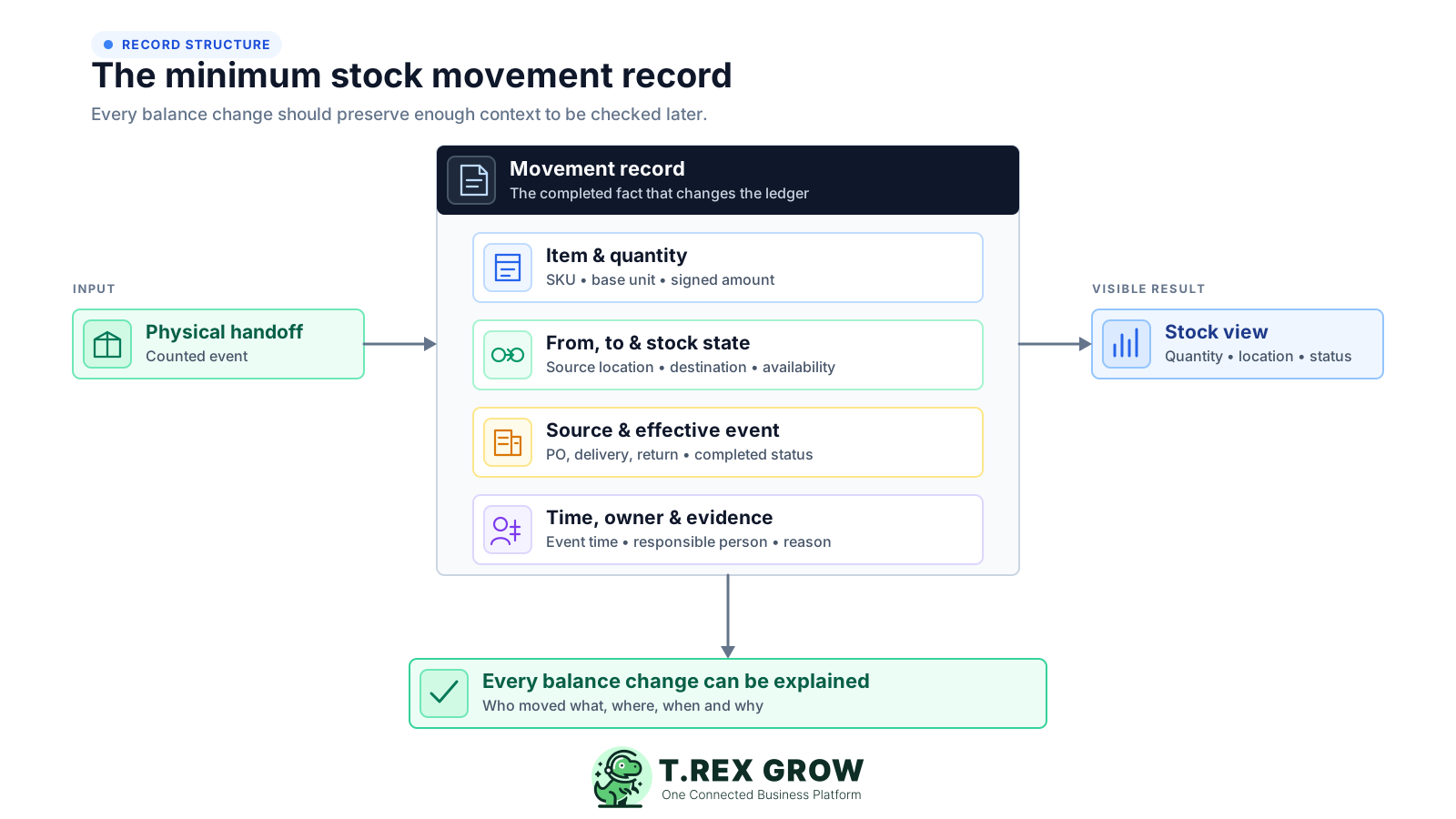
State whether the event is a receipt, issue, transfer, return, internal use, damage, write-off, reversal or adjustment, and define the completed or approved point that changes stock.
Use the controlled product code or SKU and a known unit. Convert cartons, packs, pieces, kilograms, metres or litres according to one documented rule.
Record what physically changed hands and whether the event adds, removes, moves or reclassifies stock. Keep expected and outstanding quantities separate.
Preserve the source and destination when location changes, and show whether the units are available, reserved, in transit, returned, quarantined, damaged or otherwise held.
Link the movement to the purchase, delivery, transfer, return, count, damage note or other operating record. Use a specific reason for exceptions and corrections.
Keep who prepared, handed over, received, checked or corrected the movement, when the physical event occurred, when it was posted and any supporting note or attachment.
Use one sequence across receiving, stock out, branch transfers, customer returns and internal movements. The details may differ by event, but the discipline stays the same: prepare, verify, count, hand over, post and resolve.
Record the current facts in one shared place.
Confirm what is known and what needs attention.
Make the next decision or follow-up accountable.
Complete the next task and record the outcome.
Refresh the shared view when facts change.
A dependable workflow keeps the shared record and the next action aligned.
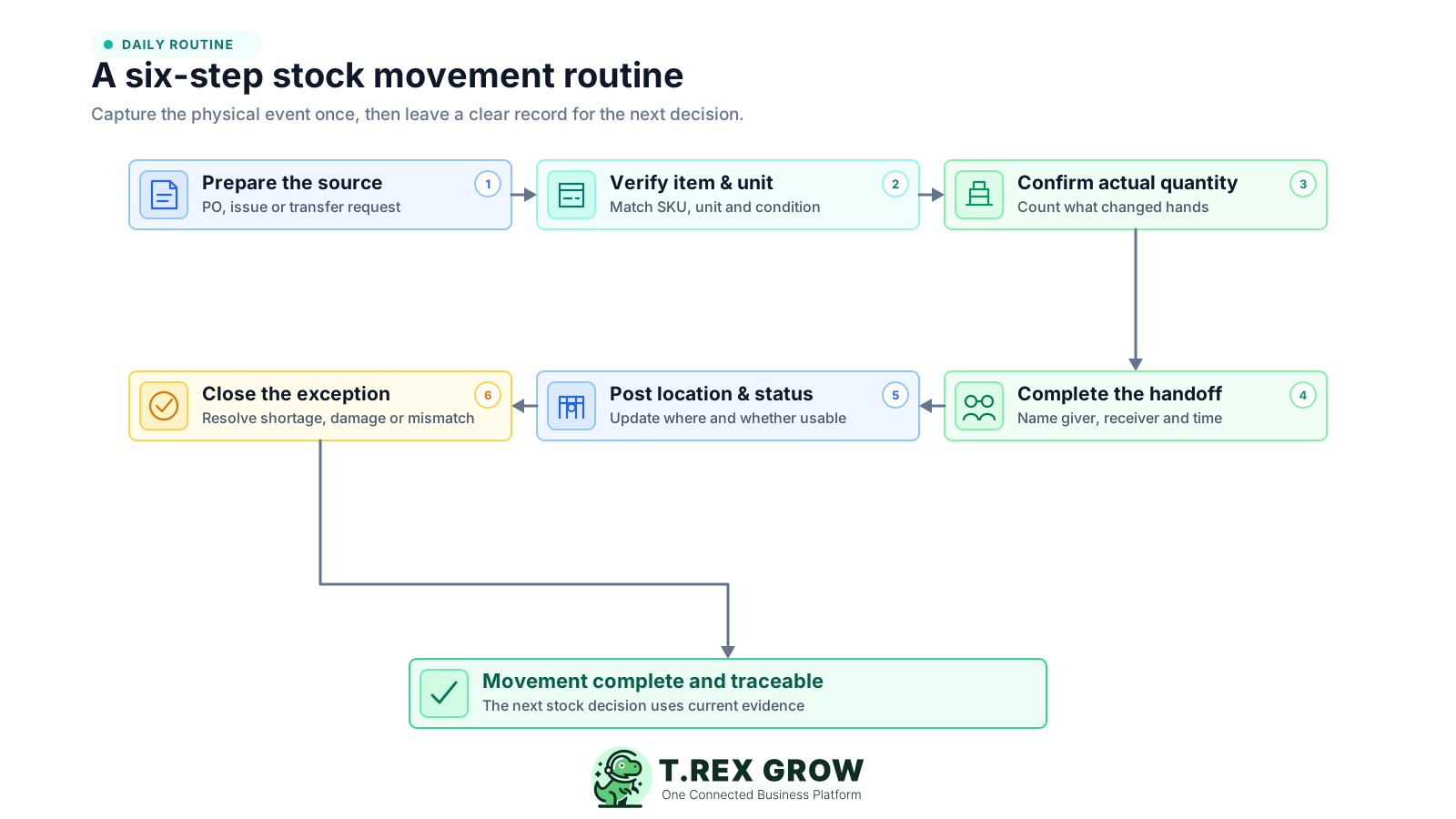
Prepare the source: start from the purchase order, delivery requirement, transfer request, return record, internal-use request or approved reason that explains why stock should move. Keep a planned event separate from a completed event.
Verify the item, unit and condition: match the controlled product record, confirm the base unit or pack conversion, and inspect whether the goods are acceptable, damaged, expired, substituted or otherwise different from the request.
Confirm the actual quantity: count, weigh or measure what physically changes hands. Record accepted, rejected, outstanding and unexpected quantities separately instead of forcing the request and reality to match.
Complete the handoff: identify the person or team giving and receiving the stock, the source and destination, and the event time. For a transfer, preserve the in-transit state until the destination confirms receipt.
Post the location and status once: update the completed event against the correct item and avoid retyping the same quantity into unrelated trackers. Make the new location and usable, reserved, held, returned or damaged status visible.
Close the exception: isolate the affected quantity, assign an owner, trace the source evidence and record the outcome. Correct the source event or use a controlled reversal or adjustment without deleting the earlier trail.
The fastest-looking shortcut often moves effort into a later reconciliation. These habits weaken the relationship between the physical event, the quantity change and the evidence needed to explain it.
Recurring issues usually point to workflow-control gaps, not one isolated data-entry mistake.
A receipt, delivery, return or transfer should use its normal movement path. An adjustment is for a genuine correction or exception, not a shortcut around missing operating records.
Ordered, requested and expected quantities help staff prepare. Only the quantity actually accepted, issued, moved or returned should complete the movement.
A decrease at one location and increase at another must remain one linked movement. Separate edits make in-transit shortages and duplicate posting harder to find.
Item codes, pack sizes, quantities, condition and recipients are easily misremembered. Capture the movement at the handoff or use a short, owned posting window with a visible pending queue.
Returned, damaged, quarantined, reserved and in-transit units may exist physically but should not automatically be promised to a customer or included in pickable stock.
Removing the evidence makes the new balance difficult to rebuild. Preserve the original event and use a linked reversal, correction or approved adjustment with a reason.
Hiding an exception corrupts the balance, while stopping all work creates unnecessary delay. Separate the affected quantity, complete safe items and send the mismatch to an owned review lane.
An exception lane is a controlled place for quantities that cannot complete the normal path. It protects the stock view without forcing every routine movement to wait for one uncertain carton, unit, document or status.
Complete only the accepted quantity, retain the outstanding balance against the source and assign the shortage for supplier or receiving follow-up.
Pause the affected line, confirm the SKU and conversion, then correct the source or return the item. Do not post it temporarily to the closest product record.
Move the quantity into a defined held, damaged or quarantine status and prevent normal fulfilment until the inspection or decision is complete.
Preserve what the source dispatched, what the destination received and the quantity still in transit or under review. Do not silently force both locations to agree.
Record that the goods arrived, but keep them unavailable until the team confirms condition, ownership, refund or replacement treatment and final stock status.
Keep the movement pending with an owner and due time. Retain both the physical event time and posting time so the next cut-off and reconciliation can identify the gap.
Efficiency comes from removing ambiguity and duplicate entry, not from skipping checks. Use proportionate controls: routine low-risk movements should be quick, while sensitive adjustments, unusual quantities and repeated exceptions deserve stronger review.
Agree the normal path and effective event for receipts, issues, transfers, returns, internal use, damage, write-offs, reversals and adjustments so staff choose by purpose.
Record or confirm the event where stock changes responsibility. If immediate posting is impractical, set a short same-shift or same-day window and monitor the pending queue.
Name the source sender and destination receiver, define when stock becomes in transit and require destination confirmation before the transfer is treated as complete.
Keep requests, drafts, expected quantities and open balances visible without letting them change usable stock before the agreed effective event.
Correct the source movement when possible. When a reversal or adjustment is needed, retain the original reference, signed quantity, reason, owner, review and evidence.
Track handoff-to-posting time, pending movements, exception age, transfer completion time, reversal rate and repeated causes. A current balance alone does not show process efficiency.
Use this matrix to define when each movement becomes effective, which evidence travels with it and who owns an exception.
| Movement | Effective event | Minimum evidence | Exception owner |
|---|---|---|---|
| Supplier receipt | Quantity physically received, checked and accepted | Purchase or delivery source, item, unit, accepted, rejected and outstanding quantities, receiver, location and time | Receiving or purchasing owner |
| Customer issue or delivery | Quantity handed over, dispatched or otherwise completed under the agreed fulfilment rule | Sales or delivery source, item, unit, issued quantity, recipient, source location, status and time | Fulfilment or sales operations owner |
| Location transfer | Destination confirms the linked handoff under the defined in-transit rule | One transfer reference, item, unit, sent and received quantities, source, destination, sender, receiver and timestamps | Source and destination location owners |
| Customer return | Returned quantity is received and assigned an inspection status | Original sale or delivery, item, unit, quantity, condition, return reason, receiver, location and availability status | Returns or customer operations owner |
| Supplier return | Quantity is handed back or dispatched under the supplier-return rule | Purchase or receipt source, item, unit, quantity, reason, supplier, source location, owner and time | Purchasing or warehouse owner |
| Internal use, damage or write-off | Quantity is issued, classified or approved according to its risk | Item, unit, signed quantity, location, purpose or condition, owner, evidence and approval where required | Department owner and designated reviewer |
| Reversal or adjustment | Correction is reviewed and posted with a link to the original event where available | Original reference, signed quantity, reason, evidence, creator, reviewer, date and resulting stock state | Inventory control or authorised manager |
The best practice is to make the next action clear before the situation becomes urgent.
A practical transfer shows why movement efficiency is about clear states, not just speed. Assume Branch A sends 24 cartons to Branch B, but Branch B counts only 22 on arrival.
Branch A reduces a spreadsheet after loading the van and messages Branch B. Branch B later increases its own sheet by 22 cartons. The missing two have no shared transfer reference, owner or status.
The request names the controlled SKU, carton-to-base-unit conversion, 24-carton quantity, source, destination, sender, receiver and expected handoff time.
Branch A records 24 cartons dispatched. Branch B records 22 received at arrival rather than copying the request. The two confirmations remain connected to the same transfer.
The record preserves 22 cartons received and two cartons still in transit or under review. Branch B does not overstate available stock, and Branch A does not lose the evidence.
The owner checks the van, loading evidence, units, timestamps and condition. When the two cartons are found or their outcome is confirmed, the location and status are updated through the linked movement trail.
After the operating rules are clear, TREX Grow can bring product, purchasing, delivery, return, adjustment and warehouse context closer to the movement record. Available depth depends on the plan and user permissions, so match the workflow to the controls your team actually needs.
Keep product names, codes, optional SKU and barcode fields, units, categories, supplier links and approval status in a shared product context before staff create movements.
Start supported receiving work from purchase-order or purchase-return context and distinguish the expected quantity from what the team actually receives and checks.
Keep supported delivery orders, sales returns and purchase returns close to the product history so customer and supplier movements are easier to trace.
Use product, quantity, reason, remarks, attachments, status and permission-aware workflow for genuine corrections instead of an unexplained balance edit.
Review available, incoming and reserved quantities from the product context so expected supply and supported customer commitments are not compressed into one number.
Where included, locations, pure transfers, product or location ledgers, picking and inventory count sessions add deeper movement and reconciliation control.
Start by defining one effective event, one minimum record and one exception owner for each movement type. Then see how TREX Grow can support the connected inventory workflow.
A stock movement is a completed event that changes an item's quantity, location or operational stock state. Common examples include supplier receipts, customer issues or deliveries, location transfers, customer or supplier returns, internal use, damage, write-offs, reversals and reviewed adjustments. A purchase order, sales order or transfer request is normally a plan until the agreed physical or approved event occurs.