Phase 1 Inventory Guide

How SMEs Should Track Inventory Properly

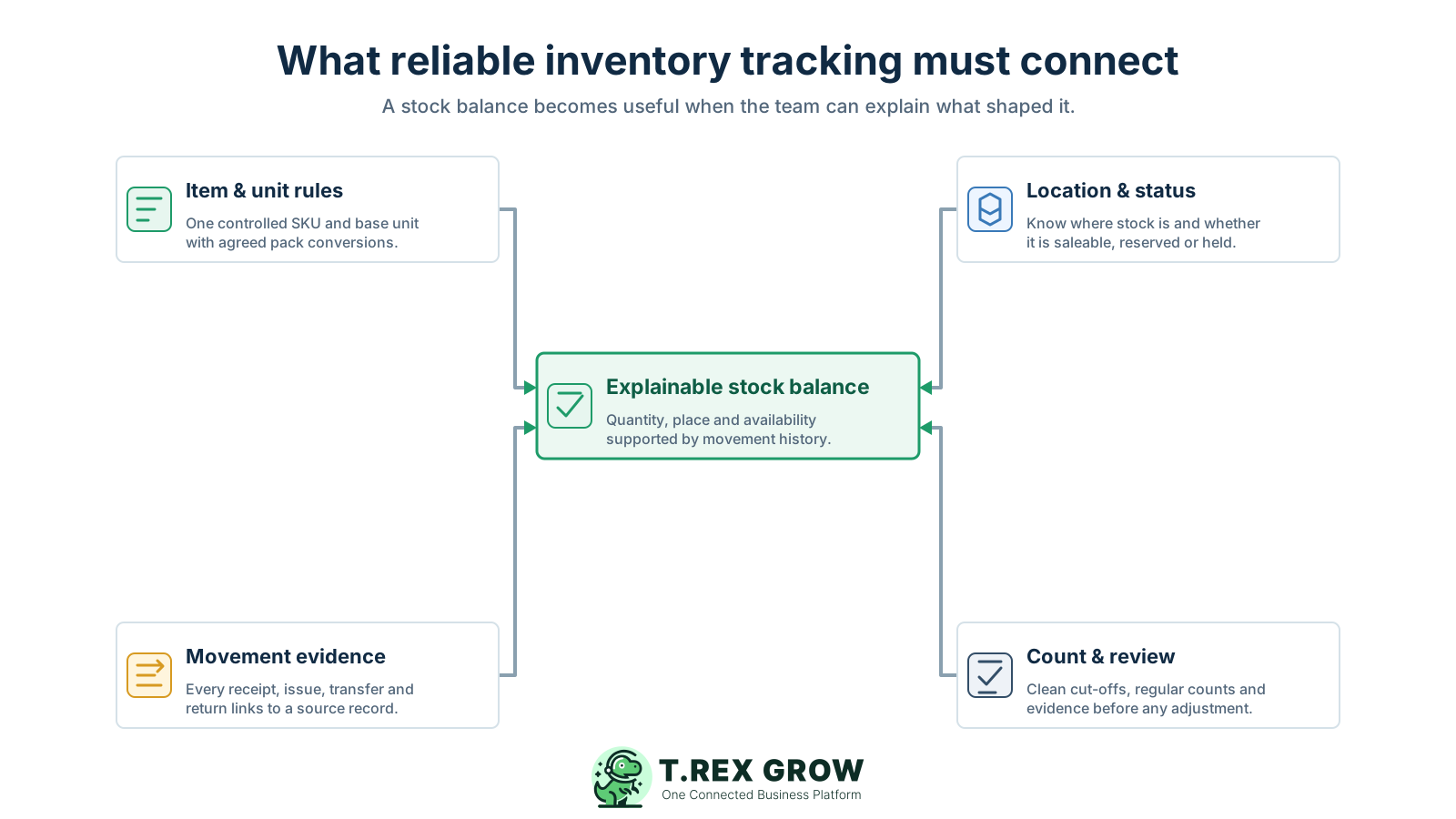
Proper inventory tracking means the physical movement and the business record stay together. Each receipt, issue, transfer, return, write-off, and approved correction should update the correct item, unit, location, status, and date so the team can explain the balance.

Four foundations of reliable SME inventory tracking connecting item and unit rules, location and status, movement evidence, and count and review controls to one explainable stock balance
Problem

Proper inventory tracking is more than updating a quantity

A stock total is useful only when the team knows what the item is, where the units are, whether they are available, and which completed events created the balance. Tracking only the latest number removes the history needed for purchasing, fulfilment, counting, and review.

Operational pressure

The next action is easy to lose when context is scattered.

When records live in different places, the person responsible has to reconstruct what happened before they can make a confident decision or follow up.

Scattered recordsUnclear ownershipAvoidable surprises
High risk

A balance without movement history cannot be checked

If the team cannot trace a quantity change to a receipt, delivery, issue, transfer, return, write-off, count, or approved adjustment, the number becomes another claim rather than operational evidence.

Different item identities split one stock position

Duplicate SKUs, inconsistent descriptions, and mixed pack sizes can place receipts on one record while sales, warehouse staff, or counts use another.

Expected stock is confused with available stock

A purchase order, pending delivery, reserved quantity, or returned item under inspection should not silently become stock that sales can promise to a customer.

High risk

Physical movements are posted late

When goods move first and records are updated at the end of the day or week, every report between those moments can show the wrong quantity, location, or availability.

Company-wide totals hide location problems

The business may own enough units overall while the warehouse, branch, van, showroom, damaged area, or return area needed for the order does not hold them.

Blind adjustments make the next error harder to find

Changing the total to match a count can restore today's number, but it does not repair the receiving, issuing, transfer, return, unit, or timing rule that caused the difference.

Education

Set the inventory rules before recording movements

Reliable tracking begins with a small set of shared definitions. Decide how the business identifies an item, measures it, classifies its stock state, records a movement, and handles corrections before several teams start entering transactions.

A useful record supports the next decision

The work is easier when the team can see the current facts, the responsible person, and the next action without reconstructing the history from separate tools.

Shared operating context
Clear ownership and status
A visible next action

Set up the team view

1

Define the shared fields

  • - Use current facts
  • - Keep details consistent
2

Assign the next action

  • - Name an owner
  • - Set a review date
3

Keep it current

  • - Record changes
  • - Resolve exceptions

Give each stock item one controlled identity

Use a unique product code or SKU, a clear name, and only the attributes needed to distinguish the item. Review possible duplicates before creating another record.

Choose a base unit and document conversions

Decide whether the ledger is kept in pieces, cartons, kilograms, metres, litres, or another base unit. Record agreed conversions when suppliers and customers use different pack sizes.

Define locations that match real handoffs

Track warehouses, branches, vans, project sites, showrooms, or controlled stock areas only where the location changes how staff receive, find, transfer, count, or fulfil the item.

Separate quantity from stock status

Define when units are available, incoming, reserved, quarantined, damaged, expired, or returned for inspection so staff do not treat every physical unit as saleable.

Agree when a movement becomes effective

Specify which completed or approved event updates stock. A draft purchase, planned delivery, pending return, or cancelled document should not change the usable balance without a clear rule.

Control adjustments and reversals

Require a reason, owner, date, source evidence, and proportionate review for corrections. Preserve the earlier movement trail instead of overwriting the latest total.

Education

Use one movement ledger as the stock source of truth

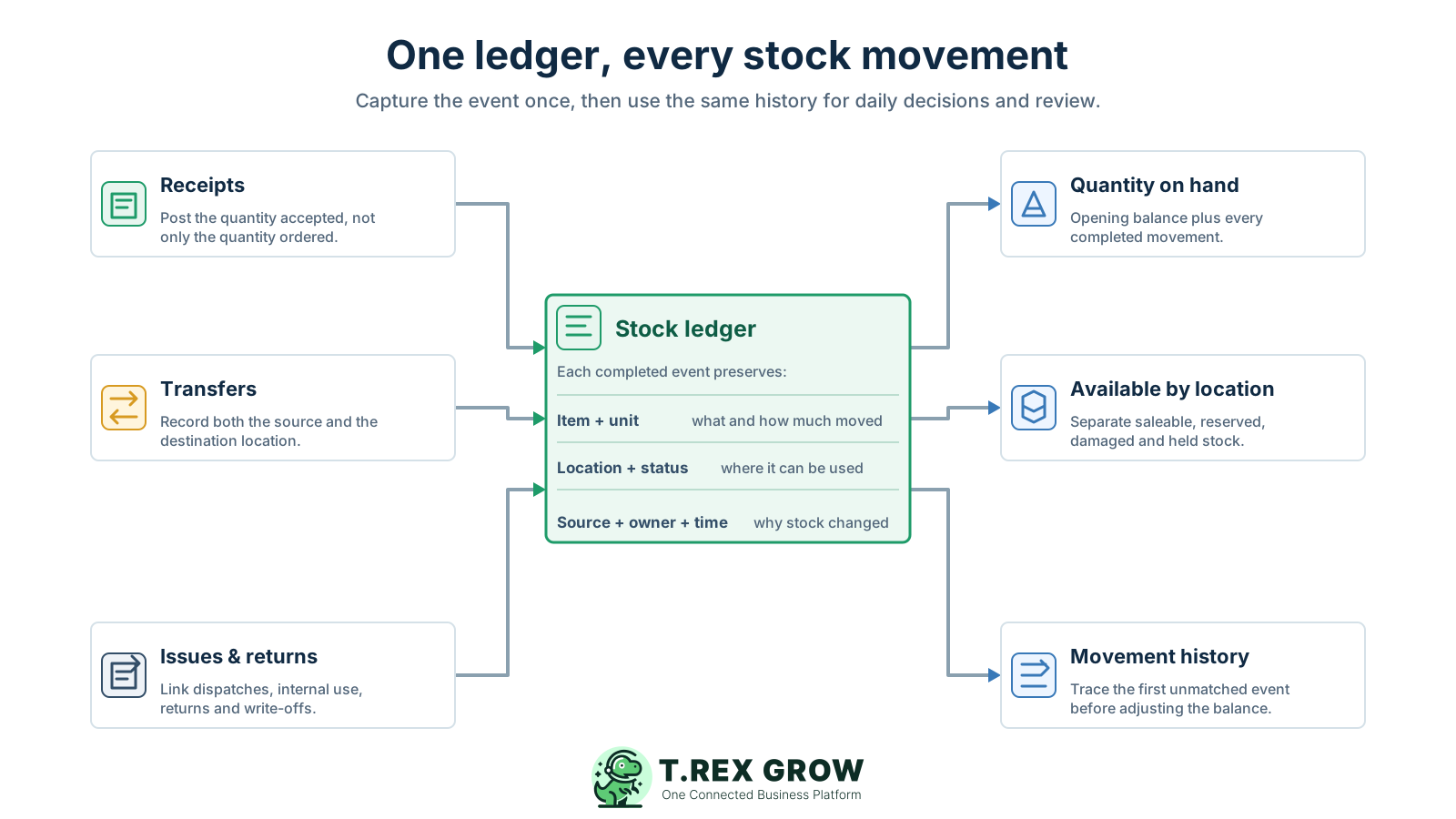
The shared inventory record should capture each completed stock event once, preserve its operating context, and reuse that history for quantity, location, availability, and investigation. Side spreadsheets may help temporarily, but they should not become a second unexplained balance.

A useful record supports the next decision

The work is easier when the team can see the current facts, the responsible person, and the next action without reconstructing the history from separate tools.

Shared operating context
Clear ownership and status
A visible next action

Set up the team view

1

Define the shared fields

  • - Use current facts
  • - Keep details consistent
2

Assign the next action

  • - Name an owner
  • - Set a review date
3

Keep it current

  • - Record changes
  • - Resolve exceptions
Inventory source-of-truth diagram showing receipts, transfers, issues and returns updating one stock ledger that provides quantity on hand, available stock by location, and movement history

Record what actually happened

Post the accepted receipt quantity, completed issue, confirmed transfer, received return, approved write-off, or reviewed correction rather than copying an expected quantity from an earlier plan.

Preserve the item and unit

Every movement should point to the exact product record and state the quantity in a known unit so the team can compare like with like.

Preserve the location and status

Show where the stock came from, where it went, and whether the units are available, reserved, damaged, quarantined, returned, or held.

Link the source and reason

Connect the change to a purchase receipt, delivery, transfer, sales issue, return, count, damage note, or approved adjustment reason rather than a free-text balance edit.

Keep ownership, time, and workflow status

Retain who created or confirmed the event, when the physical and recorded movement occurred, and whether the record is draft, completed, reversed, cancelled, or under review.

Calculate the balance from completed events

Treat the current position as the opening quantity plus and minus the movement ledger. This lets staff work backwards from the balance when a count or fulfilment question appears.

Workflow

A six-step inventory tracking workflow for SMEs

Use the same sequence for everyday receiving, storage, fulfilment, returns, and review. The workflow starts with controlled item data, captures each physical event close to the handoff, and investigates differences before changing the final balance.

A repeatable operating workflow

Capture

Record the current facts in one shared place.

Check

Confirm what is known and what needs attention.

Assign

Make the next decision or follow-up accountable.

Act

Complete the next task and record the outcome.

Review

Refresh the shared view when facts change.

A dependable workflow keeps the shared record and the next action aligned.

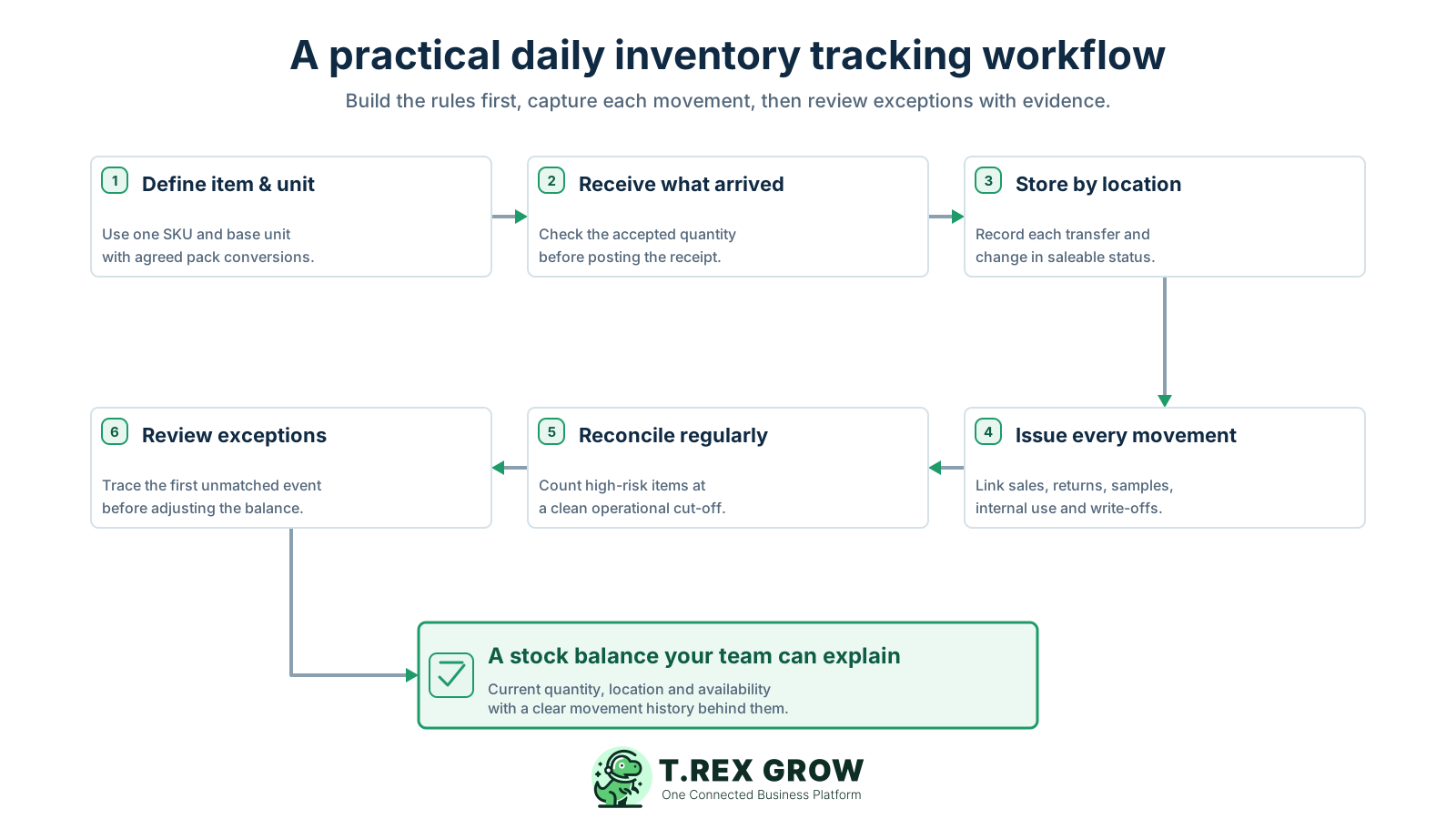
Six-step SME inventory tracking workflow from defining items and units through receiving, location tracking, recording issues and returns, reconciliation, and evidence-based exception review
1

Define the item and unit: create or verify one product record, choose the base unit, document pack conversions, and decide which locations and stock statuses matter before the first movement is posted.

2

Receive what arrived: compare the purchase or delivery expectation with the quantity physically received, accepted, rejected, or left outstanding. Record the accepted event against the correct item, unit, supplier context, location, and date.

3

Store and transfer by location: place the units in a known warehouse or stock area and record every movement between locations. Update the status when stock becomes reserved, quarantined, damaged, returned, or available.

4

Issue every movement: capture customer fulfilment, internal use, samples, service parts, transfers out, customer or supplier returns, damage, expiry, and write-offs close to the physical handoff.

5

Reconcile regularly: count selected items using a clear cut-off and compare the physical quantity with the ledger for the same SKU, unit, location, and status. Use risk and movement volume to decide which items need more frequent review.

6

Review exceptions before adjustment: classify the difference, trace movements from the last trusted balance, correct a source record where appropriate, and use a documented adjustment only after the cause and evidence have been reviewed.

Mistakes

Inventory tracking habits that create false confidence

A tidy spreadsheet or dashboard can still be wrong when item definitions, timing, stock states, source records, and review rules are inconsistent. These habits make the latest number look precise without making it explainable.

Recurring issues usually point to workflow-control gaps, not one isolated data-entry mistake.

Common

Overwriting the current balance

A direct quantity edit removes the signed movement between the old and new positions. Record a controlled event or adjustment so the history remains visible.

High risk

Recording the order instead of the receipt

The supplier may deliver a partial quantity, substitute an item, send damaged units, or complete the balance later. Check the physical receipt before updating stock.

Common

Mixing cartons, packs, and pieces

Arithmetic cannot rescue an undefined unit. Use a base unit and explicit conversions so purchasing, storage, fulfilment, and counting refer to the same quantity.

High risk

Keeping all stock under one available total

Reserved, returned, damaged, expired, quarantined, or misplaced units may exist physically but should not automatically be promised to customers.

Common

Updating records in weekly batches

Delayed posting creates a period where physical stock and reports disagree. Capture the movement at the handoff or assign a clear same-day owner and exception process.

High risk

Treating every stocktake variance as a correction

A count reveals a difference at one time; it does not identify the missing receipt, issue, transfer, return, duplicate, unit error, or timing gap behind it.

Common

Starting a private tracker when trust drops

Another spreadsheet may solve one person's immediate task but creates another balance, cut-off, owner, and update delay. Repair the shared workflow and reconcile temporary records back into it.

Best practices

Practical controls and an inventory tracking checklist

The right control depends on the value, movement speed, lead time, loss risk, and fulfilment importance of the item. Apply stronger review where the business impact is higher, then use the checklist to keep item, unit, location, status, source, owner, and timing consistent at each handoff.

Do this

Assign ownership at each stock handoff

Make receiving, transfer, issue, return, count, and adjustment responsibilities explicit so staff know who records the event and who resolves an exception.

Do this

Capture movements close to the physical event

Record the change where goods are received, moved, picked, returned, or written off. If immediate capture is not practical, use a short defined posting window and a visible pending queue.

Do this

Use source documents instead of memory

Link each movement to a purchase receipt, delivery, stock entry, transfer, return, damage note, count sheet, or approved reason so another person can review it later.

Do this

Review exceptions rather than every normal event

Focus attention on partial receipts, negative or unexpected quantities, unusual adjustments, repeated variances, old pending movements, and high-value or fast-moving items.

Do this

Count by risk and operational need

Use more frequent cycle counts for items with high value, high movement, repeated differences, long lead times, or important customer commitments, and broader counts when the business needs a full cut-off.

Do this

Measure whether the workflow is improving

Track repeated variance causes, late postings, unresolved movements, duplicate item records, unexplained adjustments, and fulfilment searches rather than relying only on one accuracy percentage.

Inventory event and evidence checklist

The minimum context an SME should preserve when stock changes or a balance is reviewed.

Movement or reviewRecord immediatelyEvidence to preserve
Supplier receiptAccepted item, quantity, unit, location, status, and receipt datePurchase or delivery reference, supplier, receiver, rejected or outstanding quantity
Location transferItem, quantity, unit, source location, destination location, and transfer statusTransfer reference, sender, receiver, dispatch time, receipt time, and any difference
Customer or internal issueItem, quantity, unit, source location, purpose, and effective timeDelivery, order, project, department, user, sample, service, or internal-use reference
Return, damage, or write-offItem, quantity, original location, new status, destination, and reasonReturn or damage reference, inspection result, owner, approval, and related customer or supplier
Physical countCounted item, unit, location, status, quantity, counter, and cut-offCount sheet or session, movements around the cut-off, recount, variance, and reviewer
Adjustment or reversalSigned quantity, item, unit, location, status, reason, and effective dateSource investigation, supporting records, creator, reviewer, approval, and link to the original event

The best practice is to make the next action clear before the situation becomes urgent.

Solution

How TREX Grow can support this inventory workflow

Once the operating rules are clear, TREX Grow can help connect product identity, quantity states, supported movement records, source documents, responsibility, and plan-dependent warehouse controls. Use it as the shared record behind the process, not as a substitute for receiving, counting, and review discipline.

Operations work better when records and next actions are connected

Keep structured product records

Manage product names, codes, optional SKU and barcode fields, units of measure, categories, suppliers, reorder information, approval status, and archive state from one product context.

Separate quantity states

Review available, incoming, and reserved quantities distinctly so expected supply and supported commitments are not mistaken for freely usable stock.

Follow supported movement history

Review stock entries, delivery orders, inventory adjustments, sales returns, and purchase returns with quantities, dates, creators, statuses, and source links where supported.

TREX Grow Operations Hub

Add responsibility and approval context

Use permission- and plan-aware create, view, edit, approve, archive, transfer, and warehouse actions to make ownership and sensitive changes clearer.

Extend tracking by location when needed

Plan-dependent warehouse workflows can add custom locations, transfers, product or location ledgers, picking, and structured inventory count sessions for deeper location-level control.

Next step

Test the workflow with one real product

Choose an item your team handles often. Define its SKU and unit, record one receipt and one issue, check the location and quantity states, then ask another staff member to explain the balance from the movement history. Use TREX Grow when you are ready to keep those records and handoffs connected.

See How TREX Grow Works

Start with one controlled item record and base unit, then record every completed receipt, issue, transfer, return, write-off, and approved correction against that item. Keep the location, stock status, source, owner, and date with each movement so the current balance can be reconstructed.