Sales promises from the wrong quantity
The company may own 150 units, but some are reserved, damaged, returned, held, in another location or needed for an earlier order. On hand does not automatically mean available for the next customer.

A trading company does more than buy and sell products. It must turn customer demand into a realistic stock promise, replenish the right gap, receive what actually arrives, reserve and deliver the correct quantity, then feed returns and exceptions into the next purchasing decision.
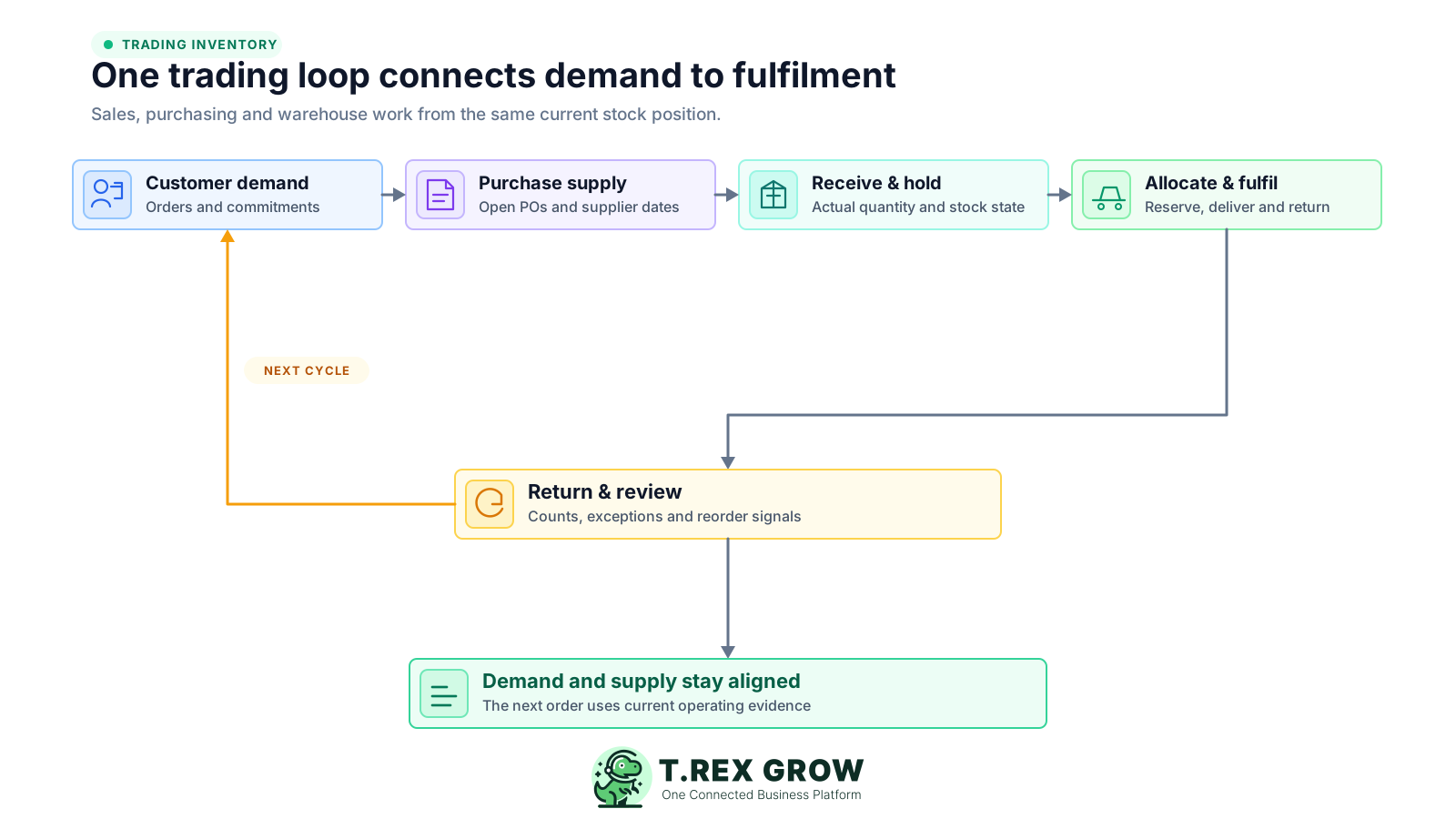
A trading company sits between suppliers and customers. Sales works with demand and due dates, purchasing works with supplier supply, warehouse works with physical goods, and finance or operations works with documents and exceptions. If those views do not meet at each handoff, one team moves faster by creating rework for another.
Operational pressure
When records live in different places, the person responsible has to reconstruct what happened before they can make a confident decision or follow up.
The company may own 150 units, but some are reserved, damaged, returned, held, in another location or needed for an earlier order. On hand does not automatically mean available for the next customer.
An urgent request can hide open purchase orders, supplier delays, existing customer commitments, minimum order constraints, slow-moving excess and a more important stock gap elsewhere.
A purchase order shows what the supplier should deliver. Partial delivery, rejection, damage, substitution or a later balance means the accepted receipt may be different.
The warehouse may process every item in arrival order even when one quantity is needed for a due customer order, another must remain held and a third needs purchasing follow-up.
Goods leave or come back physically before the shared stock view reflects the delivery, partial fulfilment, customer return, supplier return, damage or inspection status.
One item can appear under a supplier code, internal SKU, sales description and carton size. Without a controlled identity and base unit, correct arithmetic can still update the wrong product.
Sales, purchasing and warehouse each create a spreadsheet or chat thread to solve an immediate visibility gap, leaving several balances, cut-offs, owners and definitions to reconcile.
One stock total cannot answer whether sales can promise an order or purchasing should replenish an item. A useful trading view separates what is physically recorded, what is usable, what is already committed and what is expected from suppliers.
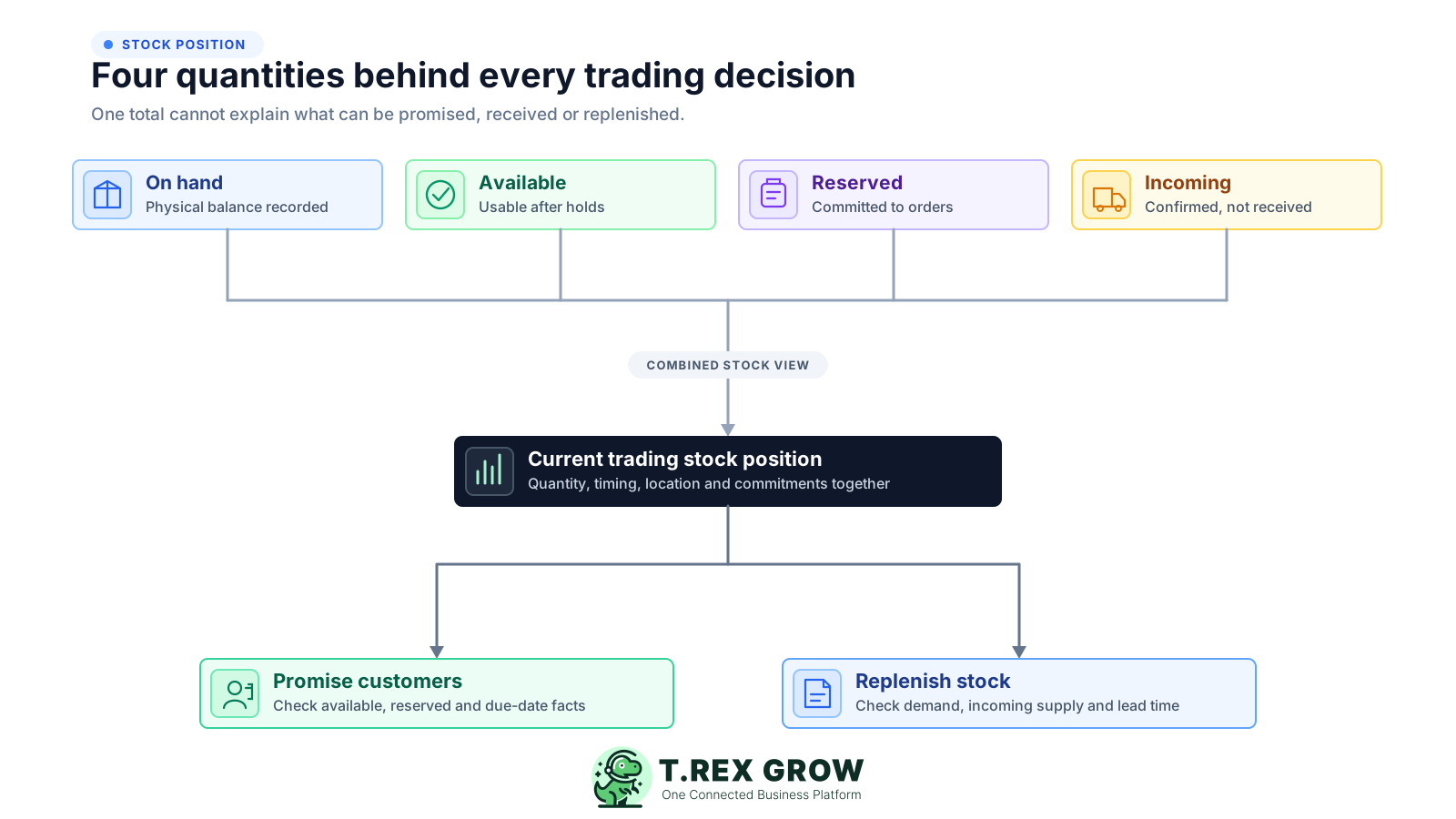
The quantity currently recorded as physically held by the business. It still needs location, condition, status and timing context before it can support a customer promise.
The portion that is usable for a new commitment after the business accounts for reservations, holds, damaged stock, quarantine, return inspection and other defined restrictions.
Stock already committed to supported customer orders, projects, internal requirements or fulfilment work. The reservation should have an owner, source and expected release or delivery event.
Confirmed supply that has not yet reached the accepted receipt state. Keep the supplier date, open balance and risk visible instead of treating incoming units as available.
A company-wide quantity may exist in the wrong branch, warehouse, van, return area or held status. Confirm where the units are and whether they can serve the required order.
Keep the quotation, order, purchase, receipt, delivery, return or reviewed correction behind the quantity and distinguish document dates from the event that actually changes stock.
The workflow begins with customer demand, not an isolated stock number, and closes only when fulfilment, returns and exceptions update the next decision. Each step has a clear owner and completion event.
Record the current facts in one shared place.
Confirm what is known and what needs attention.
Make the next decision or follow-up accountable.
Complete the next task and record the outcome.
Refresh the shared view when facts change.
A dependable workflow keeps the shared record and the next action aligned.
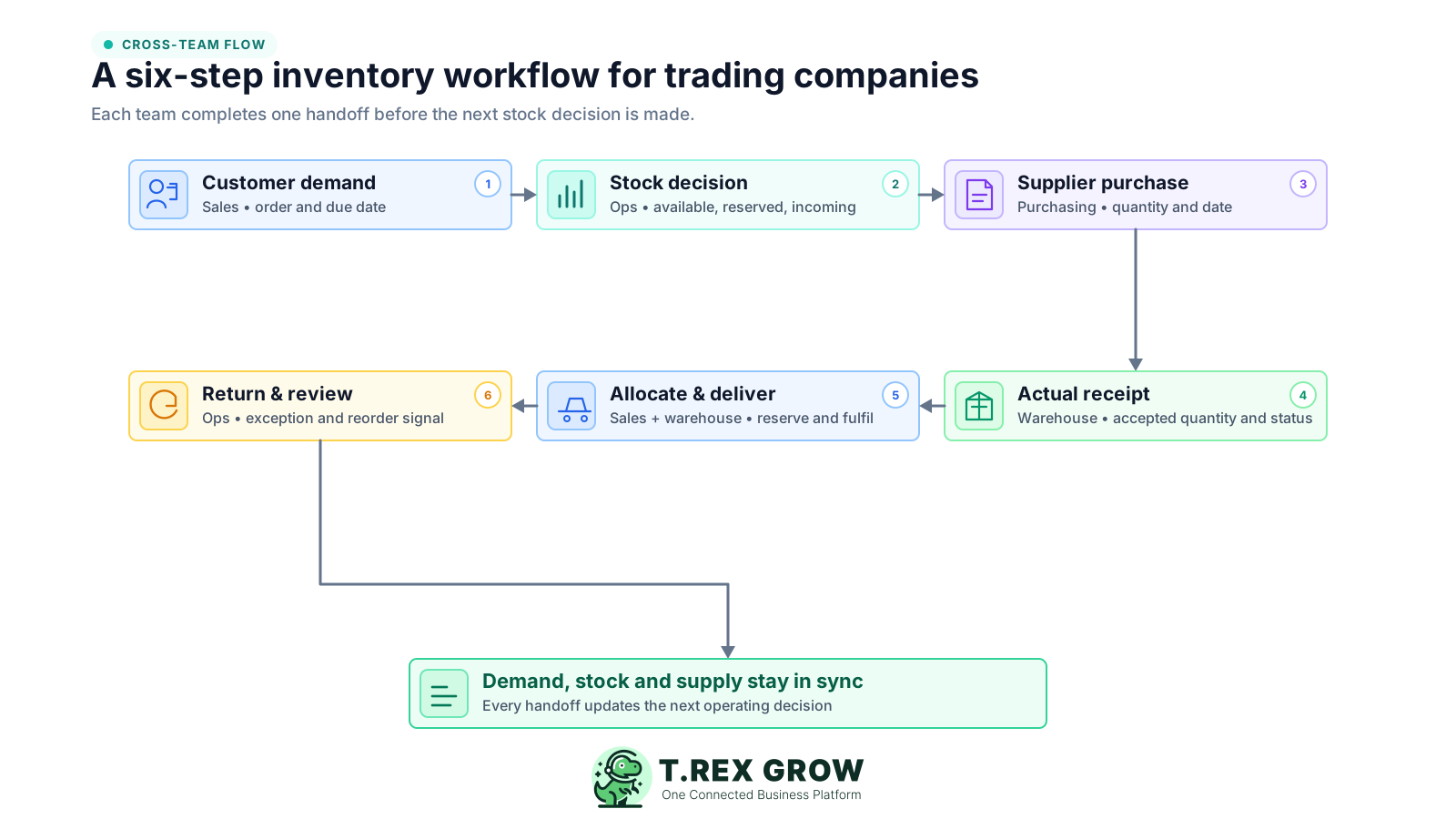
Capture customer demand: record the correct item, unit, requested quantity, due date, customer context and commercial status. Keep an enquiry, draft quotation and supported commitment distinct so tentative demand does not reserve stock by accident.
Check the current stock position: compare available, reserved, held and incoming quantities for the correct item, location and date. Decide what can be promised now, what depends on an accepted receipt and what needs another response.
Replenish the real gap: purchasing reviews open commitments, usable stock, incoming supply, supplier lead time, order constraints and business priorities before creating or changing the purchase requirement.
Receive what actually arrived: warehouse checks the item, unit, quantity and condition against the source. Record accepted, rejected, damaged, substituted and outstanding quantities separately, then update the correct location and stock state.
Allocate, pick and deliver: reserve accepted stock for the supported customer commitment, release a clear pick quantity, record the physical issue or delivery and keep partial fulfilment or backorder status visible.
Record returns and review the loop: inspect customer returns before making them available, connect supplier returns and genuine adjustments to their sources, reconcile priority items and feed repeated exceptions into the next reorder and process decision.
These mistakes happen at the borders between teams and documents. The stock number may look reasonable while the customer promise, supplier order, physical quantity and movement history describe different situations.
Recurring issues usually point to workflow-control gaps, not one isolated data-entry mistake.
On-hand stock can include reserved, held, damaged, returned or misplaced units. Sales should use the quantity that is usable for the required customer, location and due date.
A single sales message does not show open supply, existing commitments, demand pattern, supplier dates, minimum order quantities or slow-moving excess that should shape the purchasing decision.
Posting the expected quantity hides partial delivery, rejection, substitution and damage. Complete only the quantity physically checked and accepted under the agreed rule.
A supplier carton, internal piece and customer pack can describe the same item differently. Use one base unit and documented conversions across purchasing, storage and sales.
A returned item may be unopened, damaged, incomplete, expired, assigned to the wrong customer or waiting for supplier treatment. Use an inspection status before releasing it.
A commercial invoice and a physical issue may occur at different times. Define the delivery, handoff or other completed event that changes stock and preserve the related document trail.
A direct correction can make the total look right while preserving the missed receipt, delivery, return, unit, location, cut-off or ownership rule that caused the difference.
A good control removes ambiguity at a handoff and leaves evidence for the next team. Keep routine work simple, strengthen review around material exceptions and use the same completion rules across locations and staff.
Use one product code or SKU, clear descriptions and documented pack conversions before the item appears in quotations, purchases, receipts, deliveries or returns.
State who prepares, checks and completes customer demand, purchasing, receiving, allocation, delivery, returns and corrections so a pending record cannot remain ownerless.
Keep on hand, available, reserved and incoming separate and preserve customer due dates, supplier dates and pending-event age so timing risk remains visible.
Retain the ordered, accepted, rejected, delivered, returned and outstanding quantities against the same operating trail instead of replacing the original expectation.
Move shortages, damage, unit mismatches, overdue supply, uninspected returns and unexplained differences to an owner and due date without blocking unaffected work.
Use a short regular review for material stockouts, excess, late supply, partial fulfilment, old reservations, pending returns, large adjustments and repeated causes.
Use this table to agree what each team needs before work starts and which evidence proves the handoff is complete.
| Workflow stage | Primary owner | Required input | Completion evidence |
|---|---|---|---|
| Customer demand | Sales or customer operations | Controlled item, unit, quantity, customer, due date and commercial status | Demand is classified as enquiry, draft, supported commitment or changed request |
| Stock decision | Operations or inventory owner | Available, reserved, held and incoming quantities by relevant location and date | Promise, partial promise, alternative or replenishment gap is documented |
| Supplier purchase | Purchasing | Real gap, supplier, lead time, quantity, expected date and order constraints | Approved or supported purchase source with open balance and owner |
| Actual receipt | Warehouse or receiving | Purchase or return source, item, unit, expected quantity and destination | Accepted, rejected, damaged and outstanding quantities with receiver, time, location and status |
| Allocation and delivery | Sales operations and warehouse | Supported customer commitment, available quantity, pick location and due date | Reservation, picked or delivered quantity, recipient, time and partial or backorder status |
| Return and review | Operations, warehouse or designated reviewer | Original source, returned or counted quantity, condition, reason and evidence | Final stock state, supplier or customer action, correction, owner and next review signal |
The best practice is to make the next action clear before the situation becomes urgent.
Consider a Malaysian trading SME selling industrial fasteners. A customer wants 120 boxes on Thursday. The system shows 150 on hand, but 50 are reserved for earlier orders, 10 are held for inspection and 40 are incoming on Friday.
Sales sees 150 and confirms all 120 boxes for Thursday. Warehouse later finds only 90 available, creating a 30-box shortfall after the customer expectation is already set.
The team separates 150 on hand, 50 reserved and 10 held. That leaves 90 available now. The 40 incoming units remain supply expected on Friday, not Thursday stock.
Sales can offer 90 boxes on Thursday and 30 after an accepted Friday receipt, or agree another supported option. Purchasing and warehouse can now see the same gap and date.
The supplier delivers 40 boxes on Friday, but warehouse accepts 38 and holds two as damaged. The receipt records 38 accepted, two held and no false assumption that all 40 are available.
The team allocates 30 accepted boxes to the customer, leaving eight newly available and two held. The delivery, damage exception and remaining stock become evidence for the next sales and purchasing decision.
Once the operating rules are clear, TREX Grow can keep customer, product, purchasing, stock, delivery, return and warehouse context closer together. Feature depth depends on the plan and user permissions, so test the exact workflow your trading team needs.
Keep product names, codes, optional SKU and barcode fields, units, categories, supplier links, prices, reorder information and approval status in a shared product context.
Use reusable customer and item information across supported quotation and invoice work so the commercial request begins from clearer product data and status.
Start supported receiving activity from purchase-order or purchase-return context and distinguish the quantity expected from the quantity actually received and checked.
Review separate quantity states from the product context instead of compressing usable stock, expected supply and supported commitments into one total.
Keep supported delivery orders, sales returns, purchase returns, inventory adjustments and related product history close enough to trace how the stock position changed.
Where included, locations, pure transfers, product or location ledgers, picking and inventory count sessions provide deeper control for multi-location trading operations.
Start with one controlled item, four quantity states and a named completion event at every handoff. Then explore how TREX Grow can support a more connected trading inventory workflow.
It is the sequence that connects customer demand to the stock decision, supplier purchasing, physical receiving, stock availability, reservation, picking, delivery, returns and review. A useful workflow defines the owner, source record, quantity state and completed event at each handoff so sales, purchasing and warehouse do not maintain separate versions of the same stock story.