Incomplete customer master data
Customer master data may be incomplete, especially TIN, business registration number, address and SST details.

Malaysia e-Invoice is not only an accounting update. For SMEs, it affects how customer data is collected, how invoices are issued, how credit notes are handled, and how sales, purchasing and finance teams work together.
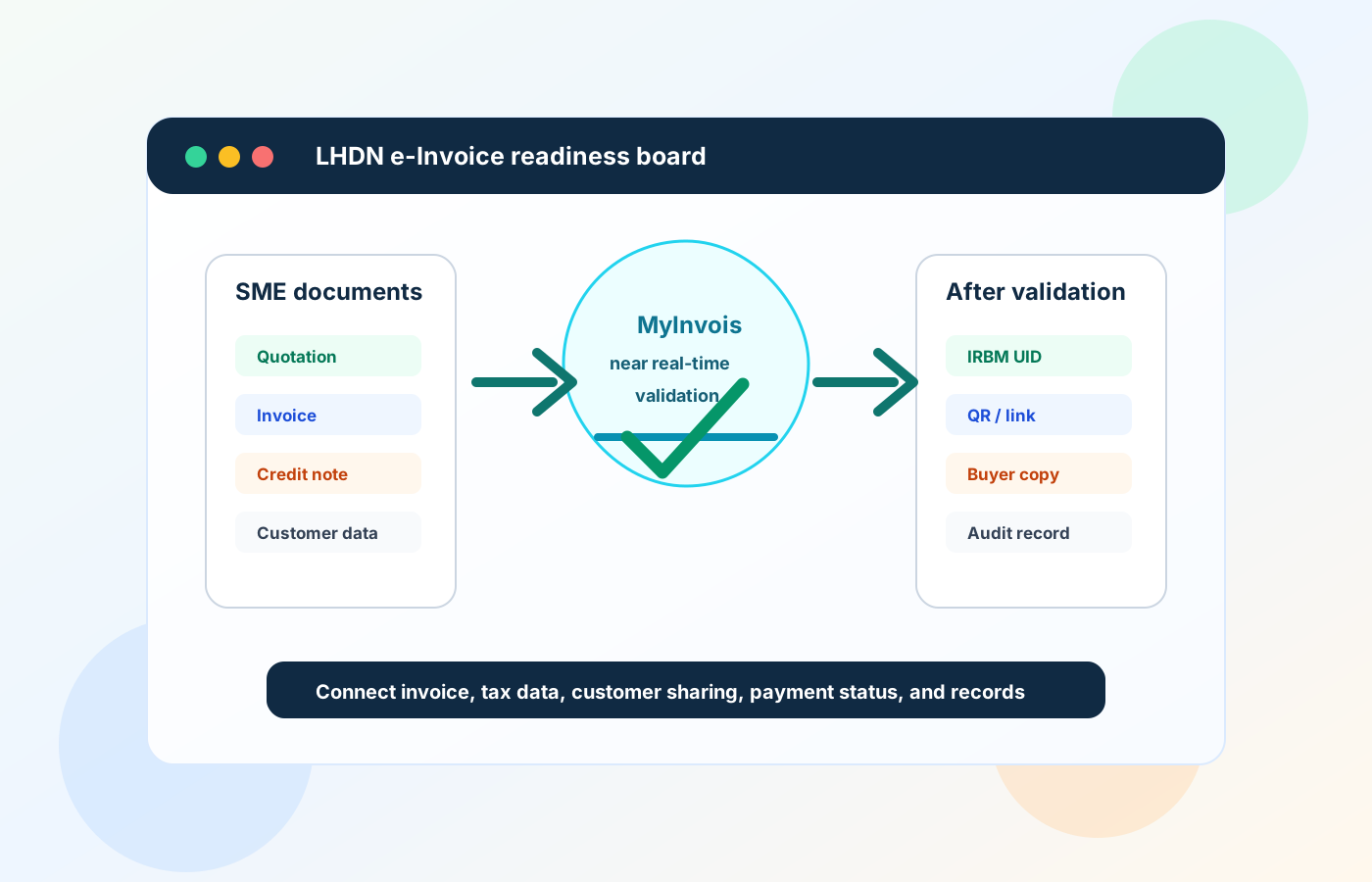
Many SMEs first treat e-Invoice as a tax submission issue, but the real challenge is usually operational. If quotation, invoice, delivery order, purchase order and payment records are scattered across Excel, WhatsApp and manual folders, e-Invoice preparation becomes more stressful than it should be.
Operational pressure
When records live in different places, the person responsible has to reconstruct what happened before they can make a confident decision or follow up.
Customer master data may be incomplete, especially TIN, business registration number, address and SST details.
Sales teams may issue invoices before finance checks whether the details are correct.
Credit notes and debit notes may not be linked clearly to the original invoice.
Purchasing and supplier payment records may sit outside the accounting workflow.
Some businesses still rely on manual numbering, making document tracking risky.
Approvals may happen verbally or through chat, leaving no clear audit trail.
Finance teams may need to re-enter data into multiple systems, increasing the chance of mistakes.
Malaysia LHDN e-Invoice is a structured digital document that is submitted for validation through LHDN's e-Invoice system. Once validated, the invoice becomes part of the official tax reporting process. For SMEs, this means invoice data needs to be accurate before submission, not cleaned up only at month end.
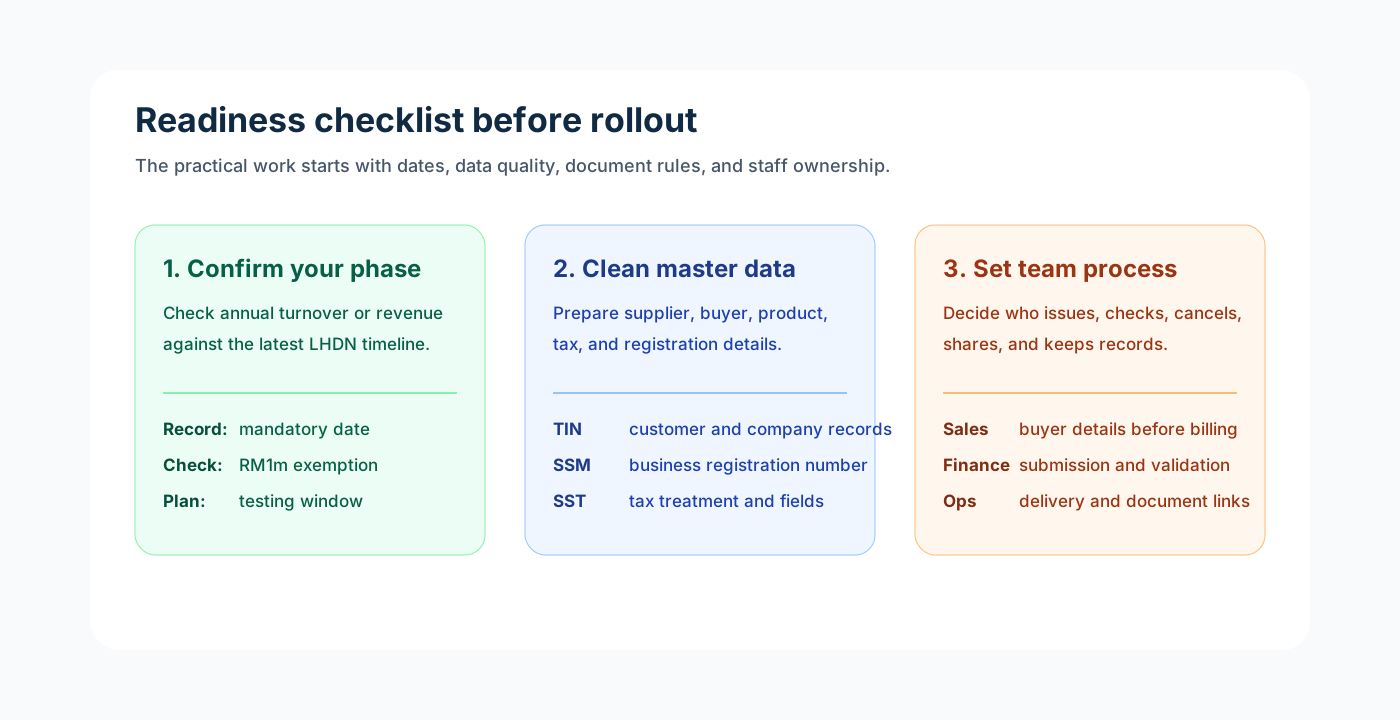
An e-Invoice is not just a PDF invoice. It contains structured transaction data required for validation.
Common transaction documents may include invoice, credit note, debit note and refund note, depending on the business scenario.
A validated e-Invoice should match the actual business transaction, including buyer details, seller details, item or service details, tax information and total amount.
For some B2C or retail-type scenarios, consolidated e-Invoice may be relevant, depending on the latest LHDN rules and transaction type.
Self-billed e-Invoice may apply in certain supplier or payment situations where the buyer issues the e-Invoice on behalf of the supplier.
The biggest preparation step for SMEs is to ensure the internal workflow can produce clean, complete and traceable invoice data.
A good e-Invoice workflow should begin before the invoice is created. SMEs should organise customer records, quotation flow, approval steps, invoice issuance and post-invoice adjustments as one connected process.
Record the current facts in one shared place.
Confirm what is known and what needs attention.
Make the next decision or follow-up accountable.
Complete the next task and record the outcome.
Refresh the shared view when facts change.
A dependable workflow keeps the shared record and the next action aligned.
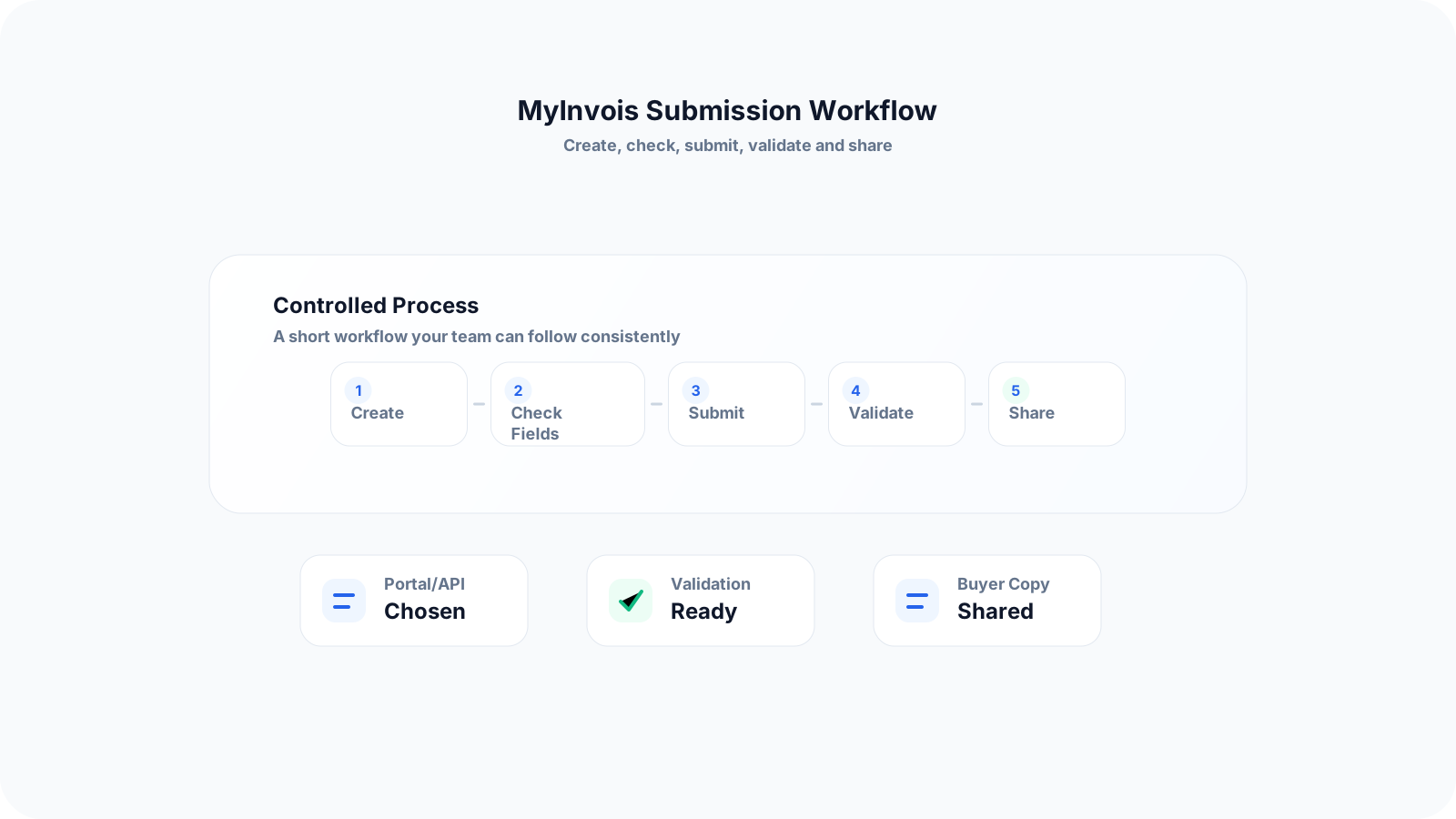
Step 1: Clean Up Customer and Supplier Master Data - Collect and maintain key details such as company name, TIN, business registration number, address, contact person, SST number where applicable and payment terms. This reduces back-and-forth when invoices need to be issued.
Step 2: Standardise Quotation and Sales Order Process - Before issuing an invoice, ensure quotation details, pricing, item descriptions, taxes and customer details are confirmed. A clean quotation-to-invoice flow reduces duplicate entry and mismatched amounts.
Step 3: Add Approval Before Invoice Issuance - For SMEs with multiple salespeople or branches, approvals help ensure pricing, discounts, payment terms and customer details are checked before the invoice is generated.
Step 4: Issue Invoice with Complete Transaction Details - The invoice should contain accurate buyer and seller information, item or service details, quantity, unit price, tax treatment, total amount and references to related documents where needed.
Step 5: Validate or Prepare for LHDN Submission - Depending on the system used, the invoice data should be prepared for submission to LHDN MyInvois or through API integration. The key is to avoid manual retyping whenever possible.
Step 6: Manage Credit Notes, Debit Notes and Refunds Properly - Any post-invoice adjustment should be linked back to the original transaction. This helps finance teams maintain a clear record when correcting invoices or adjusting amounts.
Step 7: Keep Records for Finance, Tax and Audit Review - Validated invoice records, supporting documents, approval history and payment status should be easy to retrieve. This helps SMEs handle internal checks, customer disputes and accounting review.
Most e-Invoice issues do not happen because SMEs do not understand tax. They happen because daily documents and data are not controlled properly before submission.
Recurring issues usually point to workflow-control gaps, not one isolated data-entry mistake.
Waiting until the deadline before reviewing invoice workflows and customer data creates avoidable rollout pressure.
Assuming a PDF invoice is the same as a validated e-Invoice causes teams to miss the structured data and validation requirements.
Collecting customer TIN and registration details only after invoices are ready to issue slows billing and increases correction work.
Using different item names, prices and tax treatments across quotation, invoice and inventory records makes invoice data harder to trust.
Allowing sales staff to issue invoices without approval or finance review increases the risk of wrong pricing, terms or buyer details.
Handling credit notes and debit notes manually without linking them to the original invoice makes later review harder.
Keeping invoice records in multiple Excel files without clear version control creates confusion over the latest status.
Choosing software based only on e-Invoice submission, without considering quotation, inventory, purchasing and approval workflows, can leave the real operational problems unsolved.
SMEs do not need to transform everything at once. The best approach is to start with the documents and workflows that directly affect invoice accuracy.
Create a standard customer information form that includes TIN, registration number, address and SST details where applicable.
Review current invoice templates and identify which fields are missing for e-Invoice readiness.
Map the flow from quotation to invoice, payment and credit note so the team knows where errors usually happen.
Assign clear roles for sales, finance, operations and management approval.
Reduce manual retyping by connecting quotation, invoice and inventory data where possible.
Keep supplier records updated, especially for businesses that need purchase orders, supplier payments or self-billed scenarios.
Train staff on what information must be checked before an invoice is issued.
Use a system that can support both day-to-day operations and e-Invoice compliance, instead of treating them as separate tasks.
The best practice is to make the next action clear before the situation becomes urgent.
TREX Grow is built for SMEs that need better operational control before, during and after invoicing. Instead of treating e-Invoice as a standalone tax form, TREX Grow helps connect the documents and workflows that produce invoice data in the first place.
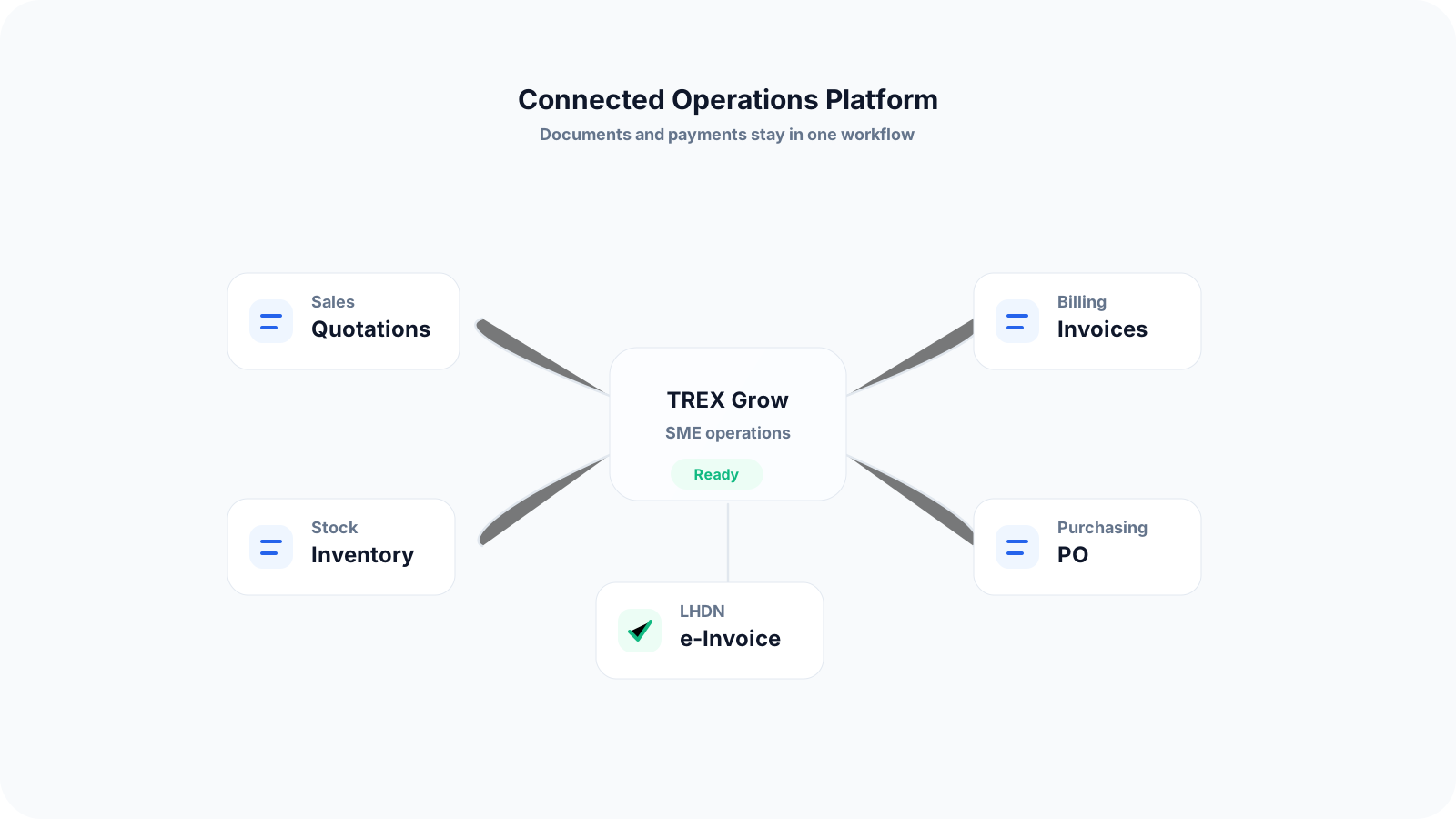
Create quotations and convert them into invoices without retyping the same transaction details.
Keep customer and supplier information in one place for easier document preparation.
Connect inventory records with sales and purchasing workflows so item details are more consistent.
Manage purchase orders, supplier payments and related operational documents in a more structured way.
Use approval workflows to reduce mistakes before documents are issued.
Support RFQ and product catalog workflows for SMEs that receive quotation requests from customers.
Prepare business documents in a way that is more organised for Malaysia LHDN e-Invoice readiness.
Give management clearer visibility over unpaid invoices, operational documents and transaction status.
The earlier your team organises customer data, invoice flow, approvals and document records, the easier it is to adapt to Malaysia LHDN e-Invoice. TREX Grow helps SMEs move from scattered documents to a more connected workflow.
LHDN e-Invoice is a structured digital invoice process where transaction data is submitted for validation through Malaysia's e-Invoice system. It is different from simply sending a PDF invoice because the invoice data must be complete and structured for tax reporting.