You need to confirm applicability first
Your turnover or revenue band, exemption position and transaction circumstances must be checked against the latest HASiL material before software scope is approved.

The strongest option is the one that fits your current obligation, submission route, source records, document cases and exception owners. Compare six credible choices with official-source evidence instead of treating e-Invoice ready as a complete buying answer.

Use this guide when the business has moved beyond general awareness and needs a defensible shortlist. It is designed for teams that will own the source records, MyInvois action, exception response and evidence after rollout.
Operational pressure
When records live in different places, the person responsible has to reconstruct what happened before they can make a confident decision or follow up.
Your turnover or revenue band, exemption position and transaction circumstances must be checked against the latest HASiL material before software scope is approved.
The team can submit through the official portal, but re-entering business data may become difficult to sustain as volume, users or corrections increase.
The new choice must handle e-Invoice work without losing the ledger, document, inventory, export or adviser workflow the business still needs.
Sales, operations, accounts, approvers and tax advisers need clear responsibility for data preparation, approval, submission and response.
Credit, debit, refund, rejection, cancellation, consolidated or self-billed cases need to be demonstrated rather than assumed from one successful invoice.
The decision must include subscription, users, volume, tax, add-ons, setup, migration, support, training and the work that remains outside the product.
HASiL's timeline page was updated on 30 August 2026. It states that taxpayers with annual income or sales below RM3 million are exempt, while the up-to-RM5-million implementation band is dated 1 January 2026. Confirm the exact rule and circumstances that apply to your entity before treating any software purchase as mandatory.
Record the page or guideline version, review date and adviser conclusion used for the decision because older articles may describe a previous threshold or timetable.
HASiL provides the portal free of charge and lists profile plus document submission, review, rejection, cancellation and printing functions. It may fit a controlled lower-volume process.
The MyInvois SDK supports taxpayer and intermediary system access. Evaluate who is authorised, how credentials and permissions are handled, and where the returned result is stored.
The taxpayer remains responsible for accurate data, correct document treatment, applicable self-billing or consolidation rules and current requirements.
Use expected volume and operating complexity to decide what must be connected.
| Starting model | Often suitable when | Evidence to collect |
|---|---|---|
| MyInvois Portal | Volume and user count are manageable and the team can control source records outside the portal. | Timed entry, double-check effort, exception steps and record linkage. |
| Accounting-led system | Ledger, reconciliation, financial statements and accountant access are central to the operating model. | Submission flow, accounting postings, document scope, quotas and support. |
| Operations-led system | Quotation, invoice, payment, purchasing or inventory records need to stay close to the MyInvois result. | Source continuity, permissions, returned status, adjustments and plan scope. |
| Custom or enterprise integration | High volume, several systems or specialised transaction flows justify an engineered API programme. | Architecture, intermediary model, retry design, monitoring, ownership and support SLA. |
Give every candidate the same test data and scoring scale. A vendor should remain on the shortlist only when the team can see the required control, reproduce it and name the person who owns the next action.
Check supplier and buyer identifiers, TIN, registration details, addresses, contact fields, item classification, unit, tax and amount data.
List the normal Invoice, Credit Note, Debit Note and Refund Note cases plus any applicable self-billed versions before comparing support.
Understand direct or intermediary access, taxpayer appointment, permissions, production versus test environment and the exact point of submission.
Confirm how submission IDs, document IDs, validation details, timestamps, QR information and status history remain linked to the business record.
Demonstrate invalid data, buyer rejection, issuer cancellation and the adjustment path after the official action window.
Test consolidated and self-billed scenarios only where they apply, including their source records, references, approvals and accounting effect.
Inspect roles, approval or finalisation gates, audit history, segregation of duties, support ownership and administrator access.
Compare normal and peak e-Invoice volume, users, companies, imports, exports, retention, integrations, support and recovery arrangements.
Avoid averaging away a critical failure.
| Score | Meaning | Shortlist rule |
|---|---|---|
| 2 · Proven | Your team completes the case and can retrieve the evidence. | Keep the product. |
| 1 · Conditional | The case needs a higher plan, add-on, setup step or written answer. | Resolve cost and ownership. |
| 0 · Unproven | The required case cannot be demonstrated or exported. | Remove it if the control is mandatory. |
| Critical fail | A required document, permission, response or data-exit control fails. | Do not hide it inside the total score. |
A successful sample invoice proves only one path. The expensive problems usually appear in the source data, exceptions, ownership and capacity that were excluded from the demo.
Recurring issues usually point to workflow-control gaps, not one isolated data-entry mistake.
Treat ready, integrated or compliant as a claim to verify with your required cases, current HASiL guidance and written provider scope.
The official 2026 timeline changed. Date the applicability decision and recheck the current exemption instead of copying an older provider article.
An invalid result, rejection or correction reveals whether the team can diagnose, repair and retain evidence without creating duplicate records.
Normal, adjustment, consolidated and self-billed records can have different product support, plan access, prerequisites and responsibilities.
Direct and intermediary routes change setup, permissions, support ownership and revocation. Confirm the exact legal entity and representation period.
Normalise annual cost, SST, users, companies, volume, add-ons, support, migration, training and manual work before presenting a winner.
This is an editorial fit comparison, not a paid ranking. The provider and pricing claims below were checked against official pages and current TREX Grow product sources on 5 September 2026. Features, prices, quotas, promotions, taxes and official rules can change, so verify the linked sources before purchase or publication.
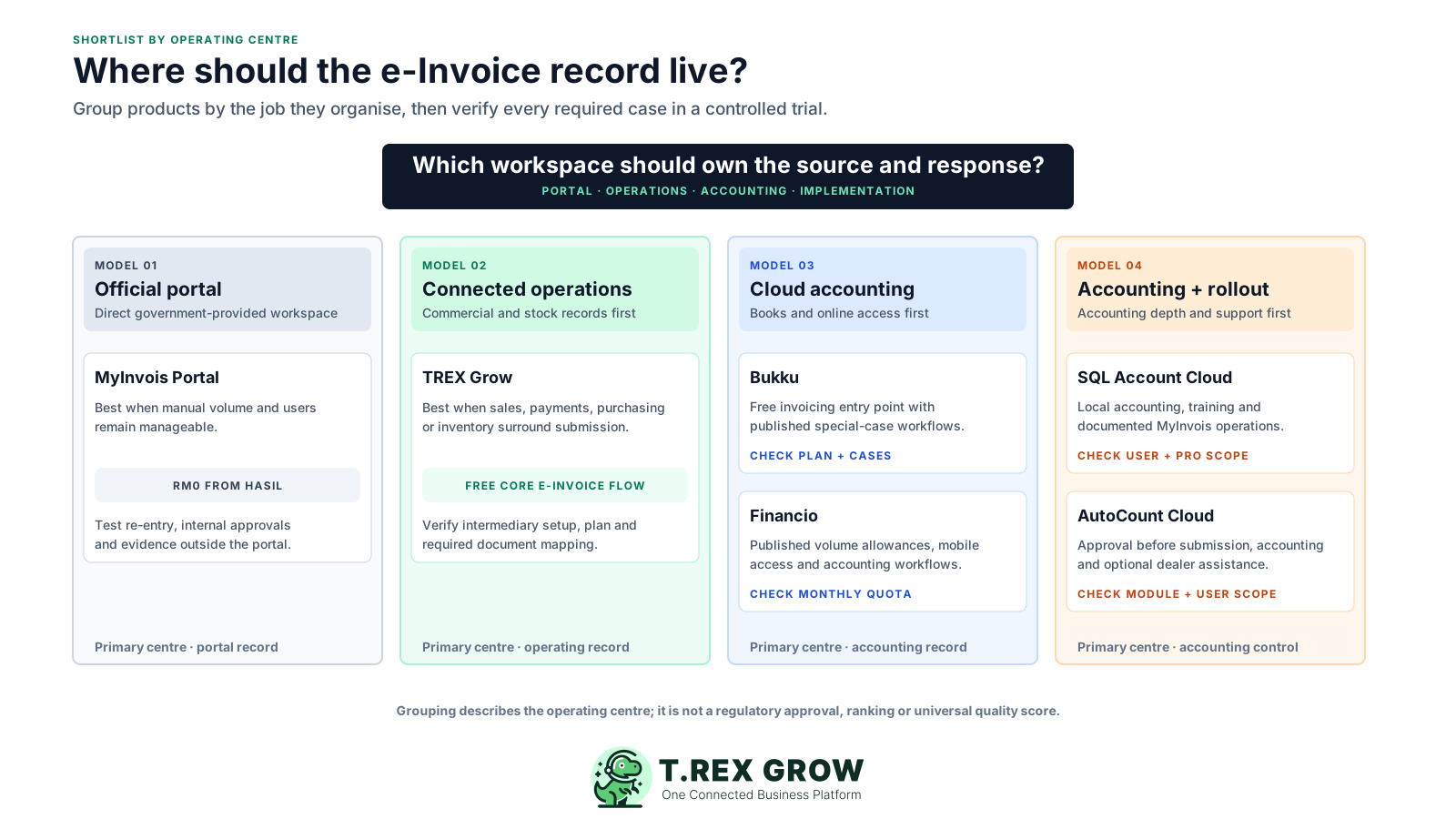
Published starting points and e-Invoice workflow claims reviewed 5 September 2026. Confirm final scope and fees directly with each provider.
| Option | Best fit | Published starting point | e-Invoice evidence to verify |
|---|---|---|---|
| MyInvois Portal | Taxpayers wanting HASiL's official no-charge route, especially when manual volume and surrounding controls remain manageable. | RM0. HASiL lists profile management plus document submission, review, rejection, cancellation and printing. | Time one complete entry and correction, then show how quotations, approvals, payment follow-up and internal evidence stay controlled outside the portal. |
| TREX Grow | Document-led SMEs wanting supported e-Invoice work connected to customers, quotations, invoices, payments, purchasing, inventory and permissions. | Free RM0; Starter RM120/year; Essential RM240/year; Premium RM380/year. Current plans list unlimited users and products. | Confirm intermediary appointment, required source fields, supported document and plan, returned status, cancellation or adjustment path and the Accounting Beta boundary. |
| Bukku | SMEs wanting Malaysian cloud accounting with a free invoicing entry point and published normal, consolidated and self-billed MyInvois workflows. | Launch RM0; Seed RM35/month or RM350/year, plus 8% SST. Its current plan page lists LHDN e-Invoice support. | Demonstrate company, contact and product readiness, separate or bulk submission, status, applicable special cases, cancellation, quotas and the accounting plan required. |
| Financio | SMEs wanting cloud accounting, bank reconciliation, mobile access and clearly published monthly LHDN e-Invoice allowances. | Essentials RM50/month with 25 LHDN e-Invoices; Premier RM85/month with 5,000. A 30-day trial is listed. | Test TIN and registration data, validation and status handling, self-billed needs, mobile role coverage and peak volume against the selected plan. |
| SQL Account Cloud | Malaysian SMEs prioritising local accounting, sales and purchase documents, bank connection, training and documented MyInvois operations. | Essential RM79/month; Pro RM109/month; RM60 per additional user is listed. Both plans list LHDN e-Invoice support. | Verify submission, status refresh, logs, cancellation, batch or self-billed cases, company and user scope; inventory and multi-currency are listed under Pro. |
| AutoCount Cloud Accounting | Accounting-led SMEs wanting an approval step before submission, status visibility, special-case workflows and optional dealer assistance. | Standard monthly Lite starts at RM70; prices exclude SST. The provider states e-Invoice is included in every plan without an extra feature fee. | Test TIN collection, approval, automatic submission after approval, consolidated and self-billed cases, plan modules, users, extra-user fees, support and export. |
The best practice is to make the next action clear before the situation becomes urgent.
Use safe test data in the provider's test or sandbox environment. Run the same six cases in every candidate and keep screenshots or exported evidence so the comparison reflects what your team can operate.
Record the current facts in one shared place.
Confirm what is known and what needs attention.
Make the next decision or follow-up accountable.
Complete the next task and record the outcome.
Refresh the shared view when facts change.
A dependable workflow keeps the shared record and the next action aligned.
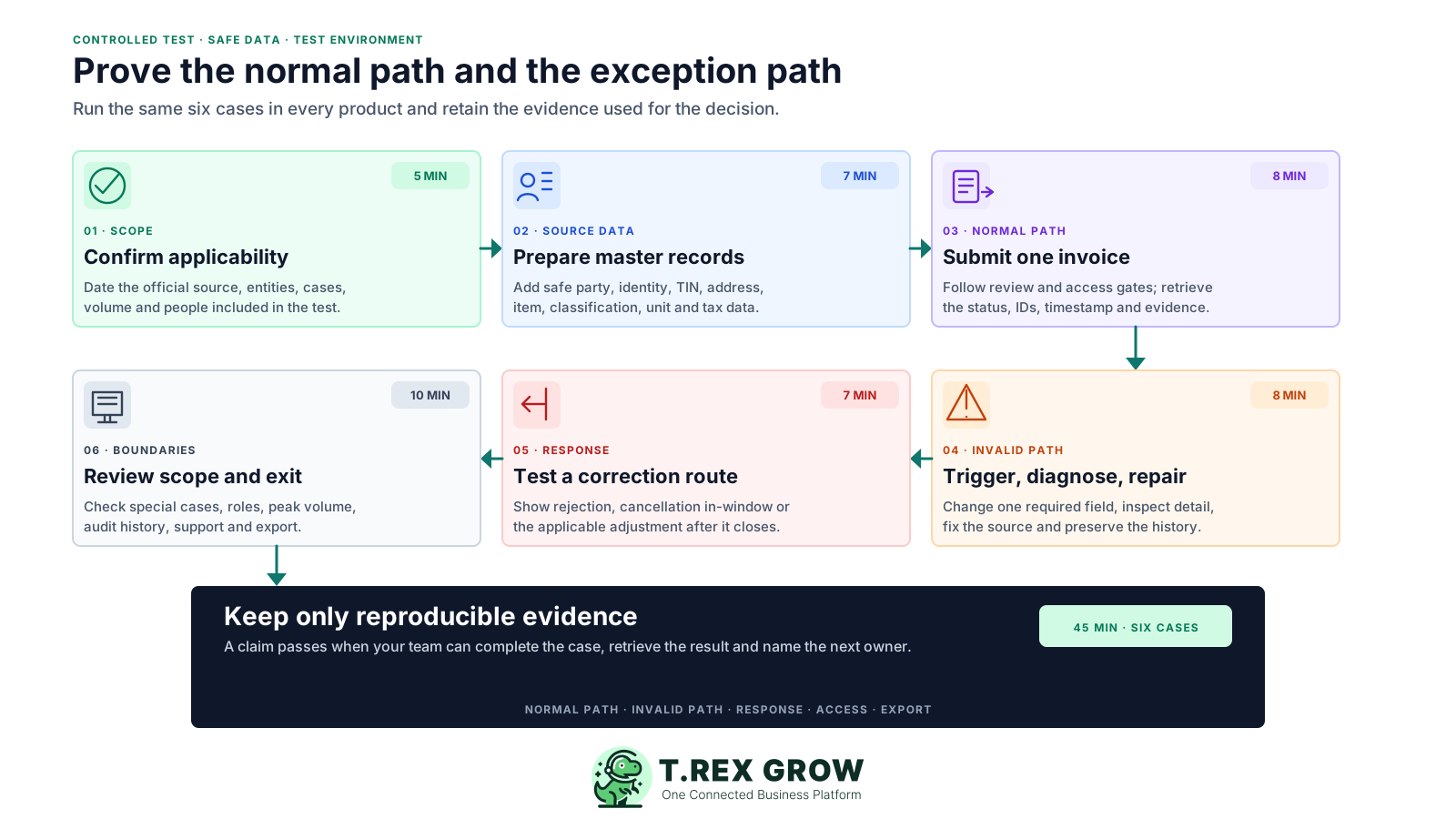
Confirm scope in 5 minutes: record the official source, implementation or exemption conclusion, entities, users, volume and transaction cases included in the test.
Prepare master data in 7 minutes: add safe supplier, buyer and item records with the identity, address, contact, classification, unit and tax fields the flow requires.
Submit one invoice in 8 minutes: follow the review and permission gates, use the test environment and retrieve the returned status, identifiers and visible evidence.
Trigger and repair an invalid case in 8 minutes: omit or change a required field, inspect the validation detail, fix the source record and resubmit without duplicating the commercial record.
Test one response case in 7 minutes: demonstrate buyer rejection, issuer cancellation within the current 72-hour window or the applicable post-window adjustment route.
Review special cases and exit in 10 minutes: inspect relevant consolidated or self-billed flows, roles, audit history, peak-volume limits, export and support escalation.
Store the result beside the signed-off requirements and quote.
| Evidence | What it proves | Owner |
|---|---|---|
| Applicability note | The team used a dated official source and reviewed the entity's circumstances. | Tax or finance lead |
| Normal-path capture | Source fields, approval, submission and returned status work together. | Process owner |
| Exception capture | The team can diagnose, correct and preserve history. | Accounts owner |
| Scope and cost sheet | Plan, users, volume, support, setup and remaining manual work are priced. | Buyer or management |
| Access and exit record | Roles, exports, retention, revocation and support ownership are understood. | Administrator |
TREX Grow is a strong candidate when the business wants supported MyInvois work to remain part of an operational document chain. It is designed around customers, quotations, invoices, payment evidence, purchasing, inventory, permissions and returned e-Invoice status rather than treating submission as a detached portal task.
Document-led service, trading or distribution SMEs where sales, accounts, purchasing or inventory users share the records behind an e-Invoice.
TREX Grow currently supports customer types 01 to 04 and supported supplier self-billed types 11 to 14, with record-specific readiness and source-reference gates.
Review company, buyer or supplier identity, TIN, address, contact, item, classification, tax and amount data from the relevant business record.
Keep submission and document identifiers, submitter, timestamp, result and history with the source record, then follow the supported cancellation or adjustment route.
The current route requires the taxpayer to appoint TREX HOUSE SDN. BHD. as an intermediary in MyInvois before TREX Grow can act for the company.
Free includes core invoices and Malaysia e-Invoice submission. Broader adjustment, purchasing, supplier and inventory workflows depend on the current paid plan.
Starter and higher include Accounting Beta, whose calculations, postings and reports may be incomplete or inaccurate. Use an accounting-first product when dependable full accounting is the central job.
The TREX Grow document review brings supplier, buyer and invoice context into one guided checkpoint before the next submission step. This safe demo screenshot is product proof of the review interface; it is not evidence that every transaction is correct or in scope.
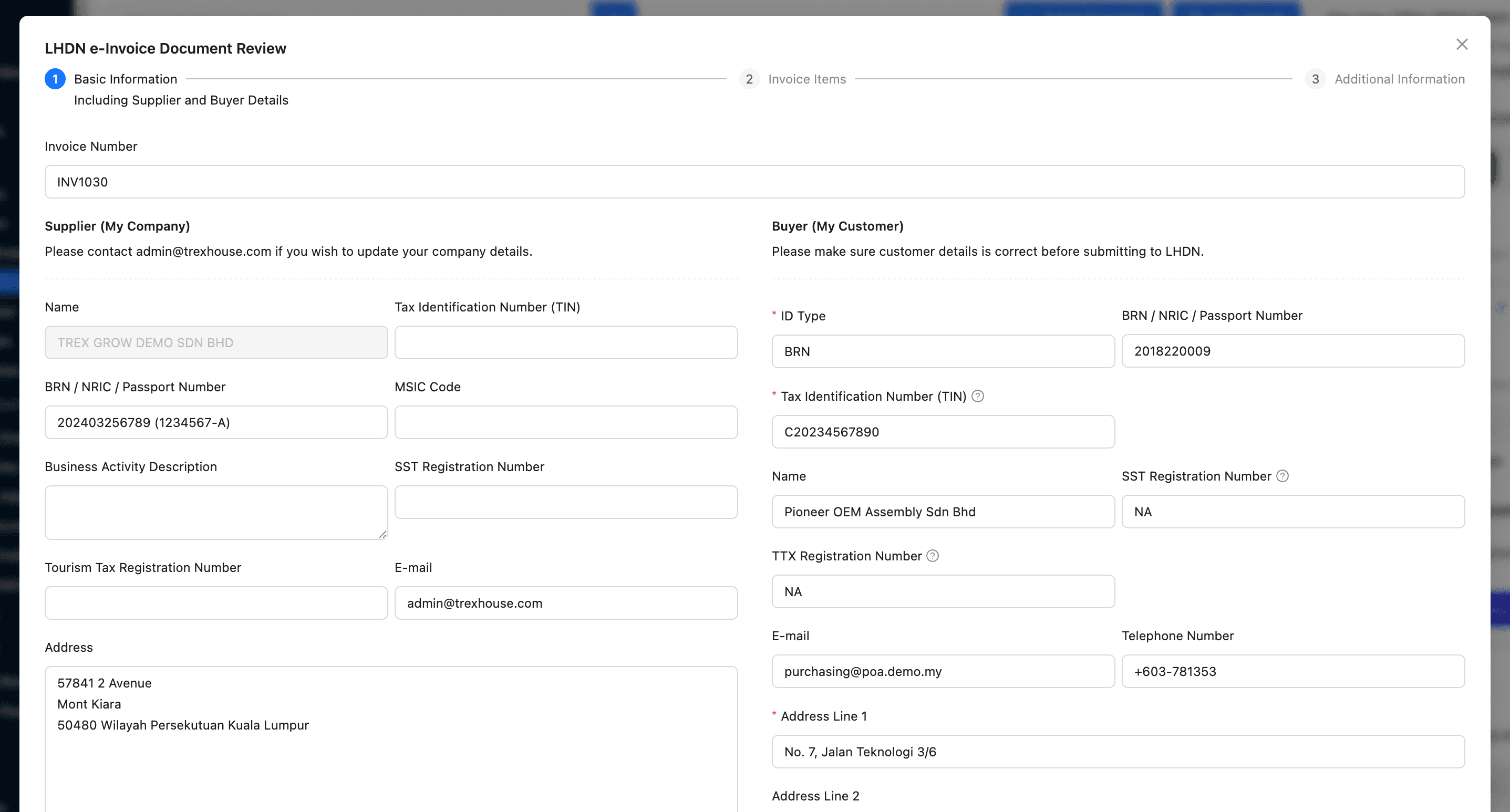
Review supplier and buyer identity, registration and TIN fields before the transaction leaves the operating workflow.
Move through basic information, invoice items and additional information instead of relying on an unchecked one-click promise.
The permitted user must still verify source accuracy, transaction treatment, approval state and current HASiL requirements.
Compare the cost of producing accurate source records and responding to MyInvois, not only the software subscription. A free route can be economical at low volume, while a paid system can earn its place when it removes repeated entry and gives the team reliable control.
Map every required document, accounting, inventory, mobile, approval and export control to the exact plan rather than the cheapest advertised tier.
Include users, companies, normal and peak e-Invoice counts, invoices, bills, storage, scans, messages and any usage-based fees.
Price master-data cleanup, opening records, templates, permissions, intermediary setup, migration, testing and adviser review.
Confirm included channels, hours, training, partner fees, response ownership, retry handling, backup and incident escalation.
Time portal entry, spreadsheet tracking, duplicate checks, status follow-up, evidence filing and corrections that remain outside the chosen product.
Check export formats, attachments, status history, retention after cancellation and the effort required to move to another provider.
Use the same cost rows for every candidate.
| Cost area | Include | Evidence |
|---|---|---|
| Subscription | Required tier, billing period, SST, promotion end and renewal basis. | Official page and written quote |
| Usage | Users, entities, e-Invoice quota, storage, scans and add-ons. | Peak-volume test |
| Setup | Data cleanup, migration, roles, training, integration and adviser time. | Implementation plan |
| Operations | Manual entry, review, exception handling and support effort. | Timed proof test |
| Exit | Export, retention, read-only access and migration support. | Contract and export sample |
e-Invoice rules, product features and prices can all change. Keep a dated selection record with the official sources, provider scope and the people responsible for checking future updates.
Name the person who monitors HASiL guidance, SDK changes, implementation dates, exemptions and transaction-specific advice.
Record supported document cases, limits, plan, intermediary or integration model, support channels and implementation responsibilities.
Document administrators, taxpayer representatives, intermediary permissions, representation period, leavers and emergency revocation.
Review authentication, encryption, backups, recovery, monitoring, incident response and any published security material.
Confirm which records and attachments can be exported, in which formats, with what history and under which cancellation terms.
Revisit official rules, prices, quotas and workflow support before contract renewal or when the business adds a new entity or transaction type.
The best practice is to make the next action clear before the situation becomes urgent.
Start with the Free plan for core invoices and supported Malaysia e-Invoice submission. Use safe data and the correct test environment, then verify the source fields, intermediary setup, returned status, correction path and current plan before rollout.
There is no universal winner. MyInvois Portal can suit a manageable manual process; TREX Grow suits connected operational records; Bukku, Financio, SQL Account and AutoCount offer different accounting-led models. Choose with your current obligation, document cases, volume, roles and proof-test evidence.