Appointment is mistaken for a software setting
A toggle inside business software cannot create the official MyInvois representation. An authorised person must complete the appointment in the company's taxpayer profile.

TREX Grow uses an authorised TREX HOUSE SDN. BHD. intermediary path for supported records. Your company appoints the intermediary in MyInvois, verifies the access in TREX Grow and keeps control of the official representation period.
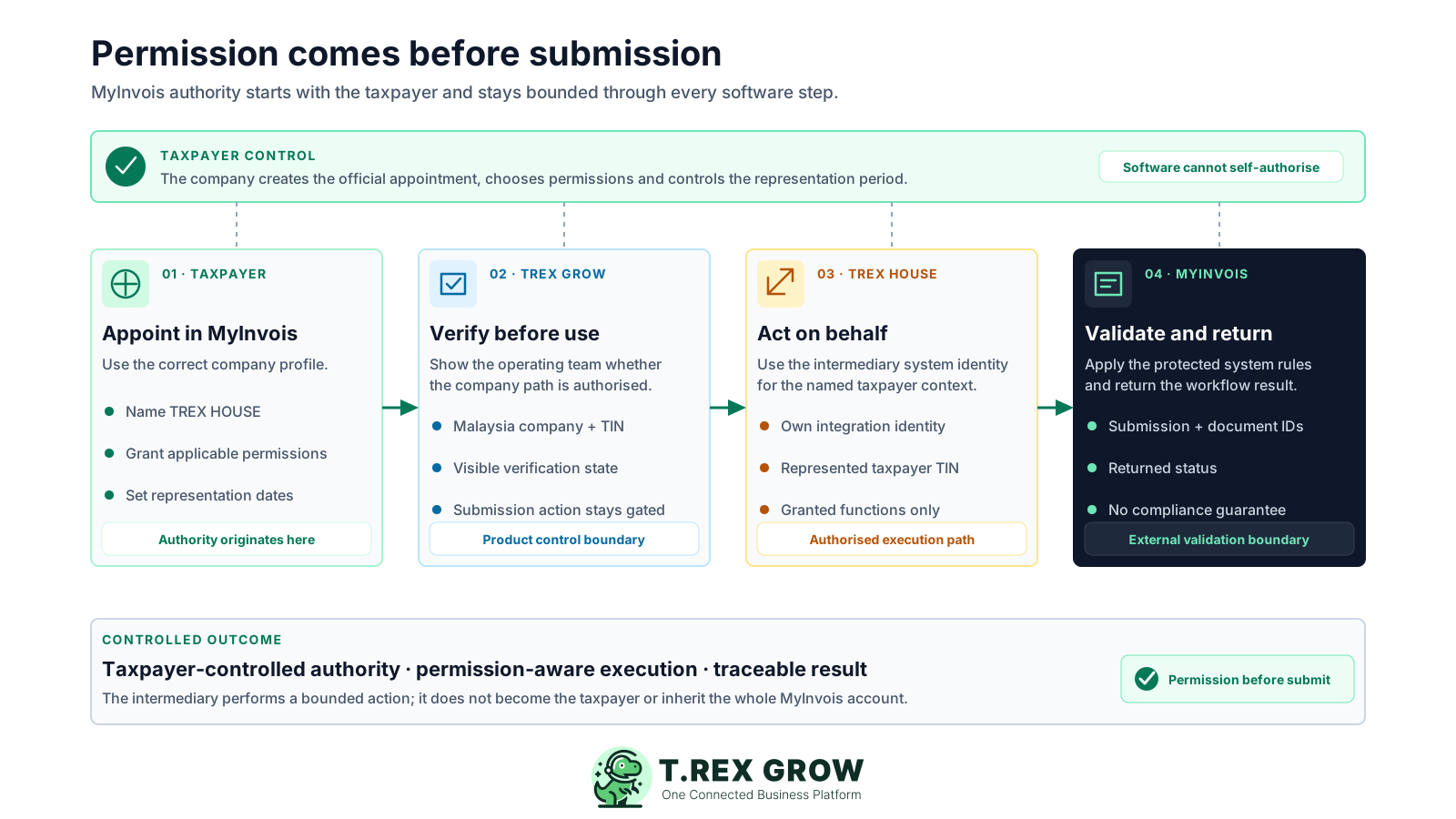
The risky misunderstanding is that selecting software automatically gives it access to a taxpayer's MyInvois account. The official model works the other way around: the taxpayer appoints and permissions an intermediary first, then the intermediary system can act on behalf of that specific taxpayer.
Operational pressure
When records live in different places, the person responsible has to reconstruct what happened before they can make a confident decision or follow up.
A toggle inside business software cannot create the official MyInvois representation. An authorised person must complete the appointment in the company's taxpayer profile.
An intermediary does not receive a general view of every document in the taxpayer account merely because it has been appointed.
The team prepares a submission before discovering that the company TIN, representation or intermediary authorisation is not ready.
No one knows who owns business-data accuracy, software review, authorised transmission, returned validation and follow-up.
The representation period changes in MyInvois, but the accounts team has no checkpoint to reverify access before the next supported submission.
HASiL's SDK defines the intermediary login as an ERP system associated with an intermediary representing and acting on behalf of a specific taxpayer. The token is tied to the represented taxpayer, and the permissions granted by that taxpayer control the functions available to the intermediary.
Your company controls the appointment in its MyInvois Taxpayer Profile and remains responsible for its transactions, data and current obligations.
The intermediary system authenticates with its own system credentials and identifies the taxpayer it is representing for the protected API call.
MyInvois applies the taxpayer-granted permissions to the intermediary profile, so authorised functionality is not a blanket handover of the account.
The software and intermediary path prepare and transmit supported data; MyInvois receives it and returns the official workflow result.
A credible intermediary solution should be able to show where official authority starts, what the product verifies, what each submission is tied to and how future access is ended. Use these checkpoints in a vendor demonstration.
Confirm that an authorised company user completes the official appointment in MyInvois rather than sharing MyTax credentials with the software.
Ask how every on-behalf session is mapped to the correct company TIN and prevented from crossing into another taxpayer's records.
Require a clear authorised or not-authorised state before staff reach the final submission action.
The user should still need the relevant business-document permission; intermediary appointment alone should not bypass internal access controls.
Submission IDs, document IDs, current status, submitter, time and previous attempts should stay connected to the source record.
The taxpayer should know where to change the official Representation To date and what the operating team must recheck afterwards.
The best practice is to make the next action clear before the situation becomes urgent.
The current TREX Grow route uses TREX HOUSE SDN. BHD. as the appointed intermediary. The taxpayer controls the MyInvois representation, TREX Grow controls product readiness and user actions, TREX HOUSE uses the authorised on-behalf path, and MyInvois controls the returned validation state.
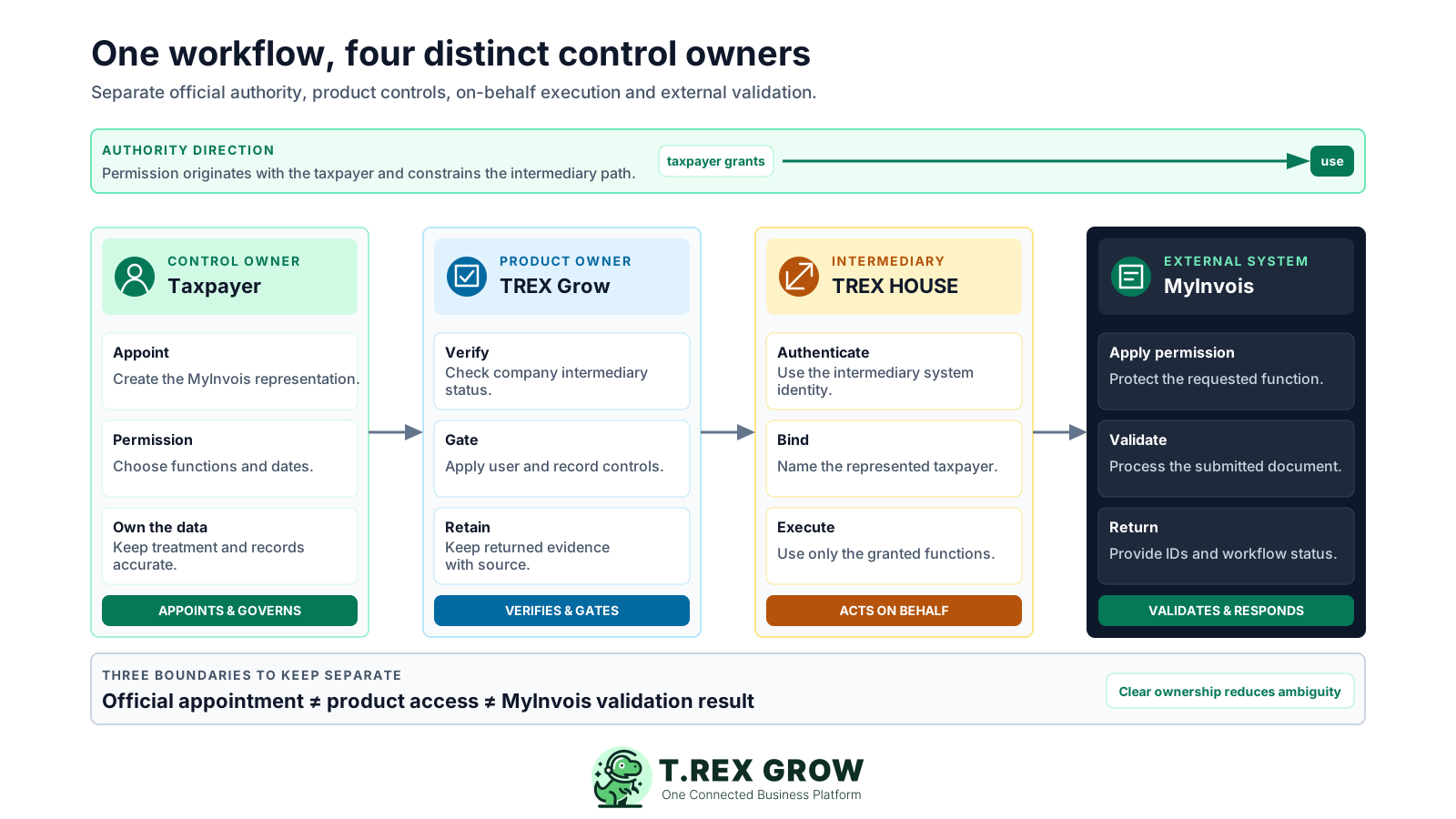
An authorised company user switches to the correct taxpayer profile, appoints TREX HOUSE, assigns the applicable permissions and controls the representation dates.
The company needs a Malaysia profile and TIN, a verified intermediary state and the applicable user and document permission before supported submission actions are available.
The intermediary system uses its own authorised integration identity in the context of the taxpayer being represented; it does not become the taxpayer.
MyInvois applies the granted permission, processes the protected request and returns the submission and document result used for follow-up.
Use a short setup path before the first supported e-Invoice action, then keep permission and source-record checks inside the normal document workflow. The official appointment remains manageable from MyInvois after setup.
Record the current facts in one shared place.
Confirm what is known and what needs attention.
Make the next decision or follow-up accountable.
Complete the next task and record the outcome.
Refresh the shared view when facts change.
A dependable workflow keeps the shared record and the next action aligned.
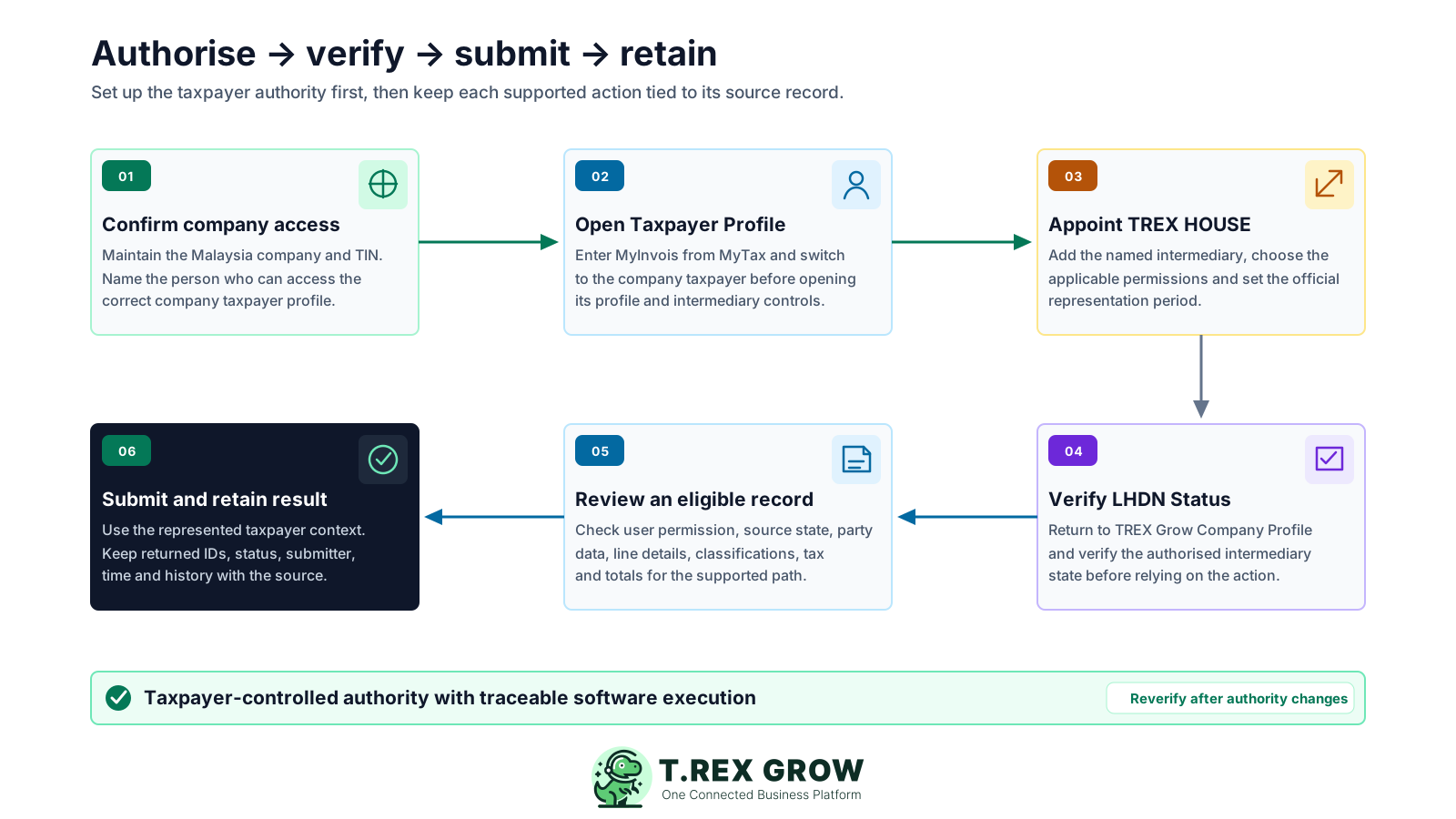
Confirm the company context: use a Malaysia company profile, maintain the company TIN and make sure an authorised person can switch to the correct taxpayer in MyTax and MyInvois.
Open the taxpayer profile: enter MyInvois from MyTax, switch to the company taxpayer and open the Taxpayer Profile rather than working from an unrelated personal context.
Appoint TREX HOUSE: add TREX HOUSE SDN. BHD. as the intermediary, select the applicable permissions and set the official representation period. Use the current identifiers in the TREX Grow setup guide.
Verify the connection in TREX Grow: open Company Profile, review the authorised-intermediary state and use Verify LHDN Status after the MyInvois appointment is complete.
Review an eligible source record: confirm the required party data, document state, user permission, line information, classifications, tax and totals for the currently supported path.
Submit and retain the result: send through the authorised taxpayer context, then keep the returned IDs, status, submitting user, time and history with the business document.
TREX Grow does not treat a MyInvois intermediary appointment as permission for every user and every record. The product combines company eligibility, intermediary verification, document access and source-state rules before it exposes the supported action.
The current verification path applies to Malaysia companies and requires the taxpayer TIN used to establish the represented-company context.
TREX Grow shows whether the company has a verified intermediary state and blocks LHDN submission while that state is not authorised.
The person taking the action still needs the relevant invoice, note or supplier-record permission; the company appointment does not grant application access by itself.
Supported records must meet their current approved, finalised, linked-original or Malaysia-supplier conditions before the e-Invoice action can proceed.
The integration uses the represented taxpayer context for MyInvois access and rejects a token that does not match the company's taxpayer TIN.
The operating team can see the returned submission details and previous attempts from the record it used to initiate the action.
HASiL's SDK FAQ places a clear privacy boundary around intermediary visibility. Product scope adds another boundary: an official permission may exist while a particular document or action is still unavailable in the software.
Use this table to separate official intermediary authority from the current application workflow.
| Question | Current boundary | What it means for the SME |
|---|---|---|
| Who creates the authority? | The taxpayer appoints and permissions the intermediary in MyInvois. | Software cannot self-authorise and your team should not treat an in-app toggle as the official appointment. |
| Which taxpayer is represented? | The intermediary login identifies the specific taxpayer it is acting on behalf of. | Your company TIN and selected taxpayer profile must be correct before verification and submission. |
| Can the intermediary see all sent e-Invoices? | HASiL says intermediaries can access e-Invoices they submitted on behalf of that taxpayer, not documents the taxpayer submitted independently. | Do not assume the intermediary becomes a complete view of every MyInvois activity. |
| Can the intermediary retrieve received e-Invoices? | HASiL says intermediaries are not permitted to access or retrieve e-Invoices received by the taxpayer. | A separate received-document or purchasing process is still needed where applicable. |
| Does company appointment authorise every TREX Grow user? | No. TREX Grow also checks the relevant source-document permission and operating state. | Keep internal roles and document approvals separate from the official intermediary appointment. |
| Does authorised access guarantee a valid result? | No. MyInvois can still return an invalid or unauthorised response, and transaction data can still be wrong. | Review the source, returned detail and current official guidance before deciding the next action. |
The best practice is to make the next action clear before the situation becomes urgent.
The March 2026 MyInvois Portal FAQ says a registered intermediary profile cannot be deleted. To stop future privileges, the taxpayer edits the intermediary and changes the Representation To date; historical records remain available for reference.
Choose representation dates that match the approved business arrangement instead of assuming access should remain open indefinitely.
Name the director, owner or authorised representative responsible for reviewing the MyInvois Taxpayer Profile and approving changes.
After permissions or representation dates change, use the TREX Grow verification step again before the team relies on the next submission action.
Use Edit Intermediary and adjust Representation To in MyInvois when the company wants to deactivate further intermediary activity while preserving history.
Check the taxpayer profile, TIN, granted permissions, representation period and current company role before treating the problem as document data.
A permission-aware intermediary workflow keeps official taxpayer authority separate from everyday application access. That creates a cleaner handoff between the company owner, accounts operator, source document, intermediary system and returned MyInvois result.
The authorised company user creates the representation in MyInvois; the intermediary path uses its own system identity for on-behalf access.
The team can see that intermediary verification is required before it reaches a supported submission deadline.
Users work through the permissions attached to their operational records rather than inheriting authority from a company-level appointment.
The source document and returned MyInvois submission history remain available together for follow-up and investigation.
The company can deactivate future intermediary privileges through the official MyInvois representation period without rewriting historical records.
Official materials can change. The HASiL guideline page was rechecked on 8 August 2026 and listed e-Invoice Guideline version 4.7 and Specific Guideline version 4.8, both published on 7 July 2026. The intermediary claims on this page were also checked against the current MyInvois SDK and the Portal FAQ updated on 9 March 2026.
Confirm who currently has authority to switch to the company taxpayer and manage its intermediary profile in MyTax and MyInvois.
Use the current MyInvois interface and user guidance when selecting intermediary permissions or changing the representation period.
Software support and a valid MyInvois response do not decide whether the document type, self-billing treatment, classification, tax or data is correct.
Confirm the current TREX Grow plan, supported document path and feature boundary before standardising the workflow across the business.
Start with one supported e-Invoice record in TREX Grow. Appoint TREX HOUSE using the current setup guide, verify the company status and keep the returned result with the source document. Confirm current obligations and permissions against HASiL guidance before changing business policy.
It is business software that uses an authorised intermediary system to act on behalf of a specific taxpayer when calling protected MyInvois APIs. The taxpayer must first appoint the intermediary and grant the applicable permissions in MyInvois; the software cannot create that authority by itself.