Source data is scattered
Party identities, TIN details, addresses, item classifications, tax settings and amounts may live in different files or tools.

TREX Grow connects the records your team maintains with readiness checks, an authorised MyInvois submission path and visible returned status, so Malaysia e-Invoice work is not isolated from daily sales and purchasing operations.
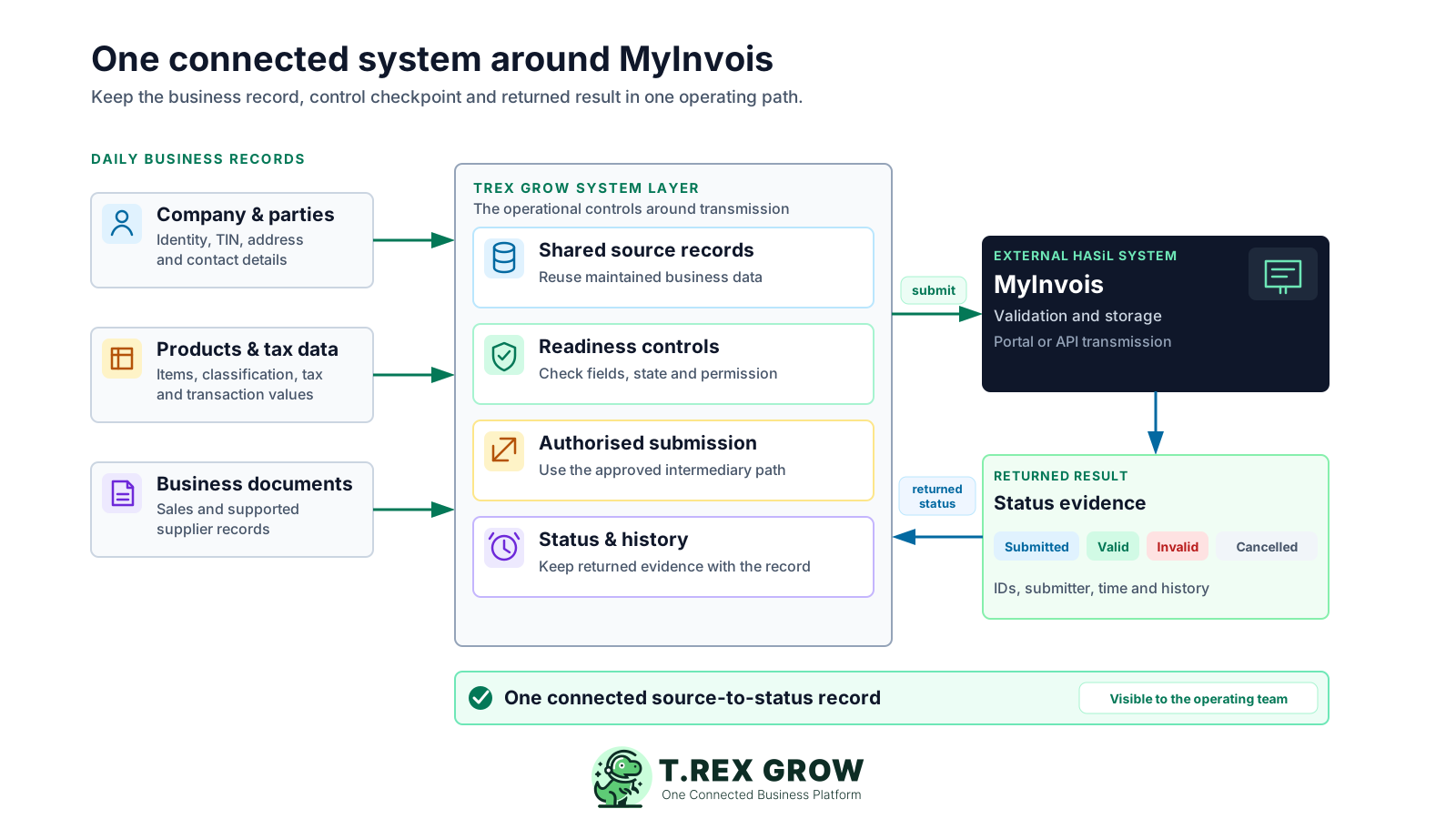
MyInvois receives and validates e-Invoice data, but the work begins in company, customer, supplier, product and transaction records. When those records are detached from submission, the accounts team has to bridge the gaps manually.
Operational pressure
When records live in different places, the person responsible has to reconstruct what happened before they can make a confident decision or follow up.
Party identities, TIN details, addresses, item classifications, tax settings and amounts may live in different files or tools.
Staff recreate transaction information for submission instead of working from the controlled business document.
Missing fields, wrong document states or unavailable permissions surface only when a deadline or customer request is already pressing.
A valid or invalid result is harder to investigate when the returned IDs and submission history are separated from the invoice.
No one knows who should correct the source data, refresh the status or retain the evidence after submission.
HASiL describes two e-Invoice transmission mechanisms: the no-charge MyInvois Portal and an API connection between a taxpayer's system and MyInvois. Either path can transmit data; your operating system still needs to control how the underlying business record is prepared, reviewed and followed up.
MyInvois validates and stores submitted transaction documents. TREX Grow does not replace that HASiL function.
HASiL provides MyInvois Portal at no charge, especially for taxpayers without a business ERP or available API connection.
An API-supported path reduces the need to recreate the same record in a separate portal process, but it still depends on accurate source data and authorised access.
Submitted, valid, invalid and cancelled are MyInvois workflow states. They do not replace the taxpayer's wider tax, accounting or record-keeping judgment.
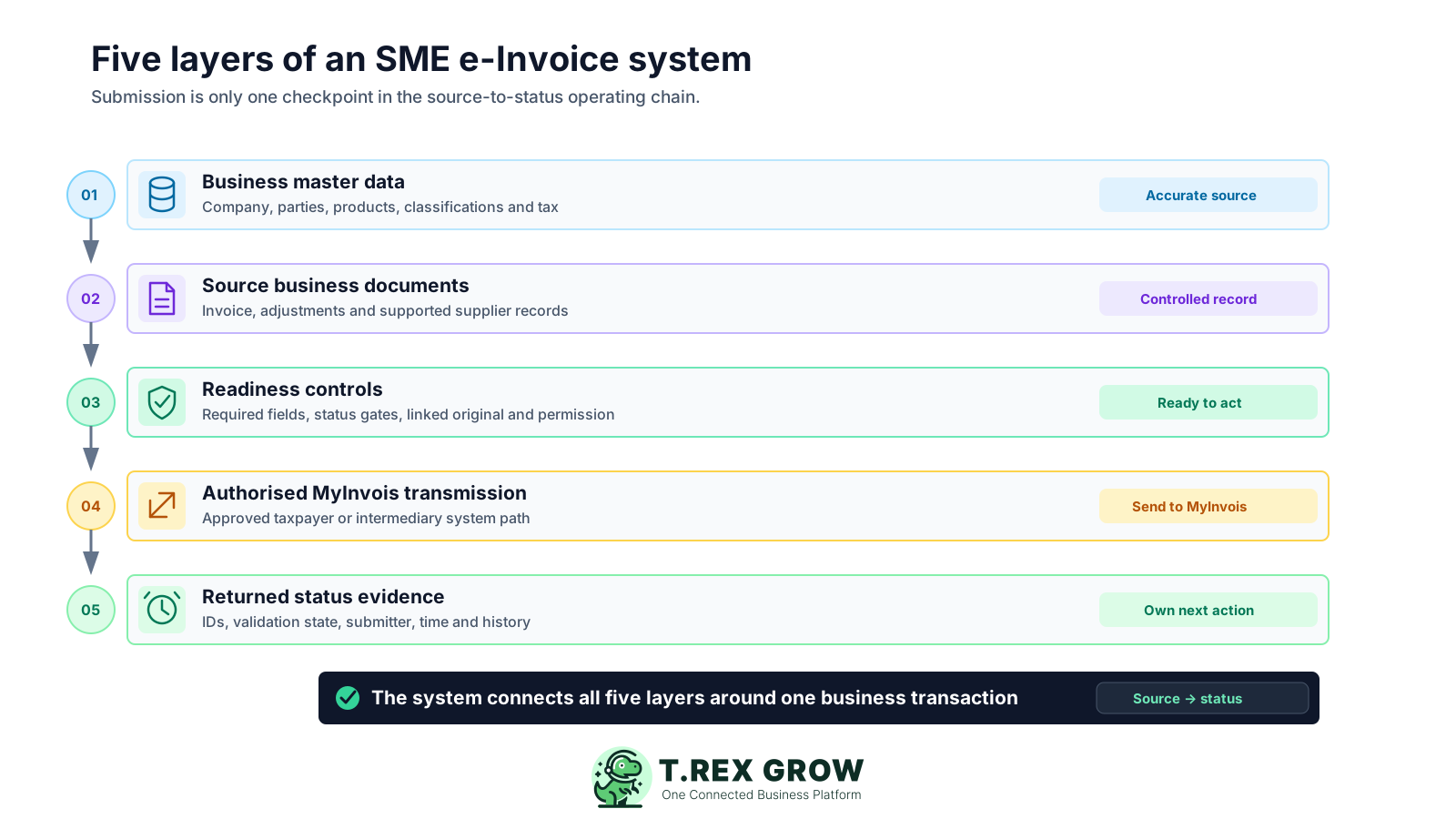
Evaluate the full operating chain, not only whether software can send a payload. Each layer has a different control purpose and should remain traceable to the same business transaction.
Maintain the company, customer, supplier, address, contact, TIN, product, classification and tax data used by the operating record.
Start from the applicable invoice, credit note, debit note, refund note or supported supplier record rather than an unrelated submission copy.
Check the responsible user, required fields, document state, linked original and intermediary eligibility before enabling the action.
Send the supported document to MyInvois through the approved taxpayer or intermediary system path.
Keep the submission ID, document ID, status, submitter, timestamp and history connected to the source record.
The best practice is to make the next action clear before the situation becomes urgent.
TREX Grow uses business records already maintained by the team, applies product and permission gates, presents a submission review and keeps the MyInvois response with the document. The result is a controlled source-to-status path rather than another detached compliance file.
Use operational party profiles for the supported transaction and maintain their identity, TIN, address and contact information in one place.
Carry descriptions, quantities, units, prices, classifications, tax and totals from supported source documents into the review.
Require the applicable approved, finalised or ready state and linked-original condition before a supported record can move forward.
Use the related document-management permission to control who can manage the e-Invoice action.
Permitted users can retrieve or validate TIN details for eligible Malaysia customer and supplier records from the supported review flow.
See current status and previous attempts with the returned IDs, submitting user and timestamp from the business document.
The high-level path has six operating checkpoints. Your detailed procedure can assign an owner and response time to each checkpoint without changing the underlying MyInvois mechanism.
Record the current facts in one shared place.
Confirm what is known and what needs attention.
Make the next decision or follow-up accountable.
Complete the next task and record the outcome.
Refresh the shared view when facts change.
A dependable workflow keeps the shared record and the next action aligned.
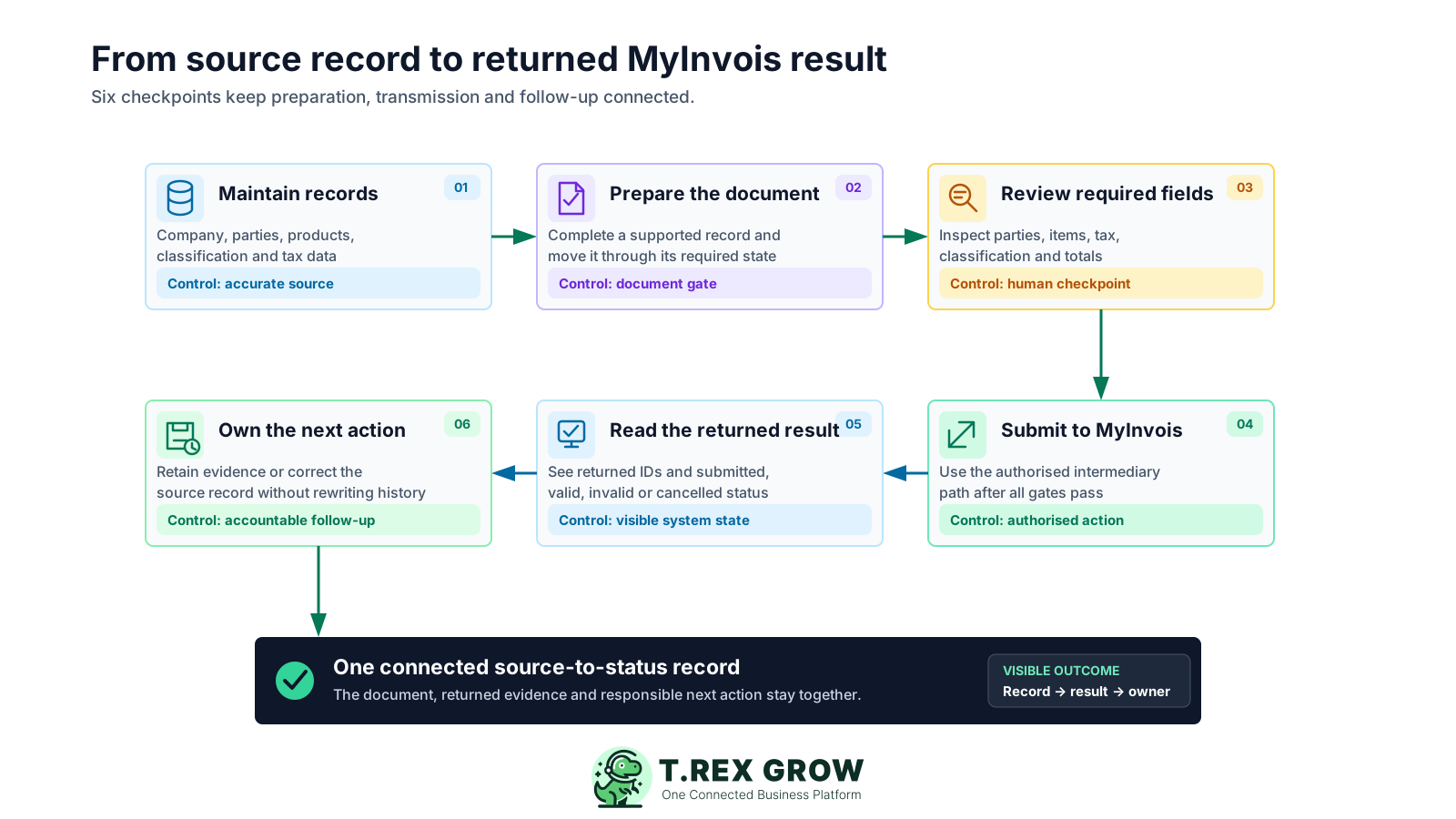
Maintain the business records: prepare the company profile, selected customer or supplier, address, contact, TIN, product and tax information used by the transaction.
Prepare a supported source document: complete the invoice or applicable adjustment or supplier record and move it through its required operating state.
Review the submission data: inspect the parties, document fields, line items, classifications, tax and totals before confirming the action.
Use the authorised transmission path: verify the company intermediary status, the user's permission and the document gate before sending the supported record to MyInvois.
Read the returned result: keep the submission ID, document ID and submitted, valid, invalid or cancelled state visible with the transaction.
Own the next action and evidence: retain a valid result, correct the source data after an invalid result, or follow the applicable current correction path without rewriting history.
HASiL allows taxpayers to select the suitable transmission mechanism based on their business requirements and situation. The practical decision is whether the no-charge portal remains manageable or whether a connected system removes enough repeated work and fragmented evidence to justify the change.
This is an operating comparison, not a rule that every SME must use the same route.
| Decision area | MyInvois Portal | Connected system path |
|---|---|---|
| Transmission | Users work in the HASiL-hosted portal. | The business system sends supported data to MyInvois through an authorised API or intermediary path. |
| Source data | The team prepares or uploads information for portal use. | The submission starts from a controlled business record already used by the team. |
| Operating fit | Useful when a business ERP or API connection is unavailable and the portal process remains manageable. | Useful when repeated entry, document gates, ownership and source-to-status visibility matter. |
| System responsibility | The taxpayer still owns data accuracy and transaction treatment. | The taxpayer still owns data accuracy and transaction treatment. |
The best practice is to make the next action clear before the situation becomes urgent.
TREX Grow currently supports eight MyInvois document-type mappings across customer and supported supplier self-billed records. The feature being available does not determine whether a transaction requires that document type or qualifies for self-billing.
Start the supported submission review from an approved customer invoice.
Use the supported credit, debit or refund note path with the required approved state and valid linked original.
Use the supported path from a finalised supplier invoice for an applicable Malaysia supplier transaction.
Use the supported supplier credit, debit or refund path when the record is ready and its original supplier e-Invoice is valid.
The current Free plan includes core invoices and Malaysia e-Invoice submission; broader adjustment, purchasing and supplier-document workflows depend on the current plan.
Ask vendors to demonstrate the complete record path and name the current product boundary. A long checklist of generic compliance claims is less useful than seeing how your team will prepare, control and investigate one real transaction.
| Capability | Question to ask | TREX Grow boundary |
|---|---|---|
| Source-record continuity | Does submission start from the same invoice or supplier record used by operations? | Yes, for the currently supported TREX Grow document paths. |
| Readiness controls | Which data, permission and document-state gates are checked before submission? | Company status, user permission, source fields and applicable document gates are checked. |
| Authorised access | How is the taxpayer or intermediary system authorised? | TREX HOUSE SDN. BHD. must be authorised as an intermediary for the current TREX Grow path. |
| Returned evidence | Can staff find IDs, status, submitter, time and previous attempts from the source record? | The current document view retains that submission information and history. |
| Exception ownership | What happens when MyInvois returns an invalid result? | The team corrects the relevant source or document data and uses the controlled resubmission action. |
| Claims and limits | Does the vendor distinguish system validation from wider compliance responsibility? | TREX Grow supports the workflow but does not guarantee compliance, tax correctness or successful validation. |
The best practice is to make the next action clear before the situation becomes urgent.
A connected system does not remove every judgment or exception. It gives the team a clearer record, checkpoint and result so routine work is easier to own and investigate.
Reuse controlled business records instead of building a disconnected submission copy for every supported document.
Prepare identity, TIN, address, classification and tax data in the operating records where the team can improve them before submission.
Separate who prepares the document, who can submit and who responds to the returned status.
Use the source document, returned IDs, submitter, timestamp and history together when checking an exception.
Keep e-Invoice validation distinct from payment status while both remain understandable within the wider customer or supplier workflow.
HASiL's implementation timeline, exemptions, guidelines and technical materials can change. The official guideline page was rechecked on 8 August 2026 and listed e-Invoice Guideline version 4.7 and Specific Guideline version 4.8, both published on 7 July 2026.
Check the latest HASiL timeline and detailed conditions for your turnover, business circumstances and commencement date rather than relying on a generic deadline statement.
Your business or tax adviser remains responsible for document type, self-billing applicability, classification, tax and amount accuracy.
A valid result confirms the returned MyInvois workflow state for that submission; it is not a promise that every wider obligation has been fulfilled.
Recheck your data, procedure, permissions and product capabilities whenever official rules or technical requirements are updated.
Start with one supported invoice path in TREX Grow, prepare the required records, authorise the intermediary connection and keep the returned MyInvois result with the transaction. Confirm your current obligations against HASiL guidance before changing business policy.
MyInvois is the HASiL system used to receive, validate and store e-Invoice submissions. For an SME, the wider operating system also includes the business data and source document, readiness and permission controls, the selected portal or integrated transmission mechanism, and the returned IDs, status and history used for follow-up.