Sales context disappears at billing
Customer details, quotation references, agreed items, pricing, and payment terms are often copied into a new file instead of carried forward from a controlled sales record.

TREX Grow helps Malaysian SMEs carry customer and quotation context into the invoice, keep totals and document status visible, retain payment history, and support Malaysia e-Invoice handling without rebuilding the same record across spreadsheets and folders.
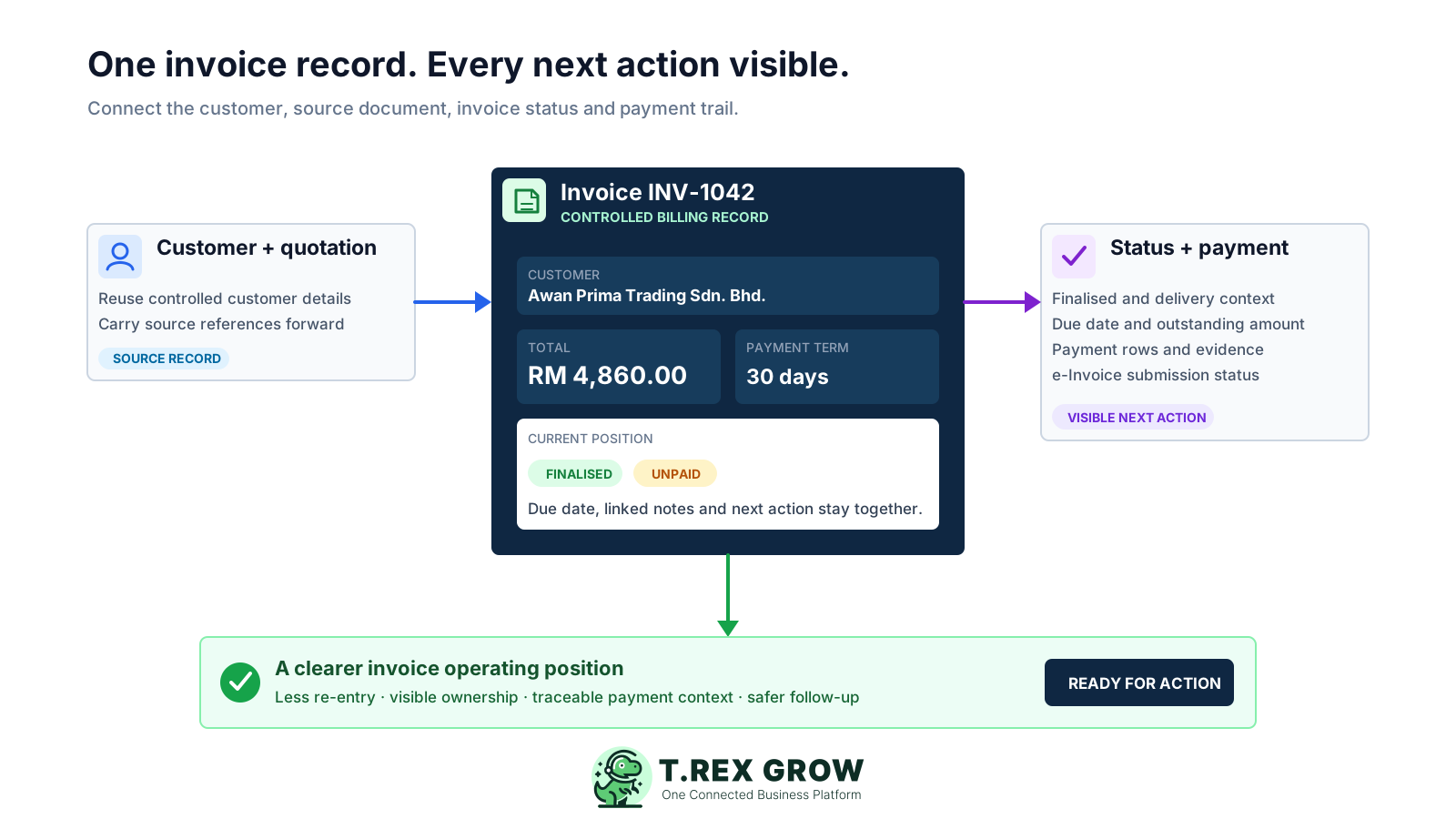
The useful business record begins before the PDF is generated and continues until the balance is settled. When those stages are disconnected, staff can produce an invoice but still struggle to explain its source, current status, outstanding amount, and next action.
Operational pressure
When records live in different places, the person responsible has to reconstruct what happened before they can make a confident decision or follow up.
Customer details, quotation references, agreed items, pricing, and payment terms are often copied into a new file instead of carried forward from a controlled sales record.
Sales may remember that the document was sent while finance sees an unpaid row and operations sees a delivery issue. Without a shared record, each answer can be partly correct and still incomplete.
Payment terms and due dates sit on the invoice, but the person responsible for the next customer action tracks it in chat, email, or a personal reminder.
Credit, debit, and refund notes can change the commercial position. If they are stored separately, staff may quote the original total when the current payable amount is different.
A bank reference, paid date, amount, person in charge, remarks, or attachment has little value when the team cannot connect it confidently to the invoice and payment row it supports.
When source data and invoice status are not controlled, Malaysia e-Invoice work becomes another place to re-enter data and investigate exceptions instead of a continuation of the billing workflow.
A template or spreadsheet can be useful at low volume, but it does not naturally preserve the relationship between customer data, source documents, status changes, adjustment notes, payment rows, and compliance handling.
Recurring issues usually point to workflow-control gaps, not one isolated data-entry mistake.
Repeated entry creates several versions of the same customer name, address, registration information, contact person, and payment terms.
Names such as FINAL, FINAL2, and PAID do not show which version was approved, what changed, or how the record connects to its source quotation.
Replacing one paid amount or date hides partial payments and removes the evidence behind earlier settlement activity.
Separate credit, debit, and refund-note files make it harder to understand why the current amount differs from the original invoice.
The team cannot see who should review the invoice, handle an exception, follow up with the customer, or update the payment record next.
No invoice tool removes the need for accurate source data, current configuration, responsible users, and business-specific confirmation of the latest HASiL requirements.
The right system should make normal billing fast while keeping exceptions understandable. Test how it handles one realistic customer, a source quotation, an adjustment, a partial payment, and the e-Invoice path relevant to your business.
Customer identity, contact, address, payment terms, and relevant billing details should come from a reusable record rather than another copied row.
Users should be able to see which quotation or source record supports the invoice and carry agreed line-item context forward without reconstructing it.
Subtotal, discounts, tax, milestones, totals, finalisation, due timing, and payment position should be readable without another reconciliation sheet.
Credit, debit, and refund notes should remain distinguishable from cash payments while staying connected to the invoice position they change.
Each payment should retain its own amount, date, method, reference, bank or person-in-charge context, remarks, and optional evidence instead of replacing an earlier entry.
Where Malaysia e-Invoice applies, the team needs accurate source data and a visible submission or exception status. Confirm current requirements and implementation timing with official HASiL guidance.
Use a realistic invoice scenario during the product review.
| Requirement | Evidence to test | Operational value |
|---|---|---|
| Customer and source context | Select a customer, use a quotation reference, and review carried-forward details. | Reduces re-entry and makes the billing source easier to trace. |
| Invoice control | Review totals, terms, status, owner, notes, and the generated document. | Gives the team one dependable invoice position. |
| Exception handling | Test a changed detail, linked adjustment, or incomplete record. | Shows whether normal workarounds remain visible and controlled. |
| Payment history | Record two partial payments with different references and evidence. | Preserves settlement history and the amount still outstanding. |
| Malaysia e-Invoice workflow | Review the data, submission mechanism, status, and exception path applicable to the business. | Connects compliance handling to the commercial invoice record. |
TREX Grow keeps the invoice journey in a visible sequence. The exact Malaysia e-Invoice step depends on the current rules and the workflow that applies to your business, but the operating record remains connected before and after submission.
Record the current facts in one shared place.
Confirm what is known and what needs attention.
Make the next decision or follow-up accountable.
Complete the next task and record the outcome.
Refresh the shared view when facts change.
A dependable workflow keeps the shared record and the next action aligned.
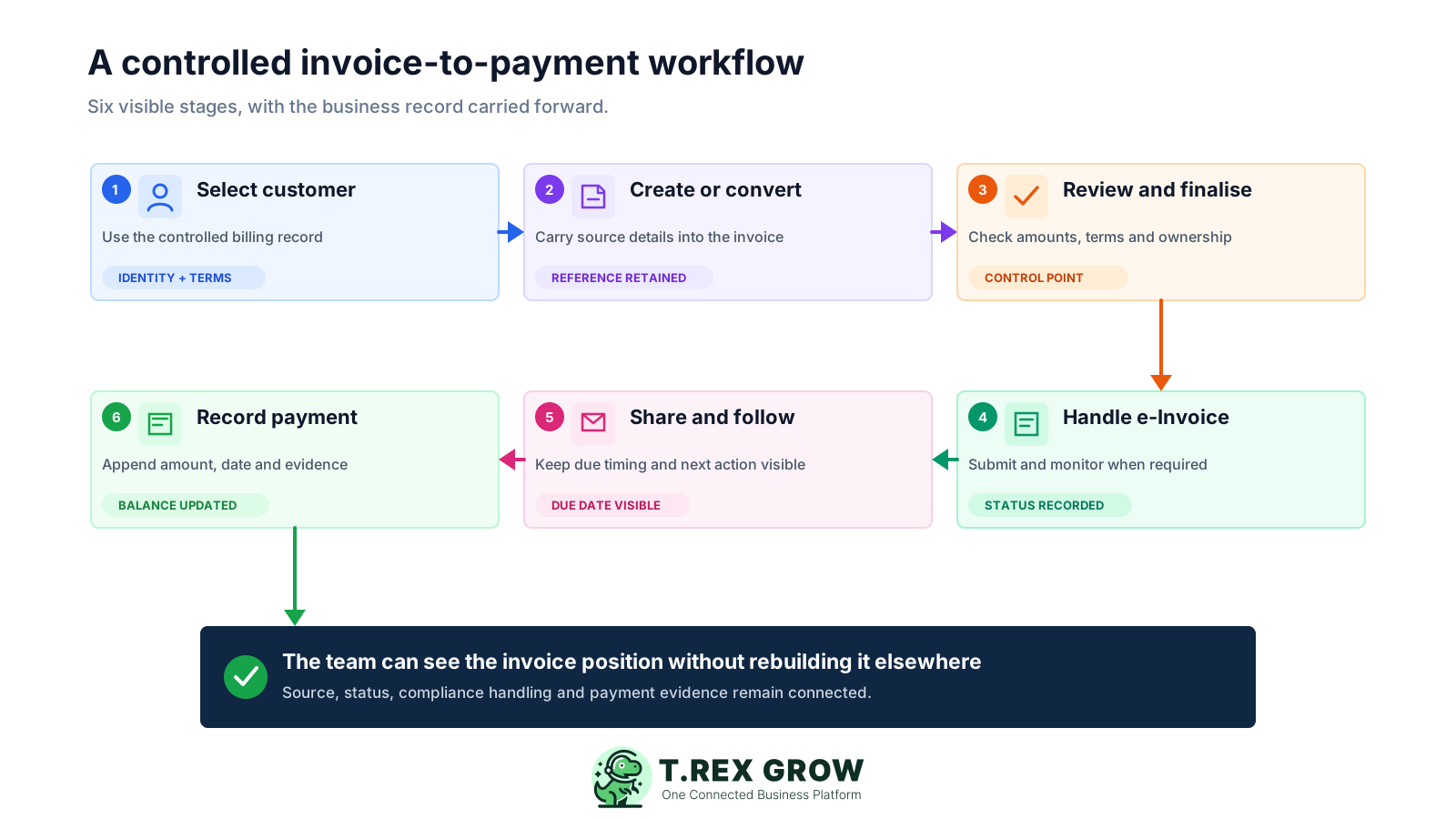
Select the controlled customer record: confirm the business identity, contact details, billing address, payment terms, and any current information needed for the invoice workflow.
Create the invoice or carry details forward from the relevant quotation: retain the source reference, agreed items, quantities, prices, discounts, milestones, and tax treatment used by the business.
Review and finalise the record: check totals, dates, terms, owner, attachments, and any missing information before treating the invoice as ready for its next action.
Handle Malaysia e-Invoice when required: use the applicable TREX Grow workflow and monitor the submission or exception status. Confirm the latest obligations and data requirements using current HASiL guidance.
Share the invoice and keep follow-up visible: use the due date, payment term, document status, and a responsible owner to guide customer communication rather than relying on memory.
Record each payment separately: append the amount, date, method, reference, bank or person-in-charge context, remarks, and evidence so total paid and outstanding balance remain explainable.
The invoice record sits between the sales commitment and the settlement outcome. TREX Grow keeps the supporting inputs, current document position, and downstream controls close enough for sales, finance, and operations to work from the same context.
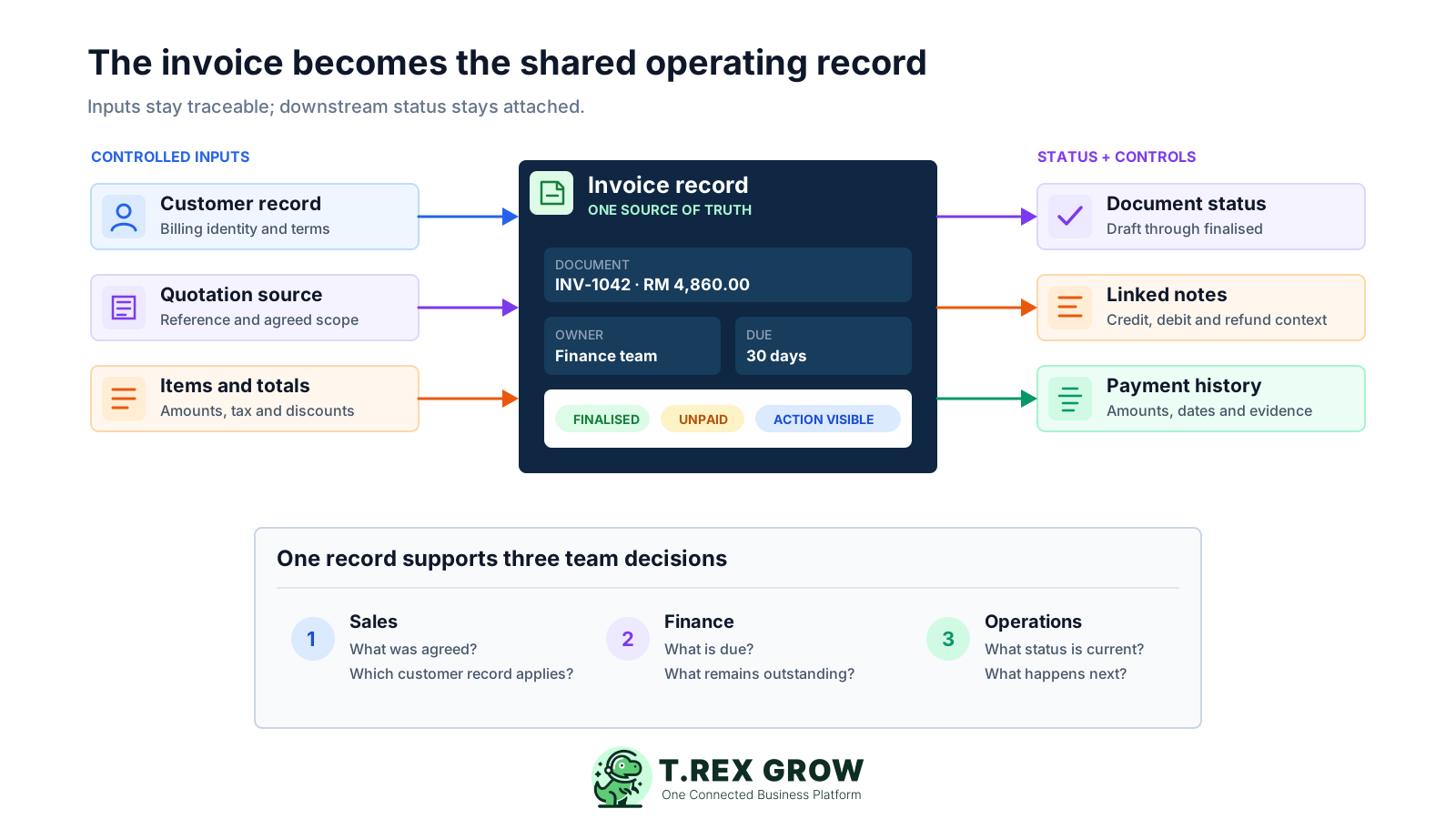
Keep the billing customer and source quotation visible so staff can understand where the invoice details came from.
Retain line items, quantities, unit prices, discounts, milestones, tax, and total values in the controlled invoice record.
Use finalisation, paid status, due date, payment term, paid amount, and outstanding context to identify what needs attention.
Keep supported adjustment notes connected to the invoice while distinguishing those changes from actual customer payment entries.
Record separate partial or full payments with dates, methods, references, bank or person-in-charge details, remarks, and optional attachments.
Support the operational submission and status workflow alongside the source invoice data, subject to current HASiL requirements and business configuration.
Use role and permission controls so the right users can view or update invoice and payment information within the company's operating rules.
The invoice workspace brings customer, source references, status, due timing, totals, adjustment context, and payment position into one searchable operating view. This product image uses safe demo records and shows the information teams need before opening each invoice.
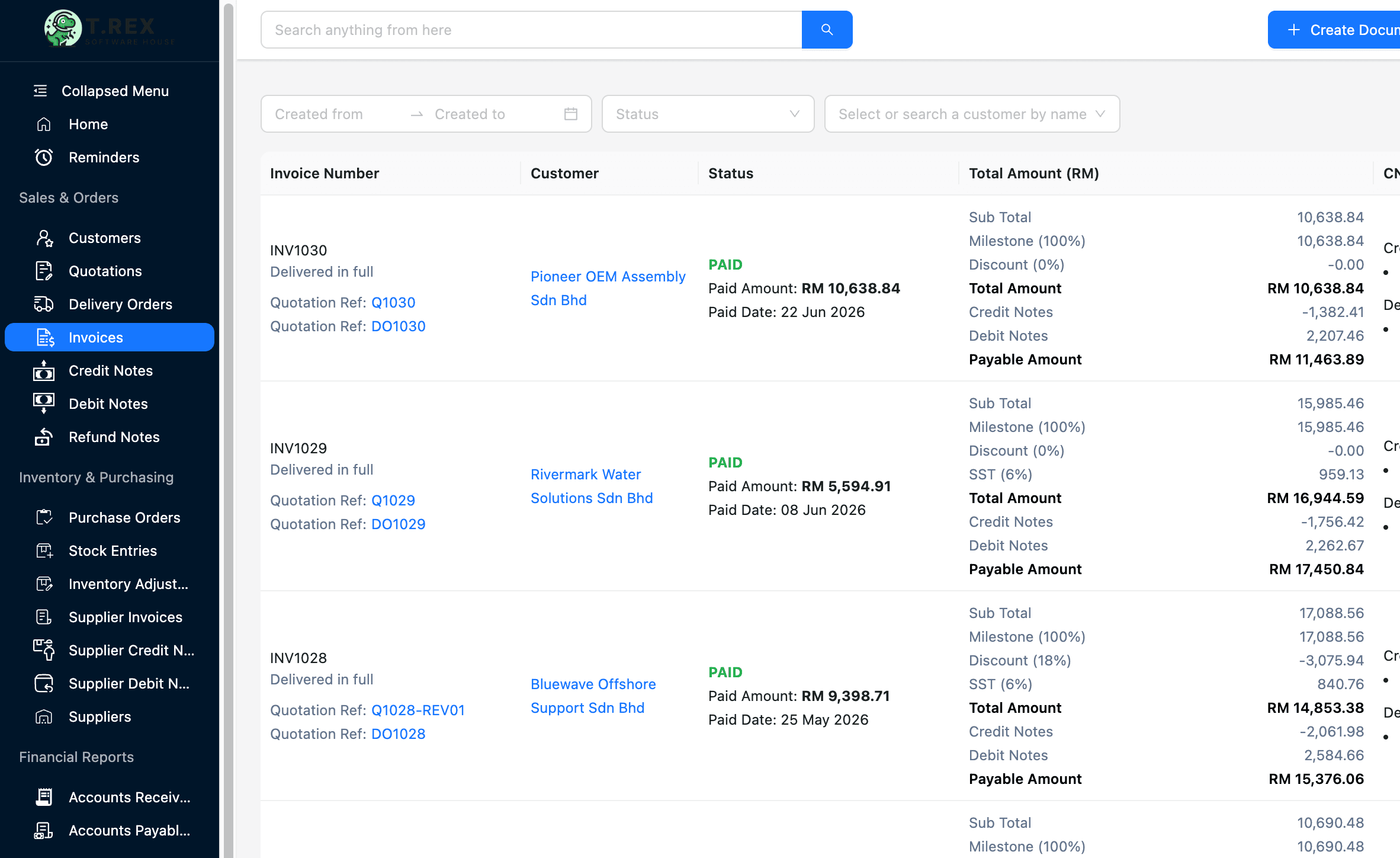
Search and filter the invoice list while keeping invoice number, customer, source reference, creator, and current position visible.
Review subtotal, discount, tax, total, supported adjustment amounts, and the resulting payable position without opening a separate spreadsheet.
A finalised invoice can still be unpaid. Showing both states helps the team understand whether the document is complete and whether collection work remains.
Where applicable, submission status appears as part of the invoice operating view instead of becoming an unrelated compliance list.
The invoice detail view keeps the commercial record, customer profile, item totals, due information, and payment-history area together. Each new payment can be recorded as another row instead of overwriting the earlier settlement evidence.
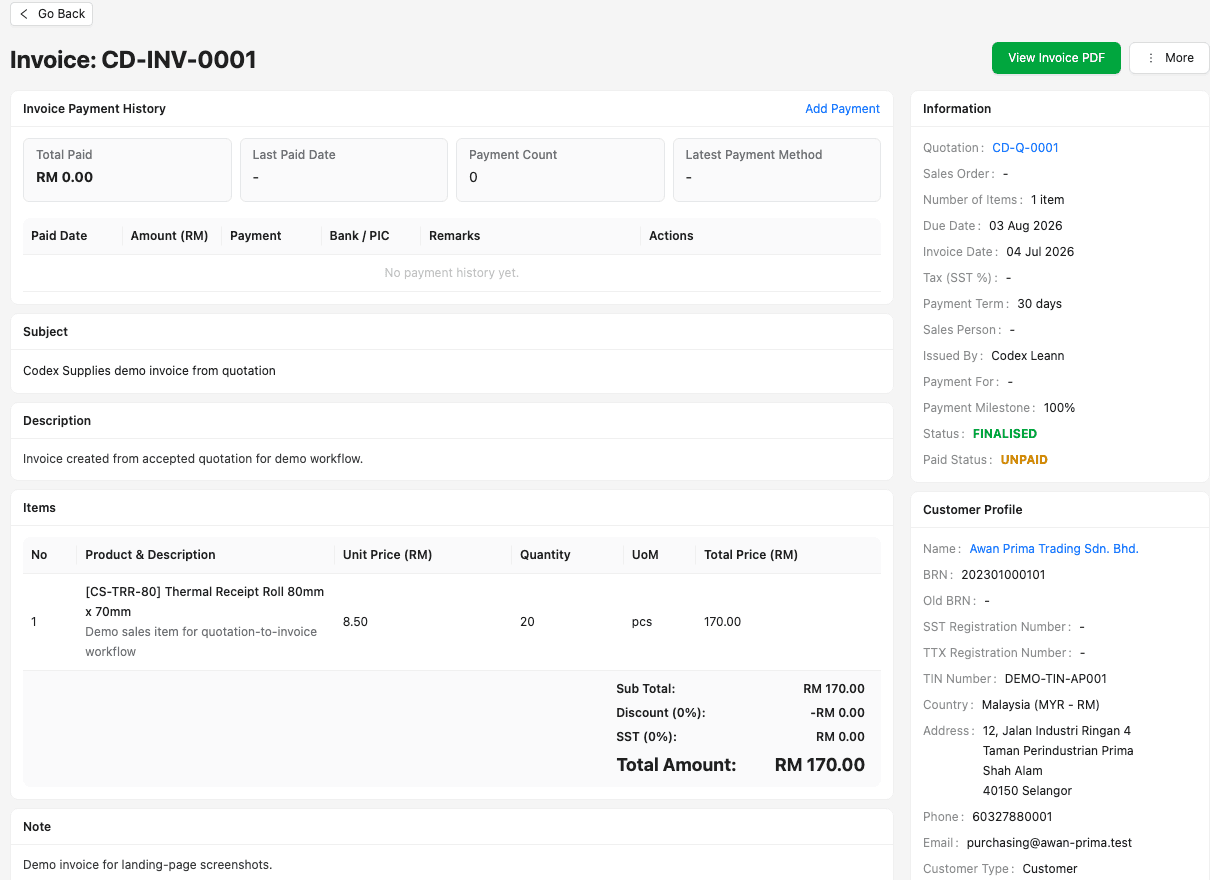
Users can review source quotation, invoice date, due date, payment term, owner, status, customer context, and item detail from one record.
Total paid, latest paid date, payment count, and latest method provide a summary while the history table retains the individual settlement rows.
Payment references, bank or person-in-charge details, remarks, and supported attachments can be retained with the relevant payment context.
Your company still receives and verifies money through its approved bank or payment channel; TREX Grow records the invoice settlement and evidence rather than executing the bank transaction.
A good implementation starts with record ownership and one realistic workflow. Move the active work first, test the exceptions your team sees every month, and only then make the new system the shared source of truth.
Resolve duplicate names, outdated contacts, inconsistent addresses, missing identifiers, and unclear payment terms before staff begin creating new invoices.
Assign operational responsibility for customer data, invoice creation, review, e-Invoice exceptions, payment entries, and periodic record checks.
Use a real but safely anonymised quotation, invoice, adjustment, partial payment, and follow-up scenario instead of evaluating only a perfect sample.
A customer payment is cash settlement evidence. A credit, debit, or refund note changes the commercial position for a different reason and should remain identifiable.
Use current HASiL materials and qualified advice where needed to confirm implementation timing, exemptions, required data, and the submission mechanism that applies to the business.
Start with the invoice workflow you need, then confirm current plan access for broader sales, adjustment, attachment, purchasing, inventory, warehouse, or reporting capabilities.
The best practice is to make the next action clear before the situation becomes urgent.
TREX Grow is designed for SMEs that want invoicing connected to day-to-day operations. It is strongest when the invoice begins with a customer or quotation and needs to remain understandable through delivery, adjustment, e-Invoice handling, and payment follow-up.
The team wants to retain the customer, commercial details, and source reference instead of rebuilding the invoice in another tool.
Both teams should be able to see the current document and payment position without maintaining separate versions of the record.
Trading, distribution, service, project, and other SMEs can benefit when customer data and common line-item context are reused frequently.
The business values customer records, quotations, invoices, adjustments, payments, approvals, inventory, or purchasing context in one connected platform.
TREX Grow's current Free plan includes core customer, quotation, invoice, and e-Invoice workflows. Review the latest pricing page before rollout because plan entitlements can change.
TREX Grow supports invoice operations and payment records; it does not promise guaranteed tax compliance, execute customer bank payments, or replace a complete accounting or specialist collection platform in every use case.
Create a TREX Grow workspace, add a customer, prepare or reuse a quotation, issue an invoice, and review the status and payment trail. Confirm the workflow with a real operating scenario before moving more billing records into the platform.
Invoice software helps a business create, manage, and follow customer invoices. A useful system goes beyond the PDF by connecting customer data, source documents, amounts, status, due timing, adjustments, payments, and the next operational action.