The invoice is treated as a standalone PDF
A PDF can show what was issued, but it does not automatically show the quotation, purchase order, delivery record, payment proof or later adjustment history.

Most invoice management mistakes are not caused by one typo. They happen when customer data, quotation details, payment terms, approvals, delivery status, adjustment notes and e-Invoice references sit in different places. This guide shows how Malaysian SMEs can control the workflow before invoices become disputes, overdue payments or messy records.
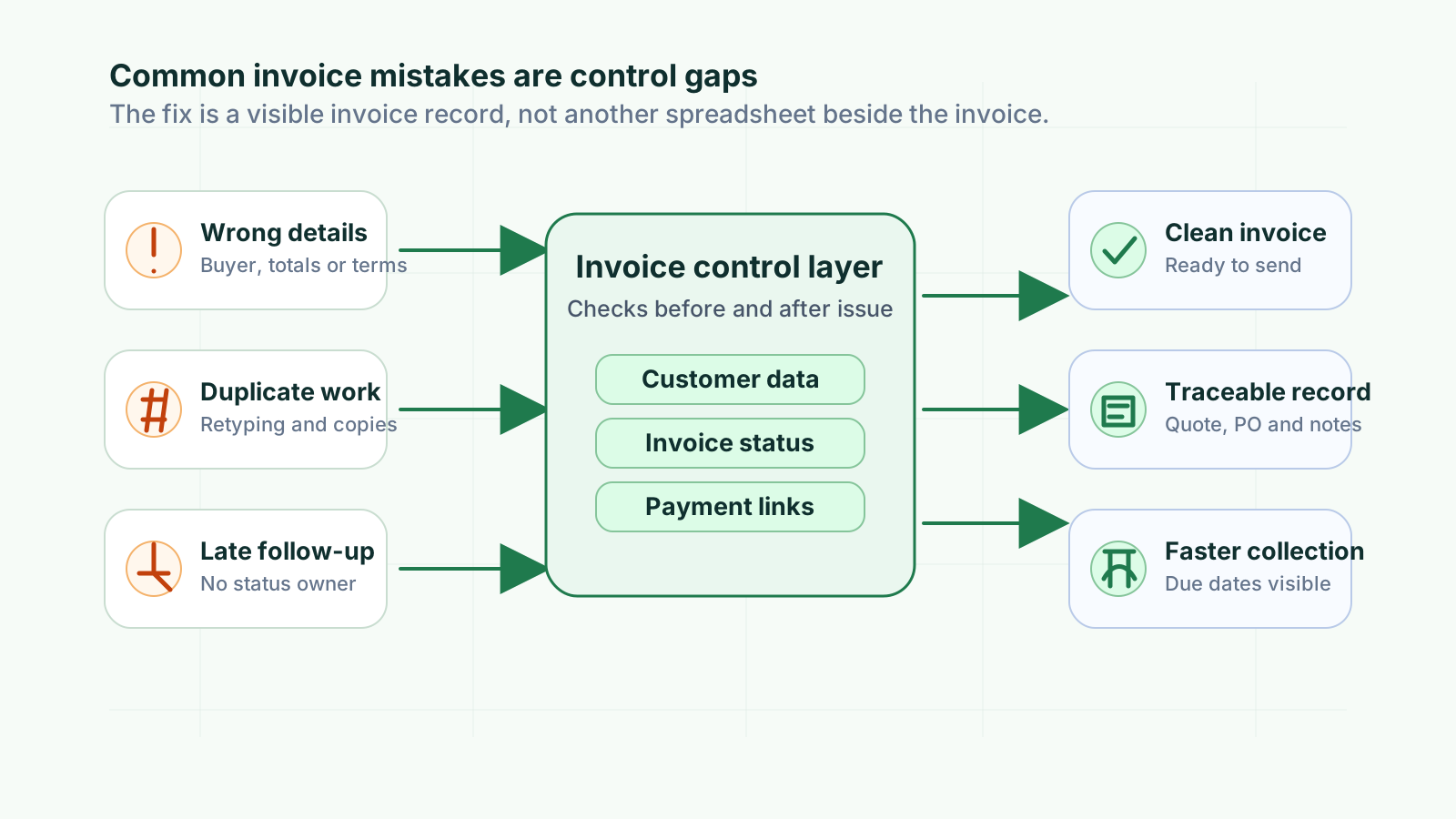
Invoice mistakes usually appear at the point of billing, but the cause often sits earlier in the workflow. Sales may have the accepted quotation, operations may know the delivery status and finance may be chasing payment, while the invoice itself only shows a small part of the transaction.
Operational pressure
When records live in different places, the person responsible has to reconstruct what happened before they can make a confident decision or follow up.
A PDF can show what was issued, but it does not automatically show the quotation, purchase order, delivery record, payment proof or later adjustment history.
Customer details, item lines, approved discounts and payment terms may sit in email, spreadsheets, WhatsApp and accounting exports instead of one controlled record.
If invoices are marked paid, overdue, cancelled or adjusted only during month-end cleanup, the team loses time for customer follow-up and correction.
Casual edits, replacement PDFs and unclear notes make it difficult to explain which document is final and why a credit note, debit note or refund note was issued.
Malaysia businesses need invoice and supporting records that can explain transactions. Good record keeping also helps daily cashflow, customer service and management review.
Good invoice management controls the records around the invoice, not only the invoice number. Malaysian businesses should keep supporting records such as invoices, receipts, bank statements and related documents. For e-Invoice workflows, validated invoice details, status and references also need to remain easy to retrieve.
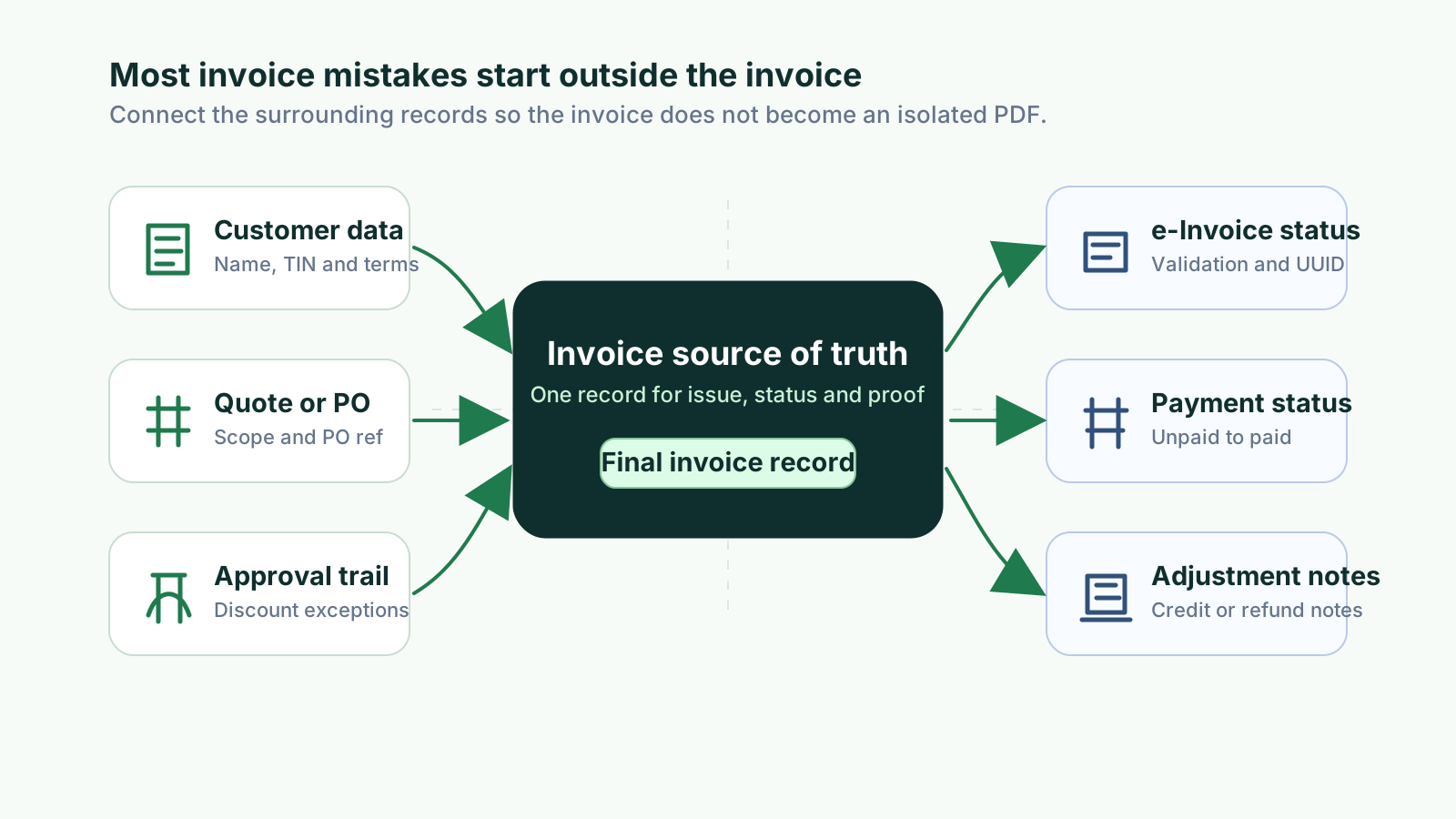
Keep customer name, registration details, TIN where applicable, billing address, contact person, payment terms and delivery or service references consistent.
The invoice should be linked to the accepted commercial source so finance can confirm price, quantity, scope, tax treatment and special terms.
Discounts, extended credit terms, manual price changes and exceptions should show who approved them before the invoice was sent.
Track whether the invoice is draft, issued, submitted, validated, rejected, cancelled or adjusted, especially when e-Invoice workflows apply.
An invoice record should show due date, payment owner, partial payments, receipts, bank proof, overdue status and follow-up notes.
Credit notes, debit notes and refund notes should include the reason, original invoice link and approval context so corrections stay explainable.
Use this workflow for customer invoices and adapt it for supplier invoices. The aim is to catch missing data before issuing, then keep status, payment and correction records clean after sending.
Record the current facts in one shared place.
Confirm what is known and what needs attention.
Make the next decision or follow-up accountable.
Complete the next task and record the outcome.
Refresh the shared view when facts change.
A dependable workflow keeps the shared record and the next action aligned.
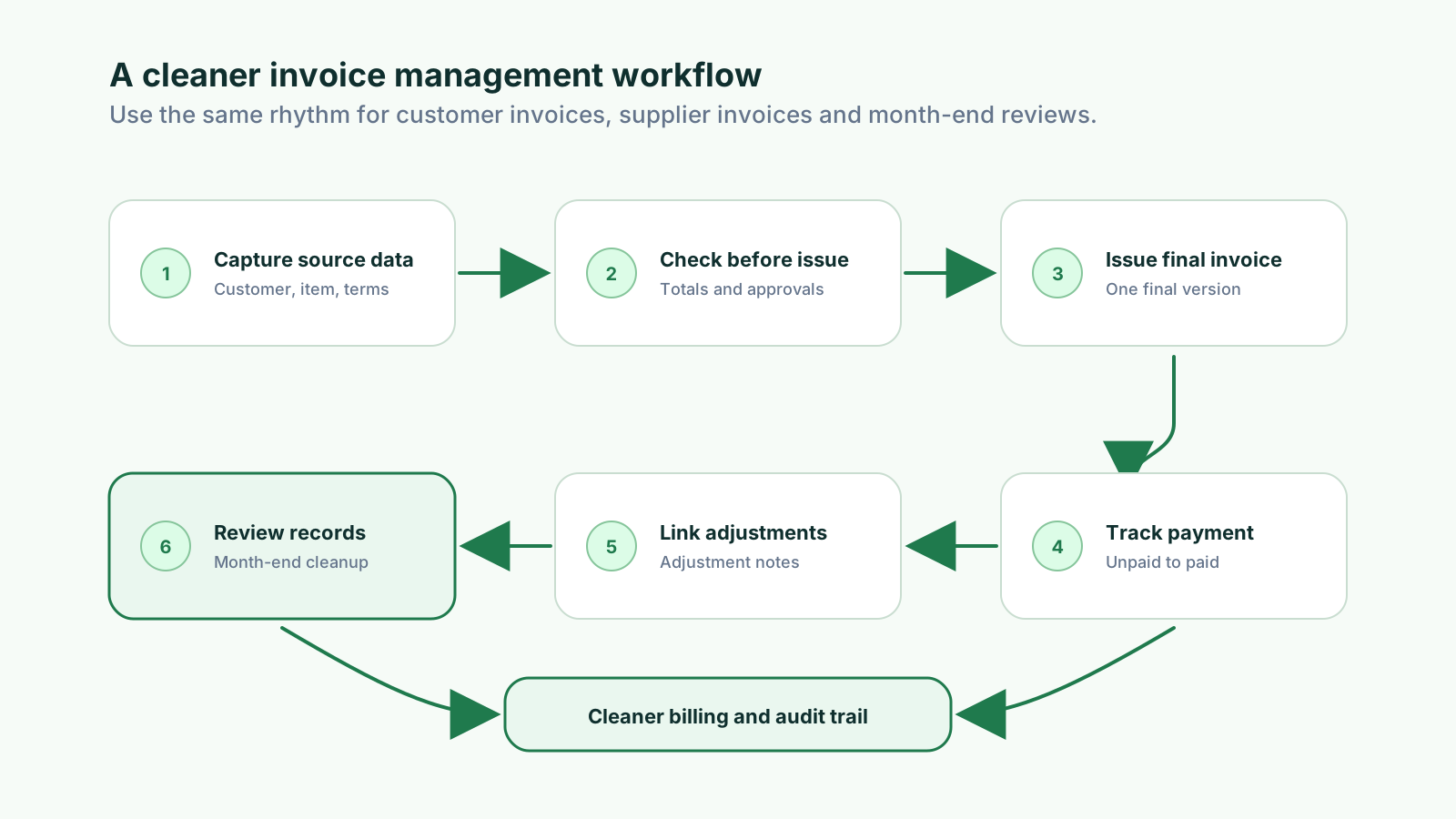
1. Capture source data before billing: Confirm customer details, item lines, accepted quotation or purchase order, delivery status, payment terms and required e-Invoice fields where applicable.
2. Check before issue: Review invoice number, date, due date, totals, tax treatment, discounts, approvals and internal references before sending anything to the customer.
3. Issue one final invoice record: Send from the controlled record and avoid multiple final PDFs, silent edits or separate spreadsheet-only invoice lists.
4. Track payment status immediately: Mark invoices as unpaid, partially paid, overdue or paid and attach receipt or bank proof close to the invoice record.
5. Link adjustments properly: If the invoice is wrong or changes after issue, use the right credit note, debit note or refund note workflow and keep the reason visible.
6. Review open records regularly: Check overdue invoices, missing payment proof, duplicate invoice numbers, rejected documents, cancelled invoices and unlinked adjustments before month-end.
These examples show how small process controls reduce billing rework and payment follow-up gaps.
| Mistake | Before control | After control | Payment impact |
|---|---|---|---|
| Wrong customer details | Staff copy details from old invoices. | Customer record is checked before issue. | Fewer disputes before payment. |
| Missing due date | Payment term is remembered manually. | Due date is set on the invoice record. | Overdue follow-up starts on time. |
| Unlinked payment proof | Bank slip is saved in a separate folder. | Receipt or proof is attached to invoice status. | Paid and partial payments are clearer. |
| Detached adjustment note | Credit note sits away from the original invoice. | Adjustment reason and source invoice stay linked. | Outstanding balance is easier to explain. |
These are the mistakes that create the most downstream work for SMEs. They are easier to prevent when the invoice is managed as part of the full quotation, fulfilment, payment and adjustment workflow.
Recurring issues usually point to workflow-control gaps, not one isolated data-entry mistake.
If the team does not confirm buyer details, accepted scope, purchase order reference, delivery status and payment terms, the invoice may be correct in format but wrong for the transaction.
Manual copying from quotations, spreadsheets or old invoices creates spelling differences, wrong quantities, missing units and price errors.
The same customer may appear under different names, contacts, registration numbers or billing addresses, making statements and follow-up confusing.
When due dates and credit terms are not attached to the invoice record, overdue follow-up starts late and cashflow visibility becomes weaker.
If staff cannot tell whether a document is draft, final, cancelled or adjusted, customers may receive the wrong copy or finance may chase the wrong amount.
For Malaysia e-Invoice, validation, rejection, cancellation and retrieval status should stay visible beside the operational invoice record, not only inside a portal or API log.
A paid invoice still needs clear evidence. If receipts, bank slips and remittance advice sit elsewhere, reconciliation and customer disputes take longer.
Adjustment documents should point back to the original invoice and explain the reason; otherwise the account history becomes hard to understand later.
The goal is not to add more admin. The goal is to make the normal billing process produce cleaner records automatically so finance, sales and management can rely on the same information.
Keep one controlled list or system for invoice number, customer, date, amount, due date, status, payment proof, source document and adjustment links.
Where possible, create invoices from accepted quotations, purchase orders, delivery records or customer profiles instead of retyping details.
Reusable customer and product records reduce spelling differences, missing fields and inconsistent invoice lines across the business.
Use a short pre-issue checklist covering buyer details, totals, tax treatment, payment terms, delivery status, approval trail and references.
Do not wait for month-end to update invoice status. Mark issued, submitted, validated, unpaid, paid, rejected, cancelled or adjusted as soon as the event happens.
Invoices and supporting records should be readable, accessible to authorised staff and retained for the required period based on the business situation.
Check rejected e-Invoices, overdue invoices, manual discounts, duplicate numbers, cancelled documents and unlinked credit notes before they become month-end problems.
The best practice is to make the next action clear before the situation becomes urgent.
TREX Grow helps SMEs manage invoice work as a connected operational workflow. Customer records, quotations, invoices, payment status, approvals, adjustment documents and Malaysia e-Invoice-ready references can stay linked instead of being rebuilt across separate files.
Teams can reuse customer, product and quotation details so invoice preparation starts from controlled information instead of scattered messages or spreadsheets.
Accepted quotations can stay linked to invoices, making it easier to explain price, quantity, discount, scope and payment term decisions.
Finance can track which invoices are unpaid, partially paid, overdue, paid, cancelled or adjusted without maintaining a separate follow-up spreadsheet.
Credit notes, debit notes and refund notes can be managed with clearer links to the original invoice, reason and operational trail.
When invoice data, customer details, source records and status controls are organised, the business is in a stronger position for Malaysia e-Invoice workflows.
TREX Grow gives Malaysian SMEs a practical way to connect quotations, invoices, approvals, payment follow-up and adjustment records so invoice management becomes easier to control.
The most common mistake is treating the invoice as a separate document instead of part of a wider workflow. The invoice should stay connected to customer data, quotation or purchase order, delivery status, payment terms, payment proof and any later adjustment notes.