The accepted version is unclear
If several revised quotations were sent, finance may not know which price, quantity, delivery scope or payment term the customer accepted.

Efficient conversion is not just about moving faster. It is about reusing the accepted quotation as the source for customer details, item lines, prices, payment terms, approvals and later invoice follow-up so billing does not become a second round of manual work.
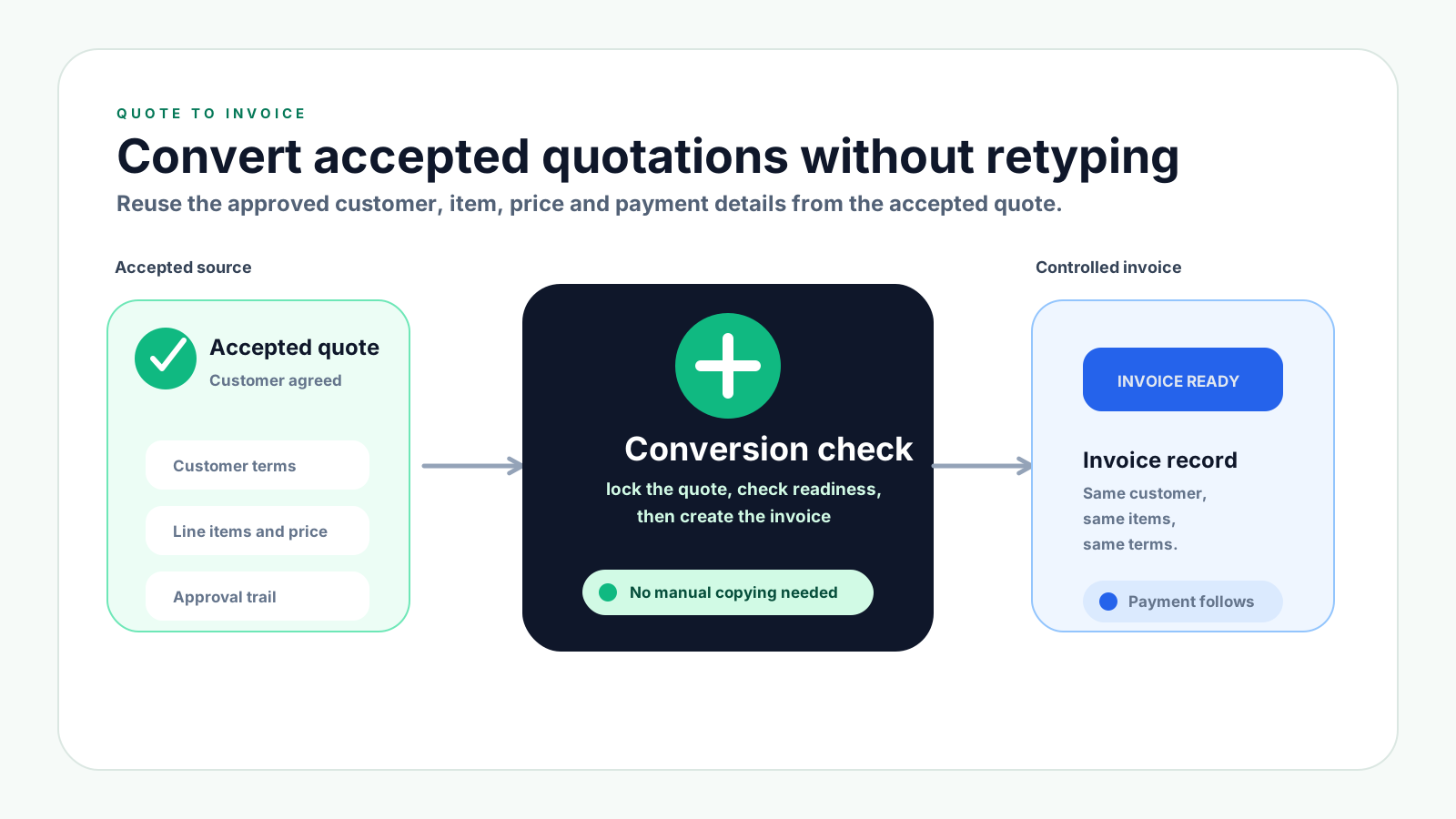
Many SMEs can prepare a quotation quickly, but the invoice still takes too long because the accepted quotation is not treated as a trusted source record. Finance has to rebuild what sales already agreed with the customer.
Operational pressure
When records live in different places, the person responsible has to reconstruct what happened before they can make a confident decision or follow up.
If several revised quotations were sent, finance may not know which price, quantity, delivery scope or payment term the customer accepted.
Retyping customer names, item descriptions, quantities, prices and payment terms creates avoidable mistakes and slows down billing.
Special discounts, credit terms and exceptions may be approved in chat, while the invoice record does not show who authorised them.
Invoices may be created before stock, delivery, service completion, purchase order references or internal checks are complete.
If due dates and payment terms are not carried forward from the quote, finance has to rebuild the follow-up plan after issuing the invoice.
Wrong invoice data may require cancellation, adjustment documents or customer explanations that could have been avoided before issuing.
A quotation should become an invoice only when the accepted source record is complete enough for billing. The goal is to convert from reliable data, not copy from a PDF and hope nothing changed.
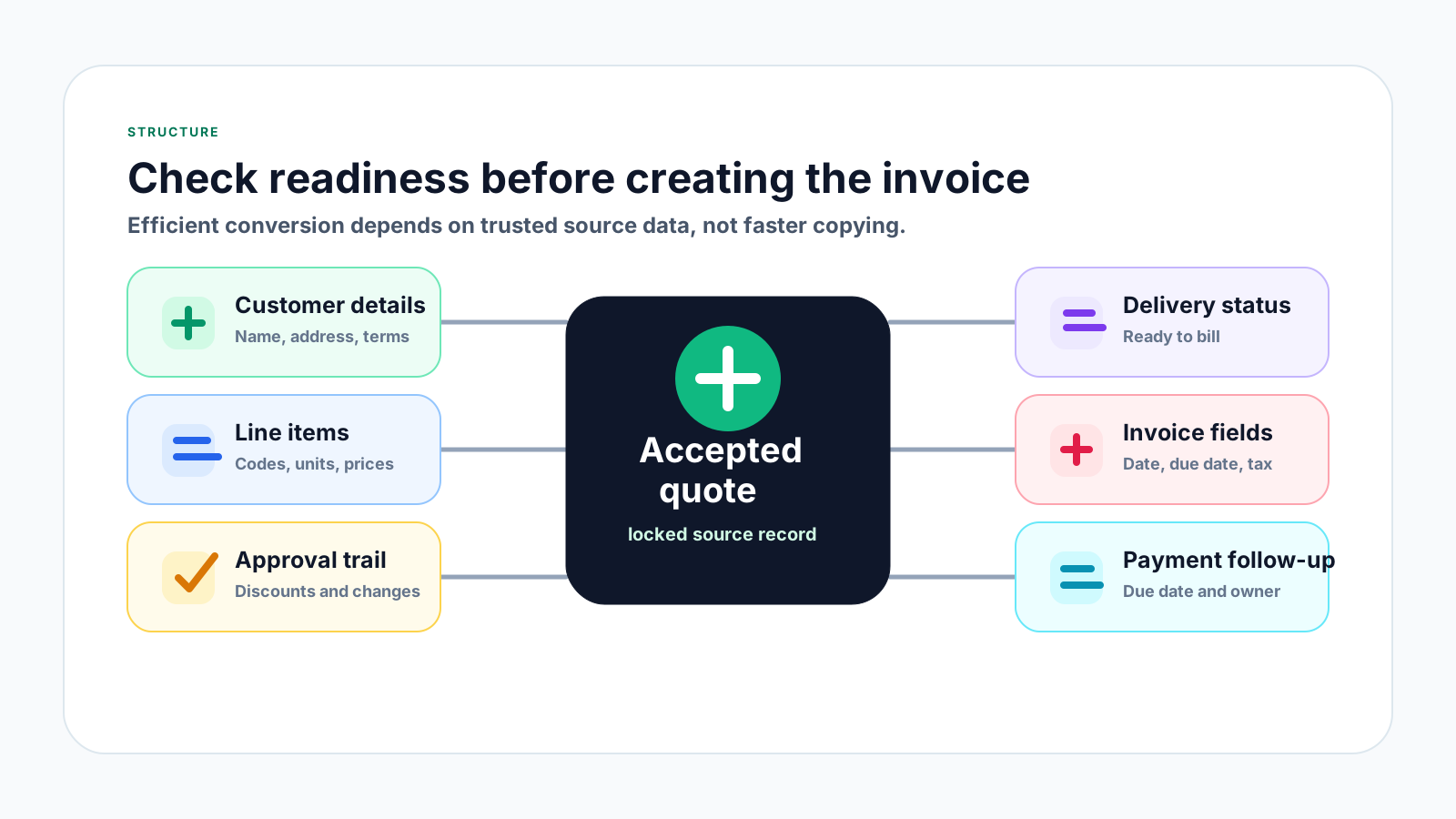
Confirm the customer name, billing address, contact person, payment terms and references such as purchase order number or project name.
Use the accepted item names, descriptions, quantities, units, prices, tax treatment and discounts from the approved quotation.
Check that discounts, low-margin pricing, extended credit terms or special scope changes were properly authorised before invoice creation.
For goods, check stock, delivery order or fulfilment status. For services, check whether the billing milestone or completion status is clear.
Prepare invoice date, due date, payment term, internal reference and any data fields needed for later accounting or e-Invoice workflows.
Assign who will follow up, what due date applies and how partial, overdue or paid status will be tracked after the invoice is issued.
Use this process when the customer has accepted a quotation and the team is ready to bill. It keeps conversion fast while reducing invoice disputes, data errors and follow-up confusion.
Record the current facts in one shared place.
Confirm what is known and what needs attention.
Make the next decision or follow-up accountable.
Complete the next task and record the outcome.
Refresh the shared view when facts change.
A dependable workflow keeps the shared record and the next action aligned.
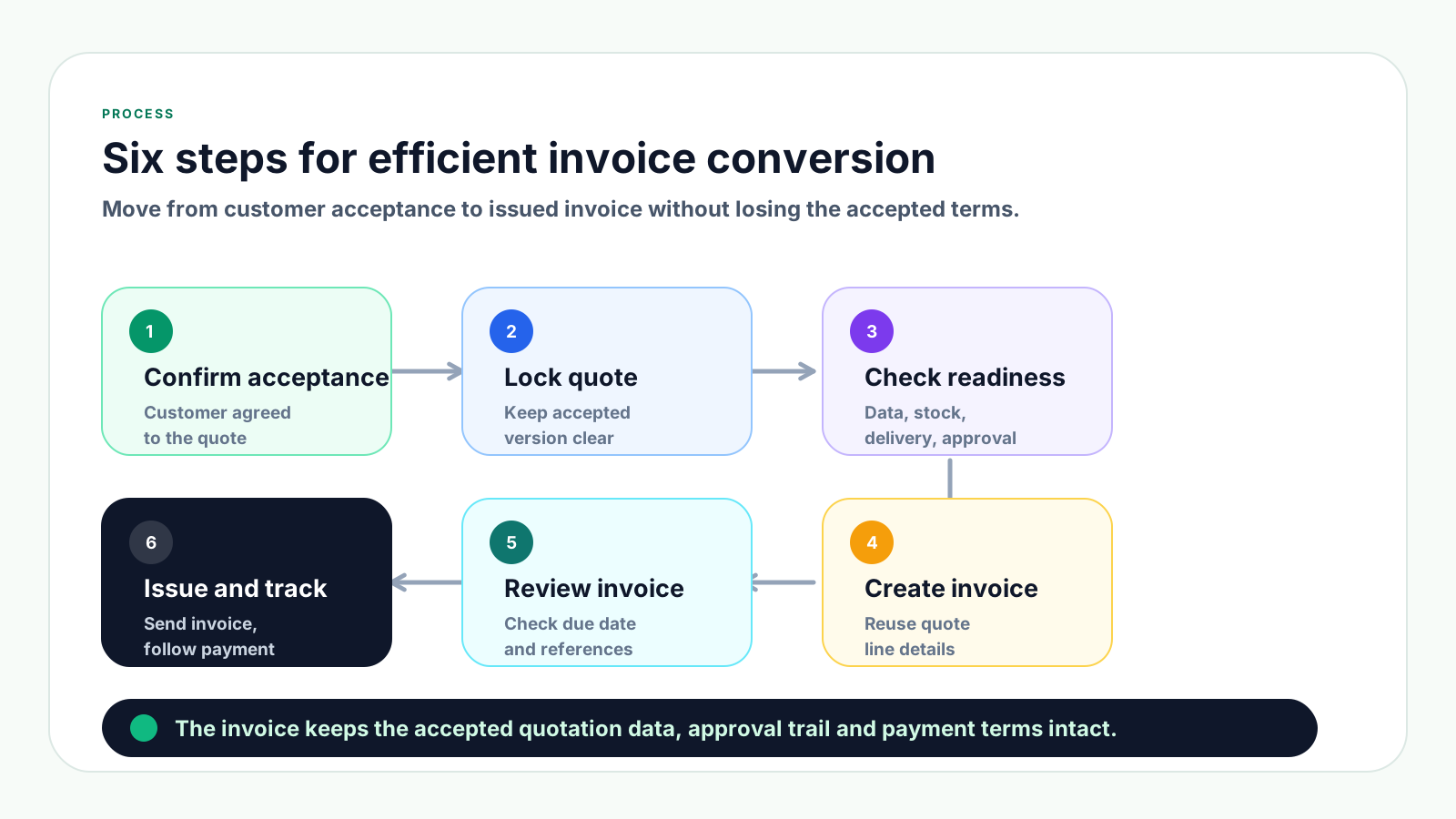
1. Confirm customer acceptance: Make sure the customer has accepted the correct quotation version, including price, quantity, scope, payment terms and validity.
2. Lock the accepted quotation: Stop editing the accepted version silently. If the customer changes scope, create a revised quotation or approval record before billing.
3. Check invoice readiness: Review customer details, item data, delivery or service status, approval trail, purchase order reference, due date and any e-Invoice readiness fields that apply.
4. Convert from the quotation: Create the invoice from the accepted quotation details so customer, item, price, discount and payment terms are reused instead of retyped.
5. Review before issuing: Compare the invoice against the accepted quote, check invoice date, due date, totals, references and internal notes before sending it to the customer.
6. Issue and track payment: Send the invoice, record status as unpaid, partially paid, overdue or paid, and keep the quotation-to-invoice link visible for follow-up.
7. Handle changes properly: If corrections are needed after issuing, use the correct adjustment process and keep the reason linked to the original invoice.
Use this table as a quick check before turning an accepted quotation into an invoice.
| Checkpoint | Before conversion | After conversion | Payment tracking result |
|---|---|---|---|
| Accepted version | Confirm the customer approved the correct quotation. | Lock the accepted version before billing. | Invoice amount and scope are easier to defend. |
| Customer terms | Check payment term, PO reference and billing contact. | Carry the same terms into the invoice record. | Due date and follow-up owner are clear. |
| Line items | Review item, quantity, price and discount. | Reuse approved lines instead of retyping. | Fewer corrections after sending. |
| Approval trail | Confirm discounts or exceptions were approved. | Attach approval context to the invoice. | Disputed payments can be resolved faster. |
These mistakes usually happen when the team treats conversion as a copying task rather than a controlled handover from sales to finance.
Recurring issues usually point to workflow-control gaps, not one isolated data-entry mistake.
If a customer accepted a revised quote but finance uses an older version, the invoice may show the wrong price, quantity or scope.
Silent edits to price, payment term, discount or delivery scope can create disputes because the invoice no longer matches the customer agreement.
Manual copying often causes spelling differences, missing units, wrong quantities or prices that make customer approval slower.
Issuing an invoice before confirming delivery, stock availability or service milestone can lead to cancellation requests and rework.
If due dates, deposits, instalments or credit terms are not carried forward, finance loses control of collection timing.
Once an invoice is issued, corrections may need proper credit note, debit note or refund note handling instead of casual edits.
Without the link, sales and finance waste time proving what was accepted when the customer asks about price, scope or payment terms.
Efficiency comes from removing duplicate work. A good process lets finance trust the accepted quotation and focus on final billing checks rather than rebuilding the sale.
Keep a clearly marked accepted version and convert only from that record, not from email attachments or old downloaded PDFs.
Reusable customer profiles and product or service records reduce spelling differences, missing fields and inconsistent invoice lines.
Before issuing, check accepted version, customer details, item details, approval, delivery status, invoice date, due date and references.
Discounts, special payment terms and exceptions should remain traceable from quotation approval through to the invoice.
Due date, deposit rules, credit term and follow-up owner should move into the invoice process automatically where possible.
Malaysia e-Invoice readiness is easier when customer, transaction and adjustment references are controlled before invoices are issued.
After conversion, mark the quotation as converted or invoiced so sales and finance do not keep treating it as an open quote.
The best practice is to make the next action clear before the situation becomes urgent.
TREX Grow helps SMEs manage quotation-to-invoice conversion as a connected workflow. Customer records, products, quotations, approvals, invoices, payment status and adjustment documents can stay linked instead of being rebuilt in separate files.
Teams can work from customer and product records so the accepted quotation already contains cleaner invoice-ready information.
Instead of retyping line items and terms, the invoice can follow the accepted quotation details and reduce avoidable manual errors.
Discount approvals, quotation status and invoice progress are easier to trace when the documents live in one workflow.
Invoice status can be tracked after conversion so the team can see unpaid, partially paid, overdue and paid records.
Credit notes, debit notes and refund notes can be managed as follow-up records instead of becoming disconnected corrections.
Organised source data helps the business prepare invoice and adjustment information more confidently for Malaysia e-Invoice workflows.
If your team still creates invoices by copying accepted quotations into another file, start by connecting quotation acceptance, approval checks, invoice creation and payment follow-up in one workflow. TREX Grow gives SMEs a cleaner way to manage the handover from accepted quote to issued invoice.
It means creating the invoice from the accepted quotation details so customer data, item lines, prices, discounts and payment terms are reused instead of entered again manually.