Quotation versions are hard to control
A customer may ask for a discount, revised quantity or changed delivery term. If the team cannot identify the approved version, the invoice may be issued with the wrong value.

For many SMEs, invoice mistakes do not start at the invoice screen. They start earlier when customer requests, pricing, discounts, stock, approvals and payment terms are handled in separate files or chat messages. This guide shows how to manage quotations and invoices as one connected workflow.
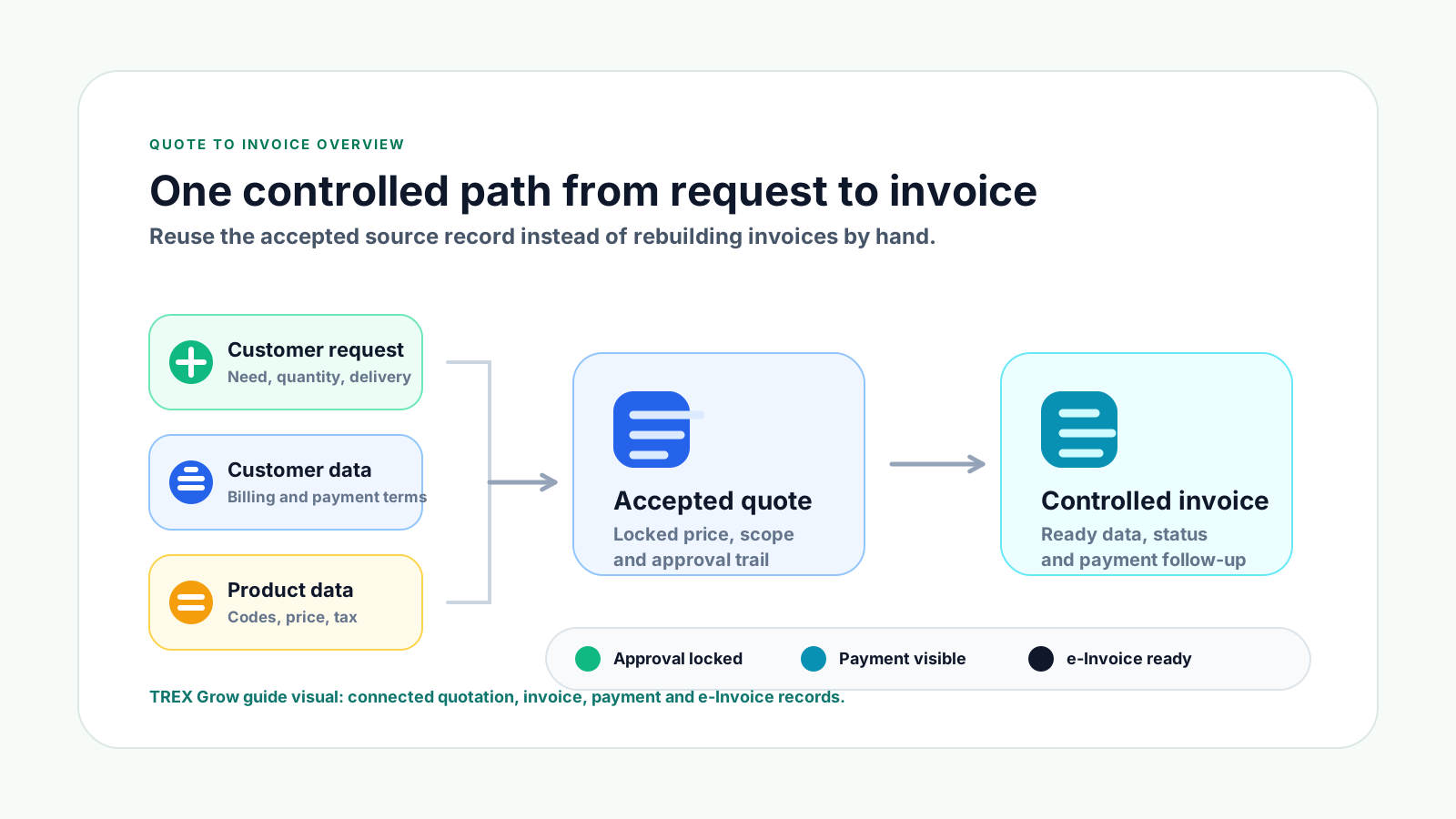
Most SMEs do not struggle because quotations and invoices are complicated documents. They struggle because the workflow around those documents is split across people, files, messages and manual checks.
Operational pressure
When records live in different places, the person responsible has to reconstruct what happened before they can make a confident decision or follow up.
A customer may ask for a discount, revised quantity or changed delivery term. If the team cannot identify the approved version, the invoice may be issued with the wrong value.
When quotation details are manually copied into invoices, small mistakes in item names, unit prices, quantities or customer details become common.
Discounts, credit terms and exceptions may be approved in WhatsApp or email, but the invoice record does not show who approved the change.
For product-based SMEs, an invoice may be prepared before stock availability, delivery order or fulfilment status is properly confirmed.
If payment terms are not recorded clearly when the quotation becomes an invoice, finance only notices the issue when cash collection is already late.
Credit notes, debit notes and refund notes become confusing when they do not clearly reference the original invoice and reason for adjustment.
A quotation is usually the customer-facing promise. An invoice is the financial document that records the sale and supports payment collection. A good SME workflow keeps the important fields, approvals and changes connected from the start.
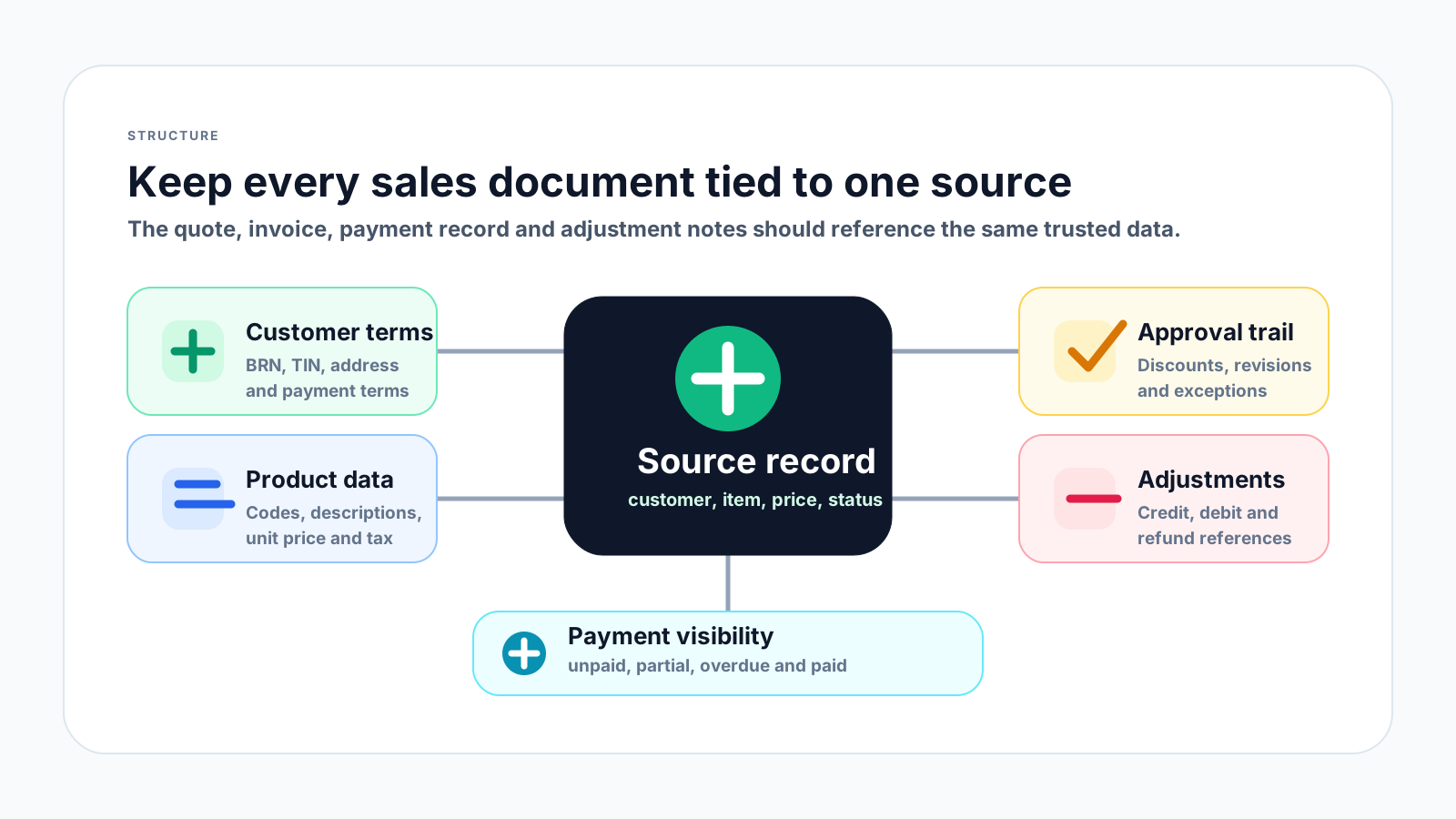
Customer name, BRN, TIN, billing address, contact person and payment terms should be clean before the invoice is urgent.
Once the customer accepts the quotation, the accepted price, quantity, discount, validity date and payment terms should be easy to trace.
The invoice should reuse the approved quotation details instead of relying on a finance user to retype the same information.
Teams should know whether a quotation is draft, sent, accepted, rejected, revised, converted, invoiced, paid or cancelled.
Under Malaysia e-Invoice practice, later adjustments such as credit notes, debit notes and refund notes should keep the original invoice reference visible.
Invoice management is incomplete if the team cannot see unpaid, partially paid, overdue and fully paid invoices.
The best workflow is simple enough for daily sales and finance work, but structured enough to prevent disputes, missed approvals and payment confusion.
Record the current facts in one shared place.
Confirm what is known and what needs attention.
Make the next decision or follow-up accountable.
Complete the next task and record the outcome.
Refresh the shared view when facts change.
A dependable workflow keeps the shared record and the next action aligned.
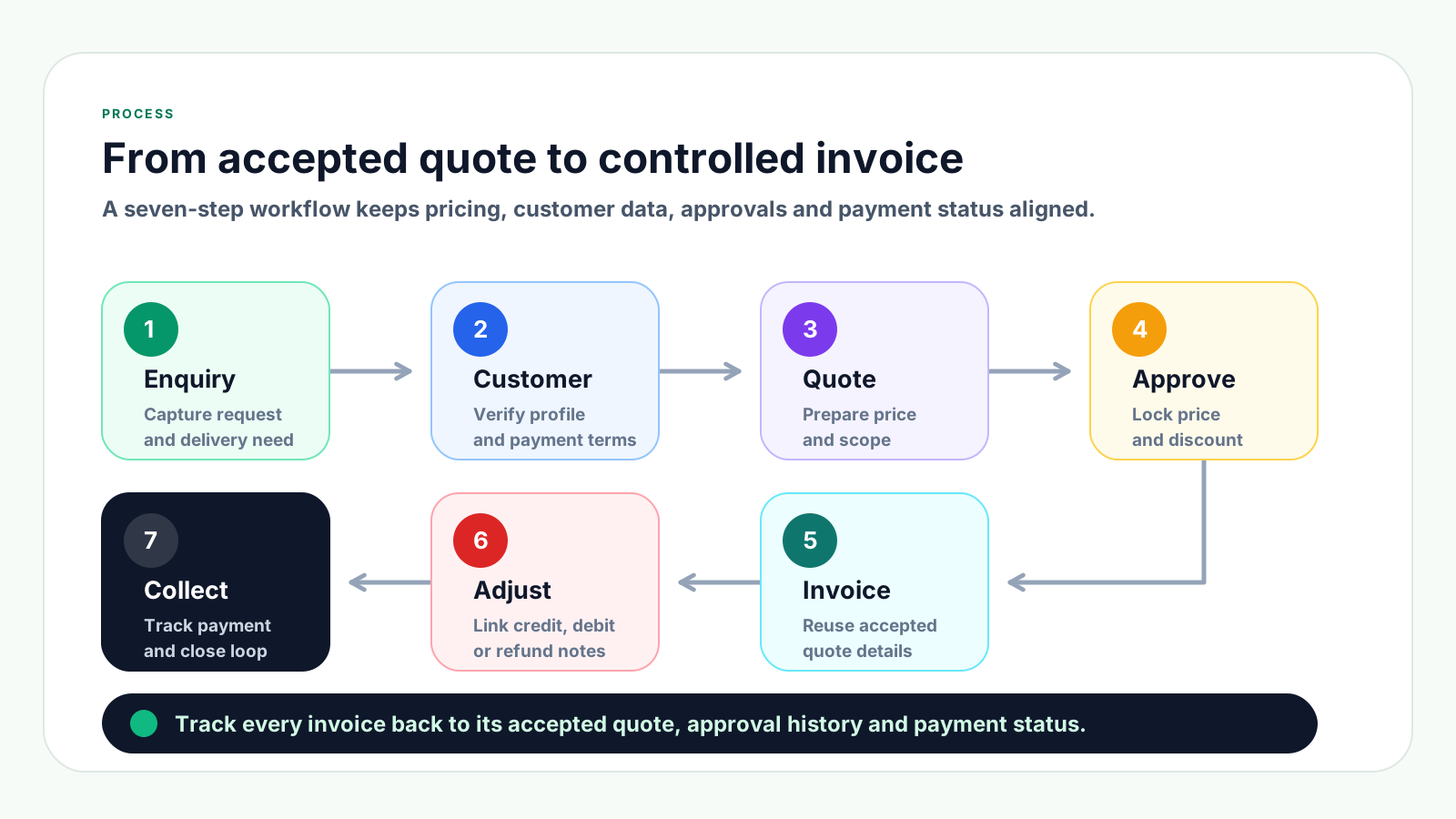
1. Capture the customer request clearly: Record the customer name, contact person, requested products or services, quantity, delivery expectation, billing address and any reference such as purchase order number or project name.
2. Prepare the quotation from clean product and customer data: Use a standard product list, item code, description, unit price, unit of measurement and payment term. Avoid typing item descriptions differently each time.
3. Review margin, discount and stock before sending: Before the quotation is sent, confirm whether the price is still valid, whether stock is available, and whether any discount or special payment term needs approval.
4. Track quotation status and revisions: Mark the quotation as draft, sent, revised, accepted, rejected or expired. Keep old versions traceable so the team knows which version the customer accepted.
5. Convert the accepted quotation into an invoice: Once accepted and ready for billing, create the invoice from the accepted quotation details. Reuse customer details, line items, pricing, payment terms and references instead of retyping.
6. Review invoice readiness before issuing: Check customer data, invoice date, due date, item details, tax treatment, delivery or service completion, approval history and any e-Invoice readiness fields that apply.
7. Track payment and close the loop: After issuing the invoice, track whether it is unpaid, partially paid, overdue or paid. If corrections are needed, use the right adjustment document and keep the original invoice link.
These mistakes look small at first, but they can create customer disputes, delayed payment, rework for finance and poor visibility for business owners.
Recurring issues usually point to workflow-control gaps, not one isolated data-entry mistake.
Without a validity date, old prices may be accepted later when cost, stock or supplier pricing has already changed.
If the quotation uses one product name and the invoice uses another, customers may question the invoice or delay payment approval.
Special discounts should show who approved them and why. Otherwise, margin leakage becomes hard to investigate.
Invoices issued before customer acceptance, delivery or service confirmation are more likely to be disputed or cancelled.
When the invoice is not linked to the quotation, the team wastes time proving what was agreed.
Adjustment notes should have a clear reason, original invoice reference and approval trail. They should not be used as a shortcut for poor document control.
If due dates are not clear, customer follow-up becomes awkward and cash flow reporting becomes unreliable.
A good process does not need to be complicated. The goal is to make the right data available at the right step, with enough control for sales, finance and management to trust the record.
Keep customer identity, billing address, contact person, payment terms and e-Invoice data in one customer profile rather than separate spreadsheets.
Use consistent item codes, item names, descriptions, unit prices and units of measurement so quotations and invoices match.
Define which quotations need approval based on discount level, invoice value, customer credit terms or unusual delivery requirements.
When a quotation changes, keep revision history visible so the team can explain why the final invoice value is different from the first quote.
Use a simple checklist for customer details, items, pricing, delivery, tax treatment, due date and approval history before the invoice is sent.
Review unpaid, partially paid and overdue invoices every week so collection work starts before cash flow becomes stressful.
Malaysia e-Invoice readiness is easier when customer data, invoice details, adjustment links and payment records are already controlled.
The best practice is to make the next action clear before the situation becomes urgent.
TREX Grow helps SMEs manage sales documents as connected records instead of separate files. Your team can keep customer profiles, products, quotations, invoices, payment status, approvals and adjustment documents in one operational workflow.
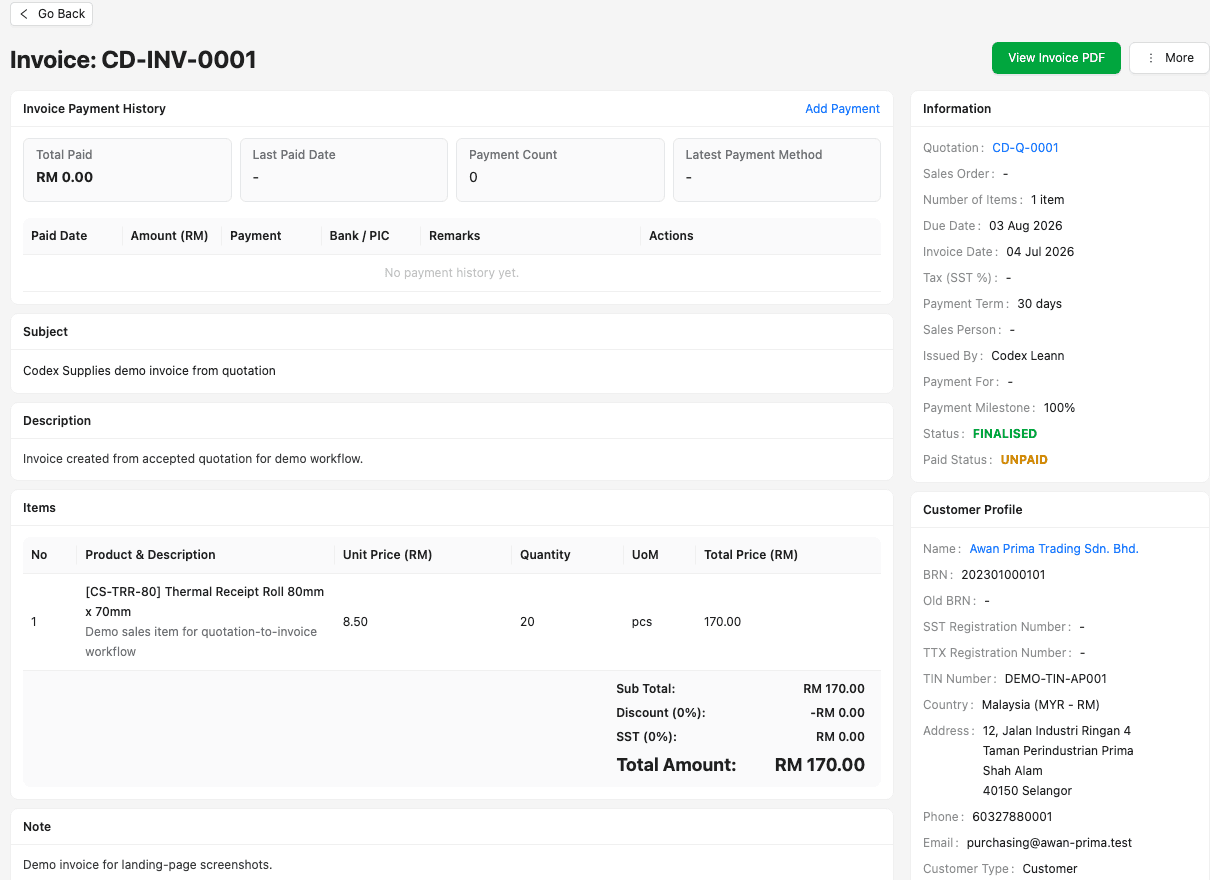
Sales and finance can work from the same customer and product records, reducing repeated typing and inconsistent invoice details.
Accepted quotation details can be kept connected to the invoice, making it easier to trace what was agreed with the customer.
Invoices can be tracked by payment status so finance knows what is unpaid, paid, overdue or still waiting for follow-up.
Credit notes, debit notes and refund notes can be managed as follow-up documents instead of disconnected corrections.
Teams can reduce informal approval gaps around discounts, special terms and document changes.
Cleaner source records make Malaysia e-Invoice preparation easier when the business needs validated invoice data and traceable adjustments.
If your SME is still copying quotation details into invoices manually, start by improving the workflow around customer data, product records, approval, invoice status and payment follow-up.
A quotation is usually a sales offer that shows proposed products, services, prices and terms. An invoice is issued when the business needs to bill the customer for a confirmed sale or completed work.