The same sale appears in more than one place
A salesperson may work from a quotation, operations from delivery proof, and finance from a spreadsheet. If those records are not connected, each team can start a separate invoice for the same work.

Duplicate invoices are rarely just a numbering mistake. They happen when the team cannot see the same sale, invoice status, owner, and next action. This guide shows how to prevent them with a practical control workflow.
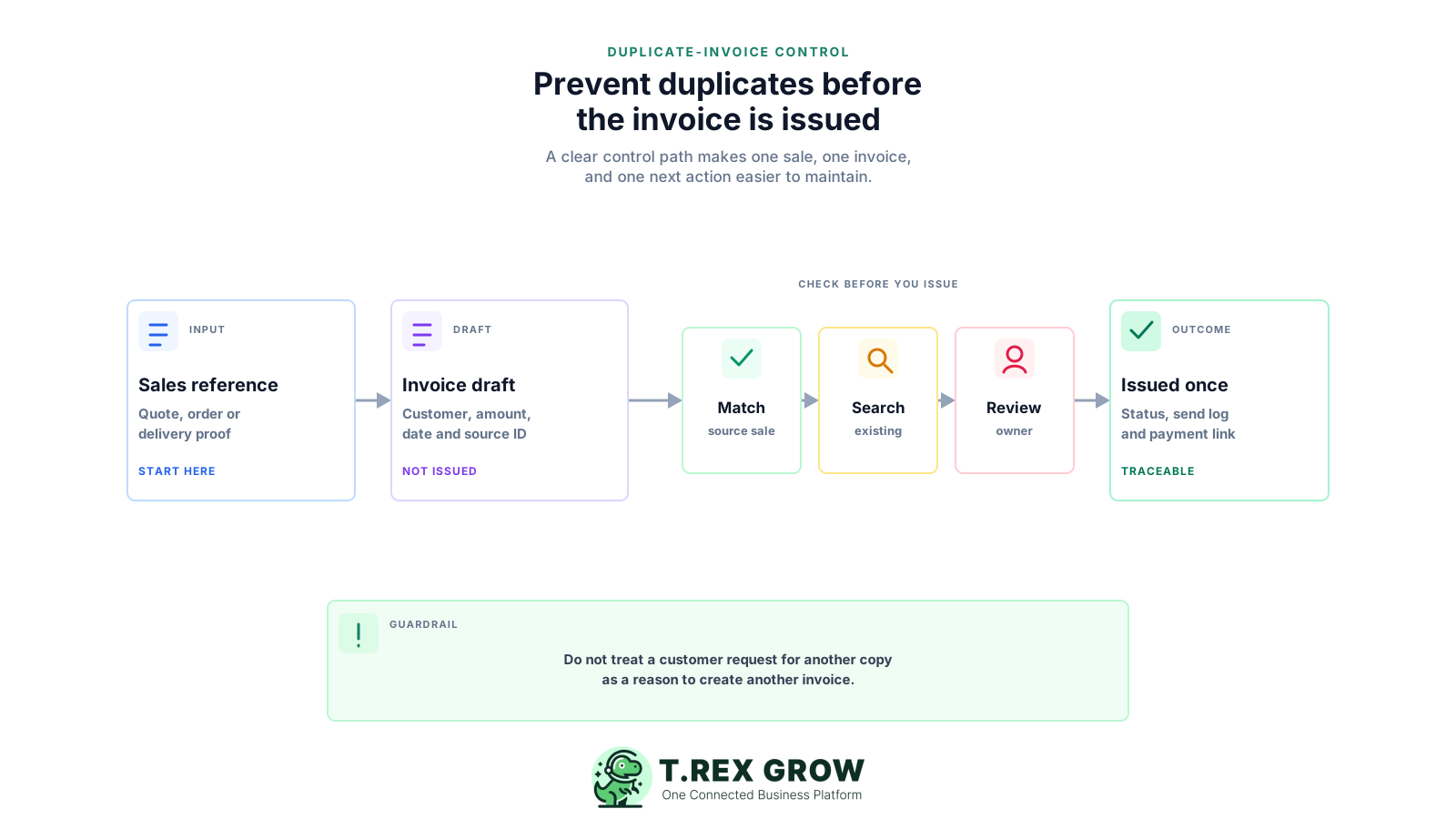
Duplicate invoices usually start with a broken handover, not a careless person. When sales, finance, and operations each see only part of the transaction, more than one person can believe an invoice still needs to be created or sent.
Operational pressure
When records live in different places, the person responsible has to reconstruct what happened before they can make a confident decision or follow up.
A salesperson may work from a quotation, operations from delivery proof, and finance from a spreadsheet. If those records are not connected, each team can start a separate invoice for the same work.
Customers often ask for an invoice to be resent. Without a clear search and send history, staff may create a fresh document instead of sharing the original invoice.
If draft, awaiting review, sent, submitted, paid, cancelled, and adjusted statuses are unclear, nobody knows whether an invoice is still pending or already completed by someone else.
An invoice without a quotation, order, delivery, service completion, or other source reference is difficult to compare with existing records before it is issued.
Deposits, partial deliveries, progress claims, and separate jobs for the same customer can be legitimate. The team needs a source and status model that distinguishes those records from a repeated invoice.
Replacing files or deleting a record hides why the invoice changed. A documented cancellation or adjustment process is safer than quietly issuing another document.
A duplicate is not simply two invoices with the same customer or similar amount. The practical question is whether two documents represent the same commercial obligation without a clear reason for separate billing.
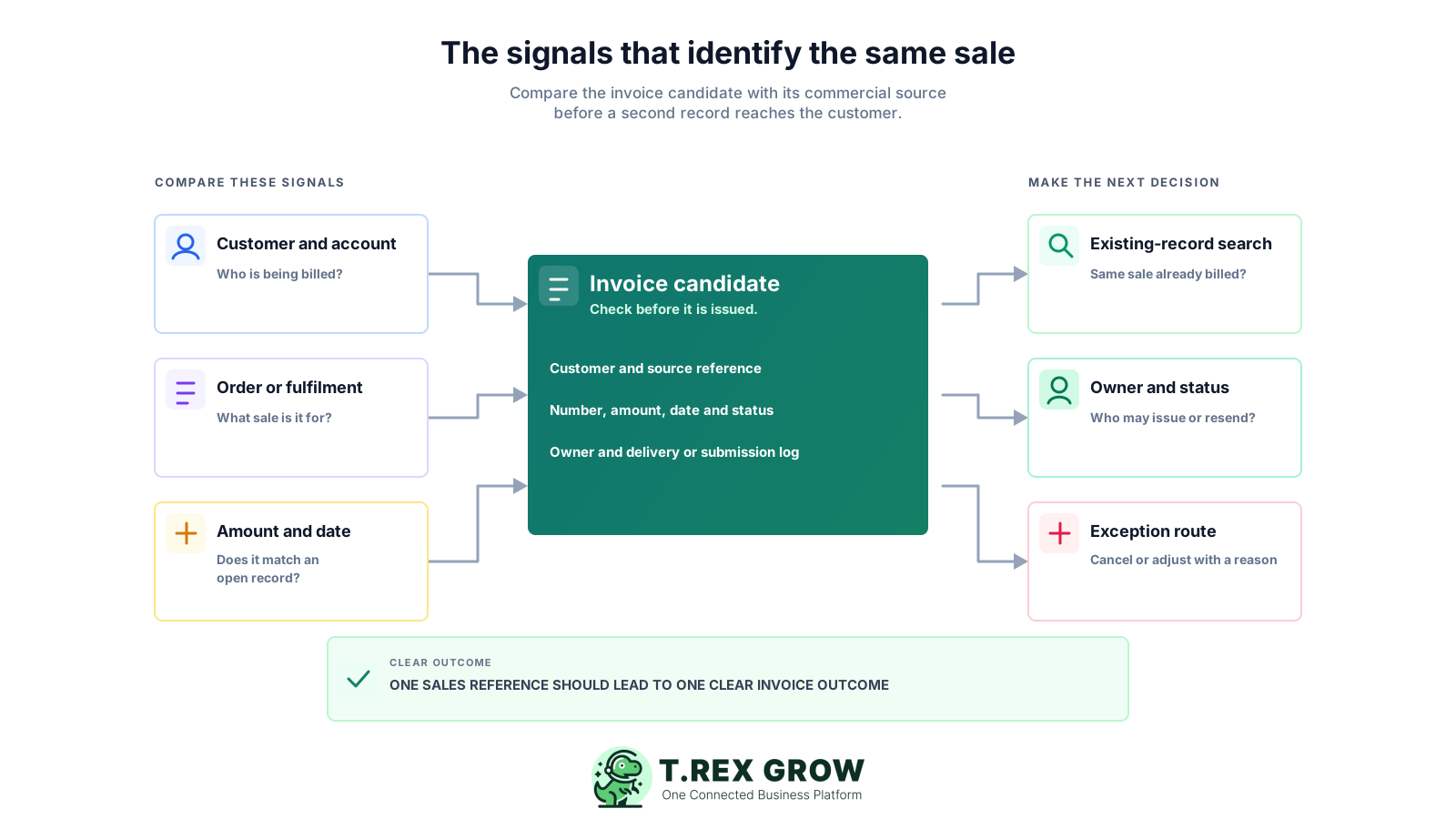
If two invoices point to the same accepted quotation, order, delivery, or completed service with no legitimate split or adjustment, the second invoice needs immediate review before it reaches the customer.
When a customer needs another copy, resend or re-share the original invoice and retain the send history. Do not create a new document merely because the customer cannot find the first copy.
A deposit, milestone, partial delivery, or progress invoice can be correct if the scope, amount, timing, and remaining balance are clearly tied to the original sale and visible to the team.
A credit note, debit note, refund, or correction is not the same as issuing a fresh duplicate. It should state why the change exists and retain a reference to the original commercial record.
A reminder should refer to the existing invoice and outstanding balance. If staff create a new invoice for collection follow-up, customers may see two bills for the same obligation.
MyInvois applies its own duplicate-detection rules, but SME controls should be broader: check the sales source, customer, amount, date, status, owner, and previous document history before issuing an invoice.
A simple decision table helps staff avoid creating another invoice when the existing record is the correct response.
| Situation | Correct response | Control to use |
|---|---|---|
| Customer asks for another copy | Resend the original invoice and note the delivery. | Search by invoice number, customer, and source sale. |
| Two staff start billing the same completed work | Keep one draft and assign a clear owner. | Compare quotation, order, delivery, or service reference before issue. |
| A partial delivery needs billing | Create a separate, clearly scoped invoice only for that partial fulfilment. | Use a distinct delivery or milestone reference and show the remaining balance. |
| Price or quantity needs correction | Follow the documented cancellation or adjustment route rather than silently replacing the invoice. | Keep a reason and a link to the original record. |
| A payment is received twice or looks unclear | Match the payment references before changing the invoice status. | Use a receipt and payment-reconciliation check. |
Build the duplicate check into normal invoice work. The aim is not to make every invoice slow; it is to make the right record easy to find before a second document is created or sent.
Record the current facts in one shared place.
Confirm what is known and what needs attention.
Make the next decision or follow-up accountable.
Complete the next task and record the outcome.
Refresh the shared view when facts change.
A dependable workflow keeps the shared record and the next action aligned.
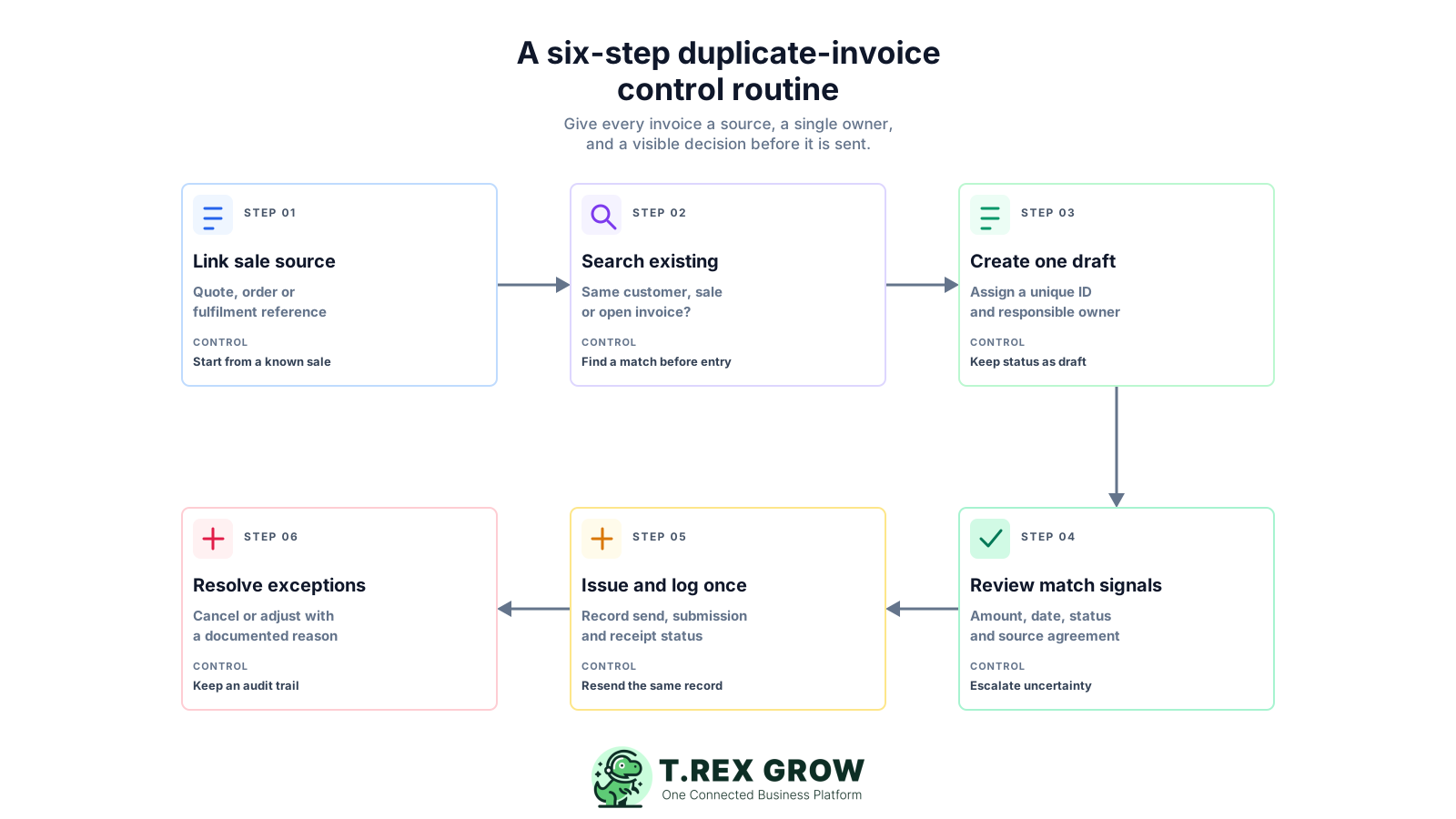
Start from the commercial source: create an invoice from a quotation, sales order, delivery order, service completion, approved milestone, or another recognised source record. Do not begin with a blank document when the sale already has a reference.
Search before creating a new record: look for existing drafts, issued invoices, payment reminders, cancelled records, and adjustments using the customer, source reference, invoice number, amount, and date.
Keep one invoice draft and one responsible owner: assign a clear invoice reference and an owner before the document is issued. If another staff member needs to help, they should update the same draft rather than start a separate one.
Review the match signals before issue: compare the customer, sale source, items or services, amount, delivery or completion evidence, date, and current status. Escalate a possible match instead of guessing.
Issue once and record the delivery path: keep the send history, relevant submission status, customer contact, and payment terms with the invoice. If a customer asks for another copy, resend that record instead of creating another invoice.
Use a documented exception path: if a duplicate or error is discovered, follow the applicable cancellation, correction, credit note, debit note, or refund process with a reason and a link to the original transaction. For Malaysia e-Invoice, confirm the current HASiL rules before acting.
Review duplicate-risk exceptions weekly: look for invoices sharing the same source reference, multiple drafts for one customer sale, invoices with unclear ownership, repeated unpaid balances, and unlinked adjustments.
Most duplicate invoices are preventable when a team distinguishes a source sale, a working draft, an issued document, a resend, and a correction. These habits make that distinction disappear.
Recurring issues usually point to workflow-control gaps, not one isolated data-entry mistake.
A sequential number helps, but it does not prove the sale has not already been billed under another number, draft, or staff member. Connect the invoice to the commercial source as well.
A resend, a request for a PDF, a reminder, and a request for payment details should normally point back to the same issued invoice rather than generate a new bill.
If sales can invoice from an accepted quote while finance invoices from delivery proof without a shared check, both teams can create valid-looking documents for the same customer obligation.
A draft should not be treated as sent, and a sent invoice should not be treated as payable until the team understands its current status. Clear state labels prevent repeat work.
Removing a file can hide an attempted duplicate but does not improve the process. Record the reason, source record, owner, and corrective action so the same failure does not repeat.
A system-level duplicate check may only compare specific fields within a limited period. It cannot replace a business workflow that checks the actual customer sale, fulfilment, ownership, and payment context.
When payment references and outstanding balances are not linked to the invoice, staff may think a customer needs another bill or reminder when the issue is actually a matching or timing problem.
Use a small number of controls consistently. The best process is one your team can follow under normal workload, not an exception-only checklist that appears after the customer has received two documents.
Link the invoice to a quotation, order, delivery, service job, milestone, or other commercial trigger. That reference is the fastest way to see whether the sale has already been billed.
One person should be responsible for the current invoice draft and its status. Other teams can contribute evidence or checks without creating competing invoice records.
Before issue, check customer, source reference, amount, date, invoice number, status, and delivery or service evidence. The exact fields can be simple, as long as the team uses them consistently.
Use explicit status labels and a send history. Staff should know whether they are editing a draft, re-sending an existing invoice, or following up on an outstanding balance.
For deposits, milestones, partial deliveries, or progressive work, show the exact scope billed, the remaining balance, and the relationship to the original sale.
A cancellation, credit, debit, refund, or other adjustment should explain what happened and remain linked to the source invoice. This improves review and customer communication.
Run a weekly list for invoices with the same source reference, multiple open drafts, missing owner, unusual payment history, or unresolved adjustments. Focus on exceptions rather than rechecking every closed record.
The best practice is to make the next action clear before the situation becomes urgent.
Duplicate prevention becomes easier when the sales source, invoice, status, owner, payment record, and correction history sit closer together. A connected workflow reduces the number of places where a second invoice can start unnoticed.
TREX Grow helps SMEs keep customer records, quotations, invoices, payment visibility, and related operations closer together, so the team has more context before creating a new billing document.
A shared view of document and payment status helps sales, finance, and operations distinguish a draft, a sent document, a payment follow-up, and an exception that needs a different response.
For trading and service SMEs, invoices often depend on inventory, purchasing, approvals, delivery, supplier payments, RFQs, catalogues, or appointments. TREX Grow brings those related records closer to the invoice workflow.
TREX Grow supports Malaysia LHDN e-Invoice workflows alongside quotation, invoice, and operations management. Each business should still confirm its configuration and correction process against current HASiL guidance.
Start with the documents that are most often duplicated or re-entered today, then extend the shared workflow as the team builds confidence in a single source of truth.
Map one recent duplicate or near-duplicate incident through the workflow in this guide. When your team is ready for a more connected way to manage sales and invoice records, TREX Grow can help bring the relevant context together.
Duplicate invoices usually happen when one sale is represented in separate systems or files and the team cannot see what has already been drafted, issued, sent, paid, cancelled, or adjusted. Common triggers include unclear source references, more than one billing owner, a customer request for another copy, and unlinked delivery or payment records.