
Sales document workflow guide

Sales Document Management Software for Malaysian SMEs

From quotation through payment, sales documents should tell one consistent story. This guide helps Malaysian SMEs control versions, handovers, fulfilment proof, invoice status, and changes before evaluating software.

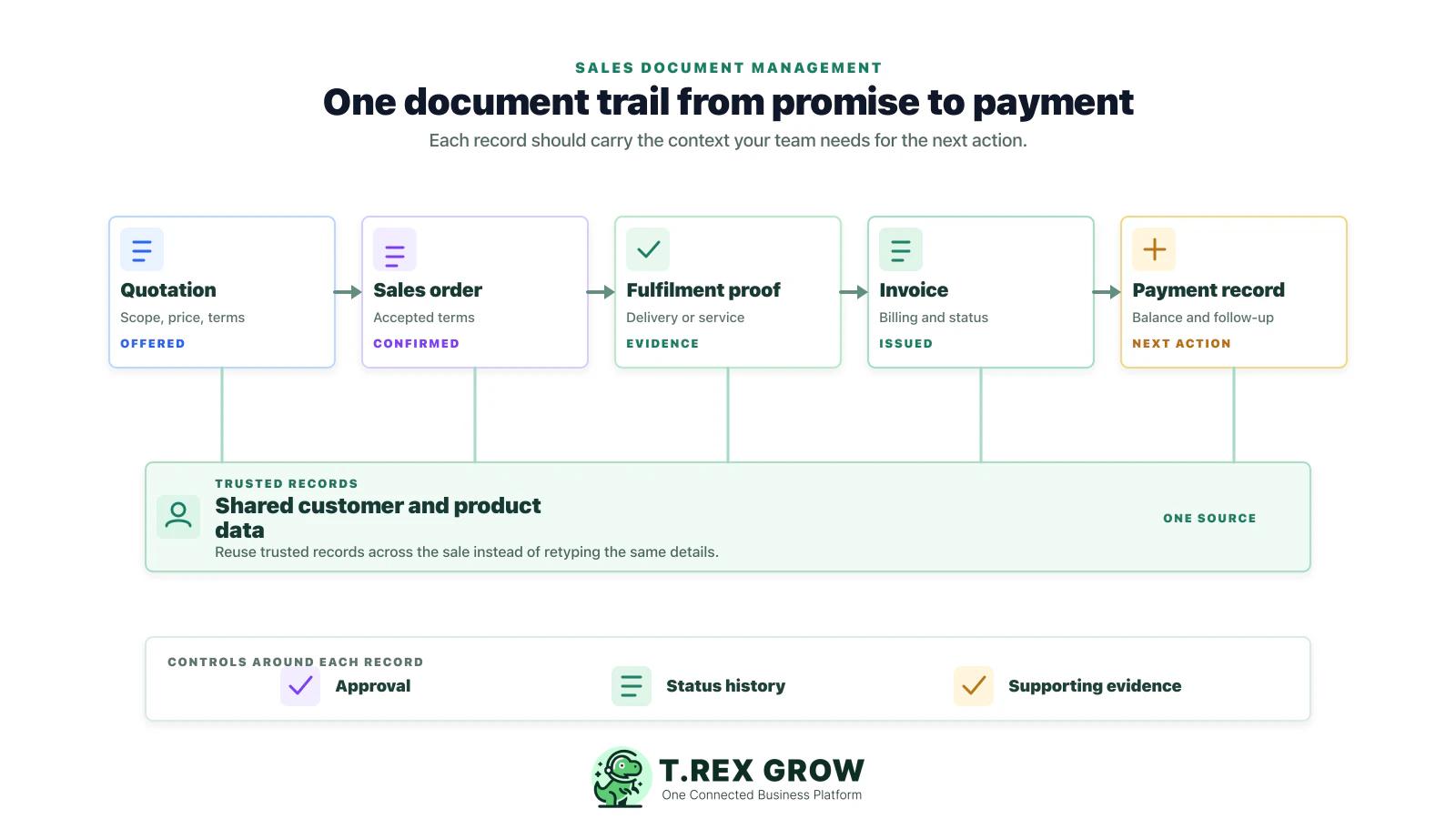
Connected sales document trail from quotation to payment with shared customer and product data

Primary keyword

sales document management software

Audience

Malaysian SME owners, sales administrators, finance assistants, account teams, operations managers, distributors, and service businesses that manage quotations, customer orders, delivery or service proof, invoices, payments, and document changes.

Goal

Teach Malaysian SMEs how to define a controlled sales-document workflow before choosing software, then softly show how TREX Grow brings customer, quotation, invoice, payment, approval, inventory, purchasing, and Malaysia LHDN e-Invoice workflows closer together.

Problem

Why sales documents become hard to manage as an SME grows

The problem is rarely a missing folder. It is the loss of connection between the records that explain the same customer sale: what was offered, accepted, delivered, billed, paid, or changed.

Operational pressure

The next action is easy to lose when context is scattered.

When records live in different places, the person responsible has to reconstruct what happened before they can make a confident decision or follow up.

Scattered recordsUnclear ownershipAvoidable surprises
High risk

Every team sees a different version of the sale

Sales may keep the quotation in email, operations may keep delivery proof in a chat, and finance may keep the invoice in a spreadsheet. None of those records alone explains the complete customer transaction.
Accepted terms do not travel forward

If the accepted quotation or customer purchase order is not clearly linked to the sales order and invoice, the team can bill the wrong price, quantity, discount, or payment term.

Fulfilment proof is separated from billing

Delivery orders, signed proof, stock movement, or service completion notes often sit outside the invoice record. That slows down customer queries, disputes, and payment follow-up.

High risk

Status lives in people’s heads

When no shared system shows draft, accepted, delivered, invoiced, paid, overdue, cancelled, or adjusted, each handover depends on memory and informal messages.

Changes are handled by replacing files

Overwriting a PDF or spreadsheet does not explain why a sale changed. The team needs a visible trail for revisions, credit notes, debit notes, refunds, and customer exceptions.

e-Invoice readiness exposes weak source records

Malaysia e-Invoice workflows depend on reliable transaction data and a clear status process. Disconnected records make that operational work harder before a document is even submitted.

Education

What sales document management actually covers

Sales document management is the discipline of keeping each commercial record connected to its source, owner, status, and outcome. It is broader than storing PDFs and more practical than treating every document as an isolated task.

A useful record supports the next decision

The work is easier when the team can see the current facts, the responsible person, and the next action without reconstructing the history from separate tools.

Shared operating context
Clear ownership and status
A visible next action

Set up the team view

1

Define the shared fields

  • - Use current facts
  • - Keep details consistent
2

Assign the next action

  • - Name an owner
  • - Set a review date
3

Keep it current

  • - Record changes
  • - Resolve exceptions
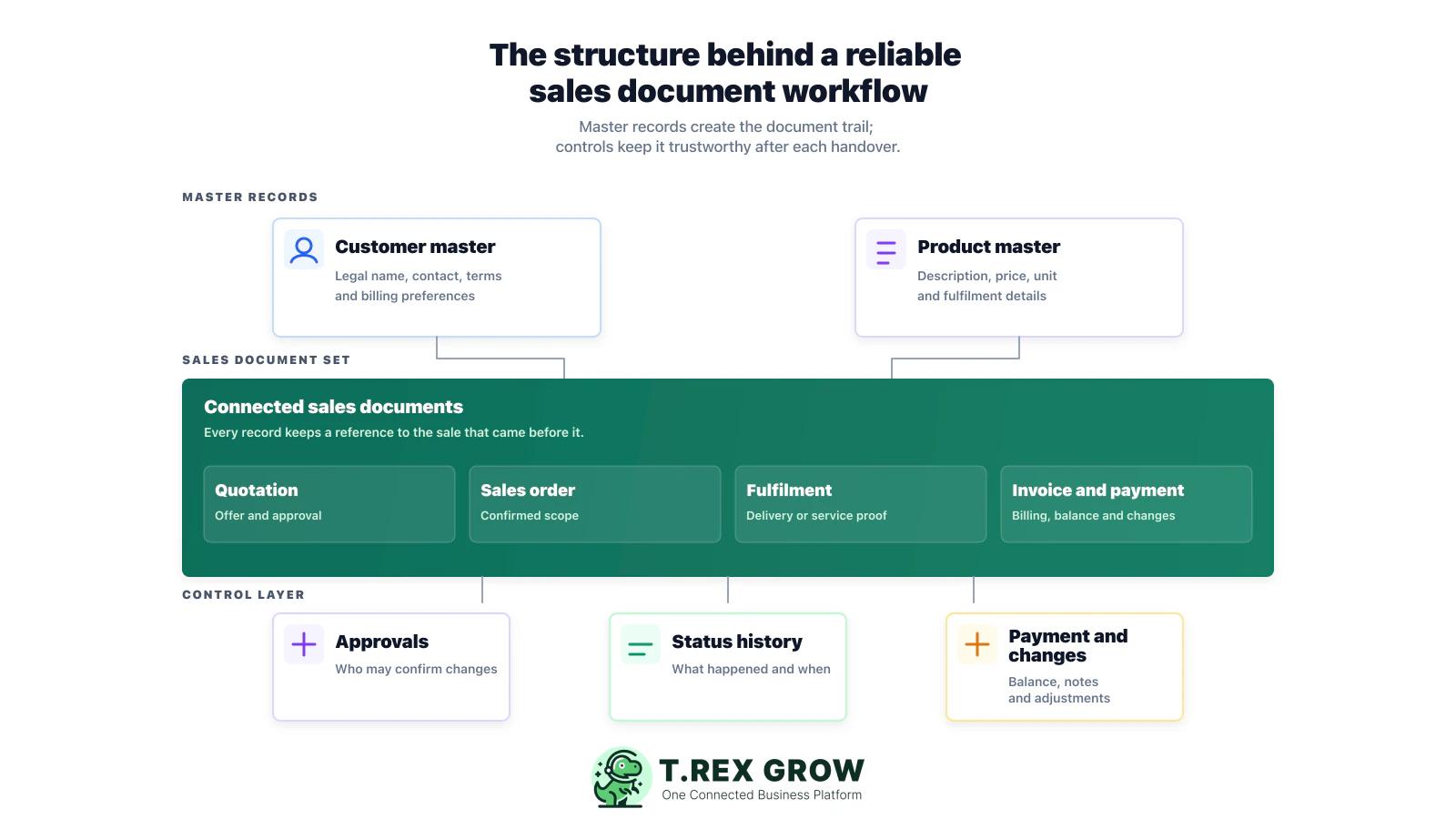
Layered diagram showing master data, connected sales documents, approvals, status history, and payment changes

Master records behind the sale

Customer details, contact people, products or services, price rules, payment terms, and tax-related fields should have a clear source. Reusing those records reduces re-entry and makes documents easier to check.

The commercial commitment

Enquiries, quotations, quotation revisions, customer approval, and sales orders explain what was requested, offered, and accepted before fulfilment begins.

Proof of fulfilment

Delivery orders, service completion notes, picking records, and other proof help the team show what was supplied or completed before and after billing.

Billing and collection records

Invoices, e-Invoice status, receipts, payment references, outstanding balances, and follow-up notes explain the financial state of the sale.

A controlled change trail

Credit notes, debit notes, refunds, cancellations, and pricing corrections should retain their connection to the original record and state why the change happened.

Access, status, and ownership

The workflow should show who can create, review, approve, send, update, or close a document. Clear ownership matters as much as storage location.

Workflow

A practical sales document control workflow

Before choosing a tool, test whether your current process can follow one sale from initial data to a final payment or adjustment without rebuilding the story in different files.

A repeatable operating workflow

Capture

Record the current facts in one shared place.

Check

Confirm what is known and what needs attention.

Assign

Make the next decision or follow-up accountable.

Act

Complete the next task and record the outcome.

Review

Refresh the shared view when facts change.

A dependable workflow keeps the shared record and the next action aligned.

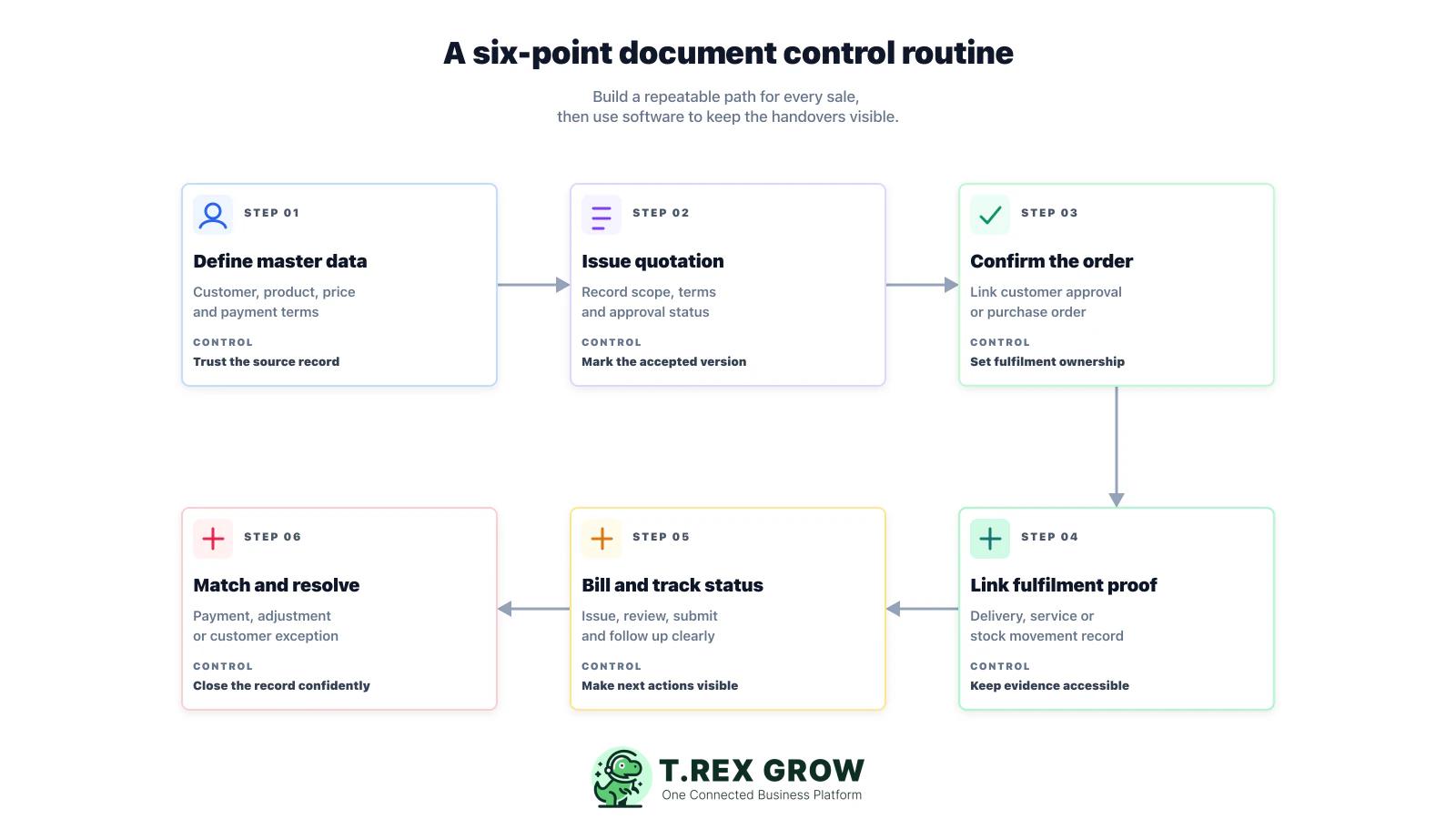
Six-point routine for sales document controls from master data through payment and adjustments
1

Set the source for customer and product data: decide where legal customer details, contact people, pricing, payment terms, item descriptions, and other key fields are maintained. Make that record the starting point for every sales document.

2

Create a quotation with a controlled version: give the quotation a reference number, record the offer details and expiry or payment terms, and make it clear which version is current before it reaches the customer.

3

Record acceptance and turn it into an order: link the customer approval, purchase order, or internal confirmation to the accepted quotation. Name the person responsible for the next fulfilment action.

4

Attach fulfilment evidence before billing: connect a delivery order, signed proof, service completion record, or stock movement to the sale. This gives finance and customer-facing staff the context they need later.

5

Issue the invoice and make status visible: show whether the record is ready for review, sent, submitted, needs correction, due soon, overdue, or paid. Where e-Invoice applies, test the submission path your business will use and verify current HASiL guidance.

6

Match payment and close the right record: record full or partial payments, balance changes, customer follow-up, and any adjustment, credit, debit, refund, or cancellation reason against the original sale.

7

Review exceptions every week: check accepted quotes not yet fulfilled, delivered work not billed, unpaid invoices, disputed balances, and open changes so they do not become month-end surprises.

Mistakes

Common sales document management mistakes

These mistakes do not always look serious at first. They become costly when a customer disputes a sale, a team member is absent, or management needs an accurate view of open work and cash collection.

Most issues are not tax knowledge problems. They are workflow control problems.

Common

Treating the system as a digital filing cabinet

Folders and attachments are useful, but a document system should also show the source, status, owner, and relationship between quotation, order, fulfilment, billing, and payment.

High risk

Allowing several accepted quotation versions

If staff cannot see the accepted version, an old price, quantity, or scope can be carried into the sales order or invoice. Mark acceptance explicitly.

Common

Copying the same data into every document

Repeated manual entry increases the chance of different customer names, item descriptions, quantities, or terms appearing in records that should agree.

High risk

Billing without accessible proof

An invoice may be validly issued, but finance and sales still need a quick way to retrieve the delivery or service evidence when a customer asks for it.

Common

Using vague statuses

Labels such as open, pending, or done are not enough. The team should distinguish draft, sent, accepted, delivered, invoiced, submitted, due, overdue, paid, cancelled, and adjusted where relevant.

High risk

Overwriting changes instead of recording them

Replacing a file loses the reason for the change. Keep a documented link from a credit, debit, refund, cancellation, or correction back to the original sale.

Common

Leaving ownership undefined

A clear workflow names who maintains master data, confirms an order, attaches proof, issues a document, updates payment, and resolves exceptions.

Best practices

Best practices before rolling out document management software

Software works best when the underlying business rules are simple enough for daily use. Define those rules first, then use a pilot to see whether the system makes the desired workflow easier rather than more complicated.

Do this

Use one reference number per commercial trail

Keep a clear relationship between the quotation, sales order, fulfilment record, invoice, and payment. The references do not need to be identical, but staff should be able to trace the chain quickly.

Do this

Define a small, shared status map

Agree on statuses that drive a decision, such as draft, awaiting approval, accepted, in fulfilment, ready to bill, invoiced, overdue, paid, and adjusted. Avoid labels that mean different things to different teams.

Do this

Make accepted versions unmistakable

Use a version marker, acceptance date, and customer approval reference. Finance should not need to guess which quotation controls the final invoice.

Do this

Add data checks at the handover points

Before a quotation becomes an order and before an order becomes an invoice, check the customer details, items, price, terms, source documents, and required approvals.

Do this

Keep fulfilment proof close to the billing record

A delivery order, proof of service, or stock movement record is more useful when it can be found from the same customer transaction as the invoice.

Do this

Review open exceptions weekly

Create a routine for accepted quotes, unfulfilled orders, unbilled deliveries, invoices needing action, overdue balances, and adjustment requests. Focus on exceptions rather than reviewing every closed record.

Do this

Treat e-Invoice as a continuing operational workflow

Use current HASiL material to confirm requirements, roles, and the appropriate transmission method for your business. Do not treat a vendor claim as a substitute for reviewing your own data and process.

The best practice is to make the next action clear before the situation becomes urgent.

Solution

When a connected operations workspace helps

For SMEs that move frequently from quotation to fulfilment, invoice, and payment follow-up, a connected workspace can reduce re-entry and make the customer transaction easier for sales, finance, and operations to understand together.

Operations work better when records and next actions are connected

Connect the sales document trail

TREX Grow helps SMEs keep customer records, quotations, invoices, payment visibility, and related activity closer together so the team can follow the commercial story without rebuilding it from separate files.

Share status across teams

Sales, finance, and operations can work from a clearer document and customer context when the status, owner, and next action are visible in the same workflow.

Link sales to wider operations

For trading and service SMEs, the sale may depend on stock, purchasing, approvals, supplier payments, product catalogues, RFQs, or appointments. TREX Grow brings these operational records closer to the sales workflow.

TREX Grow Operations Hub

Support Malaysia LHDN e-Invoice workflows

TREX Grow supports Malaysia LHDN e-Invoice workflows alongside quotation, invoice, and operations management. Each business should still confirm that its configuration and responsibilities match current HASiL guidance.

Adopt controls at a useful pace

Begin with the document handovers that cause the most rework today, then extend the shared workflow as the team becomes confident using a consistent source of truth.

Next step

Ready to make the sales document trail easier to manage?

Start by mapping one real sale from quotation through payment and checking where the document story breaks. When your team is ready for a connected workspace, TREX Grow can help bring the records and operations around each sale closer together.

See how TREX Grow works

Sales document management software helps a business organise and connect records such as quotations, sales orders, delivery or service proof, invoices, receipts, payment updates, and changes. The useful part is not only file storage; it is being able to trace each customer transaction, its status, owner, and next action.