A good-looking invoice can hide a weak process
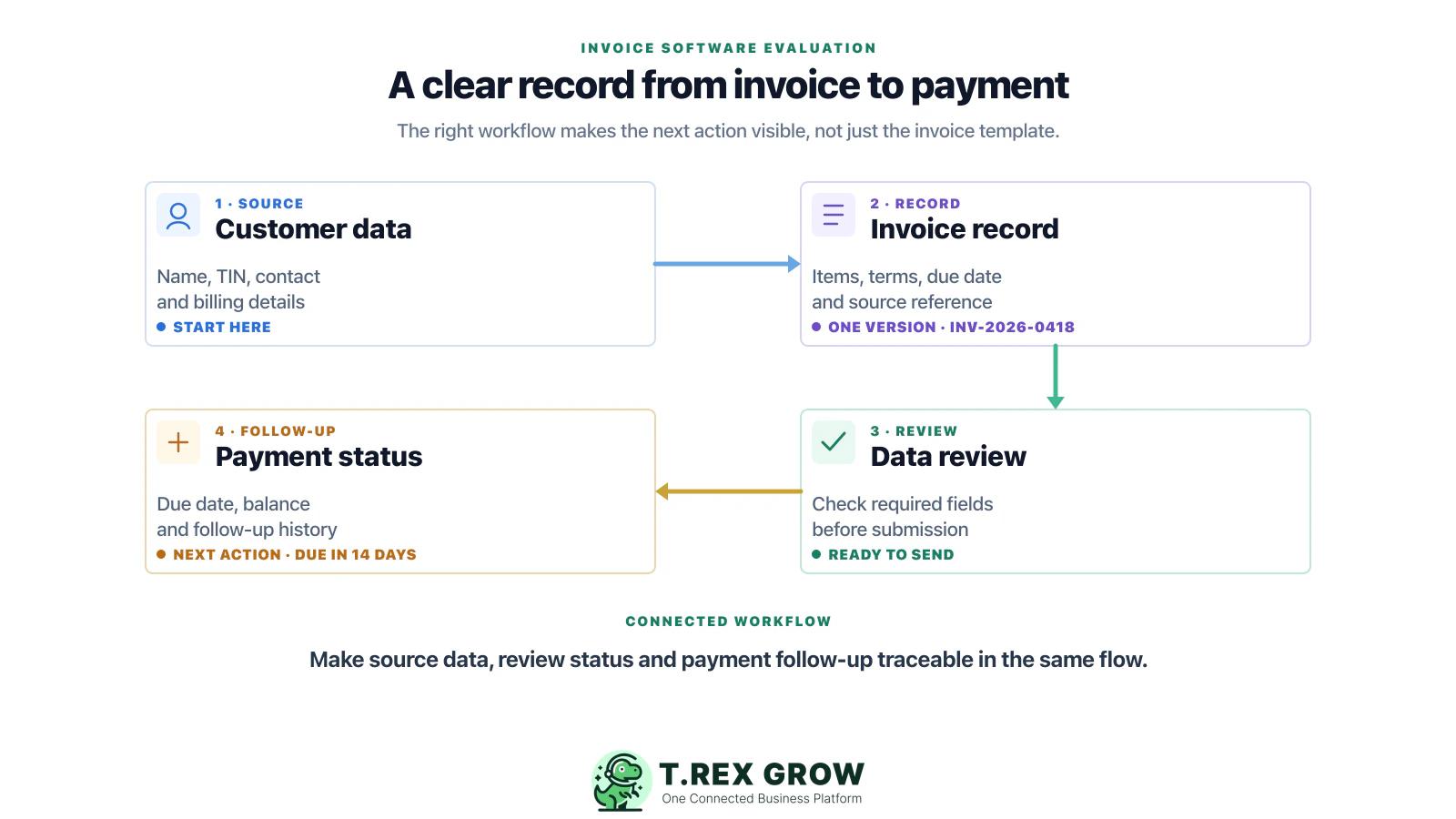
A template may look professional while the invoice data still comes from copied spreadsheets, old customer records, and manual checks. The document is only as reliable as the workflow that creates it.

Invoice software should do more than make a presentable PDF. This guide helps Malaysian SMEs assess customer data, invoice controls, payment tracking, and e-Invoice workflow readiness before choosing a system.
Primary keyword
invoice software Malaysia
Audience
Malaysian SME owners, finance admins, accounts assistants, operations managers, distributors, trading companies, and service businesses that issue invoices and want a more reliable workflow than scattered files and manual re-entry.
Goal
Teach Malaysian SMEs how to evaluate invoice software around practical controls and connected records first, then introduce TREX Grow as a connected SME operations platform for quotation, invoice, payment, inventory, purchasing, approval, and Malaysia LHDN e-Invoice workflows.
An invoice generator may solve the final document, but it does not automatically solve the operational work around it. The real decision is whether your team can create accurate records, handle exceptions, trace related documents, and follow an invoice through to payment.
Operational pressure
When records live in different places, the person responsible has to reconstruct what happened before they can make a confident decision or follow up.
A template may look professional while the invoice data still comes from copied spreadsheets, old customer records, and manual checks. The document is only as reliable as the workflow that creates it.
Different names, contacts, addresses, tax identifiers, or billing instructions can create rework. The system should make it clear where customer data lives and who keeps it current.
When quotations, sales orders, delivery proof, invoices, and payment records are disconnected, staff spend time searching for context before they can answer a customer or correct an issue.
Finance and operations need to know what happens next: draft, awaiting review, sent, submitted, needs correction, due soon, overdue, or paid. A printable invoice alone does not provide that visibility.
Malaysia e-Invoice requirements make accurate source data, document status, and a clear submission process more important. Software should help your team run those controls, not encourage a last-minute manual workaround.
Evaluate how the system connects the records your team uses before, during, and after an invoice is issued. The goal is a traceable operational record, not simply a faster way to export a PDF.
The work is easier when the team can see the current facts, the responsible person, and the next action without reconstructing the history from separate tools.
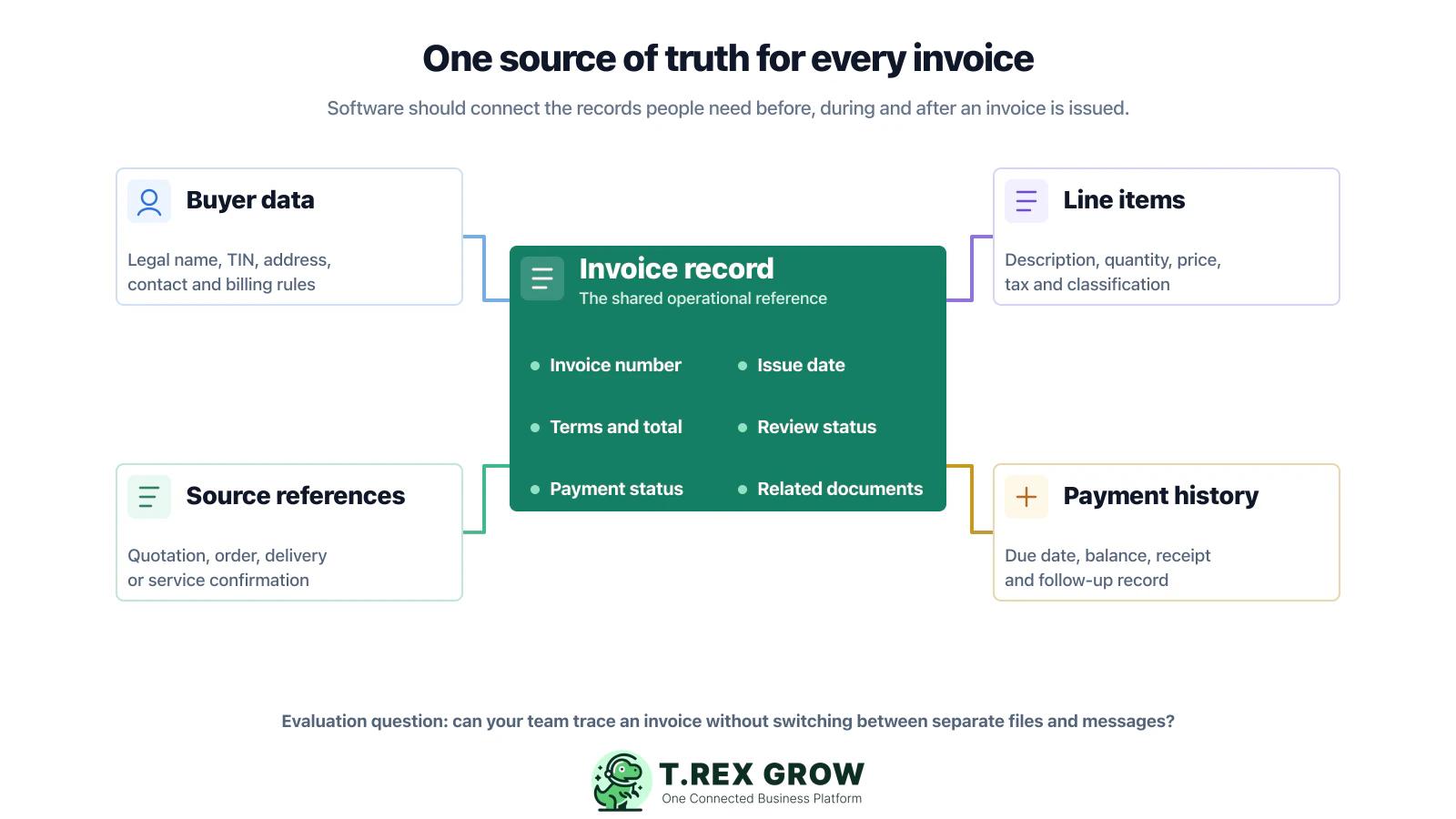
Your team should be able to find, update, and reuse customer billing information from one controlled record. Where relevant, that includes the legal and tax details needed for your current invoicing workflow.
Check how invoice numbering, issue dates, payment terms, line items, tax treatment, attachments, and approvals are created. Ask which fields staff can change and what is recorded when they do.
A useful system should help the team move from quotation or order to invoice while retaining the references that explain why the invoice was issued.
Users need to identify records that are ready, incomplete, sent, submitted, rejected, cancelled, or waiting for a follow-up action without building a separate tracking spreadsheet.
The invoice record should make due dates, balances, payment references, and follow-up history easy to see so that the team does not chase the wrong amount or duplicate a reminder.
If your business is within the current e-Invoice rollout, assess how the software supports accurate data, your selected submission mechanism, document status, and exception handling. Confirm the current HASiL requirements for your own tax position.
Do not choose a system from a feature list alone. Run one familiar invoice through a realistic workflow and judge how well the system handles the decisions your team makes every week.
Record the current facts in one shared place.
Confirm what is known and what needs attention.
Make the next decision or follow-up accountable.
Complete the next task and record the outcome.
Refresh the shared view when facts change.
A dependable workflow keeps the shared record and the next action aligned.
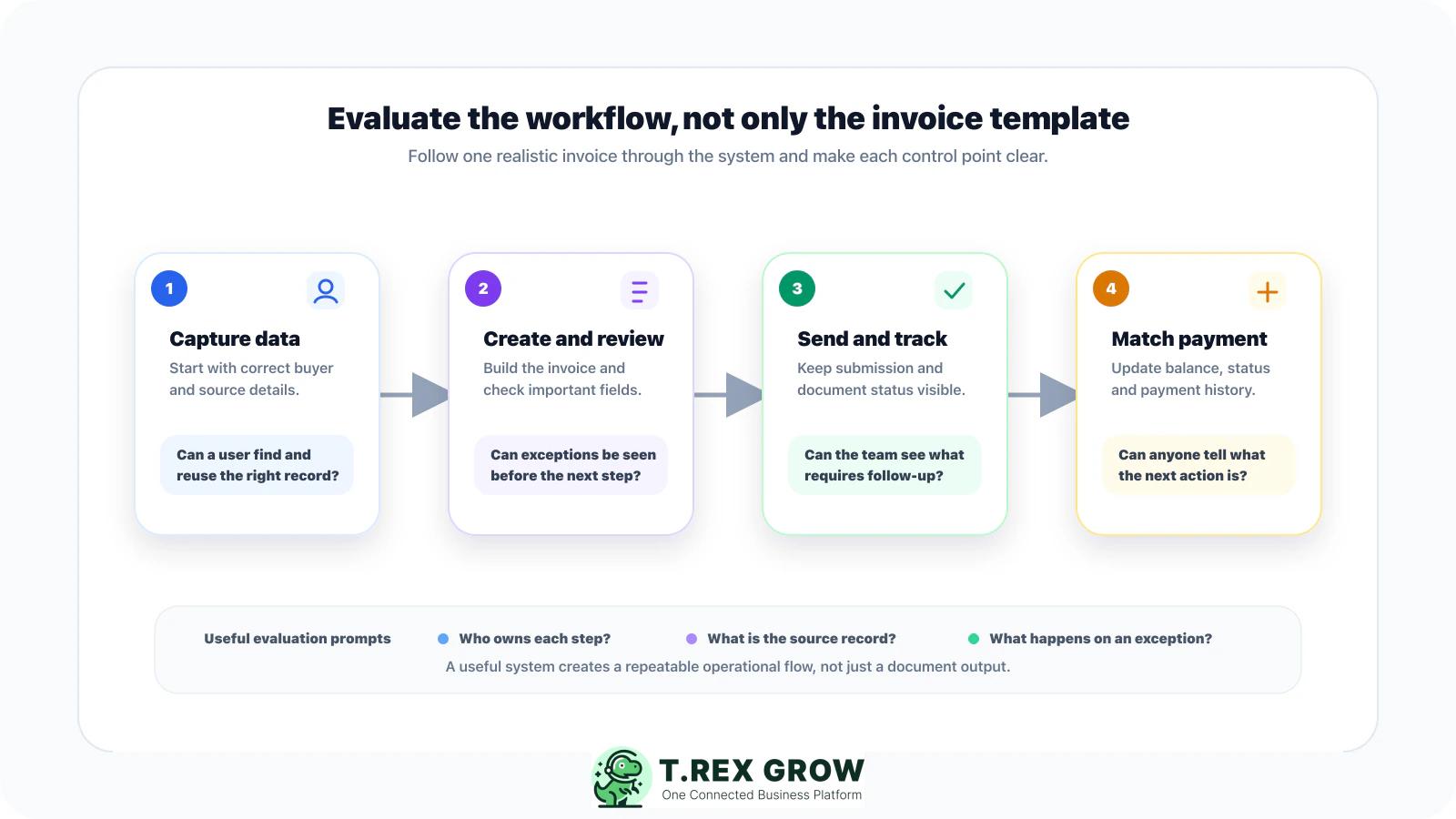
Map the current invoice journey: write down where a quotation or order starts, who creates the invoice, who checks it, how it is sent, and how payment is recorded. Use this map to judge whether the new system removes work or merely moves it elsewhere.
Prepare a realistic test case: use a genuine but safely anonymised customer, several line items, a payment term, a source document, and at least one common complication such as a changed address, partial payment, or missing field.
Test customer and source-data controls: create or find the customer, update a field, and trace the invoice back to the quotation, order, delivery evidence, or service completion record that supports it.
Create and review an invoice: check invoice numbering, line-item detail, totals, tax treatment, payment terms, attachments, approval ownership, and whether staff can see what still needs attention before sending it.
Test a real exception: ask the vendor to show what happens when a document needs correction, cancellation, adjustment, or customer follow-up. A useful workflow records the reason and makes the next action clear.
Assess the e-Invoice path you will use: HASiL offers MyInvois Portal and API mechanisms. Test the route appropriate for your business volume and technical readiness, then verify current requirements and responsibilities with HASiL guidance or your tax adviser.
Follow the invoice to payment: record a full or partial payment, see the outstanding balance, review the follow-up history, and confirm that the team can retrieve the connected record without relying on a separate spreadsheet.
Decide on operating ownership: name the people responsible for master data, invoice creation, review, exceptions, payment updates, and periodic checks before you commit to a rollout.
The most expensive choice is often a system that appears simple in a sales demo but creates hidden manual work when your staff handle real customers, corrections, and payment follow-up.
Most issues are not tax knowledge problems. They are workflow control problems.
A low-cost tool can still be costly if staff must retype customer data, rebuild reports, or maintain a second spreadsheet to see what is happening.
No software removes the need for accurate source data, correct configuration, current rules, and clear operational ownership. Test the actual workflow and confirm your business-specific obligations.
A clean sample does not show how the system behaves when details are missing, an amount changes, a document is disputed, or payment is only partial.
Teams need a clear way to see what is drafted, awaiting review, sent, submitted, needs attention, cancelled, or outstanding. Without that, exception work goes back to chat messages and memory.
If the invoice system cannot give a reliable view of due dates, balances, and payment actions, finance will continue maintaining a separate receivables tracker.
A better tool will not help if nobody owns customer data quality, invoice approval, exception handling, and payment updates. Assign those responsibilities before rollout.
The right choice should fit how your business operates today while giving the team a controlled path to manage data, document status, payment follow-up, and changing e-Invoice requirements.
List the document types, customer data, approval steps, payment terms, integrations, reports, and roles your business actually needs. Keep this list separate from the vendor feature list.
Ask to see a quotation or source document converted into an invoice, a customer data change, an exception, and a payment update. A real scenario exposes gaps quickly.
Users should be able to understand what happened to an invoice, who changed it, what document supports it, and what action is due next.
HASiL provides the MyInvois Portal and an API option. The portal is available at no charge, while API use requires system integration work; evaluate the option that fits your volume, process, and technical capability.
Use current HASiL materials and your tax adviser to confirm rollout timing, exemptions, data requirements, and your responsibility. Treat vendor statements as inputs to test, not a substitute for that confirmation.
Remove duplicate customer records, set a source for each key field, and define who may create, change, approve, and view invoices before migrating large volumes.
Start with one team, customer group, or document flow. Review errors, missing data, user friction, and reporting needs before making the system the source of truth for the whole business.
The best practice is to make the next action clear before the situation becomes urgent.
For SMEs whose invoice records start with a quotation, order, delivery, or service job and end with payment follow-up, a connected operations platform can reduce re-entry and keep the context around the invoice available to the right people.
TREX Grow helps teams manage quotations, invoices, customer records, and related operational context in one workflow so that staff do not need to rebuild each document from scratch.
A connected view of document and payment status gives finance, sales, and operations a clearer way to coordinate invoice review, customer queries, and follow-up.
For trading, distribution, and service SMEs, invoices often depend on inventory, purchasing, supplier payments, approvals, and fulfilment. TREX Grow brings those records closer together.
TREX Grow supports Malaysia LHDN e-Invoice workflows alongside invoice and operations management. Each business should still verify that its configuration and process reflect current HASiL guidance and its own tax treatment.
Start with the documents and controls that create the most manual work today, then extend the process as the team gains confidence with a shared operational record.
Use the checklist in this guide to compare your current process with the workflow you need. When you are ready, TREX Grow gives Malaysian SMEs a connected way to manage quotations, invoices, payments, approvals, purchasing, inventory, and e-Invoice workflows.
Start with the workflow, not the template. Check whether the system keeps customer data, line items, payment terms, source documents, invoice status, payment updates, and exception handling connected. Then assess whether it fits the e-Invoice process that applies to your business.