The same customer exists in several files
A company name, address, phone number, and contact person are entered separately in a sales spreadsheet, quotation template, invoice file, finance list, and staff phone. Each copy can become different.

TREX Grow keeps customer company details, contact people, ownership, payment terms, quotations, orders, deliveries, invoices, returns, and adjustment documents closer together. Your team can continue the next customer task from one current operating record instead of rebuilding context from separate files.
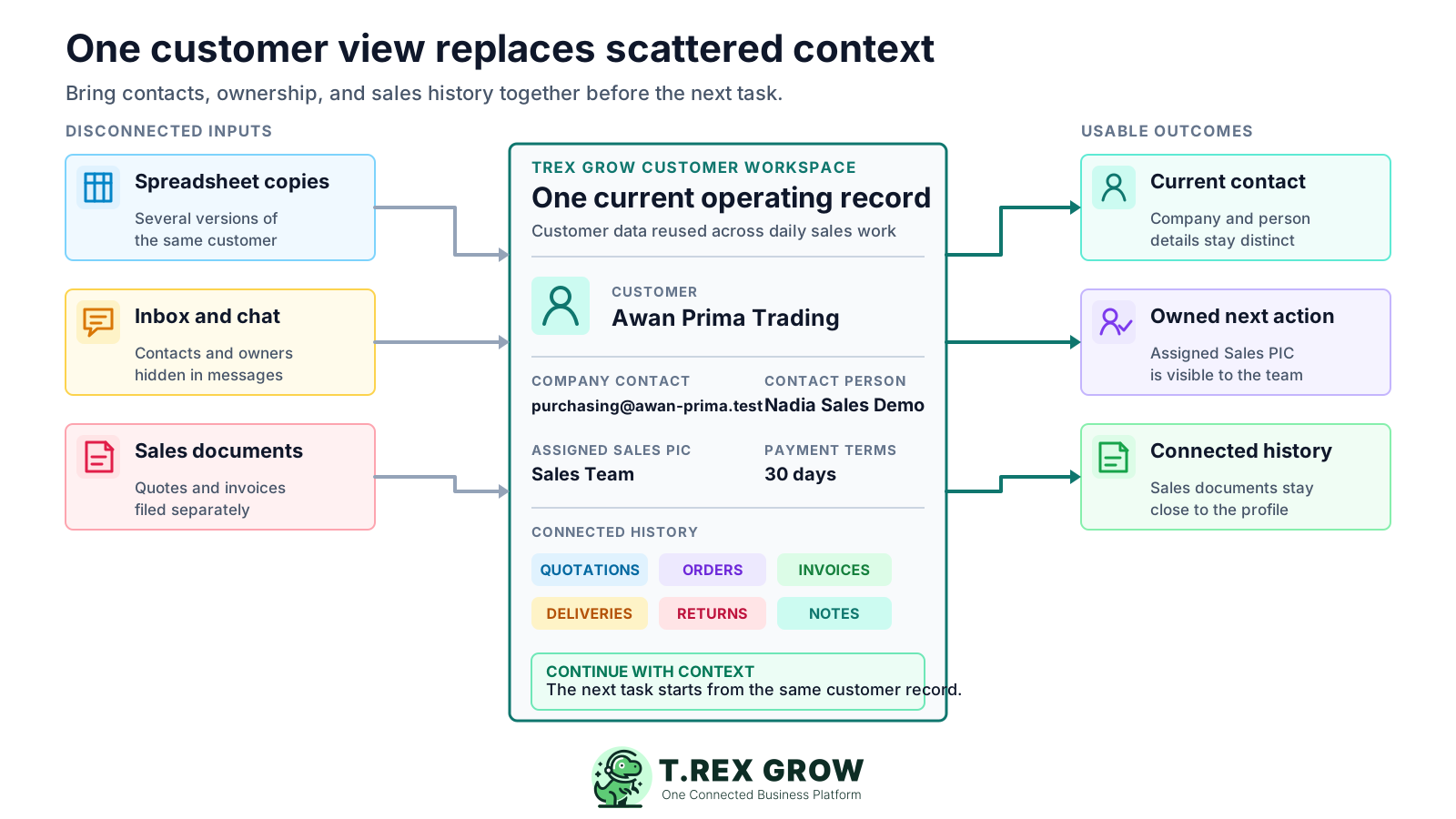
A customer database becomes useful when sales, finance, and operations can act from it. The record should show who the customer is, who owns the relationship, which contact is current, what documents already exist, and what the team needs to do next.
Operational pressure
When records live in different places, the person responsible has to reconstruct what happened before they can make a confident decision or follow up.
A company name, address, phone number, and contact person are entered separately in a sales spreadsheet, quotation template, invoice file, finance list, and staff phone. Each copy can become different.
Staff can find an invoice but not the quotation, delivery, return, or adjustment that explains it. Another person must reconstruct the sequence before answering the customer.
Everyone knows that one salesperson usually handles the account, but the shared record does not show an assigned owner. Follow-up becomes unclear when that person is unavailable.
A new contact person, email address, billing location, customer type, or payment term is updated in one place but not in the other documents that reuse it.
Deleting or hiding old records can break the link to earlier quotations and invoices. A safer customer workflow preserves history while keeping inactive accounts out of normal active views.
Sales collects the details, administration prepares the quotation, operations handles fulfilment, and finance issues the invoice, but each team receives a different version of the customer context.
Manual tools can hold customer information, but they do not automatically create one accountable relationship between the customer record and the documents that move through the business. The operational cost appears when volume, staff, and document types increase.
Recurring issues usually point to workflow-control gaps, not one isolated data-entry mistake.
A spreadsheet row may contain a name and phone number, but it rarely shows current ownership, document status, related returns, payment context, or which contact belongs to which role.
Quotations and invoices are saved with customer names in folders, but spelling differences and duplicate names make history dependent on how each person files and searches documents.
A message says who will follow up, but the customer record does not retain that ownership. The task becomes difficult to hand over or review later.
Staff copy the last quotation or invoice to save time. Old addresses, contacts, payment terms, and identifiers can continue into the next document.
Small variations in company names or contact details create several customer entries. Document history and balances then appear under separate records.
Removing an inactive customer appears tidy, but it can make earlier documents harder to understand. A structured archive keeps historical context without mixing inactive records into daily work.
Choose software around the customer workflow your team actually runs. For a quotation-and-invoice-led SME, the essential question is whether one customer record can be maintained, owned, found, reused, and traced through the documents that matter.
Keep the company or individual name, customer type, country, address, contact details, payment terms, and other required identifiers together instead of retyping them per document.
A business customer may have one legal or billing identity and a different day-to-day contact. The software should preserve both without squeezing them into one name field.
Assign the customer to a responsible sales person or account owner so another team member can understand who should continue the next action.
Staff should be able to find the right customer, focus on active records, and retain inactive customers without deleting the history behind earlier documents.
The customer view should bring relevant quotations, orders, deliveries, invoices, returns, credit notes, debit notes, and refund notes closer to the source profile.
Customer creation, editing, viewing, and archival should follow the access rules your business sets for owners, sales administrators, finance staff, and other users.
TREX Grow treats the customer as an operating record rather than an isolated address book entry. The profile can hold current customer and contact details while the surrounding tabs and workflows keep sales documents and adjustments easier to trace.
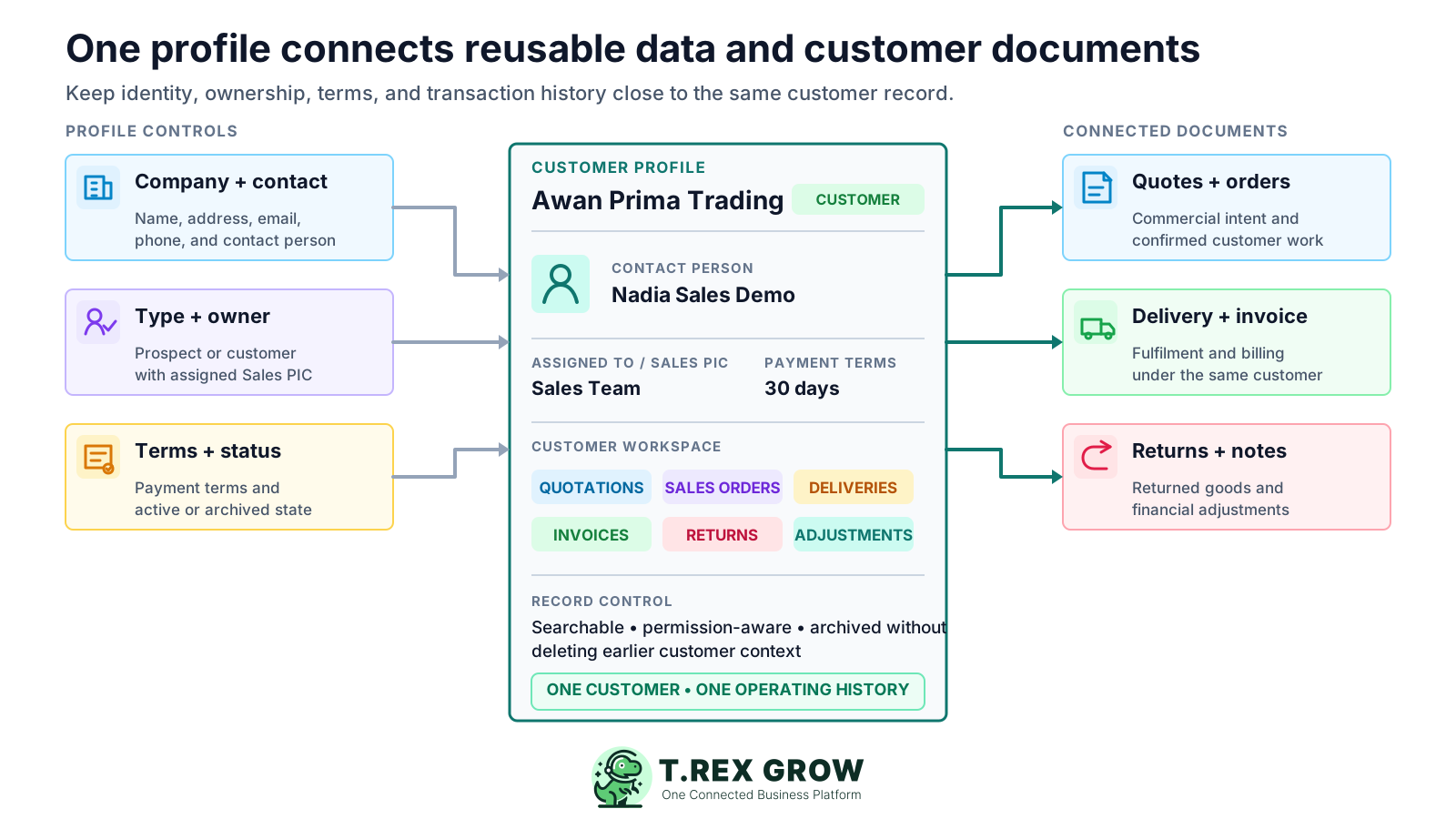
Maintain the customer name, country, address, email, phone number, and related identifiers from one current profile before using them in downstream sales work.
Store the day-to-day contact person's name, email, and phone separately from the customer's general company contact information.
Distinguish a prospect from a customer so the team can maintain cleaner records as an enquiry becomes an active commercial relationship.
Keep the assigned Sales PIC and the customer's payment terms visible as part of the operating context used by sales and finance.
Review customer-specific quotations, sales orders, pro-forma invoices, delivery orders, and invoices from the customer workspace according to plan and permission access.
Keep sales return notes, credit notes, debit notes, and refund notes connected to the customer record where the relevant modules and workflows are used.
The software should carry the same customer context forward as the relationship develops. TREX Grow supports a practical sequence from capturing the record and assigning ownership through quotation, fulfilment, invoicing, and later review.
Record the current facts in one shared place.
Confirm what is known and what needs attention.
Make the next decision or follow-up accountable.
Complete the next task and record the outcome.
Refresh the shared view when facts change.
A dependable workflow keeps the shared record and the next action aligned.
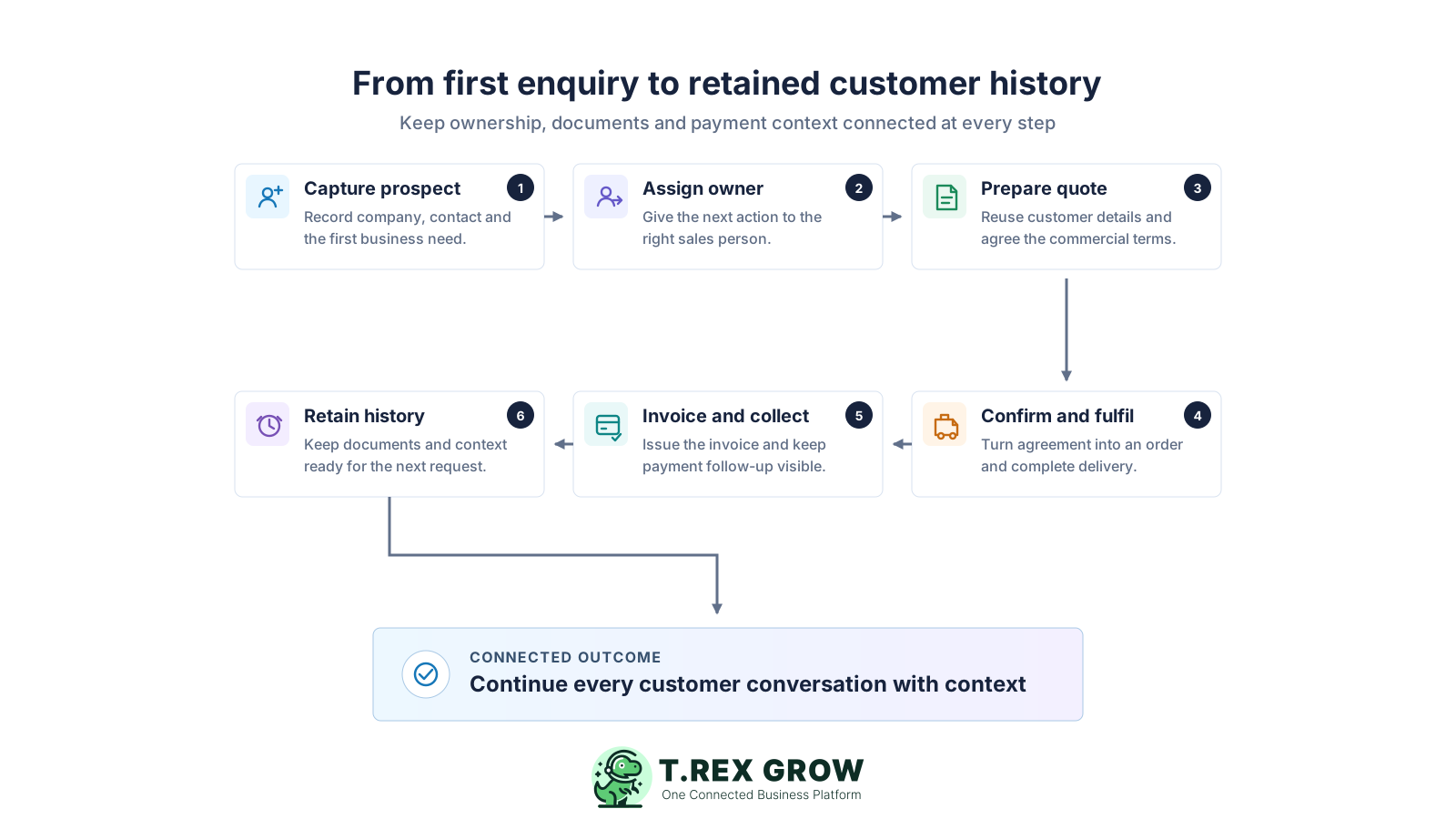
Capture the customer or prospect once: create the profile with the current company or individual name, customer type, country, address, contact details, and the fields your business needs before preparing a sales document.
Assign ownership: select the responsible Sales PIC or account owner and confirm which contact person should receive day-to-day communication. Keep the shared record usable when work needs to be handed over.
Prepare the first quotation: select the controlled customer record instead of retyping the name and contact information. Keep the quotation visible from the customer workspace for later review.
Continue confirmed work: move accepted work into the relevant sales order, pro-forma invoice, delivery, or fulfilment process available to the plan and workflow without creating a second customer identity.
Invoice and record payment context: issue the invoice from the same customer relationship and retain related status, payment, receipt, credit, debit, refund, or return context as the transaction changes.
Retain and maintain the history: update current contacts, ownership, payment terms, or customer type when facts change. Archive inactive customers instead of deleting the earlier operating context.
The module is designed around customer records and connected business documents. Use the feature set to reduce repeated entry, make ownership visible, and give sales, operations, and finance a more consistent starting point.
Search customer records and use status filters to focus on active or archived accounts instead of scanning multiple spreadsheets.
Maintain the identifying, address, contact, and operating details needed for the customer profile your business uses.
Classify the record as a prospect or customer so the team can use a clearer shared label as the relationship develops.
Show the responsible user on the customer record so ownership is visible beyond private messages or personal notes.
Keep customer payment terms and the named contact person's email and phone information with the customer profile.
Bring quotations, orders, delivery documents, invoices, returns, and adjustment notes into customer-filtered views based on module and permission access.
Use customer-management permissions for create, edit, view, and archive actions while preserving inactive customer history.
The customer list gives the team a practical shared view before it creates the next quotation or invoice. This screenshot uses safe demo records and shows how company information, contact details, contact people, and ownership can sit in one operational screen.
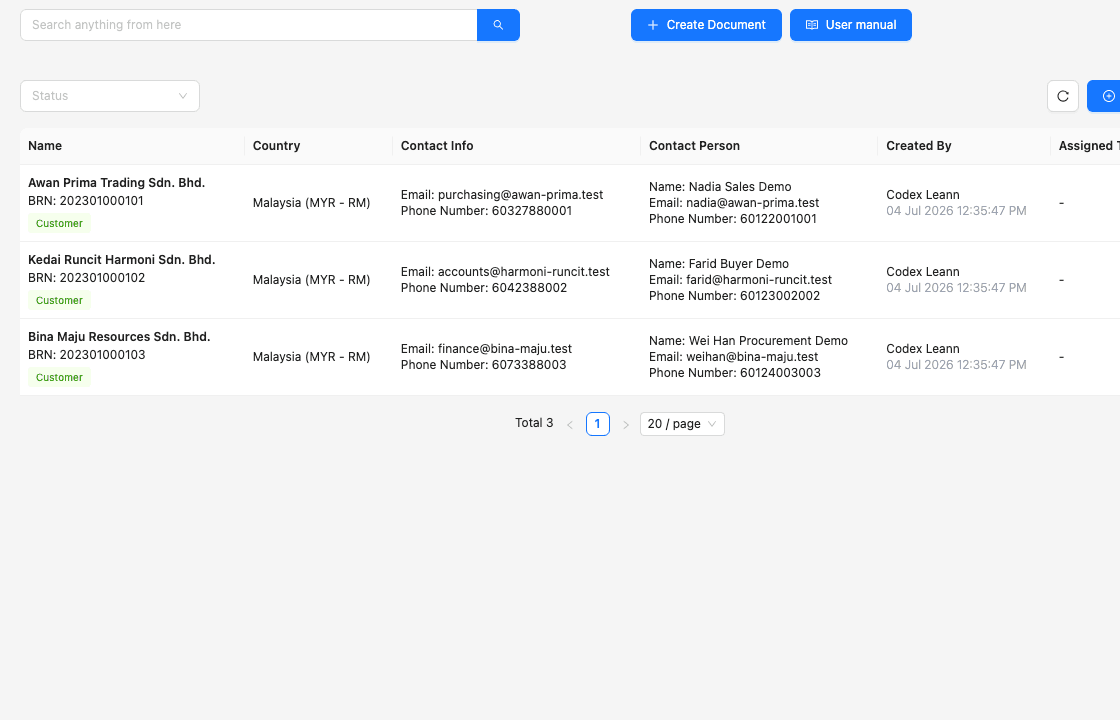
Company name, country, and business-identification context help staff choose the intended customer before creating another document.
The screen distinguishes the customer's general email and phone details from the named person who handles day-to-day communication.
Creation and assignment columns provide operational context that a shared address book or invoice template normally does not retain.
TREX Grow is a strong fit when the main need is to connect customer master data, ownership, quotations, invoices, fulfilment, and adjustment history. Define advanced CRM requirements separately so the team does not assume every customer platform includes the same marketing or pipeline functions.
Clean the active customer names, contact people, phone numbers, email addresses, locations, ownership, and terms that appear repeatedly in sales documents.
Decide who can create, edit, archive, and review customer records so duplicated or outdated details do not return after the initial clean-up.
Use a realistic customer to test quotation, confirmation, delivery, invoice, payment, return, and adjustment scenarios relevant to your business.
Core customer records, quotations, and invoices may be available before broader sales, delivery, return, adjustment, attachment, or control workflows. Verify the current plan and user permissions for the modules you need.
Archive customers that are no longer active so normal lists stay focused while earlier document relationships remain understandable.
If you require mass email campaigns, call-centre tooling, complex lead scoring, or advanced pipeline forecasting, document those needs and evaluate them explicitly.
Use this table to match the software evaluation to the workflow your business expects to run.
| Requirement | TREX Grow workflow | What to verify |
|---|---|---|
| Customer master data | Company, individual, address, contact, customer type, payment terms, and assigned owner fields | Your required fields and record clean-up approach |
| Sales document context | Customer-filtered quotations, orders, deliveries, invoices, returns, and adjustment records | Plan and permission access for each document type |
| Ownership and handover | Assigned To or Sales PIC visible on the shared customer record | Your team's assignment and review rules |
| Inactive customer handling | Archive and restore without deleting the customer history | Who can archive and how duplicates are resolved |
| Advanced CRM automation | Operational customer records and connected document workflows | Separate needs for campaigns, lead scoring, call logging, or complex forecasting |
The best practice is to make the next action clear before the situation becomes urgent.
The module suits SMEs that need customer records to drive real sales and finance work. It is especially relevant when quotations and invoices are already central to the business and the next improvement is to connect the customer context around them.
The team wants one record with controlled contact information, ownership, archive handling, and document context instead of several manually maintained files.
Customer details are reused frequently in quotations, orders, deliveries, invoices, and later adjustment documents.
The business wants customer ownership, contact details, document status, and payment-related history to remain understandable across team handoffs.
The customer relationship creates repeated operational documents and benefits from one shared company, contact, and transaction history.
TREX Grow provides a Free starting point for customer records, quotations, invoices, and related core workflows, with paid modules available when the operation needs broader controls.
The team understands whether it also needs marketing automation, complex lead pipelines, call logging, or other specialist CRM capabilities outside the core customer operations workflow.
Create a TREX Grow workspace, add a few current customers, assign ownership, and run one quotation-to-invoice path. Confirm that sales, operations, and finance can understand the same customer record before moving more customer history into the workflow.
Customer management software keeps customer company or individual details, contact people, ownership, status, and related business activity in a shared record. For an SME, it should make quotation, invoice, fulfilment, payment, and adjustment work easier to continue.