Back to software buying guidesQuickBooks alternative evaluation

QuickBooks Alternative for Malaysian SMEs

TREX Grow connects sales, purchasing, stock and daily follow-up. When evaluating it as a QuickBooks alternative, define the operating work you want to move and validate finance requirements separately. Accounting Beta needs setup, activation and qualified review.

QuickBooks alternative evaluation covering accounting requirements, everyday operating workflows and the cost and ownership of a change
Problem

Identify the job you want your QuickBooks alternative to do

A reason to change should be specific enough to test. Start with the work that is difficult today, the people affected and the evidence a better setup must retain.

Operational pressure

The next action is easy to lose when context is scattered.

When records live in different places, the person responsible has to reconstruct what happened before they can make a confident decision or follow up.

Scattered recordsUnclear ownershipAvoidable surprises
High risk

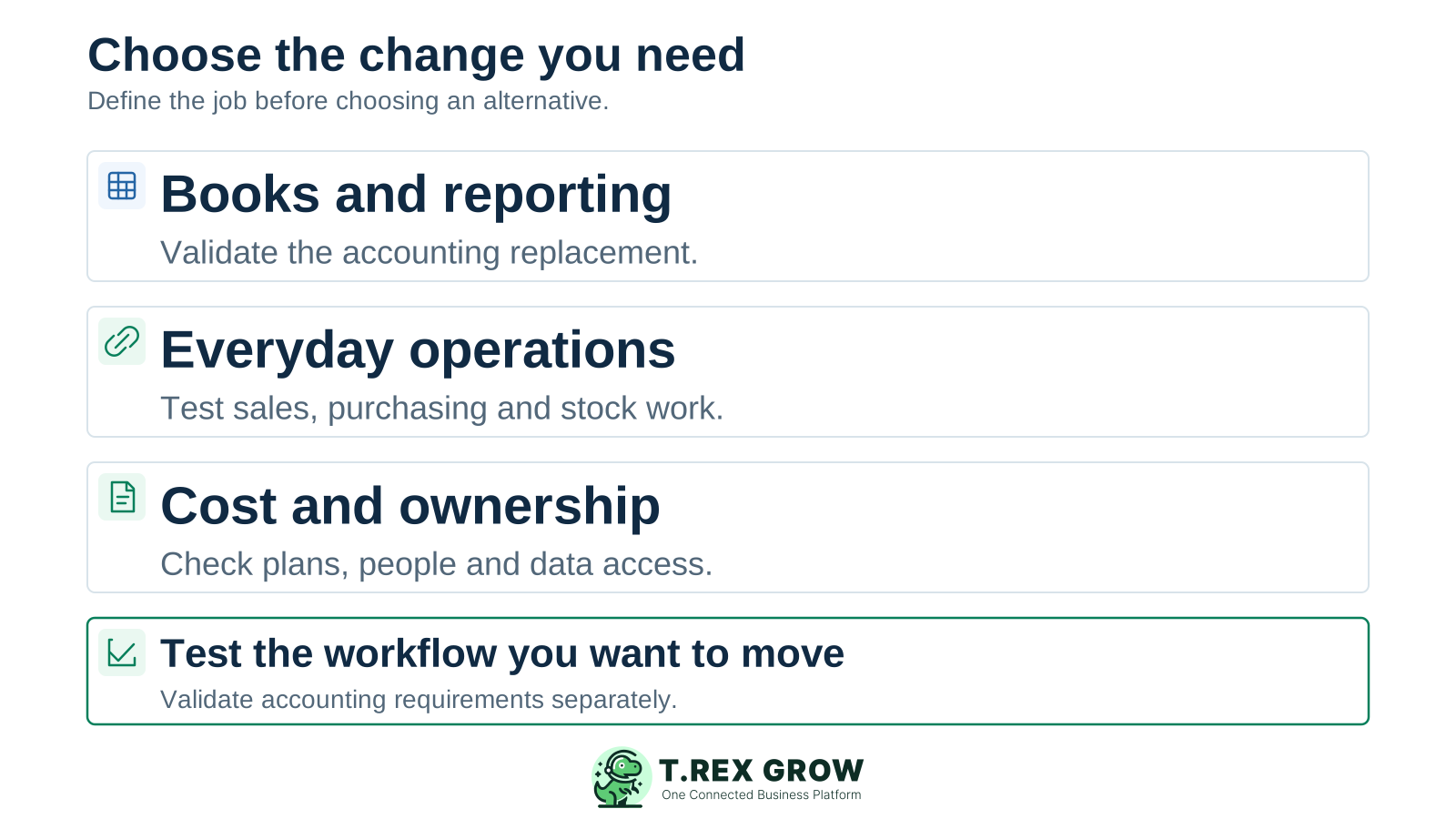
Finance needs a different accounting setup

If the main requirement is bookkeeping, bank reconciliation or financial reporting, give the finance owner a separate acceptance test for those outputs. An operational demonstration will not establish accounting fit by itself.
Daily operations need clearer handovers

If the problem is repeated work around quotations, deliveries, purchasing, stock and follow-up, test how the proposed operating records connect and how staff find unfinished work.

The complete setup has become difficult to maintain

If subscriptions, apps, exports and manual checks are accumulating, list the whole setup and its owners. Compare the work a change removes with the work it introduces.

Education

Check what the current QuickBooks setup already covers

This page reviews QuickBooks Online's Malaysia offering. Official product and plan information was checked on 17 October 2026; Desktop editions and other country offerings need their own review. Some problems may be addressed by a different configuration or plan within the existing setup.

Accounting, invoicing and connected financial work

QuickBooks Malaysia advertises invoicing, bank connections, financial reports and connected apps. Evaluate the particular finance task and the supported bank or app in the plan your business would use.

Stock and purchasing are already part of the evaluation

The reviewed Malaysia plan page lists inventory and purchase orders in supported plans. Ask whether the actual workflow meets your needs before treating these as missing capabilities.

Malaysia e-Invoice has a documented route

QuickBooks advertises a Malaysia e-Invoice solution with Sovos. Compare the setup, supported records, submission status and exception handling you need in either product; the existence of a feature name is only the starting point.

Mistakes

Avoid four assumptions that weaken an alternative shortlist

A useful shortlist makes the operating scope and finance responsibilities visible before a subscription decision.

Recurring issues usually point to workflow-control gaps, not one isolated data-entry mistake.

Common

Treating every alternative as a complete replacement

A product that improves daily operations may still need a separate accounting process. Write down which records, controls and outputs would actually change.

High risk

Comparing only the advertised subscription

Include the required plan, user access, extra apps, data preparation, training and any period of running both setups. Check current country and offer terms.

Common

Assuming a file export creates a live connection

An exported file can support a reviewed handover. A continuing connection needs its own demonstrated behaviour, timing, error handling and reconciliation owner.

High risk

Testing only a completed, tidy transaction

Use a revision, partial delivery or part payment to see what remains open, who acts next and how the source record stays traceable.

Education

Match the reason for changing to evidence you can inspect

Use this table to define a trial brief. It is a scope checklist rather than a vendor ranking. For a detailed product-to-product review, use the separate TREX Grow vs QuickBooks comparison.

What a suitable QuickBooks alternative must prove

Reason for lookingEvidence to requestHow to assess TREX Grow
Sales records are repeatedly re-enteredFollow a customer request into its related sales documents and show how a revision is handled.Explore customer and product records, quotations and the linked documents available in the selected plan.
Purchasing and stock handovers are unclearShow the supplier commitment, actual receipt, stock record and unresolved quantity with a responsible next action.Use Essential for purchasing and stock evaluation; include Premium when advanced warehouse scope is needed.
The finance setup needs replacingValidate the required ledger, bank reconciliation and reporting outputs with the finance owner.Accounting Beta requires setup, activation and qualified review. Its outputs may be incomplete or inaccurate; evaluate this boundary explicitly.
Malaysia e-Invoice work needs improvementTest the applicable record, required setup, submission result and a relevant correction or exception.Check the supported TREX Grow workflow against the business's actual requirements; also recognise QuickBooks' documented Sovos route.
The complete cost is difficult to justifyPrice the exact scope, access, extra services, change effort and ongoing administration.Compare current TREX Grow plan scope and billing with the full current and proposed setup; avoid a subscription-only savings claim.
Staff need a clearer daily viewFind one open item, trace its source and identify who can complete the next action.Review relevant document status, outstanding work and reminders using realistic demo records and permissions.
Solution

Where TREX Grow can fit your alternative shortlist

Consider TREX Grow when the priority is connected operating records across customer work, purchasing, stock and follow-up. Choose the plan around the workflow you need to test, and keep its accounting beta status in the decision.

Operations work better when records and next actions are connected

Start from reusable business records

Explore how customer, supplier and product details support the relevant documents. Check which source details carry forward and how staff handle later changes.

Trace sales and fulfilment work

Review a quotation with its related sales order, invoice or delivery records where available in the selected plan. Check document readiness separately from actual delivery and settlement.

TREX Grow Operations Hub

Match stock depth to the plan

The current plan structure places purchasing and core stock work in Essential and adds advanced warehouse work in Premium. Use the appropriate scope for a meaningful trial.

Give finance its own acceptance decision

Accounting Beta is included in paid plans and requires accounting setup plus explicit activation. A qualified accountant should review its records and outputs before they are relied on.

Education

Inspect linked sales records in a real TREX Grow demo screen

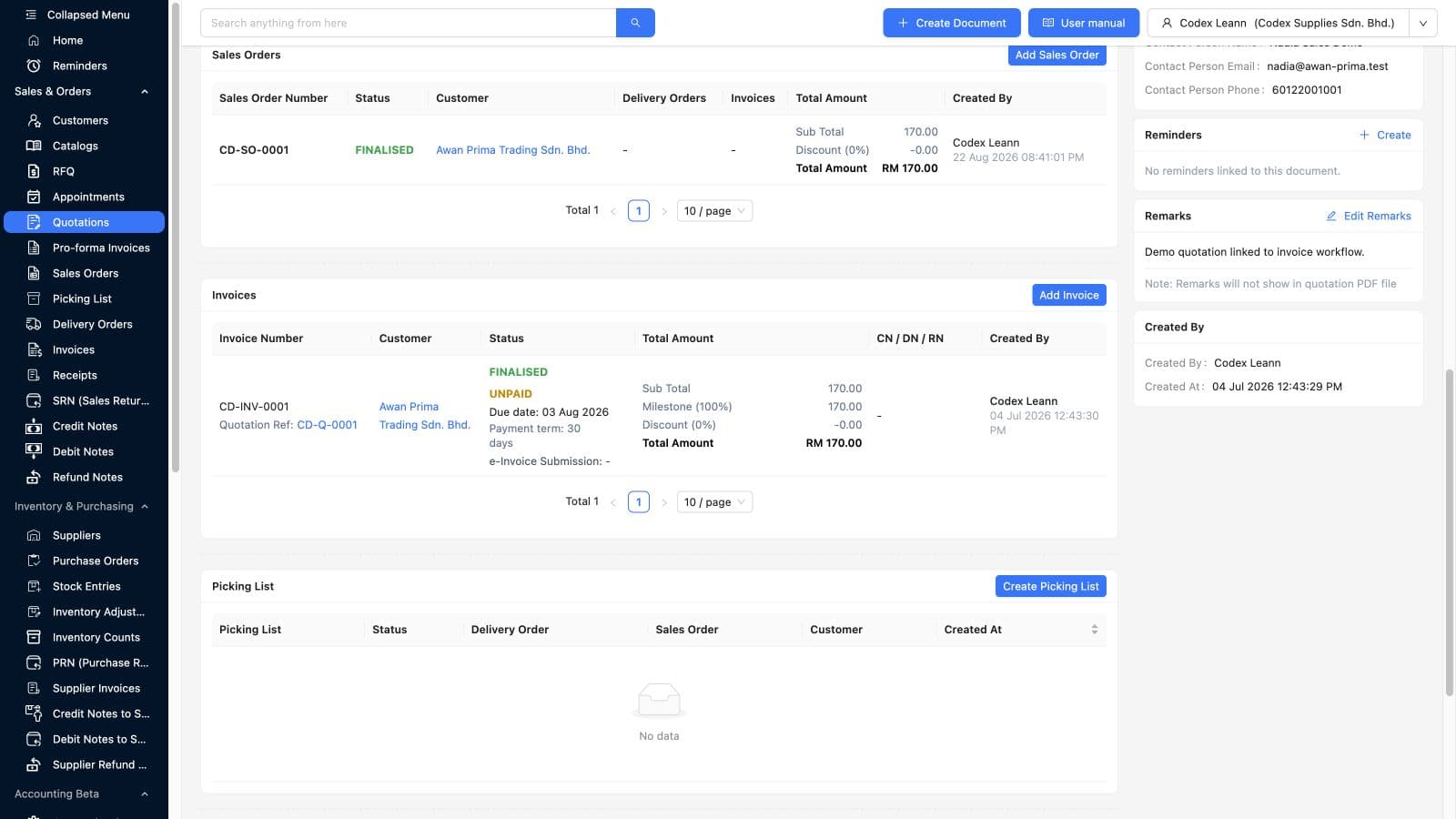
This existing demo screenshot shows a quotation's downstream sales order and invoice as separate records. The invoice is finalised and unpaid, so the screen lets you inspect a document relationship and its current state without treating document creation as a payment event.

Actual TREX Grow demo quotation screen showing a linked finalised sales order and an unpaid invoice with the source quotation reference
TREX Grow demo workspace; existing product screenshot with illustrative records.

Follow the source reference

Ask your team to trace the quotation reference into the linked document and identify which record they would open to continue the work.

Extend the demonstration to your exception

Use your trial to test the relevant revision, delivery or settlement case, then confirm the record, permissions and remaining action. The screenshot illustrates one demo state.

Education

Define the boundary if operating and accounting records stay separate

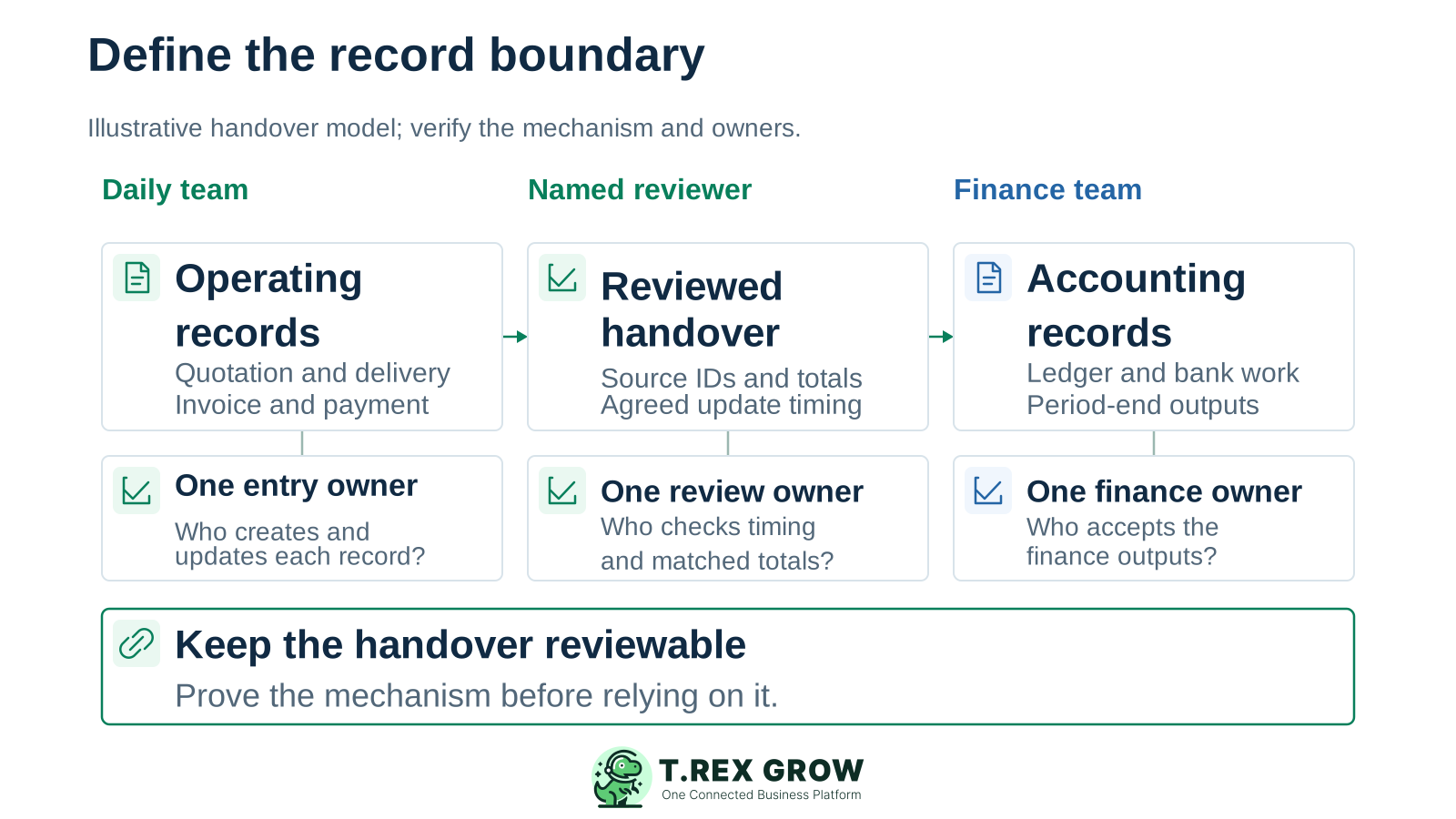
If QuickBooks or another accounting setup remains in use, agree the records it receives and how they are checked. A useful operating change has a clear entry owner, review point and finance owner. The diagram is a handover model to verify, not a claim of a built-in QuickBooks connection.

An illustrative handover model connecting operating records, a reviewed transfer and accounting records with separate entry, review and finance owners

Keep the source reference through the handover

Agree the identifiers, dates, amounts and supporting evidence that let a reviewer match an operating record to the finance entry. Define how later adjustments are communicated.

Demonstrate the actual mechanism

Test the export, manual process or proposed connection. Agree timing, duplicate prevention, error handling and who reconciles the result before it becomes a routine dependency.

Best practices

Compare the complete cost, access and change effort

Compare the current country, currency, billing period and recurring charge for the plan you need. TREX Grow offers annual plans, a Free plan and a one-time paid-plan trial. Check plan scope and trial eligibility before estimating the cost.

Do this

Review the trust information with the workflow owner

Use the data security information and your demonstration to check account access, permissions, responsibilities and recovery questions. Request evidence for any specific security requirement.

Do this

Retain a usable decision record

Keep the selected scope, plan, cost assumptions, tested exceptions and reviewers together. Document any finance or handover condition that must be met before new entry moves.

A cost and implementation worksheet for your shortlist

Cost or dependencyWhat to recordDecision check
Subscription and billingThe current country, currency, billing period, promotion and later recurring charge.Compare the same period and scope; a monthly equivalent is different from the amount actually billed.
Users and responsibilitiesCreators, approvers, warehouse staff, finance reviewers and administrators.Verify plan access and permissions. QuickBooks user allowances vary by plan; TREX Grow currently lists unlimited users.
Required workflow depthSales documents, purchasing, stock, warehouse tasks and any accounting evaluation.Test the plan that contains the required work. TREX Grow Starter does not include purchasing or inventory management.
Apps and handoverAny separate subscription, export step, connection and reconciliation routine.Confirm who maintains the process and how errors are detected, including recurring service costs.
Preparation and trainingData cleaning, supported imports, open-record treatment, user practice and reviewer time.Try representative records before agreeing the scope. Do not assume a QuickBooks export becomes an accepted import automatically.
Overlap and later accessAny time using both setups, the next entry point, usable exports and required historical access.Confirm current access and retention terms with the providers, and test the files you need before closing an existing subscription.

The best practice is to make the next action clear before the situation becomes urgent.

Workflow

Make the alternative prove one complete job before moving it

Use safe representative records and a defined trial scope. Operations and finance should review the parts they will rely on, including the exception path and the records retained after a change.

A repeatable operating workflow

Capture

Record the current facts in one shared place.

Check

Confirm what is known and what needs attention.

Assign

Make the next decision or follow-up accountable.

Act

Complete the next task and record the outcome.

Review

Refresh the shared view when facts change.

A dependable workflow keeps the shared record and the next action aligned.

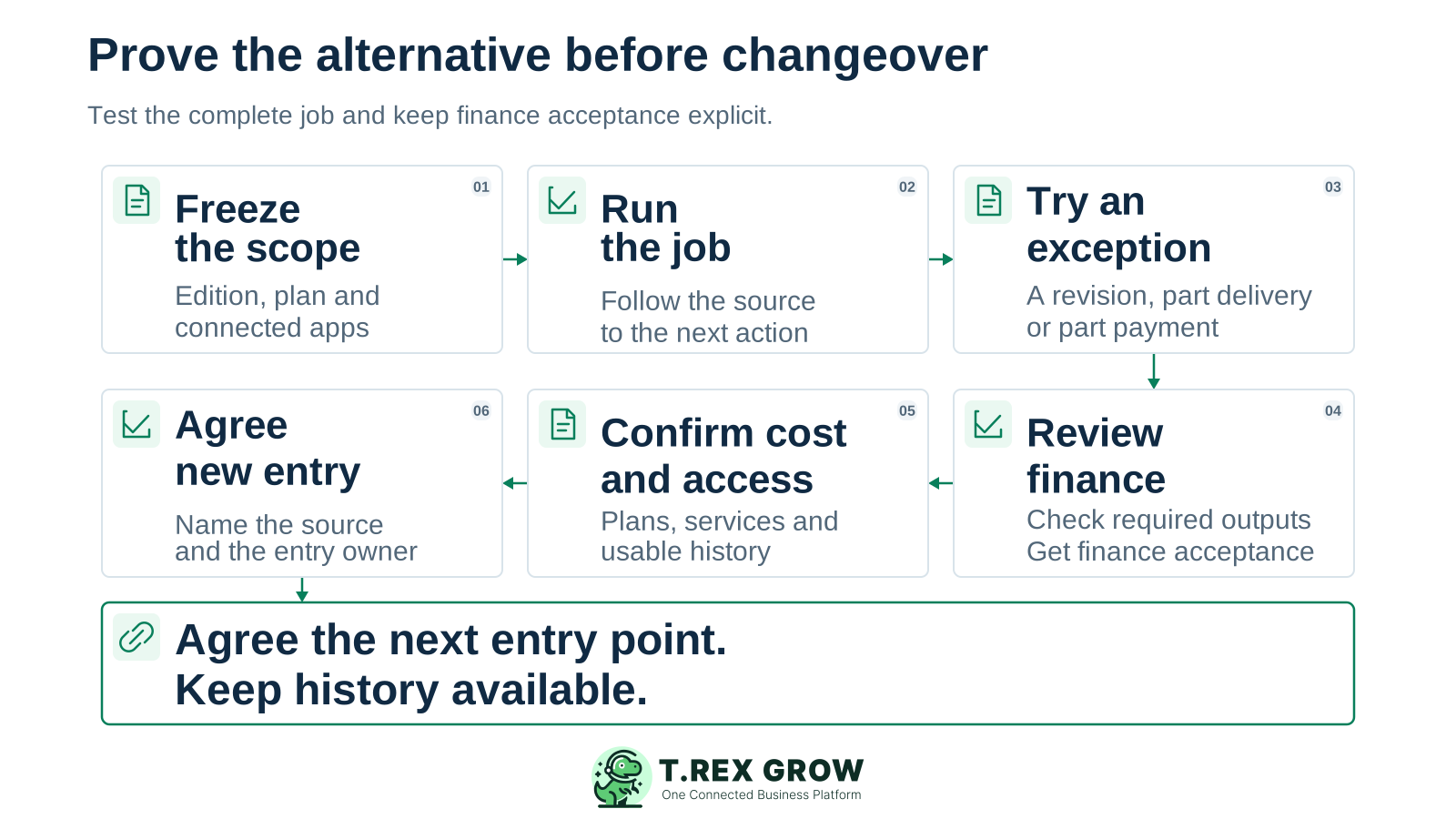
Six-stage alternative evaluation covering scope, a normal job, an exception, finance review, cost and access, then an agreed point for new entry
1

Freeze the scope: name the QuickBooks edition, plan, connected apps and specific work being evaluated. Identify what stays in the current setup and the outcomes the alternative must support.

2

Run the normal job: create or inspect the relevant customer or supplier source, documents and next action in the candidate setup using realistic demo data.

3

Force one exception: test a revision, partial delivery or part payment. Follow the outstanding work and prove that its source and responsible action remain clear.

4

Review finance separately: have the finance owner validate the required accounting outputs and any retained-system handover. Apply the Accounting Beta qualification explicitly when evaluating TREX Grow finance features.

5

Confirm cost and access: record the actual plan and services, the preparation effort, usable exports and required historical access. Resolve untested dependencies before committing.

6

Agree the next entry point: approve who enters new work, where it begins and how earlier open records finish. Retain source evidence and review the first changed handovers before expanding the scope.

Next step

Test TREX Grow against the workflow you want to improve

Create a free workspace, review the plan for your required scope and use an eligible paid-plan trial for broader workflows. Bring one normal job, one exception and the finance questions that must be answered before you decide.

Start your TREX Grow evaluation

It can be an operations-led candidate for connected sales, purchasing, stock and daily follow-up. Define the particular workflow and plan you need. TREX Grow Accounting is in beta, requires setup and explicit activation, and needs qualified review because its outputs may be incomplete or inaccurate.