Customer work fragments after the sale
A quotation, delivery, invoice, adjustment and payment may exist, yet no one view explains how those records relate or what remains unfinished.

TREX Grow brings the records behind sales, purchasing, inventory, approvals, payments and supported Malaysia e-Invoice work into one practical environment—so teams can find the source, understand the current position and move the next action forward.

The problem is rarely the absence of software. It is that each tool, file or team owns a different part of the operating truth, so the business spends time rebuilding context between them.
Operational pressure
When records live in different places, the person responsible has to reconstruct what happened before they can make a confident decision or follow up.
A quotation, delivery, invoice, adjustment and payment may exist, yet no one view explains how those records relate or what remains unfinished.
A purchase order is sent, but receipt, supplier-invoice, payment and stock information are tracked elsewhere by different people.
A quantity changes, but the sale, purchase, return, transfer or adjustment that explains the movement is difficult to find.
The decision sits in email or chat while the document, amount, version, status and responsible user remain in another system.
To understand unpaid work, deliveries, supplier commitments, low stock or follow-up, someone must first reconcile several trackers.
Incorrect customer, product, tax or document data reaches the e-Invoice step because earlier operational records were not controlled consistently.
A connected platform is not simply a collection of modules on one menu. The records, relationships, controls and daily attention signals must continue across the work people actually perform.
Recurring issues usually point to workflow-control gaps, not one isolated data-entry mistake.
A shared drive makes documents easier to store, but it does not explain which quotation, order, delivery, invoice, payment or adjustment belongs together.
Copying data between tools can spread an error faster when the business has not defined the authoritative source and review responsibility.
A summary is useful only when staff can open the underlying records, understand their status and take the supported next action.
Approved, finalised, delivered, received, submitted, unpaid and paid describe different operating facts and should not be replaced by one vague label.
A broad launch makes it harder to isolate data, permission, ownership and training gaps before active work depends on the platform.
A connected SME operations platform can cover important document-led work without claiming manufacturing, payroll, projects, banking or every enterprise requirement.
OECD research separates basic digital-tool adoption from deeper business-process integration. Malaysia's National MSME Digitalisation 2030 direction similarly connects digital adoption with better processes and more efficient operations. For an SME buyer, the useful test is whether the platform makes everyday operating questions easier to answer from controlled records.
Customer, supplier, product, price, unit, tax and document information should begin from records with clear ownership.
Staff should be able to identify the supported quotation, order, fulfilment, receipt or other source behind downstream work.
Each document needs a status that matches its purpose instead of relying on one manually interpreted tracker field.
Permissions and approval behaviour should make creation, editing, review and finalisation responsibilities explicit.
Search, dashboard cues, reminders and record status should surface real follow-up without another shadow list.
Plans, specialist requirements, integrations and human review must remain clear before the business commits to implementation.
Test one customer or supplier transaction across the records and teams that participate in it.
| Operating question | Evidence to inspect | A strong result |
|---|---|---|
| Shared source | Customer, supplier, product, unit, price, tax and payment-term records used by the workflow. | Staff reuse controlled information instead of retyping it. |
| Cross-functional trail | Source and downstream document references across sales, purchasing, stock and invoices. | The next team can explain where the record came from. |
| Control | Draft, pending approval and finalised behaviour for users with different module permissions. | Available actions match responsibility and policy. |
| Daily visibility | Unpaid, due, delivery, purchase, low-stock, follow-up and reminder views. | A summary leads directly to the record needing review. |
| Normal exception | Revision, partial receipt, return, adjustment, cancellation or payment difference supported by the workflow. | The exception remains distinct, traceable and understandable. |
| Scope boundary | Current plan entitlements and any specialist functions or integrations the company requires. | The rollout does not depend on an assumed feature. |
TREX Grow connects reusable master data, document workflows, permission and status controls, and daily visibility without pretending every record is the same. The platform value comes from keeping each operating fact distinct while making the supported relationships easier to follow.
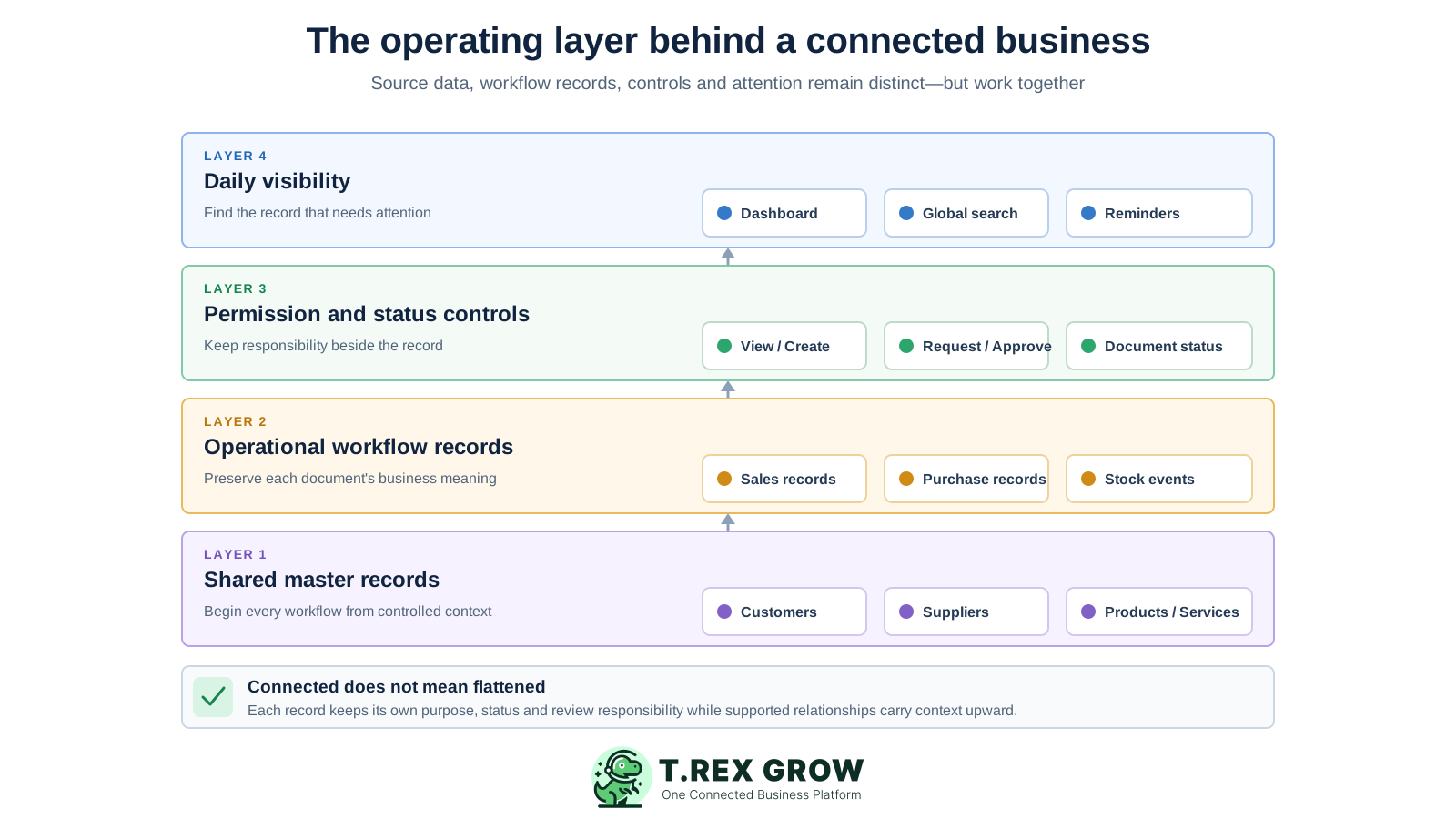
Customers, suppliers, products and services provide reusable operational information for the documents built around them.
Quotations, orders, deliveries, receipts, invoices, payments, returns and adjustments remain separate records with their own meaning.
Where TREX Grow supports continuation, the downstream record can retain the relevant source reference and business information.
Module permissions, approval behaviour, document status, remarks and selected attachments help teams review the record in context.
Dashboard cards, search and reminders help staff locate attention items while the underlying record remains available for verification.
TREX Grow supports practical, predefined workflows. It does not replace staff judgement or provide arbitrary no-code orchestration; each team still verifies the source, status and exception before continuing the work.
Record the current facts in one shared place.
Confirm what is known and what needs attention.
Make the next decision or follow-up accountable.
Complete the next task and record the outcome.
Refresh the shared view when facts change.
A dependable workflow keeps the shared record and the next action aligned.
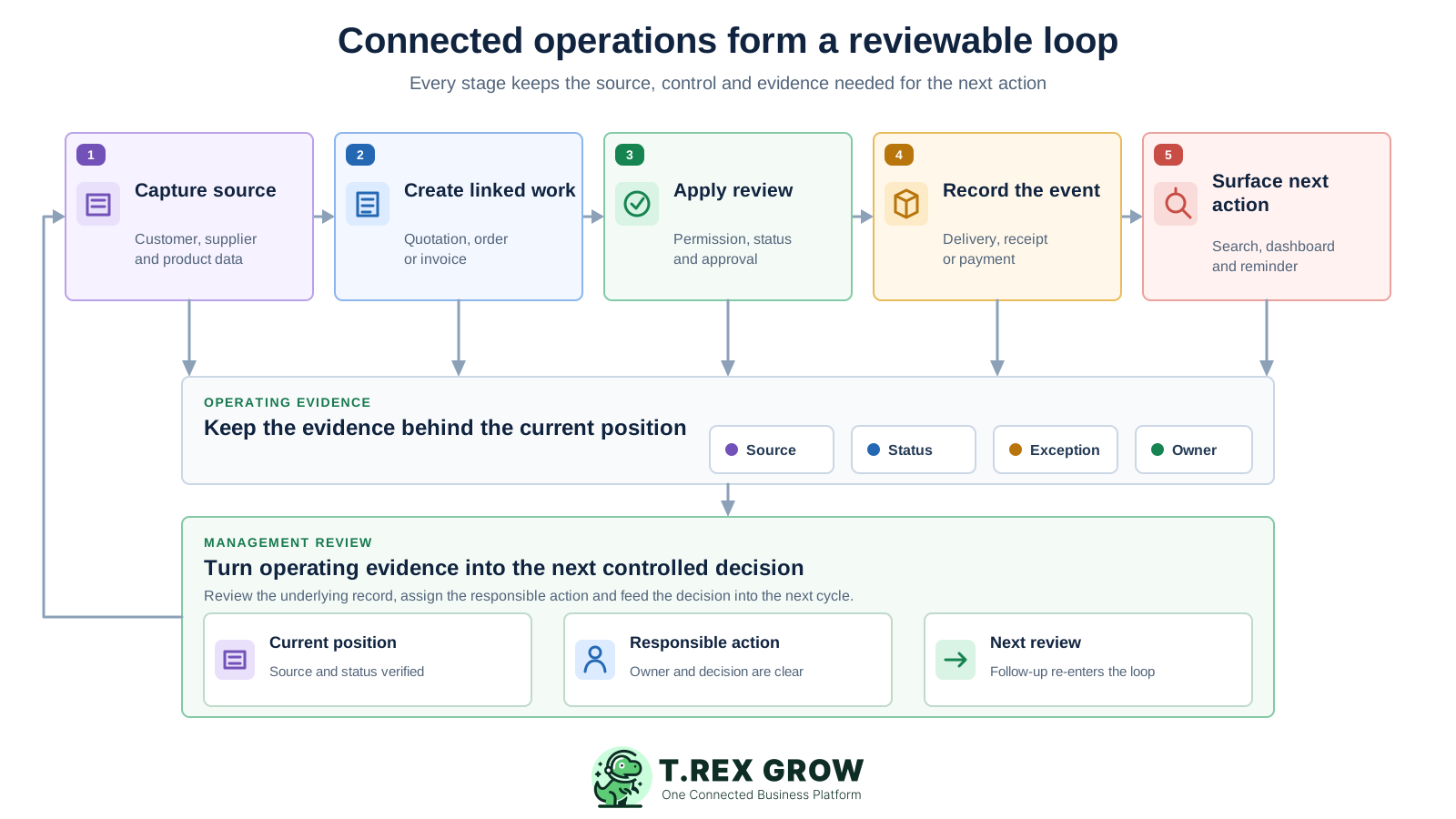
Capture the source: confirm the customer or supplier, products or services, commercial fields and responsible users before creating operational work.
Create linked work: prepare the supported quotation, order, delivery, receipt, invoice or stock record from the relevant master data or source document.
Apply review: verify values, quantities, attachments and status, then use direct finalisation or permission-aware approval where the module and policy require it.
Record the event: capture what actually happened through fulfilment, receipt, payment, return, adjustment, cancellation or supported Malaysia e-Invoice activity.
Surface the next action: use search, document status, dashboard attention cards and reminders to find follow-up while management reviews the wider operating picture.
The platform combines broad daily visibility with workflow depth that grows by plan. Buyers should confirm the exact documents, permissions, attachments, currencies, stock and warehouse controls their team intends to use.
Keep searchable business profiles and related transaction history near the sales or purchasing records teams need to review.
Manage supported quotations, orders, fulfilment, invoices, receipts, payments and adjustment records with visible document relationships.
Connect supplier, purchase-order, receiving, supplier-invoice, payment, return and adjustment context on the appropriate plan.
Track products and stock-affecting events, then add location, picking and inventory-count depth where the current plan supports it.
Use module-level access together with Request or Approve behaviour on supported documents to keep review responsibility explicit.
Use global search, quick creation, reminders and dashboard attention views to reduce time spent asking where a record is.
Turn selected product discovery and buyer enquiries into structured RFQs that staff can review and continue into draft quotations.
Prepare and track applicable submission activity from supported invoice and adjustment records after staff verify current data and HASiL guidance.
The TREX Grow operations dashboard surfaces unpaid customer and supplier invoices, today's delivery and purchase-order activity, low-stock products, quotation follow-up and reminders. Each attention signal is a starting point for staff review, not a substitute for it.
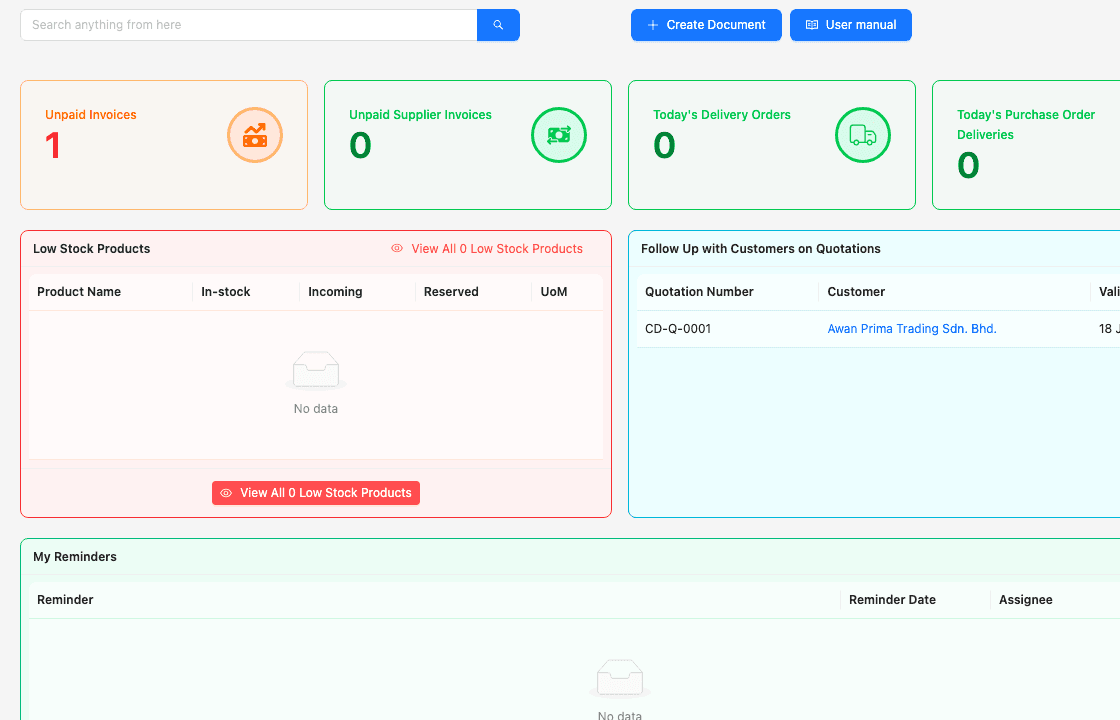
Unpaid customer and supplier invoice cards help the relevant teams begin review from the same daily view.
Delivery-order and purchase-order delivery cards point operations towards records connected to current activity.
Low-stock, quotation-follow-up and reminder views surface different kinds of work without flattening their status or ownership.
This TREX Grow product screen shows a stock entry created from a purchase order. The purchase-order number, supplier, expected quantity, received quantity, unit and shortage or oversupply position stay visible while staff record the actual receipt.
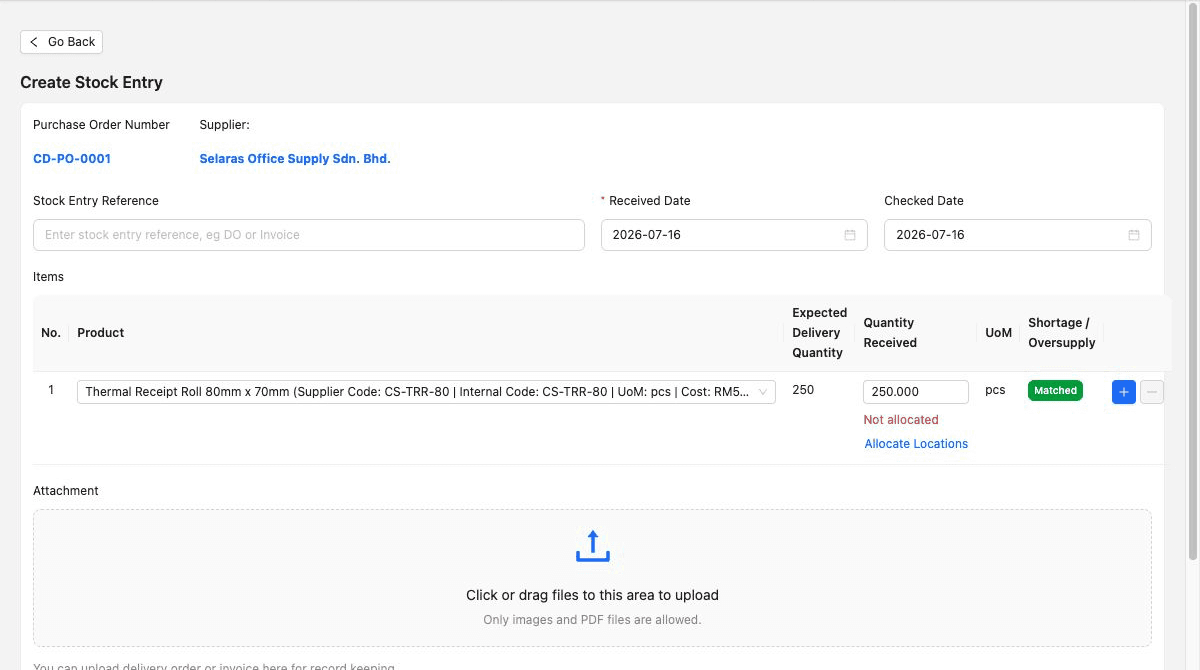
The purchase-order number and supplier stay visible as staff record what arrived.
The receiving screen separates the ordered quantity from the quantity received instead of assuming the commitment was fulfilled exactly.
A shortage or oversupply position helps staff review a difference before it disappears into a general stock total.
Begin with one cross-functional transaction, establish the operating source and controls, then expand only after each team can explain the record trail and recover normal exceptions.
Start with a recurring customer or supplier transaction that crosses two or three teams and includes at least one real review point.
Name who maintains customer, supplier, product and service records and who resolves duplicates or conflicting commercial fields.
Agree what quotation, order, fulfilment, receipt, invoice, payment and adjustment status means before configuring daily responsibilities.
Give users the access needed for their part of the work and test Request, Approve and direct-finalisation behaviour where supported.
Run a revision, partial receipt, return, adjustment, rejected approval, cancellation or payment difference relevant to the business.
Add the next workflow after users can find the source, explain the current position and identify attention items without a parallel tracker.
Use measurable operating evidence before moving to the next scope.
| Stage | Focus | Evidence before expanding |
|---|---|---|
| 1. Foundation | Users, permissions, company settings and master records. | Ownership and required data fields are clear. |
| 2. First workflow | One recurring sales or purchasing transaction. | Source, status, review and downstream relationship are understandable. |
| 3. Daily visibility | Dashboard, search, reminders and follow-up responsibility. | Users can locate attention items without a shadow tracker. |
| 4. Adjacent workflow | Inventory, payments, adjustments or another connected team. | Normal exceptions remain traceable across the handoff. |
| 5. Governance review | Plan fit, access, training, data quality and specialist gaps. | Management knows what the platform covers and what remains elsewhere. |
The best practice is to make the next action clear before the situation becomes urgent.
TREX Grow is designed for document-led SMEs that want core operating records and daily visibility in one environment. It can reduce fragmentation without claiming to replace every specialist application or enterprise requirement.
The business wants sales, purchasing, inventory, approvals, payments and supported e-Invoice records to share controlled context.
Owners and teams need searchable records, visible status, dashboard attention and reminders without a complex enterprise programme.
The company wants to begin with core customer, product, quotation and invoice work, then add deeper modules on the appropriate plan.
TREX Grow is not positioned here as an integration platform, data warehouse or no-code automation hub for arbitrary external systems.
Manufacturing planning, payroll, complex projects, budget enforcement, tendering, banking and specialist industry requirements need their own fit assessment.
Current official guidance, accounting review, tax advice, bank authority and management judgement remain necessary where applicable.
Use the TREX Grow trial to set up controlled records, run one cross-functional workflow, review its status and exceptions, and confirm whether each team can find the source and next action without rebuilding the context.
A connected operations platform gives different teams one environment for the business records, workflows, controls and daily attention signals they share. For an SME, that can mean connecting customer, supplier, product, sales, purchasing, inventory, approval, payment and compliance-related records without managing every handoff in a separate tracker.