Sales promises lose their source
A delivery or invoice exists, but operations and finance cannot quickly identify the quotation, customer order or sales record that supports it.

TREX Grow gives Malaysian SMEs practical operating workflows for sales, purchasing, inventory, approvals, payments and e-Invoice activity—built around connected records, clear status, permission-aware actions and visible work needing attention.

Each department may have a working document, yet the business still slows down when the source, owner, approval state or next step disappears at the handoff.
Operational pressure
When records live in different places, the person responsible has to reconstruct what happened before they can make a confident decision or follow up.
A delivery or invoice exists, but operations and finance cannot quickly identify the quotation, customer order or sales record that supports it.
What was ordered, what arrived, what the supplier invoiced and what was paid become one manually updated row instead of distinct records.
Product and stock information sits apart from the purchase, receipt, delivery, return or adjustment that explains the movement.
An approver receives a message or attachment without the full customer, supplier, item, value, status and source information needed for review.
Invoice, payment and adjustment evidence must be matched back to commercial and operational records before the current position can be explained.
Overdue follow-up, unpaid documents, supplier commitments and low-stock work become visible only after someone builds another report.
These tools remain useful for analysis and communication, but they do not naturally preserve record lineage, document-specific status, permissions and cross-team continuation across an operating workflow.
Recurring issues usually point to workflow-control gaps, not one isolated data-entry mistake.
A row cannot cleanly represent the different roles, controls and lifecycles of a quotation, order, receipt, invoice, payment and adjustment.
A short message may record agreement, but often omits the version, amount, item detail, source and permission context behind the decision.
Retyping customer, supplier, product, quantity, price, tax and terms at every stage creates new differences after earlier work was already reviewed.
Finalised, approved, delivered, completed, unpaid and paid describe different facts; forcing them into one status hides unfinished work.
Automating an unclear process can move incomplete or incorrect information faster. Define the source, owner, review and exception path first.
A generic workflow or ERP label does not prove that the product supports the specific sales, purchasing, inventory and finance records the SME actually uses.
OECD research distinguishes basic digital-tool adoption from deeper process integration, while Malaysia's MSME digitalisation roadmap links digital adoption to better business processes and more efficient operations. For an SME buyer, the practical test is whether real work can move between teams without losing its source or control.
Customer, supplier, product, service, unit, price, tax and payment-term data should begin from controlled records instead of copied text.
Quotations, orders, fulfilment records, invoices, returns, adjustments and payments should keep their own purpose and operating status.
A downstream record should show which supported source it came from so staff can verify the commercial or operational context.
The product should control who can view, create, edit, request approval or approve within each relevant module.
Search, reminders, dashboard cues and record status should help each team locate work that requires follow-up without another shadow tracker.
Plan access, specialist requirements, integrations and human review should remain explicit before the business commits to a rollout.
Test one representative transaction from source data to the final operating evidence.
| Requirement | Evidence to test | Why it matters |
|---|---|---|
| Controlled source | Begin with existing customer or supplier records and finalised or approved products. | Reduces conflicting master data before the workflow starts. |
| Record lineage | Continue a supported quotation, order or purchase record into a downstream document and inspect the retained reference. | Makes the handoff explainable across teams. |
| Permission and status | Test a draft, a requested approval, a direct finalisation and the actions available to different users. | Shows whether the system reflects the SME's control model. |
| Operational exception | Test a partial receipt, revision, return, adjustment, payment row or other normal exception supported by the workflow. | Reveals whether the current position remains understandable. |
| Daily visibility | Find overdue follow-up, unpaid work, delivery activity, purchase commitments, low stock and reminders without another spreadsheet. | Helps staff locate the next real action. |
| Plan and boundary | Confirm the exact modules, users, locations, currencies, attachments, trial rules and specialist integrations required. | Prevents category assumptions from becoming rollout gaps. |
TREX Grow keeps reusable master data, source documents, permission and status controls, downstream records and action evidence distinguishable but connected. Staff can inspect what the current record means instead of relying on one all-purpose tracker label.
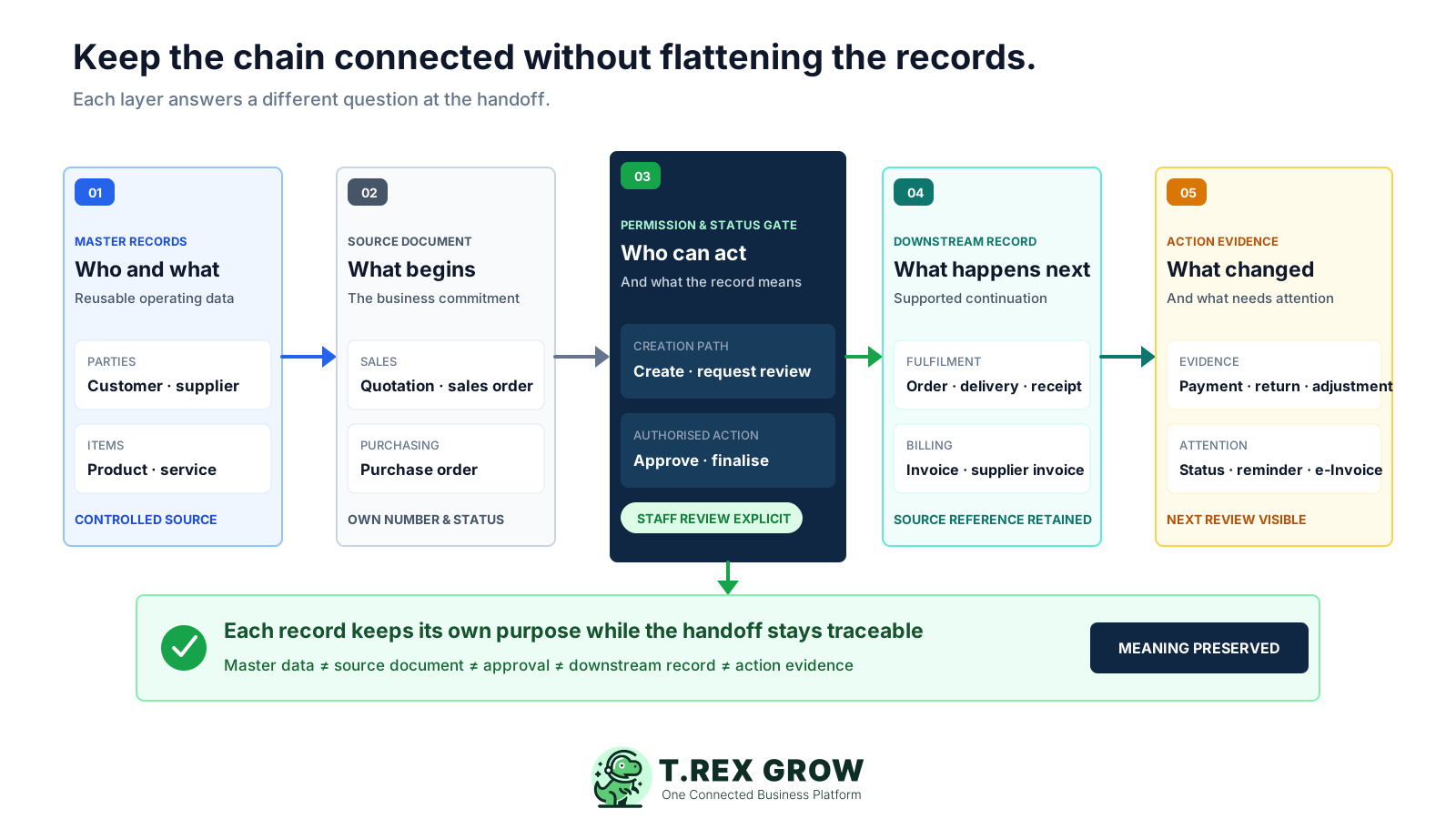
Customers, suppliers, products and services hold reusable information that can support the documents created around them.
A quotation, purchase order, stock entry, supplier invoice or customer invoice represents a different business fact and retains its own state.
Module-level View, Create and Edit access can be combined with direct finalisation, Request or Approve behaviour where the document supports approval.
Supported continuations can carry customer, supplier, product or item context forward while keeping the upstream reference visible.
PDFs, attachments where included, remarks, fulfilment records, payment rows, receipts, returns and adjustments can remain near the records they explain.
TREX Grow supports predefined document workflows rather than arbitrary no-code automation. The exact path varies by team and plan, but the control pattern remains consistent: establish the source, create the business record, review it, continue the supported work and retain the evidence.
Record the current facts in one shared place.
Confirm what is known and what needs attention.
Make the next decision or follow-up accountable.
Complete the next task and record the outcome.
Refresh the shared view when facts change.
A dependable workflow keeps the shared record and the next action aligned.
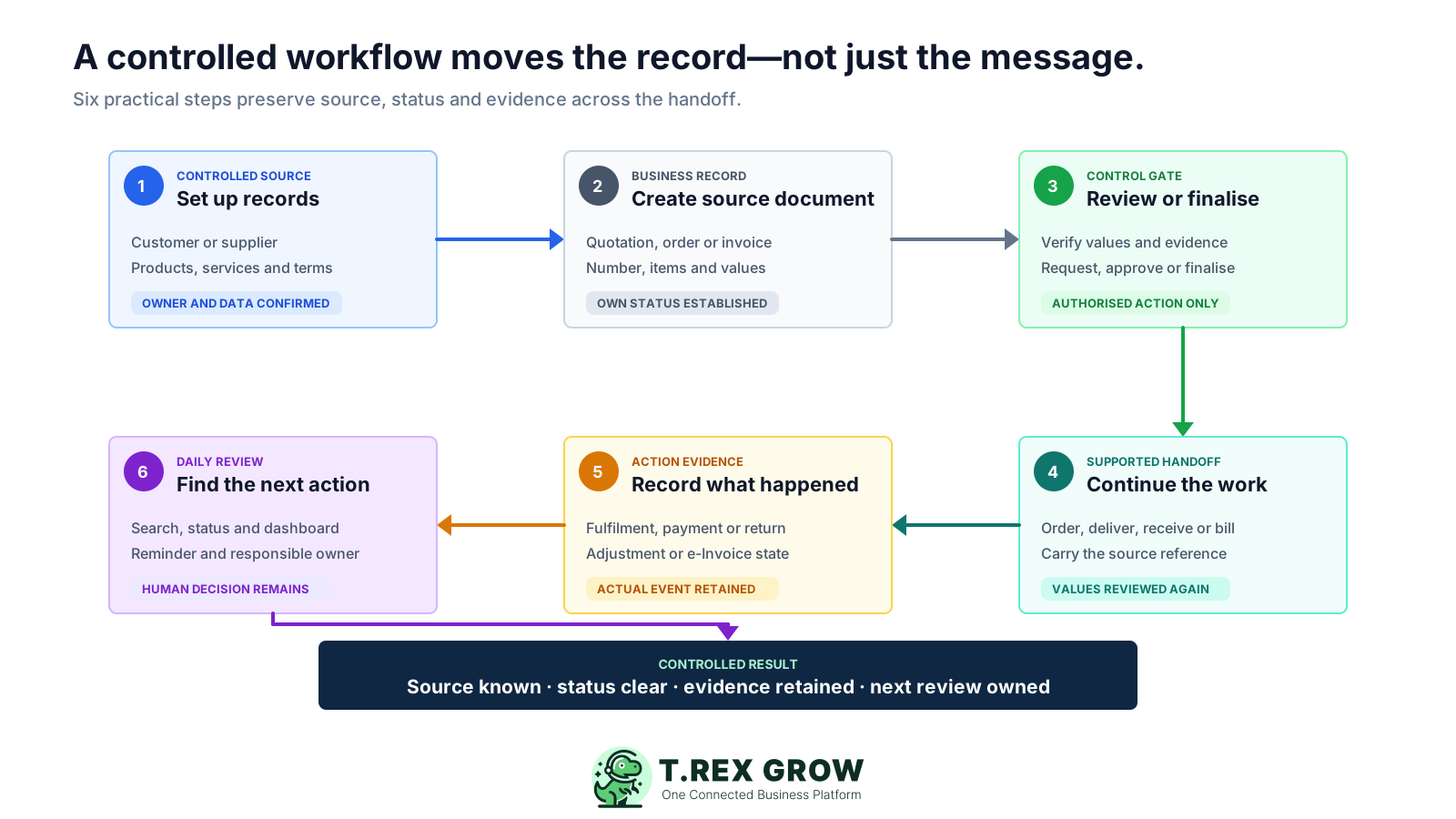
Set up controlled records: confirm the customer or supplier, products or services, units, price, tax, payment terms and the staff permissions needed for the workflow.
Create the source document: begin the quotation, sales order, purchase order, stock record, invoice or other supported document from the relevant master records.
Review or finalise: verify the values and attachments, then use direct finalisation or permission-aware approval where the module and company policy require it.
Continue supported downstream work: create the next appropriate order, fulfilment, receipt, supplier-invoice, customer-invoice or adjustment record while retaining its source context.
Record what actually happened: update delivery, receipt, payment, return, adjustment, completion or applicable Malaysia e-Invoice evidence in the correct record.
Review the next action: use search, record status, dashboard cues and reminders to identify follow-up while each team remains responsible for checking the underlying business facts.
The value comes from connecting the controls that already matter in everyday SME operations. Availability differs by module and plan, so buyers should test the exact workflow they intend to use.
Begin operational documents from searchable master data instead of recreating names, contacts, items, units and commercial fields in every file.
Connect supported quotation, customer-confirmed sales-order, delivery, pro-forma and invoice records while retaining the relevant source relationship.
Link supplier and product context to purchase orders, record actual receipts through stock entries and begin supplier invoices from the relevant PO.
Keep receipts, deliveries, returns, adjustments and location-level stock controls where applicable tied to the events that change inventory.
Use module-specific Create, Edit, Request and Approve behaviour to distinguish a pending review from authorised finalisation.
Retain payment-history rows and supported credit, debit, refund or return documents around the invoice or stock position they change.
Handle applicable submission and status work from supported final invoice and adjustment records after verifying accurate data and current HASiL requirements.
Search across customers, suppliers, products and documents, use reminders, and open daily dashboard cards for work that needs attention.
The TREX Grow operations dashboard brings unpaid customer and supplier invoices, today's delivery and purchase-order activity, low-stock products, quotation follow-up and reminders into one view. It points staff to work needing attention without replacing the underlying records.
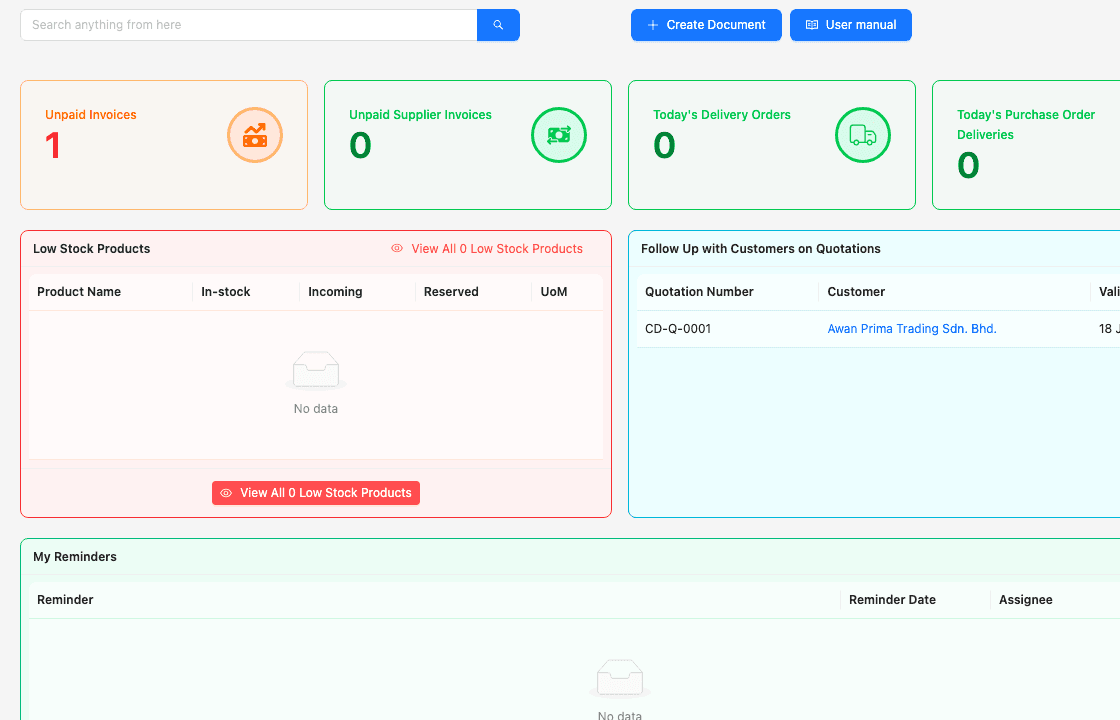
Unpaid customer-invoice and supplier-invoice cards give the relevant team a direct starting point for review.
Delivery-order and purchase-order delivery cards help operations locate records connected to today's activity.
A low-stock product view helps the team investigate inventory needs in the product and purchasing workflow.
Quotation follow-up and reminders remain visible while staff decide the appropriate communication or operational next step.
The TREX Grow quotation workspace shows the quotation number, status, customer, linked sales orders, delivery orders and invoices, total and creator. This safe demo screen demonstrates how a source record and its downstream work can remain visible together.
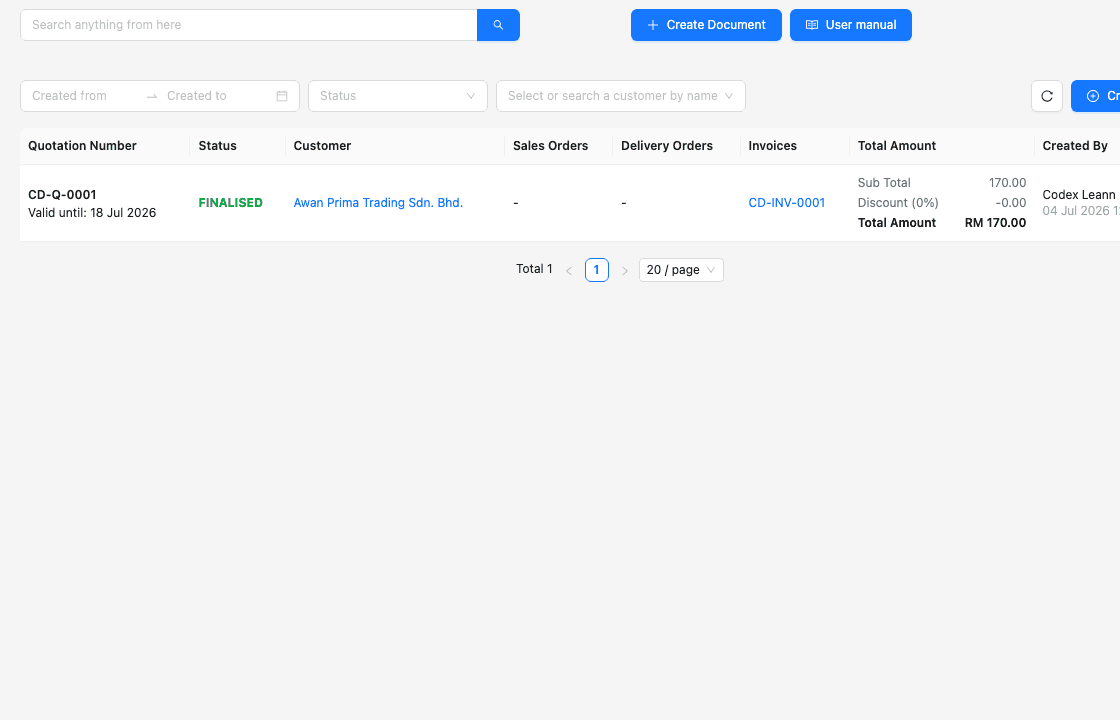
Quotation number, status, customer, total and creator remain visible as the team reviews the commercial starting point.
Sales-order, delivery-order and invoice columns help staff identify which supported records already continue the customer work.
The quotation retains its own state while each downstream order, fulfilment or invoice record manages the facts relevant to that stage.
Start with a representative process that crosses two or three teams, agree the source and decision rules, then test normal exceptions. A focused pilot makes scope, ownership and plan gaps visible before active work moves.
List the trigger, actors, records, decisions, controls, handoffs and end condition. Process mapping is useful because it makes relationships and control points visible.
Assign responsibility for customer, supplier and product data so staff know who resolves duplicates, outdated details and conflicting terms.
Decide who can view, create, edit, request approval and approve within each document area rather than assigning one generic workflow role.
Agree which source reference, attachment, date, quantity, status, payment row or remark must exist before the next team acts.
Run a revision, partial receipt, return, adjustment, late payment or approval rejection relevant to the business before declaring the workflow ready.
Confirm current entitlement and separately assess requirements such as budgets, requisitions, OCR, advanced automation, payroll, manufacturing, banking or deep integrations.
Use one real but non-sensitive test transaction and ask each team to verify its part of the trail.
| Pilot check | Team question | Ready when |
|---|---|---|
| Source data | Can staff find the correct customer or supplier and the approved products without duplicate entry? | Required master fields and ownership are clear. |
| Document control | Can the creator and approver distinguish draft, pending approval and finalised work? | Permission and status behaviour matches policy. |
| Handoff | Can the next team see the supported source and verify what was carried forward? | The downstream record is understandable without a side message. |
| Exception | Can staff explain a revision, partial event, return, adjustment or payment difference? | The current position and remaining action stay visible. |
| Daily work | Can the responsible user find the record again through search, status, dashboard or reminder? | Follow-up no longer depends on a separate shadow tracker. |
The best practice is to make the next action clear before the situation becomes urgent.
TREX Grow is designed for SMEs that want practical connected workflows around sales documents, purchasing, inventory, payments, permissions and Malaysia e-Invoice operations. It should be evaluated against the actual records the business uses, not treated as a universal workflow engine.
The business wants customer, supplier, product, sales, purchase, stock and invoice records to continue through clear operational stages.
Teams need controlled creation, review and approval behaviour, searchable records and a clearer view of work needing attention.
The company prefers to begin with core records and add the sales, purchasing, inventory or warehouse depth included in the appropriate plan.
TREX Grow is not positioned here as a drag-and-drop builder for arbitrary forms, triggers, branches, webhooks or cross-application automations.
Manufacturing planning, payroll, complex projects, tendering, supplier portals, budget enforcement and enterprise-wide ERP requirements need a separate fit review.
Software supports operating records but does not replace current official guidance, tax advice, accounting review, bank authorisation or management judgement.
Use the TREX Grow trial to create the source records, run a permission-aware document review, continue the supported downstream work and verify whether each team can see the status, evidence and next action without rebuilding the context.
Business workflow software helps people move work through defined records, stages, responsibilities and controls. For an SME, that can mean connecting customer, supplier and product data to quotations, orders, fulfilment, invoices, approvals, payments, returns and follow-up without relying on one manually updated tracker.