The commercial source disappears
An invoice or delivery record may exist, but staff cannot quickly identify the quotation, customer purchase order or sales order that supports it.

TREX Grow helps Malaysian SMEs carry controlled customer, item and commercial context from quotation into sales order, fulfilment and invoicing, while keeping approval, document status, payment evidence and Malaysia e-Invoice activity visible.
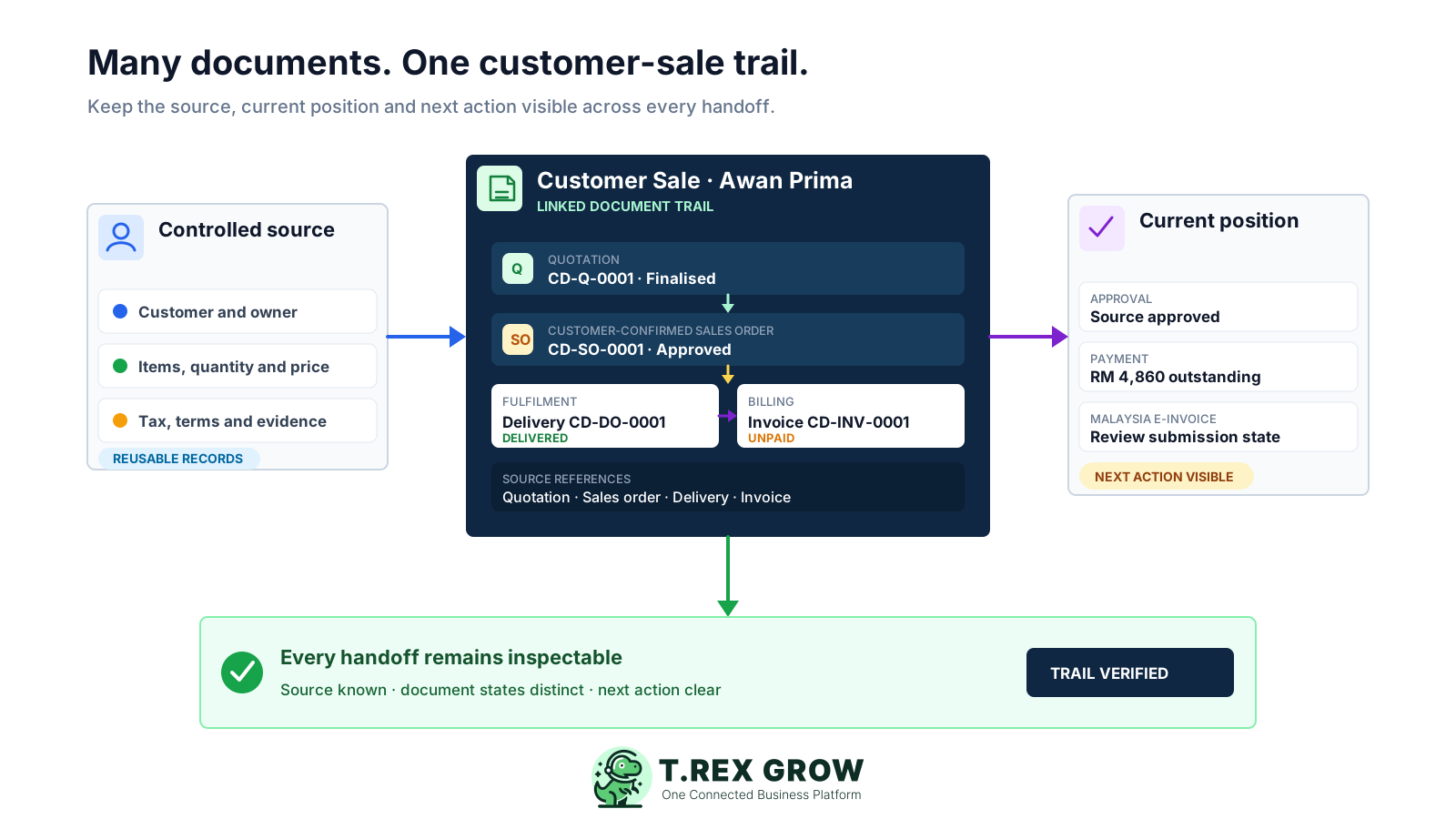
Each customer document has its own job, but the team should still be able to explain where it came from and what happened next. The problem begins when that relationship depends on filenames, inboxes and staff memory.
Operational pressure
When records live in different places, the person responsible has to reconstruct what happened before they can make a confident decision or follow up.
An invoice or delivery record may exist, but staff cannot quickly identify the quotation, customer purchase order or sales order that supports it.
Customer details, items, quantities, prices, tax and payment terms are copied into each new record, creating several versions of the same transaction.
A finalised quotation describes an internal document state; it does not by itself prove that the customer accepted the offer or placed an order.
Operations sees delivery work while finance sees an invoice. Without visible source references, both teams can be looking at the same sale and still reach different conclusions.
Credit, debit and refund notes, payment rows and receipts are stored separately, making the current customer balance harder to explain.
Incomplete invoice data and unclear document ownership create avoidable investigation when the business reaches submission, validation or exception handling.
A spreadsheet can list documents, and a shared drive can store them, but neither naturally enforces source lineage, approval, revision, fulfilment status or payment evidence across the whole transaction.
Recurring issues usually point to workflow-control gaps, not one isolated data-entry mistake.
FINAL, FINAL2 and REVISED do not show which record was approved, what changed or whether downstream documents already exist.
When the business needs a sales order but continues directly from an internally finalised quotation, fulfilment may start without a clear customer purchase-order or confirmation reference.
Re-entering source details into a sales order, delivery order, pro-forma invoice or invoice introduces differences after the commercial context has already been reviewed.
Quotation finalisation, sales-order completion, delivery, invoice due timing and payment position are different events and should remain distinguishable.
Silent edits can break the trail that supports delivery and billing. Revisions and adjustments should preserve the earlier source when workflow rules allow them.
Expanded sales documents can depend on the current plan, and Malaysia e-Invoice still requires accurate data, responsible users and confirmation of current HASiL guidance.
A useful system does more than generate documents. It lets staff see the source record, apply the right control at each stage and continue into the next supported document without hiding normal business review.
Customer, contact, product, service, unit, price, tax and payment-term context should begin from controlled records rather than copied document text.
Quotations, sales orders, pro-forma invoices, delivery orders and invoices should retain the upstream relationship that explains each new record.
The system should distinguish drafts from official PDFs, respect permission-aware approval and preserve numbered revisions where the workflow permits a change.
Each module should retain its own operational position, such as draft, pending approval, finalised, completed, delivered, unpaid or paid.
Delivery records, recipient or attachment context, invoice due timing, adjustment notes and payment rows should remain close to the customer transaction.
Test the modules and e-Invoice path that apply to the business, then confirm current plan access and official requirements before rollout.
Run one realistic customer transaction through the product before moving active documents.
| Requirement | Evidence to test | Operational value |
|---|---|---|
| Controlled source data | Create a quotation from an existing customer and approved products or services. | Reduces repeated entry and inconsistent master data. |
| Customer-confirmed commitment | Create a sales order from a quotation or direct customer purchase-order context and retain its source. | Separates an offer from the confirmed order used for fulfilment. |
| Downstream continuation | Create a delivery order, pro-forma invoice or invoice from a supported source and inspect the carried reference. | Keeps the handoff traceable while allowing a business review. |
| Exception control | Test a revision, linked adjustment, partial payment or document that cannot be changed after dependencies exist. | Shows whether normal exceptions remain understandable. |
| Daily visibility | Find quotation follow-up, delivery work, invoice status, reminders and payment evidence without another tracker. | Makes ownership and the next action easier to see. |
TREX Grow supports a connected sales-document path while allowing different SMEs to use only the stages they need. Every conversion or continuation still requires staff to confirm the source, current values and next business action.
Record the current facts in one shared place.
Confirm what is known and what needs attention.
Make the next decision or follow-up accountable.
Complete the next task and record the outcome.
Refresh the shared view when facts change.
A dependable workflow keeps the shared record and the next action aligned.
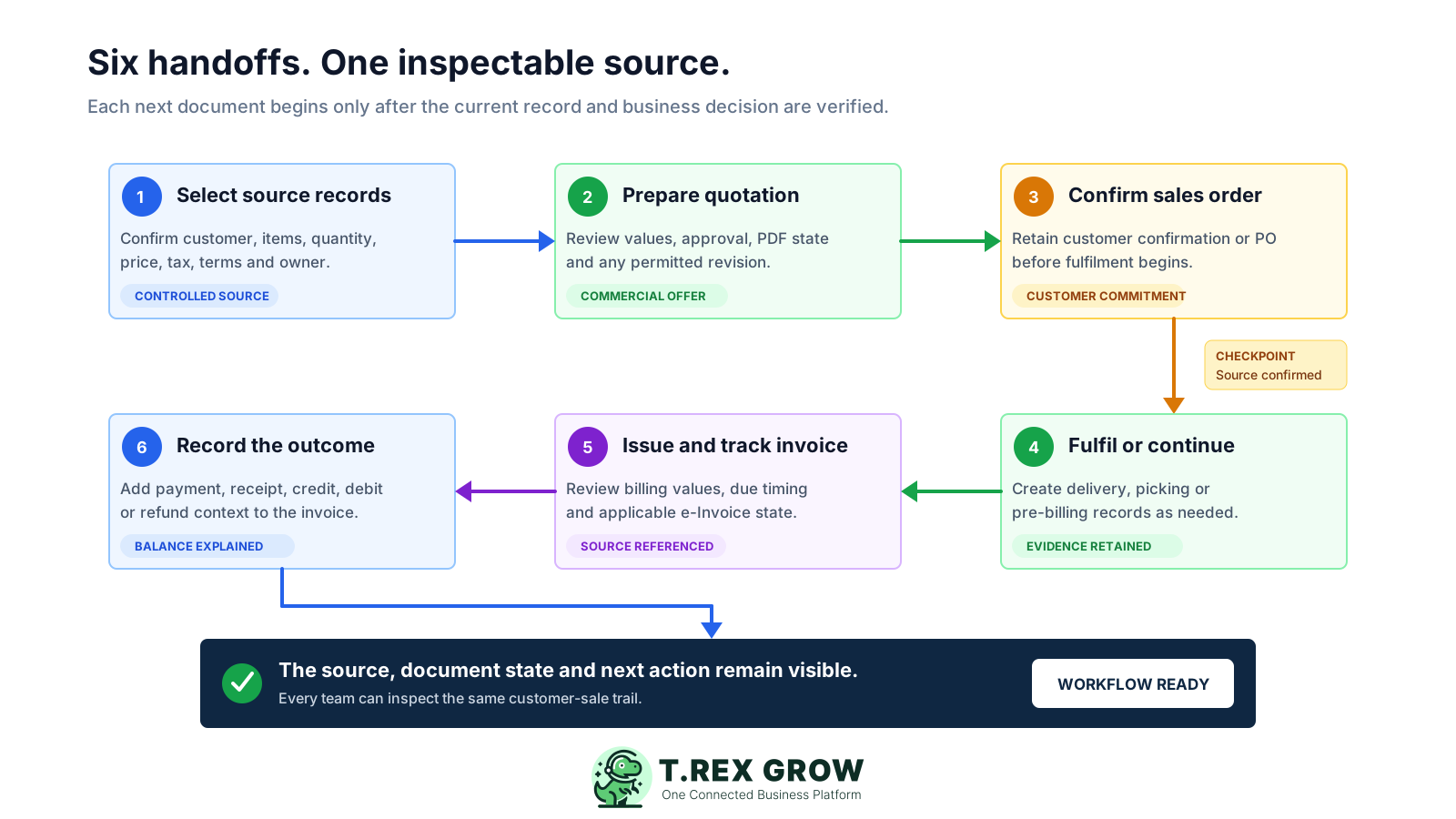
Select controlled records: confirm the customer, contact, products or services, quantities, price, tax, payment terms, sales owner and relevant job or purchase-order context.
Prepare the quotation: review commercial values, use the configured approval path, generate the official PDF and preserve a numbered revision if the offer legitimately changes.
Confirm the customer commitment: where the business uses sales orders, create one from quotation, pro-forma or direct customer purchase-order context. A finalised quotation alone is not customer acceptance.
Continue into fulfilment or pre-billing: create a supported delivery order, picking activity or pro-forma invoice, then verify remaining quantity, stock and recipient or attachment context where applicable.
Create and review the invoice: carry the supported source reference forward, verify every billing value, finalise the invoice and handle the applicable Malaysia e-Invoice submission or exception state.
Complete the financial trail: record individual payments, generate an official receipt where available, and keep credit, debit or refund notes linked to the invoice position they change.
TREX Grow links the business objects around a customer transaction instead of flattening them into one status. Staff can see where the current record began, which control applies and which downstream documents already depend on it.
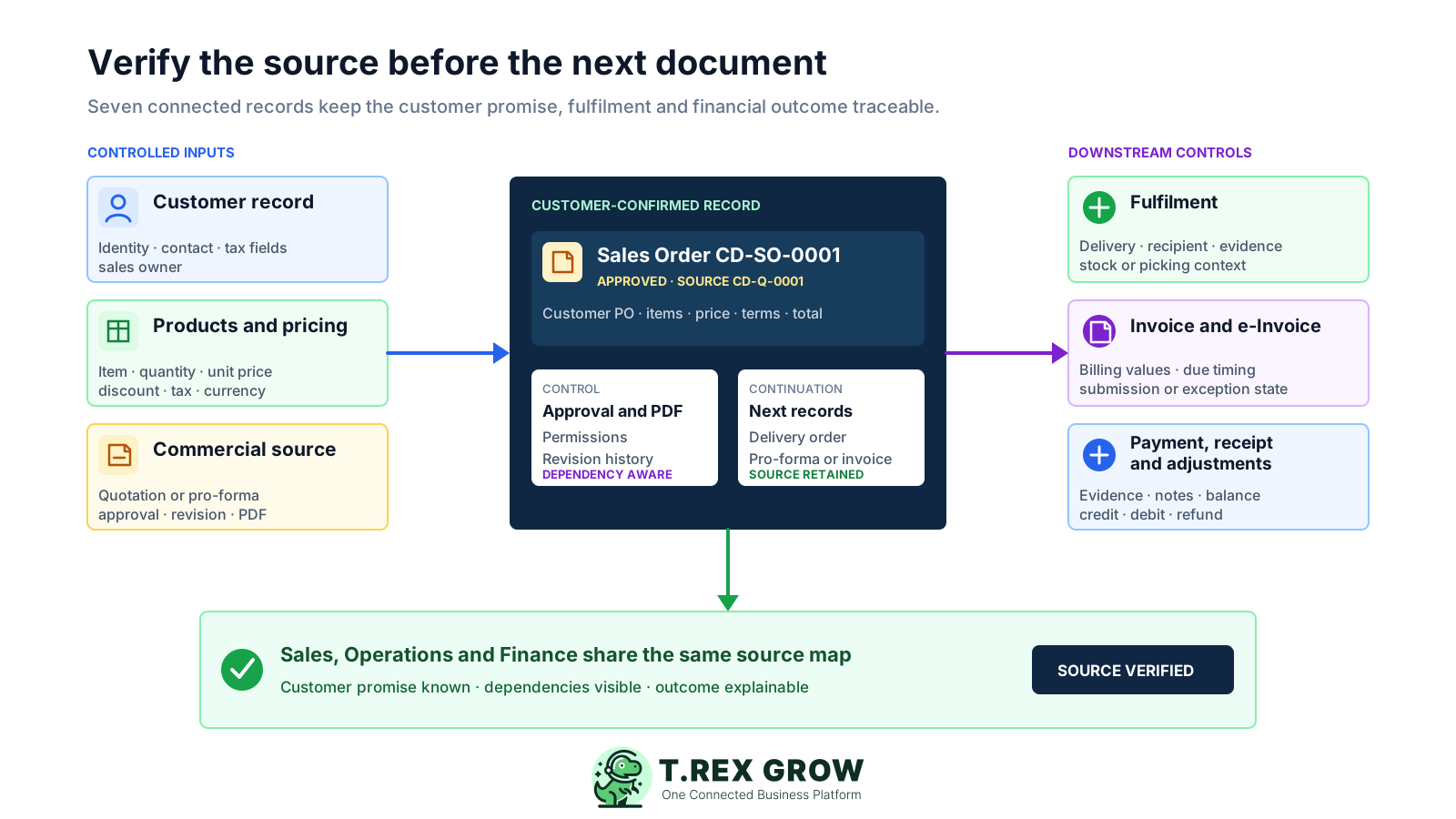
Begin documents from reusable customer, contact, product or service, quantity, price, tax and payment-term context.
Retain commercial values, validity, approval, PDF state, revisions and downstream references without treating internal finalisation as customer acceptance.
Create a sales order from a quotation, pro-forma invoice or direct customer context, attach purchase-order evidence and retain its own approval, PDF and revision trail.
Continue supported sales-order or quotation context into delivery records and keep delivery, recipient, stock or attachment evidence distinguishable from billing.
Create an invoice from customer, quotation, sales order, pro-forma invoice or delivery-order context and retain the relevant upstream reference.
Keep credit, debit and refund notes, individual payment rows and official receipts connected to the invoice position they explain.
Use cross-module search, document-linked reminders, owners and permission-aware actions to keep daily follow-up attached to the real record.
The TREX Grow quotation list shows the quotation number, validity, internal status, customer, sales-order, delivery-order and invoice columns, total and creator. This safe demo screen shows how the source and its downstream references can stay visible in one workspace.
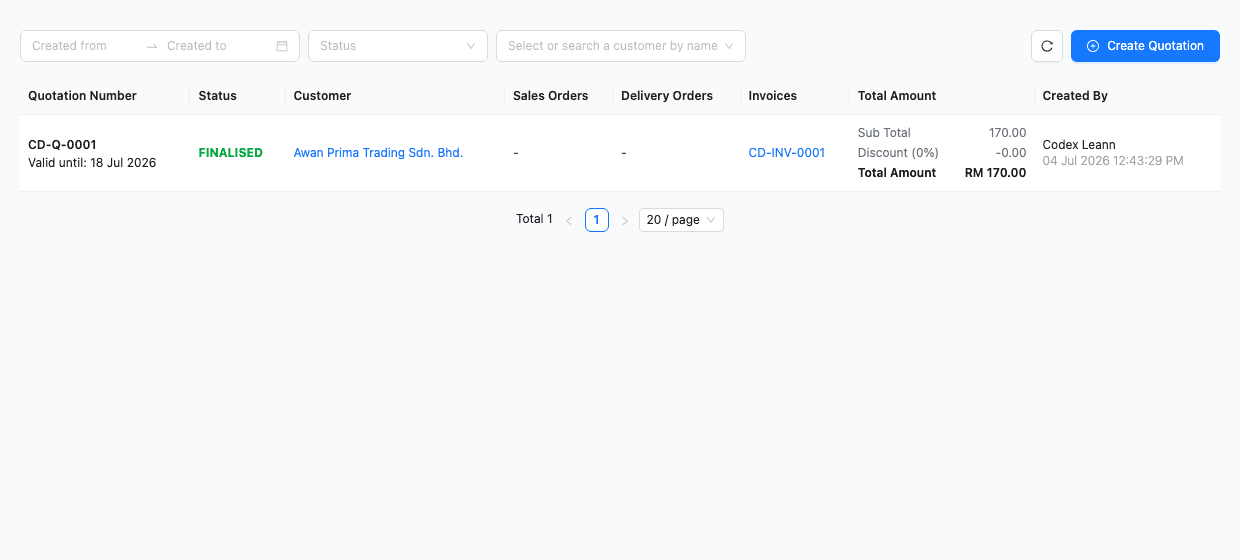
Search or filter the quotation workspace instead of comparing exported files and email attachments.
Read quotation validity and internal workflow status without assuming that it describes the customer response or downstream document.
Sales-order, delivery-order and invoice columns keep later document references close to the quotation source.
Customer, amount, creator and created date help the team verify the commercial record being used.
The TREX Grow invoice detail keeps quotation and sales-order reference fields close to the customer, items, totals, due timing, invoice state, paid status and payment history. Staff can review the billing position without losing the documents that preceded it.
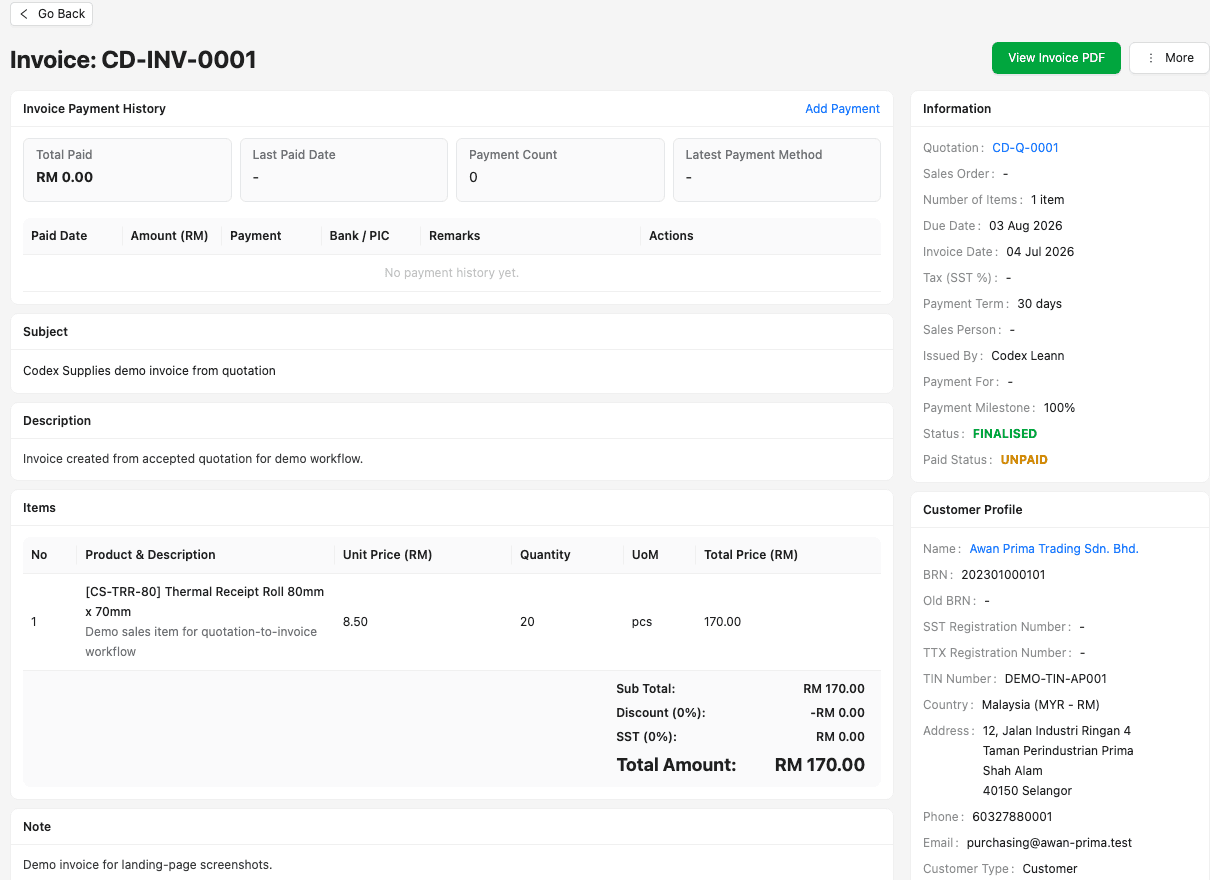
Quotation and sales-order fields help staff identify the record used to begin the invoice.
Customer and source-item context can be carried forward, but the final quantities, prices, discounts, tax and terms still require review.
Finalisation, due timing and paid status describe the invoice and do not overwrite the state of the quotation, order or delivery.
Individual payment rows can retain amount, date, method, reference, bank or person-in-charge context, remarks and attachments.
The TREX Grow operations dashboard brings unpaid invoices, today's delivery work, quotation follow-up and reminders into one daily view. It does not replace the underlying documents; it helps the team see which records need attention next.
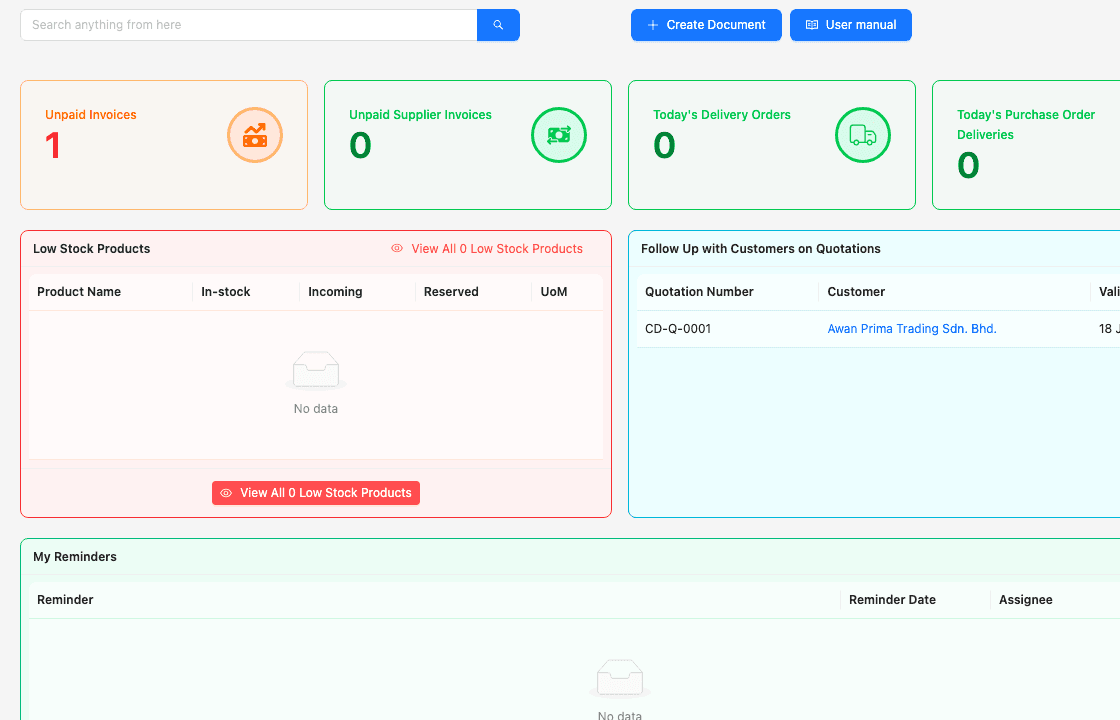
An unpaid-invoice card gives finance a direct starting point for collection work.
Today's delivery-order context helps operations find the records that require fulfilment action.
Quotation follow-up remains visible without inventing a customer-response state inside the document itself.
Document-linked reminders help users retain an assignee and date for the next operational action.
Begin with one representative customer sale, define the source and handoff rules, then test the exceptions before moving active records. The system should make the agreed workflow easier to operate and audit.
Resolve duplicate customers, outdated contacts, inconsistent item names, old prices, unclear tax treatment and unsupported payment terms before creating new documents.
Decide when a quotation becomes a sales order, when a pro-forma invoice is appropriate, what evidence starts fulfilment and which source should support the invoice.
Set responsibility for source data, pricing, approval, customer confirmation, fulfilment, invoice review, e-Invoice handling, payment updates and adjustments.
Train staff that an official quotation PDF is not proof of acceptance; use the approved customer communication and order-control process before fulfilment.
Conversion reduces re-entry but does not remove the need to verify quantities, price, discount, tax, currency, due date, payment terms, remaining fulfilment and customer instructions.
The Free plan covers core customer, quotation, invoice and Malaysia e-Invoice workflows; broader sales documents depend on current paid-plan access. Verify the latest pricing and official HASiL guidance before rollout.
The best practice is to make the next action clear before the situation becomes urgent.
Use the TREX Grow trial to build a quotation, confirm the customer commitment, continue into the supported fulfilment or invoice path, inspect every source reference and verify how payment, receipt, adjustment and e-Invoice context remains connected.
Sales document management software connects the records around a customer transaction, such as customer and product data, quotations, sales orders, pro-forma invoices, delivery orders, invoices, adjustments, payments and receipts. A useful system preserves source references, document-specific status, ownership and the next action instead of storing unrelated PDFs.