Customer context starts in another file
The customer name, contact, address, salesperson and job context are repeatedly copied instead of selected from one reusable record.

TREX Grow helps Malaysian SMEs build quotations from controlled customer and product records, review prices and terms, generate draft or final PDFs, preserve revisions, and keep the next sales document linked to the original commercial promise.
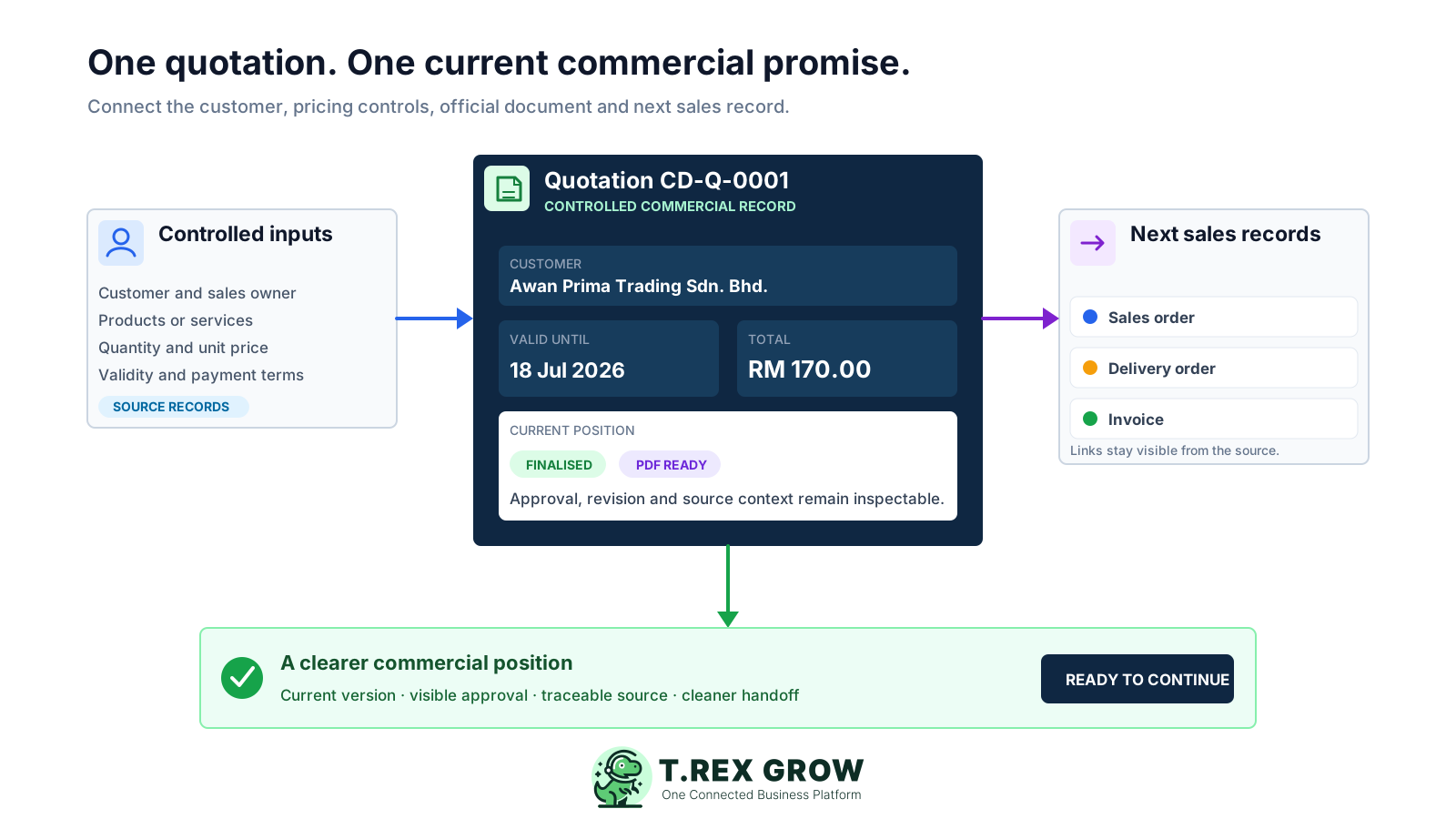
The quotation records what the business is offering, to whom, at which price, under which terms, and for how long. A polished PDF is useful, but the team also needs to know which record is current, who reviewed it, what changed, and what happened next.
Operational pressure
When records live in different places, the person responsible has to reconstruct what happened before they can make a confident decision or follow up.
The customer name, contact, address, salesperson and job context are repeatedly copied instead of selected from one reusable record.
Items, quantities, unit prices, discounts, tax, validity and payment terms can be edited without a clear review point or retained earlier version.
When every exported PDF looks similar, staff may send an unreviewed draft or refer to a file that is no longer current.
A manager may approve the price informally, but the system of record does not show whether approval was required, requested or completed.
Overwriting the original or renaming a file removes the trace between the first offer and the revised commercial position.
An invoice, sales order or delivery record may be created later without a dependable quotation reference, causing another round of re-entry and checking.
A template can produce an attractive document at low volume. It becomes fragile when several people quote, prices change, approval matters, or the accepted work must continue into fulfilment and billing.
Recurring issues usually point to workflow-control gaps, not one isolated data-entry mistake.
Copying an old file can retain the wrong customer, item, price, tax treatment, validity date, note or payment term.
FINAL, FINAL2 and LATEST do not prove which quotation is current or preserve a dependable relationship to the previous revision.
The total can look correct while quantities, unit prices, discounts, tax, terms or validity still contain a commercial error.
Without a visible document state, an internal working version can leave the business before review or approval is complete.
The system should not imply customer acceptance automatically; the team needs a deliberate next record and its source link when work proceeds.
Retyping customer and line-item data into a sales order, delivery order or invoice introduces avoidable differences after terms have already been agreed.
Use one realistic quotation during evaluation. Include a price change, an approval requirement, a revision and a downstream document so you can see whether the software controls both normal work and common exceptions.
Users should select an existing customer and approved products or services instead of reconstructing the same information in each document.
Quantities, unit prices, discounts, tax, subject, description, notes, validity and payment terms should remain inspectable in the quotation record.
A draft should remain clearly distinguishable from the official PDF created after finalisation or approval.
The system should respect who can create, edit, request approval, approve, view and manage quotation records.
Commercial changes should create a traceable revision while preserving the earlier quotation instead of silently replacing it.
Later sales orders, delivery orders and invoices should remain visible from the quotation context where the product workflow supports them.
Test the workflow with actual operating conditions before moving active quotations.
| Requirement | Evidence to test | Operational value |
|---|---|---|
| Customer and item source | Select an existing customer and approved products or services, then review populated information. | Reduces re-entry and inconsistent master data. |
| Pricing and totals | Change quantities, unit prices, discount and tax, then confirm calculated totals. | Makes the commercial offer easier to review. |
| Approval and PDF state | Generate a draft, request approval where configured, and compare the final PDF state. | Separates internal work from the official quotation. |
| Revision control | Create a revised quotation and inspect its number and previous-record relationship. | Preserves what changed without overwriting history. |
| Downstream continuity | Create the next supported sales document and confirm the quotation reference and carried context. | Reduces rebuilding after the customer decides to proceed. |
TREX Grow keeps the quotation journey in a visible sequence. The business still decides how and when to send the document, records the customer's commercial response, and confirms that the next document matches the agreed work.
Record the current facts in one shared place.
Confirm what is known and what needs attention.
Make the next decision or follow-up accountable.
Complete the next task and record the outcome.
Refresh the shared view when facts change.
A dependable workflow keeps the shared record and the next action aligned.
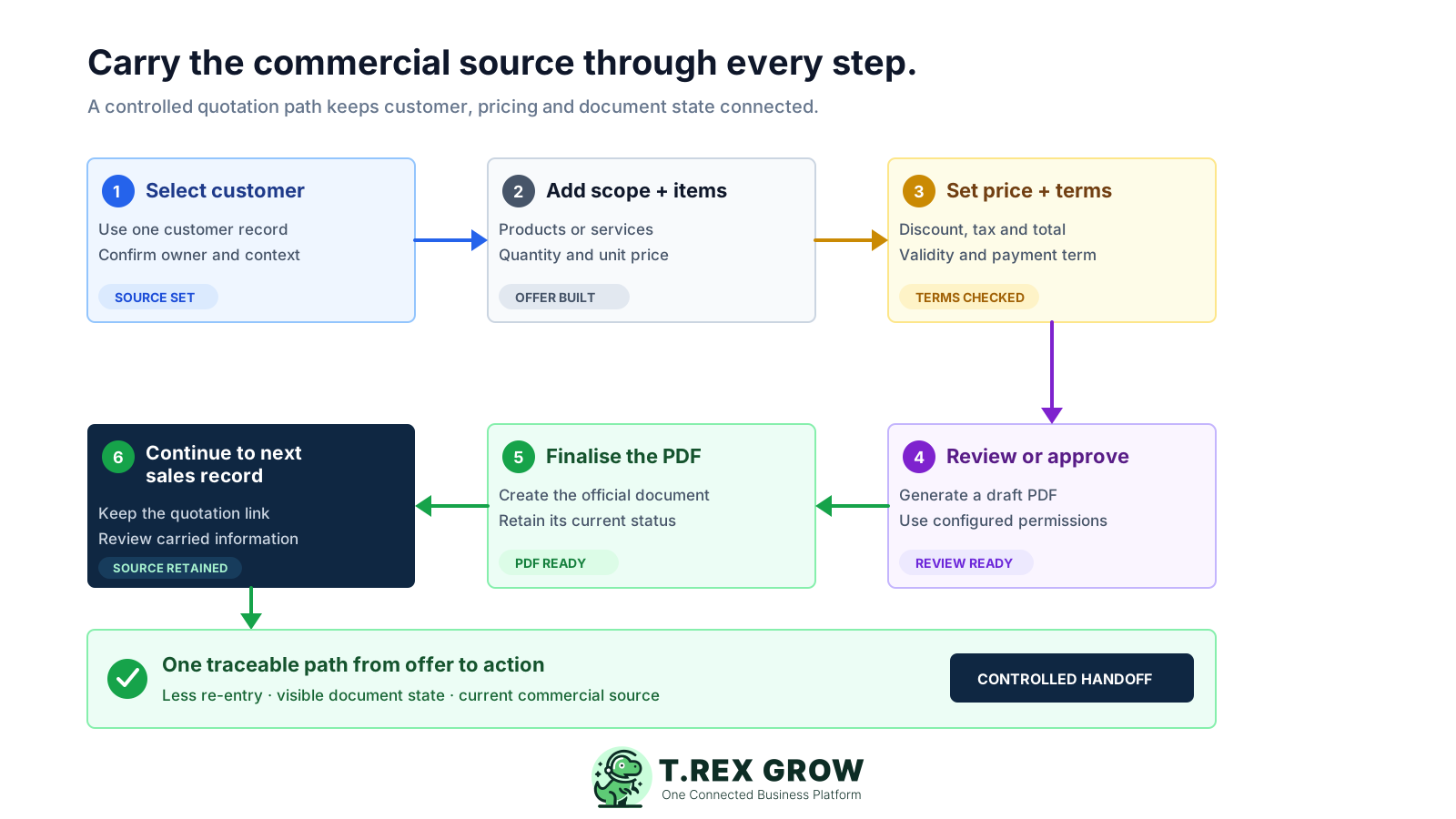
Select the controlled customer record: confirm the customer identity, contact, address, responsible salesperson, and the opportunity or job context used by the business.
Build the quotation: add approved products or services, quantities, editable unit prices, subject, description, and notes relevant to the offer.
Set the commercial terms: confirm discount, tax treatment, payment terms, validity date, document currency where available, and the calculated total.
Review or approve: generate a watermarked draft PDF for internal checking, then use the configured permission and approval path before the quotation becomes official.
Finalise the quotation: TREX Grow generates the final PDF after direct finalisation or approval. The business shares it through its chosen customer communication channel.
Continue from the current record: when the customer proceeds, create the supported sales order, delivery order or invoice path and retain the quotation link instead of rebuilding the sale from memory.
The quotation record sits between customer intent and the next sales action. TREX Grow keeps source data, commercial controls, document state and downstream references close enough for the team to understand the current position.
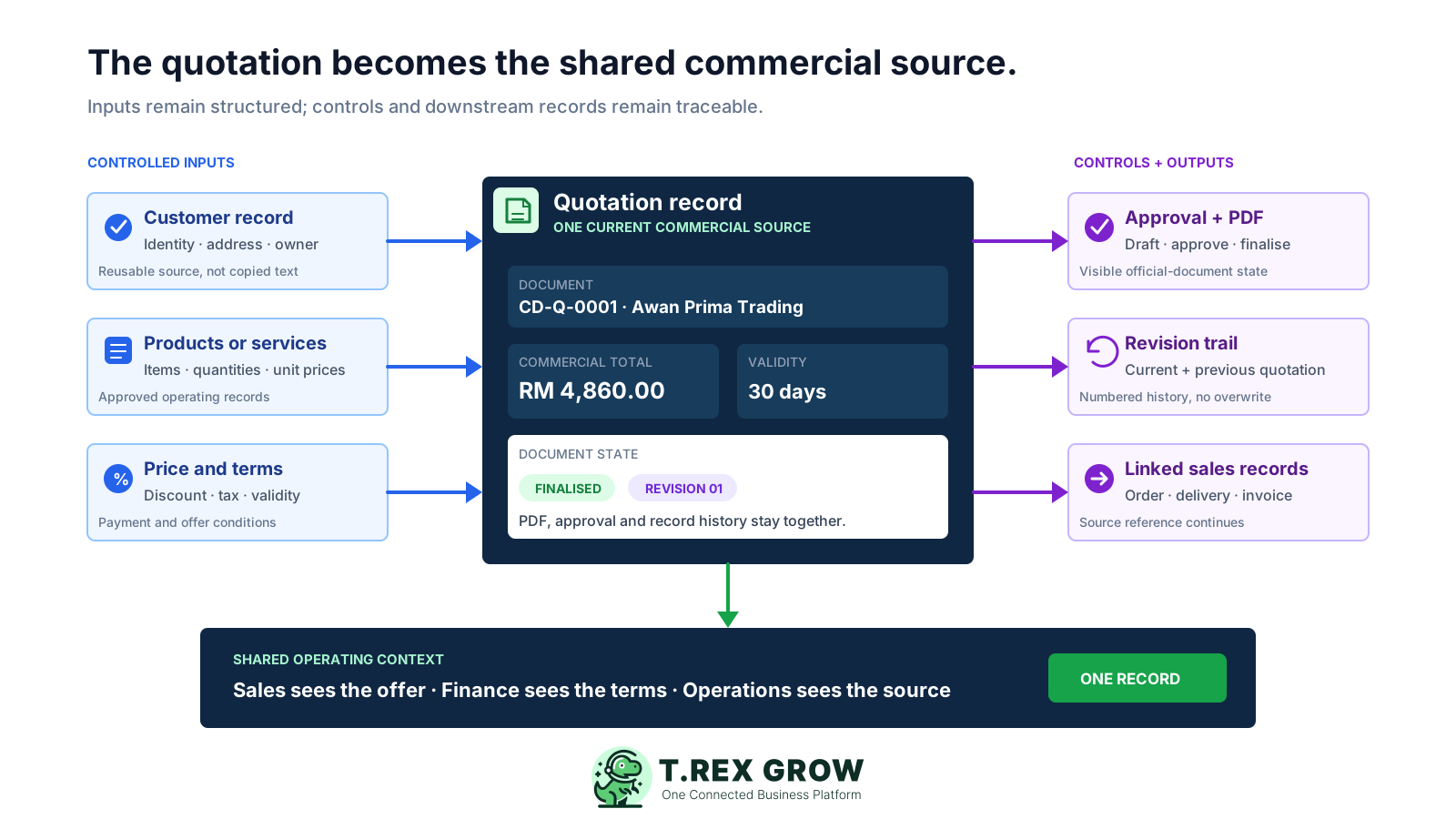
Create the quotation from an existing customer and retain salesperson, issuer and creator context for the operating record.
Keep products or services, quantities, editable unit prices, discount, tax, subtotal and grand total in one calculable record.
Retain the offer's validity date, payment term, subject, description and document notes alongside its pricing.
Generate a watermarked draft for internal review and a final PDF after the quotation is finalised or approved.
Use the configured create, edit, request-approval, approve and view permissions to control who can move the quotation forward.
Create a new numbered revision, preserve the earlier quotation as archived history, and prevent silent overwrites after commercial changes.
Keep associated sales orders, delivery orders and invoices visible from the quotation list and detail context, subject to current plan access and workflow rules.
The quotation list brings date, status and customer filters together with the current quotation number, validity, customer, linked downstream documents, amount and creator. This product image uses safe demo records and shows the operating context available before opening the quotation.
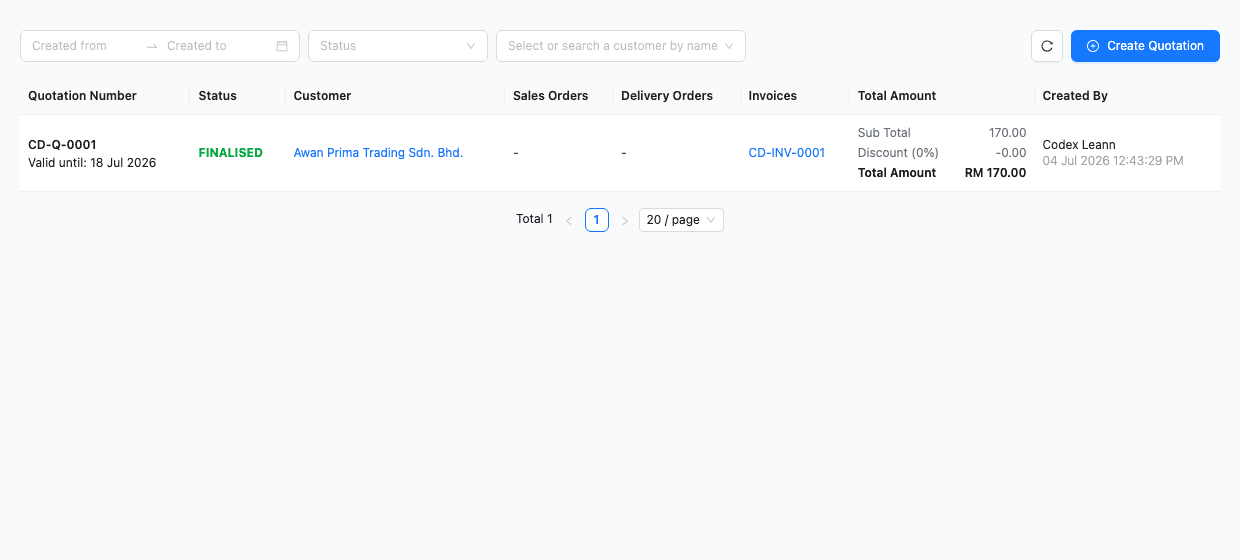
Search quotations and filter by created date, workflow status or customer instead of navigating a folder of exported files.
See the quotation number, current workflow state and valid-until date before deciding which record needs attention.
Associated sales orders, delivery orders and invoices appear in the quotation context rather than becoming disconnected lists.
Review customer, subtotal, discount, tax, total amount, creator and created date from the shared workspace.
When the business creates an invoice from a quotation, TREX Grow can retain the quotation reference with the customer, document status and amount. The team should still review every carried value against the customer's confirmed scope before issuing the invoice.
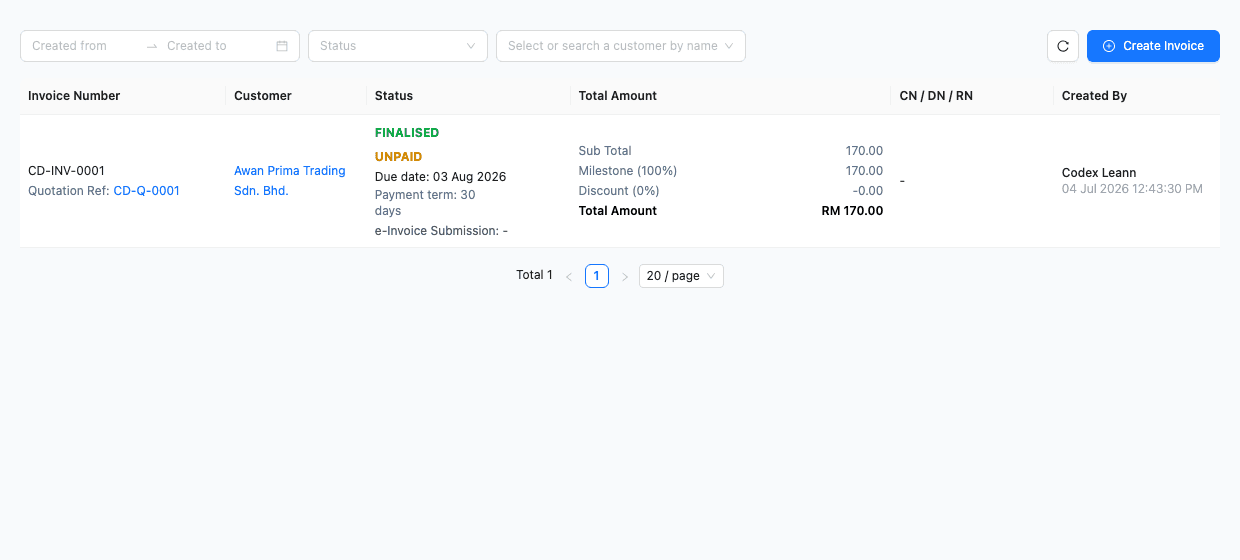
The invoice list can show its quotation reference, helping staff trace where the customer and commercial context originated.
The quotation may be finalised while the downstream invoice has its own finalisation, due and payment position.
Carried data reduces re-entry but does not remove the need to verify final quantities, prices, tax, milestones, due dates and customer instructions.
A quotation is a commercial offer, not the Malaysia e-Invoice submission itself. Confirm the current HASiL requirements that apply when the later invoice is issued.
Start with one representative quotation path, assign ownership and define what counts as current. Move active work only after the team has tested pricing, approval, revision and the next document.
Resolve duplicate customers, outdated contacts, inconsistent item names, old prices and unclear tax treatment before creating new quotations.
Set permissions and operational responsibility for customer data, pricing, discounts, approval, revisions, document sharing and downstream creation.
Review quotation numbering, description, note, currency, tax, payment-term and validity conventions rather than carrying spreadsheet habits into the new system.
Confirm that staff understand the draft watermark, finalisation path, approval requirement and revision relationship before sending customer-facing documents.
Do not treat a finalised quotation as proof of customer acceptance. Continue only after the business has confirmed the response through its approved communication and control process.
Start with the quotation workflow you need, then confirm current plan access for sales orders, delivery, inventory, attachments, multi-currency and broader operations.
The best practice is to make the next action clear before the situation becomes urgent.
TREX Grow is designed for SMEs that want quotations connected to real customer, sales and operations records. It is strongest when the business needs more control than a document template but still wants a practical starting point.
Shared customer, pricing, permission and status context helps the team avoid competing files and private approval trails.
Revision history matters when scope, quantity, price, discount, tax or terms are negotiated over more than one round.
Trading, distribution, service and project SMEs benefit when an agreed quotation can remain linked to sales, delivery or invoice records.
Permission-aware review is useful when staff can prepare an offer but a manager must approve it before it becomes official.
TREX Grow's current Free plan includes core customer and quotation workflows. Review the latest pricing page before rollout because plan entitlements can change.
TREX Grow controls quotation records and connected workflows; it does not guarantee customer acceptance, automatically send every follow-up, provide business-specific tax advice, or include every downstream feature on every plan.
Create a TREX Grow workspace, add a customer and product, build a realistic quotation, review the draft PDF, test approval or revision, and confirm how the record continues into your next sales action.
Quotation software helps a business create, review, issue, revise and trace customer quotations. A useful system goes beyond a PDF template by connecting the customer, products or services, quantities, prices, discounts, tax, terms, validity, approval, revisions and later sales records.