The approval is separated from the work
A decision is captured in a message while the quotation, purchase, stock adjustment, expense, form submission or project item stays unchanged.

The best approval workflow software is the one that keeps the right request, reviewer, decision and operating outcome together. Compare six credible options, then prove the fit with the same controlled workflow in every shortlisted product.

This guide is for an SME replacing approvals scattered across chat, email and spreadsheets or reviewing a tool that no longer fits. It is most useful when the shortlist mixes fundamentally different products.
Operational pressure
When records live in different places, the person responsible has to reconstruct what happened before they can make a confident decision or follow up.
A decision is captured in a message while the quotation, purchase, stock adjustment, expense, form submission or project item stays unchanged.
Record-native software, form builders, work boards, low-code automation and process platforms may all appear under the same approval-workflow search.
The team has not decided whether it needs one authorised checkpoint, conditional assignment, several stages, parallel review, delegation or escalation.
A total or screenshot reaches the approver without the live source, attachments, previous decision, current version or downstream consequence.
Returned requests, changed amounts, absent approvers and duplicate submissions reveal gaps that the normal demonstration did not cover.
Management needs a defensible recommendation based on a repeatable workflow, total cost, implementation capacity and a clear product boundary.
Start with the decision the business must control. A useful product should fit the source, authority, routing and outcome of that decision without creating more maintenance than the SME can own.
Identify whether approval begins on an operational record, submitted form, board item, Microsoft object, custom app record or process card.
Check required fields, attachments, version visibility, duplicate prevention and the information available before submission.
Verify who may create, view, edit, submit, approve, reject, reassign and administer the workflow, including self-approval rules.
Match direct, sequential, conditional, parallel, group or threshold routing to the real policy rather than a future wish list.
Time how quickly an approver can understand the request, inspect evidence, comment and make a decision on desktop and mobile.
Test missing information, changed values, rejection, return for correction, an unavailable approver, expiry and resubmission where required.
Confirm what the decision actually changes: an official record, task status, connected application, payment gate or process stage.
Inspect decision history, timestamps, comments, exports, administration, retention and the effort needed to maintain the workflow.
Use the same representative request, people and exception so the results remain comparable.
| Evaluation area | Test evidence | A practical result |
|---|---|---|
| Source | Create the request from the real business object or a faithful test record. | The reviewer can identify the current source and version. |
| Authority | Use separate requester, approver and administrator accounts. | Available actions match the intended responsibility. |
| Routing | Run the normal path and one required condition or second stage. | The right person receives the request without manual redirection. |
| Exception | Change one material field, return or reject the request, then resubmit. | The corrected position stays understandable and attributable. |
| Outcome | Inspect the source record and downstream work after the decision. | Approval controls the intended next state without duplicate entry. |
| Evidence | Retrieve the decision, comments, time, actor and export after the test. | The team can reproduce why the outcome was allowed. |
A simple approve button can make very different products look equivalent. The differences appear when the source changes, the normal reviewer is absent or the decision must move work forward.
Recurring issues usually point to workflow-control gaps, not one isolated data-entry mistake.
A visual flow does not prove how identity, live data, permissions, failed automations or downstream records behave in production.
Forms are useful for intake, but an SME may need the approval to remain on an existing invoice, purchase order, stock record or other operating object.
Every condition, branch, escalation and exception adds testing, administration and change-management work that someone must own.
A normal approval hides returned information, edited values, duplicate requests, unavailable reviewers and failed integrations.
Users, forms, submissions, boards, automation actions, connectors, environments, implementation and support can change the real annual cost.
Visible status and decision details can be useful, but governance depends on identity, edit controls, retention, export and wider business evidence.
This is an editorial fit comparison, not a paid ranking. TREX Grow has no sponsorship, endorsement, affiliation or partnership with Jotform, monday.com, Microsoft, Zoho or Pipefy. Product and pricing claims were checked against official sources on 5 September 2026; verify current details before purchase.
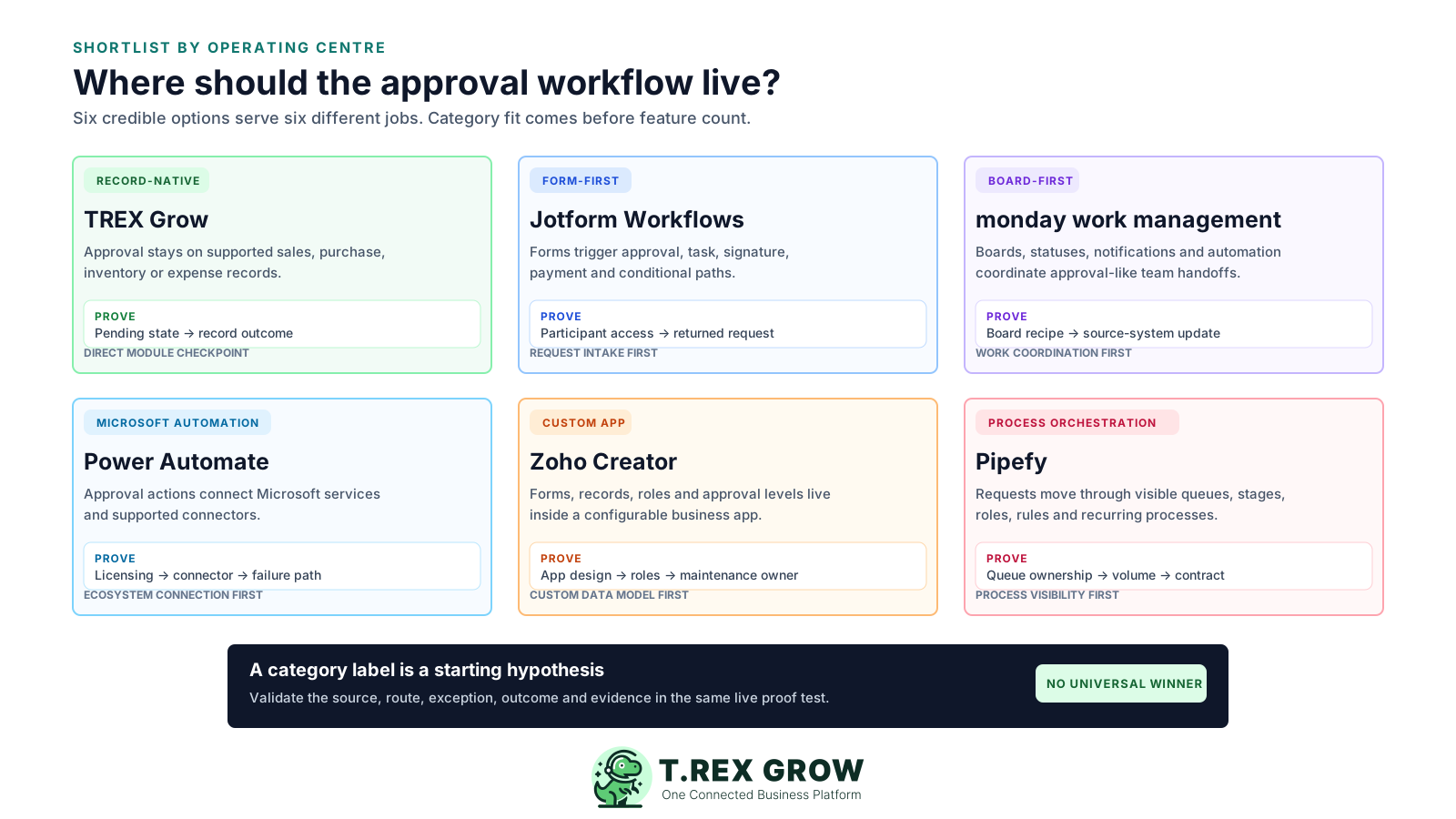
Published starting points and practical checks, reviewed 5 September 2026. Prices exclude any unlisted tax, add-on, connector, implementation, support or currency-conversion cost.
| Option | Best-fit job | Published starting point | Approval evidence to verify |
|---|---|---|---|
| TREX Grow | Document-led SMEs wanting a direct approval checkpoint on supported sales, purchasing, inventory and expense records. | Free RM0; Starter RM120/year; Essential RM240/year; Premium RM380/year. Current plans list unlimited users, while underlying modules remain plan-dependent. | Confirm the exact record, None/Request/Approve responsibility, Pending Approval state, notification, approver context and operating effect. Do not assume amount thresholds, conditional routing or multiple stages. |
| Jotform Workflows | Teams wanting form-first intake, internal or external reviewers, conditional branches, tasks, signatures or payment requests. | Starter is free with unlimited workflows, 5 forms, 100 monthly submissions, one individual user and Jotform branding. Bronze is listed at US$34/month billed annually. | Test the required approver method, comments, returned information, group or dynamic approval, submission limits, participant access, branding, data handling and reporting. |
| monday work management | Teams already managing work on boards and wanting statuses, notifications and automations to coordinate approval-like handoffs. | Free is listed for up to 2 seats. Paid plans start at US$9 per seat/month billed annually, and the pricing FAQ states paid plans start from 3 users. | Build the exact board, permissions and automation recipe. Confirm plan-specific workflow and automation allowances, reviewer actions, edit history, guests and what updates the source system. |
| Microsoft Power Automate | Microsoft 365 organisations wanting approval actions connected to services such as Lists, Outlook, Teams and other supported connectors. | The Approvals connector is documented as a standard connector. Power Automate Premium is listed at US$15/user/month paid yearly; eligible Office 365 or Dynamics 365 rights may cover standard connectors. | Confirm creator and responder licensing, connectors, environment and Dataverse setup, tenant administration, approval type, failure handling and the system that remains authoritative. |
| Zoho Creator | Teams prepared to build a custom application with forms, records, permissions, actions and one or multiple approval levels. | A free edition for one custom app and a 15-day Professional trial are listed. Paid editions use per-user pricing, and the comparison page lists built-in approvals. | Prototype the app, roles, approver levels, record locking, criteria, actions, portal users, notifications, data limits, developer ownership and export before estimating rollout. |
| Pipefy | Teams wanting a visible request queue and configurable process stages across recurring internal workflows. | Starter is free for up to 5 processes and 10 users, with 50 cards and 15 automation jobs per month. Business and Enterprise require a sales quote. | Confirm process privacy, requester and guest experience, role-based access, conditional logic, automation volume, integrations, API limits, activity evidence, support and the quoted contract. |
The best practice is to make the next action clear before the situation becomes urgent.
Use one real but safely copied request, two separate users and one exception. Retain the same evidence for every product instead of relying on vendor-specific demonstrations.
Record the current facts in one shared place.
Confirm what is known and what needs attention.
Make the next decision or follow-up accountable.
Complete the next task and record the outcome.
Refresh the shared view when facts change.
A dependable workflow keeps the shared record and the next action aligned.
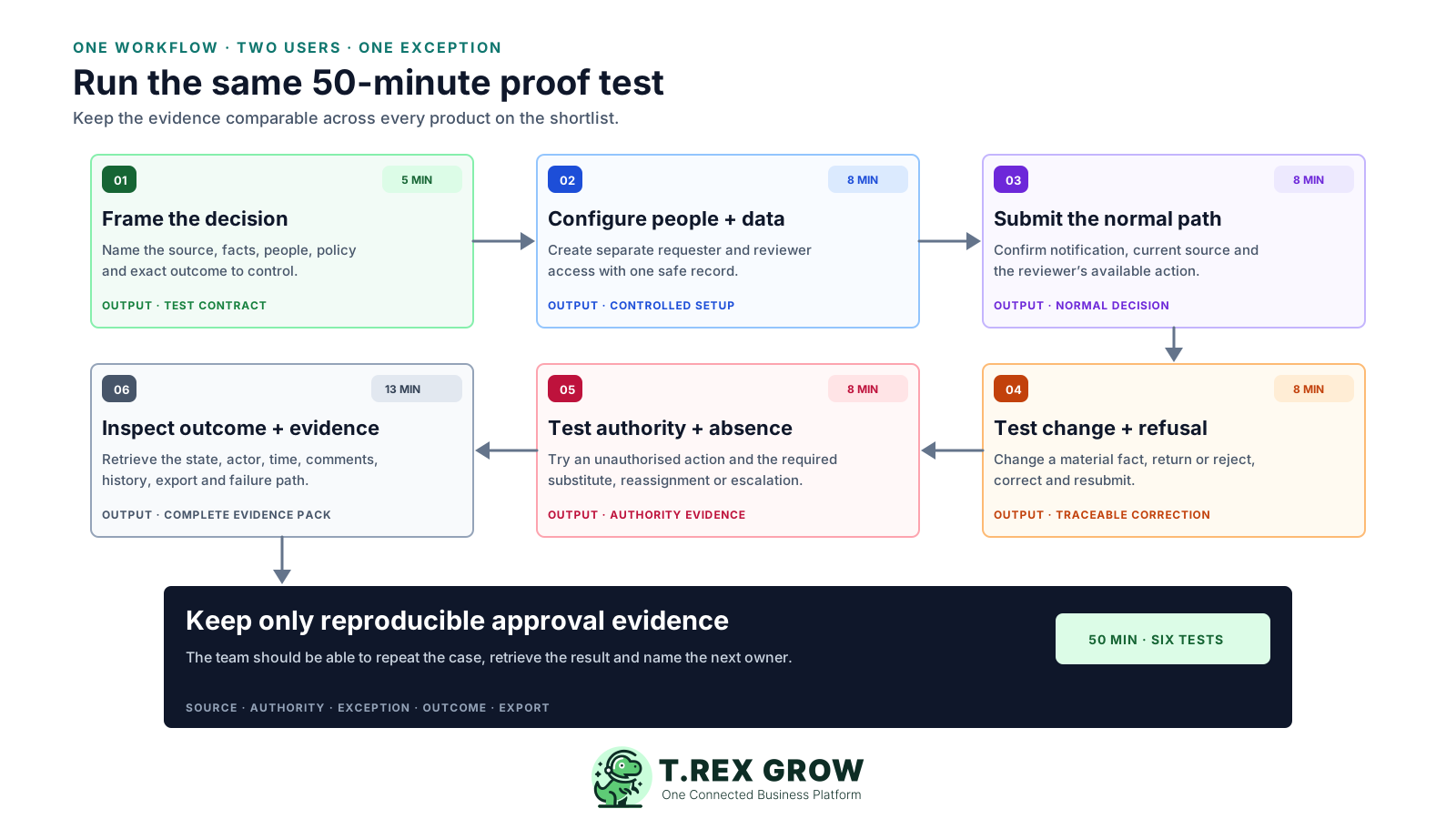
1. Frame the decision in 5 minutes: name the source record, material facts, requester, reviewer, policy and exact outcome approval should control.
2. Configure people and data in 8 minutes: create separate requester and approver access, required fields, attachments and one safe representative record.
3. Submit the normal path in 8 minutes: request approval, confirm the reviewer notification and inspect whether the live source and current version are clear.
4. Test change and refusal in 8 minutes: alter one material fact, reject or return the request, correct it and resubmit without losing the earlier context.
5. Test authority and absence in 8 minutes: try an unauthorised action and the required substitute, reassignment or escalation route if the policy needs one.
6. Inspect outcome and evidence in 13 minutes: verify the next operating state, actor, time, comments, history, export and any failed integration or duplicate-entry risk.
TREX Grow fits document-led SMEs that want a direct approval checkpoint attached to supported operating records. Company membership and module permissions separate access from None, Request and Approve responsibility; the exact state, notification and downstream effect remain module-specific.
Confirm the exact module in a trial because supported records do not all have identical states or outcomes.
| Buyer need | TREX Grow fit to verify | Boundary to keep visible |
|---|---|---|
| Separate preparation from authorisation | Company membership, module access and None/Request/Approve responsibility. | This is a direct module path, not a general rules engine. |
| Keep approval on the live record | Pending status, current record details and supported approver context. | The state, notification and effect vary by module. |
| Control the operating outcome | Official document, usable product, applied stock effect or expense progression where supported. | Approval does not by itself authorise or execute a bank payment. |
| Roll out across an SME | Unlimited users on current plans and plan-based module access. | Confirm the required plan and test separate user accounts. |
The decision stays on the supported quotation, invoice, purchase order, product, stock entry, inventory adjustment or expense instead of a separate generic request.
None allows intentional direct finalisation, Request sends supported work for review, and Approve gives an authorised user the relevant module decision.
Supported requested records use Pending Approval so the team can identify unfinished work on the operating record.
Supported records can retain visible approver identity and approval time, providing practical context without being presented as a complete immutable audit system.
Users and permissions are available across current plans; the sales, purchasing, inventory, expense and inventory-count modules follow their own plan availability.
The verified product does not claim amount or budget thresholds, conditional or parallel routing, multiple approval levels, delegation, SLA timers or automated escalations.
A useful approval handoff should show the reviewer the current operating facts and keep the record visibly pending. This TREX Grow inventory-adjustment example shows the product, location, quantity, reason, creator and remarks on the live record before approval.
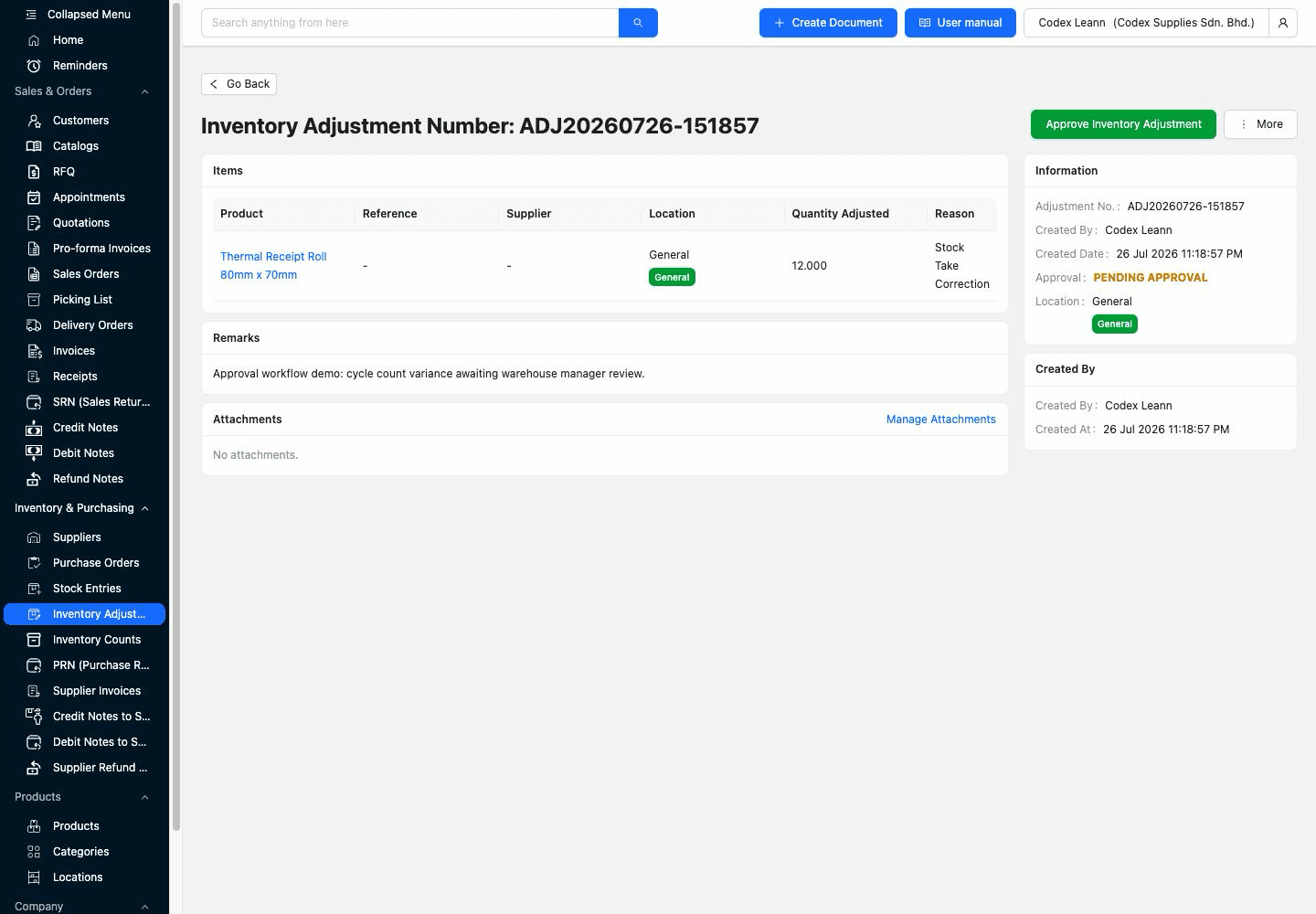
Pending Approval appears on the record rather than being inferred from an email or private message.
The adjustment details and internal remarks stay beside the approval action, reducing the need to reconcile a separate copy.
Use the same check on the quotation, invoice, purchase, product, stock or expense workflow the business intends to deploy.
After the decision, inspect the same record again. The corresponding TREX Grow example shows Approved status, the approver identity and approval time on the live inventory adjustment; buyers should also confirm the resulting stock history and permissions in their own trial.
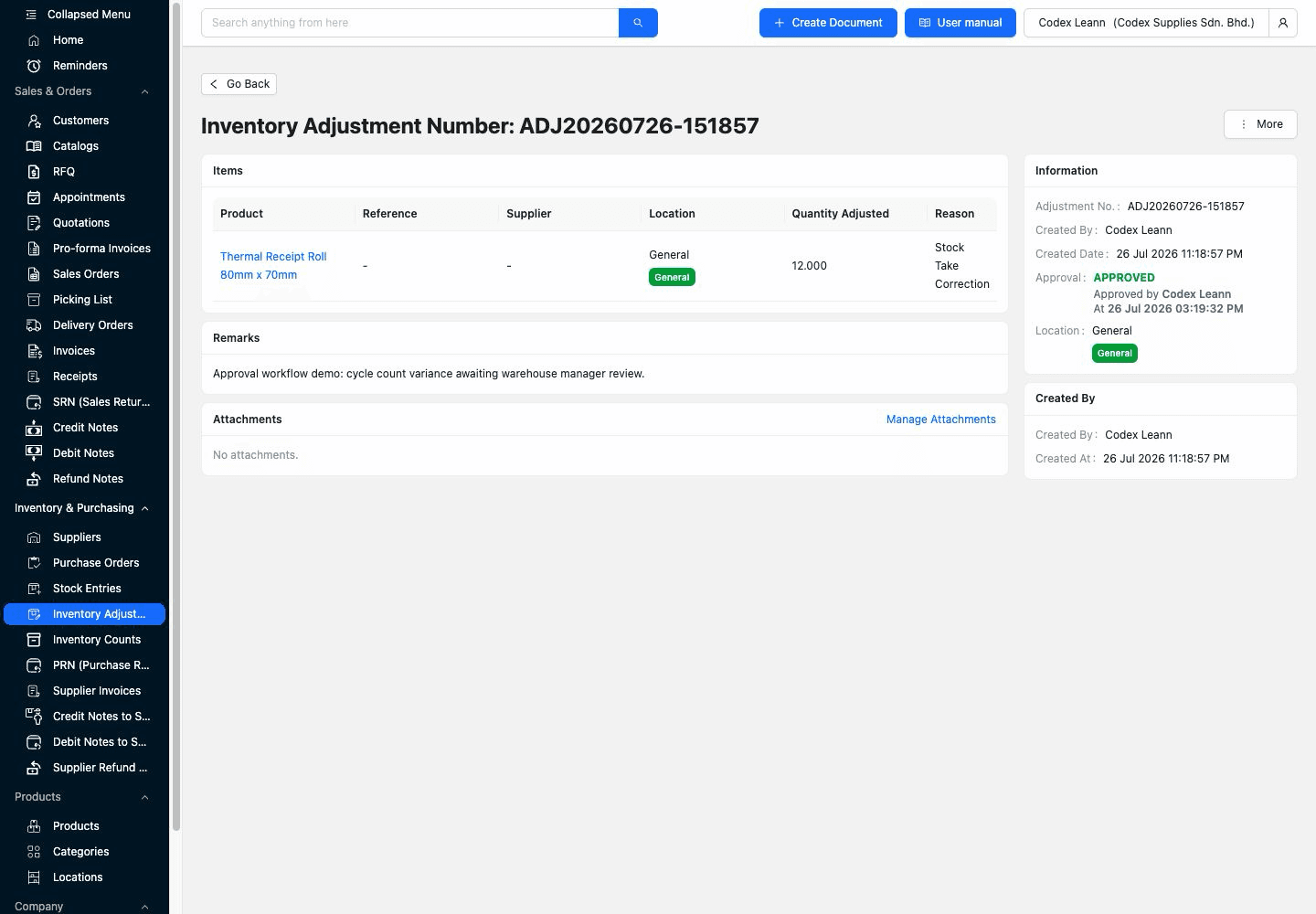
The same adjustment record moves from waiting to approved without creating a separate approval-only copy.
Approver identity and time help the team explain who acted and when, within the verified limits of the product.
Confirm the stock movement, official document, usable record or next workflow step that approval is meant to control.
Normalise every quote to the people, workflow volume, connected systems and support needed for the first year. A low entry price can remain excellent value, but only when its limits match live use.
Record whether the charge is per user, seat, organisation, bot, form, submission, process, card, automation action or negotiated contract.
Count creators, occasional approvers, administrators, guests, portal users and external participants under the vendor's actual licensing rules.
Include forms, submissions, boards, processes, records, automation runs, connector calls, storage and peaks rather than average volume alone.
Estimate process mapping, permissions, templates, conditions, integrations, exception tests and acceptance work before launch.
Price the internal administrator, vendor support, consultant or developer needed to maintain routes when people and policy change.
Include importing open requests, preserving past decisions, exporting attachments and history, cancelling service and moving to another system.
Approval software handles business decisions and often sensitive supporting data. Review the operating controls around the product before management accepts the shortlist.
Confirm sign-in, separate accounts, role changes, offboarding, administrator access and the treatment of external approvers.
Test what happens when a material field or attachment changes before, during or after approval and whether another decision is required.
Verify delivery, reminders if required, unavailable reviewers, failed automations, retries and who notices a stalled request.
Review current vendor documentation for access, encryption, backup, recovery, retention, incidents and the controls relevant to company policy.
Export requests, decisions, timestamps, comments, attachments and configuration in a form the business can retain and understand.
Assign an owner and date to recheck pricing, limits, integrations, permissions and workflow rules before renewal or a major process change.
The best practice is to make the next action clear before the situation becomes urgent.
Choose one supported quotation, invoice, purchase order, product, inventory or expense workflow. Use separate requester and reviewer accounts, test the pending state and decision outcome, and compare the evidence with the rest of your shortlist.
There is no universal winner. TREX Grow suits direct approvals attached to supported operating records; Jotform Workflows suits form-first intake; monday work management suits board-based coordination; Power Automate suits Microsoft-connected automation; Zoho Creator suits custom apps; and Pipefy suits visible process queues. Prove the fit with one real workflow and exception.