The decision is separated from the record
A message thread may approve one version while the quotation, invoice, purchase order or stock record continues to change elsewhere.

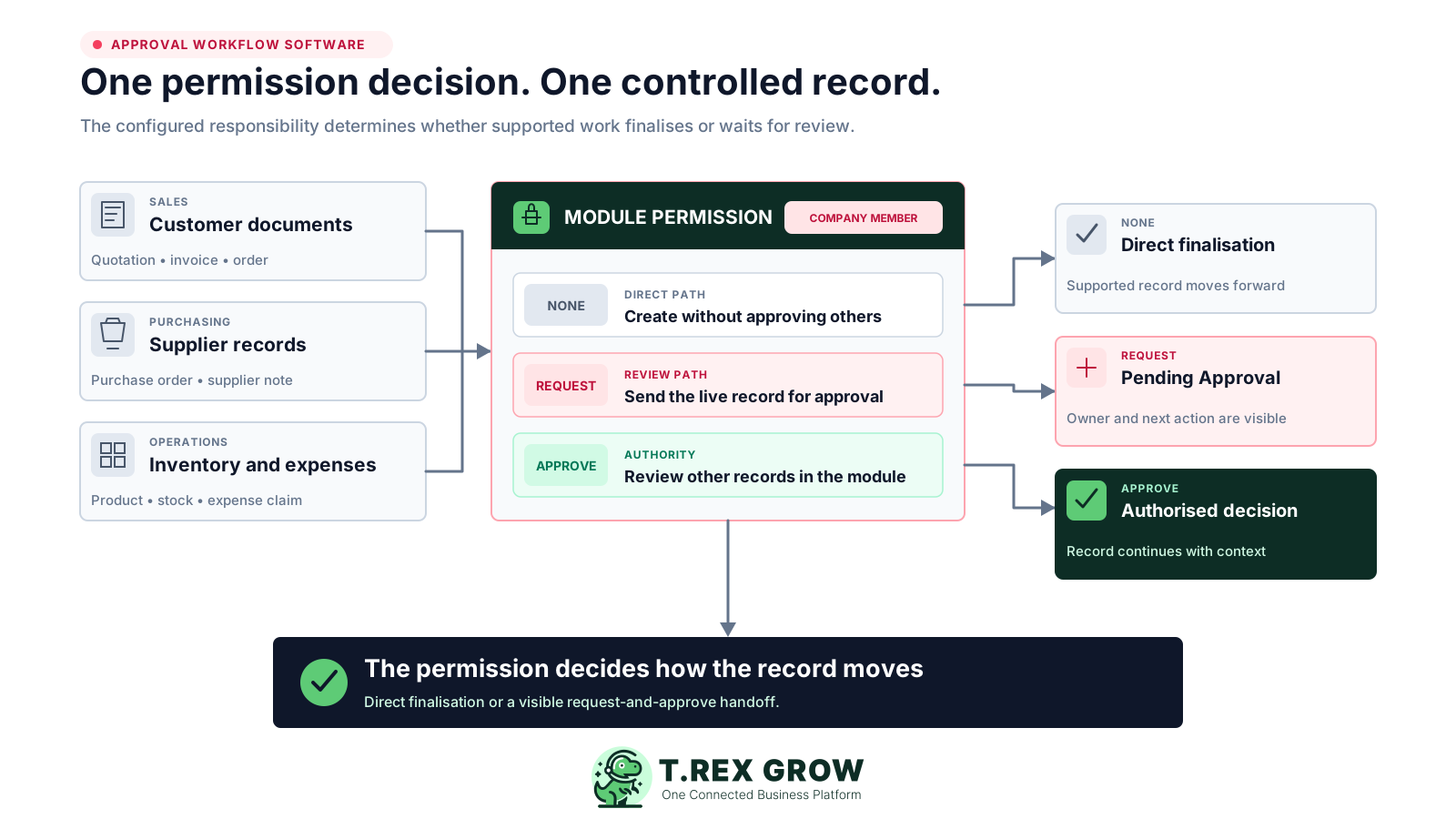
TREX Grow gives supported sales, purchasing, inventory and expense records a direct permission-based path. A user can finalise directly, request approval or approve for others according to the module setup, so status, reviewer and the next operational step stay connected.
An informal yes may feel fast, but it does not necessarily change the document, protect the next action or show the rest of the team what was decided. The operational record and the approval can drift apart within minutes.
Operational pressure
When records live in different places, the person responsible has to reconstruct what happened before they can make a confident decision or follow up.
A message thread may approve one version while the quotation, invoice, purchase order or stock record continues to change elsewhere.
The requester assumes the manager is reviewing; the manager assumes finance has already acted; the record remains unfinished.
Screenshots and copied totals omit the customer, supplier, products, dates, terms, attachments or remarks behind the decision.
The approval must still be copied back into the system before a PDF, stock effect, payment step or downstream document can proceed.
Manual tools can discuss a decision, but they do not consistently enforce who may prepare, review or continue a supported business record.
A chat group cannot reliably limit who may create an invoice, edit a stock entry or approve a purchase order inside the operating system.
Exported sheets and forwarded attachments become separate versions that must be reconciled with the source record.
When several people use the same account, the system cannot clearly distinguish the person preparing the record from the person authorising it.
Even after someone replies Approved, another person must find the record, update its state and restart the downstream workflow.
An SME does not need the most complicated approval engine. It needs a clear answer to six operating questions for every supported record.
View, Create, Edit and Delete access should be set at the relevant company membership and module.
The permission design should deliberately choose between a Request path and direct finalisation through None.
Approve access should be assigned only to the people expected to review records in that module.
Pending Approval should be visible on the operating record rather than inferred from a separate message.
The reviewer should inspect the current parties, items, quantities, dates, totals, terms and attachments that matter.
The approved state should connect to the relevant outcome, such as an official document, usable product or applied stock effect.
The best practice is to make the next action clear before the situation becomes urgent.
TREX Grow stores permissions per company membership. Each supported module can separate basic record access from the approval responsibility: None for direct creation without approving others, Request for records that wait for review, and Approve for users authorised to approve other records. The underlying module and plan still determine which workflow is available.
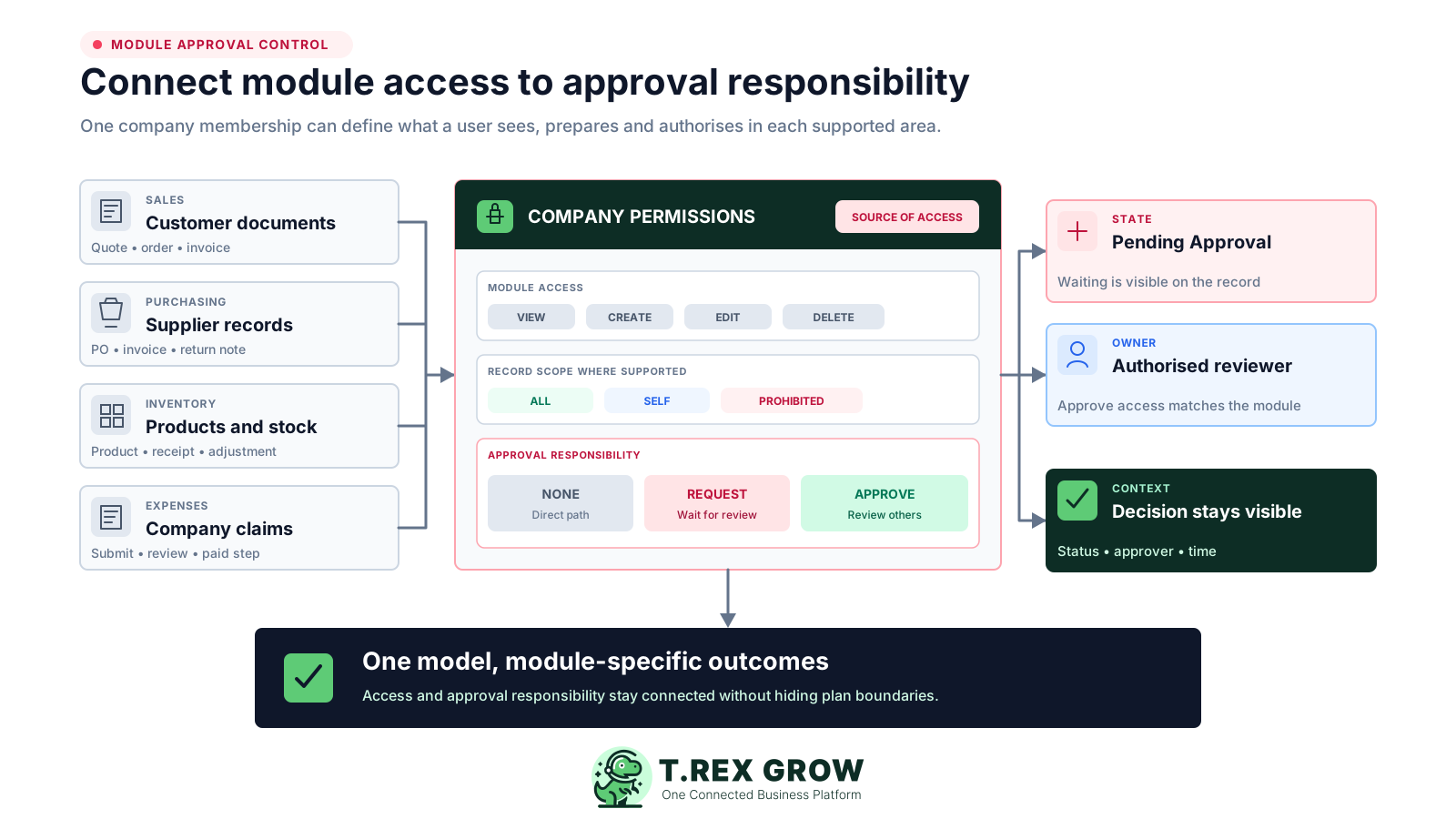
Supported workflows include quotations, invoices, sales orders, delivery orders and adjustment documents, subject to their module access.
Purchase orders and supported supplier-side documents can use their own module approval responsibility when that purchasing module is enabled.
Product creation, stock entries, inventory adjustments and plan-dependent inventory-count work have approval controls tied to the relevant permissions.
Expense requests separate a staff submission from an authorised reviewer, and the verified expense workflow prevents users from approving their own claim.
Start with the business decision, not the software screen. Configure one supported record, prove the handoff and only then repeat the model in another module.
Record the current facts in one shared place.
Confirm what is known and what needs attention.
Make the next decision or follow-up accountable.
Complete the next task and record the outcome.
Refresh the shared view when facts change.
A dependable workflow keeps the shared record and the next action aligned.
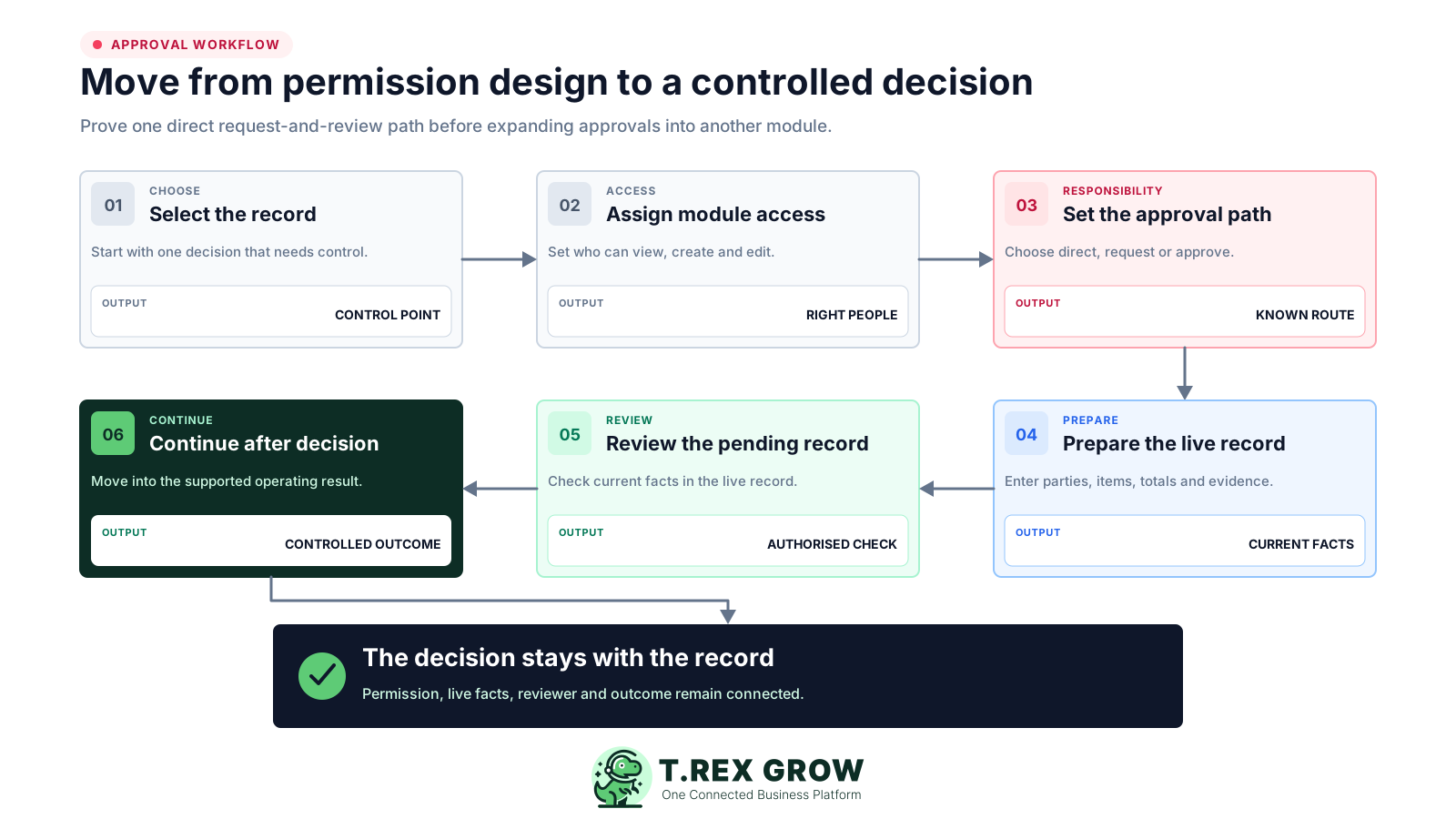
1. Select the controlled record: choose a quotation, invoice, purchase order, product, stock entry, adjustment or expense where a second decision is genuinely useful.
2. Assign module access: decide who may view, create, edit or archive the record and whether access applies to Self or All records where supported.
3. Set approval responsibility: use Request for preparers, Approve for authorised reviewers, or None where direct finalisation is intentional.
4. Prepare the live record: enter the customer or supplier, items, quantities, dates, totals, attachments, remarks and other relevant operating facts.
5. Review the pending record: the authorised person opens the current record, checks the facts and uses the module's supported approval action.
6. Continue with decision context: the approved or directly finalised record moves into its supported outcome while status and approval details remain visible.
The approval value is not the button itself. It is the checkpoint before a supported record becomes official, usable or able to change the next business state.
Quotation and invoice approval can hold the record in Pending Approval before the supported final PDF and downstream workflow proceed.
Purchase-order approval keeps the supplier, products, quantities, prices, dates and terms on the live record before the official PO is generated.
Supported inventory approvals can hold a new product, receipt, adjustment or count result before it becomes usable or changes quantity.
A company expense can be submitted for another authorised user to review before it becomes eligible for the separate paid step.
Approval quality depends on the information available at the point of review. Keep the decision on the current record and make the relevant evidence easy to inspect.
Check the customer or supplier, record creator, assigned users and the module that owns the action.
Review products or services, quantities, unit prices, discounts, taxes, totals and currency where the record uses them.
Confirm document dates, validity or delivery expectations, payment terms and source references before approving.
Use supporting files and internal remarks, then understand whether approval generates a PDF, activates a product, applies stock or unlocks another step.
Not every record needs a second person. In TREX Grow, None is an intentional path for a user who may create without requesting approval but cannot approve records for others. Request and Approve should be used only where the team needs that handoff.
A trusted owner handling low-risk records alone may use direct finalisation where the module supports it.
Use Request when the preparer should not make the final decision for that supported business record.
The approval user should understand the operating facts and have the relevant module permission, not merely a management title.
Update company membership access when staff responsibilities, employment or module ownership changes.
The best practice is to make the next action clear before the situation becomes urgent.
A direct approval workflow should reduce uncertainty for both the requester and reviewer without claiming to replace every governance process.
Supported records show that preparation is complete but the authorised decision has not yet happened.
The user must have Approve responsibility for the relevant module rather than a broad verbal instruction to approve everything.
Approved-by and approval-time details add useful operating context without being described as a complete immutable audit system.
Verified records such as quotations, invoices, purchase orders, products and stock entries notify owners or matching approvers, but notification behavior should be tested per module.
TREX Grow supports practical module-based request and approval paths. Do not design the rollout around enterprise features that have not been verified in the product.
Use the direct permission model for the decision it actually supports.
| TREX Grow verified control | Do not assume |
|---|---|
| Module-specific None, Request and Approve responsibility | Amount, department, budget or cost-centre thresholds |
| Pending Approval followed by an authorised approval action | Conditional, parallel or multi-level routing |
| Review notification for verified supported records | Delegation, escalation, SLA timers or automatic reminders |
| Visible status, approver identity and approval time where supported | A complete immutable audit log or compliance guarantee |
| Direct finalisation where None is configured | Mandatory approval for every user and every record |
Avoid switching on approval everywhere at once. Prove one common decision with actual users, then expand only where the operational value is clear.
Start with a quotation, invoice, purchase order, product or adjustment that already causes repeated review questions.
Write down who creates the record, who checks it and who continues the workflow after the decision.
Validate module access and approval responsibility with the accounts that will actually perform each role.
Check pending status, notification, review context, approval outcome and any generated PDF or inventory effect.
Agree what the team will do when the reviewer needs a correction, because advanced rejection routing is not being claimed.
Reuse the control pattern only after confirming that the next module, plan and operational effect are supported.
The best practice is to make the next action clear before the situation becomes urgent.
Users and permissions are listed across current TREX Grow plans, but the business records being approved are plan-dependent. Quotations, invoices and products are available in the Free plan; broader sales documents and company expenses begin with Starter; purchasing and inventory workflows begin with Essential; advanced inventory-count sessions are Premium. Confirm the current pricing page before rollout.
Approval permission cannot activate a purchase-order or inventory workflow that is not included in the company's selected plan.
Use company membership permissions to give each user only the module access and approval responsibility needed for their role.
Use the 30-day trial for paid modules and verify the real request, notification, review and outcome with representative records.
Choose a representative supported record, configure a requester and approver, and follow it from preparation through Pending Approval to the operational result. TREX Grow's 30-day trial lets an SME test paid sales, purchasing and inventory workflows before choosing a plan.
Approval workflow software connects a business record to the people allowed to prepare and authorise it. In TREX Grow, supported modules can use company membership permissions, a Pending Approval state and a direct authorised decision before the record continues into its operational outcome.