No visible decision boundary
Staff cannot distinguish routine work already covered by their role from an exception that needs another person's authority, so similar events receive different treatment.

An approval workflow should answer five questions before a controlled inventory change takes effect: what triggered review, who requested it, what evidence supports it, who has authority to decide, and where the outcome is recorded. Start with the few decisions that carry the greatest operational risk.
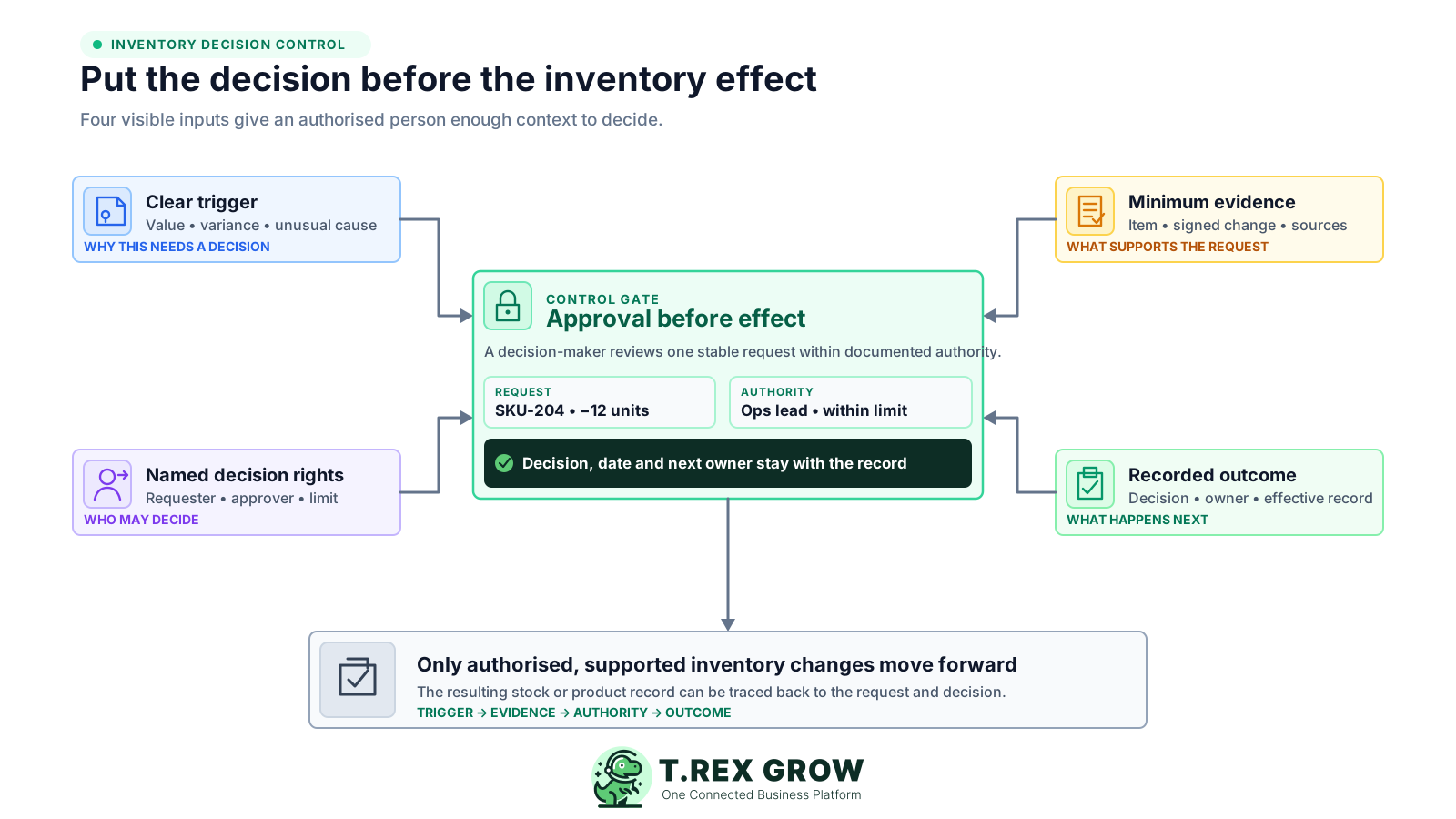
Approving everything overwhelms the decision-maker; approving nothing leaves sensitive changes unchecked. The better starting point is to identify inventory decisions whose value, rarity, direction, cause or operational effect deserves a separate decision before the record changes.
Operational pressure
When records live in different places, the person responsible has to reconstruct what happened before they can make a confident decision or follow up.
Staff cannot distinguish routine work already covered by their role from an exception that needs another person's authority, so similar events receive different treatment.
Every request reaches the owner without a clear trigger or prepared evidence. The queue grows, yet the approver still has to reconstruct the event before deciding.
A quantity, master record, transfer or disposition is changed first and endorsed later. The approval cannot prevent an unsupported effect that has already entered operations.
The spreadsheet, count, photo or message used by the approver is overwritten or separated from the final record, leaving no stable basis for the decision.
Delegation during leave, branch coverage and unusual events are handled case by case because no approved owner, limit or backup is documented.
Repeated adjustments, overrides and delays are treated as isolated requests instead of evidence that a threshold, role, master-data rule or operating process needs review.
These controls answer different questions. Combining them casually can make a workflow look controlled while one person still initiates, validates, authorises and applies the same sensitive change. Widely used internal-control principles separate these responsibilities where practical and keep authority within defined limits.
Access permits a user to create a product, receipt, adjustment, transfer or count record. It does not automatically mean the person may authorise every resulting inventory effect.
A preparer or checker confirms the item, unit, location, signed quantity, source references, reason and supporting evidence before asking someone to decide.
The approver applies the business's criteria and authority limit to the evidence presented. Approval is a decision, not a substitute for preparing the request properly.
Posting, finalising or otherwise applying the effect should follow the approved route. Keep the effective date, system status and responsible user visible.
Periodic review looks across pending time, returned or declined requests, unusual approvals, repeated causes and overrides to improve the rule rather than re-approve each event.
A useful inventory approval rule is short enough to use and precise enough to test. Keep the decision, trigger, roles, evidence, possible outcomes and review method together so staff do not have to assemble the policy from email threads.
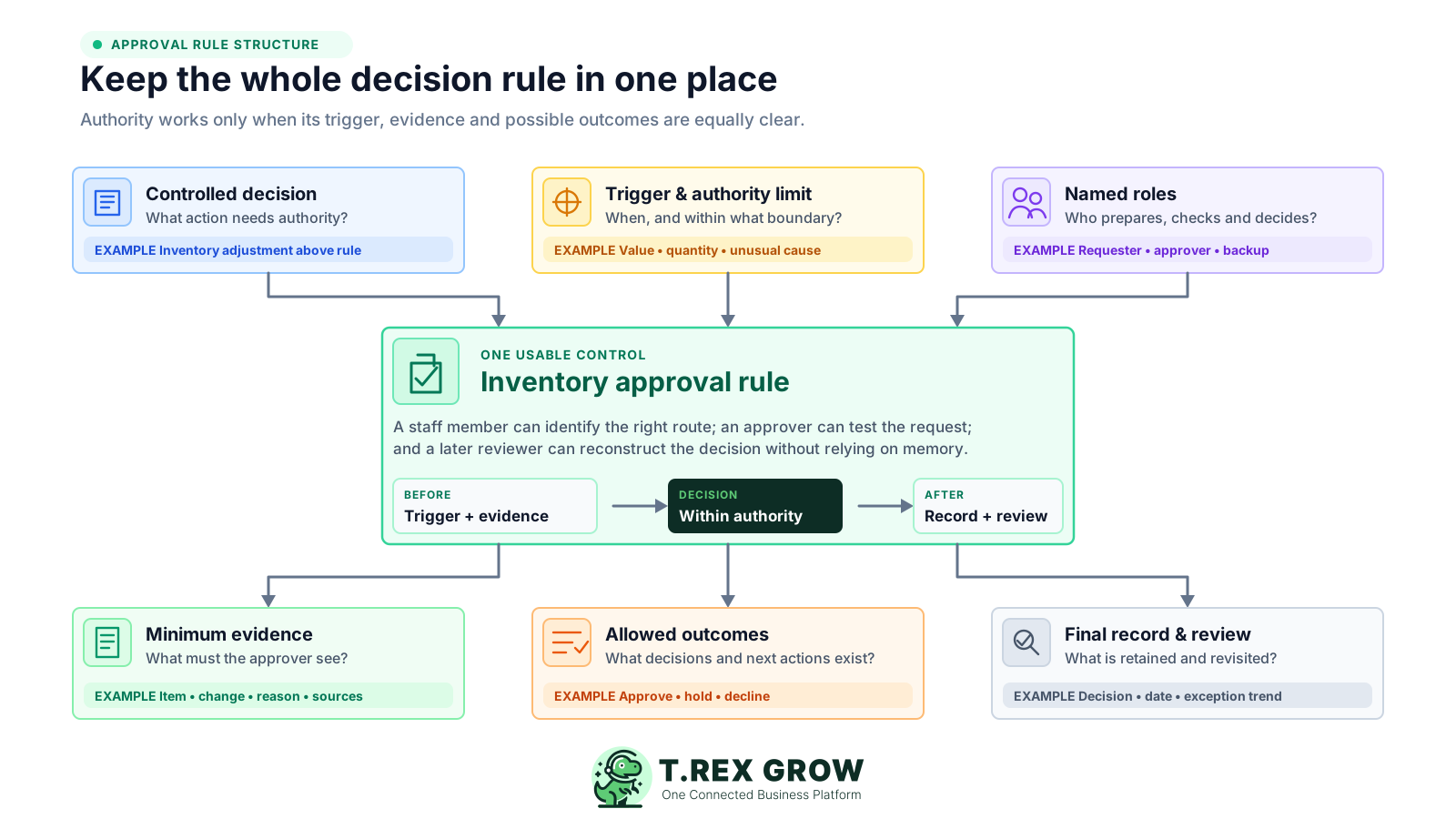
Name the event precisely—for example creating or changing a product record, accepting an unusual receipt variance, posting an inventory adjustment or deciding the disposition of damaged stock.
Define the signal that moves the event into review, such as value, quantity, percentage variance, unusual reason, sensitive item, repeat occurrence, new counterparty or out-of-hours request.
Assign responsibility to roles rather than relying only on names. State who prepares the request, who checks completeness, who decides within the limit and who covers an authorised absence.
List the fields and source records an approver must see: exact item and unit, location, before quantity, signed change, resulting quantity, reason, cut-off, relevant documents and attachments where proportionate.
State whether the approver may authorise, hold or return for clarification, decline, or cancel the request, and who owns the next action for every non-approved outcome.
Keep the request, evidence version, decision, approver, date, effective record and unresolved action connected, then review exception patterns on an agreed cadence.
The same path can govern several inventory decisions even when the trigger and approver differ. The important sequence is that the request becomes complete and reviewable before an authorised person decides and before the controlled effect is applied.
Record the current facts in one shared place.
Confirm what is known and what needs attention.
Make the next decision or follow-up accountable.
Complete the next task and record the outcome.
Refresh the shared view when facts change.
A dependable workflow keeps the shared record and the next action aligned.
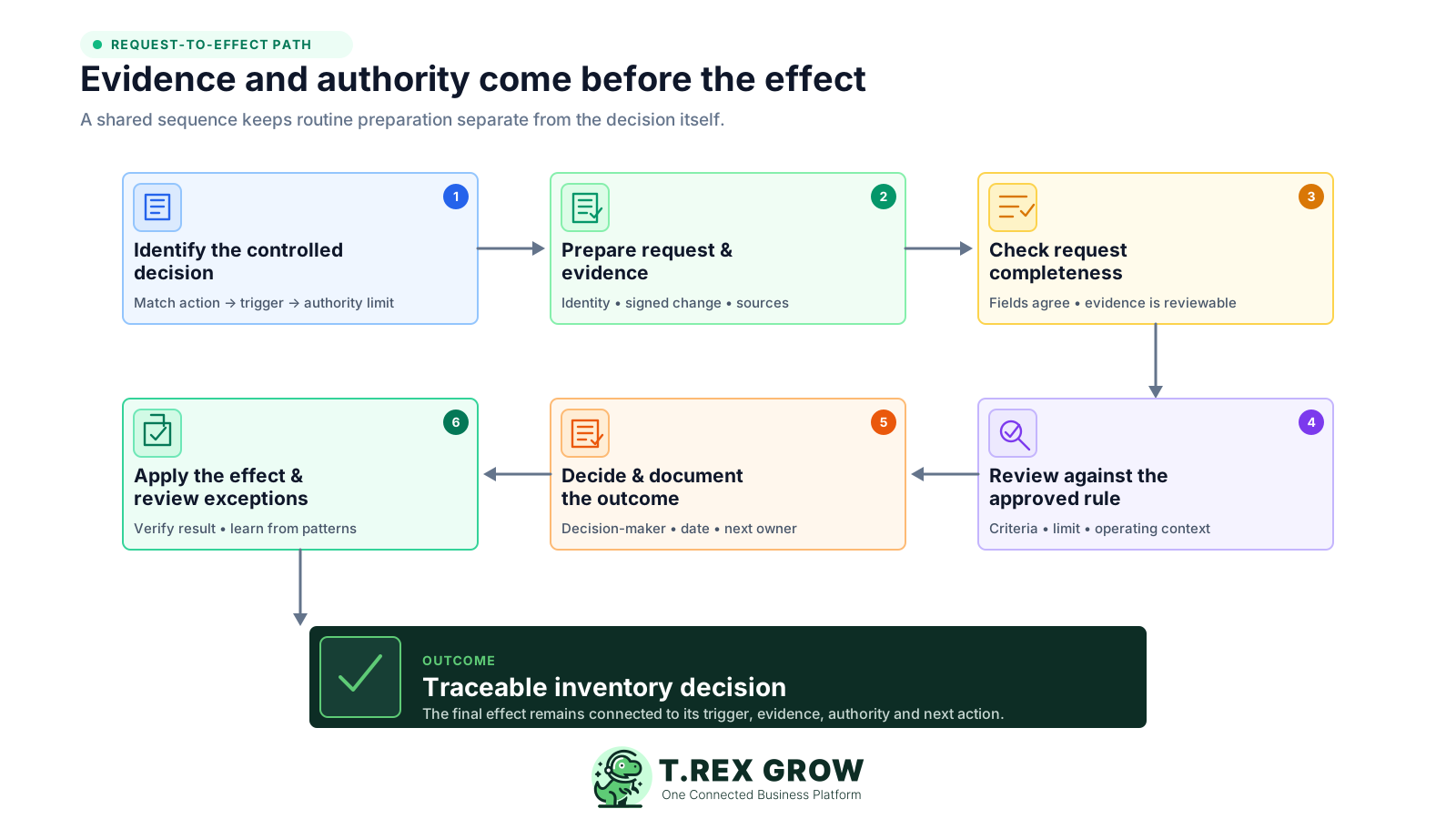
Identify the controlled decision: match the proposed product, movement, adjustment, disposition or count-variance action to the approved rule, trigger and authority limit.
Prepare the request and evidence: capture the exact stock identity, location, signed quantity or master-data change, reason, effective date, source references and proportionate supporting files.
Check completeness: confirm that fields agree, evidence is readable, duplicates and obvious source-record errors have been addressed, and the request is routed to an authorised decision-maker.
Review against the rule: compare the request with the trigger, authority limit, operating facts, available evidence and any required independent check without rewriting the requester's evidence.
Decide and document: approve only within authority, or hold, return, decline or cancel under the SME's policy; record the decision-maker, date, basis and next owner.
Apply the effect and review exceptions: complete the supported inventory action only after the required decision, verify the resulting status or quantity, and include unusual outcomes in periodic control review.
A workflow is not stronger merely because it contains an approval status. Look for design choices that delay routine work, shift decisions into private channels or let the inventory effect happen before the control gate.
Recurring issues usually point to workflow-control gaps, not one isolated data-entry mistake.
A later signature documents awareness, not preventive approval. If urgent action is sometimes necessary, define a separate exception route and review it visibly.
A universal queue consumes attention on routine work and slows sensitive requests. Use risk-based triggers and clear delegated limits instead of treating all inventory events alike.
Where practical, a person who prepares or controls the stock should not be the only decision-maker for high-impact, unusual or repeated changes.
A message without the stable request, evidence version and resulting inventory record cannot show exactly what the person authorised.
Phrases such as large variance or manager approval produce inconsistent routing. State the measurable or categorical signal and who can decide within each limit.
If a count, spreadsheet or attachment changes, preserve the reviewed version and submit a visible amendment rather than silently replacing the basis of approval.
An undocumented substitute encourages shared credentials, retroactive approval or off-system work. Define an authorised backup and a visible process for pending exceptions.
Repeated approvals from one cause, routine overrides or long pending times may show that the operating process, threshold, role or training needs adjustment.
Start with a small set of high-impact decisions and expand only when the evidence supports it. The examples below are design prompts, not universal thresholds or professional advice; adapt each trigger, role and evidence requirement to the SME's products, value, staffing and risk tolerance.
Combine measurable limits with categorical exceptions, such as any new product, any negative adjustment with an unusual reason, or any variance above the SME's approved quantity, value or percentage limit.
The best approver is not always the most senior person. Assign someone who understands the operational context, can challenge the evidence and has documented authority within the stated limit.
A low-risk correction may need a count and source reference; a sensitive disposition may need condition evidence, custody context and a second check. More attachments do not automatically mean stronger control.
Held, returned, declined and cancelled requests should remain visible with the reason or missing information, next owner and date so work does not restart in private channels.
Test the matrix on recent real events. Review which requests would be captured, who would decide, how long evidence preparation takes and whether any high-impact event falls outside the rule.
Replace the possible triggers with limits approved for the SME and confirm the named roles can act independently enough for the risk involved.
| Controlled decision | Possible approval trigger | Minimum evidence | Decision role and recorded outcome |
|---|---|---|---|
| Create or change a product master record | Any new item; unit, tracking or key identity change | Requested fields, business purpose, duplicate check and affected records | Authorised product-data owner; approved version or returned request |
| Accept an unusual receipt variance | Quantity or condition outside the agreed receiving tolerance | Order or source reference, received quantity, condition note and supplier context | Receiving or operations lead within limit; accepted exception or follow-up owner |
| Post an inventory adjustment | Value, quantity, percentage, unusual reason or repeated cause exceeds the rule | Count, cut-off, before quantity, signed change, resulting quantity and records checked | Independent inventory or finance reviewer where proportionate; approved adjustment or unresolved variance |
| Dispose of or reclassify damaged or held stock | Sensitive item, unusual quantity, value limit or restricted disposition | Item, quantity, location, condition, custody, proposed action and supporting evidence | Named operations or owner role; authorised disposition, hold or declined request |
| Move stock between controlled locations or custodians | High value, external custody, unusual destination or route exception | Origin, destination, item, quantity, hand-off owner, timing and source reference | Location or operations authority; approved movement and receiving confirmation |
| Accept an inventory count variance | Variance above the approved value, quantity, percentage or repeat-cause trigger | First count, recount, cut-off movements, cause review and proposed correction | Authorised count or finance reviewer; approved correction or open investigation |
The best practice is to make the next action clear before the situation becomes urgent.
Full separation of every task may be impractical in a small SME. That does not require abandoning decision control. Treat roles as different responsibilities, strengthen review for the most sensitive events and document the compensating check when one person must wear more than one hat.
One employee may perform several duties, but the policy can still state which hat the person is wearing and which decisions require a different authorised person.
Prioritise independent approval where one person can both control the physical stock and prepare a high-value, unusual, negative or repeated inventory change.
When same-day separation is genuinely unavailable, keep the complete event visible for a named owner or independent reviewer to examine promptly, including the evidence and resulting inventory effect.
Name who can act during leave or an operational emergency, which limits still apply and how the temporary decision will be recorded. Do not rely on shared access or borrowed credentials.
Focus periodic attention on unusual values, negative quantities, repeat causes, out-of-hours decisions, self-prepared requests, overrides and long-pending items instead of rechecking every routine event.
New locations, higher-value stock, more users, new custody arrangements and changed system capabilities can alter which decisions, evidence and separation are proportionate.
TREX Grow can support selected request-to-approve controls, while the SME remains responsible for deciding its triggers, authority limits, evidence standard and exception policy. The current verified product behaviour is a direct approval path, not a promise of configurable multi-level routing, threshold logic or escalation automation.
TREX Grow currently provides Request and Approve permission choices within Product Management and Stock Entry Management so supported inventory work can reflect different decision responsibilities.
For supported product creation, stock entry and inventory adjustment workflows, a user with request permission can send the record into approval instead of finalising it directly.
A user without the request restriction can complete supported work directly within the permissions assigned by the business, which is why the SME's access and approval design still matters.
Current supported product, stock-entry and inventory-adjustment flows can notify the relevant approval path by email, helping move the decision out of an unstructured chat-only process.
The current Premium plan includes inventory count sessions with an approval action that posts supported count variances and locks the approved session. Confirm current plan details and test the required workflow before relying on it.
If the SME needs value-based routing, several approval levels, formal rejection reasons, delegated queues, timers or automated escalation, document that requirement separately and verify the current product capability before promising it.
Choose one recurring decision—such as an unusual adjustment or count variance—and write its trigger, requester, checker, approver, backup, minimum evidence, possible outcomes and final record. Test it on three recent events before expanding the matrix.
An inventory approval workflow is the documented path a controlled inventory decision follows from request and evidence through review, authorisation, application and final recording. It defines which events need approval, who can decide, what they must see and what happens after each outcome.