SME Inventory Process Guide

Inventory Tracking Process for SMEs

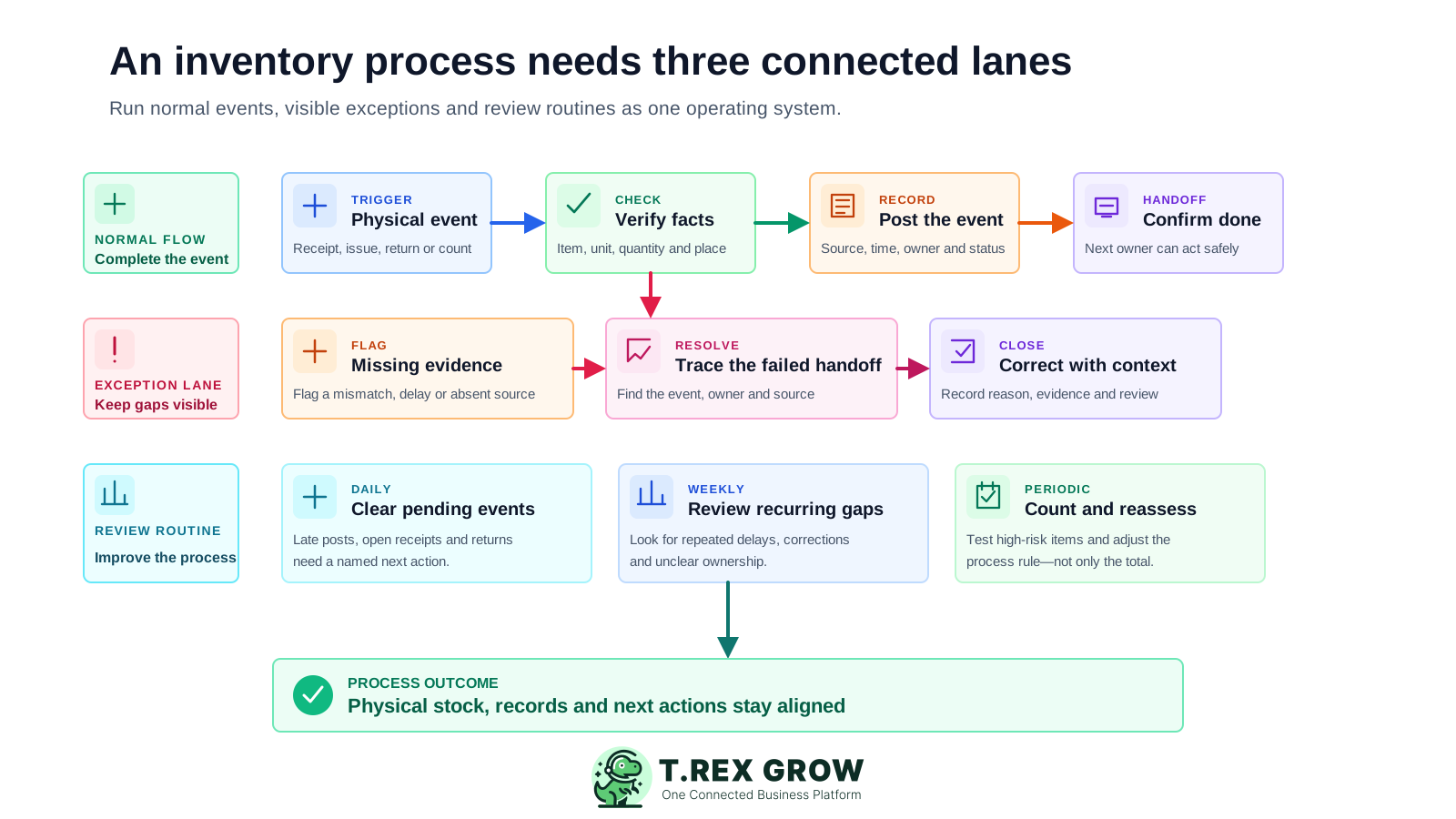
A useful inventory process tells the team what starts each record, who owns the handoff, which facts are required, when the update is due, what complete means, and where exceptions go. Design those rules before adding more products, users, or locations.

SME inventory process blueprint with a normal stock-event flow, visible exception lane, and daily, weekly, and periodic review routines leading to aligned physical stock, records, and next actions
Problem

Inventory tracking fails when the process exists only in people's heads

Most inventory gaps do not begin with difficult arithmetic. They begin when two people use different rules for the same handoff: what happened, who records it, when it becomes effective, which evidence is required, and whether the next team can safely act.

Operational pressure

The next action is easy to lose when context is scattered.

When records live in different places, the person responsible has to reconstruct what happened before they can make a confident decision or follow up.

Scattered recordsUnclear ownershipAvoidable surprises
High risk

A message is mistaken for a completed event

Purchasing says the goods have arrived, sales says an order has shipped, or a storekeeper says a return is back. The message does not prove the accepted quantity, product, unit, status, or record is complete.

Ownership changes at the busiest moment

The person handling the physical stock assumes somebody else will post the record. The next team begins work before either responsibility is confirmed.

Posting windows are informal

One person updates stock at the handoff, another at the end of the shift, and another when the month-end count exposes a gap. The shared balance has no consistent cut-off.

High risk

Incomplete work disappears into chat

A shortage, damaged unit, wrong item, missing source document, or location difference is discussed privately instead of entering a visible exception queue with an owner.

Complete means something different to each team

Receiving considers the job finished when goods are unloaded; finance waits for supporting documents; sales only cares whether the quantity is available. The process never states which conditions close the handoff.

Counts repair totals but not behaviour

A variance is adjusted, yet the delayed posting, unclear owner, missing return path, or weak review rule remains unchanged and creates the next difference.

Education

A list of inventory transactions is not yet an operating process

Receipts, issues, transfers, returns, adjustments, and counts describe types of stock events. A process explains how those events move through people and records under normal, exceptional, and review conditions.

A useful record supports the next decision

The work is easier when the team can see the current facts, the responsible person, and the next action without reconstructing the history from separate tools.

Shared operating context
Clear ownership and status
A visible next action

Set up the team view

1

Define the shared fields

  • - Use current facts
  • - Keep details consistent
2

Assign the next action

  • - Name an owner
  • - Set a review date
3

Keep it current

  • - Record changes
  • - Resolve exceptions

Scope defines what the process controls

Choose which products, locations, stock states, teams, and event types belong in the first version. A narrow process that works is more useful than a company-wide diagram nobody follows.

Triggers connect physical work to record work

Define the accepted physical moment that starts the update: goods accepted, stock issued, return inspected, transfer received, correction approved, or count completed.

Ownership makes the handoff actionable

Name the role that enters or completes the record, the role that receives the handoff, and the role that reviews sensitive exceptions.

Record requirements preserve the operating facts

Specify the product, quantity, unit, source, destination or status, date, source document, reason, and supporting context needed for that event.

Completion rules protect the next decision

State what must agree before the next team acts. The accepted physical quantity, supported record, location or status, and assigned ownership should tell the same story.

Exception and review rules keep the process honest

Incomplete handoffs need a visible holding path, while recurring delays and variances need a regular review rhythm that changes the failed rule.

Education

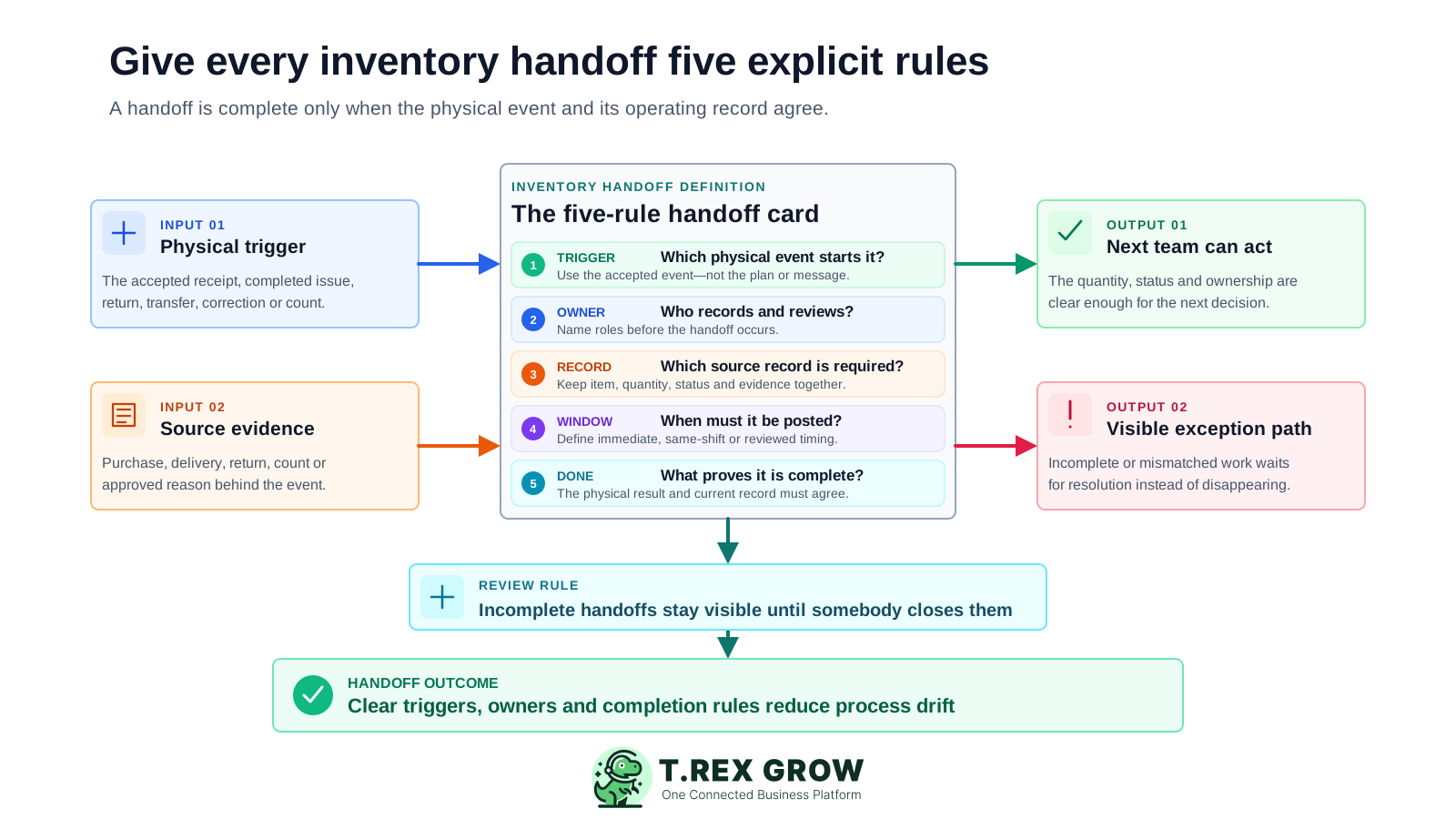
Define every inventory handoff with five explicit rules

Treat a handoff as a small operating agreement. The team should be able to answer the same five questions before normal work is considered complete, while incomplete or mismatched work stays visible for resolution.

A useful record supports the next decision

The work is easier when the team can see the current facts, the responsible person, and the next action without reconstructing the history from separate tools.

Shared operating context
Clear ownership and status
A visible next action

Set up the team view

1

Define the shared fields

  • - Use current facts
  • - Keep details consistent
2

Assign the next action

  • - Name an owner
  • - Set a review date
3

Keep it current

  • - Record changes
  • - Resolve exceptions
Five-rule SME inventory handoff definition connecting a physical trigger and source evidence to the event owner, required record, posting window, completion condition, next-team action, and visible exception path

Trigger: what physical event starts the record?

Use an accepted or completed event rather than a plan, expected quantity, verbal update, or draft message.

Owner: who records and who reviews?

Assign the primary operator and the reviewer or exception owner before the event reaches a busy handoff.

Record: which facts and source are mandatory?

Agree the minimum product, quantity, unit, location or status, date, source document, reason, and evidence for the event.

Posting window: when must the update be complete?

Choose immediate, same-shift, same-day, or reviewed timing according to the operational risk. Avoid an undefined instruction such as update later.

Done condition: what proves the handoff is complete?

The physical result and supported record should agree, the next owner should be identifiable, and no unresolved exception should be hidden.

Exception path: where does incomplete work wait?

Use a visible pending or review queue with a reason and owner instead of silently editing the quantity or relying on a private reminder.

Workflow

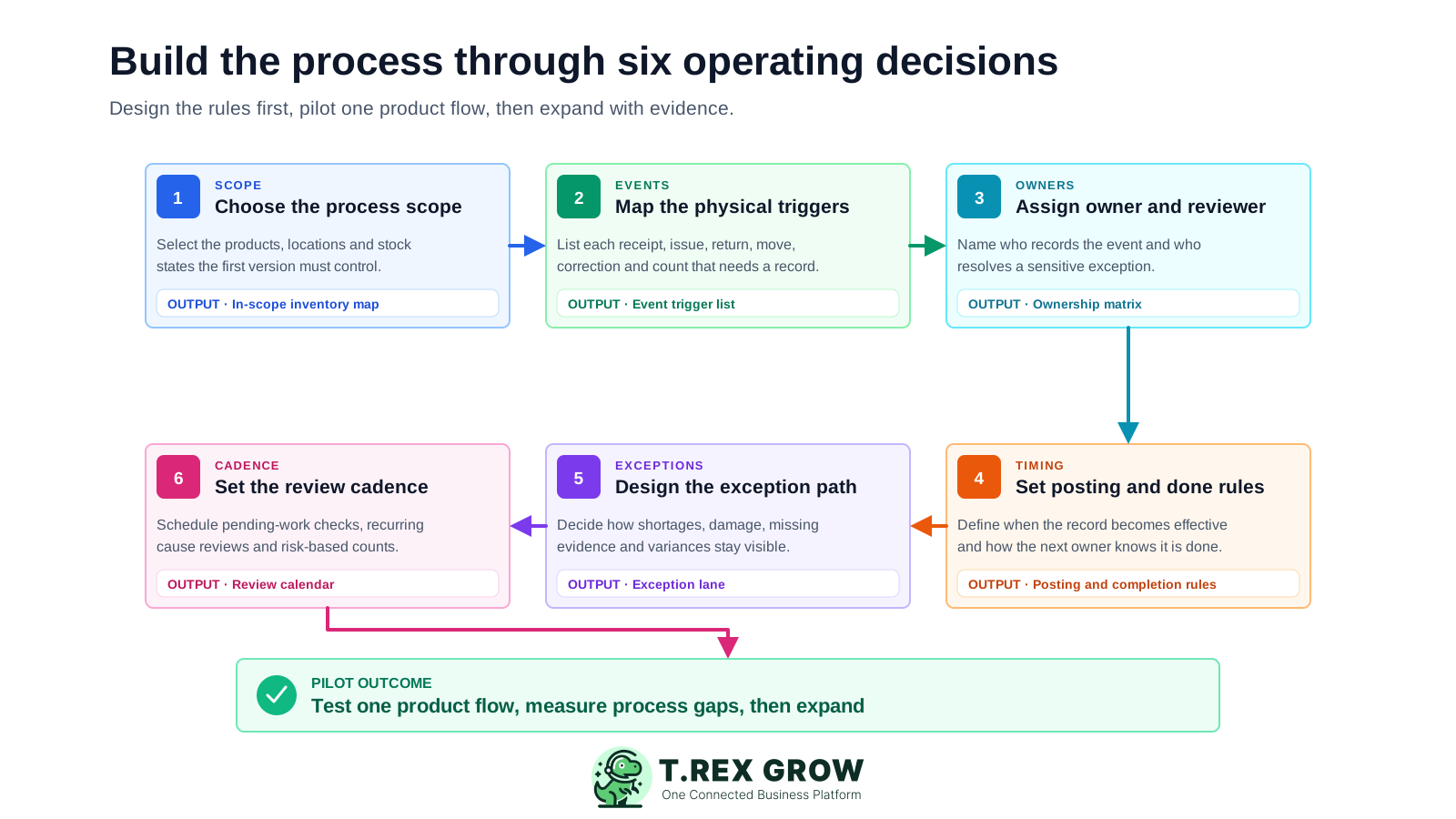
Build the inventory tracking process through six decisions

Design the workflow before configuring every product and user. Start small enough to test the handoffs, then use evidence from the pilot to improve the rules before wider rollout.

A repeatable operating workflow

Capture

Record the current facts in one shared place.

Check

Confirm what is known and what needs attention.

Assign

Make the next decision or follow-up accountable.

Act

Complete the next task and record the outcome.

Review

Refresh the shared view when facts change.

A dependable workflow keeps the shared record and the next action aligned.

Six-step SME workflow for designing an inventory tracking process by choosing scope, mapping physical events, assigning owners, setting posting rules, designing exceptions, and defining the review cadence
1

Choose the process scope: select the products, locations, stock states, teams, and event types the first version must control. Define what is intentionally outside the pilot.

2

Map the physical triggers: list every receipt, issue, return, move, correction, and count that requires a record. State the physical moment that starts each update.

3

Assign the owner and reviewer: name who completes the normal event record, who receives the handoff, and who investigates or approves a sensitive exception.

4

Set the posting and done rules: define when the record becomes effective, how soon it must be posted, which facts are mandatory, and what proves the next team can act.

5

Design the exception path: decide how shortages, damage, missing evidence, wrong items, delayed entries, and count variances remain visible until resolved.

6

Set the review cadence and pilot: schedule daily pending-work checks, weekly recurring-cause reviews, and risk-based counts, then test one complete product flow before expanding.

Mistakes

Process design mistakes that create inventory gaps

A process can look complete on paper and still fail during a busy receiving shift, urgent customer order, unexpected return, or stock count. Test whether the rules help a real person make the next decision.

Recurring issues usually point to workflow-control gaps, not one isolated data-entry mistake.

Common

Starting with every SKU and location

A large rollout hides which rule caused a failure. Pilot one product family and one end-to-end flow before widening the scope.

High risk

Using department names instead of owners

Warehouse is not an owner. Name the role or person responsible for completing the record, receiving the handoff, and resolving the exception.

Common

Defining the document but not the trigger

Telling staff to create a stock entry does not explain whether they should act when the truck arrives, after checking quantity, after accepting goods, or after approval.

High risk

Making every event an exception

If normal work needs manager intervention, people bypass the process. Separate routine handoffs from shortages, damage, missing evidence, sensitive corrections, and unusual variances.

Common

Setting an unrealistic posting rule

Immediate entry may be unsafe or impractical in some physical environments. Choose a clear window that protects decisions and can actually be followed.

High risk

Calling submission complete

A form or message can be submitted while the quantity, status, location, approval, or receiving confirmation remains unresolved. Define the operational done condition.

Common

Measuring only the final stock accuracy

A final percentage does not show late posts, open handoffs, repeated correction causes, unresolved returns, or duplicate work. Track the process signals behind the result.

Best practices

Run the process on a daily, weekly, and periodic cadence

The process should tell staff what to complete now, what recurring problems to review, and what physical evidence to test. The frequency should reflect item value, movement volume, lead time, loss risk, and customer impact rather than one universal schedule.

Do this

Daily: clear pending stock events

Review open receipts, unposted issues, returns awaiting disposition, incomplete transfers, and approval-required corrections before they become invisible backlog.

Do this

Daily: confirm high-impact handoffs

Check urgent fulfilment, high-value receipts, sensitive returns, and items where a stale position could change a customer or purchasing decision.

Do this

Weekly: review repeated process gaps

Group late postings, missing evidence, recurring adjustments, location differences, and unclear ownership by cause instead of treating each one as an isolated mistake.

Do this

Weekly: close or redesign old exceptions

An old pending item may need a record correction, physical follow-up, clearer evidence rule, different owner, or a simpler normal path.

Do this

Periodic: count by risk and activity

Give fast-moving, high-value, long-lead-time, repeatedly inaccurate, or customer-critical items more frequent physical review.

Do this

Periodic: test whether the process still fits

Revisit scope, owners, locations, stock states, posting windows, approval needs, and review routines after operational volume or responsibilities change.

Inventory process ownership matrix

Use this as a starting point. Replace each generic role and completion condition with the actual operating responsibility in the SME.

HandoffPrimary ownerRequired process evidenceDone when
Product setupProduct or inventory administratorApproved identity, unit, stock state, supplier or category context, and scope decisionThe same active product definition is ready for every in-scope team
Supplier receiptReceiving or storekeeper roleAccepted product, quantity, unit, receipt date, source purchase or delivery reference, and exceptionsAccepted stock and its supported record agree; shortages or damage have owners
Location moveSending and receiving stock rolesProduct, quantity, source, destination, dispatch, receipt, and difference where locations are controlledBoth physical custody and the supported location record agree
Customer or internal issuePicking, storekeeper, or fulfilment roleProduct, quantity, purpose, source location, delivery or internal reference, and effective timeIssued quantity and the operating document agree
Return or exceptionReturns or inventory-control ownerOriginal source, inspected quantity, condition, disposition, reason, evidence, and reviewer where requiredStock status and next action are explicit; unresolved work remains visible
Count and reconciliationIndependent counter and inventory reviewerProduct, unit, location, status, cut-off, count result, movement review, cause, and approved correctionThe variance is resolved and the failed process rule has an owner

The best practice is to make the next action clear before the situation becomes urgent.

Education

Example: process a partial supplier delivery without hiding the gap

An SME ordered 100 cartons. The truck arrives with 95 cartons: 92 are accepted, three are damaged, and five remain undelivered. A clear process separates the normal receipt from the exception instead of posting the ordered quantity or silently adjusting later.

A useful record supports the next decision

The work is easier when the team can see the current facts, the responsible person, and the next action without reconstructing the history from separate tools.

Shared operating context
Clear ownership and status
A visible next action

Set up the team view

1

Define the shared fields

  • - Use current facts
  • - Keep details consistent
2

Assign the next action

  • - Name an owner
  • - Set a review date
3

Keep it current

  • - Record changes
  • - Resolve exceptions

Trigger the process after the physical check

The receiving event begins after staff identify the product and count the delivered cartons, not when the supplier says the truck arrived.

Post the accepted quantity

Record 92 accepted cartons against the correct purchase and supplier context using the agreed unit and receiving date.

Open visible exceptions

Keep the three damaged cartons and five undelivered cartons visible with their own condition, source evidence, owner, and next action.

Complete only the supported handoff

The accepted stock can move to its supported available or storage position only when the physical quantity and receipt record agree.

Review the process signal

If partial or damaged deliveries recur, review supplier follow-up, receiving evidence, exception ownership, and the time taken to close the gap.

Solution

How TREX Grow can support a process your team has already defined

Once the operating rules are clear, TREX Grow can help keep product context, quantity states, supported movement records, source documents, responsibility, and plan-dependent warehouse controls in one shared workflow. It does not replace physical checks, timely entries, or process ownership.

Operations work better when records and next actions are connected

Keep product definitions in one context

Use structured product names, codes, optional SKU or barcode fields, units of measure, categories, suppliers, reorder information, status, and approval context.

Separate useful quantity states

Review available, incoming, and reserved quantities distinctly so expected or committed stock is not silently treated as freely usable.

Connect supported events to their records

Use stock entries, delivery orders, sales returns, purchase returns, inventory adjustments, and product history to keep movement and source context together.

TREX Grow Operations Hub

Add permission and approval context

Use configured roles and supported approval states to make responsibility clearer for sensitive product or inventory work.

Extend the process when warehouse depth is needed

Current plans may add custom locations, transfers, ledgers, picking, and inventory-count sessions. Confirm the current plan and user access before designing around those controls.

Next step

Pilot the process with one product flow

Choose one frequently handled product. Map its physical triggers, owners, required records, posting window, done conditions, exception path, and review cadence. Run one receipt, one issue or return, and one reconciliation before expanding the process. See how TREX Grow can support the shared workflow after the rules are working.

See How TREX Grow Works

It is the documented operating flow that connects a physical stock event to its owner, required record, posting window, completion condition, exception path, and review routine. It explains how people and records move together, not only which inventory transactions exist.