The operating trail is fragmented
Customer, supplier, product, sales, purchasing, stock and finance records exist, but staff rebuild context whenever work crosses a team boundary.

The best business management software is the one that fits the work your Malaysian SME must control now. Compare six credible options across connected operations, modular ERP, broad app suites and accounting-led systems—then prove the fit with one repeatable trial.

This guide is for a Malaysian SME replacing disconnected tools or reviewing an incumbent system. It is most useful when the buying team needs to choose between an operations platform, modular ERP, broad app suite or accounting-led product rather than compare identical products.
Operational pressure
When records live in different places, the person responsible has to reconstruct what happened before they can make a confident decision or follow up.
Customer, supplier, product, sales, purchasing, stock and finance records exist, but staff rebuild context whenever work crosses a team boundary.
The shortlist mixes accounting packages, app suites, ERP systems and operations software because all are marketed under broad business-management language.
A useful point tool handles one job well but leaves quotations, orders, fulfilment, supplier work or stock activity in separate trackers.
A comprehensive suite may cover future needs, yet its configuration, migration and training burden can exceed the value of the first rollout.
Malaysia e-Invoice, SST, currency, support and professional accounting needs must be checked against current official guidance and plan details.
Owners need a defensible buying record based on one real workflow, normal exceptions, total cost and clear boundaries—not a polished demonstration alone.
OECD work on SME digitalisation highlights the resource and capability barriers smaller firms face as they move into deeper process integration. Malaysia's National MSME Digitalisation 2030 direction links digital adoption with better processes, productivity and competitiveness. A useful shortlist therefore starts with operating evidence, not maximum feature count.
Decide whether the centre of the purchase is connected sales and purchasing, customisable ERP, a broad cross-functional suite or reliable accounting.
Test whether supported source data and documents remain linked as work moves through sales, purchasing, fulfilment, inventory, invoicing and payment evidence.
Check who can view, create, edit, request approval, approve, finalise, adjust and export records in each required module.
Include a revision, partial fulfilment, return, adjustment, cancellation or payment difference that occurs in the real business.
Confirm current e-Invoice, SST, currency, local support and professional review needs against official guidance and provider documentation.
Compare the required plan, users, apps, companies, storage, transactions, add-ons, tax, currency, services and renewal terms.
Estimate migration, configuration, templates, training, integrations, partner work and management time before setting a launch date.
Verify data export, attachment retrieval, audit evidence, cancellation, retention and the route to another system if requirements change.
Use the same representative customer or supplier scenario so the evidence remains comparable.
| Evaluation area | Test evidence | A practical result |
|---|---|---|
| Operating job | Complete the one cross-team workflow that creates the most delay or re-entry today. | The product improves the job at the centre of the purchase. |
| Continuity | Inspect customer, supplier, product, source-document and downstream references. | The next user can explain where the record came from. |
| Control | Ask two users with different responsibilities to create, review and finalise work. | Available actions match responsibility and policy. |
| Exception | Run one revision, partial transaction, return, adjustment or cancellation. | The changed position stays distinct and understandable. |
| Daily review | Locate unpaid, due, fulfilment, purchasing, low-stock and follow-up work. | A summary leads back to controlled records. |
| Boundary | List every plan, add-on, service, integration and specialist system required. | The rollout does not depend on an assumed capability. |
Business management software is a broad label. A fair comparison separates the product's operating centre, the implementation model and the evidence needed for your specific company.
Recurring issues usually point to workflow-control gaps, not one isolated data-entry mistake.
Unused breadth still creates evaluation, configuration and training work. Prioritise the records and decisions required during the first rollout.
A free or low starting point may exclude the users, apps, invoice volume, locations, currencies, storage, support or implementation needed for live use.
Apps can share an account or brand while still requiring configuration, integration and ownership decisions between their records.
A clean demonstration hides the revisions, partial receipts, returns, adjustments and incomplete data that expose practical fit.
Software can support Malaysia e-Invoice and tax-related work, but accurate source data, current configuration, authorised review and applicable requirements remain the taxpayer's responsibility.
Moving duplicate customers, obsolete products and conflicting terms transfers existing ambiguity into a more expensive operating system.
This is an editorial shortlist, not a paid ranking. TREX Grow has no sponsorship, endorsement, affiliation or partnership with Odoo, Zoho One, SQL Account Cloud, Bukku or Xero. Product and pricing claims were checked against official sources on 30 August 2026; verify current details before purchase.
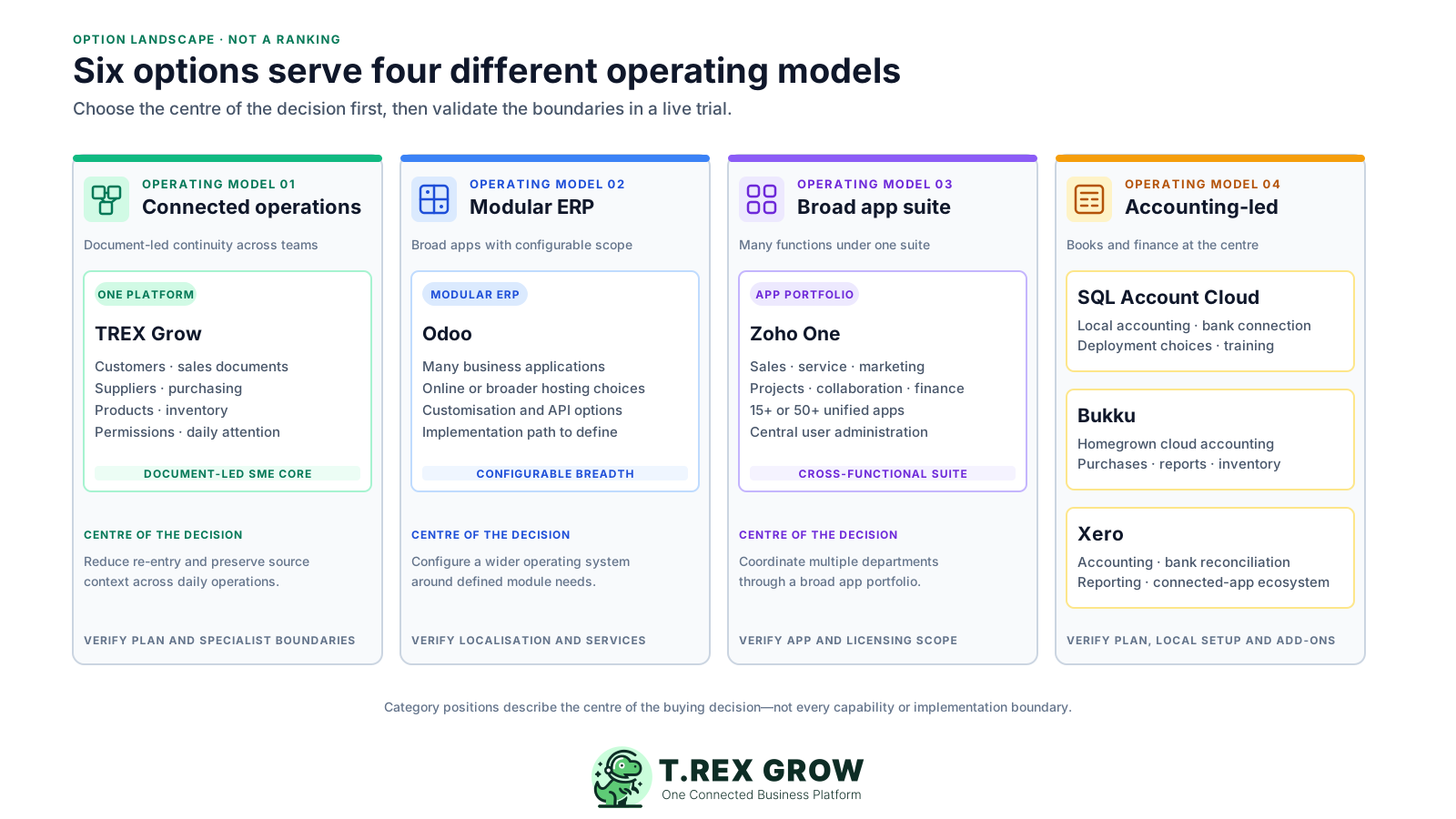
Published starting points and practical checks, reviewed 30 August 2026. Prices exclude any unlisted tax, payment, add-on, implementation, partner or migration fees.
| Option | Best-fit operating job | Published starting point or model | Check before choosing |
|---|---|---|---|
| TREX Grow | Document-led Malaysian SMEs wanting connected customer, sales, purchasing, supplier, inventory, permission and supported e-Invoice work in one operating environment. | Free RM 0; Starter RM 120/year; Essential RM 240/year; Premium RM 380/year. Current plans list unlimited users and products. | Confirm which plan contains each required module. Paid plans include Accounting Beta, whose calculations, postings and reports may be incomplete or inaccurate and require qualified review. |
| Odoo | Companies wanting a broad modular ERP with many apps, configurable scope and options for customisation or external API access. | One App Free is listed at USD 0 with unlimited users. Standard and Custom are priced per user; current promotional and locale-specific prices should be rechecked. | Confirm Malaysia localisation, required apps, hosting model, custom development, implementation or partner services, migration and ongoing administration. |
| Zoho One | Teams wanting a broad cross-functional suite spanning sales, service, marketing, projects, collaboration, finance and other business functions. | Essentials lists 15+ unified apps; Standard lists 50+ apps. Pricing depends on annual licensing plus all-employee or flexible-user terms and the applicable local quote. | Confirm the exact apps, Malaysia finance and e-Invoice path, licensing population, configuration, integration between apps and implementation support. |
| SQL Account Cloud | Malaysian SMEs prioritising local accounting, invoicing, reports, bank connection, training and a choice of public, private or hybrid deployment. | Essential RM 79/month; Pro RM 109/month; the official page lists RM 60 per additional user. Pro adds inventory and multiple currencies. | Confirm company and user scope, deployment, support, implementation, data access and whether Essential or Pro covers the required inventory and reporting depth. |
| Bukku | Startups and SMEs wanting homegrown cloud invoicing that can expand into purchases, accounting, bank feeds, reports and inventory. | Launch RM 0; Seed RM 35/month plus 8% SST. Current plans list unlimited users, with higher plans and add-ons available. | Review transaction guidance, storage, email and extraction quotas, plus the plan or add-ons required for SST, multi-currency and multiple inventory locations. |
| Xero | Accounting-first businesses wanting invoicing, bills, bank reconciliation, reporting, online-payment options and a broad connected-app ecosystem. | Lite standard USD 7/month, currently USD 3.50/month for 36 months under an offer ending 31 December 2026; Lite lists five invoices. | Compare the required plan, USD billing, invoice limits, add-ons, payment fees, Malaysia e-Invoice setup, bank-feed availability and integration costs. |
The best practice is to make the next action clear before the situation becomes urgent.
Use safe representative data and the same cross-team scenario for every option. The goal is not to explore every feature; it is to prove the critical path, one normal exception and the ownership of the result.
Record the current facts in one shared place.
Confirm what is known and what needs attention.
Make the next decision or follow-up accountable.
Complete the next task and record the outcome.
Refresh the shared view when facts change.
A dependable workflow keeps the shared record and the next action aligned.
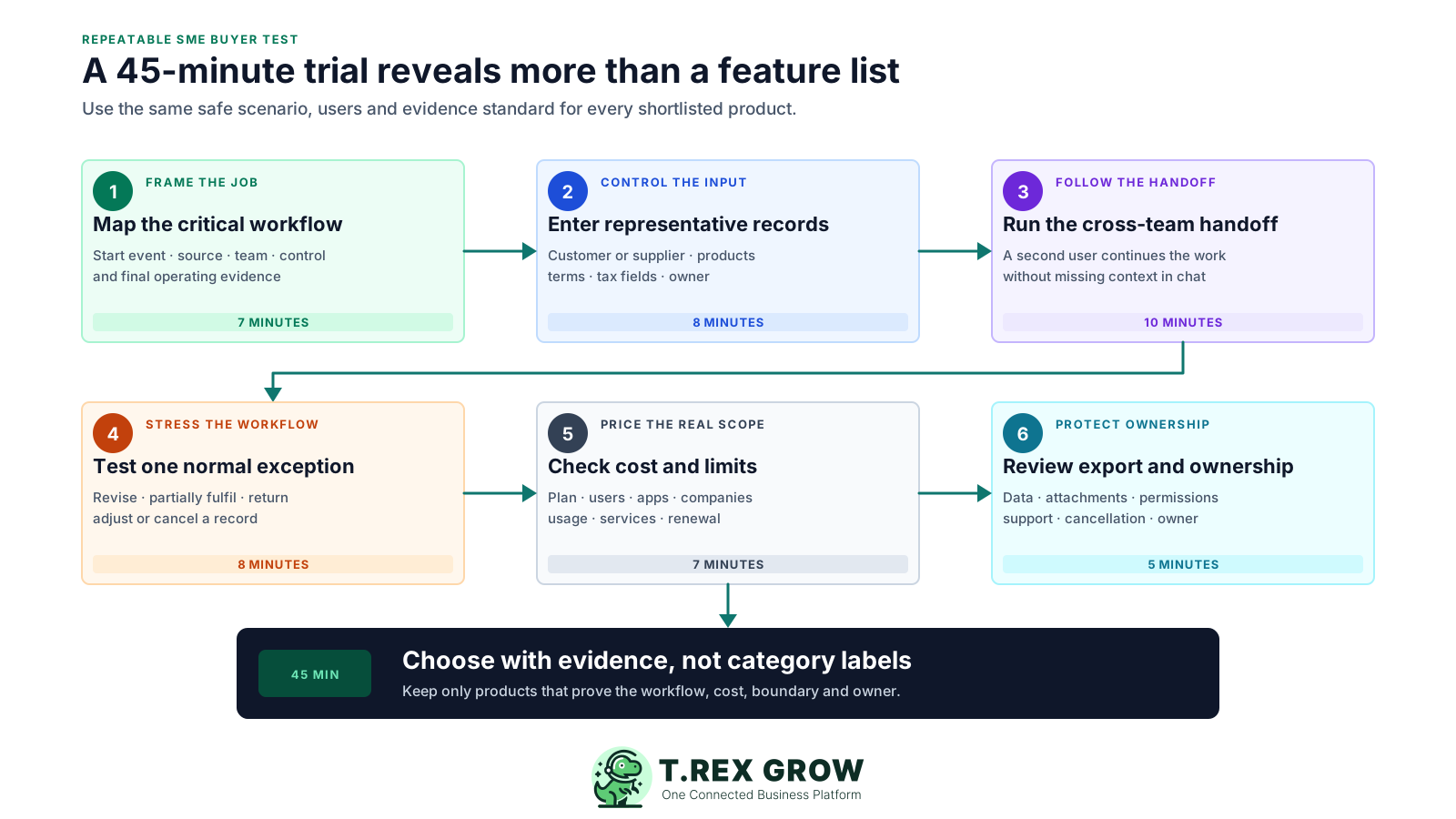
Map the critical workflow: write the start event, source records, teams, approval points, downstream documents and final evidence for one high-friction process.
Enter controlled records: create a safe representative customer or supplier plus the products, prices, terms, tax fields and ownership needed by the scenario.
Run the cross-team handoff: ask the first user to create the source work and a second user to continue it without receiving missing details through chat.
Test one normal exception: revise, partially fulfil, return, adjust or cancel a supported record and check whether the changed position stays clear.
Check cost and limits: identify the exact plan, users, apps, companies, storage, volumes, add-ons, tax, services and post-promotion renewal needed for launch.
Review export and ownership: inspect data and attachment export, permissions, audit evidence, cancellation, retention, support and the plan for any work that remains outside the product.
Record the result immediately after each product trial.
| Result | Meaning | Next action |
|---|---|---|
| Pass | The critical path and normal exception work with acceptable effort and clear ownership. | Keep the product on the shortlist and verify commercial terms. |
| Investigate | The job may be possible, but a plan, add-on, integration, configuration or service is unclear. | Get the answer, owner, delivery scope and cost in writing. |
| Fail | A critical record, role, control, exception or export cannot be demonstrated. | Remove the product or redefine the requirement explicitly. |
TREX Grow is strongest when a document-led SME wants customer, supplier, product, sales, purchasing and inventory work to share controlled records and visible continuations. It is not a universal replacement for a custom ERP, broad workforce app suite, accounting-first system or every specialist industry platform.
Customer, supplier, product and service records support quotations, orders, invoices, purchasing documents and related operational work on the applicable plan.
Supported source references help staff follow work across quotations, orders, deliveries, receipts, invoices, returns and adjustments without flattening every record into one status.
Product and stock activity, low-stock visibility and deeper location or warehouse controls are available according to the selected plan and workflow.
Users, module permissions, approval behaviour, search, reminders and dashboard cues help teams find work that needs review.
TREX Grow supports applicable e-Invoice work, but current HASiL guidance, accurate source data, authorised review and taxpayer responsibility still apply.
Accounting Beta is included in paid plans and requires setup, explicit activation and qualified review; choose an accounting-first product when dependable full accounting is the primary job.
TREX Grow brings several daily attention areas together so users can move from a summary into the underlying business record. This safe demo view shows unpaid sales and supplier invoices, deliveries, purchase-order receipts, low stock, quotation follow-up and reminders.
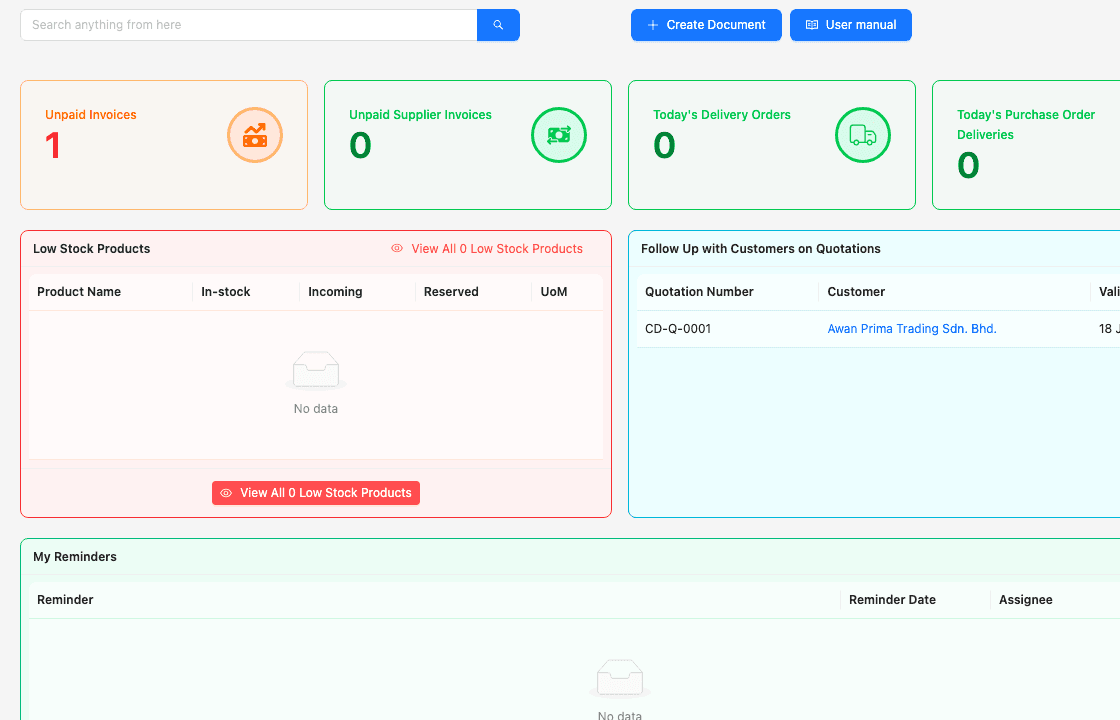
Sales, supplier, fulfilment, purchasing, inventory and reminder cues can be reviewed without starting from separate team trackers.
The dashboard is a starting point for investigation; staff still open the relevant records, verify the current status and take the authorised action.
A business management system should preserve why a downstream record exists. This safe demo screenshot shows an invoice beside its source quotation reference, customer, payment position and amount instead of reducing the workflow to an unexplained total.
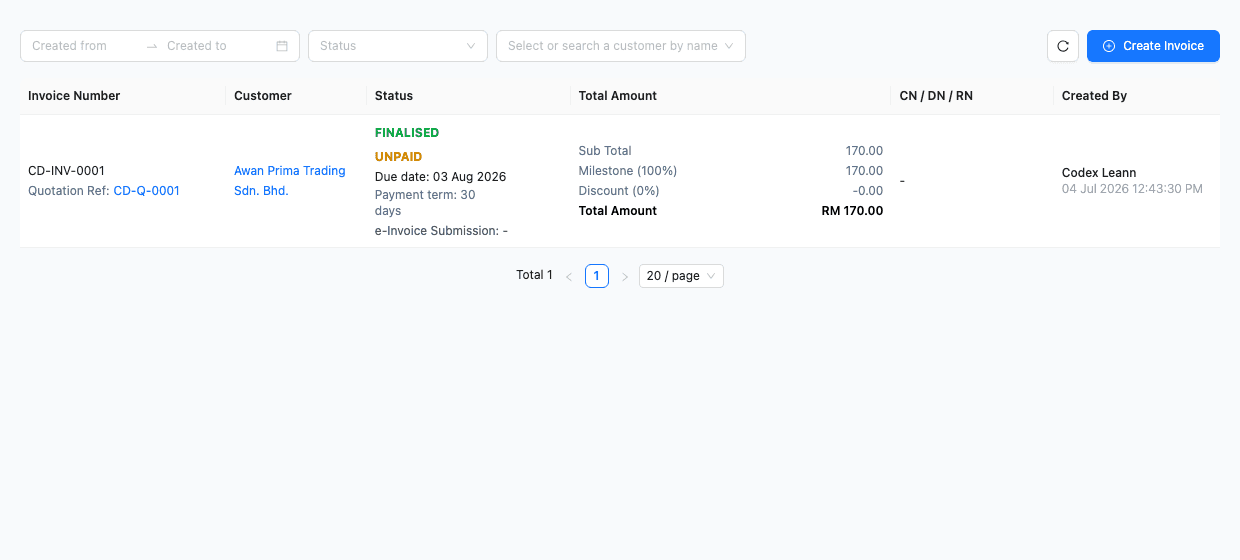
The quotation reference helps the next user understand the commercial source behind the invoice.
Payment status remains a specific operating fact rather than an assumed consequence of the invoice existing.
Headline subscription prices describe different units and scopes. Build one cost worksheet for every candidate, separate promotional from standard pricing and record the staff time required to make the system usable.
Price the plan, apps and modules needed by the tested workflow—not the lowest published entry point.
Record whether charges apply per user, employee, app, company, location, document, transaction, storage allowance or connected service.
Include currency, tax, offer end, promotional period and the published or quoted renewal basis.
Add data cleanup, migration, configuration, templates, training, integrations, consultant or partner services and internal management time.
Estimate the recurring time spent in spreadsheets, portals, duplicate checks, reconciliation and unsupported exception handling after launch.
Use written evidence for every amount and assumption.
| Cost area | What to include | Evidence |
|---|---|---|
| Subscription | Required plan, apps, billing period, currency, tax, promotion end and renewal basis. | Official pricing page and written quote. |
| People and usage | Users or employees, companies, locations, invoices, transactions, storage, messages and extraction volume. | Normal and peak-volume worksheet. |
| Implementation | Migration, setup, templates, training, integrations, partner work, hardware and internal time. | Named owner, delivery scope and onboarding plan. |
| Outside work | Portals, spreadsheets, duplicate checks, reconciliation and exceptions that remain manual. | Observed trial steps and monthly staff time. |
| Change and exit | Support upgrades, customisation maintenance, data export, cancellation and replacement-system work. | Contract, service terms and tested export. |
Features and pricing can change after comparison pages are written. Re-open the official sources, test your own configuration and keep the final buying evidence with the approval record.
Verify current pricing, plan limits, promotions, product scope and support directly with each provider before signing or publishing a recommendation.
The official guideline index listed e-Invoice Guideline version 4.7 and Specific Guideline version 4.8 on 30 August 2026. Applicable requirements may change, so use the latest source.
Document user provisioning, permission changes, authentication, backup, incident handling, retention and access to exported records.
Name who cleans data, configures the product, approves templates, trains users, owns integrations and resolves normal exceptions.
Software does not replace qualified accounting, tax, legal or industry-specific advice where the business depends on it.
Export representative records and attachments, read cancellation terms and confirm how long the company can access data after ending the service.
The best practice is to make the next action clear before the situation becomes urgent.
Start with the Free plan for customer, quotation, invoice, product, user and supported Malaysia e-Invoice work. If purchasing, inventory or warehouse depth matters, use the 30-day paid-plan trial and score the same 45-minute scenario before deciding.
There is no universal winner. TREX Grow may fit a document-led SME connecting sales, purchasing and inventory; Odoo may fit modular ERP and customisation needs; Zoho One may fit a broad app-suite strategy; SQL Account, Bukku or Xero may fit accounting-led requirements. Test the operating job at the centre of your purchase.