Master data starts to diverge
Customer, supplier, product, unit, price, tax and payment-term details change in one file while older copies remain active elsewhere.

TREX Grow gives document-led Malaysian SMEs an ERP-style operating core for customer, supplier, product, sales, purchasing, inventory, payment and supported e-Invoice work. Start with the workflows you need, confirm the current plan and expand from proven use—not from an oversized module list.

Growth exposes the gaps between customer work, supplier commitments, stock activity and finance records. The useful ERP decision is not how many modules exist; it is which operating facts must stay connected now.
Operational pressure
When records live in different places, the person responsible has to reconstruct what happened before they can make a confident decision or follow up.
Customer, supplier, product, unit, price, tax and payment-term details change in one file while older copies remain active elsewhere.
A quotation, order, delivery, invoice, adjustment and payment may exist, but the relationship between them is difficult to verify.
What was ordered, what arrived, what the supplier invoiced and what was paid become one manually interpreted tracker row.
Teams see a quantity but cannot quickly identify the purchase, receipt, sale, return, transfer or adjustment behind the movement.
Permissions, approvals, revisions and exception decisions happen in messages separated from the document under review.
Unpaid work, supplier commitments, low stock and overdue follow-up appear only after someone reconciles several sources.
ERP implementation requires time, data discipline, user training and management attention. A smaller business protects adoption by defining fit before committing to a broad category promise.
Recurring issues usually point to workflow-control gaps, not one isolated data-entry mistake.
An ERP category name does not prove that the product supports the exact sales, purchasing, inventory and finance records the business uses.
A long feature list cannot compensate for unclear data ownership, permission rules, document status and exception responsibility.
A big-bang rollout makes data, configuration, training and process problems harder to isolate before live work depends on the system.
Moving duplicates, obsolete products and inconsistent customer or supplier details carries old ambiguity into the new operating core.
A clean demonstration hides the partial receipts, revisions, returns, adjustments and rejected approvals that reveal practical fit.
e-Invoice and accounting features still depend on accurate source data, current official guidance, staff review and professional advice where needed.
OECD research describes ERP as a form of deeper business-process integration and notes that complexity, time, resources and reskilling can create higher barriers for smaller firms. Malaysia's National MSME Digitalisation 2030 direction links digital adoption with better processes and more efficient operations. That makes a scope-first evaluation especially important.
Customers, suppliers, products and services should provide reusable information for the operational documents built around them.
Supported sales and purchasing records should preserve the source context needed by the next team without flattening every step into one status.
Stock changes should be understandable through supported receipts, deliveries, returns, adjustments, transfers and counts where applicable.
Users need module access and approval behaviour that reflects who prepares, reviews, approves or finalises relevant work.
Search, reminders, document status and dashboard attention should lead users back to the record requiring action.
Payroll, manufacturing, projects, budgeting, banking, deep integrations and industry-specific requirements need separate confirmation.
Test the system with one representative customer or supplier transaction before deciding that the category fits.
| Evaluation area | Evidence to inspect | A practical result |
|---|---|---|
| Core records | Customer, supplier, product, unit, price, tax and payment-term data used by real documents. | Staff reuse controlled information instead of retyping it. |
| Workflow trail | Source and downstream references across quotations, orders, fulfilment, receipts, invoices and payments. | Each team can explain where the current record came from. |
| User control | Module permissions, draft actions, approval requests and finalisation behaviour for different roles. | Available actions match responsibility and policy. |
| Normal exception | A revision, partial receipt, return, adjustment, cancellation or payment difference supported by the workflow. | The exception remains distinct and traceable. |
| Daily visibility | Unpaid, due, delivery, purchase, low-stock, follow-up and reminder views. | A summary leads directly to the underlying record. |
| Scope boundary | Current plan entitlements plus required specialist functions, integrations and professional review. | The rollout does not depend on an assumed feature. |
TREX Grow connects practical commercial and operating records without claiming universal ERP scope. Use the current plan to match the business areas you need, then confirm specialist requirements separately.
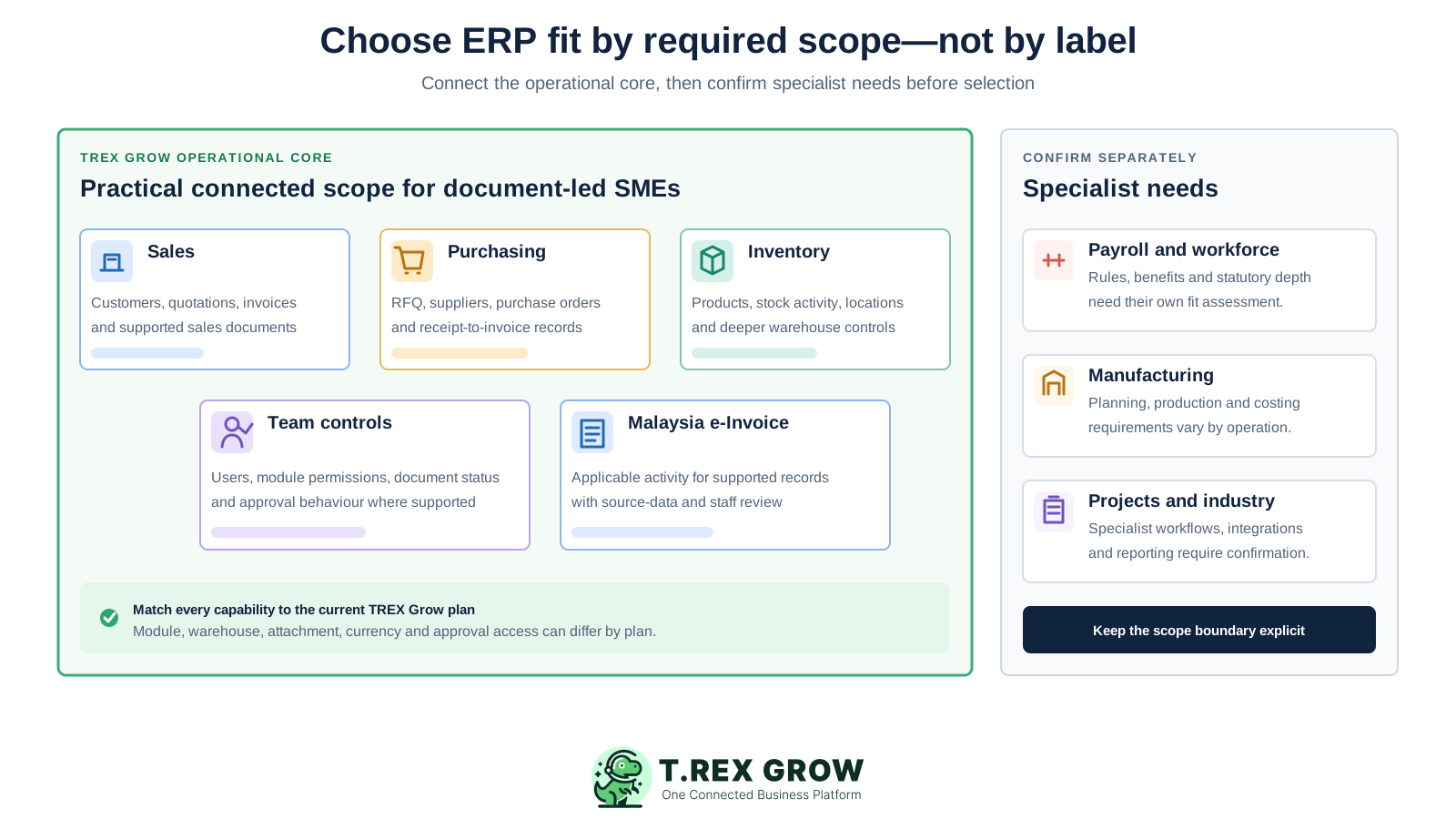
Customer records, appointments, quotations, invoices, supported e-Invoice activity and related sales documents provide a practical starting point.
RFQs, suppliers, purchase orders, stock receipts, supplier invoices, purchase returns and supported adjustments are available on the appropriate plan.
Product records, categories, stock activity, low-stock visibility and deeper location or warehouse controls depend on the selected scope and plan.
Company settings, users, module permissions and approval behaviour help align available actions with responsibility.
Invoices, receipts, payments, credit or debit documents and Accounting Beta can support review, but they do not remove accounting judgement.
Begin with one recurring workflow and a clean operating foundation. Expand after users can complete normal work, explain the record trail and recover the exceptions relevant to the business.
Record the current facts in one shared place.
Confirm what is known and what needs attention.
Make the next decision or follow-up accountable.
Complete the next task and record the outcome.
Refresh the shared view when facts change.
A dependable workflow keeps the shared record and the next action aligned.
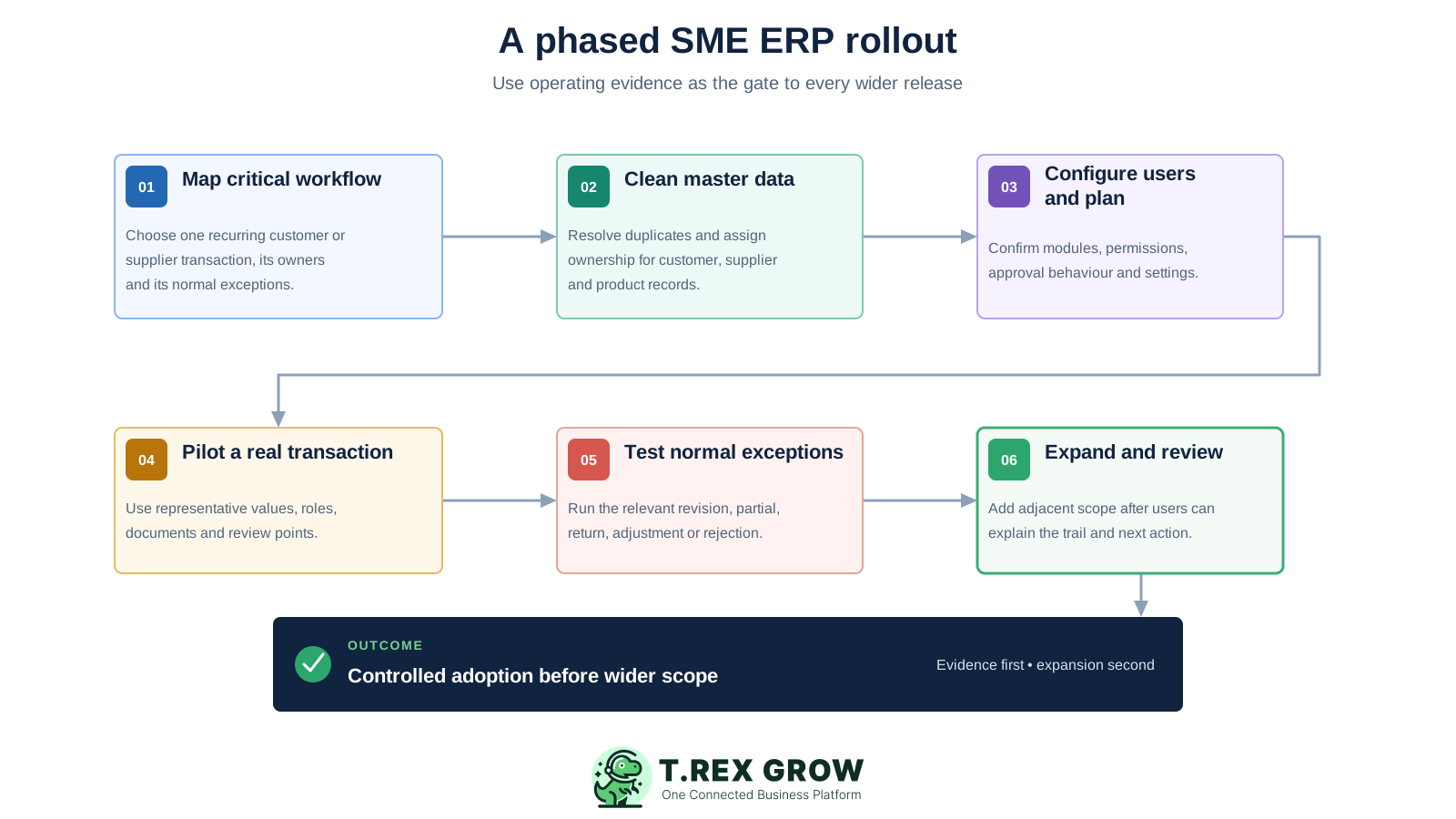
Map the critical workflow: choose one recurring customer or supplier transaction and document its source, owners, decisions, outputs and normal exceptions.
Clean the master data: resolve duplicate customers, suppliers and products and agree who maintains commercial fields going forward.
Configure users and plan: confirm the required modules, plan entitlement, user permissions, approval behaviour and company settings before live use.
Pilot a real transaction: complete one end-to-end workflow using representative values, documents, roles and review points.
Test normal exceptions: run the relevant revision, partial receipt, return, adjustment, rejected approval, cancellation or payment difference.
Expand and review: add an adjacent workflow only after users can locate the source, explain status and identify work needing attention without a shadow tracker.
The right ERP-style scope depends on the records and controls the SME actually needs. TREX Grow grows from core commercial documents into broader sales, purchasing, inventory and warehouse workflows through current plan entitlements.
Maintain reusable counterpart information for the supported documents and workflows built around each relationship.
Control operational item records, categories and public-catalogue or RFQ workflows where they fit the business.
Prepare quotations and continue supported commercial information into invoices and broader sales documents on the appropriate plan.
Use purchase orders, stock entries, supplier invoices, returns and supported adjustments when the Essential scope is required.
Track stock activity and add custom locations, ledgers, picking or inventory counts when the current plan provides that depth.
Control module access and test Request, Approve or direct-finalisation behaviour wherever the supported module and policy require review.
Surface selected unpaid, delivery, purchase, low-stock and follow-up work, then open the record to verify the next action.
Handle applicable e-Invoice activity for supported documents while keeping source-data checks and current HASiL guidance in the process.
This TREX Grow product screen shows product information alongside quantity, reorder-point and approval context. Master-data discipline matters because the same item facts support downstream commercial and inventory work.
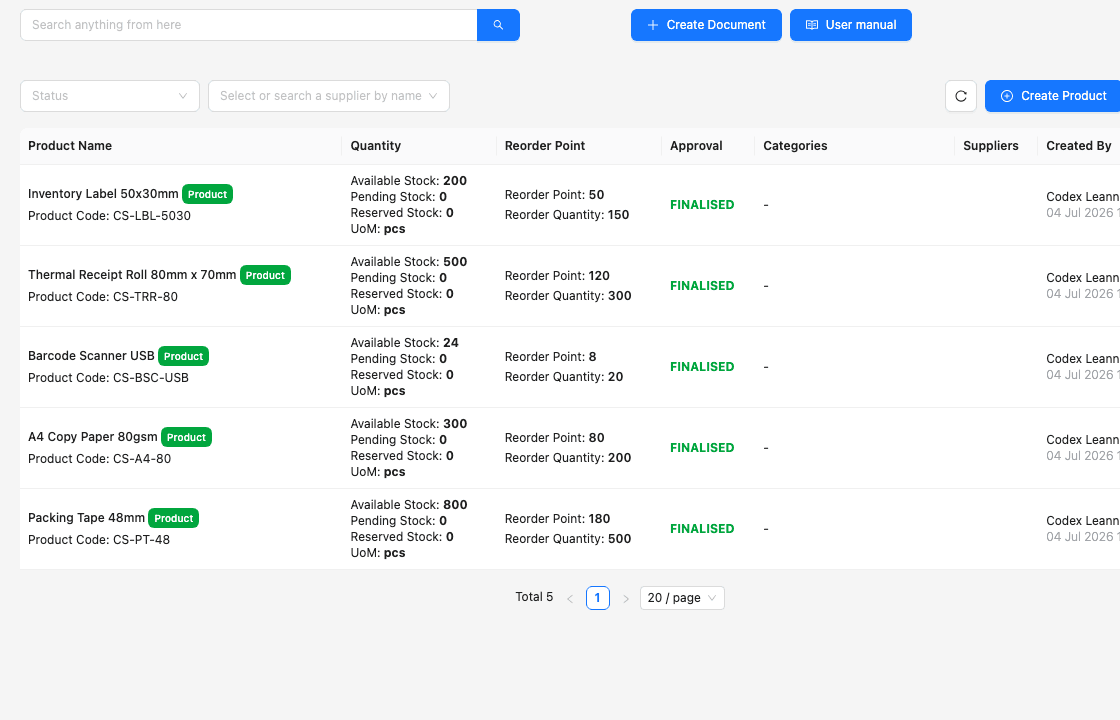
Product records give downstream work a controlled starting point instead of another manually typed item description.
Current quantity and reorder information help authorised users investigate stock needs from the product record.
Supplier, creator and approval context helps the team understand how the item record should be reviewed and maintained.
This TREX Grow product screen shows an invoice connected to its quotation, customer information and payment history. The relationship helps finance and operations review the current position without rebuilding the commercial trail.
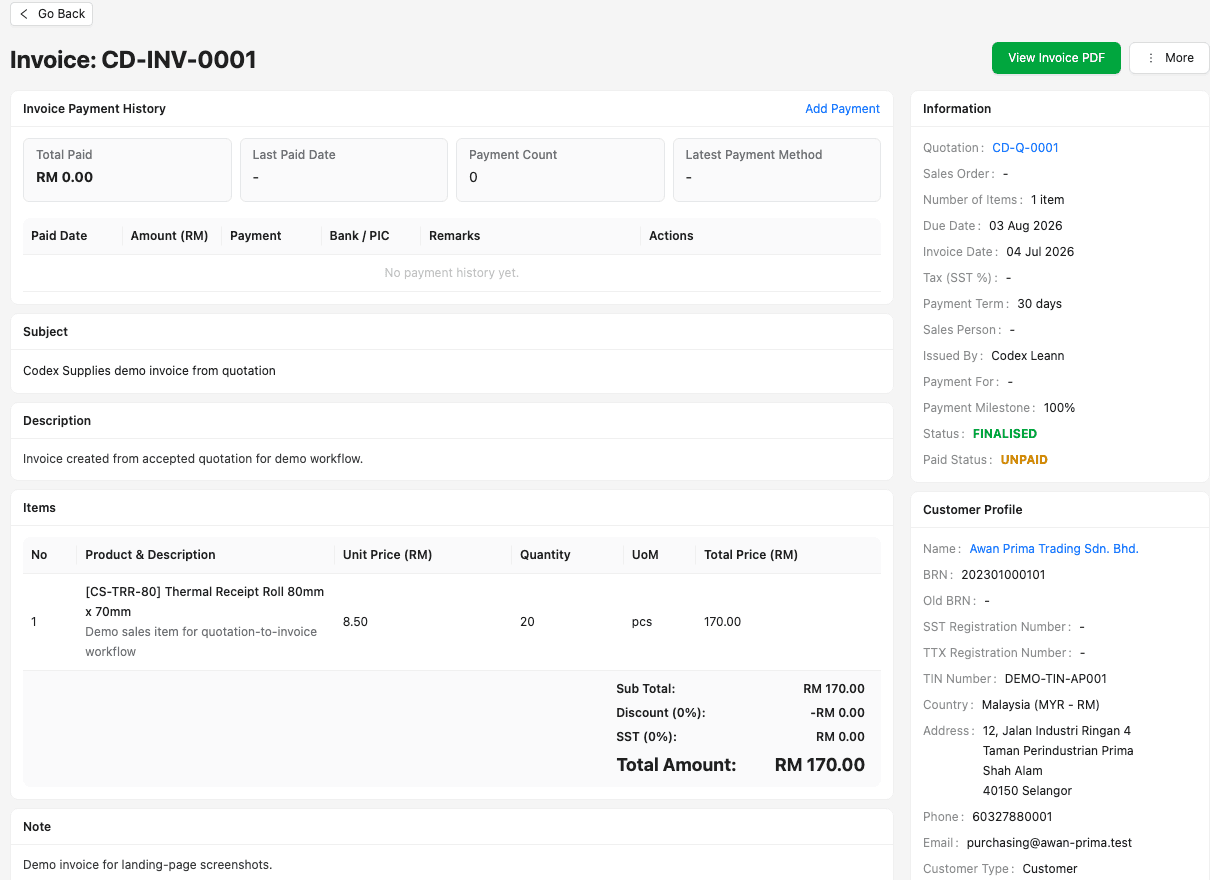
The quotation reference helps staff verify which commercial record supports the invoice under review.
Customer details remain available with the document rather than being reconstructed from a separate contact file.
Payment history gives staff a clearer document-level view while the business retains its normal financial controls.
A phased implementation gives the SME a chance to correct data, access, training and process gaps while the scope is still understandable. Each stage should end with evidence the next stage can rely on.
Give one person authority to resolve scope, data and workflow decisions across the teams taking part in the rollout.
Assign ownership for customer, supplier and product data and define how duplicates or conflicting fields will be corrected.
Teach users the records, actions, approval behaviour and exception paths relevant to their work instead of every module.
Use a short, defined reconciliation period for critical outputs rather than maintaining an indefinite shadow system.
Track required integrations, specialist functions, data decisions and professional reviews outside the current rollout.
Confirm that users can find the source, explain the status and complete normal exceptions before adding wider scope.
Move forward when the current operating evidence is dependable—not simply when setup is finished.
| Stage | Focus | Evidence before expanding |
|---|---|---|
| 1. Scope | One critical workflow, participating roles and explicit exclusions. | The team agrees what the first release will and will not cover. |
| 2. Foundation | Company settings, users, permissions and master records. | Ownership is clear and representative records are clean. |
| 3. Pilot | One end-to-end customer or supplier transaction. | Source, status, review and downstream relationships are understandable. |
| 4. Exception | Normal revision, partial, return, adjustment or approval scenarios. | Users can recover the workflow without hiding the difference. |
| 5. Adoption | Daily use, search, dashboard attention, reminders and reconciliations. | The workflow no longer depends on an indefinite shadow tracker. |
| 6. Expansion | Next team, module, location or reporting need. | The current process is stable and the next plan boundary is confirmed. |
The best practice is to make the next action clear before the situation becomes urgent.
TREX Grow is suited to SMEs that want a practical operating core around document-led sales, purchasing, inventory, control and applicable e-Invoice work. It should be evaluated honestly against the full requirements of the company and industry.
The business wants customer, supplier, product, sales, purchasing, inventory and payment records to share controlled context.
The company wants to begin with a recurring operational workflow and expand through plan-based capability after proving adoption.
Users need module permissions, supported approval behaviour, document status, search, reminders and daily attention visibility.
Manufacturing planning, payroll, complex projects, budget enforcement, tendering, banking and specialist industry workflows need their own assessment.
Required external platforms, data migration, APIs, identity, reporting and downstream system connections should be verified before selection.
Accounting Beta may be incomplete or inaccurate, and current official guidance, qualified accounting review, tax advice and management judgement remain necessary.
Use the TREX Grow trial to configure representative records, run one customer or supplier transaction, test a normal exception and confirm whether the team can follow the source, status and next action before expanding the scope.
ERP software connects information and workflows across important business functions such as sales, purchasing, inventory, finance and control. For an SME, the practical value comes from shared records, traceable transactions and clearer responsibilities—not simply from having the largest possible module list.