You are leaving inventory spreadsheets
The business can calculate stock today, but product identity, movement timing, exception reasons, location, and ownership depend on filenames or personal knowledge.

Compare six credible options using one real purchasing, receiving, fulfilment, return, transfer, adjustment, and counting scenario. No product wins every category; the best choice is the one that controls your most important stock events with acceptable effort.
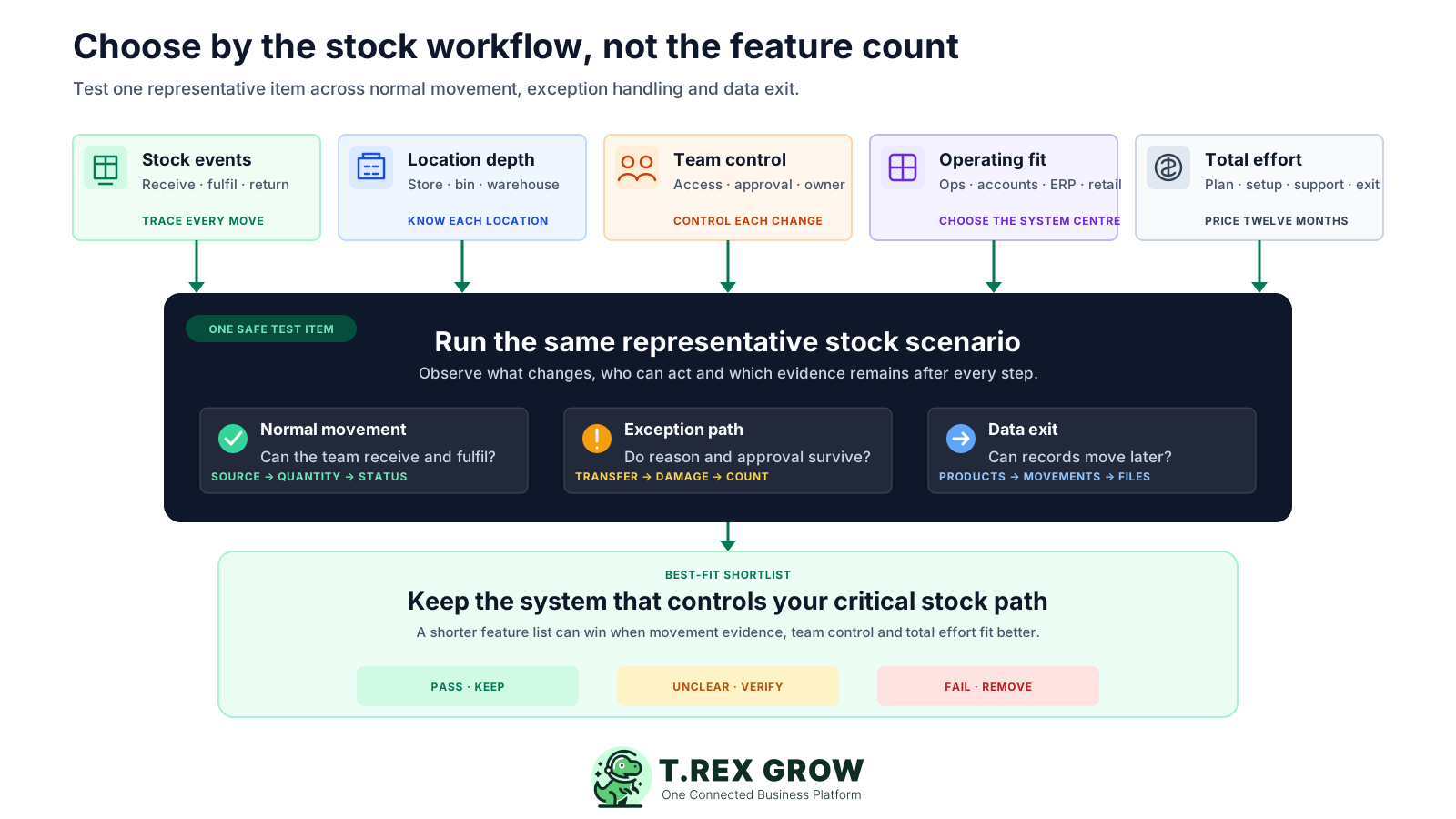
This guide is for Malaysian SMEs that need more than a stock total. It is most useful when several people create product, purchasing, receiving, sales, warehouse, return, adjustment, or count records and management needs a defensible shortlist rather than a universal winner.
Operational pressure
When records live in different places, the person responsible has to reconstruct what happened before they can make a confident decision or follow up.
The business can calculate stock today, but product identity, movement timing, exception reasons, location, and ownership depend on filenames or personal knowledge.
Receipts, fulfilment, returns, and adjustments should update the same product record instead of being reconciled after the fact.
Stock may sit in a general store, bin, outlet, warehouse, damaged area, return area, or temporary location that needs a controlled movement path.
Purchasing, warehouse, sales, finance, and management need different access while still working from consistent records and statuses.
You want to compare users, locations, quotas, integrations, implementation, support, and migration effort instead of relying on the smallest advertised price.
If a group company, accountant, marketplace, POS, manufacturer, 3PL, or integration already requires a specific platform, confirm that constraint before using this shortlist.
Start with the stock events the team must control, then score every candidate using the same evidence. A straightforward operations platform may fit a trading SME, while serial traceability, manufacturing, omnichannel retail, or deep accounting can justify a more specialised system.
Test product codes, SKU, barcode, unit of measure, categories, suppliers, variants, reorder context, status, import, archive, and duplicate controls.
Confirm how purchase receipts, deliveries, returns, transfers, adjustments, and opening quantities create an explainable stock position.
Understand on-hand, available, incoming, reserved, damaged, in-transit, or other states and which business event changes each one.
Separate simple locations from bins, ledgers, put-away, picking, packing, scanning, transfers, counts, and multi-warehouse controls.
Test reasons, attachments, approval, count cut-off, expected versus counted quantities, variance review, and correction evidence.
Decide whether inventory should sit inside connected SME operations, local accounting, a dedicated inventory tool, modular ERP, or omnichannel commerce.
Check Ringgit billing, local support, SST and e-Invoice workflow, accounting handoff, sales channels, API, shipping, POS, and required partner ecosystem.
Include users, locations, quotas, add-ons, hardware, implementation, migration, support, training, renewal terms, and work that remains outside the product.
Use the same representative SKU and movement scenario for every shortlisted system.
| Criterion | Test evidence | Decision signal |
|---|---|---|
| Product control | Create or import an item with a unit, barcode, supplier, reorder rule, and opening quantity. | The item is usable without duplicate entry or ambiguous units. |
| Inbound movement | Receive part of one purchase order into the intended location. | Received quantity and remaining commitment stay explainable. |
| Outbound movement | Fulfil an order, then process a customer return. | Availability and movement history reflect both events correctly. |
| Exception control | Transfer stock, record damage, and run a small count variance. | Location, reason, owner, approval, and correction remain visible. |
| Team and exit | Ask a second user to complete a task, then export products and movements. | Access and data portability can be demonstrated before purchase. |
Poor inventory choices usually start before implementation. The shortlist is built around labels such as real time, warehouse, AI, or ERP without agreeing which records, stock states, locations, controls, and integrations must work every day.
Recurring issues usually point to workflow-control gaps, not one isolated data-entry mistake.
One quantity can hide whether the system distinguishes incoming, reserved, damaged, in-transit, location-level, or unavailable stock.
A barcode field or search is not the same as supported mobile receiving, picking, counting, label printing, and hardware integration.
Bins, waves, put-away, lots, serials, and complex routes add value only when the physical operation, data discipline, and team can use them.
A specialist stock tool can still leave quotations, purchasing, invoicing, e-Invoice, accounting, POS, or ecommerce in disconnected systems.
Discount periods, currencies, SST, annual billing, users, locations, quotas, add-ons, and partner services can materially change the twelve-month total.
Confirm imports, opening balances, historical movements, attachments, exports, cancellation, retention, and support before important stock history enters the system.
This is a fit comparison, not a paid ranking. Product and pricing claims below were checked against each provider's official pages and current TREX Grow product sources on 17 August 2026. Features, promotions, taxes, limits, editions, and terms can change, so verify the official pages before purchase.
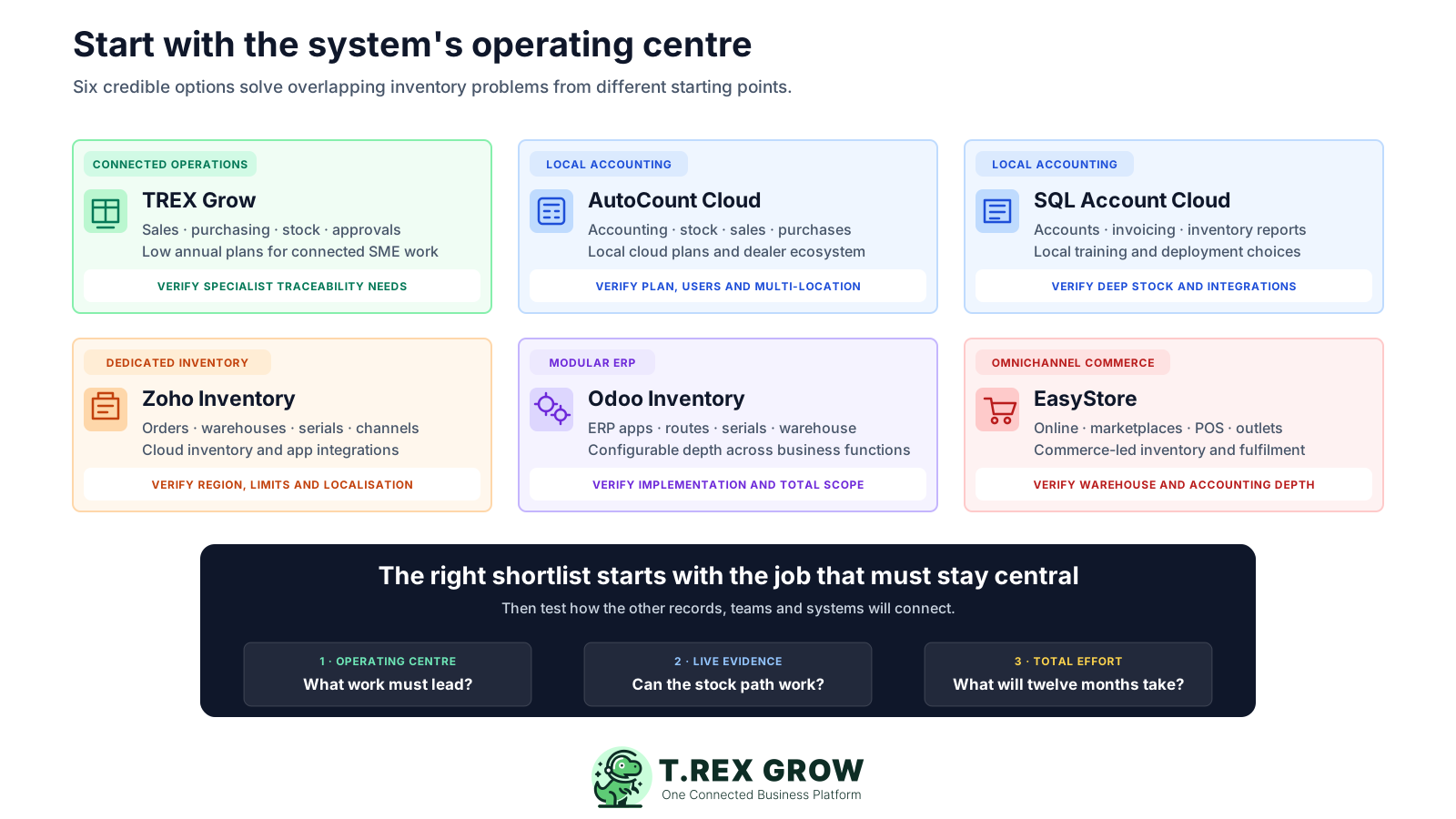
Published starting points and practical checks, reviewed 17 August 2026. Prices exclude any unlisted tax, foreign-exchange, add-on, hardware, implementation, partner, or payment fees.
| Option | Best fit | Published starting point | Check before choosing |
|---|---|---|---|
| TREX Grow | Malaysian SMEs prioritising connected sales, purchasing, inventory, approvals, warehouse work, and supported e-Invoice handling without a heavyweight ERP rollout. | Free RM 0 for core product records; Essential RM 240/year adds purchasing and inventory documents; Premium RM 380/year adds advanced warehouse controls. Current plans list unlimited users and products. | Verify the exact plan and trial path. Evaluate another system when serial, batch, expiry, manufacturing MRP, native POS, or marketplace sync is non-negotiable. Accounting Beta requires setup and qualified review. |
| AutoCount Cloud Accounting | Local accounting-led businesses that want stock, sales, purchases, reports, and dealer-supported rollout in one Malaysian cloud accounting product. | The official monthly table lists Plus at RM 140/month for trading products and Pro at RM 180/month for multi-warehouse. Displayed prices exclude SST. | Confirm the exact inventory, variant, multi-location, user, implementation, support, annual-promotion, and renewal terms for the chosen plan. |
| SQL Account Cloud | Malaysian SMEs prioritising local accounting, invoicing, inventory reports, training, and public, private, or local deployment choices. | Pro is listed at RM 109/month for accounting, invoicing, and inventory; the page lists RM 60/month per additional user. | Confirm multi-location, serial or batch, POS, API, implementation, backup, support, and deployment requirements rather than assuming every stock control is included. |
| Zoho Inventory | Cloud-first order and inventory teams needing purchase receives, multi-location control, serial or batch tracking, ecommerce connections, shipping, and automation by plan. | The US edition lists Free at US$ 0 and Standard at US$ 29 per organisation/month billed annually, with 3 users and 2 locations. Regional editions and taxes can differ. | Confirm the edition available to the Malaysian entity, Ringgit or foreign-currency cost, order and location limits, carrier and channel coverage, accounting handoff, and Malaysia e-Invoice path. |
| Odoo Inventory | Businesses willing to configure a modular ERP around advanced warehouse, replenishment, lot or serial, barcode, manufacturing, sales, purchase, and other app workflows. | One App Free is listed at US$ 0 for one app and unlimited users. Standard and Custom all-app plans are priced per user on the official pricing page. | Scope required apps, users, localisation, hosting, implementation, migration, partner services, customisation, support, and renewal pricing before treating the licence as total cost. |
| EasyStore | Retail and ecommerce brands that want online channels, marketplaces, POS, customer data, inventory, and outlet fulfilment to share one commerce platform. | Standard is listed at RM 199/month; Growth at RM 449/month adds POS with shared online and offline inventory; Success is RM 999/month with higher operational limits. | Confirm the plan's inventory-location limit and separately test batch, serial, manufacturing, accounting, purchasing, warehouse, hardware, app, messaging, and migration requirements. |
The best practice is to make the next action clear before the situation becomes urgent.
A demo shows the happy path. A short controlled trial shows whether the product fits your product data, movement rules, locations, roles, exceptions, and next actions. Use the same safe SKU and scenario in every product so the result is comparable.
Record the current facts in one shared place.
Confirm what is known and what needs attention.
Make the next decision or follow-up accountable.
Complete the next task and record the outcome.
Refresh the shared view when facts change.
A dependable workflow keeps the shared record and the next action aligned.
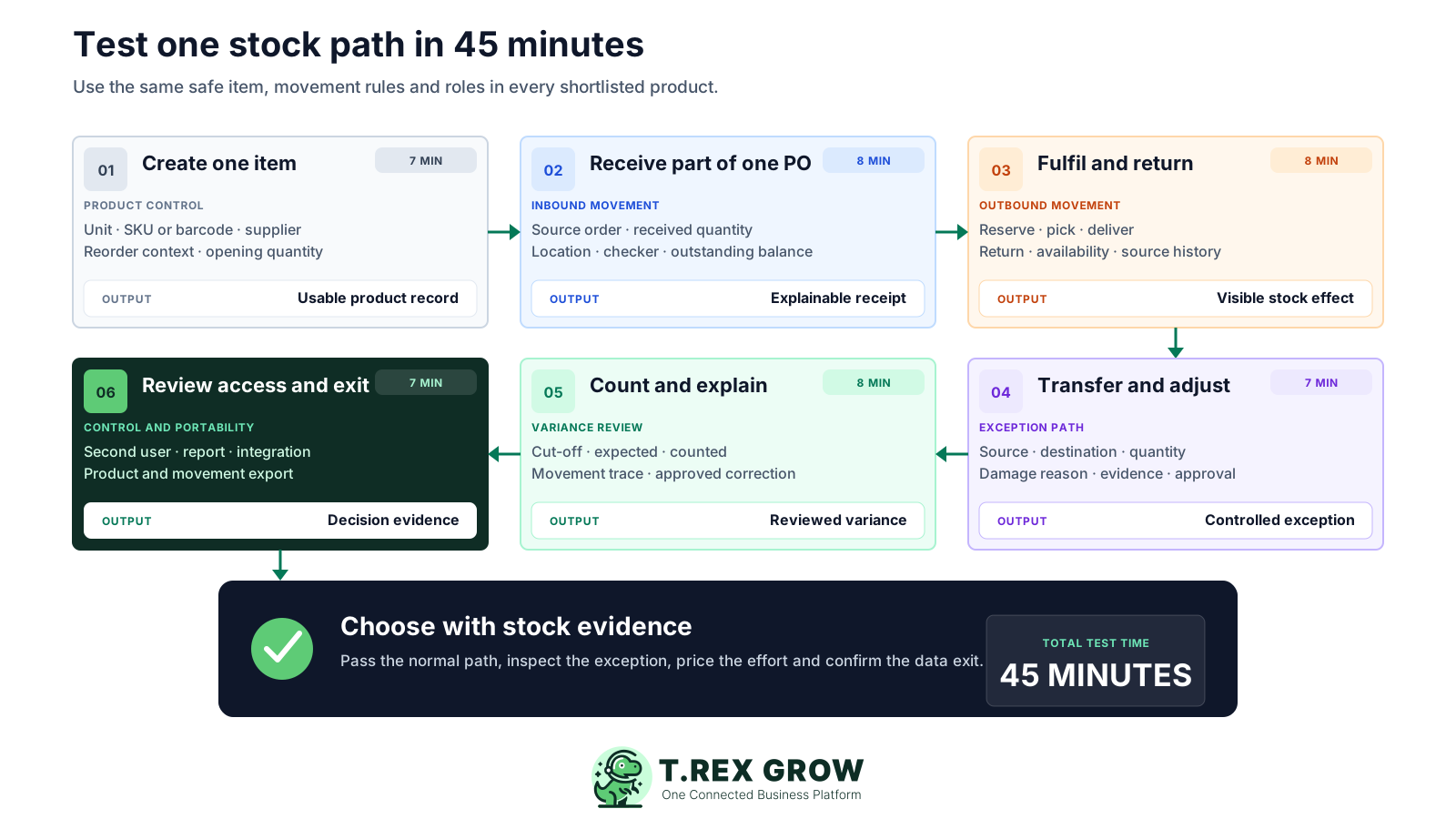
Create one representative item: add the unit, SKU or barcode, supplier, reorder context, opening quantity, and any variant, lot, or serial information that genuinely matters.
Receive a partial purchase order: record what arrived, where it was placed, who checked it, and what remains outstanding without rebuilding the source record.
Fulfil demand and process a return: confirm when stock becomes reserved, picked, delivered, unavailable, or available again and whether the source documents remain visible.
Move stock and record one exception: transfer quantity between locations, then record damage or a correction with the intended reason, evidence, and approval path.
Count and explain a variance: compare expected and counted quantity at a clear cut-off, trace likely movements, and confirm how the approved correction reaches the record.
Review permissions, reports, integrations, and exit: ask another user to complete a task, inspect a movement report, and export the product and stock history.
Score demonstrated evidence, not the sales presentation.
| Result | Meaning | Next action |
|---|---|---|
| Pass | The normal and exception paths work with acceptable control and effort. | Keep the product on the shortlist. |
| Investigate | The job may be possible, but a plan, add-on, configuration, integration, or workaround is unclear. | Get the workflow and total cost confirmed in writing. |
| Fail | A critical product, movement, location, role, control, or export cannot be demonstrated. | Remove the product or redefine the requirement explicitly. |
TREX Grow is a strong fit when inventory is part of a wider SME operating flow. It connects controlled product records with supported purchasing receipts, customer fulfilment, returns, adjustments, locations, counts, approvals, and business documents without requiring a heavyweight ERP implementation.
Trading, wholesale, distribution, service-parts, and stock-led SMEs that need several operating records to stay connected across sales, purchasing, warehouse, finance, and management teams.
Maintain goods and services, product codes, SKU, optional barcode, unit, categories, suppliers, selling price, reorder point, reorder quantity, status, and import support.
Use available, incoming, and reserved context with product history and low-stock attention instead of treating one spreadsheet total as the entire stock position.
Connect supported purchase orders, stock entries, delivery and return work, adjustments, remarks, attachments by plan, and source references to the product record.
Essential adds purchasing and inventory documents with system locations; Premium adds custom locations, location ledgers, transfers, picking, and inventory count sessions.
Assign module access and supported direct, request, or approve responsibility so the team can control who prepares and authorises sensitive stock records.
Choose a specialist system when serial, batch, expiry, manufacturing MRP, sophisticated forecasting, native POS, marketplace sync, carrier automation, or dependable full accounting is the non-negotiable centre of the decision.
The product list gives the team a shared view before it receives, sells, delivers, adjusts, moves, or counts stock. This screenshot uses safe demo products and shows quantity states, units, reorder context, supplier links, and product status in one operational screen.
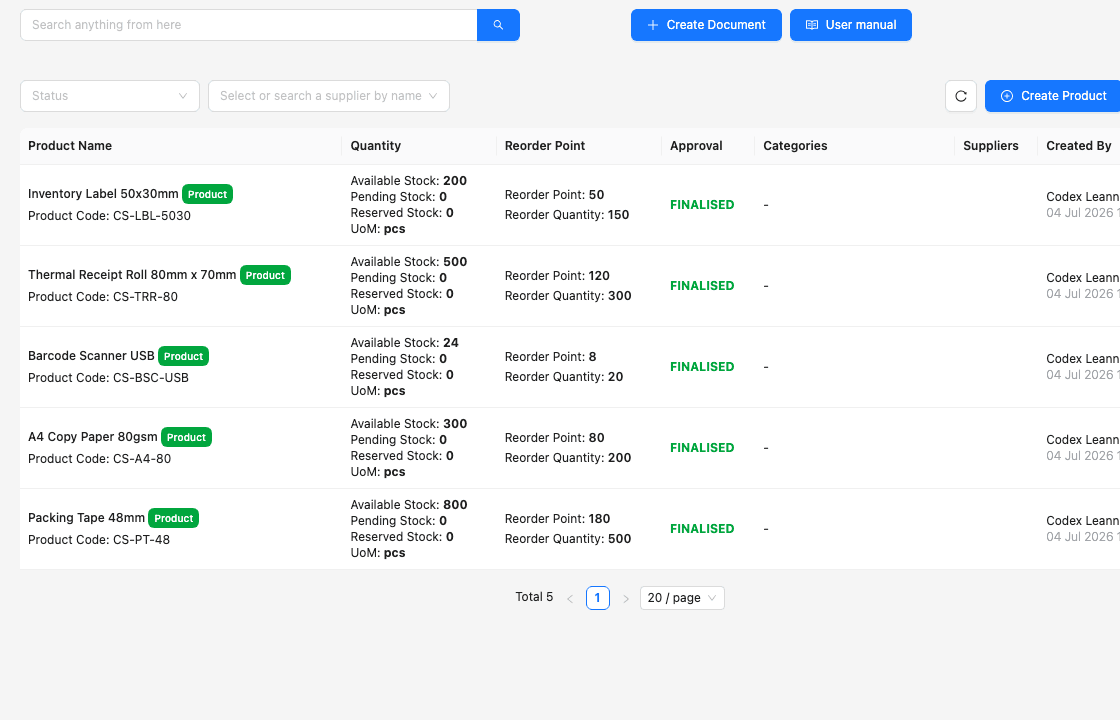
Review the product code, unit, supplier, category, and status before a movement or document uses the item.
See available, incoming, and reserved information without opening a separate spreadsheet.
Compare the current position with the product's reorder point and reorder quantity before deciding the next purchasing action.
The smallest monthly figure is only one part of the decision. Build a twelve-month view using the plan the business actually needs, then include people, locations, transaction volume, implementation, migration, support, hardware, integrations, and the work that still happens outside the product.
Map each must-have workflow to the exact plan, note whether the price is monthly or annual, and separate temporary promotions from the normal renewal basis.
Check users, companies, outlets, warehouses, bins, products, orders, transactions, storage, API calls, messages, and other plan limits against peak months.
Estimate product cleanup, units, suppliers, opening quantities, locations, historical data, templates, roles, imports, validation, and partner or consultant effort.
Include scanners, printers, POS devices, ecommerce apps, marketplaces, carriers, accounting, bank, API, middleware, and ongoing connector subscriptions.
Confirm who supports setup and daily exceptions, which channels and response expectations are included, and whether local partner service is separately charged.
Record which spreadsheets, portal entries, reconciliations, duplicate checks, forecasts, compliance reviews, and exception handoffs remain outside the product.
Use one worksheet for every candidate so the totals are comparable.
| Cost area | What to include | Evidence |
|---|---|---|
| Subscription | Required plan, billing period, tax, currency, promotion end, renewal price, users, and companies. | Official pricing page and written quote. |
| Operational scale | Products, orders, locations, bins, transactions, storage, API, messages, and peak volume. | Normal and peak-volume worksheet. |
| Implementation | Data cleanup, migration, setup, training, integrations, hardware, customisation, and consultant time. | Scoped onboarding plan. |
| Outside work | Spreadsheets, portal entry, accounting handoff, stock reconciliation, forecasting, and unsupported exceptions. | Observed trial steps and staff time. |
A shortlist is not ready for management approval until the team has checked permissions, security, backups, support, data ownership, exports, cancellation, and current Malaysia requirements. Ask each provider the same questions and keep the answers with the decision record.
Confirm which users can view, create, receive, fulfil, transfer, adjust, count, approve, archive, export, and administer sensitive inventory records.
Verify whether the product supports the exact location, lot, serial, expiry, reason, attachment, approval, and historical evidence the business needs.
Review authentication, access controls, encryption, backups, recovery approach, monitoring, incident handling, availability, and published security documentation.
Confirm export formats, attachments, movement history, master data, retention, deletion, read-only access, and assistance available if the company changes products.
Know who answers product, setup, billing, integration, stock-control, accounting, and e-Invoice questions and what service is included in the chosen plan.
Recheck every shortlisted provider's official feature, pricing, quota, promotion, contract, localisation, and support pages immediately before purchase.
The best practice is to make the next action clear before the situation becomes urgent.
TREX Grow is intentionally not positioned as every type of inventory product. Let the most important operating centre lead the shortlist, then test how the remaining work will connect.
AutoCount or SQL Account may fit better when dependable local accounting, financial reporting, bank workflows, dealer support, or accountant familiarity must sit at the centre.
Zoho Inventory may fit better when serial or batch tracking, ecommerce connections, shipping workflows, order quotas, automation, and its broader app ecosystem match the operation.
Odoo may fit better when advanced replenishment, routes, lots, serials, barcode, manufacturing, multi-app ERP scope, and configurable implementation justify greater setup.
EasyStore may fit better when online store, marketplaces, social selling, POS, outlet fulfilment, loyalty, and unified customer commerce are the primary jobs.
A specialist MRP, food, pharmaceutical, asset, field-service, or regulated traceability product may be necessary when production, quality, recall, expiry, or serial history is non-negotiable.
Start Free with products and users, then use the 30-day Essential or Premium trial to test one representative purchase, receipt, fulfilment, return, adjustment, location, and count workflow. Score the same evidence you will use for every other shortlisted product.
There is no universal winner. TREX Grow is a strong fit for connected sales, purchasing, inventory, approvals, and plan-dependent warehouse workflows; AutoCount and SQL Account suit accounting-led evaluation; Zoho Inventory suits dedicated cloud order and stock control; Odoo suits configurable ERP depth; and EasyStore suits commerce-led retail. Test your non-negotiable movement path before choosing.