You are leaving templates or spreadsheets
The business can create invoices today, but version control, status, customer context, partial payments, and follow-up depend on filenames or personal knowledge.

Compare six credible options using your actual quotation, invoice, payment, accounting, inventory, and e-Invoice workflow. No product wins every category; the best choice is the one that keeps your most important records and handoffs under control.
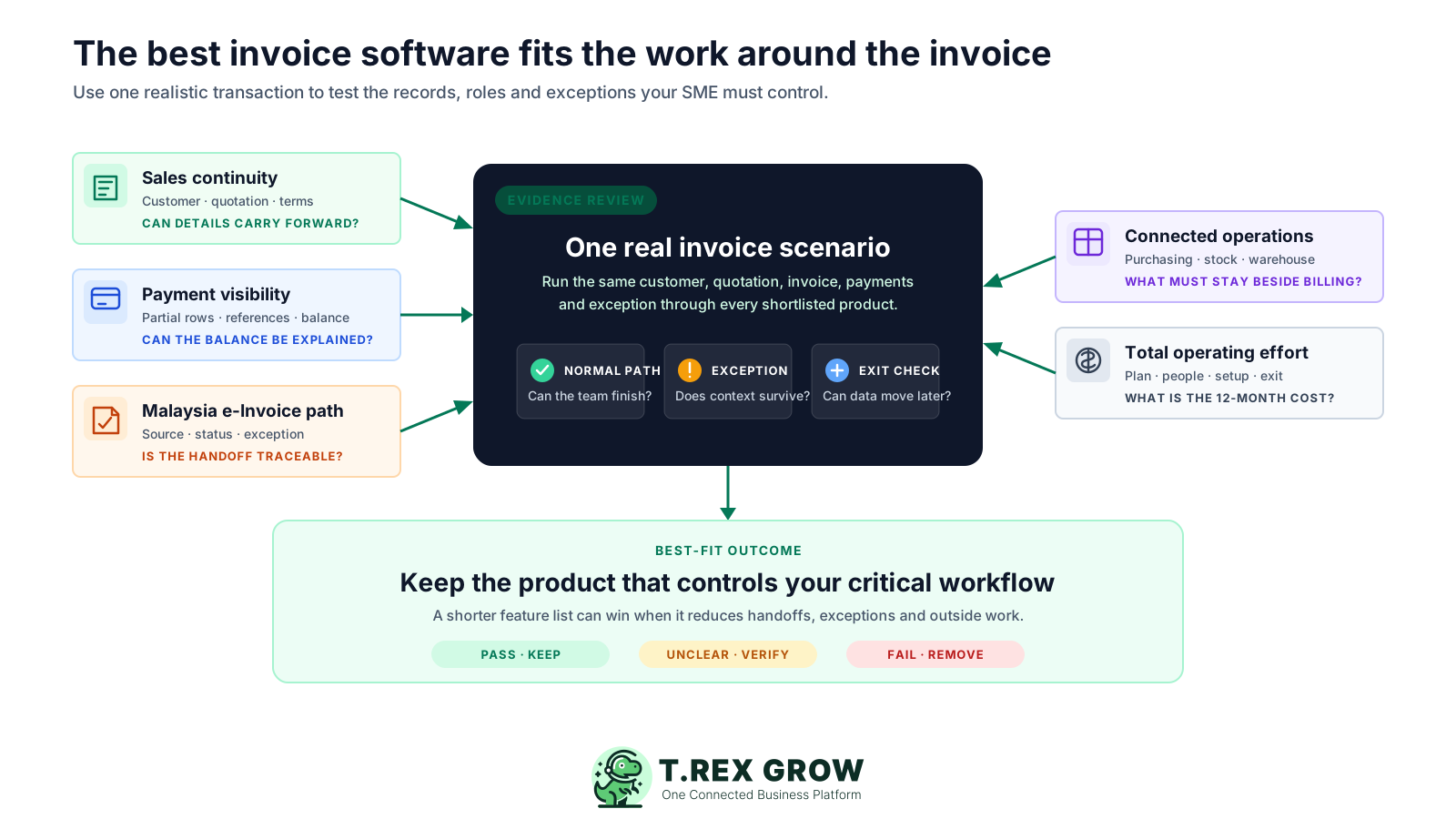
This guide is for Malaysian SMEs that need more than an attractive invoice template. It is most useful when several people touch the customer, quotation, invoice, payment, inventory, or e-Invoice record and the team needs a defensible shortlist rather than a universal winner.
Operational pressure
When records live in different places, the person responsible has to reconstruct what happened before they can make a confident decision or follow up.
The business can create invoices today, but version control, status, customer context, partial payments, and follow-up depend on filenames or personal knowledge.
You need to understand whether the product supports the relevant submission path and how source data, returned status, and exceptions stay connected.
The people agreeing prices and terms are not always the people issuing, adjusting, following, or recording settlement against the invoice.
A standalone billing tool may be too narrow when delivery, stock, supplier documents, or warehouse activity must remain traceable to the commercial record.
You want to compare users, quotas, add-ons, implementation, support, and migration effort instead of relying on the smallest advertised price.
If an accountant, group company, regulator, or integration already requires a specific accounting or ERP system, confirm that constraint before using this shortlist.
Start with the work the team must control, then score each product using the same evidence. A lower-cost tool can be the best fit for a simple portal-led process, while a broader platform can be better when one invoice depends on sales, purchasing, inventory, or warehouse records.
Check whether customer, items, agreed prices, terms, references, and ownership carry into the invoice without being retyped.
Test draft and final states, due dates, credit or debit notes, refunds, and the ability to explain the current commercial position.
Confirm whether partial payments, dates, methods, references, evidence, total paid, and outstanding balance remain traceable.
Review source-data requirements, transmission mechanism, returned status, cancellation or correction path, and current HASiL guidance.
Decide whether general ledger, bank feeds, reconciliation, financial statements, and accountant collaboration are primary selection criteria.
Check whether purchasing, supplier documents, stock movement, locations, picking, and inventory counts need to sit beside invoicing.
Include users, quotas, add-ons, support, onboarding, migration, data export, training, and the work required outside the product.
Use the same live business scenario for every shortlisted product.
| Criterion | Test evidence | Decision signal |
|---|---|---|
| Sales continuity | Create a customer and quotation, then produce the invoice. | Details carry forward with a visible source reference. |
| Invoice control | Change a term, finalise the record, and create an adjustment. | The current position and history remain understandable. |
| Settlement | Record two partial payments with different references. | Paid and outstanding amounts can be explained without another sheet. |
| e-Invoice | Review the supported submission, status, and exception path. | The operating record remains connected before and after transmission. |
| Team fit | Ask one sales user and one finance user to complete their tasks. | Both roles can act without sharing private workarounds. |
Most poor software choices are not caused by one missing button. They happen when the shortlist is built around marketing labels instead of the records, people, exceptions, and total effort the business must manage every week.
Recurring issues usually point to workflow-control gaps, not one isolated data-entry mistake.
Transmission support does not by itself organise customer data, source approvals, returned statuses, corrections, payment evidence, or internal ownership.
Discount periods, currencies, SST, annual billing, user charges, quotas, and paid add-ons can change the effective cost materially.
A comprehensive ledger-led product may be valuable, but it can add setup and training when the immediate problem is operational document control.
A fast invoice generator can still leave quotation, delivery, purchasing, inventory, adjustments, and payment follow-up in disconnected tools.
Invoice counts, e-Invoice counts, users, companies, storage, emails, transaction recommendations, and support levels should be tested against normal and peak volume.
Confirm what can be imported, exported, retained after cancellation, and handed to an accountant before important business history enters the system.
This is a fit comparison, not a paid ranking. Product and pricing claims below were checked against the named providers' official pages and current TREX Grow product sources on 9 August 2026. Features, promotions, taxes, limits, and terms can change, so verify the official pages before purchase.
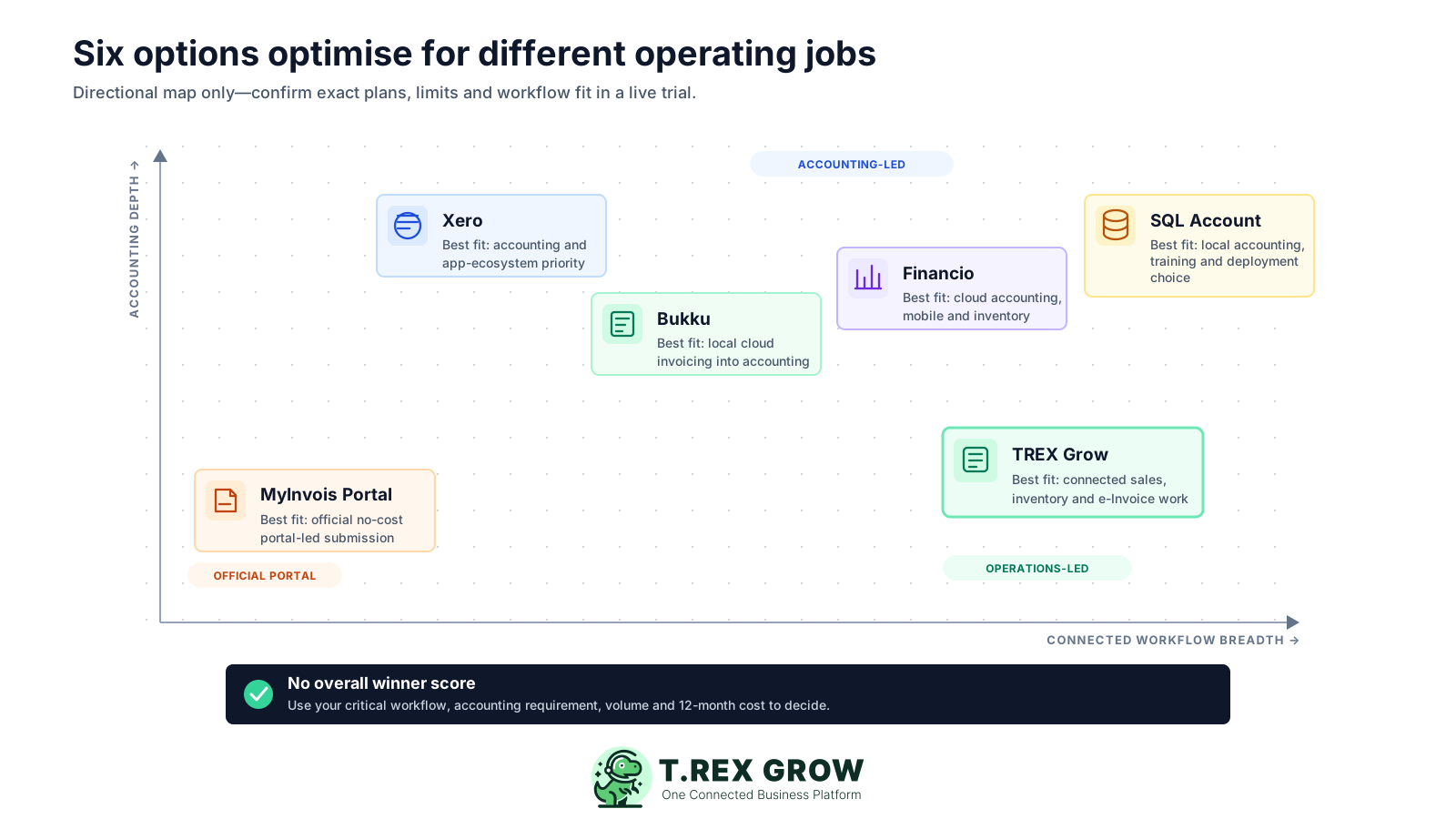
Published starting points and practical checks, reviewed 9 August 2026. Prices exclude any unlisted tax, payment, add-on, implementation, or partner fees.
| Option | Best fit | Published starting point | Check before choosing |
|---|---|---|---|
| MyInvois Portal | Taxpayers wanting the official no-cost portal, especially without a business ERP or API connection. | RM 0 from HASiL. | Plan how quotations, payment follow-up, inventory, approvals, and internal handoffs will be controlled around the portal. |
| TREX Grow | Malaysian SMEs prioritising connected customers, quotations, invoices, payment evidence, purchasing, inventory, warehouse work, and supported e-Invoice handling. | Free RM 0; Starter RM 120/year; Essential RM 240/year; Premium RM 380/year. Unlimited users and products are listed across plans. | Starter and higher plans include Accounting Beta. Its calculations, postings and reports may be incomplete or inaccurate, so choose an accounting-first product when reliable ledger, reconciliation and statutory reporting are the primary jobs. |
| Bukku | Startups and SMEs wanting local cloud invoicing that can expand into accounting, bank feeds, reports, and inventory. | Launch RM 0; Seed RM 35/month plus 8% SST. Current plans list unlimited users. | Review transaction guidance, storage, email and extraction quotas, plus the plan or add-ons required for SST and multi-currency. |
| Financio | SMEs wanting cloud accounting, bank reconciliation, mobile access, inventory, and published invoice and e-Invoice allowances. | Accounting Essentials RM 50/month; Premier RM 85/month, with a 30-day trial. | Essentials lists 20 invoices and 25 LHDN e-Invoices per month; check volume, currency, locations, support, and post-trial data terms. |
| SQL Account Cloud | Malaysian SMEs prioritising local accounting, invoicing, reports, bank connection, training, and public, private, or hybrid deployment choices. | Essential RM 79/month; Pro RM 109/month; the page lists RM 60 per additional user. | Inventory and multi-currency are listed under Pro; confirm company, user, deployment, support, and implementation terms with the provider. |
| Xero | Accounting-first businesses wanting bank feeds, reconciliation, reporting, online-payment options, and a broad app ecosystem. | Lite standard USD 7/month, currently USD 3.50/month for 36 months under an offer ending 31 December 2026. | Lite lists five invoices; compare the required plan, USD billing, payment fees, add-ons, Malaysia e-Invoice setup, and integration costs. |
The best practice is to make the next action clear before the situation becomes urgent.
A product tour shows the happy path. A short controlled trial shows whether the product fits your data, roles, exceptions, and next actions. Use the same customer and scenario in every product so the result is comparable.
Record the current facts in one shared place.
Confirm what is known and what needs attention.
Make the next decision or follow-up accountable.
Complete the next task and record the outcome.
Refresh the shared view when facts change.
A dependable workflow keeps the shared record and the next action aligned.
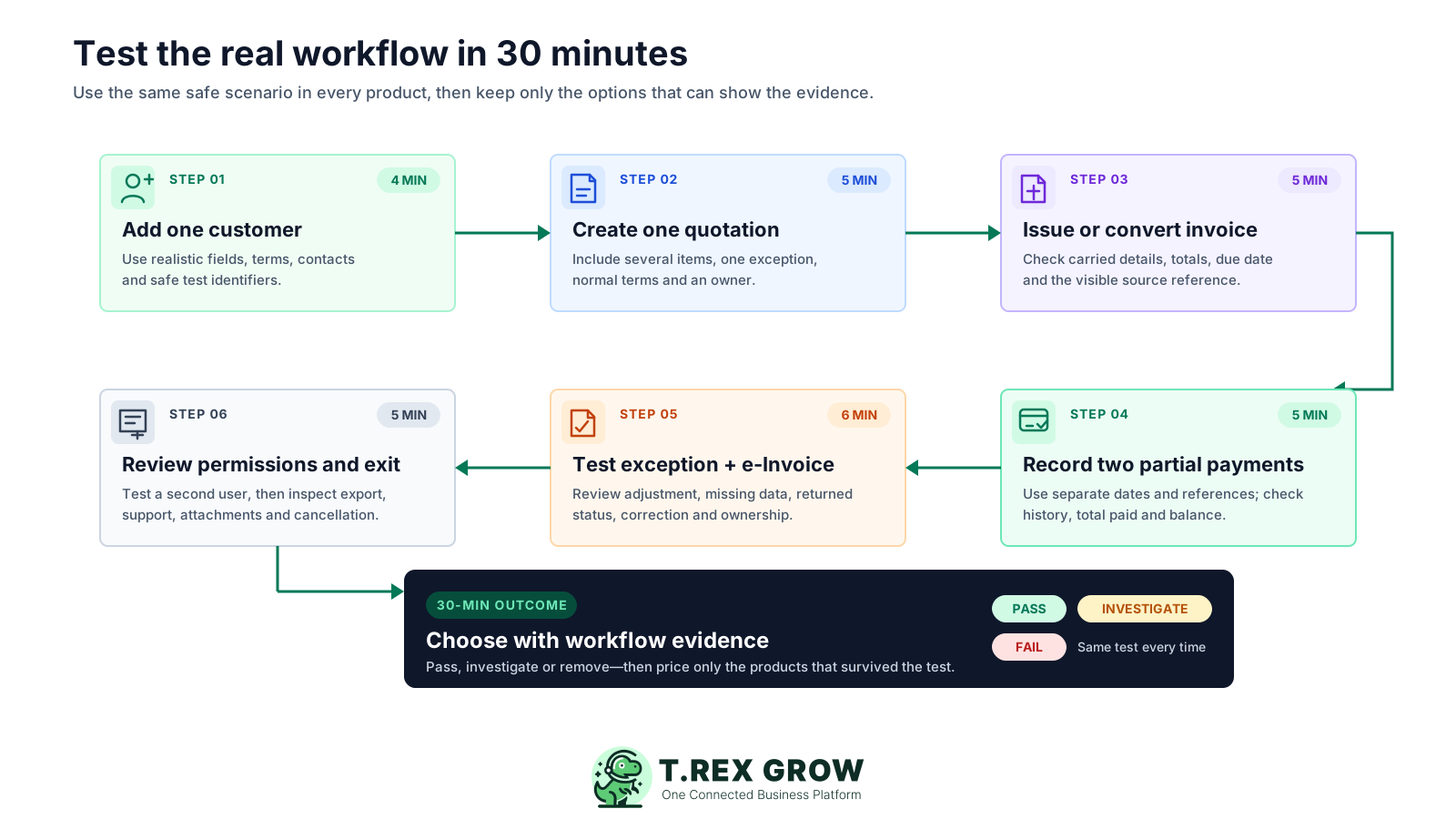
Add one real customer: use safe test data that reflects the fields, payment terms, contacts, addresses, and identifiers your team normally maintains.
Create one representative quotation: include several items, a discount or milestone, normal terms, an owner, and the source information needed later.
Convert or issue the invoice: check which details carry forward, how totals and due timing are controlled, and whether the source reference remains visible.
Record two partial payments: use different dates and references, then confirm that total paid, outstanding balance, and payment history remain explainable.
Test an exception and the Malaysia e-Invoice path: create an adjustment or incomplete-data case and inspect the review, returned status, correction, and ownership flow.
Review permissions and data exit: ask a second user to complete a task, then inspect export, attachment, audit, cancellation, support, and migration options.
Score the evidence, not the sales presentation.
| Result | Meaning | Next action |
|---|---|---|
| Pass | The normal and exception paths work with acceptable effort. | Keep the product on the shortlist. |
| Investigate | The job may be possible, but a plan, add-on, integration, or workaround is unclear. | Get the answer and cost in writing. |
| Fail | A critical record, role, control, or export cannot be demonstrated. | Remove the product or redefine the requirement explicitly. |
TREX Grow is a strong fit when invoice work is part of a wider SME operating flow. It keeps customer and quotation context close to the invoice, retains adjustment and payment evidence, and connects supported sales, purchasing, inventory, warehouse, and Malaysia e-Invoice work without requiring a heavyweight ERP rollout.
Trading, distribution, service, and project SMEs that need several operating records to stay connected across sales, finance, purchasing, and inventory teams.
Carry customer and source-document context into invoicing so the team does not reconstruct agreed items, references, prices, and terms.
Keep totals, due timing, document state, supported credit, debit, and refund context, and the current commercial position readable.
Retain multiple payment-history rows, references, remarks, and supported evidence. TREX Grow does not send money; its bank-reconciliation workflow is part of Accounting Beta and requires qualified review before reliance.
Keep source data, review, submission status, and returned evidence beside the operating record, subject to current HASiL requirements and company configuration.
Free includes core customers, quotations, invoices and Malaysia e-Invoice submission. Starter adds complete sales documents, attachments, multi-currency and Accounting Beta; Essential adds purchasing and inventory; Premium adds advanced warehouse depth.
Choose an accounting-first product when dependable general ledger, financial statements, bank feeds, reconciliation or an accountant-led ecosystem is the non-negotiable centre of the decision. TREX Grow Accounting remains a Beta module.
The TREX Grow invoice list keeps the customer, source quotation, document status, due timing, amounts, adjustment context, and payment position in one searchable operating view. The image uses safe demo records and is product proof, not a conceptual mock-up.
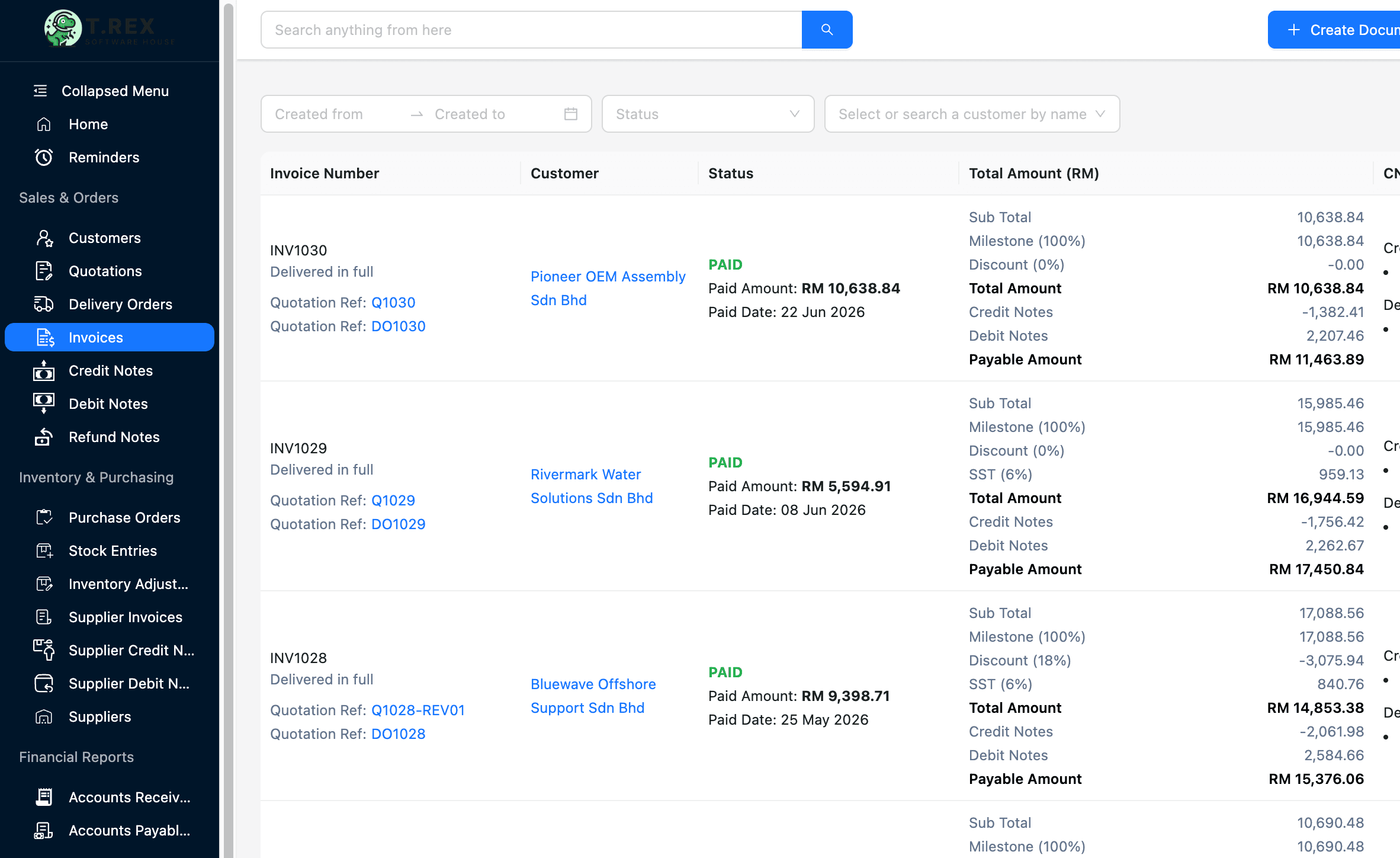
See which quotation or sales record supports the invoice before investigating an exception.
Use the invoice and payment position to identify which records need review or follow-up.
Compare invoice totals with supported adjustment and payment context from the shared list.
Inside the invoice, the team can review the source quotation, customer, items, terms, due date, document position, and payment-history rows together. This supports an explainable follow-up trail without claiming that TREX Grow executes or reconciles the bank transaction.
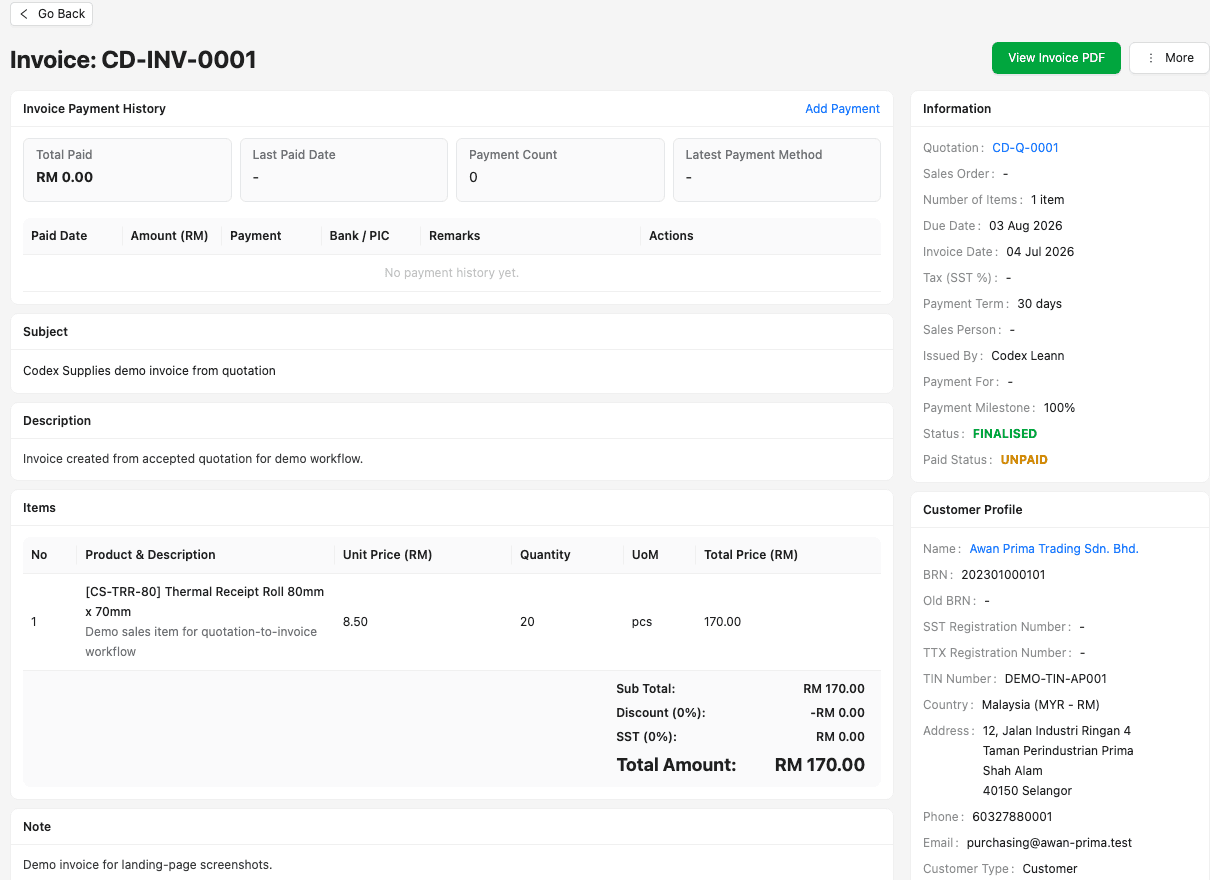
Review the customer, source document, commercial lines, terms, and current status from one record.
Keep separate dates, amounts, methods, references, remarks, and supported evidence for instalments or partial settlement.
Use the invoice record and payment history to understand total paid and outstanding context before the next customer action.
The smallest monthly figure is only one part of the decision. Build a 12-month view using the plan the business actually needs, then include staff time, setup, migration, support, add-ons, payment fees, hardware, integrations, and the work that still happens outside the product.
Check invoice, e-Invoice, transaction, storage, email, document-extraction, company, and user limits against busy months, not only averages.
Map each must-have workflow to the exact plan, then add SST, multi-currency, inventory, warehouse, attachment, payroll, payment, or integration charges.
Estimate customer, item, opening document, template, permission, and historical-data preparation, including any partner or consultant work.
Confirm who supports setup and daily exceptions, which channels are included, and whether training or response expectations depend on the plan.
Understand export formats, attachments, audit history, read-only periods, cancellation handling, and what happens when a subscription ends.
Record which prices are promotional, which are billed in foreign currency, and which product claims need to be rechecked before approval.
Use one worksheet for every candidate so the totals are comparable.
| Cost area | What to include | Evidence |
|---|---|---|
| Subscription | Required plan, billing period, tax, currency, promotion end, and renewal price. | Official pricing page and written quote. |
| People and usage | Users, companies, invoices, e-Invoices, storage, messages, scans, and transactions. | Normal and peak-volume worksheet. |
| Implementation | Migration, setup, template work, training, integrations, hardware, and consultant time. | Scoped onboarding plan. |
| Outside work | Spreadsheets, portal entry, bank reconciliation, duplicate checks, and exception handling that remain manual. | Observed trial steps and staff time. |
A shortlist is not ready for management approval until the team has checked access, security, support, data ownership, exports, cancellation, and the latest official e-Invoice guidance. Ask each provider the same questions and keep the answers with the decision record.
Confirm which users can view, create, approve, adjust, submit, export, and administer sensitive customer and financial records.
Review authentication, encryption, backups, recovery approach, monitoring, incident handling, and any published security documentation.
Confirm export formats, attachment access, history, retention, deletion, and assistance available if the company changes products.
Know who answers product, setup, billing, integration, and e-Invoice workflow questions and what service is included in the chosen plan.
Treat software as workflow support, not a universal tax, legal, accounting, or compliance guarantee for the business.
Recheck HASiL guidance and every shortlisted provider's official feature, pricing, quota, promotion, and contract pages immediately before purchase.
The best practice is to make the next action clear before the situation becomes urgent.
Start with the Free plan for customers, quotations, invoices, products, users, and supported Malaysia e-Invoice submission. If purchasing, inventory, or warehouse depth matters, use the 30-day paid-plan trial and score the same scenario before deciding.
There is no universal winner. TREX Grow is a strong fit for connected operational documents, inventory, and supported e-Invoice workflows; accounting-first businesses may prefer Bukku, Financio, SQL Account, or Xero, while a simple official portal-led process may suit MyInvois Portal. Test your non-negotiable workflow before choosing.