POs live in files and chat
The supplier order exists, but the latest commercial terms, approval evidence, receipt and invoice references sit in separate places.

The best PO software is the option that controls your real commitment from supplier and approval through receiving and supplier billing. Compare six credible products across five buying models, then prove the fit with one repeatable trial.

This guide is for a Malaysian SME replacing PO templates, disconnected approval messages or a narrow purchasing document. It is most useful when the shortlist mixes products built around different operating jobs.
Operational pressure
When records live in different places, the person responsible has to reconstruct what happened before they can make a confident decision or follow up.
The supplier order exists, but the latest commercial terms, approval evidence, receipt and invoice references sit in separate places.
Purchasing knows what was ordered while the warehouse knows what arrived, yet nobody has one reliable outstanding quantity by item.
The team needs a review checkpoint but has not decided whether that means direct PO approval or a deeper requisition, budget and routing process.
Supplier invoices begin as fresh data entry because the PO and receiving records do not provide usable source context.
Accounting, inventory, ERP, connected operations and dedicated procurement products all appear under purchase-order search results.
Owners need a dated, defensible buying record based on the same workflow, exception and commercial checks for every option.
A useful comparison begins with the commitment the PO represents and the evidence required after it is issued. Score every product against the same criteria and mark any unproven claim for follow-up instead of assuming it exists.
Check supplier, item, quantity, price, currency, tax, delivery, payment terms, address, numbering, attachments, revision and document output.
Separate direct finalisation, PO approval, multi-step routing, thresholds, delegation, requisitions and budget control because they are different requirements.
Test ordered, received, rejected and outstanding quantities, partial deliveries, dates, locations, attachments and the owner of each receipt.
Confirm whether the supplier, items, PO reference and received position continue into the bill or supplier invoice without hiding differences.
Decide whether the purchase is led by stock control, dependable accounting, connected operations or broader ERP and procurement needs.
Verify currency, SST, e-Invoice-related downstream work, local support, implementation partners and professional accounting or tax review.
Include the required plan, users, order volume, companies, locations, apps, tax, services, migration, integration, training and internal time.
Inspect permissions, history, export, attachments, retention, cancellation and how the company will move if requirements change.
Use one safe supplier scenario so every result remains comparable.
| Evaluation area | Test evidence | A practical result |
|---|---|---|
| Commitment | Create a PO with the required supplier, items, quantities, prices, terms, dates and output. | The issued order states exactly what the company approved. |
| Approval | Ask a preparer and authorised reviewer to complete the real decision path. | Available actions and history match responsibility. |
| Receiving | Record a partial delivery and inspect received and outstanding quantity by line. | The system distinguishes the order from the accepted receipt. |
| Invoice handoff | Continue from the PO or receipt into a supplier invoice or bill with one difference. | Finance can see the source and explain the difference. |
| Commercial fit | Identify the exact plan, users, volume, add-ons, services, currency, tax and renewal basis. | The quoted scope covers the tested workflow. |
| Exit | Export representative purchase records and retrieve their attachments. | The company can retain usable evidence outside the product. |
A purchase order screen is only one part of the decision. The important differences appear in approval scope, receiving, invoice continuation, implementation and the work that remains outside the system.
Recurring issues usually point to workflow-control gaps, not one isolated data-entry mistake.
Several products can print a professional PO while providing very different control over revisions, approvals, receipts and supplier invoices.
A single permission checkpoint is not the same as requisition intake, amount thresholds, multi-level routing, delegation, budget checks or escalation.
A full receipt hides whether the system can preserve line-level ordered, received and outstanding quantities after a normal exception.
A linked PO, receipt and supplier invoice do not automatically mean the product performs configurable automated matching or exception resolution.
The lowest published plan may exclude the users, volume, locations, apps, workflow controls, implementation or support needed for live use.
A purchase order is not itself a Malaysia e-Invoice. Validate supplier-invoice, accounting, tax and record-keeping requirements separately.
This is an editorial shortlist, not a paid ranking. TREX Grow has no sponsorship, endorsement, affiliation or partnership with Odoo, Zoho Inventory, SQL Account Cloud, Xero or Precoro. Product and pricing claims were checked against official sources on 30 August 2026; verify the live product, local configuration and quote before purchase.
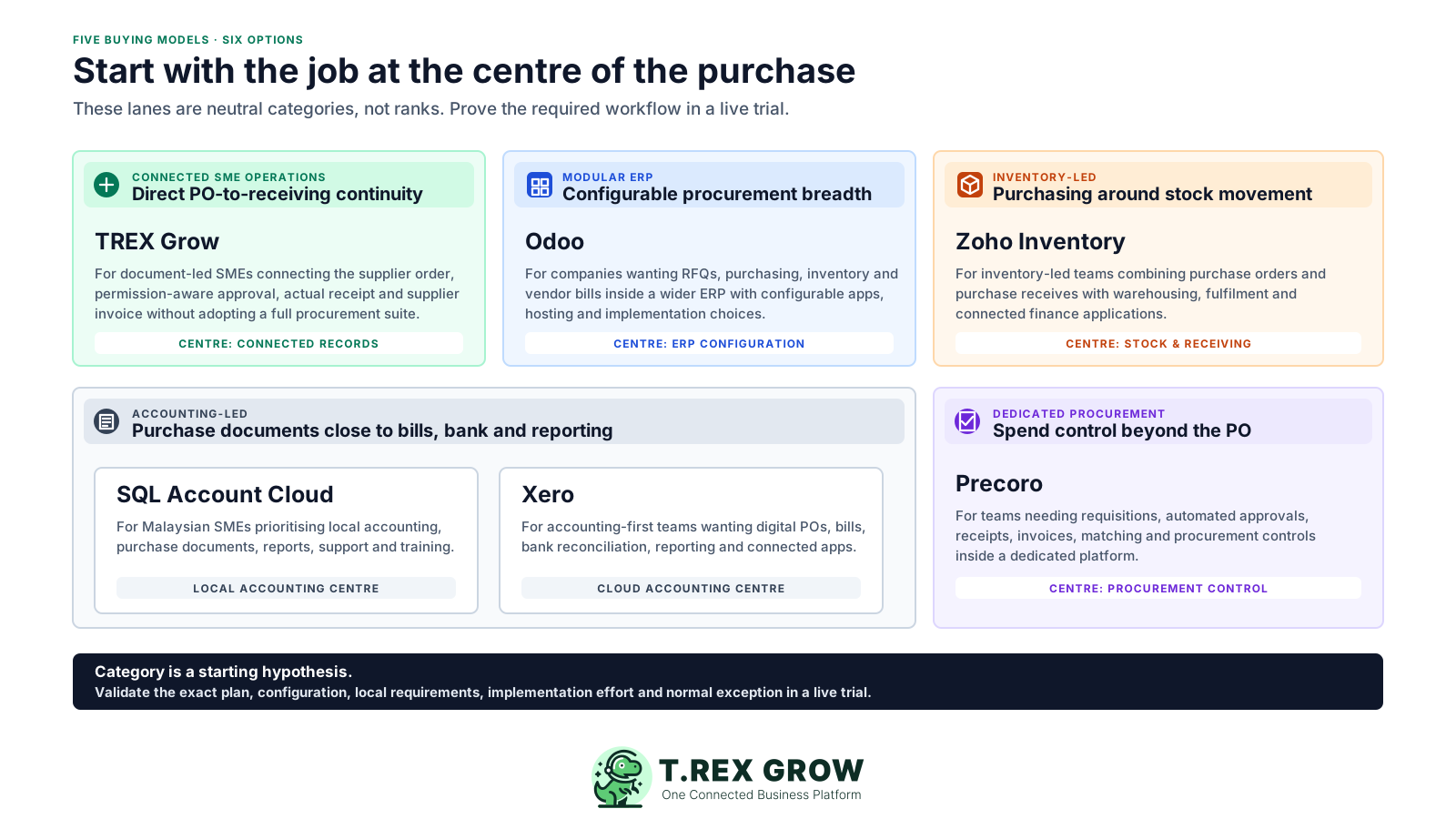
Published starting points and practical checks, reviewed 30 August 2026. Prices exclude any unlisted tax, payment, add-on, implementation, partner, migration or integration fees.
| Option | Best-fit purchasing job | Published starting point or model | Check before choosing |
|---|---|---|---|
| TREX Grow | Document-led Malaysian SMEs wanting a direct PO workflow connected to approval, receiving, supplier invoicing and inventory records. | Purchase Orders are on Essential at RM 240/year and Premium at RM 380/year. Current Malaysia plans list unlimited users and products and a 30-day paid-plan trial. | Confirm the direct approval path and plan fit. TREX Grow does not claim purchase requisitions, budget enforcement, tendering, supplier portal, automated three-way matching, advanced routing or automatic low-stock PO creation. |
| Odoo | Companies wanting modular ERP procurement breadth including RFQs, purchasing, inventory, vendor billing and configurable expansion. | One App Free is listed at USD 0 with one app and unlimited users. Standard and Custom are per-user plans; the official page currently displays first-year promotional pricing. | Confirm Malaysia localisation, required apps, hosting, configuration, custom development, implementation or partner services and which advanced purchase features must be enabled. |
| Zoho Inventory | Inventory-led businesses wanting purchase orders and purchase receives alongside stock, warehousing, fulfilment and connected finance apps. | Free lists 50 orders, 1 user and 2 locations. Standard lists USD 29/organisation/month billed annually with 500 orders, 2 users and 2 locations; local taxes are excluded. | Confirm what counts as an order, the approval behaviour and plan, extra users, locations or volume, accounting integration and Malaysia-specific finance requirements. |
| SQL Account Cloud | Malaysian SMEs whose purchase documents need to sit close to local accounting, invoicing, bank connection, reports, support and training. | Essential is listed at RM 79/month and Pro at RM 109/month, with RM 60 per additional user. Pro adds inventory, multi-currency and advanced sales and purchase reports. | Demonstrate the exact PO creation, approval, goods-receiving and purchase-invoice path; confirm user scope, deployment, support, migration and the required plan. |
| Xero | Accounting-led businesses wanting digital purchase orders that can continue into bills within an accounting and connected-app environment. | Malaysia Lite is listed at USD 7/month standard, currently USD 3.50/month for 36 months under an offer ending 31 December 2026. The Malaysia page lists digital purchase orders as a popular feature. | Verify the required plan, PO approval behaviour, receiving or inventory needs, bill conversion, USD billing, invoice or bill limits, add-ons and Malaysia configuration. |
| Precoro | Teams needing a dedicated procurement and spend-control platform with requisitions, approvals, receipts, invoices and matching. | Core starts at USD 499/month billed annually and lists PRs, POs, receipts, invoices, 2- and 3-way matching, automated approvals and custom workflows. | Confirm the final quote, included users, implementation, integrations, regional hosting and how Malaysia accounting, tax and e-Invoice work will connect downstream. |
The best practice is to make the next action clear before the situation becomes urgent.
Use safe representative data and the same supplier scenario for every option. Include a partial receipt and one supplier-invoice difference so the trial exposes the handoffs that a clean product demonstration can hide.
Record the current facts in one shared place.
Confirm what is known and what needs attention.
Make the next decision or follow-up accountable.
Complete the next task and record the outcome.
Refresh the shared view when facts change.
A dependable workflow keeps the shared record and the next action aligned.
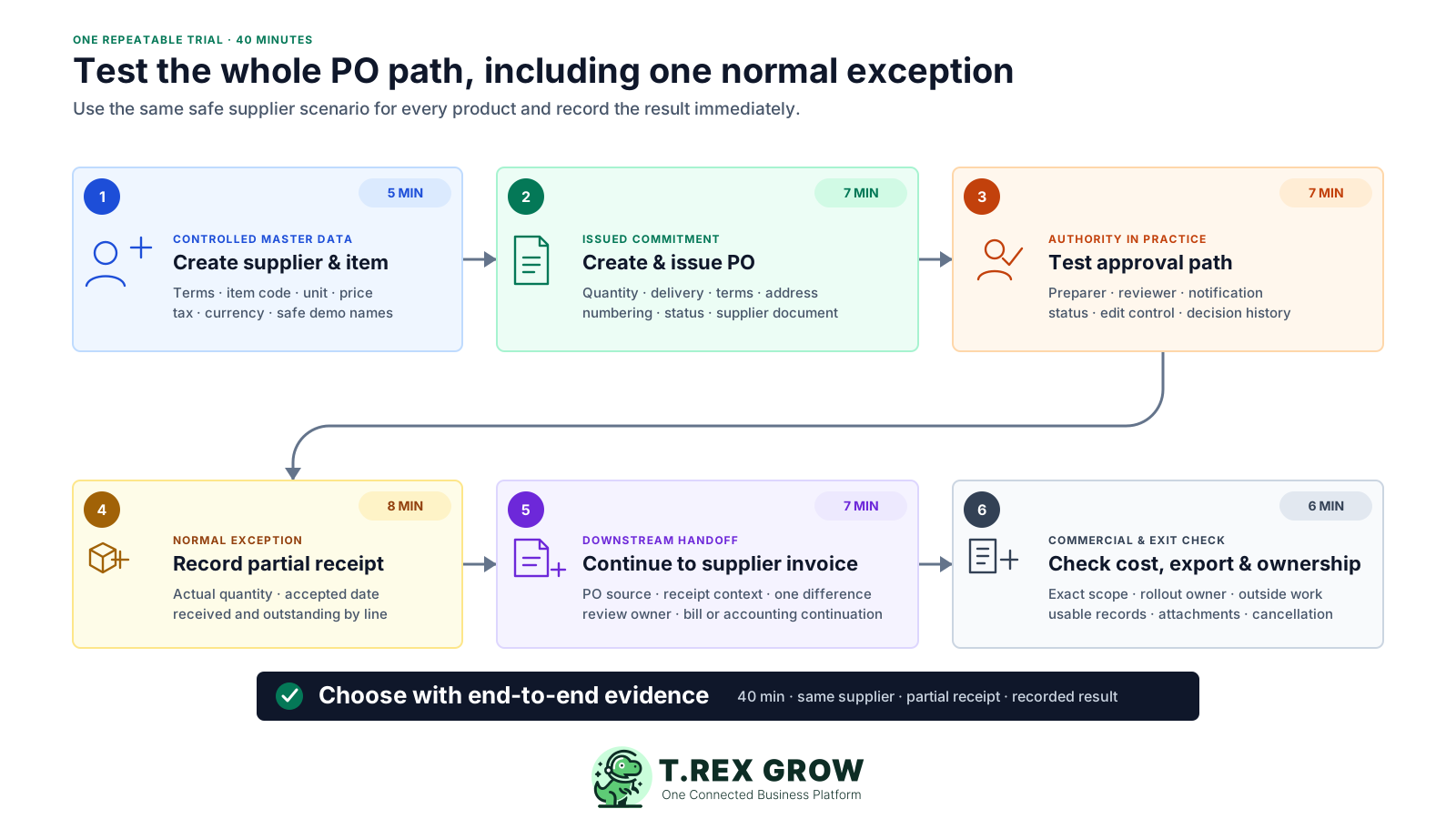
Create the supplier and item: use safe representative names, supplier terms, item code, unit of measure, price, tax and currency required by the scenario.
Create and issue the PO: enter quantity, expected delivery, payment terms, delivery address, attachments and notes, then inspect numbering, status and the supplier-facing document.
Test the approval path: ask a preparer and authorised reviewer to perform the real action, then inspect notifications, status, edit controls and decision history.
Record a partial receipt: receive less than ordered, preserve the accepted quantity and date, and check the line-level outstanding position without changing the original commitment.
Continue to the supplier invoice: start from the PO or receipt where supported, introduce one quantity or price difference and confirm who reviews the exception.
Check cost, export and ownership: identify the exact live scope, implementation owner, remaining manual work and the usable records or attachments the company can export.
Do not let an unanswered capability become an assumed pass.
| Result | Meaning | Next action |
|---|---|---|
| Pass | The issued PO, approval, partial receipt and supplier-invoice handoff work with acceptable effort and clear ownership. | Keep the option and verify commercial, security and implementation terms. |
| Investigate | The path may work, but a plan, configuration, add-on, integration, partner service or local requirement is unclear. | Get the delivery scope, owner, cost and evidence in writing. |
| Fail | A critical record, role, exception, downstream handoff or export cannot be demonstrated. | Remove the product or explicitly redefine the requirement. |
TREX Grow is strongest when a document-led SME wants one direct path from supplier and PO through permission-aware approval, official PO output, receiving, supplier invoicing and controlled completion. It is not a universal replacement for modular ERP, accounting-first software or dedicated procurement and spend management.
Use an active supplier and approved or finalised supplier-assigned products, with quantity, price, currency, delivery, terms, tax, discount and address in one PO.
Users can follow the configured direct finalisation or request-and-approve path, with a draft watermark before the official PO is generated.
PO-linked stock entries record what actually arrived and update received and outstanding quantity against the original order lines.
A supplier invoice can start from the PO with supplier and item context while retaining its own quantities, prices, dates, terms and payment history.
The PO reaches completion only after its downstream readiness conditions are met, then becomes read-only and stops new receiving or invoice records.
Validate another product if requisitions, budget enforcement, tenders, supplier portals, automatic matching, threshold routing, delegation, escalation or specialised integrations are essential.
This real TREX Grow purchase order screen keeps the supplier-facing order subject and item lines beside unit prices, ordered quantities, received quantities, outstanding quantities and units of measure. It shows the operational position without turning a receipt into a silent edit of the original order.
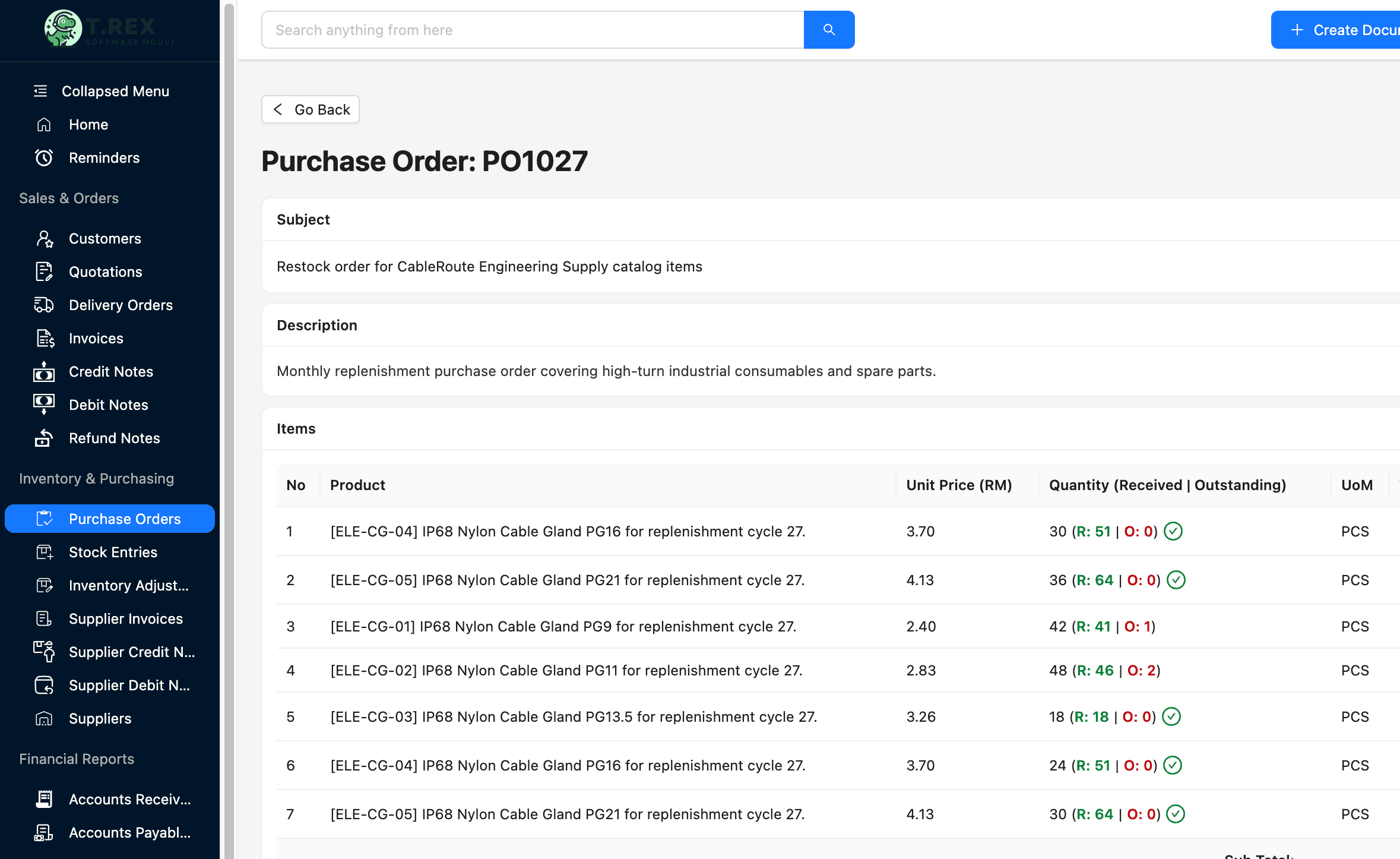
The PO subject, item description, supplier-facing code, unit price, ordered quantity and unit remain visible in one operating view.
Received and outstanding quantities sit beside the ordered amount, making an unfinished delivery visible at the item level.
Purchasing, warehouse and finance teams can return to the same PO number when discussing deliveries, balances and supplier documents.
This safe TREX Grow demo screen starts a stock entry from a finalised PO and carries the supplier, expected quantity and item context into receiving. The warehouse user records the actual receipt and preserves evidence around shortage, oversupply, dates, locations and attachments.
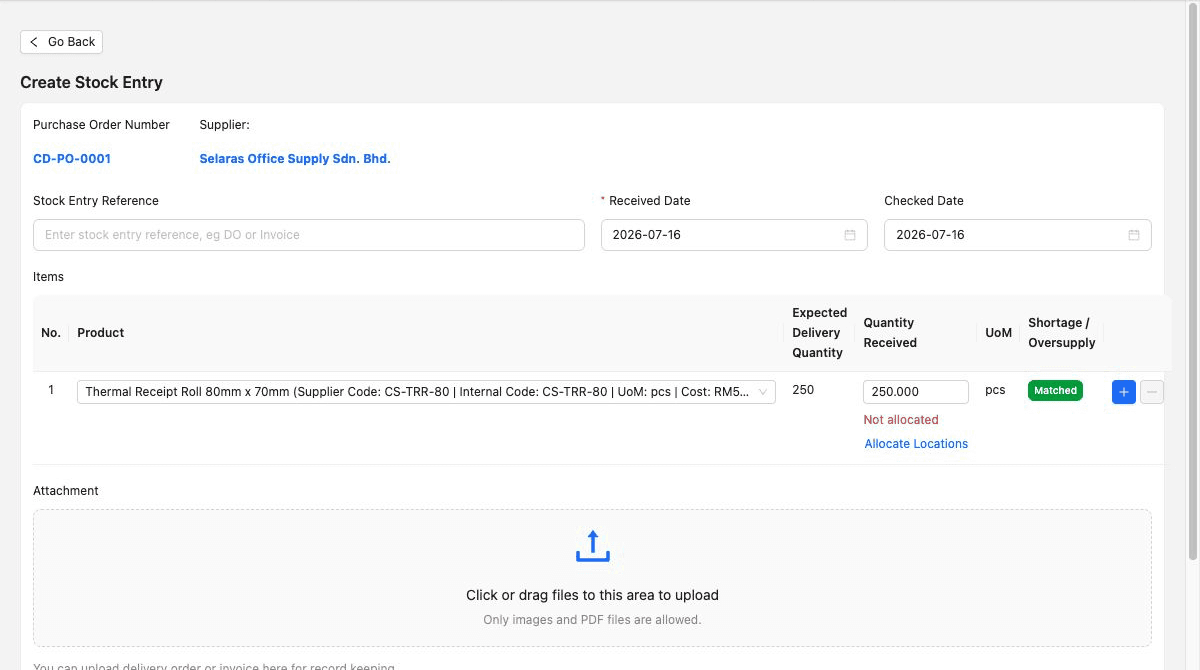
The receiving record carries the relevant order and supplier instead of asking warehouse staff to recreate the source.
The user records what arrived rather than posting the ordered quantity automatically, preserving partial, short or excess delivery context.
Dates, location allocation where applicable, stock-entry reference and attachments help explain what the business accepted.
The six products use different commercial units and implementation models. Build the same twelve-month worksheet for every candidate, separate promotions from standard pricing and count the staff time required to operate the process after launch.
Use the plan, apps and services needed by the trial rather than the lowest public entry point.
Record company, user, app, order volume, location, storage, transaction, integration and annual-contract charges.
Include currency, tax, offer end, promotional period and the standard or quoted renewal basis.
Add supplier and item cleanup, migration, numbering, templates, permissions, training, integrations, partner services and management time.
Estimate recurring time in email, spreadsheets, external portals, duplicate checks, matching and exception follow-up after launch.
Retain written evidence for every amount and assumption.
| Cost area | What to include | Evidence |
|---|---|---|
| Subscription | Required plan or apps, billing period, currency, tax, promotion end and renewal basis. | Official pricing page and written quote. |
| People and volume | Users, companies, locations, purchase orders, receipts, bills, storage and other usage limits. | Normal and peak-volume worksheet. |
| Implementation | Data cleanup, migration, numbering, templates, permissions, training, partner work and integrations. | Named owner, delivery scope and onboarding plan. |
| Outside work | Requisitions, budgets, supplier communication, spreadsheets, matching and exceptions that remain manual. | Observed trial steps and monthly staff time. |
| Change and exit | Support upgrades, customisation maintenance, export, cancellation and replacement-system work. | Contract, service terms and tested export. |
Features, prices and promotions can change after a comparison is written. Re-open every official source, test the actual configuration and keep the final evidence with the software-approval record.
Verify live pricing, plan limits, promotions, approval scope, receiving, matching, integrations and support directly with the provider.
Confirm current Malaysia supplier-invoice, SST, e-Invoice, accounting and record-keeping requirements with official guidance and qualified advisers.
Document user provisioning, authentication, permissions, approval history, backups, incident handling, retention and exported-record access.
Name who cleans supplier and item data, configures numbering and roles, approves templates, trains users and resolves exceptions.
Run the actual accounting, inventory, ERP or reporting exchange required by the business and identify the owner when it fails.
Export representative POs, receipts, supplier invoices and attachments, then confirm cancellation, retention and post-service access.
The best practice is to make the next action clear before the situation becomes urgent.
Use the 30-day paid-plan trial to create a PO, inspect the draft and official document, test your direct finalisation or approval path, record a partial receipt, continue to a supplier invoice and review the completion rule before deciding.
There is no universal winner. TREX Grow may fit a document-led SME connecting POs to receiving and supplier invoices; Odoo may fit modular ERP procurement; Zoho Inventory may fit inventory-led purchasing; SQL Account or Xero may fit accounting-led needs; and Precoro may fit dedicated procurement and spend-control requirements. Test the same real workflow before choosing.