The word refund points in different directions
A customer refund note confirms money returned to a buyer. A supplier refund note handles a supplier-side refund where your company is the buyer and the supplier invoice needs a payable reduction.

A Supplier Refund Note is not the same as a customer refund note or a stock return. In a self-billed workflow, the buyer issues the document for supplier-side refund handling, keeps it linked to the original supplier invoice, and uses it to reduce the payable balance when the refund is approved.
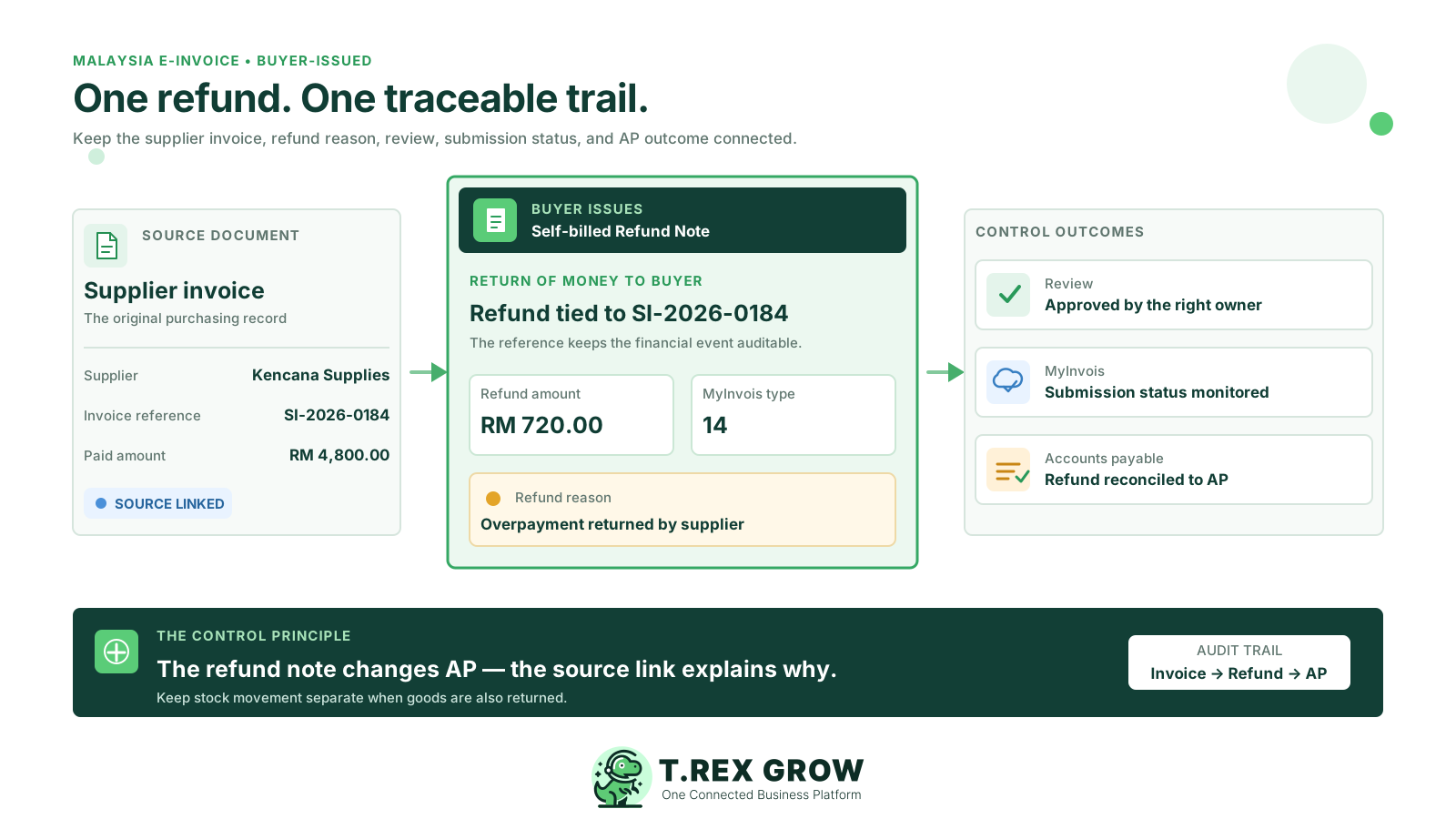
Supplier refund notes sit between purchasing, accounts payable and e-Invoice records. The confusion usually starts when teams use customer-side language for supplier-side transactions or treat every supplier adjustment as a stock return.
Operational pressure
When records live in different places, the person responsible has to reconstruct what happened before they can make a confident decision or follow up.
A customer refund note confirms money returned to a buyer. A supplier refund note handles a supplier-side refund where your company is the buyer and the supplier invoice needs a payable reduction.
A supplier refund note should start from a supplier invoice, not from a sales invoice, quotation or customer account.
If goods physically return to the supplier, the stock workflow should be handled through purchase return records. A supplier refund note is financial and AP-focused.
In self-billed e-Invoice scenarios, the buyer issues the document. The actual supplier remains the supplier party, while your company is the buyer and submitter.
If a supplier refund reduces what your company owes, the payable balance should be traceable back to the supplier invoice and approved refund note.
A supplier refund note should be chosen because of the business event, not because it sounds close to another document name. The clearest test is who is refunding whom, which invoice is affected, and whether any stock movement is involved.
Used on the sales side when your company returns money to a customer or buyer after a sales invoice scenario.
Used on the purchasing side when a supplier-side refund reduces the payable amount linked to a supplier invoice.
Used when a supplier-side adjustment reduces the supplier invoice value, but it may not represent a direct refund event.
Used when a supplier-side adjustment increases the payable amount after the supplier invoice has already been recorded.
Used for the physical return of goods to a supplier and stock-related records. It should not be used as a replacement for every financial refund.
The MyInvois SDK lists Self-billed Refund Note as type code 14. SMEs should still verify current LHDN guidance and their own tax-advisor advice before changing internal policies.
A clean workflow starts from the supplier invoice and keeps the reason, approval, AP impact and LHDN status together. That makes the refund easier to explain during payment review, audit or month-end reconciliation.
Record the current facts in one shared place.
Confirm what is known and what needs attention.
Make the next decision or follow-up accountable.
Complete the next task and record the outcome.
Refresh the shared view when facts change.
A dependable workflow keeps the shared record and the next action aligned.
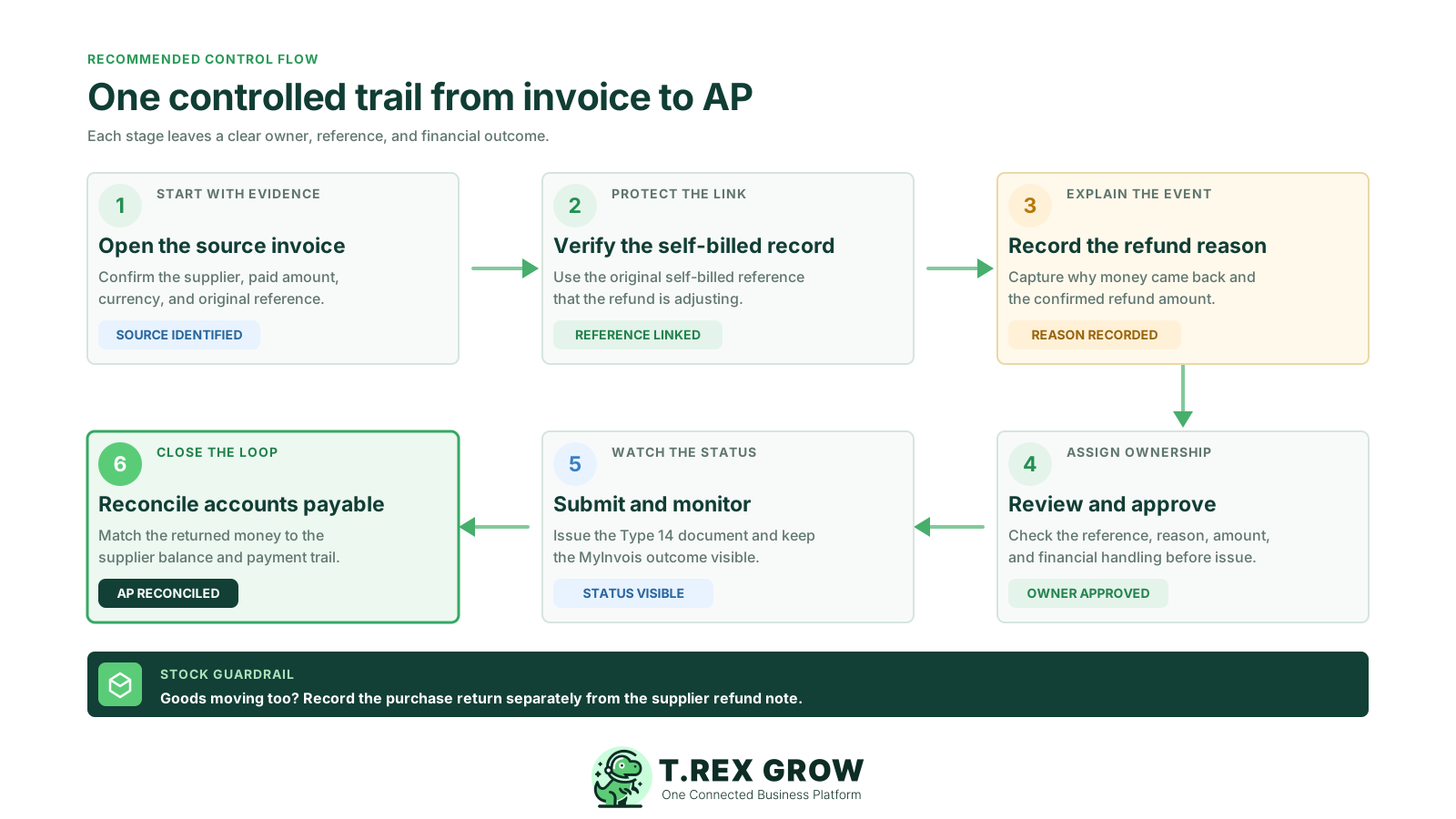
Step 1: Start from the supplier invoice - Confirm the supplier invoice is ready and linked to the relevant supplier, currency, tax, line items and exchange rate.
Step 2: Check the self-billed e-Invoice reference - If the refund note will be submitted, confirm the linked supplier invoice has a valid self-billed LHDN document reference.
Step 3: Confirm the refund reason - Record whether the refund relates to cancellation, price correction, overpayment, rejected service, commercial settlement or another approved reason.
Step 4: Choose financial or stock handling - Use Supplier Refund Note for AP reduction. Use purchase return workflows when goods physically move back to the supplier.
Step 5: Prepare the supplier refund note - Bring over the supplier invoice context and limit product lines to the source supplier invoice when product lines are used.
Step 6: Review and approve - Check supplier identity, company identity, tax, item classification, amount, reason and supporting documents before finalising.
Step 7: Submit and monitor LHDN status - For supported Malaysia self-billed workflows, submit the refund note and track valid, rejected, cancelled or pending states.
Step 8: Reconcile AP - Reduce the supplier invoice payable balance only after the supplier refund note is ready and non-archived, then review payments and outstanding balance.
Most problems come from using the right-sounding note without preserving the correct source record. Supplier refund notes should never become a shortcut around invoice references, approvals or stock controls.
Recurring issues usually point to workflow-control gaps, not one isolated data-entry mistake.
A supplier refund note is stock-neutral. If goods are returned, use the purchase return workflow so inventory remains accurate.
Do not create the refund note as a standalone document. Keep the supplier invoice number and valid LHDN reference available for review.
Customer refund notes reduce AR. Supplier refund notes reduce AP. Mixing them creates reporting and reconciliation errors.
TIN, registration number, address, contact, country, tax and classification fields should be checked before submission.
Supplier refunds affect payable balances and cashflow review, so a controlled approval path is safer than informal message approval.
Some supplier-side changes are credit notes or debit notes. Use the refund note only when the business event is a supplier refund.
A supplier refund note should make month-end review easier, not harder. Keep the document trail short, explicit and easy for finance, purchasing and management to follow.
Require every supplier refund note to link back to one supplier invoice so AP impact and LHDN reference checks are clear.
Standard reasons such as cancellation, price correction, overpayment and commercial settlement make review and reporting easier.
Let purchase return notes handle stock movement while supplier refund notes handle AP and document adjustment records.
Self-billed workflows rely on clean supplier and company information. Review identity, address, TIN, contact and item fields before submission.
Do not assume submission means completion. Monitor whether the document becomes valid, rejected, cancelled or needs follow-up.
A ready, non-archived supplier refund note should reduce the payable amount for the linked supplier invoice.
The best practice is to make the next action clear before the situation becomes urgent.
TREX Grow helps SMEs keep supplier refund note handling connected to purchasing, approval, AP and Malaysia LHDN e-Invoice workflows. The goal is practical traceability from the supplier invoice to the final payable balance.
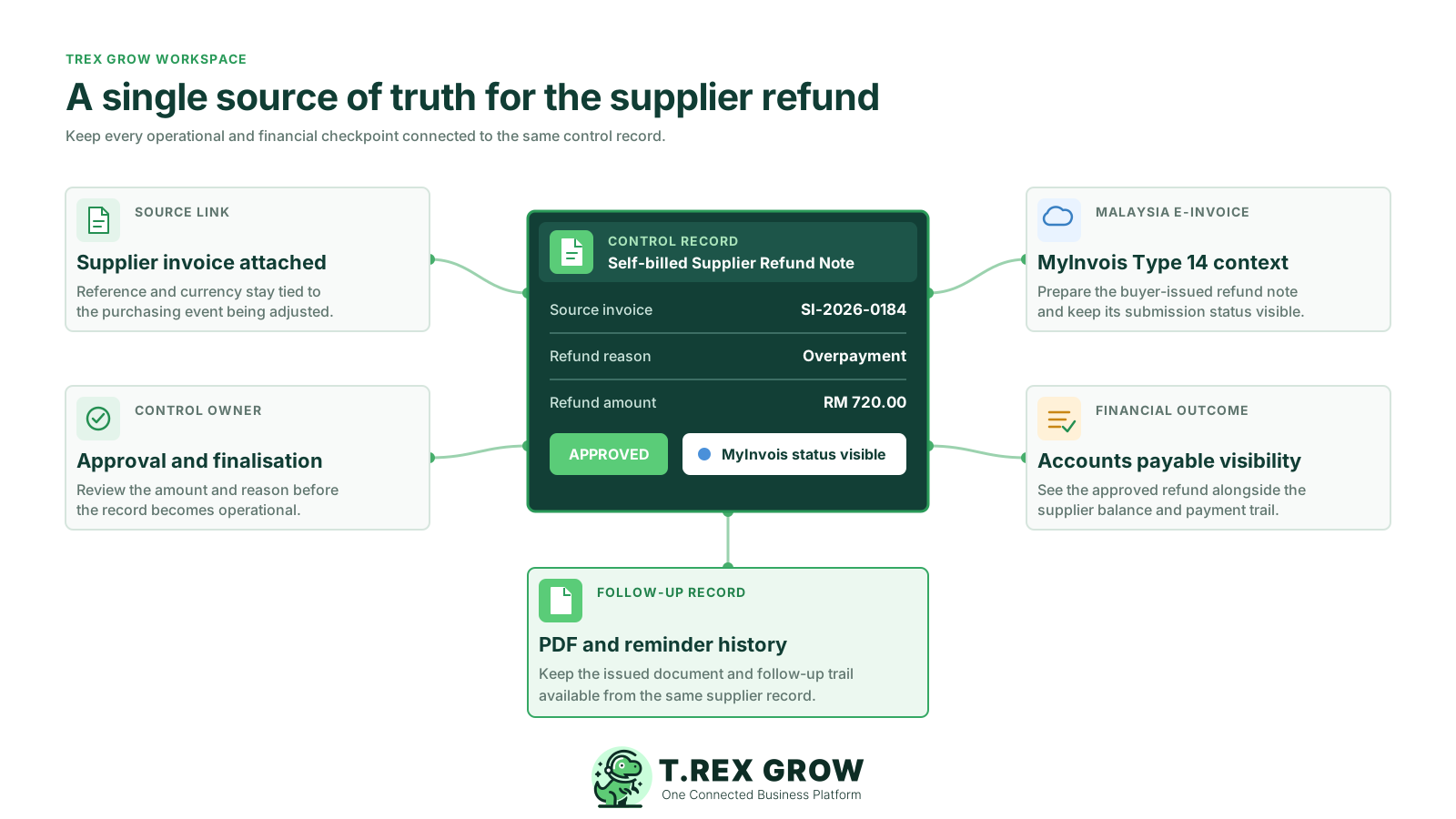
Create the supplier refund note from a source supplier invoice so supplier, currency, tax and line context stay consistent.
Route the document through draft, review and final states so users know when the record can affect payable balances.
Keep document PDFs, remarks and reminders close to the supplier refund note instead of relying on scattered messages.
Reflect ready supplier refund notes in payable calculations so teams can see the reduced outstanding amount on linked supplier invoices.
For supported Malaysia companies, TREX Grow supports self-billed e-Invoice workflows for supplier refund notes without claiming to replace official review or tax advice.
Supplier refunds should not live in separate spreadsheets, chats and manual payment notes. TREX Grow helps Malaysian SMEs keep supplier invoices, approvals, refund notes, AP balances and supported LHDN workflows connected in one operations platform.
It is a supplier-side refund document used in a self-billed workflow where the buyer issues the document and links it back to the affected supplier invoice.