The record is hidden
A tracker shows a subject or amount but does not point to the live quotation, invoice, purchase order, inventory record or expense being reviewed.

Proper tracking keeps the live business record, requester, decision owner, current state, submitted time, last activity and next action together. This guide shows how an SME can manage that queue without turning a spreadsheet count or unread message into false progress.
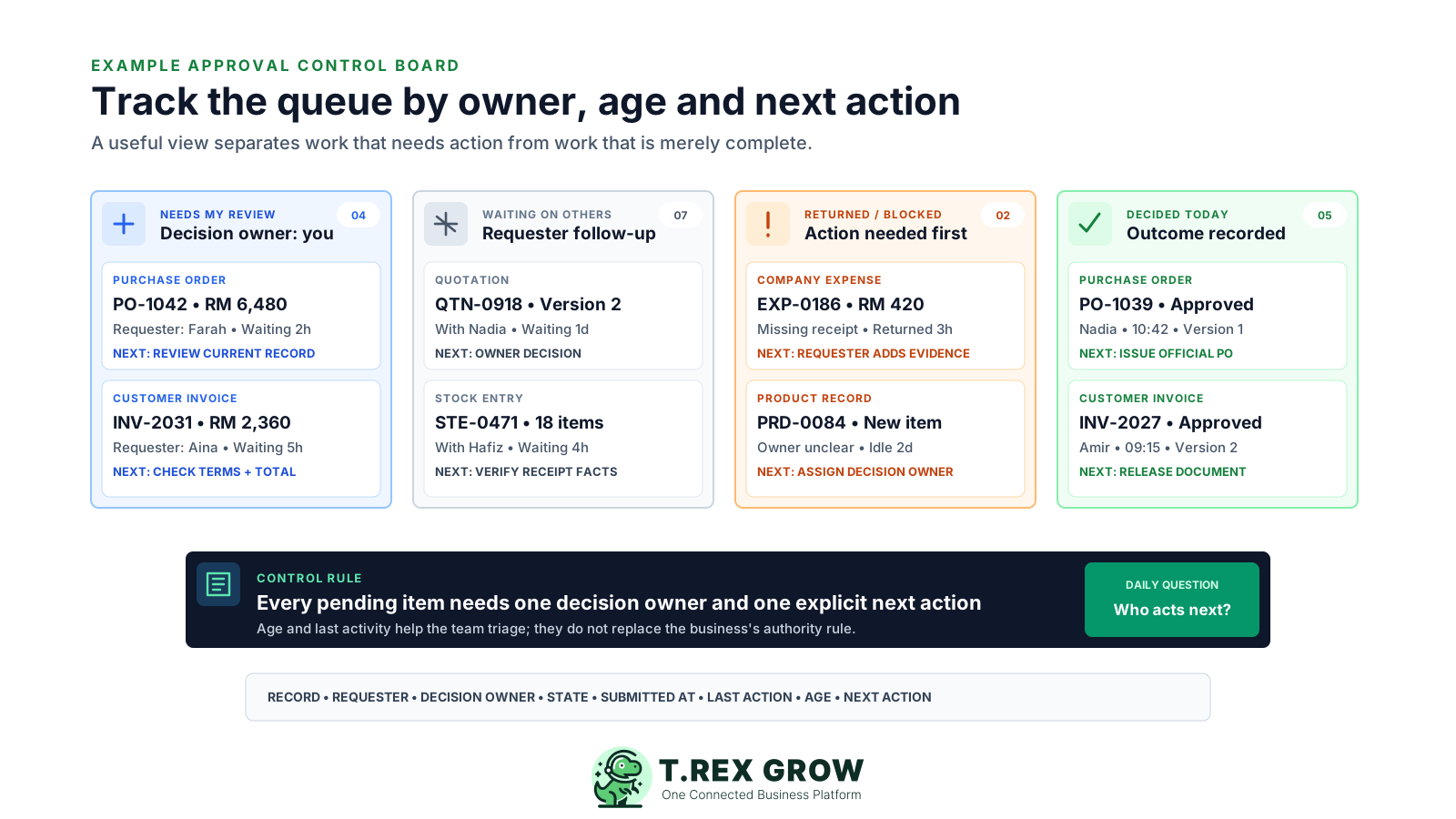
Many SMEs can count pending approvals but cannot explain the work behind the number. A row may lack the current record, owner, last action or reason it is waiting. The list grows while requesters continue chasing through private messages.
Operational pressure
When records live in different places, the person responsible has to reconstruct what happened before they can make a confident decision or follow up.
A tracker shows a subject or amount but does not point to the live quotation, invoice, purchase order, inventory record or expense being reviewed.
The row contains the requester's name while the actual decision owner is missing, or it shows an approver who no longer owns the next action.
The team says an item is old without recording when a complete request entered the queue or when someone last acted.
Missing evidence, changed facts, an absent approver or an unclear authority rule are not separated from a normal pending review.
The decision is marked complete but the next operating owner does not know whether to release, revise, wait or stop the underlying business record.
Approval tracking is first an operating discipline. The immediate goal is to make each active case understandable to the requester, decision owner and manager without asking someone to reconstruct the story.
Identify the live record and version behind the request rather than using only a copied amount, screenshot or email subject.
Show who asked for the decision and who currently has authority and responsibility to act.
Use a small set of states whose meaning is clear, such as Preparing, Pending approval, Returned or blocked, and Decided.
Record when the complete request entered the queue and when its state, evidence, owner or decision last changed.
Write the action and person required to move the case, not a vague note such as follow up or waiting.
When the decision closes, record the result and who must act on the business record afterwards.
A lightweight register can work when each row points to one current approval case and changes as ownership moves. Keep operational views outside the row so the same data can answer who needs to act, which cases are ageing and what has left the queue.
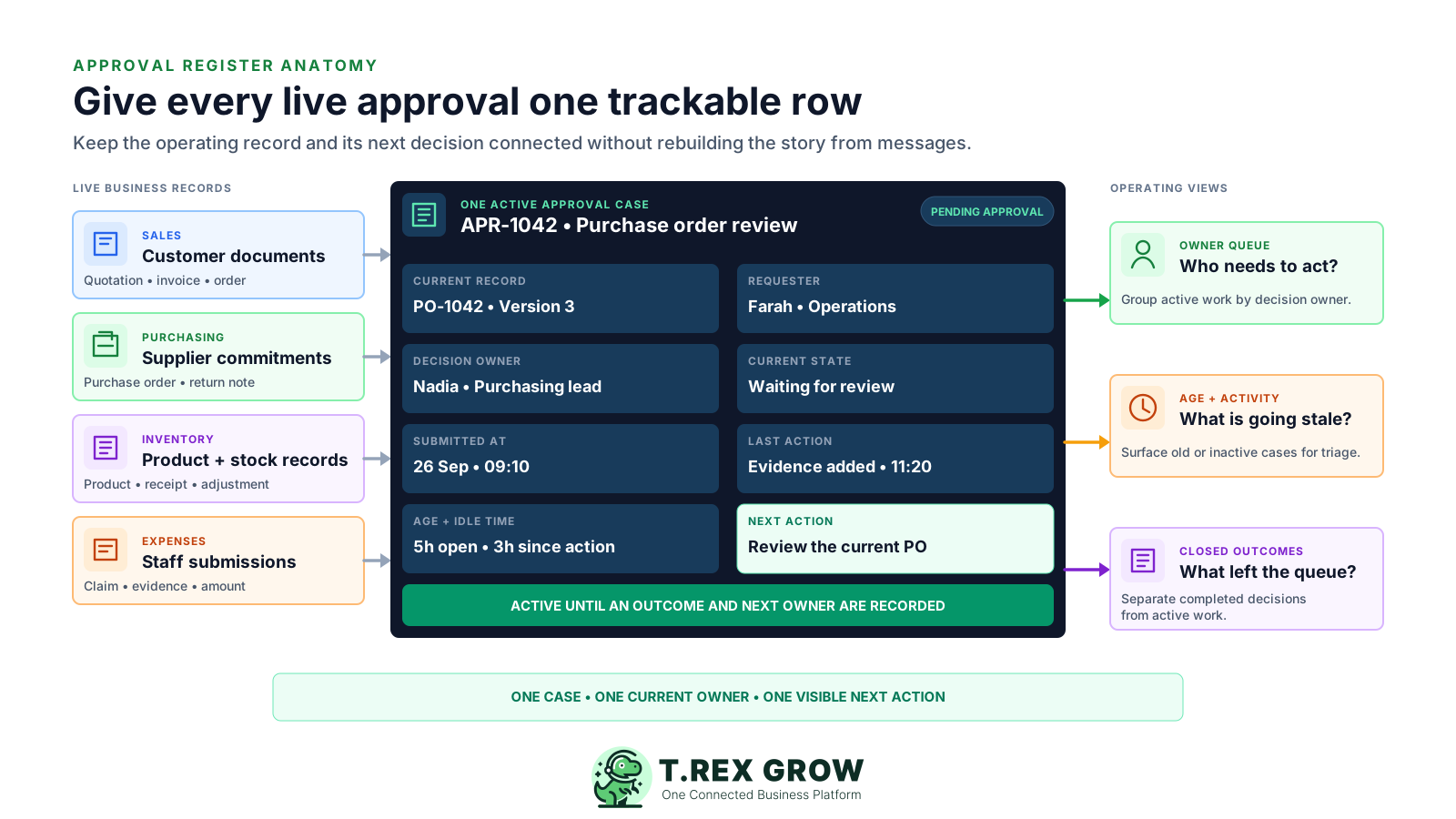
Use a unique approval or business-record reference plus the current version where version matters.
Keep requester, decision owner and next operating owner as separate fields even when one person fills more than one role.
Use one current state and a short exception reason rather than several conflicting status columns.
Store submitted, last-action and decided timestamps so age and inactivity can be calculated consistently.
Name the next required action and its owner; update both as soon as the workflow changes hands.
Move decided cases out of the active queue while keeping their outcome connected to the underlying record.
Tracking begins before submission and continues until the decision and next operating owner are recorded. The routine should work for an ordinary case and for returned, blocked or reassigned work.
Record the current facts in one shared place.
Confirm what is known and what needs attention.
Make the next decision or follow-up accountable.
Complete the next task and record the outcome.
Refresh the shared view when facts change.
A dependable workflow keeps the shared record and the next action aligned.
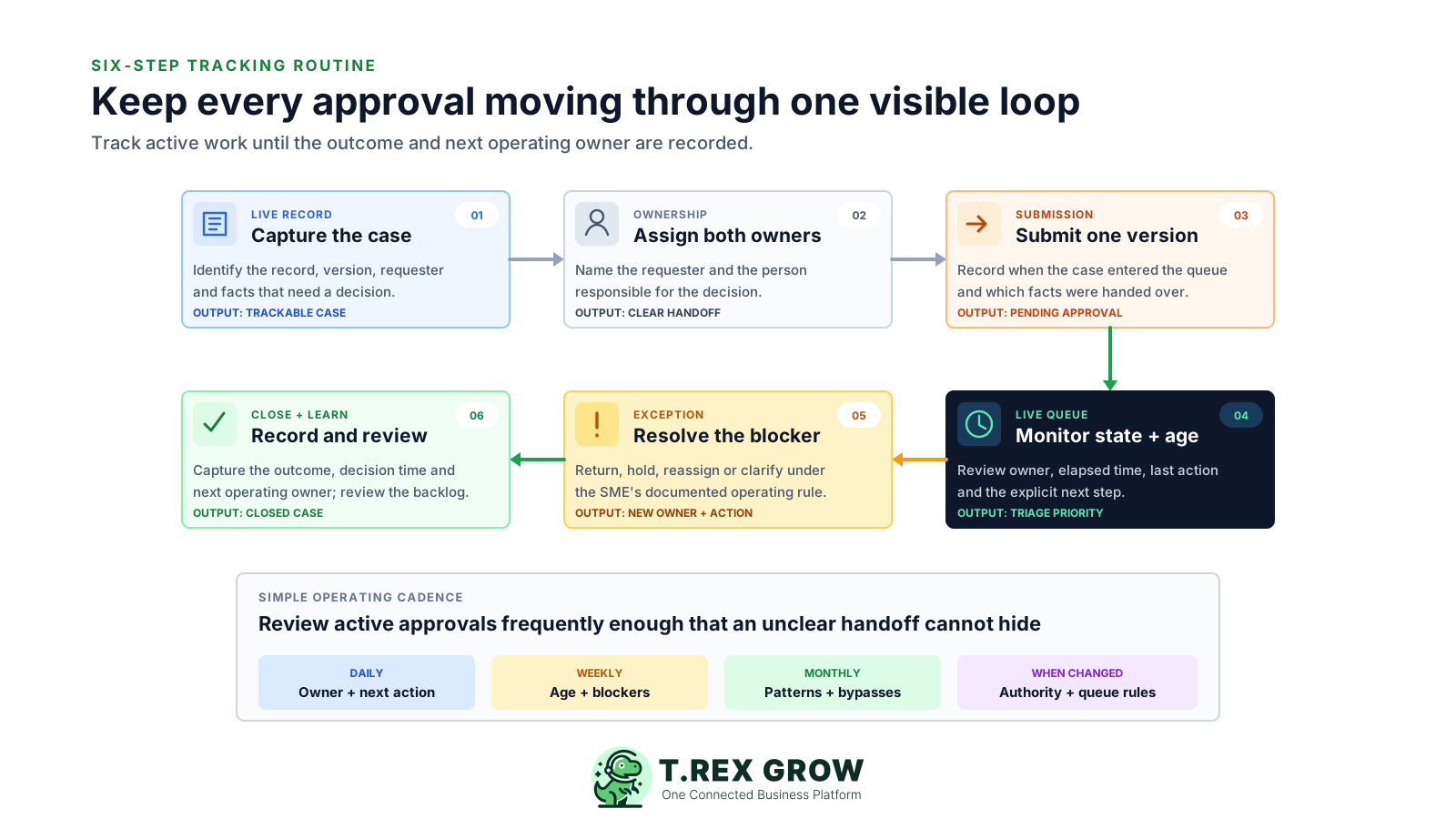
1. Capture the case: identify the live business record, relevant version, requester and decision-ready facts.
2. Assign both owners: name the requester and the person responsible for the decision before the case enters the queue.
3. Submit one version: record when the complete request became pending and which information was handed over.
4. Monitor state and age: review current owner, elapsed time, last activity, exception reason and explicit next action.
5. Resolve the blocker: return, hold, reassign or clarify the case under the SME's documented rule, then update ownership and next action.
6. Close and review: record the outcome, decision time and next operating owner, remove it from the active queue and periodically review backlog patterns.
A long all-approvals table makes the team scan every row. Use a few operating views that answer a specific question and keep active work separate from completed decisions.
Show complete cases where the signed-in decision owner can act now, ordered by the SME's chosen priority.
Let requesters see who owns the decision, when it was submitted, the last activity and whether the case is still genuinely pending.
Separate missing evidence, changed facts, absent authority and other exceptions so the correct person can remove the blocker.
Keep a short operational view of outcomes and next owners before closed cases move into longer-term history.
Treat blank ownership and action fields as control gaps that need immediate correction rather than as ordinary ageing.
Use submitted age and time since last action together to find cases that may need clarification or escalation under the SME's rule.
The best practice is to make the next action clear before the situation becomes urgent.
Age helps the team triage, but an old case is not automatically wrong and a new case is not automatically complete. Use time signals with the record type, impact, completeness and internal service expectation.
Measures how long the complete request has been in the approval queue from the agreed submitted timestamp.
Shows how long the person responsible for the next decision or correction has held the case.
Helps identify cases that look active but have had no evidence, ownership, status or decision change.
Set a practical expectation by record type and impact rather than copying one response time across every approval.
If the SME pauses its tracking clock, record why, who owns the blocker and what evidence will restart the case.
Use simple ranges for triage, then inspect the actual case before assuming delay, urgency or failure.
A colourful dashboard can still hide missing ownership or an outdated business record. Check whether the team can act from each row rather than judging the tracker by how many columns it contains.
Recurring issues usually point to workflow-control gaps, not one isolated data-entry mistake.
The requester may own follow-up, but the queue also needs the current decision owner and next operating owner.
Normal review, returned work, missing evidence, absent authority and deliberate hold need different actions.
A free-text note can erase when ownership or state changed; keep the current summary plus enough decision context to explain it.
A draft may exist for days before it becomes complete enough to submit, so creation time can exaggerate queue age.
Approved, returned, held or declined is an outcome, but the underlying record still needs a person and next action.
Repeated messages do not change the approval state unless evidence, ownership, decision or next action actually changed.
The cadence should fit the SME's volume and impact. The aim is to correct unclear handoffs early and learn from repeated patterns without turning every approval into a management meeting.
Confirm urgent and high-impact active cases have a decision owner, current record and next action.
Inspect old, inactive, returned and unassigned cases; agree the owner and action instead of sending a generic reminder.
Look for repeated missing evidence, unclear authority, bypasses, returns and queues that depend on one unavailable person.
Recheck tracking fields and views when responsibilities, record types, authority rules or business processes change.
Choose a few open and recently closed cases and confirm another team member can explain their state without private messages.
TREX Grow can connect module-specific access, Request and Approve responsibility, Pending Approval and decision context on supported business records. Use those live states as the operating source, while keeping any cross-module queue, ageing review or management tracker honest about what the product currently exposes.
TREX Grow stores access and approval responsibility per company membership, so the relevant module controls who can request or approve.
A supported record submitted by a Request user can show that preparation is complete and the authorised decision is still waiting.
Approve responsibility remains tied to the relevant sales, purchasing, inventory or expense module rather than a broad verbal instruction.
Verified records such as quotations, invoices, purchase orders, products and stock entries can notify owners or matching approvers; test behaviour per module.
Approved-by identity and approval time can help the team understand a completed outcome without being described as a complete immutable audit system.
Do not assume one consolidated cross-module queue, automatic reminders, SLA timers, escalation rules, workflow analytics or identical behaviour across every module.
Take ten active approvals and fill in the live record, requester, decision owner, state, submitted time, last activity and next action. Move returned and decided cases into the correct views, then fix every row that still needs a private message to explain it.
At minimum, track the live business record and version, requester, decision owner, current state, submitted time, last action, age, exception reason, next action and final outcome. The exact fields should fit the SME's workflow.