The approver reviews a frozen copy
A forwarded PDF cannot show whether the party, lines, quantity, price, date, tax, term or reference has since changed on the live record.

TREX Grow gives supported customer and supplier documents a controlled release path. The preparer works on the live record, Request moves it to Pending Approval, and an authorised reviewer can release the supported official PDF with decision context kept on that record.

A PDF in chat may look final, but it can be separated from the quotation, order, delivery record, invoice or adjustment note that produced it. Once the record and decision split, the team must reconstruct which version was actually reviewed.
Operational pressure
When records live in different places, the person responsible has to reconstruct what happened before they can make a confident decision or follow up.
A forwarded PDF cannot show whether the party, lines, quantity, price, date, tax, term or reference has since changed on the live record.
A message says approved while the operating document remains draft, unfinished or invisible to the next person.
Without a clear release rule, a watermarked working PDF and the final customer or supplier-facing output can be mixed together.
Staff may treat approval as customer acceptance, delivery completion, invoice settlement or e-Invoice validation even though those are separate events.
Manual tools can discuss a document, but they do not consistently control which TREX Grow record is being reviewed, who may authorise it or when its supported official output should exist.
Adding FINAL, FINAL-2 or APPROVED to a file does not update the source record or prevent another working copy from circulating.
Being copied into an email does not establish who may create, edit, request or approve that document module inside TREX Grow.
A row may store an amount and approver name while omitting the customer or supplier, item lines, terms, source references and attachments behind the decision.
After the informal yes, somebody must find the correct record, change its state and create the document the business will actually use.
A useful SME system should make the live record, responsible people, waiting state and official output easy to distinguish without pretending every business document needs enterprise workflow orchestration.
Define who may view, create, edit or delete the relevant quotation, order, delivery, invoice, return or adjustment-note record.
Use an individual company membership for the person assembling the current commercial and operational details.
Assign Approve only to people expected to release documents in that specific module.
Keep the waiting step on the live document instead of making staff infer it from a separate message thread.
Use the supported watermarked draft for checking and the official PDF only after approval or intentional direct finalisation.
Let each approved record continue according to its own meaning rather than treating approval as delivery, payment, customer acceptance or tax validation.
The best practice is to make the next action clear before the situation becomes urgent.
TREX Grow keeps the business facts, module permission, document state and generated output connected. The approval applies to the current operational record; the PDF is its controlled representation rather than a separate file with its own independent truth.
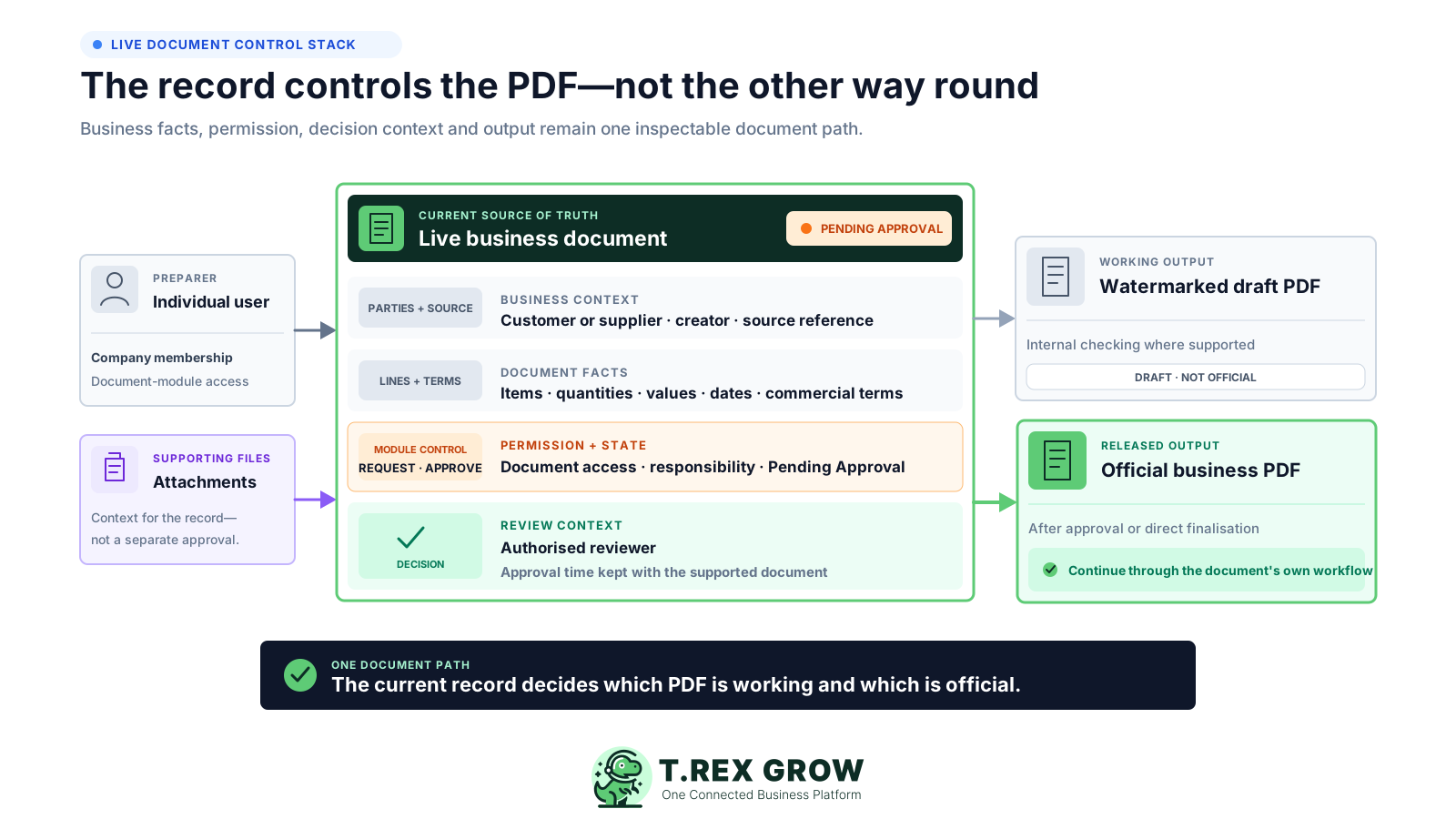
Keep the customer or supplier, items, quantities, commercial values, dates, terms and source references on the document record.
Use the module's company membership access plus None, Request or Approve responsibility where that document supports approval.
Keep Pending Approval, reviewer identity and approval time visible where the supported document exposes them.
Generate the supported official PDF after approval or direct finalisation, while keeping watermarked draft output recognisably internal.
Document approval in TREX Grow is module-specific. It is designed for business records that the platform creates and continues, not for uploading any file and building a generic sign-off route around it.
Quotations and customer invoices support the direct document approval pattern and are available in the current Free plan.
Current paid sales modules add sales orders, pro-forma invoices, delivery orders, sales return notes and customer adjustment notes with their own document workflows.
Essential and Premium add purchase orders, purchase returns and the wider supplier-document workflow, subject to each module's current approval support.
Products, stock records and company expenses may have approval controls, but the broader Approval Workflow Software page owns those cross-module decisions.
A useful document decision depends on the current operating context. The exact fields vary by module, but the reviewer should inspect the business record rather than approve an isolated file or total.
Confirm the customer or supplier, document creator, person-in-charge and source document where applicable.
Review the products or services, descriptions, units and quantities represented by the document.
Check unit prices, discounts, taxes, currency where supported, subtotal and final total for value-bearing documents.
Confirm document date, validity, due date, expected delivery, payment terms and other module-specific timing.
Use source links, notes, remarks and paid-plan attachments as context without treating every attachment as a separately approved document.
The practical sequence is simple: prepare the current record, check the working output, request a decision where required, approve the live document and release only the supported official result.
Record the current facts in one shared place.
Confirm what is known and what needs attention.
Make the next decision or follow-up accountable.
Complete the next task and record the outcome.
Refresh the shared view when facts change.
A dependable workflow keeps the shared record and the next action aligned.
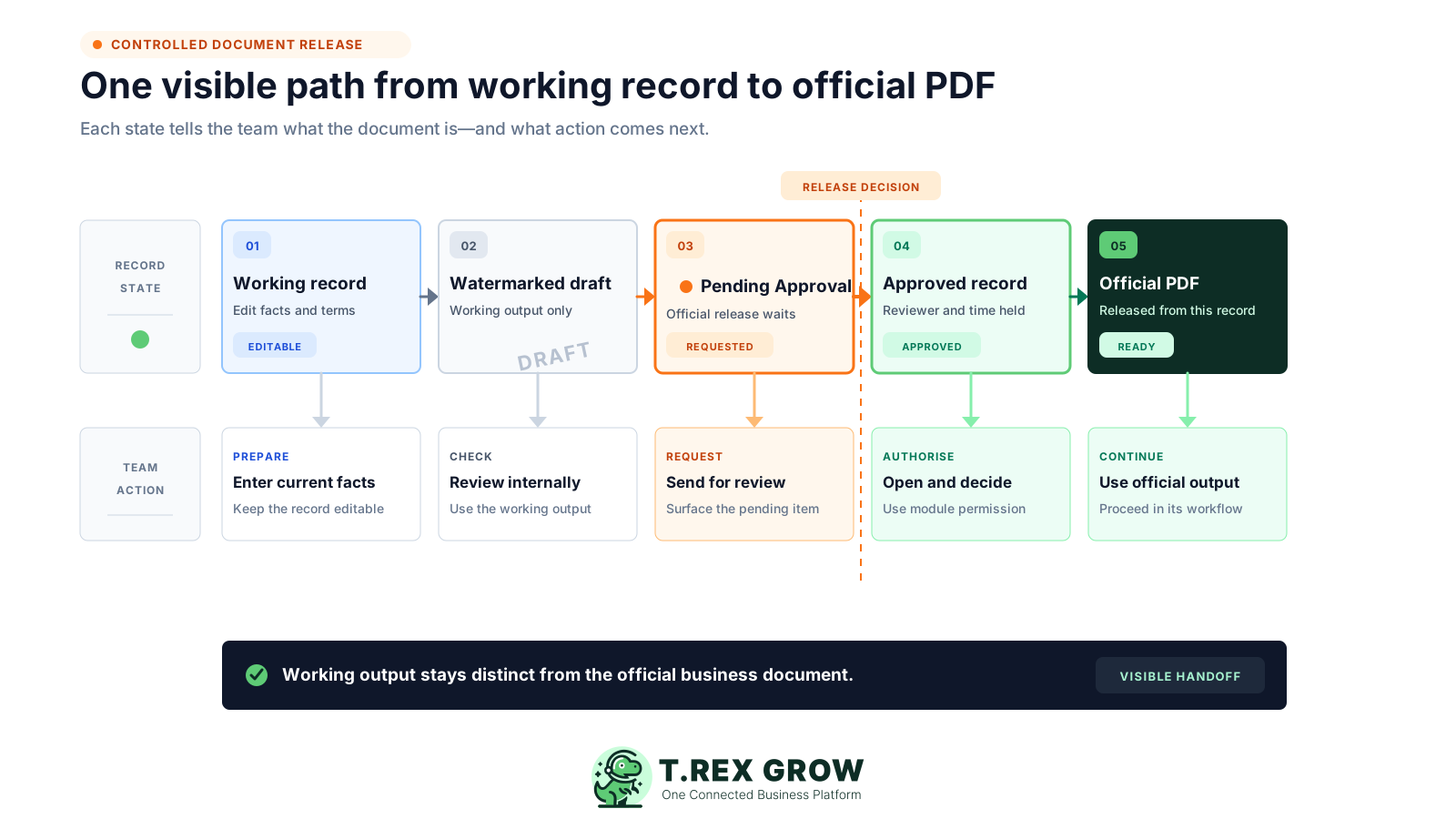
1. Choose the document module: select the quotation, order, delivery, invoice, return or adjustment-note workflow that needs a second person before release.
2. Prepare the live record: enter the current party, lines, quantities, prices, dates, terms, references and supporting context.
3. Check the working output: use the watermarked draft PDF where supported to identify corrections without presenting it as the official document.
4. Request review: a user configured with Request moves the supported record into Pending Approval and triggers the module-specific reviewer handoff.
5. Authorise the current record: an owner or user with matching Approve responsibility opens the live document, checks the current facts and uses the supported approval action.
6. Release and continue: the document becomes approved or active, its supported official PDF is available, and the next action follows that document's own workflow.
Approved means the configured reviewer released that TREX Grow business document. It does not collapse the later customer, supplier, fulfilment, payment or statutory events into the same status.
Use the state shown on the live record and confirm the separate evidence required after release.
| State | What it means | What it does not prove |
|---|---|---|
| Working draft | The document is still being prepared or checked | That a reviewer has authorised release |
| Pending Approval | Preparation is complete and a configured reviewer decision is waiting | That the customer or supplier accepted the document |
| Approved or directly finalised | The TREX Grow document passed its configured release path | That delivery, receipt, payment or settlement is complete |
| Downstream status | The later module records fulfilment, billing, payment or applicable e-Invoice activity | That document approval automatically completed those later events |
Document approval should reduce uncertainty without becoming a separate project. TREX Grow uses the module record, internal notification and visible decision context to keep the handoff close to the document being released.
Supported document lists expose the waiting state so reviewers and preparers can isolate records that still need a decision.
Verified workflows such as quotations, invoices, purchase orders and other supported documents notify owners or matching approvers with a route back to the record.
Where supported, the approved-by identity and approval date remain useful operating context on the document.
A user whose responsibility does not require review can follow the supported direct path without gaining authority to approve documents for others.
Begin with one document family and one clear release decision. Test the exact role combination, document state and PDF outcome before applying the pattern across other modules.
Start with a frequent quotation, invoice, sales order, delivery order or purchase order rather than switching on approval everywhere.
Write down the facts the reviewer must check before the business treats the document as official.
Give the preparer and reviewer individual company memberships so the document decision is associated with the right people.
Confirm users recognise the DRAFT watermark and know when the official PDF becomes available.
Use a low-risk sample to verify Pending Approval, the reviewer handoff, current record facts and the final output.
Agree what staff should do when a reviewer needs changes because advanced return-for-edit and rejection routing is not claimed here.
The best practice is to make the next action clear before the situation becomes urgent.
Current TREX Grow plans share the user and permission foundation, while document availability expands by plan. Start with the document family, then test its exact approval and official-output behaviour.
Use products, customers, quotations and customer invoices in the Free Forever workspace.
Add complete sales documents, supported attachments and multi-currency through the current Starter plan.
Add purchase orders, supplier workflows, stock entries and returns through Essential.
Premium extends warehouse locations, ledgers, picking and inventory-count controls rather than adding a generic file-approval engine.
Starter, Essential and Premium currently include a one-time 30-day trial for testing representative workflows before committing.
TREX Grow controls supported records created inside its sales and purchasing workflows. This page does not claim arbitrary file routing, contract lifecycle management, e-signature or enterprise approval orchestration.
Match the product to the document decision your SME actually needs before replacing another system.
| Verified in TREX Grow | Not claimed on this page |
|---|---|
| Module-specific business records and generated PDFs | Standalone approval for arbitrary Word, PDF, image, policy or contract files |
| View, Create, Edit and Delete access plus None, Request and Approve where supported | Amount, department, budget or cost-centre thresholds |
| Pending Approval and a direct authorised decision | Conditional, parallel or multi-level routing |
| Internal reviewer notifications on verified document workflows | Delegation, escalation, SLA timers or automatic reminder sequences |
| Reviewer identity, approval time and official PDF output where supported | E-signature, redlining, contract negotiation or guaranteed immutable audit evidence |
| Paid-plan attachments stored with supported records | Separate approval of each attachment or a general-purpose document repository |
| Document-specific continuation after release | Automatic customer acceptance, delivery completion, bank payment or Malaysia e-Invoice validation |
Choose a representative customer or supplier document, assign a requester and reviewer, and prove the live record, Pending Approval handoff, decision context and supported official PDF. A real end-to-end test will show whether the focused control fits your team.
Document approval software connects a business document to the people allowed to prepare and release it. In TREX Grow, supported document modules can combine company membership permissions, Request and Approve responsibility, a visible Pending Approval state, reviewer context and official PDF generation after the configured decision.